WP2Shell: How Two Medium WordPress Bugs Became A Pre-Auth RCE
Two WordPress core bugs, a SQL injection in the WP_Query author__not_in parameter and a route confusion in the REST batch endpoint, could be chained so that an unauthenticated visitor reached code execution on a default install. The write-up is a lab and hunting guide rather than a first-hand report, and it claims public exploits and confirmed in-the-wild exploitation.
 Published on kd-200.medium.com
A two-container lab for CVE-2026–63030 and CVE-2026–60137, read-only exposure checks, and how the same pattern pays in WordPress plugin bounties.
The full write-up lives on its author's site
It belongs to its author, so we link to it rather than copy it. The other two tabs are our own rewrites, checked against it.
Context
WordPress core shipped a chain that turns two bugs, each of which a scanner would rate as medium, into remote code execution on a default install. No plugins, no login. The chain is called wp2shell, and it affects WordPress 6.9.0 to 6.9.4 and 7.0.0 to 7.0.1.
The two components are:
- CVE-2026-60137 (CVSS 5.9 on its own):
WP_Querydoes not properly sanitise itsauthor__not_inparameter. That is a SQL injection, present since 6.8, but on its own it only matters if a plugin or theme passes untrusted input into that parameter. - CVE-2026-63030: introduced in 6.9, inside
WP_REST_Server::serve_batch_request_v1(). The batch endpoint,/wp-json/batch/v1, lets one HTTP request carry several REST requests. A route confusion there lets an anonymous request reach code that should have required a logged-in user.
Together the chain scores 9.8. The batch confusion turns the authenticated-only SQL injection into something any visitor can reach, and once you control a SQL query there are several paths to code execution.
Adam Kues of Searchlight Cyber found the batch confusion. TF1T, dtro and haongo found the SQL injection.
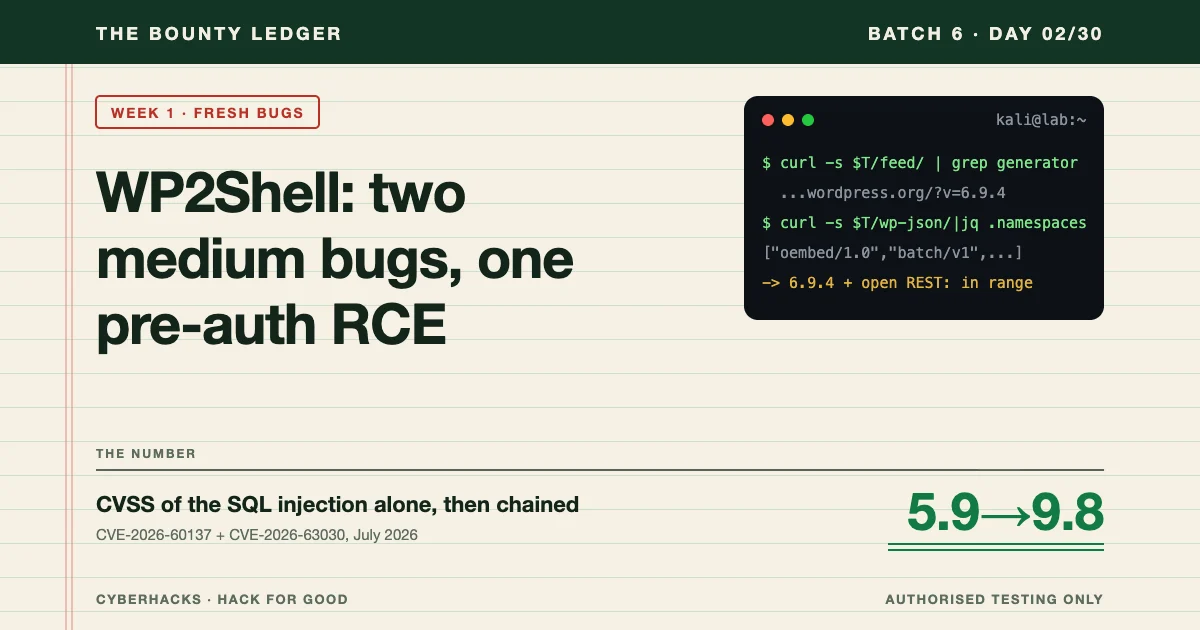
The batch endpoint itself is not new: it has existed since WordPress 5.6. What is new is the route confusion inside it. That distinction matters throughout the hunting steps below, because seeing batch/v1 in a namespace list proves nothing on its own.
Setup
The lab is two WordPress containers on one MySQL, one vulnerable and one fixed.
# docker-compose.yml
services:
  db:
    image: mysql:8.0
    environment:
      MYSQL_ROOT_PASSWORD: labroot
    volumes: ["./init.sql:/docker-entrypoint-initdb.d/init.sql"]
  wp-vuln:
    image: wordpress:6.9.4-apache
    ports: ["8091:80"]
    environment: { WORDPRESS_DB_HOST: db, WORDPRESS_DB_USER: root, WORDPRESS_DB_PASSWORD: labroot, WORDPRESS_DB_NAME: wp_vuln }
  wp-fixed:
    image: wordpress:6.9.5-apache
    ports: ["8092:80"]
    environment: { WORDPRESS_DB_HOST: db, WORDPRESS_DB_USER: root, WORDPRESS_DB_PASSWORD: labroot, WORDPRESS_DB_NAME: wp_fixed }
The two databases are created by an init script mounted into the MySQL container:
-- init.sql
CREATE DATABASE wp_vuln;
CREATE DATABASE wp_fixed;
Bring it up and finish the installer on both ports:
docker compose up -d
# then finish the five-minute installer at <http://localhost:8091> and <http://localhost:8092>
# turn OFF auto-updates on 8091 (Dashboard > Updates) so it stays on 6.9.4
Turning auto-updates off on the vulnerable container is the precondition that keeps the lab honest: WordPress forced automatic updates for supported affected sites after disclosure, so a lab that leaves them on will not stay on 6.9.4.
One further precondition comes from Cloudflare's analysis: the vulnerable path is reached when a persistent object cache is not in use. A site running a Redis or Memcached object cache may behave differently, and that changes the risk picture, so it belongs in reports.
Finding it
The starting observation is structural: the batch endpoint has existed since WordPress 5.6, so its presence is expected. The bug is not that the endpoint exists but that a route confusion inside it lets an anonymous request reach code that should have required a logged-in user. Pair that with a SQL injection that is only reachable by an authenticated caller, and the two medium findings connect into a critical one.
The lesson the author draws is that two findings a lazy triage would rate medium became a critical when somebody asked how they connect. Chaining is the job.
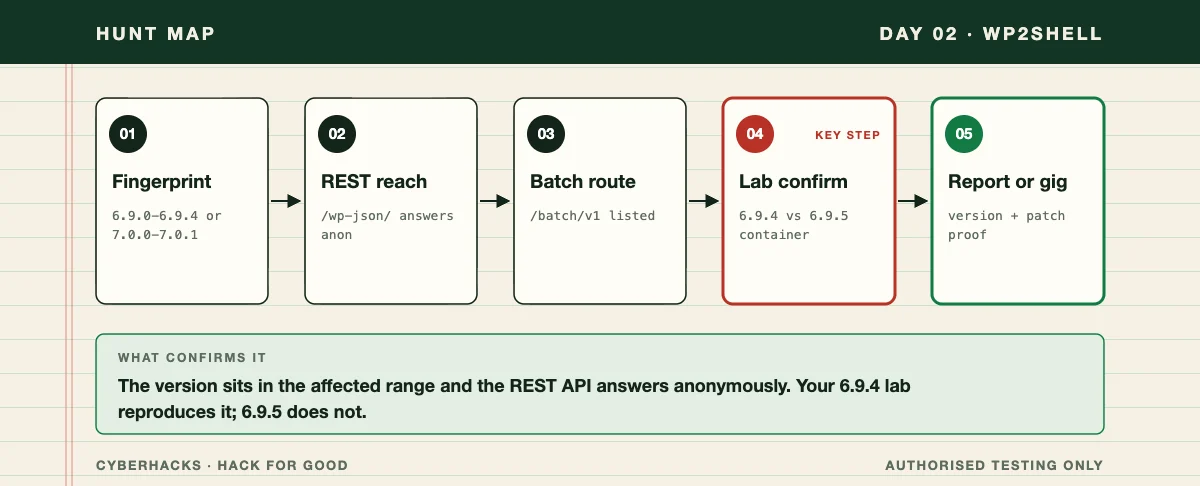
The hunt map is: fingerprint, REST reach, batch route, lab confirm, report.
Exploitation
Everything in the hunting steps is read-only. It is what the author would run against a client site with signed scope, or an in-scope asset whose programme accepts known-CVE reports. Running the actual chain is exploitation and belongs in the lab only, unless you hold written authorisation that covers it.
Step 1: fingerprint the core version
T=http://localhost:8091
curl -s $T/feed/ | grep -o '<generator>[^<]*'
curl -s $T/ | grep -oE 'ver=[0-9]+\.[0-9]+(\.[0-9]+)?' | sort | uniq -c | sort -rn | head -3
wpscan --url $T --detection-mode passive --no-banner | grep -i 'version'
What to look for: https://wordpress.org/?v=6.9.4 in the feed generator, and the same version repeating in core asset query strings. Security plugins often strip the generator tag, so never rely on one signal. Three agreeing signals is a confident version.
Step 2: is the REST API answering anonymous visitors?
curl -s $T/wp-json/ | jq -r '.namespaces[]'
curl -s "$T/?rest_route=/" | jq -r '.namespaces[]' | grep batch
You will see batch/v1 listed. That alone means nothing, the batch endpoint has existed since WordPress 5.6. It only matters next to a version in the affected range.
Step 3: check whether a mitigation exists, without exploiting anything
for p in '/wp-json/batch/v1' '/?rest_route=/batch/v1'; do
  curl -s -o /dev/null -w "$p -> %{http_code}\n" -X POST "$T$p" \
    -H 'Content-Type: application/json' -d '{"requests":[]}'
done
An empty batch carries no sub-requests, so nothing runs. A validation error such as 400 means the endpoint is reachable. A 403 from a firewall means somebody blocked it.
The hidden part: Searchlight's own mitigation advice says to block both /wp-json/batch/v1 and ?rest_route=/batch/v1. That tells you something about real-world rules. If a client's firewall blocks one pattern and not the other, the mitigation is fake, and that is a finding on its own.
Step 4: confirm the difference in your lab
Run steps 1 to 3 against 8091 and 8092. The fingerprint should say 6.9.4 and 6.9.5. Run your scanner against both, for example WPScan with its API token, or a nuclei template once one exists (check with vulnx id CVE-2026-63030). It should flag 8091 and stay quiet on 8092. If it flags both, your tool is matching banners, not logic, and you just learned not to trust it on a client.
Public proof-of-concept code exists. If you study it, study it against 8091 with the network cut, never anywhere else.
Step 5: hunt the next one in plugins
The pattern behind wp2shell is a REST route whose permission check does not hold up. Plugins register hundreds of REST routes, and many get the permission callback wrong. In the lab:
docker compose exec wp-vuln bash -c 'cd wp-content/plugins && \
  grep -rnE "register_rest_route|permission_callback" . | head -50'
# the classic smell: routes anyone can call
grep -rn "__return_true" wp-content/plugins/ | grep permission_callback
# routes that opted in to batching
grep -rn "allow_batch" wp-content/plugins/
Download popular plugins into the lab, read every route that changes data, and ask one question: what happens if an anonymous user calls this? That single question is how a lot of WordPress researchers pay their rent through Wordfence and Patchstack.
Root cause
Two defects, one in the query layer and one in the REST dispatcher.
WP_Query does not properly sanitise the author__not_in parameter, which is a SQL injection. It has been present since 6.8. On its own it is only reachable by a caller that can already pass input into that parameter, which is why it scores 5.9 alone.
The batch endpoint introduced in 6.9, /wp-json/batch/v1, is handled by WP_REST_Server::serve_batch_request_v1(). That is the piece that removes the authentication requirement from the SQL injection.
Why the existing defences did not stop it: the batch endpoint has been part of WordPress since 5.6, so its presence is expected and unremarkable to anyone enumerating namespaces. The version range is what makes it interesting. On the mitigation side, blocking only one of the two URL forms leaves the other reachable, which is why the empty-batch check tests both.
Impact
On a default install in the affected range, an unauthenticated attacker with no plugins required can chain the two bugs into remote code execution. The chain scores 9.8.
Exposure is bounded by a few conditions:
- Version. Only 6.9.0 to 6.9.4 and 7.0.0 to 7.0.1 are affected.
- Object cache. Cloudflare noted the vulnerable path is reached when a persistent object cache is not in use; a site running Redis or Memcached may behave differently.
- Update state. WordPress forced automatic updates for supported affected sites, which protects sites that allow auto-updates. Sites where an agency switched core updates off are exactly the ones still sitting there.
- Firewall coverage. A rule that blocks one URL form but not the other does not mitigate anything.
Exploit code was public within hours of the 17 July disclosure, and multiple firms, including Hexastrike and Patchstack, confirmed exploitation in the wild. CISA added it to the KEV catalogue on 21 July, with a federal patch deadline of 24 July.
Fix
WordPress 6.8.6, 6.9.5 and 7.0.2 were released on 17 July 2026 with the fixes. The WordPress security team also enabled forced auto-updates for supported installs, and Cloudflare pushed WAF rules for both CVEs to proxied sites on all plans.
For anyone writing a rule by hand, Searchlight's mitigation advice is to block both /wp-json/batch/v1 and ?rest_route=/batch/v1. Blocking one pattern only is a fake mitigation.
Variants to test
The transferable pattern is a REST route whose permission check does not hold up. Concrete things to try on other targets:
- Grep for
register_rest_routeandpermission_callbacktogether in plugin code. A positive result is a route whose permission callback does not hold up when an anonymous user calls it. - Grep for
__return_truenext topermission_callback. This is the classic smell of routes anyone can call. Half of these routes are meant to be public and return public data, so each lead has to be verified by calling it. - Grep for
allow_batch. Grep forallow_batchto find routes that opted in to batching. - Call every data-changing plugin route as an anonymous user in the lab. Ask what happens if an anonymous user calls each data-changing route.
- Test both URL forms of any REST endpoint you assess,
/wp-json/...and?rest_route=/.... If a firewall blocks one form and not the other, the mitigation is fake.
Hunting notes
Where this kind of bug hides: WordPress core's compatibility surfaces, and plugin REST routes. Plugins register hundreds of REST routes and many get the permission callback wrong, which is why the plugin programmes are where the author sees people actually get paid. Wordfence and Patchstack both run programmes that pay researchers for vulnerabilities in plugins and themes.
Recon signals that point at it:
- A core version in the affected range, confirmed by three agreeing signals: the feed generator,
ver=query strings on core assets, and WPScan in passive detection mode. Security plugins often strip the generator tag, so one signal is never enough. batch/v1in the REST namespace list, through both/wp-json/and?rest_route=/. On its own this means nothing; it only matters next to an affected version.- The empty-batch check returning 400 (reachable) rather than 403 (blocked) on both URL patterns.
Before trusting any scanner on a client, confirm it flags 8091 and stays quiet on 8092. A tool that flags both is matching banners, not logic.
On impact: for a bug bounty, the report is the version in range plus the three version signals and the reachability check, for example "WordPress 6.9.4 on blog.target.example is in range for CVE-2026-63030 and CVE-2026-60137". Respect the programme's waiting period, and do not run the chain unless the rules explicitly allow it. For a client, report version, REST exposure, whether an object cache is present, firewall coverage of both URL patterns, then update and retest. For a plugin bug, report the route, the missing check, a minimal proof in your lab, the version range, and the fix in one sentence.
Where AI helps: ask an LLM to read the diff between 6.9.4 and 6.9.5 (GitHub's compare view on WordPress/wordpress-develop is enough) and explain which permission check changed, then ask it for a grep plan to find the same shape in plugin code. Where it lies: it will happily call a plugin route "likely exploitable" because it saw __return_true. You verify every lead by calling the route in your lab and checking what actually changes.
Fingerprinting and the empty-batch check are read-only. Running the actual chain is exploitation. Lab only, unless you hold written authorisation that covers it.
What happened, in plain words
On 17 July 2026, WordPress released versions with fixes for a serious problem in WordPress itself. Not in a plugin, not in a theme, but in the core program that every WordPress site runs.
The interesting part is that the problem was made of two smaller problems. Each one, looked at alone, would be rated "medium" by an automated security scanner. Medium means "worth fixing, but not an emergency". But when you put the two together, they become something much worse: a way for a stranger on the internet to run their own code on the website's server, without any username or password. Security people call that remote code execution, and it is about as bad as it gets.
The combined attack got a nickname: wp2shell. It works on a fresh, default WordPress install, with no plugins added, and without logging in. The affected versions are WordPress 6.9.0 to 6.9.4 and 7.0.0 to 7.0.1.
A few words before we go further, because they come up constantly:
- WordPress is a free program for building websites. You install it on a web server, and it gives you a dashboard where you write posts and pages. It is the most popular website software in the world, which is exactly why bugs in it matter so much.
- A plugin is an add-on you install into WordPress to get extra features, like a contact form or an online shop. Plugins are separate pieces of code written by other people.
- A theme is the add-on that controls how a site looks.
- Core means the main WordPress program itself, as opposed to plugins and themes.
- A vulnerability is a mistake in a program that lets someone use it in a way the author did not intend, usually to do something harmful.
- Remote code execution means an attacker can make the server run commands or programs of their choosing. Think of it as a stranger not just getting into your house, but being able to rewire it.
- A CVE is a public catalogue number for a known vulnerability, so that everyone can talk about the same bug unambiguously. CVE-2026-63030 and CVE-2026-60137 are the two numbers for the two bugs here.
- CVSS is a scoring system from 0 to 10 for how severe a vulnerability is. Higher is worse. 5.9 is medium-ish, 9.8 is critical.
- A scanner is a program that automatically checks a website for known weaknesses. It is fast but not clever: it often matches version numbers and known patterns rather than understanding what the code actually does.
The image above is the setup for a practice lab: two WordPress containers, one running the vulnerable version and one running the fixed version, used for read-only exposure checks.
The two bugs, and why together they are worse
Bug one: the database query that trusts its input
WordPress stores almost everything in a database, a program that holds data in tables and answers questions about it. WordPress asks the database questions using a language called SQL. For example: "give me all posts written by author number 5".
One of the internal WordPress classes that builds these questions is called WP_Query. It has a setting called author__not_in, which means "exclude posts by these authors". The bug, CVE-2026-60137, is that WP_Query does not properly clean up (sanitise) what it is given for that setting before putting it into the SQL question.
The everyday comparison: imagine a form where you write your name, and the clerk copies whatever you wrote straight into an official instruction. If you write "Bob, and also delete all the files", the clerk obeys. SQL injection is the same idea: the attacker writes database instructions where the program expected a plain value, and the database obeys.
On its own, this bug scores 5.9. Why only medium? Because it only matters if some other piece of code, a plugin or a theme, passes untrusted input into that author__not_in setting. If nothing does, the bug sits there unused. It has been present since WordPress 6.8.
Bug two: the batch endpoint that confuses its routes
WordPress has an API, which is a way for programs to talk to it over the web instead of through a browser page. WordPress's API is called the REST API. You can think of an API as a waiter: you give it a request in a fixed format, and it brings back an answer in a fixed format. The REST API lives under a web address that starts with /wp-json/.
Inside the REST API there is a feature called the batch endpoint, at /wp-json/batch/v1. Batching means sending several requests bundled into one. Instead of making five separate trips to the waiter, you hand over a list of five orders at once. The batch endpoint has existed since WordPress 5.6, so its presence is completely normal.
The bug, CVE-2026-63030, was introduced in WordPress 6.9, inside a piece of code called WP_REST_Server::serve_batch_request_v1(). That is the function that handles a batch request. The problem is a route confusion: when requests are bundled together, the code can get confused about which request is which, and an anonymous request (one from a visitor who is not logged in) can end up reaching code that should only have been reachable by a logged-in user.
A route here means one specific address inside the API, like /wp-json/wp/v2/posts. A permission check is the guard that asks "is this caller allowed to do this?". The batch bug lets a caller slip past a guard that should have stopped them.
The chain
Put the two together. The SQL injection only matters if a plugin or theme passes untrusted input into that parameter. The batch confusion lets an anonymous visitor reach code that should have required a login. So the batch confusion removes the login requirement from the SQL injection, and now any visitor can reach it. Once an attacker controls a SQL query, there are several paths from there to running their own code. Together the chain scores 9.8.
Who found what: Adam Kues of Searchlight Cyber found the batch confusion. TF1T, dtro and haongo found the SQL injection.
The lesson the author draws is that two findings a lazy triage would rate medium became a critical when somebody asked how they connect. Triage is the first pass where someone decides how serious a finding is. Chaining, asking how separate weaknesses combine, is the job.
The image above is the hunt map: fingerprint, REST reach, batch route, lab confirm, report. In plain words: find out which version a site runs, check whether its API answers strangers, check whether the batch address is reachable, confirm the difference in a practice lab, then write it up.
Why this matters right now
- The chain works on a default install. Unauthenticated, no plugins required, on WordPress 6.9.0 to 6.9.4 and 7.0.0 to 7.0.1. "Unauthenticated" means the attacker does not need an account.
- Exploit code was public within hours of the 17 July disclosure, and multiple firms, including Hexastrike and Patchstack, confirmed exploitation in the wild. "Exploit code" is a ready-made program that carries out the attack. "In the wild" means real attackers were seen using it against real sites, not just in a lab.
- CISA added it to the KEV catalogue on 21 July, with a federal patch deadline of 24 July. CISA is a US government cybersecurity agency. The KEV catalogue (Known Exploited Vulnerabilities) is its list of bugs that are confirmed to be used by real attackers. Being on it means US federal agencies had to patch by a set date.
- WordPress forced automatic updates for supported affected sites. That protects sites that allow auto-updates. Sites where an agency switched core updates off are exactly the ones still sitting there.
Where the money is. Three places, in order of how often the author sees people actually get paid:
- WordPress plugin bounties. Wordfence and Patchstack both run programmes that pay researchers for vulnerabilities in plugins and themes. A bug bounty is a scheme where a company pays people for reporting security bugs responsibly instead of exploiting them. This chain is a masterclass in what to look for in plugin REST routes.
- Client audits. Version check, REST exposure, firewall coverage, update and retest. Small businesses run WordPress everywhere. An audit is a paid review of a client's site for security problems.
- Bug bounty programmes whose marketing site or blog runs WordPress, but only under their rules for known CVEs.
Build the lab
Before touching anything real, you build a lab: a copy of the software on your own computer, where breaking things is fine. The lab here is two WordPress containers on one MySQL, one vulnerable and one fixed.
A container is a packaged, self-contained copy of a program with everything it needs to run, so it does not interfere with the rest of your computer. Docker is the tool that runs containers. Docker Compose is a way of describing several containers in one text file so they start together. MySQL is the database program WordPress uses.
# docker-compose.yml
services:
  db:
    image: mysql:8.0
    environment:
      MYSQL_ROOT_PASSWORD: labroot
    volumes: ["./init.sql:/docker-entrypoint-initdb.d/init.sql"]
  wp-vuln:
    image: wordpress:6.9.4-apache
    ports: ["8091:80"]
    environment: { WORDPRESS_DB_HOST: db, WORDPRESS_DB_USER: root, WORDPRESS_DB_PASSWORD: labroot, WORDPRESS_DB_NAME: wp_vuln }
  wp-fixed:
    image: wordpress:6.9.5-apache
    ports: ["8092:80"]
    environment: { WORDPRESS_DB_HOST: db, WORDPRESS_DB_USER: root, WORDPRESS_DB_PASSWORD: labroot, WORDPRESS_DB_NAME: wp_fixed }
Line by line:
services:starts the list of containers to run. There are three:db,wp-vulnandwp-fixed.db:is the database container.image: mysql:8.0says to use the official MySQL version 8.0 package.MYSQL_ROOT_PASSWORD: labrootsets the database's master password. It is a throwaway lab password, not a real secret.volumes:mounts a file from your computer into the container. Here,./init.sqlis placed in a special folder that MySQL runs automatically the first time it starts, so the databases get created for you.wp-vuln:is the deliberately vulnerable WordPress.image: wordpress:6.9.4-apacheuses WordPress 6.9.4, which is in the affected range, with the Apache web server.ports: ["8091:80"]connects port 8091 on your computer to port 80 inside the container. A port is a numbered doorway on a computer; web traffic normally goes to port 80. So you will reach this site athttp://localhost:8091.- The
environment:line tells WordPress how to reach the database: hostdb, userroot, passwordlabroot, database namewp_vuln. wp-fixed:is the same thing on WordPress 6.9.5, the fixed version, reachable athttp://localhost:8092, using a separate database calledwp_fixed.
The two databases are created by an init script mounted into the MySQL container:
-- init.sql
CREATE DATABASE wp_vuln;
CREATE DATABASE wp_fixed;
Line by line:
-- init.sqlis just a comment naming the file.CREATE DATABASE wp_vuln;creates an empty database for the vulnerable copy.CREATE DATABASE wp_fixed;creates a second, separate empty database for the fixed copy. Keeping them separate means the two WordPress installs do not share data.
Bring it up and finish the installer on both ports:
docker compose up -d
# then finish the five-minute installer at <http://localhost:8091> and <http://localhost:8092>
# turn OFF auto-updates on 8091 (Dashboard > Updates) so it stays on 6.9.4
Line by line:
docker compose up -dstarts all three containers. The-dmeans "in the background", so your terminal stays usable.- The first comment tells you to open both addresses in a browser and click through WordPress's setup wizard, which takes about five minutes. This is the same wizard you would see setting up any WordPress site.
- The second comment is the important one: in the dashboard of the vulnerable copy, go to Updates and switch automatic updates off. Otherwise WordPress will quietly update itself to a fixed version and your vulnerable lab will stop being vulnerable.
Turning auto-updates off on the vulnerable container is the precondition that keeps the lab honest: WordPress forced automatic updates for supported affected sites after disclosure, so a lab that leaves them on will not stay on 6.9.4.
One further precondition comes from Cloudflare's analysis: the vulnerable path is reached when a persistent object cache is not in use. A persistent object cache is a speed feature that keeps frequently used data in a fast separate store, such as Redis or Memcached, instead of asking the database every time. A site running one may behave differently, and that changes the risk picture, so it belongs in reports.
Finding it
The starting observation is structural: the batch endpoint has existed since WordPress 5.6, so its presence is expected. The bug is not that the endpoint exists but that a route confusion inside it lets an anonymous request reach code that should have required a logged-in user. Pair that with a SQL injection that is only reachable by an authenticated caller, and the two medium findings connect into a critical one.
Chaining is the job.
Exploitation
Everything in the hunting steps is read-only. It is what the author would run against a client site with signed scope, or an in-scope asset whose programme accepts known-CVE reports. Read-only means the checks only ask questions and look at answers; they do not change anything. Scope is the written list of what you are allowed to test. Running the actual chain is exploitation and belongs in the lab only, unless you hold written authorisation that covers it.
Step 1: fingerprint the core version
Fingerprinting means working out what software and version a site is running, the way you might recognise a car model from its shape. You do this first because the whole issue only applies to specific versions.
T=http://localhost:8091
curl -s $T/feed/ | grep -o '<generator>[^<]*'
curl -s $T/ | grep -oE 'ver=[0-9]+\.[0-9]+(\.[0-9]+)?' | sort | uniq -c | sort -rn | head -3
wpscan --url $T --detection-mode passive --no-banner | grep -i 'version'
Line by line:
T=http://localhost:8091stores the address of the vulnerable lab in a short name,T, so the following lines are shorter.localhostmeans "this computer".curl -s $T/feed/fetches the site's news feed.curlis a command-line tool for fetching web pages. The-smeans silent, so it does not print progress noise. The|symbol pipes the output into the next command.grep -o '<generator>[^<]*'searches that output for the<generator>tag, which WordPress puts in feeds to say what made them.-omeans print only the matching part.[^<]*means "everything up to the next<".- The second
curlfetches the home page, andgrep -oE 'ver=[0-9]+\.[0-9]+(\.[0-9]+)?'looks for version numbers in the formver=6.9.4.-Eallows the pattern syntax used here. sort | uniq -c | sort -rn | head -3tidies the results: sort them, count how many times each appears, sort by count with the biggest first, and show the top three. This is how you spot the version that repeats most often.wpscan --url $T --detection-mode passive --no-bannerruns WPScan, a well-known WordPress security scanner, against the lab.--detection-mode passivetells it to only look at what the site openly says, not to probe aggressively.--no-bannerhides its logo.grep -i 'version'keeps only the lines mentioning a version.-imeans ignore upper/lower case.
What to look for: https://wordpress.org/?v=6.9.4 in the feed generator, and the same version repeating in core asset query strings. A query string is the part of a web address after a ?, often used to mark which version of a file to load. Security plugins often strip the generator tag, so never rely on one signal. Three agreeing signals is a confident version.
Step 2: is the REST API answering anonymous visitors?
This step asks a simple question: can a stranger, with no account, get answers from the site's API? If the API is closed to strangers, the batch route cannot be reached at all.
curl -s $T/wp-json/ | jq -r '.namespaces[]'
curl -s "$T/?rest_route=/" | jq -r '.namespaces[]' | grep batch
Line by line:
curl -s $T/wp-json/fetches the API's front page, which lists what the API offers.jq -r '.namespaces[]'usesjq, a tool for picking values out of JSON. JSON is a common text format for structured data, like a very tidy shopping list.-rmeans print plain text..namespaces[]means "the list called namespaces". A namespace is a named group of API routes, like a folder.- The second line does the same thing through a different address form,
?rest_route=/, andgrep batchkeeps only the lines containing the word batch.
Why two addresses? WordPress's API can be reached in two ways: the pretty form /wp-json/... and the plain form ?rest_route=/.... Both work. Testing both matters later, because a firewall might block one and forget the other.
You will see batch/v1 listed. That alone means nothing, the batch endpoint has existed since WordPress 5.6. It only matters next to a version in the affected range.
Step 3: check whether a mitigation exists, without exploiting anything
A mitigation is a defence that reduces risk without fixing the underlying bug, such as a firewall rule. A firewall here means a filter in front of the site that blocks certain requests. This step sends a deliberately empty batch, which does nothing, just to see whether the address is reachable or blocked.
for p in '/wp-json/batch/v1' '/?rest_route=/batch/v1'; do
  curl -s -o /dev/null -w "$p -> %{http_code}\n" -X POST "$T$p" \
    -H 'Content-Type: application/json' -d '{"requests":[]}'
done
Line by line:
for p in ...; do ... doneis a loop: run the commands once for each of the two addresses, storing the current one inp.curl -s -o /dev/nullfetches the address but throws the page content away (-o /dev/nullmeans "write output to nowhere").-w "$p -> %{http_code}\n"prints the address, an arrow, and the HTTP status code. An HTTP status code is the three-digit number a web server sends back to say how it went: 200 means fine, 400 means the request was malformed, 403 means forbidden, 404 means not found.-X POSTsends a POST request. POST is the method used when you are sending data to the server, as opposed to GET, which is used for simply asking for a page.-H 'Content-Type: application/json'is a header, extra information attached to the request. This one says "the body of my request is JSON".-d '{"requests":[]}'is the body of the request: a JSON object with arequestslist that is empty. An empty batch carries no sub-requests, so nothing runs.
How to read the answer: a validation error such as 400 means the endpoint is reachable. A 403 from a firewall means somebody blocked it.
The hidden part: Searchlight's own mitigation advice says to block both /wp-json/batch/v1 and ?rest_route=/batch/v1. That tells you something about real-world rules. If a client's firewall blocks one pattern and not the other, the mitigation is fake, and that is a finding on its own.
Step 4: confirm the difference in your lab
Run steps 1 to 3 against 8091 and 8092. The fingerprint should say 6.9.4 and 6.9.5. Run your scanner against both, for example WPScan with its API token, or a nuclei template once one exists (check with vulnx id CVE-2026-63030). It should flag 8091 and stay quiet on 8092. If it flags both, your tool is matching banners, not logic, and you just learned not to trust it on a client.
A few terms: an API token here is a key that lets WPScan look up extra data in its online database. Nuclei is another scanner that runs small check files called templates. A banner is the version string a program announces about itself; matching banners is shallow, because a site can hide or fake its banner while still being vulnerable, or announce an old version while being patched.
Public proof-of-concept code exists. Proof-of-concept means a demonstration program that proves the bug is real. If you study it, study it against 8091 with the network cut, never anywhere else. Cutting the network means the lab cannot accidentally reach the internet.
Step 5: hunt the next one in plugins
The pattern behind wp2shell is a REST route whose permission check does not hold up. Plugins register hundreds of REST routes, and many get the permission callback wrong. A callback is a function the program calls when something happens; a permission callback is the function that decides whether the caller is allowed. In the lab:
docker compose exec wp-vuln bash -c 'cd wp-content/plugins && \
  grep -rnE "register_rest_route|permission_callback" . | head -50'
Line by line:
docker compose exec wp-vulnruns a command inside the runningwp-vulncontainer.bash -c '...'runs the quoted text as a shell command inside that container.cd wp-content/pluginsmoves into the folder where plugins live.grep -rnE "register_rest_route|permission_callback" .searches every file in that folder for either of two words.-rmeans search folders recursively,-nmeans show line numbers,-Eallows the|meaning "or".register_rest_routeis the function plugins use to create an API route;permission_callbackis where they say who may call it.| head -50shows only the first 50 results, so the screen is not flooded.
# the classic smell: routes anyone can call
grep -rn "__return_true" wp-content/plugins/ | grep permission_callback
Line by line:
grep -rn "__return_true" wp-content/plugins/finds every place a plugin uses__return_true. In WordPress,__return_trueis a tiny built-in function that always answers "yes". Used as a permission callback, it means "anyone may call this route".| grep permission_callbackkeeps only the lines that also mention the permission callback, which is the classic smell: routes anyone can call.
# routes that opted in to batching
grep -rn "allow_batch" wp-content/plugins/
Line by line:
grep -rn "allow_batch" wp-content/plugins/finds routes that opted in to batching.allow_batchis the setting a route uses to say "I can be bundled into a batch request". Those are the places where the same route-confusion shape can appear.
Download popular plugins into the lab, read every route that changes data, and ask one question: what happens if an anonymous user calls this? That single question is how a lot of WordPress researchers pay their rent through Wordfence and Patchstack.
Root cause
Two defects, one in the query layer and one in the REST dispatcher.
WP_Query does not properly sanitise the author__not_in parameter, which is a SQL injection. It has been present since 6.8. On its own it is only reachable by a caller that can already pass input into that parameter, which is why it scores 5.9 alone.
The batch endpoint introduced in 6.9, /wp-json/batch/v1, is handled by WP_REST_Server::serve_batch_request_v1(). A route confusion there lets an anonymous request reach code that should have required a logged-in user. That is the piece that removes the authentication requirement from the SQL injection.
Why the existing defences did not stop it: the batch endpoint has been part of WordPress since 5.6, so its presence is expected and unremarkable to anyone enumerating namespaces. The version range is what makes it interesting. On the mitigation side, blocking only one of the two URL forms leaves the other reachable, which is why the empty-batch check tests both.
Impact
Impact means what an attacker could actually do, and to whom. On a default install in the affected range, an unauthenticated attacker with no plugins required can chain the two bugs into remote code execution. The chain scores 9.8.
Exposure is bounded by a few conditions:
- Version. Only 6.9.0 to 6.9.4 and 7.0.0 to 7.0.1 are affected.
- Object cache. Cloudflare noted the vulnerable path is reached when a persistent object cache is not in use; a site running Redis or Memcached may behave differently.
- Update state. WordPress forced automatic updates for supported affected sites, which protects sites that allow auto-updates.
- Firewall coverage. A rule that blocks one URL form but not the other does not mitigate anything.
Fix
WordPress 6.8.6, 6.9.5 and 7.0.2 were released on 17 July 2026 with the fixes. The WordPress security team also enabled forced auto-updates for supported installs, and Cloudflare pushed WAF rules for both CVEs to proxied sites on all plans. A WAF is a web application firewall, a filter in front of a site that inspects requests and blocks suspicious ones. "Proxied" means the site's traffic passes through Cloudflare's servers first.
For anyone writing a rule by hand, Searchlight's mitigation advice is to block both /wp-json/batch/v1 and ?rest_route=/batch/v1. Blocking one pattern only is a fake mitigation.
Variants to test
A variant is the same kind of mistake showing up somewhere else. The transferable pattern is a REST route whose permission check does not hold up. Concrete things to try on other targets:
- Grep for
register_rest_routeandpermission_callbacktogether in plugin code. A positive result is a route whose permission callback does not hold up when an anonymous user calls it. A capability is a permission level in WordPress, such as "can edit posts". - Grep for
__return_truenext topermission_callback. This is the classic smell of routes anyone can call. Half of these routes are meant to be public and return public data, so each lead has to be verified by calling it. - Grep for
allow_batch. Grep forallow_batchto find routes that opted in to batching. - Call every data-changing plugin route as an anonymous user in the lab. Ask what happens if an anonymous user calls each data-changing route. Data disclosure means private information being shown to someone who should not see it.
- Test both URL forms of any REST endpoint you assess,
/wp-json/...and?rest_route=/.... If a firewall blocks one form and not the other, the mitigation is fake.
Hunting notes
Where this kind of bug hides: WordPress core's compatibility surfaces, and plugin REST routes. Plugins register hundreds of REST routes and many get the permission callback wrong, which is why the plugin programmes are where the author sees people actually get paid. Wordfence and Patchstack both run programmes that pay researchers for vulnerabilities in plugins and themes.
Recon means the information-gathering phase before any testing. Signals that point at it:
- A core version in the affected range, confirmed by three agreeing signals: the feed generator,
ver=query strings on core assets, and WPScan in passive detection mode. Security plugins often strip the generator tag, so one signal is never enough. batch/v1in the REST namespace list, through both/wp-json/and?rest_route=/. On its own this means nothing; it only matters next to an affected version.- The empty-batch check returning 400 (reachable) rather than 403 (blocked) on both URL patterns.
Before trusting any scanner on a client, confirm it flags 8091 and stays quiet on 8092. A tool that flags both is matching banners, not logic.
On impact: for a bug bounty, the report is the version in range plus the three version signals and the reachability check, for example "WordPress 6.9.4 on blog.target.example is in range for CVE-2026-63030 and CVE-2026-60137". Respect the programme's waiting period, and do not run the chain unless the rules explicitly allow it. For a client, report version, REST exposure, whether an object cache is present, firewall coverage of both URL patterns, then update and retest. For a plugin bug, report the route, the missing check, a minimal proof in your lab, the version range, and the fix in one sentence.
Where AI helps: ask an LLM to read the diff between 6.9.4 and 6.9.5 (GitHub's compare view on WordPress/wordpress-develop is enough) and explain which permission check changed, then ask it for a grep plan to find the same shape in plugin code. A diff is a side-by-side view of what changed between two versions of code. An LLM is a large language model, the kind of AI behind chat assistants. Where it lies: it will happily call a plugin route "likely exploitable" because it saw __return_true. You verify every lead by calling the route in your lab and checking what actually changes.
Fingerprinting and the empty-batch check are read-only. Running the actual chain is exploitation. Lab only, unless you hold written authorisation that covers it.
Glossary
- API: a fixed way for one program to ask another for information or actions, like a waiter taking orders in a set format.
- API token: a key that identifies you to a service, here used by WPScan to look up extra data.
- Audit: a paid review of a client's site for security problems.
- Banner: the version string a program announces about itself.
- Batch endpoint: a WordPress API address that accepts several requests bundled into one.
- Bug bounty: a scheme where a company pays people for reporting security bugs responsibly.
- Callback: a function the program calls when something happens; a permission callback decides whether the caller is allowed.
- Capability: a permission level in WordPress, such as "can edit posts".
- CISA: a US government cybersecurity agency.
- Container: a packaged, self-contained copy of a program with everything it needs to run.
- Core: the main WordPress program itself, as opposed to plugins and themes.
- CVE: a public catalogue number for a known vulnerability.
- CVSS: a scoring system from 0 to 10 for how severe a vulnerability is.
- Data disclosure: private information being shown to someone who should not see it.
- Diff: a side-by-side view of what changed between two versions of code.
- Docker: the tool that runs containers.
- Docker Compose: a way of describing several containers in one file so they start together.
- Exploit code: a ready-made program that carries out an attack.
- Fingerprinting: working out what software and version a site runs.
- Firewall: a filter in front of a site that blocks certain requests.
- Header: extra information attached to a web request or response.
- HTTP status code: the three-digit number a web server sends back to say how a request went, such as 200, 400 or 403.
- Impact: what an attacker could actually do, and to whom.
- In the wild: seen being used by real attackers against real sites.
- JSON: a common text format for structured data.
- KEV catalogue: CISA's list of vulnerabilities confirmed to be used by real attackers.
- Lab: a copy of software on your own computer where breaking things is fine.
- LLM: a large language model, the kind of AI behind chat assistants.
- Mitigation: a defence that reduces risk without fixing the underlying bug.
- MySQL: the database program WordPress uses.
- Namespace: a named group of API routes, like a folder.
- Nuclei: a scanner that runs small check files called templates.
- Permission check: the guard that asks whether a caller is allowed to do something.
- Persistent object cache: a speed feature that keeps frequently used data in a fast separate store such as Redis or Memcached.
- Plugin: an add-on installed into WordPress for extra features.
- Port: a numbered doorway on a computer; web traffic normally goes to port 80.
- POST: the web method used when sending data to a server.
- Proof-of-concept: a demonstration program that proves a bug is real.
- Query string: the part of a web address after a
?, often used to mark a file version. - Read-only: checks that only ask questions and look at answers, without changing anything.
- Recon: the information-gathering phase before any testing.
- Remote code execution: an attacker can make a server run commands or programs of their choosing.
- REST API: WordPress's way for programs to talk to it over the web, under
/wp-json/. - Route: one specific address inside an API.
- Route confusion: code getting confused about which bundled request is which, so a request reaches code it should not.
- Sanitise: clean up input before using it, so it cannot be interpreted as instructions.
- Scanner: a program that automatically checks a site for known weaknesses.
- Scope: the written list of what you are allowed to test.
- SQL: the language used to ask questions of a database.
- SQL injection: failing to clean up input before putting it into a database question, so the attacker's text is obeyed as instructions.
- Theme: the add-on that controls how a WordPress site looks.
- Triage: the first pass where someone decides how serious a finding is.
- Unauthenticated: without any account or login.
- Variant: the same kind of mistake showing up somewhere else.
- Vulnerability: a mistake in a program that lets someone use it in a harmful way.
- WAF: a web application firewall, a filter in front of a site that inspects and blocks suspicious requests.
- WordPress: the most popular free website-building software.