Pinned, Patched, and Broken: Bypassing SSL Pinning on Android With Frida
An unprotected Flutter login app sent credentials in plaintext over the network, and adding SSL pinning blocked proxy interception on a non-rooted device. However, an attacker with root access and Frida could bypass the pinning at runtime and capture the credentials again.
 Published on medium.com
SSL Pinning gets sold as the control that finally stops Man-in-the-Middle attacks on mobile apps. It does, right up until the attacker controls the device itself.
The full write-up lives on its author's site
It belongs to its author, so we link to it rather than copy it. The other two tabs are our own rewrites, checked against it.
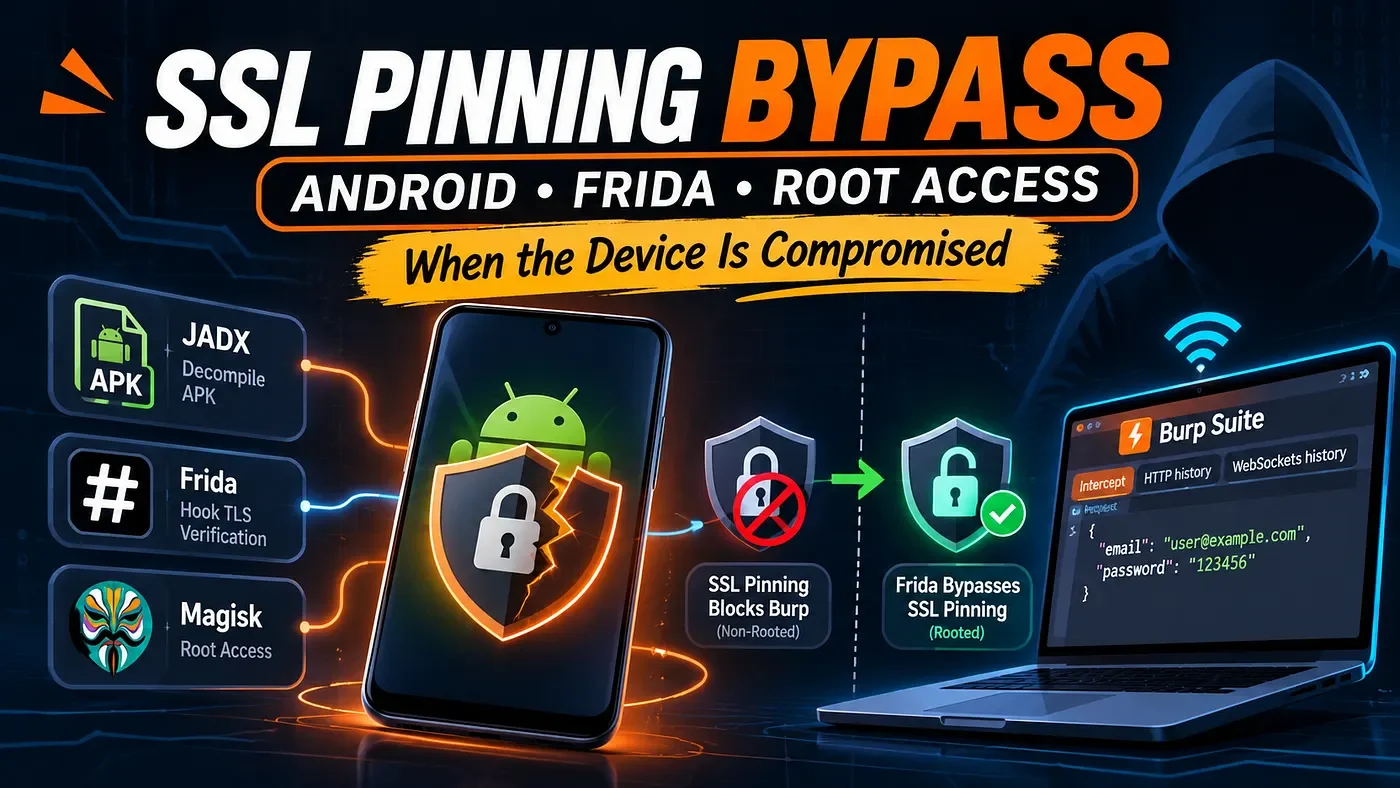
SSL Pinning is often presented as the control that finally stops man-in-the-middle attacks on mobile apps. It does, right up until the attacker controls the device itself. This walkthrough uses one small Flutter login app that talks to the public reqres.in API to show both sides of that story: how easily an unprotected app leaks data, and how little a single client-side control buys you once root enters the picture.
Everything here was done with freely available tools: JADX-GUI, Burp Suite Community Edition, RootAVD, Magisk, and Frida. No special access, no private exploits, just standard mobile pentesting technique applied one step at a time.
Context
The target is a small Flutter login application that authenticates against the public reqres.in API. The feature under examination is the login flow itself: the app collects an email and password, sends them to the API, and receives a response. The walkthrough shows what an unprotected app leaks, what obfuscation changes, and what happens once the app pins its certificate and the attacker gains root.
The app is examined in several states: unprotected, obfuscated, pinned, and pinned with root and Frida. Each state is tested against the same proxy setup so the results can be compared directly.
Setup
The tooling is entirely free and publicly available:
- JADX-GUI, for static decompilation of the APK.
- Burp Suite Community Edition, as the interception proxy.
- RootAVD, to root the emulator's ramdisk.
- Magisk, for superuser access on the emulator.
- Frida, with Frida Server running as root inside the emulator and the Frida CLI driven from the host machine.
The workflow runs against an Android emulator. Burp's CA certificate is installed on the device so that proxy interception works in the unprotected state. For the bypass step, the emulator is rooted and Frida Server is launched with root privileges inside it.
Finding it
Step 1: Decompile first, run nothing
Before touching any network traffic, the release APK is pulled apart statically. It is opened in JADX-GUI, and the whole project is searched, classes, resources, and native libraries included, for anything that looks like an endpoint, key, or secret.
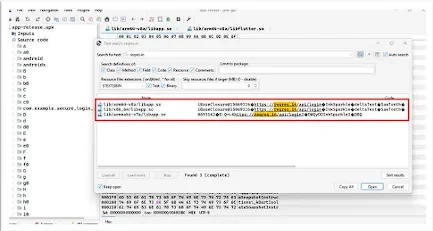
The login endpoint turns up as a plain string inside the native library, once for every CPU architecture the build was compiled for. The URL sat inside libapp.so as plain text. Three copies showed up: arm64, x86_64, and armeabi, each readable without running the app or touching an emulator.
The lesson is not that a URL should never ship inside an app. Anything compiled into a mobile binary should be treated as public from day one. The real risk sits on the other end: if the backend skips rate limiting and server-side validation, an exposed endpoint turns into an easy target the moment someone finds it.
Step 2: Watch the credentials leave the device
Burp Suite is set up as a proxy between the emulator and the network. Burp's CA certificate is installed on the device, and the login flow is run with no pinning in place yet.
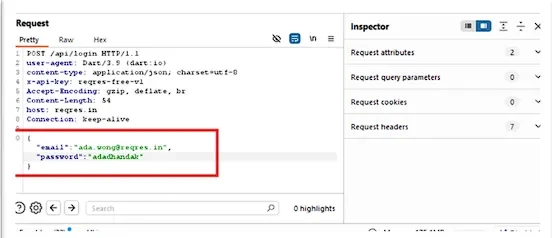
With nothing pinning the certificate, Burp sees everything: the full request body and the credentials inside it. The email and password arrive at the proxy as plain, readable JSON.
A quick follow-up test sharpens the point. Intercept the request, change the password field by hand, forward it, and watch whether the server still accepts it. If it does, that is the finding worth writing down. Client-side input cannot work as a security boundary, because the client is exactly where the attacker stands.
Step 3: Try obfuscation, then check the result
The app is rebuilt with:
flutter build apk - obfuscate - split-debug-info
The two binaries are then compared side by side in JADX.
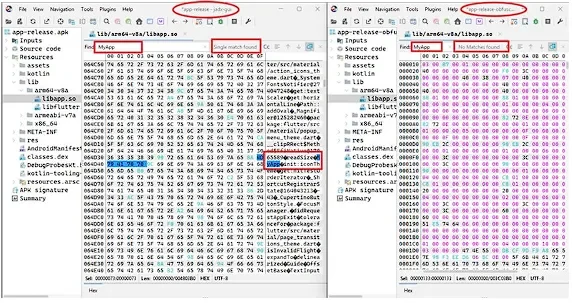
Class and method names that used to read like documentation now look like noise, a real gain for anyone trying to map the app's logic by hand. Obfuscation still has a narrow job, though. It renames Dart symbols. It does not touch strings and it does not touch the native library. Running the exact search from Step 1 again against the obfuscated build, the API domain still turns up untouched. Obfuscation is a speed bump for reverse engineering, not a replacement for keeping secrets out of the binary in the first place.
Step 4: Lock it down with SSL Pinning
SSL Pinning is added next. The app is pinned to one certificate, so it refuses anything else, including a proxy's self-signed certificate, which is what makes Burp-style interception possible in the first place. The app is rebuilt, reinstalled, and the same login flow is run against the same proxy setup again.
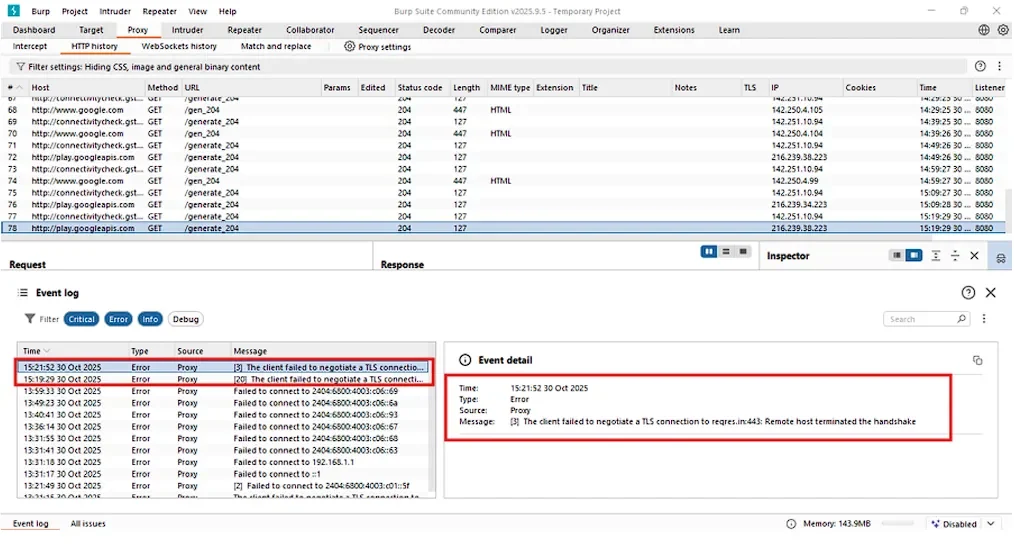
The result is CERTIFICATE_VERIFY_FAILED, self-signed certificate in certificate chain. No request reaches the proxy. On a device that has not been rooted, this holds up. It shuts down the exact attack from Step 2.
Step 5: Bypass the pin with root and Frida
Pinning runs from inside the client, so its guarantee only holds while the attacker does not control that client. Root access removes that limit.
The setup starts with RootAVD, used to root the emulator's ramdisk. Magisk and superuser access are confirmed next, then Frida Server is run as root inside the emulator and driven from the Frida CLI on the host machine. The target app is launched through Frida using a public CodeShare script built to disable Flutter's TLS verification. No source code edits, no rebuild required:
frida -U -f <package.name> --codeshare TheDauntless/disable-flutter-tls-v1
The script hooks the certificate verification function at runtime and feeds it a different answer before the app decides whether to trust the connection. The pinning code itself never changes. It just receives a different result while it runs.
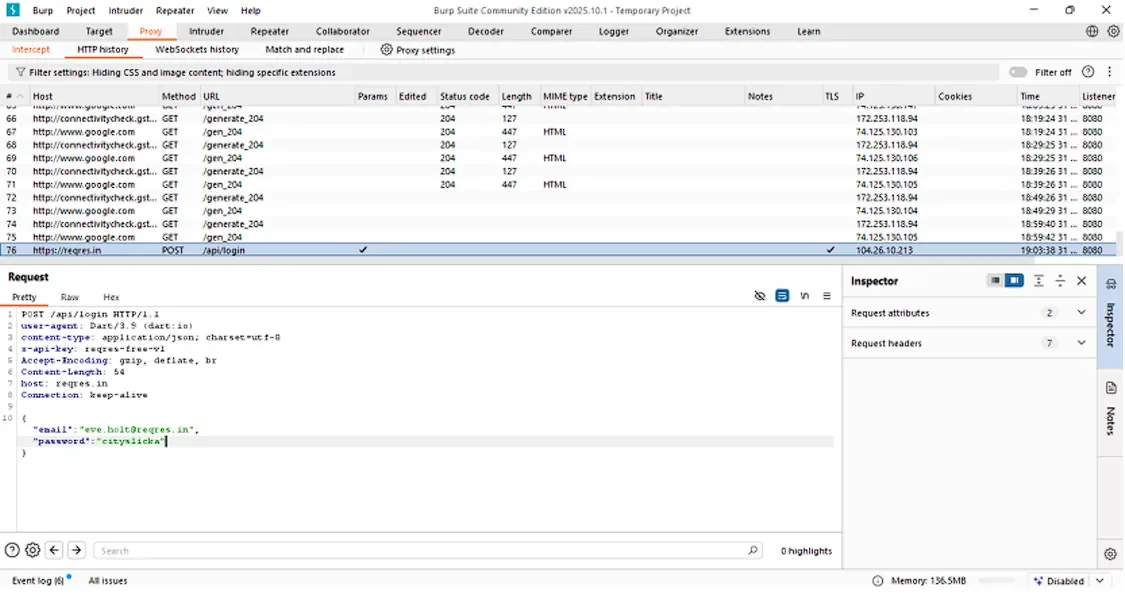
Login succeeds. No TLS error appears. The full request shows up in Burp again, with the POST to /api/login fully captured, credentials included. The pinning implementation did not break and did not carry a flaw. An attacker who owns the device fed it a different environment to run inside. That distinction matters: polishing the pinning code further would not have stopped this particular attack.
Root cause
Pinning runs from inside the client. Its guarantee therefore only holds while the attacker does not control that client. Once root access is available, the attacker can hook the certificate verification function at runtime and return a different answer before the app decides whether to trust the connection. The pinning code is unchanged and correct; it simply receives a different result while it runs.
The earlier steps show the same pattern at a lower level. The API domain is embedded as a plain string in libapp.so, so static analysis recovers it without running the app. Obfuscation renames Dart symbols but leaves strings and the native library untouched, so the same search still finds the domain. And with no pinning, the proxy sees the full request body, credentials included.
Impact
On an unrooted device, pinning stops the network attacker cold: the TLS handshake fails before any HTTP request forms, and the proxy never sees a login attempt at all. On a rooted device with Frida active, the same login flow is captured in full, credentials included, and the login succeeds with no TLS error.
The static exposure matters too. Anyone who obtains the APK can recover the API endpoint from the native library without running the app. Whether that becomes a real problem depends on the backend: if it skips rate limiting and server-side validation, an exposed endpoint turns into an easy target the moment someone finds it. The follow-up test in Step 2 is to change the password field by hand and watch whether the server still accepts it.
Fix
No single control on a rooted device acts like a wall; each is a speed bump. None of the items below would stop this bypass by itself, but stacked together they make the attack harder to pull off and louder to attempt:
- Root and jailbreak detection as a first line. Check for
subinaries and Magisk artifacts, or call the Play Integrity API, so the app refuses to run at all on a device that has been compromised. - Application integrity checks at runtime. Verify the APK signature and check native library checksums to catch repackaging or tampering.
- Pin the public key instead of the full certificate. Keep a backup pin ready, and run the pinning check in native code (C or C++) instead of Dart, where it is easier to locate and hook.
- Basic RASP-style runtime checks. Detect an active debugger, a hooking framework such as Frida or Xposed, or an emulator, and react by ending the process or wiping sensitive memory instead of staying quiet.
- Server-side validation as the real source of truth, never the client. This is the one control that would have mattered at every step in this walkthrough.
Variants to test
- Static string search on other Flutter builds. Decompile the release APK in JADX-GUI and search classes, resources, and native libraries for endpoints, keys, and secrets. A positive result is a readable URL or secret inside
libapp.sofor one or more CPU architectures, recoverable without running the app. - Obfuscation check. Rebuild with
flutter build apk - obfuscate - split-debug-infoand repeat the same search. A positive result is the API domain still turning up untouched in the obfuscated build, showing that symbol renaming did not remove the string. - Proxy interception without pinning. Install Burp's CA certificate on the device and run the login flow. A positive result is the full request body, credentials included, arriving at the proxy as readable JSON.
- Client-side validation test. Intercept the login request, change the password field by hand, forward it, and watch the response. A positive result is the server still accepting the modified request, which shows client-side input is being trusted as a boundary.
- Pinning enforcement check. Add pinning, rebuild, reinstall, and repeat the proxy run on an unrooted device. A positive result for the defender is
CERTIFICATE_VERIFY_FAILEDwith no request reaching the proxy. - Runtime bypass on a rooted device. Root the emulator with RootAVD, confirm Magisk and superuser access, run Frida Server as root, and launch the app with
frida -U -f <package.name> --codeshare TheDauntless/disable-flutter-tls-v1. A positive result is the login succeeding with no TLS error and the fullPOSTto/api/loginappearing in Burp, credentials included.
Takeaway
SSL Pinning is not theatre. It stopped the first attack cold. It answers a narrower question than people give it credit for: it keeps out an attacker on the network, not an attacker who owns the device. Before trusting any single control, ask which threat model it was built to survive.
What happened, in plain words
Imagine you post a letter to your bank. The envelope is sealed, so nobody along the postal route can read it. That seal is what encryption does for traffic between a phone app and a server. Now imagine the postal service itself is run by someone who wants to read your mail: they can hand you a fake seal, and if you accept it, they read everything. That is a man-in-the-middle attack, and the defence against it is checking that the seal really belongs to the bank.
This walkthrough takes one small login app, built with a toolkit called Flutter, that talks to a public test API called reqres.in. It shows three things in order. First, that an app with no pinning leaks the email and password to a proxy the device trusts. Second, that a common defence called SSL Pinning does stop that attack, as long as the attacker only controls the network. Third, that the same defence falls apart the moment the attacker controls the phone itself, which is what rooting a phone means.
The point is not that pinning is useless. The point is that it answers a narrower question than people think: it keeps out an attacker on the network, not an attacker who owns the device. Every step below uses free, publicly available tools, and each step is done for a reason, which I explain as we go.
The app and the question
The target is a small Flutter login application. Flutter is a toolkit for building mobile apps, and one of its quirks matters later: a lot of the app's logic ends up compiled into a native library file rather than in easy-to-read code. The app authenticates against the public reqres.in API.
An API, in plain terms, is the counter where one program asks another program for something. The app is the customer, the API is the counter, and the request is the order. Here the order is a login: the app collects an email and a password, sends them to the API, and gets a response back saying whether the login worked.
The feature under examination is that login flow. The question the walkthrough answers is simple: what can an attacker sitting between the app and the network see, and what happens to that visibility once the app pins its certificate and the attacker gains root on the device?
The app is examined in several states: unprotected, obfuscated, pinned, and pinned with root and Frida. Each state is tested against the same proxy setup, so the results can be compared directly rather than guessed at.
The tools, and why each one is needed
Everything used here is free and publicly available:
- JADX-GUI, for static decompilation of the APK. An APK is the installable package file of an Android app, roughly what a .zip is to a folder. Decompiling means turning the compiled package back into something a human can read. "Static" means we read the file without running the app at all.
- Burp Suite Community Edition, as the interception proxy. A proxy is a middleman that sits between the phone and the internet. Burp is a proxy built for inspection: traffic passes through it, and it can show you, or let you edit, every request.
- RootAVD, to root the emulator's ramdisk. An emulator is a phone simulated on a computer. Rooting means gaining the highest level of control over the device's operating system, the level normally reserved for the manufacturer and the system itself. The ramdisk is the small startup filesystem the emulator boots from.
- Magisk, for superuser access on the emulator. Superuser access is the practical name for that root power: the ability to do anything on the device, including things the app is not supposed to allow.
- Frida, with Frida Server running as root inside the emulator and the Frida CLI driven from the host machine. Frida is a tool that attaches to a running program and changes what it does while it runs. The CLI is its command line interface, run from the host machine, meaning the real computer that hosts the emulator.
The workflow runs against an Android emulator. Burp's CA certificate is installed on the device so that proxy interception works in the unprotected state. A CA certificate is a digital document that says "trust me when I vouch for a website's identity". Installing Burp's own certificate on the phone tells the phone to trust Burp when Burp pretends to be the server. For the bypass step, the emulator is rooted and Frida Server is launched with root privileges inside it.
Finding it
Step 1: Decompile first, run nothing
Before touching any network traffic, the release APK is pulled apart statically. It is opened in JADX-GUI, and the whole project is searched, classes, resources, and native libraries included, for anything that looks like an endpoint, key, or secret.
Why start here rather than with the network? Because reading the file is free of risk and often faster. You learn what the app is made of, where it keeps its addresses, and whether anything sensitive was left lying around, all without running a single line of it. An endpoint is simply the address of a specific function on a server, the way a street address plus a flat number points at one door. A key or secret is a password-like string that grants access to something.
The login endpoint turns up as a plain string inside the native library, once for every CPU architecture the build was compiled for. The URL sat inside libapp.so as plain text. Three copies showed up: arm64, x86_64, and armeabi, each readable without running the app or touching an emulator.
A CPU architecture is the family of processor the app was built for. Phones mostly use arm64, emulators on Intel or AMD computers use x86_64, and armeabi is an older 32-bit family. App builders ship one copy of the compiled library per family so the app runs everywhere, which is why the same URL appears three times. libapp.so is the compiled native library file itself, and a string is just text stored as-is, not hidden or scrambled.
The lesson is not that a URL should never ship inside an app. Anything compiled into a mobile binary should be treated as public from day one. The real risk sits on the other end: if the backend skips rate limiting and server-side validation, an exposed endpoint turns into an easy target the moment someone finds it. Rate limiting means refusing to answer the same caller too many times in a short period, and server-side validation means the server checks the data itself instead of trusting what the app sent.
Step 2: Watch the credentials leave the device
Burp Suite is set up as a proxy between the emulator and the network. Burp's CA certificate is installed on the device, and the login flow is run with no pinning in place yet.
Why do this? Because the previous step told us where the app sends data, but not what it sends or how. Watching the traffic answers that directly. The phone is configured to send its internet traffic through Burp, and because Burp's certificate is trusted by the phone, the encrypted connection is set up with Burp rather than with the real server. Burp then opens its own connection to the real server and relays everything, reading it on the way through.
With nothing pinning the certificate, Burp sees everything: the full request body and the credentials inside it. The email and password arrive at the proxy as plain, readable JSON. JSON is a simple text format for structured data, the kind of thing that looks like {"name": "value"}. "Plain, readable" means no scrambling at all once the connection is opened by the proxy.
A quick follow-up test sharpens the point. Intercept the request, change the password field by hand, forward it, and watch whether the server still accepts it. If it does, that is the finding worth writing down. Client-side input cannot work as a security boundary, because the client is exactly where the attacker stands. "Client-side" means the checks happen inside the app on the phone. A boundary is something an attacker cannot cross; if the check lives on the attacker's own device, they can simply step around it.
Step 3: Try obfuscation, then check the result
Obfuscation means deliberately making code harder for a human to read, usually by renaming things to meaningless labels, while keeping it working exactly the same. The app is rebuilt with:
flutter build apk - obfuscate - split-debug-info
Line by line, in plain words:
flutterruns the Flutter build tool.build apktells it to produce an Android package file, the installable app.- obfuscateasks for the code to be scrambled in the renaming sense described above.- split-debug-infoasks for the debugging information to be written out separately instead of being packed into the app, which is part of how the scrambling is made useful.
The two binaries are then compared side by side in JADX. A binary here means the compiled app file, and comparing them side by side means opening both in the same tool and looking at the same search results in each.
Class and method names that used to read like documentation now look like noise, a real gain for anyone trying to map the app's logic by hand. A class and a method are just named building blocks of a program: a class groups related code, a method is one action inside it. When those names are descriptive, reading them is like reading a table of contents.
Obfuscation still has a narrow job, though. It renames Dart symbols. Dart is the programming language Flutter apps are written in, and a symbol is a name the program uses internally. It does not touch strings and it does not touch the native library. Running the exact search from Step 1 again against the obfuscated build, the API domain still turns up untouched. Obfuscation is a speed bump for reverse engineering, not a replacement for keeping secrets out of the binary in the first place. Reverse engineering means working backwards from a finished product to understand how it was built.
Step 4: Lock it down with SSL Pinning
SSL Pinning is added next. SSL is the older name for the encryption layer that protects traffic between an app and a server, and pinning means the app is told in advance exactly which certificate to expect. The app is pinned to one certificate, so it refuses anything else, including a proxy's self-signed certificate, which is what makes Burp-style interception possible in the first place. A self-signed certificate is one that vouches for itself rather than being vouched for by a recognised authority, which is exactly what a proxy like Burp has to use.
The app is rebuilt, reinstalled, and the same login flow is run against the same proxy setup again. Keeping the setup identical is what makes the comparison fair: the only thing that changed is the pinning.
The result is CERTIFICATE_VERIFY_FAILED, self-signed certificate in certificate chain. In plain words, the app looked at the certificate Burp presented, compared it with the one it was pinned to, saw they did not match, and stopped. "In certificate chain" refers to the sequence of certificates a server presents to prove its identity; the app rejected the chain because it contained the self-signed one. No request reaches the proxy. On a device that has not been rooted, this holds up. It shuts down the exact attack from Step 2.
Step 5: Bypass the pin with root and Frida
Pinning runs from inside the client, so its guarantee only holds while the attacker does not control that client. Root access removes that limit. This is the heart of the whole walkthrough: the check is real and correct, but it runs on a machine the attacker now owns.
The setup starts with RootAVD, used to root the emulator's ramdisk. Magisk and superuser access are confirmed next, then Frida Server is run as root inside the emulator and driven from the Frida CLI on the host machine. The target app is launched through Frida using a public CodeShare script built to disable Flutter's TLS verification. TLS is the modern name for the same encryption layer SSL refers to. CodeShare is a public place where Frida users share scripts, so this is not a private exploit, just a script anyone can fetch. No source code edits, no rebuild required:
frida -U -f <package.name> --codeshare TheDauntless/disable-flutter-tls-v1
Line by line, in plain words:
fridaruns the Frida command line tool from the host machine.-Utells it to talk to a connected device, which here is the emulator.-f <package.name>tells it to start the app fresh, where<package.name>is the app's unique identifier on the device, the same kind of name you see in an app store link.--codeshare TheDauntless/disable-flutter-tls-v1tells it to fetch a shared script by that name and run it inside the app as it starts.
The script hooks the certificate verification function at runtime and feeds it a different answer before the app decides whether to trust the connection. A hook, in this context, means intercepting a function call and substituting your own behaviour. Runtime means while the program is running, as opposed to editing the file beforehand. The pinning code itself never changes. It just receives a different result while it runs.
Login succeeds. No TLS error appears. The full request shows up in Burp again, with the POST to /api/login fully captured, credentials included. A POST is the kind of request used to send data to a server, as opposed to simply asking for a page. The pinning implementation did not break and did not carry a flaw. An attacker who owns the device fed it a different environment to run inside. That distinction matters: polishing the pinning code further would not have stopped this particular attack.
Why it works
Pinning runs from inside the client. Its guarantee therefore only holds while the attacker does not control that client. Once root access is available, the attacker can hook the certificate verification function at runtime and return a different answer before the app decides whether to trust the connection. The pinning code is unchanged and correct; it simply receives a different result while it runs.
The earlier steps show the same pattern at a lower level. The API domain is embedded as a plain string in libapp.so, so static analysis recovers it without running the app. Obfuscation renames Dart symbols but leaves strings and the native library untouched, so the same search still finds the domain. And with no pinning, the proxy sees the full request body, credentials included.
What it means in practice
On an unrooted device, pinning stops the network attacker cold: the TLS handshake fails before any HTTP request forms, and the proxy never sees a login attempt at all. A handshake is the opening conversation where the two sides agree on encryption and check each other's identity; if it fails, nothing else is sent.
On a rooted device with Frida active, the same login flow is captured in full, credentials included, and the login succeeds with no TLS error.
The static exposure matters too. Anyone who obtains the APK can recover the API endpoint from the native library without running the app. Whether that becomes a real problem depends on the backend: if it skips rate limiting and server-side validation, an exposed endpoint turns into an easy target the moment someone finds it. The follow-up test in Step 2 is to change the password field by hand and watch whether the server still accepts it.
What to do about it
No single control on a rooted device acts like a wall; each is a speed bump. None of the items below would stop this bypass by itself, but stacked together they make the attack harder to pull off and louder to attempt:
- Root and jailbreak detection as a first line. Check for
subinaries and Magisk artifacts, or call the Play Integrity API, so the app refuses to run at all on a device that has been compromised.suis the standard command that switches a user to superuser, so its presence is a hint that the device is rooted. Play Integrity is a service that reports whether a device looks trustworthy. - Application integrity checks at runtime. Verify the APK signature and check native library checksums to catch repackaging or tampering. A signature is a cryptographic stamp proving who built the app, and a checksum is a short fingerprint of a file's contents that changes if the file changes.
- Pin the public key instead of the full certificate. Keep a backup pin ready, and run the pinning check in native code (C or C++) instead of Dart, where it is easier to locate and hook. A public key is the part of the certificate used to prove identity, and pinning it is more flexible than pinning the whole certificate, which changes more often.
- Basic RASP-style runtime checks. RASP stands for runtime application self-protection, meaning the app watches itself while running. Detect an active debugger, a hooking framework such as Frida or Xposed, or an emulator, and react by ending the process or wiping sensitive memory instead of staying quiet. A debugger is a tool for pausing and inspecting a running program, and Xposed is another framework for changing app behaviour at runtime.
- Server-side validation as the real source of truth, never the client. This is the one control that would have mattered at every step in this walkthrough.
Other things worth testing
- Static string search on other Flutter builds. Decompile the release APK in JADX-GUI and search classes, resources, and native libraries for endpoints, keys, and secrets. A positive result is a readable URL or secret inside
libapp.sofor one or more CPU architectures, recoverable without running the app. - Obfuscation check. Rebuild with
flutter build apk - obfuscate - split-debug-infoand repeat the same search. A positive result is the API domain still turning up untouched in the obfuscated build, showing that symbol renaming did not remove the string. - Proxy interception without pinning. Install Burp's CA certificate on the device and run the login flow. A positive result is the full request body, credentials included, arriving at the proxy as readable JSON.
- Client-side validation test. Intercept the login request, change the password field by hand, forward it, and watch the response. A positive result is the server still accepting the modified request, which shows client-side input is being trusted as a boundary.
- Pinning enforcement check. Add pinning, rebuild, reinstall, and repeat the proxy run on an unrooted device. A positive result for the defender is
CERTIFICATE_VERIFY_FAILEDwith no request reaching the proxy. - Runtime bypass on a rooted device. Root the emulator with RootAVD, confirm Magisk and superuser access, run Frida Server as root, and launch the app with
frida -U -f <package.name> --codeshare TheDauntless/disable-flutter-tls-v1. A positive result is the login succeeding with no TLS error and the fullPOSTto/api/loginappearing in Burp, credentials included.
Takeaway
SSL Pinning is not theatre. It stopped the first attack cold. It answers a narrower question than people give it credit for: it keeps out an attacker on the network, not an attacker who owns the device. Before trusting any single control, ask which threat model it was built to survive. A threat model is simply a description of who might attack you and what they are able to do.
Glossary
- API: the counter where one program asks another program for something, defined by addresses and the data they accept.
- APK: the installable package file of an Android app.
- arm64 / x86_64 / armeabi: families of processor that apps are compiled for, so one app can run on phones and on emulators.
- Binary: a compiled program file, as opposed to readable source code.
- Burp Suite: a proxy tool that sits between a device and the network and can show or edit the traffic.
- CA certificate: a digital document that says "trust me when I vouch for a server's identity".
- Certificate chain: the sequence of certificates a server presents to prove its identity.
- Checksum: a short fingerprint of a file's contents that changes if the file changes.
- Class: a named group of related code in a program.
- Client-side: happening inside the app on the user's device, where an attacker who owns the device can interfere.
- CodeShare: a public place where Frida users share scripts.
- CPU architecture: the family of processor a compiled program is built for.
- Dart: the programming language Flutter apps are written in.
- Debugger: a tool for pausing and inspecting a running program.
- Decompile: turn a compiled package back into something a human can read.
- Emulator: a phone simulated on a computer.
- Endpoint: the address of a specific function on a server.
- Flutter: a toolkit for building mobile apps, which compiles much of the app into a native library.
- Frida: a tool that attaches to a running program and changes what it does while it runs.
- Frida CLI: Frida's command line interface, run from the host machine.
- Frida Server: the part of Frida that runs inside the device.
- Handshake: the opening conversation where two sides agree on encryption and check each other's identity.
- Hook: intercept a function call and substitute your own behaviour.
- Host machine: the real computer that hosts the emulator.
- Integrity check: verifying that a file or app has not been modified.
- JADX-GUI: a tool for decompiling Android APKs and browsing the result.
- JSON: a simple text format for structured data, like
{"name": "value"}. - Key / secret: a password-like string that grants access to something.
- libapp.so: the compiled native library file inside a Flutter app.
- Magisk: a tool that provides superuser access on Android.
- Man-in-the-middle attack: an attacker sitting between two parties, reading or altering what they send each other.
- Method: one named action inside a class.
- Native code / native library: compiled code shipped with the app, as opposed to the Dart-level code.
- Obfuscation: deliberately making code harder for a human to read, usually by renaming things, while keeping it working.
- Play Integrity API: a service that reports whether a device looks trustworthy.
- POST: the kind of request used to send data to a server.
- Proxy: a middleman that sits between a device and the internet.
- Public key: the part of a certificate used to prove identity.
- RASP: runtime application self-protection, meaning the app watches itself while running.
- Rate limiting: refusing to answer the same caller too many times in a short period.
- Ramdisk: the small startup filesystem a device or emulator boots from.
- Reverse engineering: working backwards from a finished product to understand how it was built.
- Root: the highest level of control over a device's operating system.
- RootAVD: a tool for rooting an Android emulator's ramdisk.
- Runtime: while a program is running, as opposed to editing the file beforehand.
- Self-signed certificate: a certificate that vouches for itself rather than being vouched for by a recognised authority.
- Server-side validation: the server checks the data itself instead of trusting what the app sent.
- Signature (APK): a cryptographic stamp proving who built the app.
- SSL / TLS: the encryption layer that protects traffic between an app and a server.
- SSL Pinning: telling an app in advance exactly which certificate to expect, so it refuses anything else.
- Static analysis: reading a file without running it.
- String: text stored as-is, not hidden or scrambled.
su: the standard command that switches a user to superuser, whose presence hints that a device is rooted.- Superuser access: the practical name for root power, the ability to do anything on the device.
- Symbol: a name a program uses internally.
- Threat model: a description of who might attack you and what they are able to do.
- Xposed: a framework for changing app behaviour at runtime.



