Potential remote code execution in PyPI
A GitHub Actions workflow in PyPI's repository combined pull requests without verifying the author, and it inserted untrusted branch names and pull request titles directly into shell and JavaScript contexts. An attacker could exploit this to leak a GitHub token with write access, push malicious code to the main branch, and thereby execute arbitrary code on pypi.org.

blog.ryotak.net
Published on blog.ryotak.net
2021-07-30 1544 字 PyPI Vulnerability Python Supply Chain RCE
The full write-up lives on its author's site
It belongs to its author, so we link to it rather than copy it. The other two tabs are our own rewrites, checked against it.
Context
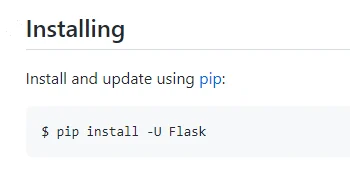
PyPI is the package registry used by Python's package manager (pip), and is referenced when you run commands such as pip install [package name]. Many projects, including Flask and TensorFlow, depend on it indirectly.
The source code of PyPI lives in the pypa/warehouse repository, and the code pushed to its main branch is automatically deployed to pypi.org. That deployment path is what turns a repository-level compromise into code execution on the production registry.
The investigation covered three issues: two found by reading the source, and one in the GitHub Actions workflow of the repository. The author describes them as potential vulnerabilities, reported using publicly available information, without actually exploiting or demonstrating them.
Setup
No accounts, roles or tool versions are described. The work was source code review: reading the warehouse code, the Pyramid documentation (the Python web framework the application uses), and the GitHub Actions workflow files. The only precondition that matters for the final issue is that the main branch of pypa/warehouse deploys automatically to pypi.org, and that GitHub Actions workflows have write permission to the repository by default.
The starting point was Max Justicz's blogpost on a Packagist RCE, which mentioned a report to PyPI. Following the advisory linked from that article showed that PyPI's source is public on GitHub, which prompted the review.
Finding it
Arbitrary legacy document deletion
PyPI once had a documentation hosting feature. It was removed because usage did not grow, but existing documents were kept, so a feature to delete them was requested and implemented. Internally the deletion uses this code:
    def remove_by_prefix(self, prefix):
        if self.prefix:
            prefix = os.path.join(self.prefix, prefix)
        keys_to_delete = []
        keys = self.s3_client.list_objects_v2(Bucket=self.bucket_name, Prefix=prefix)
        for key in keys.get("Contents", []):
            keys_to_delete.append({"Key": key["Key"]})
            if len(keys_to_delete) > 99:
                self.s3_client.delete_objects(
                    Bucket=self.bucket_name, Delete={"Objects": keys_to_delete}
                )
                keys_to_delete = []
        if len(keys_to_delete) > 0:
            self.s3_client.delete_objects(
                Bucket=self.bucket_name, Delete={"Objects": keys_to_delete}
            )
The list_objects_v2 call takes a prefix parameter, and the name of a user-owned project is passed into it. Because S3 prefix matching is a plain string prefix, deleting legacy documents in a project named examp also deletes documents of projects whose names start with examp, such as example and exampleasdf.
Arbitrary role deletion
PyPI has a permission management feature where a project owner can grant and remove permissions. The removal path fetched the role like this:
role = (
    request.db.query(Role)
    .join(User)
    .filter(Role.id == request.POST["role_id"])
    .one()
)
The query filters only on Role.id from the POST body and never constrains the role to the project the requester owns, so an attacker could delete another project's permission by supplying its role_id. The author notes that he assumed role_id was a sequential number and told the team that IDs could be sprayed, but it was in fact a UUID.
Neither of these has much impact; at best they can be used for harassment. That is why the search continued for something that could execute arbitrary code. Reading the package upload and project management code produced nothing, but an article titled "Unintended Deployments to PyPI Servers" revealed that pushes to main in pypa/warehouse are deployed automatically to pypi.org. Write permission on the repository therefore means code execution on the registry.
The combine-prs workflow
GitHub Actions workflows have write permission to the repository by default, so the workflow files were the next target. The repository contains a workflow called combine-prs.yml, which collects pull requests whose branch names start with dependabot and merges them into a single pull request. Dependabot has no feature to merge all its pull requests, so this workflow simulates it.
The workflow does not verify the author of the pull request. Anyone can create a pull request with a branch name starting with dependabot and force the workflow to process it. On its own this only produces a combined pull request, which a human reviews and would discard if it contained malicious changes, so it is not directly exploitable.
The second problem is in the line that prints the branch list:
run: |
  echo "${{steps.fetch-branch-names.outputs.result}}"
It looks like a harmless echo, but ${{ }} expressions are evaluated before the result is passed to Bash. The expression does not care about the surrounding Bash context, so if steps.fetch-branch-names.outputs.result contains a string such as ";curl https://example.com;#, then curl https://example.com is executed. Because the workflow uses actions/checkout, .git/config contains secrets.GITHUB_TOKEN, which has write permissions, so a command such as cat .git/config leaks a GitHub access token with write access to pypa/warehouse.
Exploitation
The first published procedure was:
- Fork pypa/warehouse
- In the forked repository, create a branch named
dependabot;cat$IFS$(echo$IFS'LmdpdA=='|base64$IFS'-d')/config|base64;sleep$IFS'10000';# - Add a harmless modification to the created branch
- Create a pull request with a harmless name (e.g.
WIP) - Wait for
combine-prs.ymlto be executed - A GitHub access token with write permissions against pypa/warehouse is leaked, so add an arbitrary modification to the
mainbranch - The modified code is deployed to
pypi.org
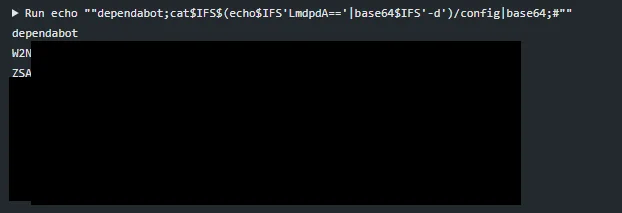
The report notes that this branch name will execute cat .git/config | base64; sleep 10000 if it is executed in Bash. The trailing # comments out whatever follows.
After publication, @mrtc0 pointed out that this procedure does not work. On checking, the author confirmed that a different procedure is needed.
The working path is at line 119 of combine-prs.yml:
script: |
  const prString = `${{ steps.fetch-branch-names.outputs.prs-string }}`;
Again the ${{ }} expression ignores its context. If steps.fetch-branch-names.outputs.prs-string contains a string such as ;console.log("test")//, then console.log("test") is executed. That output contains the titles of pull requests, which the attacker controls, so the revised procedure is:
- Find a branch that starts with
dependabotinpypa/warehouse - In the forked repository, add a harmless modification to the branch found in step 2
- Create a pull request named
;github.auth().then(auth=>console.log(auth.token.split("")))// - Wait for
combine-prs.ymlto be executed
The report shows the payload but does not explain how its parts work.
Root cause
The core mistake is using ${{ }} expressions to interpolate attacker-controlled data directly into run: and script: blocks. GitHub evaluates the expression before handing the text to Bash or to the script runner, so the data is not a quoted value but part of the program. The workflow also trusted branch names and pull request titles without verifying who created them, and it ran with a token that had write permission to the repository. The combination of untrusted input, expression interpolation and a privileged token is what made the chain work. The automatic deployment of main to pypi.org then turned repository write access into production code execution.
Impact
An attacker able to trigger the workflow could obtain a GitHub access token with write permissions against pypa/warehouse, push arbitrary changes to main, and have those changes deployed to pypi.org. The author describes this as arbitrary code execution on the production registry, with a significant impact on the Python ecosystem. The two source-level issues are much weaker: arbitrary deletion of legacy documents for projects sharing a name prefix, and deletion of another project's role by role_id. The report frames all of this as potential, based on public information, without an actual exploit demonstration.
Fix
The combine-prs vulnerability was fixed in this commit. The document deletion vulnerability was fixed on July 26, 2021 and the role deletion vulnerability on July 27, 2021. The advisory was published on July 29, 2021. The report does not describe the content of the fixes.
Variants to test
- Search workflow files for
${{ }}insiderun:andscript:blocks where the expression references pull request titles, branch names, commit messages, issue bodies or other contributor-controlled fields. A positive result is a value you control appearing unquoted in the generated shell or script. - Look for workflows that process branches by name prefix, such as
dependabot,renovateor release branches, without checking the author. A positive result is your crafted branch being picked up by a workflow run you did not trigger yourself. - Check whether
actions/checkoutis used in a job whose token has write permission, and whether.git/configor environment variables holding the token are reachable from the injected command. A positive result is the token appearing in job output. - Trace what happens after a push to the default branch: automatic deployment, package publication or release automation. A positive result is a path from repository write access to a production system.
- For storage-backed features, test whether user-supplied names are used as key prefixes in list or delete operations. A positive result is objects belonging to a differently named project being listed or removed.
- For permission removal endpoints, try supplying an identifier that belongs to another project and observe whether the request succeeds. A positive result is a role you do not own being deleted.
What happened, in plain words
PyPI is the place where Python programmers download ready-made pieces of software, called packages. When you type a command like pip install flask, your computer asks PyPI for the Flask package and installs it. Because so many people and projects rely on PyPI, anything that lets an outsider run their own code on PyPI's servers is serious.
This article is about a chain of small mistakes that, put together, could have allowed exactly that. The author did not break into anything. He read PyPI's public source code on GitHub (the website where programmers keep and share code), noticed some weak spots, and reported them to the Python security team. The combine-prs issue was fixed by Python's security team. The article explains what he found and how the pieces would have fitted together.
Three issues are described:
- A way to delete documentation files belonging to other projects by accident.
- A way to delete another project's permission settings.
- A way to make an automated helper on GitHub run commands of the attacker's choosing, which could lead to running code on
pypi.orgitself.
The first two are minor. The third is the interesting one, and most of the article is about it.
Some background first
What PyPI and pip are
PyPI stands for the Python Package Index. Think of it as an enormous public library of software components. pip is the tool that fetches a component from that library and puts it on your computer. The command looks like this:
pip install [package name]
Here [package name] is a placeholder: you replace it with the name of the package you want, for example flask. The square brackets are not typed literally.
Many well-known projects, including Flask and TensorFlow, rely on PyPI indirectly: they themselves depend on other packages that live there. So a problem at PyPI can ripple out to a huge number of users. That is what people mean by a "supply chain": you trust not only the software you install directly, but everything that software in turn depends on.
The image relates to Flask, one of the projects that uses PyPI indirectly. That is the everyday path through which PyPI reaches ordinary developers.
What source code and a repository are
Source code is the human-readable text that programmers write. A repository (often shortened to "repo") is a folder of source code plus its full history of changes, usually hosted on a service such as GitHub. PyPI's source code is public in a repository called pypa/warehouse. Anyone can read it.
What a branch is
Inside a repository, work happens on "branches". A branch is a parallel copy of the code where someone can make changes without disturbing the main version. The main version is usually called main. When changes on a branch are approved, they get merged into main.
What a pull request is
A pull request (often abbreviated PR) is a proposal: "here is a branch with my changes, please review them and merge them into main". On GitHub, a pull request has a title, a description, and a list of the commits (individual changes) it contains. Other people can comment on it, approve it, or reject it.
What GitHub Actions and workflows are
GitHub Actions is an automation service built into GitHub. You write a small recipe, called a workflow, in a file, and GitHub runs it automatically when something happens, for example when someone opens a pull request. A workflow is made of steps, and each step can run a command.
By default, a workflow gets a kind of key that lets it read and write to the repository it lives in. That key is called a token. Think of it as a temporary pass card: whoever holds it can act on the repository as if they were the automation itself.
What a token is
A token is a long string of characters that proves who you are, a bit like a wristband at an event. You show it to a service instead of typing a password every time. If someone else copies your wristband, they can get in too. That is why leaking a token is dangerous.
What a fork is
A fork is your own personal copy of someone else's repository, stored under your account. You can change anything in your fork without affecting the original. You can then propose that your changes be pulled into the original, which is exactly what a pull request does.
What Dependabot is
Dependabot is a helper that watches the packages a project uses and automatically opens pull requests to update them when new versions appear. Each of its pull requests comes from a branch whose name starts with dependabot.
What a vulnerability class is
Security people group similar mistakes into "classes". Two classes appear in this article:
- Injection: when data that a user controls is treated as if it were part of a program. A simple comparison: imagine a form where you write your name, and the system later reads your name out loud as an instruction. If you write "delete all files" as your name, and the system obeys, that is injection.
- Missing authorisation check: when a system checks that you are logged in, but not that you are allowed to do this particular thing. Like a hotel where any guest's key opens every room.
How the investigation started
The author read a blog post by Max Justicz about a similar problem in Packagist (the package registry for PHP, another programming language). That post mentioned a report made to PyPI. Following the link to the published advisory, the author discovered that PyPI's source code is public on GitHub. So he decided to read it.
This is worth pausing on: reading public source code is not an attack. It is like reading the blueprints of a public building. The author stresses that he did not actually exploit or demonstrate any of the issues; he reported them based on what the code showed.
Reading the code: two small bugs
PyPI's code is written using a web framework for Python called Pyramid. A web framework is a toolkit that handles the repetitive parts of a website, such as receiving a request from a browser and deciding which piece of code should answer it. The author read Pyramid's documentation to understand the conventions, then went through PyPI's own code.
Bug one: deleting documents by name prefix
PyPI used to host documentation for Python projects. The feature was removed because not enough people used it, but the documents that already existed were left in place. Later, someone asked for a way to delete those leftover documents, and the feature was added.
Under the hood, the deletion works like this:
    def remove_by_prefix(self, prefix):
        if self.prefix:
            prefix = os.path.join(self.prefix, prefix)
        keys_to_delete = []
        keys = self.s3_client.list_objects_v2(Bucket=self.bucket_name, Prefix=prefix)
        for key in keys.get("Contents", []):
            keys_to_delete.append({"Key": key["Key"]})
            if len(keys_to_delete) > 99:
                self.s3_client.delete_objects(
                    Bucket=self.bucket_name, Delete={"Objects": keys_to_delete}
                )
                keys_to_delete = []
        if len(keys_to_delete) > 0:
            self.s3_client.delete_objects(
                Bucket=self.bucket_name, Delete={"Objects": keys_to_delete}
            )
Line by line, in plain words:
def remove_by_prefix(self, prefix):defines a function calledremove_by_prefixthat takes one input,prefix. A function is a named block of code you can call whenever you need it.if self.prefix:checks whether the storage location already has a base folder configured. If it does, the next line joins that base folder with theprefixyou passed in, usingos.path.join, which glues path pieces together with the right separator.keys_to_delete = []creates an empty list. A list is an ordered collection of items; here it will collect the names of files to delete.keys = self.s3_client.list_objects_v2(Bucket=self.bucket_name, Prefix=prefix)asks the storage service (Amazon S3, a service for storing files in the cloud) for every file whose name starts withprefix.Bucketis the container where the files live.list_objects_v2is the operation that lists files.for key in keys.get("Contents", []):goes through each file the service returned.Contentsis the part of the answer that holds the list of files; if it is missing, an empty list is used instead.keys_to_delete.append({"Key": key["Key"]})adds the file's name (itsKey) to the list of things to delete.if len(keys_to_delete) > 99:checks whether the list has grown past 99 items. The storage service accepts at most 100 deletions in one request, so the code sends a batch whenever it is about to exceed that.self.s3_client.delete_objects(Bucket=self.bucket_name, Delete={"Objects": keys_to_delete})sends the batch of deletions.keys_to_delete = []empties the list so it can start collecting again.- The final
if len(keys_to_delete) > 0:block sends whatever is left over after the loop finishes.
The problem is the Prefix=prefix part. The name of a project that a user owns is passed straight into prefix. And "starts with" matching is literal: the string examp is a prefix of example and of exampleasdf. So if someone deleted the leftover documents of a project called examp, the code would also delete the documents of every project whose name begins with examp. The author's own example uses exactly those names.
This is a small bug. It can annoy people, but it cannot run code.
Bug two: deleting another project's permissions
PyPI lets a project owner decide who may do what with their project. This is called permission management: the owner can grant a permission to someone, or take it away. The code that removes a permission looked like this:
role = (
    request.db.query(Role)
    .join(User)
    .filter(Role.id == request.POST["role_id"])
    .one()
)
Line by line:
role = (starts an assignment: the result of the expression that follows will be stored in a variable calledrole.request.db.query(Role)asks the database for records of typeRole. A database is an organised store of information; a query is a question you ask it.Rolehere means a permission entry..join(User)links each role record to its user record, so the answer includes who the role belongs to..filter(Role.id == request.POST["role_id"])keeps only the role whose identifier matches therole_idvalue sent in the request.request.POSTis the part of an incoming web request that carries data submitted through a form..one()says "there must be exactly one match; give it to me".
The flaw: the query filters only on the role's identifier. It never checks that the role belongs to a project the person making the request actually owns. So an attacker who knows or guesses another project's role_id can delete that project's permission.
The author adds a candid note: he assumed role_id was a simple sequential number (1, 2, 3, ...) and told the team that an attacker could "spray" IDs, meaning try many numbers in a row. In reality the identifier was a UUID, a long random-looking string that is very hard to guess. That makes the bug much harder to use in practice.
Neither of these two bugs is powerful. As the author puts it, at best they can be used for harassment. He wanted to find something with real impact, so he kept reading, looking for a way to run arbitrary code.
The big one: from a pull request to code on pypi.org
The key discovery
He read the code for uploading packages and for managing projects, and found nothing that would let an attacker run code. Then, while taking a break, he came across an article titled "Unintended Deployments to PyPI Servers". Reading it carefully, he learned something crucial: any code pushed to the main branch of pypa/warehouse is automatically deployed to pypi.org.
"Deployed" means put into production, made live for real users. So the chain becomes clear:
- If you can write to the repository, you can change
main. - If you can change
main, your change goes live onpypi.org. - If your change goes live on
pypi.org, you are running your own code on PyPI's servers.
So the question changes from "how do I break into PyPI's website?" to "how do I get write access to its GitHub repository?".
Looking at the automation
GitHub Actions workflows have write permission to their repository by default. That makes the workflow files a natural place to look. In pypa/warehouse there is a workflow called combine-prs.yml.
What it does: Dependabot opens many separate pull requests, one per package update, and it has no built-in way to merge them all into one. So the team wrote this workflow to collect all pull requests whose branch names start with dependabot and combine them into a single pull request. That way a human reviews one pull request instead of dozens.
The first weakness: the workflow does not check who created the pull request. Anyone can create a pull request from a branch whose name starts with dependabot, and the workflow will pick it up and process it.
On its own, that is not enough. The workflow only produces a combined pull request, and a human reviews that. If it contained malicious changes, the reviewer would simply discard it. So this alone does not let an attacker run code.
The second weakness: a harmless-looking echo
Reading further, the author found this line in the workflow:
run: |
  echo "${{steps.fetch-branch-names.outputs.result}}"
What this means:
run: |tells GitHub "the following lines are shell commands to execute". The|introduces a block of text.echois a shell command that prints whatever you give it.${{ ... }}is GitHub's expression syntax. It means "replace this with the value of whatever is inside".steps.fetch-branch-names.outputs.resultis the value produced by an earlier step in the workflow, namely the list of branch names.
At first glance this is just printing a list. But the crucial detail is when the substitution happens. GitHub evaluates the ${{ }} expression before handing the text to the shell. The shell never sees ${{ ... }}; it sees the final text with the value already pasted in.
That means the value is not treated as data. It is treated as part of the program. If the value contains characters that the shell interprets as commands, those commands run.
The author gives a concrete illustration: if steps.fetch-branch-names.outputs.result contains the string ";curl https://example.com;#, then the shell ends up running curl https://example.com. curl is a command-line tool for fetching a web address. The leading " closes the quote that was around the value, the ; ends the echo command, and the trailing # turns the rest of the line into a comment, so nothing after it is executed.
This is the injection class in action: attacker-controlled text becomes part of the command.
Why that leads to a token leak
The workflow uses actions/checkout, a standard building block that downloads the repository's code into the workflow's working area. As part of that, the token that lets the workflow act on the repository is stored in a file called .git/config.
So if an attacker can run commands, they can run cat .git/config. cat prints the contents of a file. That would print the token, which has write permission to pypa/warehouse.
Put the pieces together and the chain is complete: control a branch name, get it into the workflow, inject a command, read the token, use the token to push to main, and the push is deployed to pypi.org.
The first published attack procedure
The author published these steps:
- Fork pypa/warehouse
- In the forked repository, create a branch named
dependabot;cat$IFS$(echo$IFS'LmdpdA=='|base64$IFS'-d')/config|base64;sleep$IFS'10000';# - Add a harmless modification to the created branch
- Create a pull request with a harmless name (e.g.
WIP) - Wait for
combine-prs.ymlto be executed - A GitHub access token with write permissions against pypa/warehouse is leaked, so add an arbitrary modification to the
mainbranch - The modified code is deployed to
pypi.org
The image is titled 'Remote code execution in GitHub Actions'.
Why each step:
- You cannot create branches in someone else's repository, so you make your own copy first.
- The branch name is the payload. It starts with
dependabotso the workflow picks it up, and the rest is crafted to survive being pasted into a shell command. - A harmless change makes the branch a real branch with a real commit, so a pull request can be opened from it.
- The pull request title is deliberately boring so nobody gets suspicious.
- The workflow runs on its own; you just wait.
- With the token in hand, you can push to
mainin the original repository. - The automatic deployment takes it from there.
Unpacking that branch name
The report notes that this branch name will execute cat .git/config | base64; sleep 10000 if it is executed in Bash.
dependabotmakes the workflow treat the branch as one of its own.;ends the current command and starts a new one.$(echo$IFS'LmdpdA=='|base64$IFS'-d')runs a command inside a command.echoprints the textLmdpdA==, andbase64 -ddecodes it./configcompletes the path, giving.git/config.
The correction
After publication, a reader called @mrtc0 pointed out that this procedure does not work. The author checked and confirmed it: a different procedure was needed.
This is a good reminder that even a careful write-up can contain a mistake, and that public review catches it.
The working procedure
The working path is at line 119 of combine-prs.yml:
script: |
  const prString = `${{ steps.fetch-branch-names.outputs.prs-string }}`;
What this means:
script: |is a step that runs a script rather than a shell command. In this workflow the script is JavaScript, the language used by the GitHub Actions toolkit.const prString =starts a variable declaration.constmeans the value will not be reassigned.- The backtick characters around the value make it a template literal, a JavaScript string that can contain other values.
${{ steps.fetch-branch-names.outputs.prs-string }}is again a GitHub expression, this time holding the titles of the pull requests.
Once more, the expression is evaluated before the script runs. The value is pasted into the JavaScript source, not passed as data. If the value contains JavaScript code, that code becomes part of the program.
The author's illustration: if steps.fetch-branch-names.outputs.prs-string contains the string ;console.log("test")//, then console.log("test") is executed. console.log prints something to the log.
And here is the key difference from the first attempt: this value contains the titles of pull requests, and the attacker chooses the title of their own pull request. So the attacker controls the injected text directly.
The revised steps:
- Find a branch that starts with
dependabotinpypa/warehouse - In the forked repository, add a harmless modification to the branch found in step 2
- Create a pull request named
;github.auth().then(auth=>console.log(auth.token.split("")))// - Wait for
combine-prs.ymlto be executed
Why the steps changed:
- Step 2 now says to find an existing
dependabotbranch in the original repository. - Step 3 adds a harmless modification to the branch found in step 2.
- Step 4 puts the payload in the pull request title.
Unpacking the title payload
The title is JavaScript, because it lands inside a JavaScript script:
auth.tokenis the token itself.
Why it worked: the root cause
The core mistake is using ${{ }} expressions to paste data controlled by outsiders directly into run: and script: blocks. GitHub fills in the expression before handing the text to the shell or the script runner. The data is therefore not a quoted value; it is part of the program. This is the injection class again, in two flavours: shell injection in the run: block and JavaScript injection in the script: block.
Two more ingredients made the chain work:
- The workflow trusted branch names and pull request titles without checking who created them.
- The workflow ran with a token that had write permission to the repository.
Untrusted input, plus expression interpolation, plus a privileged token: that combination is what turned a small automation script into a path to production. The automatic deployment of main to pypi.org then converted repository write access into code running on the live registry.
What the impact would have been
An attacker who could trigger the workflow could obtain a GitHub access token with write permissions against pypa/warehouse, push arbitrary changes to main, and have those changes deployed to pypi.org. The author describes this as arbitrary code execution on the production registry, with a significant impact on the Python ecosystem. Given how many projects depend on PyPI, that is a serious prospect.
The two source-level issues are much weaker: deletion of leftover documentation for projects sharing a name prefix, and deletion of another project's role by role_id. The report frames everything as potential, based on public information, without an actual exploit demonstration.
How it was fixed
The combine-prs vulnerability was fixed in this commit. The document deletion vulnerability was fixed on July 26, 2021 and the role deletion vulnerability on July 27, 2021. The advisory was published on July 29, 2021. The report does not describe what the fixes changed.
Timeline
| Date (UTC) | Event |
|---|---|
| July 25, 2021 | Found and reported the document deletion vulnerability |
| July 26, 2021 | Fixed the document deletion vulnerability |
| July 26, 2021 | Found and reported the role deletion vulnerability |
| July 27, 2021 | Found and reported the combine-prs vulnerability |
| July 27, 2021 | Fixed the role deletion vulnerability |
| July 27, 2021 | Fixed the combine-prs vulnerability |
| July 29, 2021 | Published the advisory |
| July 30, 2021 | Published this article |
What to look for in your own projects
If you maintain a repository that uses GitHub Actions, these are the checks the author's findings suggest:
- Search your workflow files for
${{ }}insiderun:andscript:blocks, especially where the expression refers to pull request titles, branch names, commit messages, issue bodies or other fields a contributor can fill in. A positive result is a value you control appearing unquoted in the generated shell or script. - Look for workflows that process branches by name prefix, such as
dependabot,renovateor release branches, without checking the author. A positive result is your crafted branch being picked up by a workflow run you did not trigger yourself. - Check whether
actions/checkoutis used in a job whose token has write permission, and whether.git/configor environment variables holding the token are reachable from the injected command. A positive result is the token appearing in job output. - Trace what happens after a push to the default branch: automatic deployment, package publication or release automation. A positive result is a path from repository write access to a production system.
- For storage-backed features, test whether user-supplied names are used as key prefixes in list or delete operations. A positive result is objects belonging to a differently named project being listed or removed.
- For permission removal endpoints, try supplying an identifier that belongs to another project and observe whether the request succeeds. A positive result is a role you do not own being deleted.
A closing note from the author
The vulnerabilities described had a significant impact on the Python ecosystem. Some supply chains have critical weaknesses, yet only a limited number of people research supply chain attacks, and most supply chains are not properly protected. The author's conclusion is that people who depend on a supply chain should actively contribute to improving its security.
If you find a vulnerability in PyPI, report it to [redacted] Do not test it without permission.
Glossary
- API: a defined way for one piece of software to ask another for information or action, like a service counter with a fixed set of requests you can make.
- Arbitrary code execution: the ability for an attacker to make a system run commands or programs of their choosing.
- Base64: an encoding that turns any data into plain letters and digits, often used to carry data through places that only accept text. It is not encryption; anyone can decode it.
- Branch: a parallel version of a repository's code where changes can be made without affecting the main version.
- Bucket: a container for files in cloud storage such as Amazon S3.
- cat: a command that prints the contents of a file.
- Commit: a saved set of changes in a repository, with a message describing it.
- curl: a command-line tool for fetching a web address.
- Database: an organised store of information that software can query.
- Dependabot: a GitHub helper that automatically opens pull requests to update the packages a project uses.
- Deploy: to put code into production, making it live for real users.
- echo: a command that prints text.
- Expression (
${{ }}): GitHub's syntax for inserting a value into a workflow file. It is filled in before the surrounding command or script runs. - Fork: your own copy of someone else's repository, under your account.
- GitHub Actions: GitHub's built-in automation service that runs workflows in response to events.
- Injection: a vulnerability class where data controlled by a user is treated as part of a program, so the data can change what the program does.
- JavaScript: the programming language used for scripts in web pages and in the GitHub Actions toolkit.
- main: the conventional name for the default branch of a repository, holding the current official version of the code.
- Missing authorisation check: a vulnerability class where a system checks who you are but not whether you are allowed to perform a specific action.
- Package: a reusable piece of software that can be downloaded and installed.
- Permission management: a feature that lets an owner decide who may do what with their project.
- pip: Python's package manager, the tool that downloads and installs packages from PyPI.
- Prefix: the beginning of a string. A prefix match finds every string that starts with the given characters.
- Pull request (PR): a proposal to merge changes from a branch into another branch, reviewed by other people.
- PyPI: the Python Package Index, the public registry from which Python packages are downloaded.
- Pyramid: a web framework for Python, a toolkit for building websites.
- Query: a question asked of a database.
- Repository (repo): a folder of source code together with its full history of changes, usually hosted on a service such as GitHub.
- S3: Amazon's cloud file storage service.
- Shell: the program that reads and runs typed commands, such as Bash.
- Source code: the human-readable text that programmers write to build software.
- Supply chain: the full set of software components that a project depends on, directly and indirectly.
- Template literal: a JavaScript string written with backticks that can contain other values.
- Token: a string that proves identity or grants access, like a temporary pass card. If leaked, it can be used by someone else.
- UUID: a long, random-looking identifier that is very hard to guess.
- Vulnerability: a weakness in software that could be used to cause harm.
- Workflow: a recipe file for GitHub Actions describing steps to run automatically when something happens.
- Write permission: the right to change a repository, as opposed to only reading it.
- YAML (
.yml): a plain-text format for configuration files, used for GitHub Actions workflows.


