Power of Your Own Wordlist — Fuzz for Log File Leads to Information Leakage
A publicly accessible log file on an API subdomain exposed thousands of customer enquiry messages containing names, emails and phone numbers. An attacker could read this file to harvest personal data.

This is another story of my recent finding of sensitive information leakage. The target is a big hotel and resort Group which has operation in over 10 countries over the world.
The full write-up lives on its author's site
It belongs to its author, so we link to it rather than copy it. The other two tabs are our own rewrites, checked against it.
Context
The target was a large hotel and resort group operating in more than 10 countries. The researcher was not permitted to disclose the details, so the write-up uses redacted.com as the site name and states that all parameters and directories shown are made up. The finding itself is an information disclosure issue: a log file left inside a web-accessible upload directory, containing customer enquiry messages.
The article is as much about methodology as about the bug. Its main subject is how the researcher built a personal wordlist and how that wordlist surfaced the endpoint.
Setup
The only tool named in the report is ffuf, used for content discovery. The researcher maintains a set of wordlists built up over previous research work, and one of them is dedicated to sensitive information disclosure. No versions, accounts or roles are mentioned.
In this case the subdomain returned 404 at its root but still served content beneath it, and the wordlist contained the right directory and file-name patterns.
Finding it
During reconnaissance the researcher found a subdomain called api.redacted.com. Requesting the subdomain directly returned 404, but that response raised the question of what the subdomain might contain, so the researcher decided to fuzz it with ffuf.
Exploitation
Step 1: Fuzz the subdomain
The subdomain was fuzzed at its root path:
ffuf -u https://api.redacted.com/FUZZ -w wordlist.txt
This substitutes each entry of wordlist.txt into the FUZZ position and requests https://api.redacted.com/<entry>. The wordlist used was one of the researcher's own, in the sensitive information disclosure category, built from previous research.
Step 2: Read the hit
One entry in that wordlist returned HTTP 200:
Opening the URL in a browser displayed the log file. The page disclosed over thousands of messages that customers had sent to the website for enquiries. Those messages contained customer names, email addresses, phone numbers and similar details.
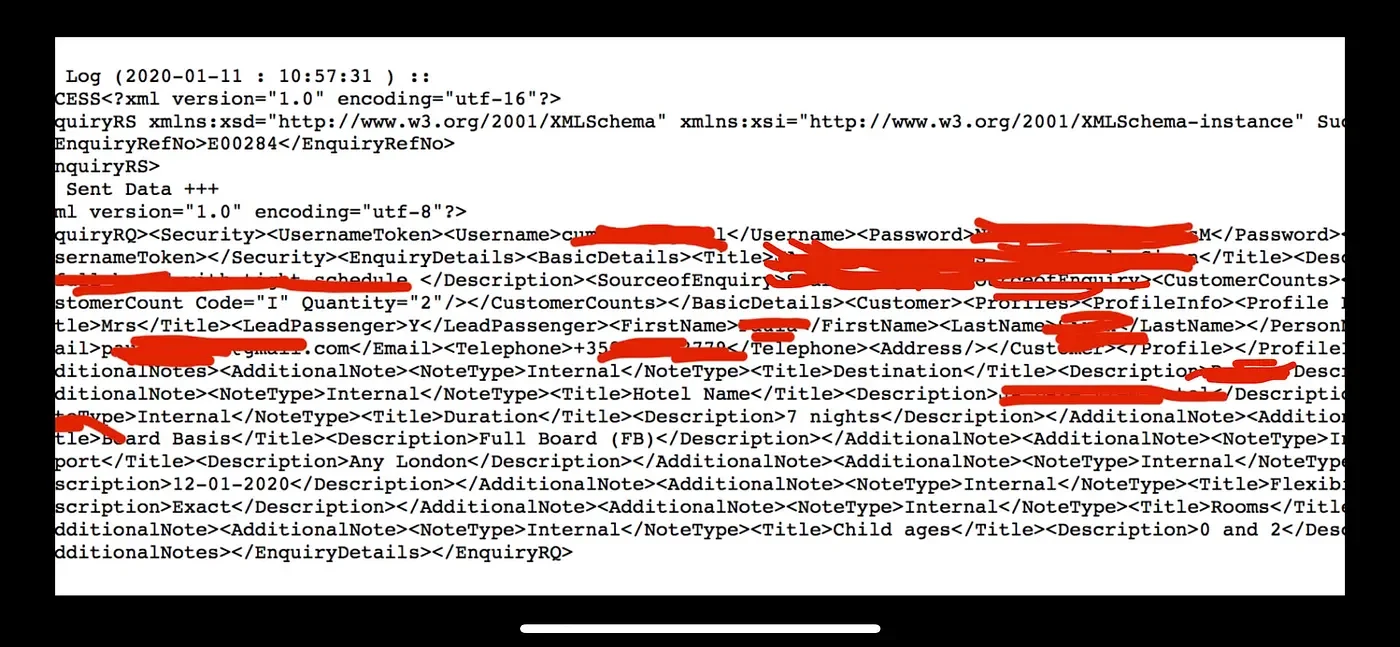
The screenshot shows the log content as rendered in the browser, which is what confirmed the exposure. The researcher reported the issue to the site promptly.
Root cause
A log file was written into a directory that the web server serves publicly, /wp-content/uploads/, and nothing prevented direct retrieval of it. The path is the conventional WordPress uploads directory, so files placed there are reachable by URL by design. The report does not describe the server configuration or any defence that was in place, so the exact reason the file was reachable is only implied by the 200 response.
Impact
Anyone who knew or guessed the path could download the log and read customer enquiry messages, including names, email addresses and phone numbers. The exposure is limited to whatever was written into that particular log file, and the report gives no count beyond "over thousands of messages". The researcher reported it to the site; the report does not describe the response or any remediation.
Fix
The measure the finding points to is keeping log files out of publicly served directories such as /wp-content/uploads/, or otherwise denying direct HTTP access to them.
Building your own wordlist
Public wordlists are widely downloaded and shared, which the researcher says leads to duplicate bugs. A personal wordlist is therefore presented as the key advantage, and the one behind this finding took a long time to develop and is still updated regularly. The method:
- Use Google dorking to find sensitive information indexed in search results, for example:
filetype:log "@gmail.com"
inurl:admin "@gmail.com"
- Many of the sites found this way leak private data. If a site has a VDP or bug bounty programme, report it; if not, leave it or email a reminder. In every case, copy down the endpoint, for example
/wp-content/uploads/23.log. - Split each copied endpoint into its standard part and its site-specific part. For
/wp-content/uploads/23.log, different sites use different names for23.log, but most sit under/wp-content/uploads/. The wordlist entry therefore becomes/wp-content/uploads/FUZZ.log. - During recon on a target, collect as many of the site's unique naming conventions as possible, such as
useridorapi-v1, and combine them with the sensitive endpoint list to generate a new list. - Fuzz with that new list.
In this case, dorking showed that many sites store sensitive information under /wp-content/uploads/, but the log file name still had to be guessed. The researcher gathered a long list of unique names used by the site, one of which was api-v1, and put those names back into fuzzing. That produced wp-content/uploads/api-v1.log. The same technique can be used to find hidden features and abandoned services.
Variants to test
- Log files under upload directories. Try
/wp-content/uploads/FUZZ.logwith names harvested from the target's own conventions. A positive result is HTTP 200 returning log lines rather than an error page. - A positive result is a downloadable file containing user data.
- A positive result is a 200 on a path the root response gave no hint of.
- A positive result is a hit that a generic wordlist would miss.
The researcher notes that building the list this way is time consuming but rewarding.
What happened, in plain words
A security researcher was looking at the website of a large hotel and resort group that operates in more than 10 countries. The company did not allow the details to be published, so throughout the write-up the site is called redacted.com, and every parameter and directory shown is made up. The real finding was an information disclosure problem: a log file had been left in a folder that anyone on the internet could open, and that log file contained messages customers had sent to the company.
The story is really about method. The researcher keeps his own lists of words and paths to try against websites, and one of those lists is what led him to the exposed file. So this article explains both the bug and how such a list is built.

The background you need first
A few ideas come up again and again, so here they are from zero.
A subdomain. A domain is the name of a site, like redacted.com. A subdomain is a name placed in front of it, like api.redacted.com. Companies use subdomains to split different services onto different addresses, the way a large building gives different departments their own entrance. api usually stands for application programming interface.
An API. An API is the part of a website that software talks to, rather than people. Think of a restaurant: the dining room is the website you see, and the kitchen door where orders are handed over is the API. You normally do not browse an API; programs call it.
HTTP status codes. When your browser asks a web server for something, the server answers with a number. 200 means "here it is, everything is fine". 404 means "there is nothing at this address". These numbers matter a lot in this story, because a 404 at one address does not mean the whole server is empty.
Fuzzing. Fuzzing means trying a large number of guesses automatically and watching which ones get an interesting answer. Instead of typing addresses by hand, you give a tool a list of words and it requests the site once per word. It is like trying every key on a big bunch in a lock, quickly, and noting which one turns.
A wordlist. A wordlist is simply a text file with one guess per line: folder names, file names, common words. The tool reads it top to bottom. The quality of the list decides the quality of the results.
ffuf. ffuf is a free command-line tool that does exactly this: it takes a wordlist, puts each entry into a spot in a URL that you mark, sends the request, and shows you the responses. It is the only tool named in the report. No versions, accounts or user roles are mentioned.
A log file. A log is a running diary that a program writes as it works: who contacted it, when, and often what they said. Logs are meant for the site's own staff to read. If a log ends up somewhere the public web server hands out, anyone can read the diary too.
Information disclosure. This is the name for the class of bug where something that should stay private becomes readable. Nothing is broken or changed; the data is simply exposed. That is what happened here.
Step 1: Looking around (recon)
Recon, short for reconnaissance, is the looking-around phase before any testing. The researcher found a subdomain called api.redacted.com. He tried to open it directly, and it returned 404. On its own that looks like a dead end.
But a 404 at the front door does not mean the building is empty. It only means there is no page at that exact address. There may still be files and folders further in. That is what made the subdomain interesting, so he decided to fuzz it with ffuf.
Step 2: Fuzzing the subdomain
He ran ffuf against the root of the subdomain:
ffuf -u https://api.redacted.com/FUZZ -w wordlist.txt
Line by line, in plain words:
ffufstarts the tool.-u https://api.redacted.com/FUZZis the address to test. The wordFUZZis a placeholder: ffuf replaces it with each entry from the list, one at a time. So if the list containsadmin, ffuf requestshttps://api.redacted.com/admin.-w wordlist.txtsays which file holds the guesses. Here it is a file calledwordlist.txt.
For every line in the file, ffuf sends one request and records the status code. A 200 stands out immediately, because it means something real lives at that path.
The list he used was one of his own, kept in a category for sensitive information disclosure, and built up from earlier research. The researcher says public lists lead to duplicate bugs.
Step 3: Reading the hit
One entry in that list came back with HTTP 200:
This is a path on the subdomain. wp-content/uploads is the folder where WordPress sites normally store uploaded files such as images, and api-v1.log is a log file sitting inside it. Because the server answered 200, the file was there and the server was willing to hand it over.
He opened the address in a browser, and the log file was displayed as a page:
The screenshot shows the log content rendered in the browser, and that is what confirmed the exposure. The page contained over thousands of messages that customers had sent to the website for enquiries. Those messages included customers' names, email addresses, phone numbers and similar details. In other words, a diary of customer conversations was readable by anyone who knew the address.
He reported the issue to the site promptly.
Why this was possible
The log file was written into a folder that the web server serves publicly, /wp-content/uploads/, and nothing stopped a direct request for it. That folder name is the standard WordPress uploads directory, and files placed there are reachable by URL by design.
The report does not describe the server configuration or any protection that was in place, so the exact reason the file was reachable is only implied by the 200 response.
What the impact was
Anyone who knew or guessed the path could download the log and read customer enquiry messages, including names, email addresses and phone numbers. The exposure is limited to whatever was written into that particular log file, and the report gives no count beyond "over thousands of messages". The researcher reported it to the site; the report does not describe the reply or any fix that followed.
How to prevent it
The lesson the finding points to is to keep log files out of publicly served folders such as /wp-content/uploads/, or otherwise deny direct web access to them.
Building your own wordlist
Public wordlists are downloaded and shared by huge numbers of people, and the researcher says this leads to duplicate bugs: everyone finds the same things. A personal wordlist is therefore the advantage, and the one behind this finding took a long time to develop and is still updated regularly. Here is the method, step by step.
- Use Google dorking to find exposed sensitive files. Dorking means using special search operators in Google to find things that were not meant to be found. The examples given are:
filetype:log "@gmail.com"
inurl:admin "@gmail.com"
filetype:logasks Google for results that are log files."@gmail.com"asks for pages containing that exact text, which is a hint that real email addresses are inside.inurl:adminasks for addresses that contain the wordadminin the URL.
The point is not to attack anyone; it is to learn which kinds of paths tend to hold private data.
-
Record the endpoints you find. Many of the sites found this way leak private data. If a site has a VDP (vulnerability disclosure programme, a formal way to report problems) or a bug bounty programme (which pays for reports), report it. If not, leave it or send an email to remind them. In every case, copy down the endpoint, for example
/wp-content/uploads/23.log. An endpoint here simply means the path part of the address. -
Split each endpoint into the standard part and the site-specific part. For
/wp-content/uploads/23.log, different sites use different names for23.log, but most sit under/wp-content/uploads/. So the wordlist entry becomes/wp-content/uploads/FUZZ.log. The fixed part stays; the part that changes from site to site becomes the placeholder. -
Collect the target's own naming habits during recon. While looking around a target, gather as many of the site's unique names as possible, such as
useridorapi-v1. Then combine those names with the sensitive endpoint list to generate a new list. This is the step that turns a generic list into one tailored to that company. -
Fuzz with that new list. Because the guesses now match the target's own vocabulary, the chance of a hit goes up and the chance of finding what everyone else already found goes down.
In this case, dorking showed that many sites store sensitive information under /wp-content/uploads/, but the log file name still had to be guessed. The researcher gathered a long list of unique names used by the site, one of which was api-v1, and put those names back into fuzzing. That produced wp-content/uploads/api-v1.log. The same technique can be used to find hidden features and abandoned services.
Things worth trying
- Log files under upload folders. Try
/wp-content/uploads/FUZZ.logwith names harvested from the target's own conventions. A positive result is HTTP 200 returning log lines rather than an error page. - A positive result is a downloadable file containing user data.
- A positive result is a 200 on a path the root response gave no hint of.
- A positive result is a hit that a generic wordlist would miss.
Closing thoughts
Building the list this way is time consuming, the researcher notes, but also rewarding. The exposed log was found because the list already contained the right shape of path, and the target's own naming supplied the missing piece.
Glossary
- API: the part of a website that software talks to, rather than people browsing pages.
- Bug bounty programme: a scheme where a company pays people for reporting security problems to it.
- Content discovery: finding files, folders and pages on a site that are not linked from anywhere visible.
- Dorking (Google dorking): using special search operators in Google to find pages or files that were not meant to be found.
- Endpoint: the path part of a web address that identifies a specific file or service, for example
/wp-content/uploads/api-v1.log. - ffuf: a free command-line tool that sends a request for each entry in a wordlist and reports the responses.
- FUZZ: the placeholder word in an ffuf command that gets replaced by each entry of the wordlist.
- HTTP status code: the number a web server returns with its answer; 200 means success, 404 means not found.
- Information disclosure: a bug where data that should stay private can be read by someone who should not see it.
- Log file: a diary a program writes as it runs, recording events and often the content of messages.
- Recon (reconnaissance): the looking-around phase before testing, gathering names, addresses and habits of a target.
- Subdomain: a name placed in front of a domain, like
api.redacted.com, used to separate services. - VDP (vulnerability disclosure programme): a formal channel a company offers for reporting security problems, usually without payment.
- Wordlist: a text file with one guess per line, used by a fuzzing tool.
- WordPress: a widely used system for building websites; its standard uploads folder is
/wp-content/uploads/. /wp-content/uploads/: the conventional WordPress folder where uploaded files are stored and served publicly.





