Privilege Escalations through Integrations
The application had Amazon Cognito self-registration enabled and allowed users to update their own attributes, so an attacker could create an account and forge a JWT for another user. The Tableau trusted authentication endpoint trusted the email in the URL rather than the JWT, allowing privilege escalation to Tableau site or server administrator.
 Published on blog.stratumsecurity.com
This assessment was interesting as multiple issues while integrating Okta, Amazon Cognito, and Tableau led to privilege escalations. Both unauthenticated and authenticated users can escalate their privileges to become administrative users.
The full write-up lives on its author's site
It belongs to its author, so we link to it rather than copy it. The other two tabs are our own rewrites, checked against it.
Context
The target was an application that lets financial institutions build dashboards from their financial data. Architecturally it is a wrapper around Tableau: custom code glues together Amazon Cognito and Okta for authentication, Tableau provides the dashboard functionality, and a custom web page lists the dashboards a user can access and lets users share dashboards with each other.
The assessment is interesting because the weaknesses are not in one component but in the seams between three: Cognito, the custom API gateway code that brokers Tableau trusted authentication, and Okta. Both unauthenticated and authenticated users could escalate their privileges to administrative users.
Setup
The application was intended to have administrators provision accounts; there was no registration option in the UI. Tableau was integrated through Tableau's trusted authentication, and the custom code lived in an Amazon API gateway. Okta acted as the identity provider, and Cognito sat alongside it.
The researcher worked from the outside: the Cognito client ID had to be retrieved from the /static/js/main.js file, and the same file turned out to hold the Cognito client IDs and Tableau URLs for every environment (dev, QA, UAT and production).
Finding it
Amazon Cognito has an option that allows users to self-register, confirm their account, and then log in to retrieve their tokens (access, ID and refresh). For this application that option should have been off, because accounts are meant to be provisioned by administrators. It was on for the application client, which meant anyone could create an account and log into the application, bypassing the Okta integration entirely.
Two further observations made this more than a nuisance. First, correct profile and role values are necessary for successful access to the application, and the public dev environment described below could be used by unauthenticated users to disclose those values. Second, the formatting of those values is easy to enumerate as an authenticated user, and the Cognito registration can be used to enumerate emails.
The Tableau integration had its own gap. The custom code in the Amazon API gateway only checked that a valid JWT was present; it did not confirm the identity carried by that JWT. Instead, the email address in the URL was used to confirm identity and retrieve a valid Tableau ticket.
Exploitation
Step 1: self-register in Cognito
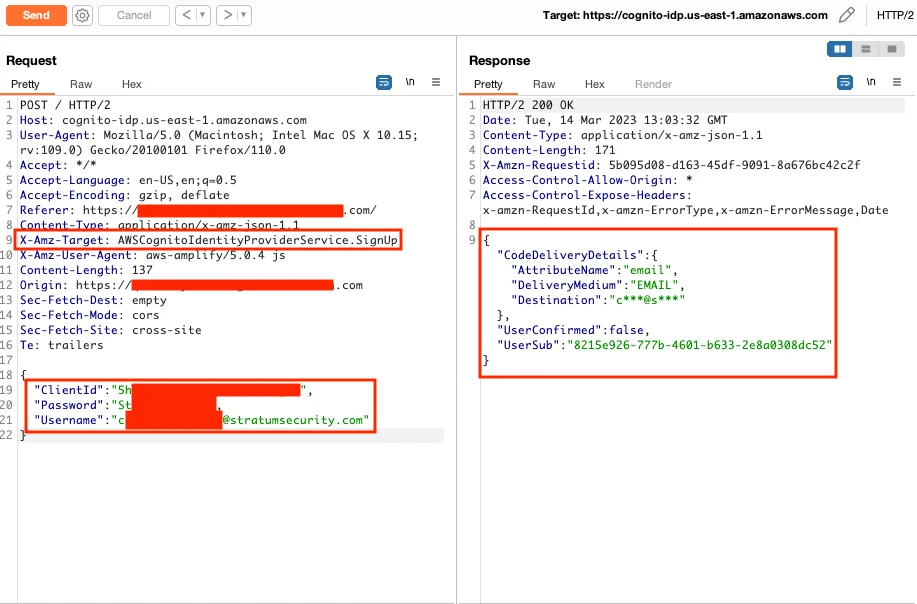
With the Cognito client ID taken from /static/js/main.js, the researcher used the enabled self-registration to create an account. Figure 1 confirms that self-registration is enabled for the application client.
Step 2: confirm the account
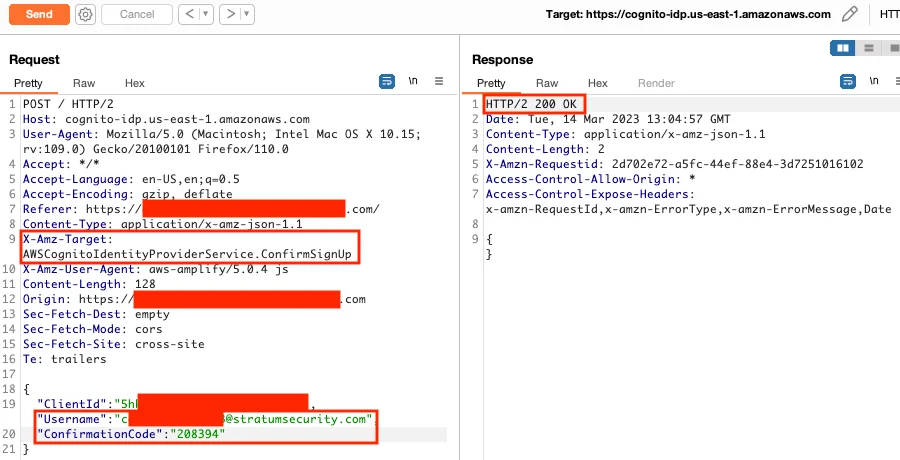
The account was confirmed with the code sent by email, as shown in Figure 2.
Step 3: log in through Cognito
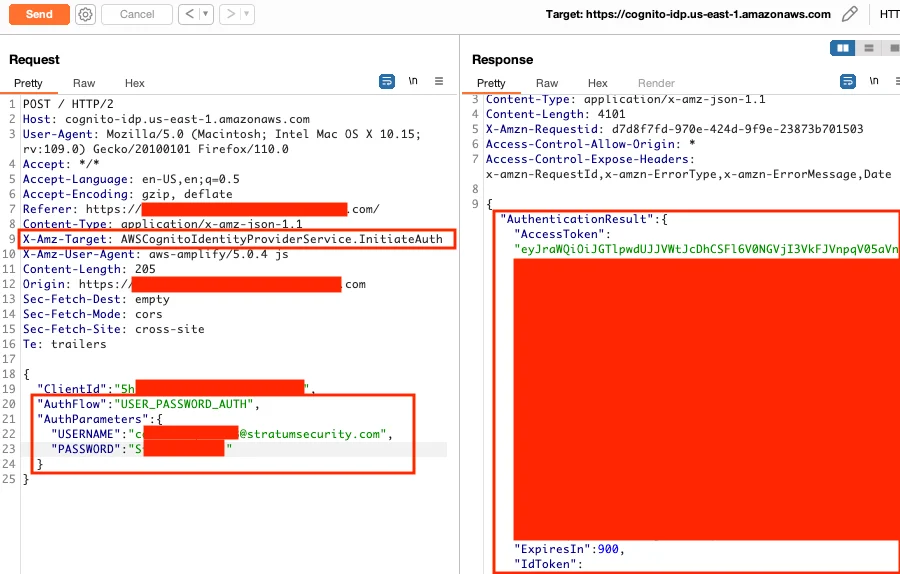
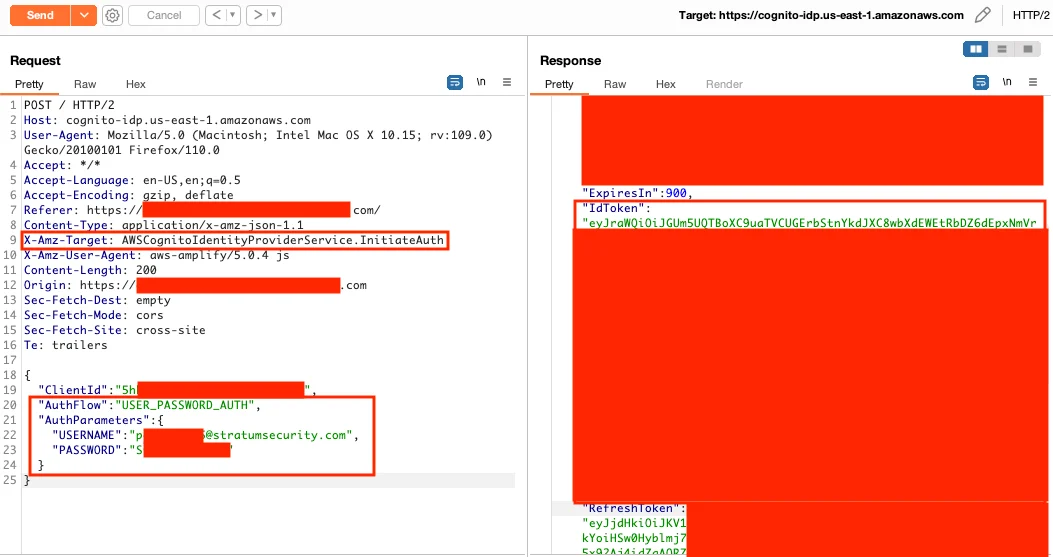
Logging in with the new account gave access to the application while bypassing the Okta integration (Figure 3).
Step 4: forge another user's identity through user attributes
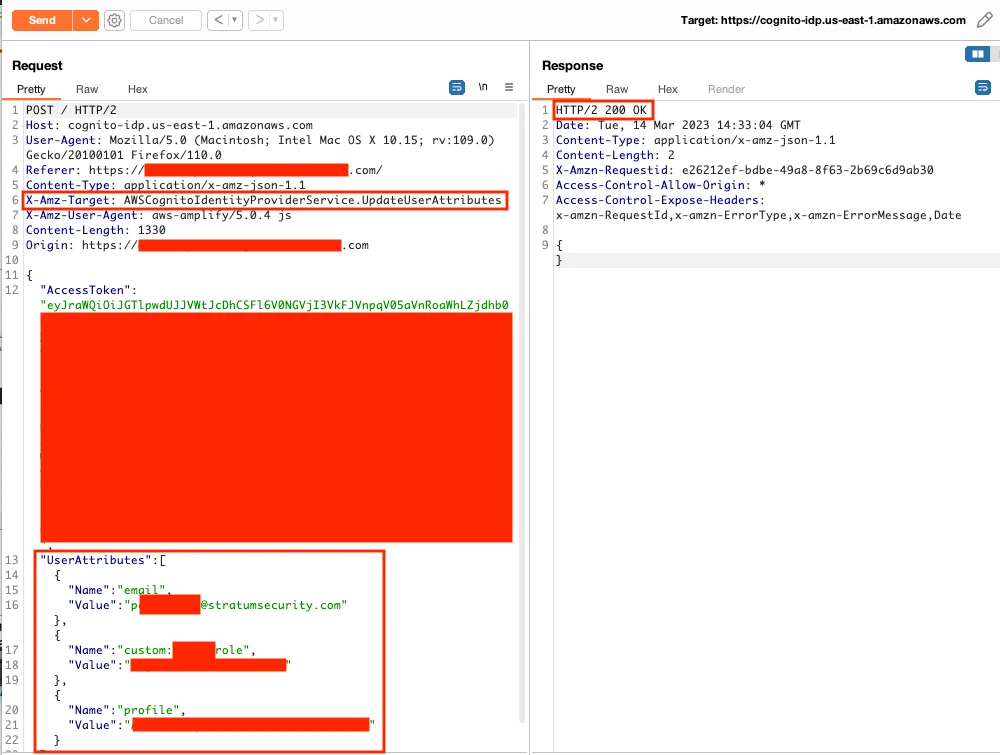
As an authenticated user, the researcher updated the user attributes to another user's email, role and profile (Figure 4). The report notes that the formatting of these values is easy to enumerate as an authenticated user, and that the public dev environment can supply correct profile and role values to an unauthenticated user.
Step 5: log in as the other user
With the attributes changed, the researcher logged in using another user's email and the attacker's own password (Figure 5), and confirmed that the registered account could access the application (Figure 6).
Step 6: retrieve a Tableau ticket for a server admin
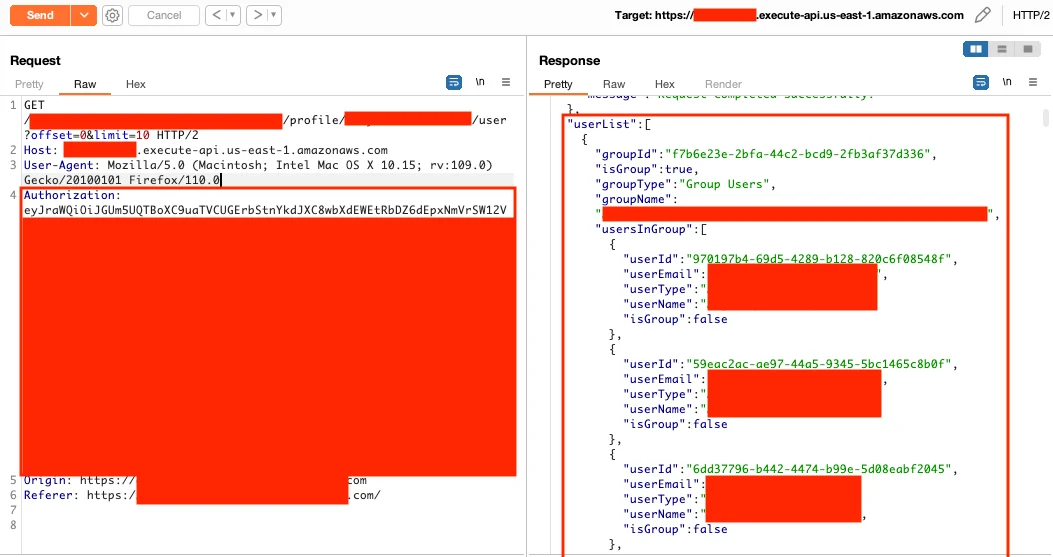
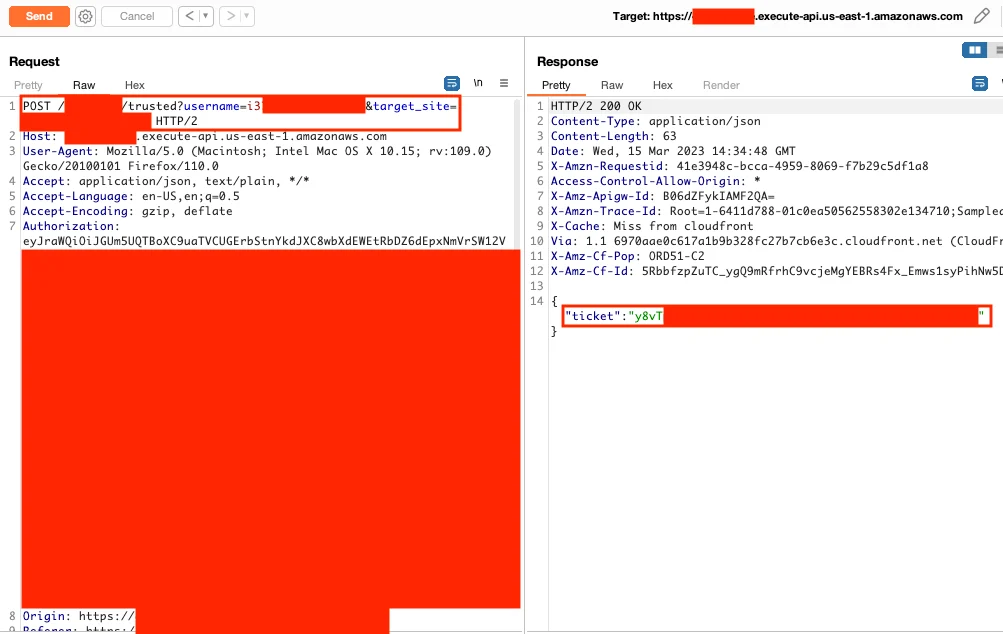
Because the API gateway only checked for the presence of a valid JWT and then trusted the email address in the URL, an unauthenticated user can register with Cognito and then use another user's email address, here a Tableau server admin user taken from Figure 6, to retrieve a valid Tableau ticket. Figure 7 shows the ticket being retrieved.
Step 7: exchange the ticket for a session
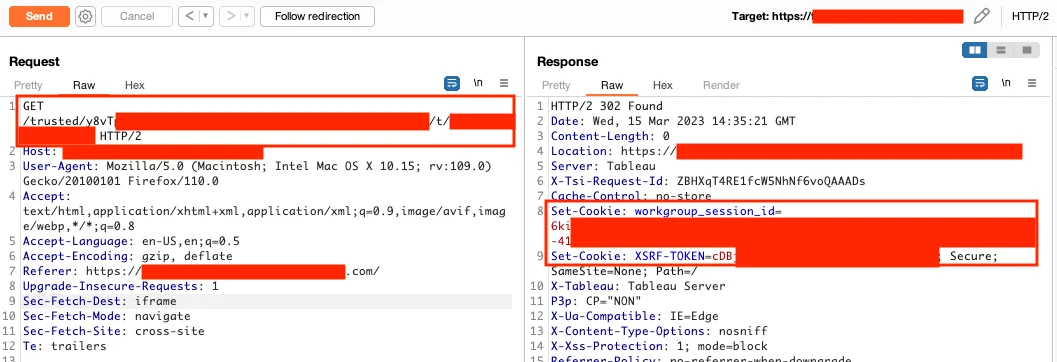
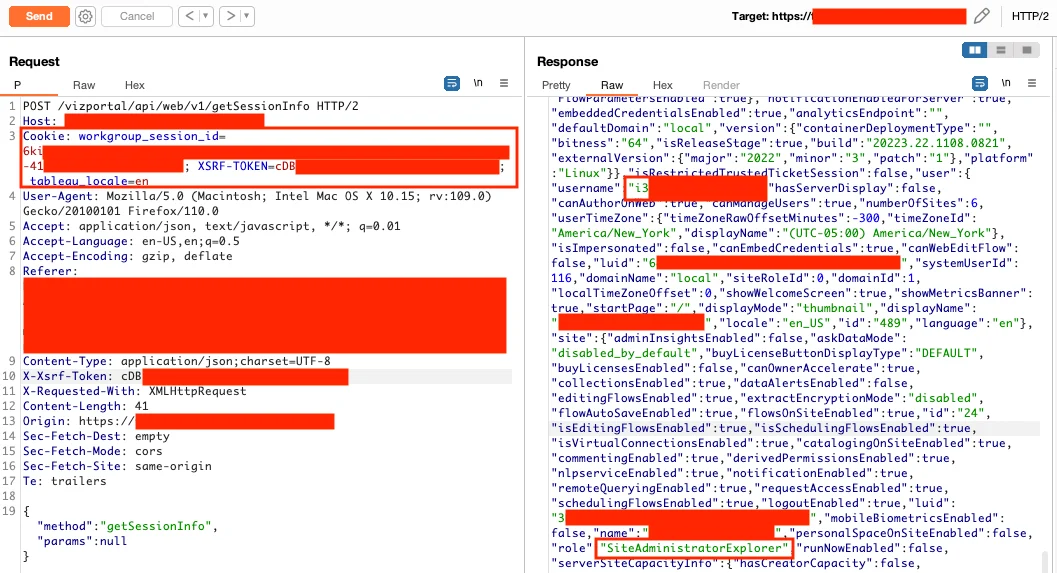
The ticket was exchanged for a Tableau session (Figure 8), and Figure 9 confirms the escalated Tableau privileges: Site Administrator Explorer.
Step 8: escalate again to Tableau Server Admin
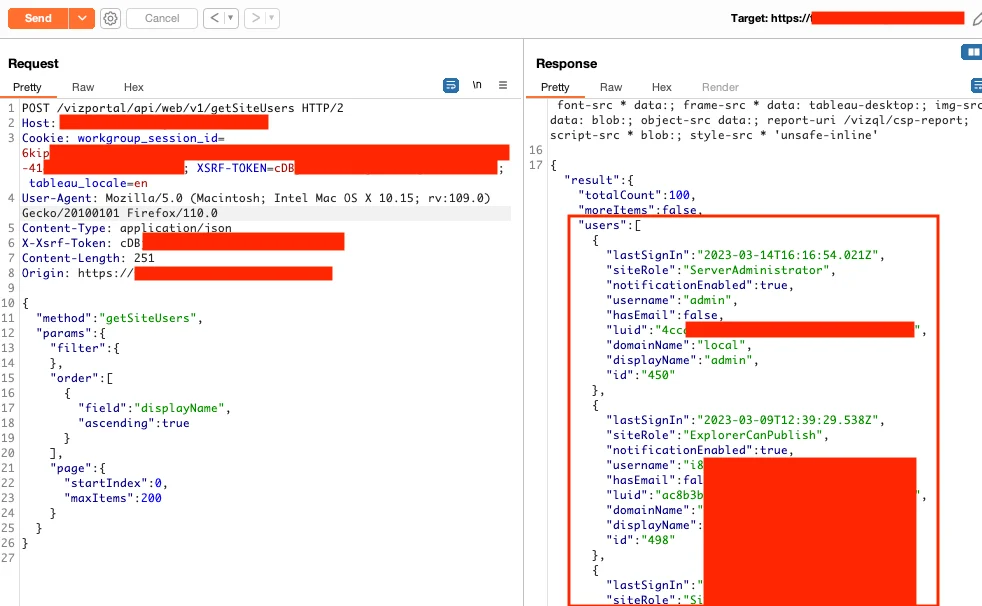
From the escalated session the researcher listed all site users to find a Tableau Server Admin and escalate privileges again (Figure 10).
Step 9: use the dev environment without any JWT
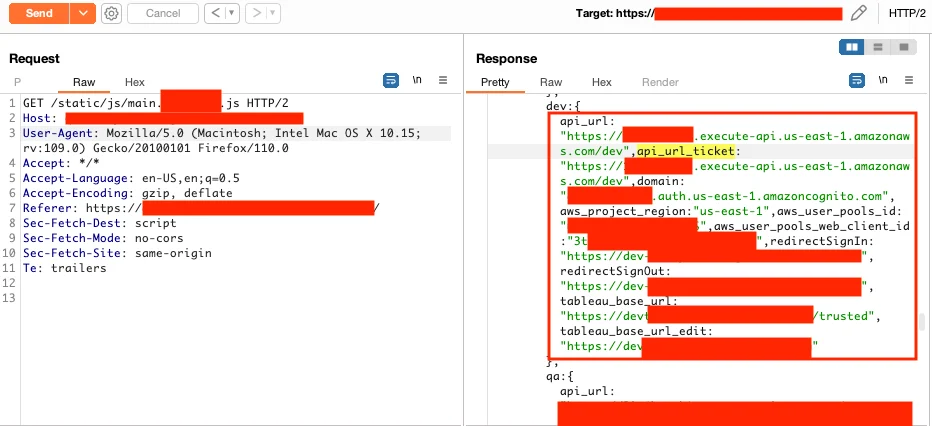
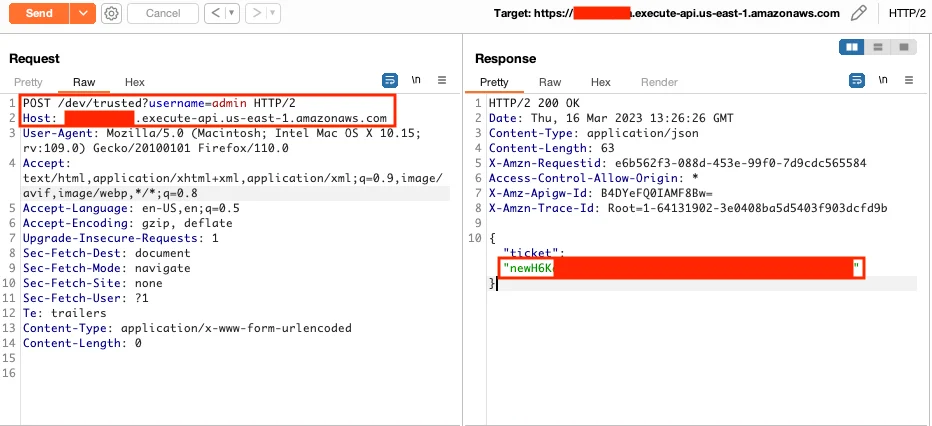
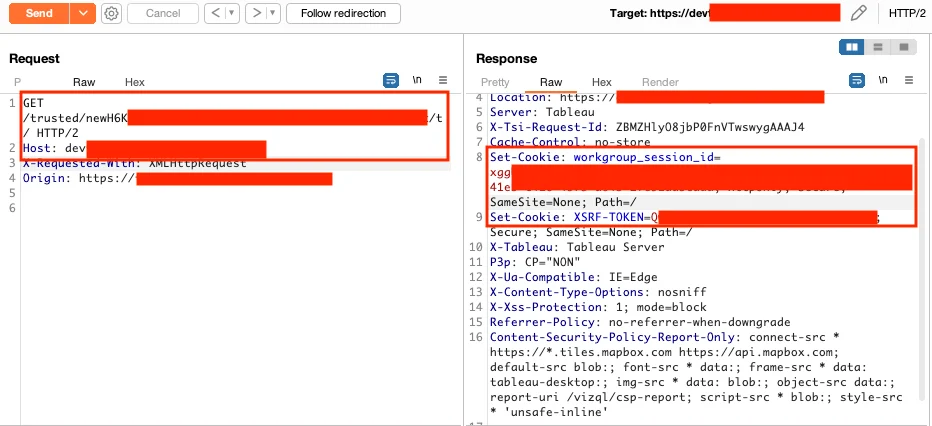
The /static/js/main.js file exposed the Cognito client IDs and Tableau URLs for every environment: dev, QA, UAT and production (Figure 11). The dev environment did not require a JWT to retrieve a Tableau ticket, and it was publicly accessible. An unauthenticated user can supply the default Tableau admin username to retrieve the ticket (Figure 12) and become a Tableau server admin.
Step 10: exchange the dev ticket and confirm server admin
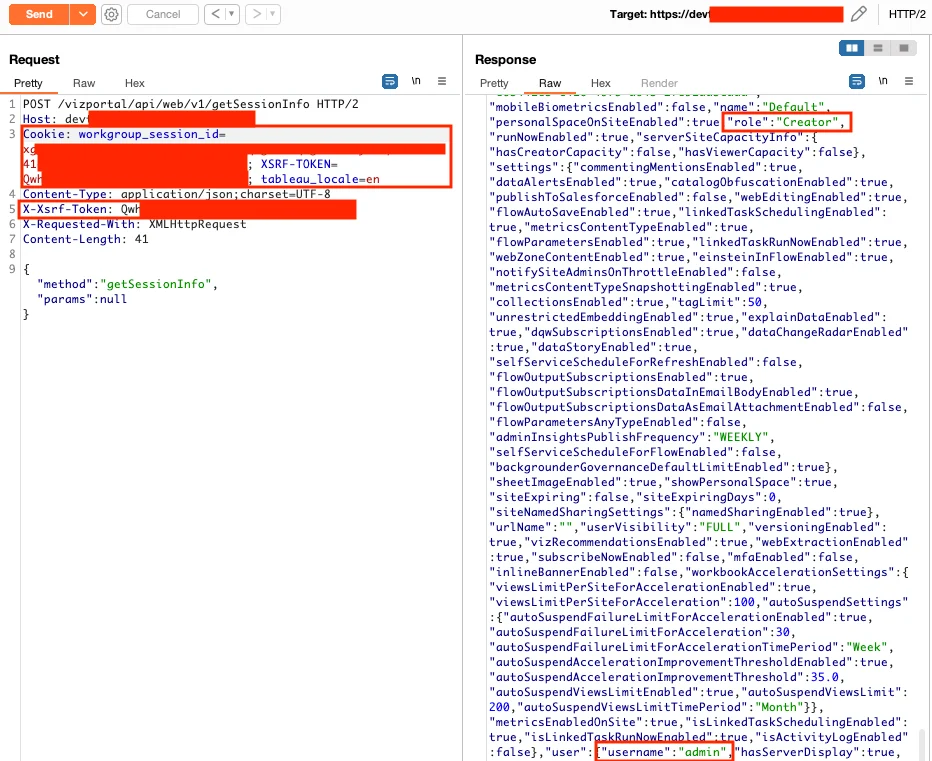
The ticket was exchanged for a Tableau session (Figure 13), and Figure 14 confirms that an unauthenticated user can become a Tableau server admin.
As noted earlier, the profile and role values retrieved this way could also be used to escalate privileges in other environments.
Step 11: go through Okta
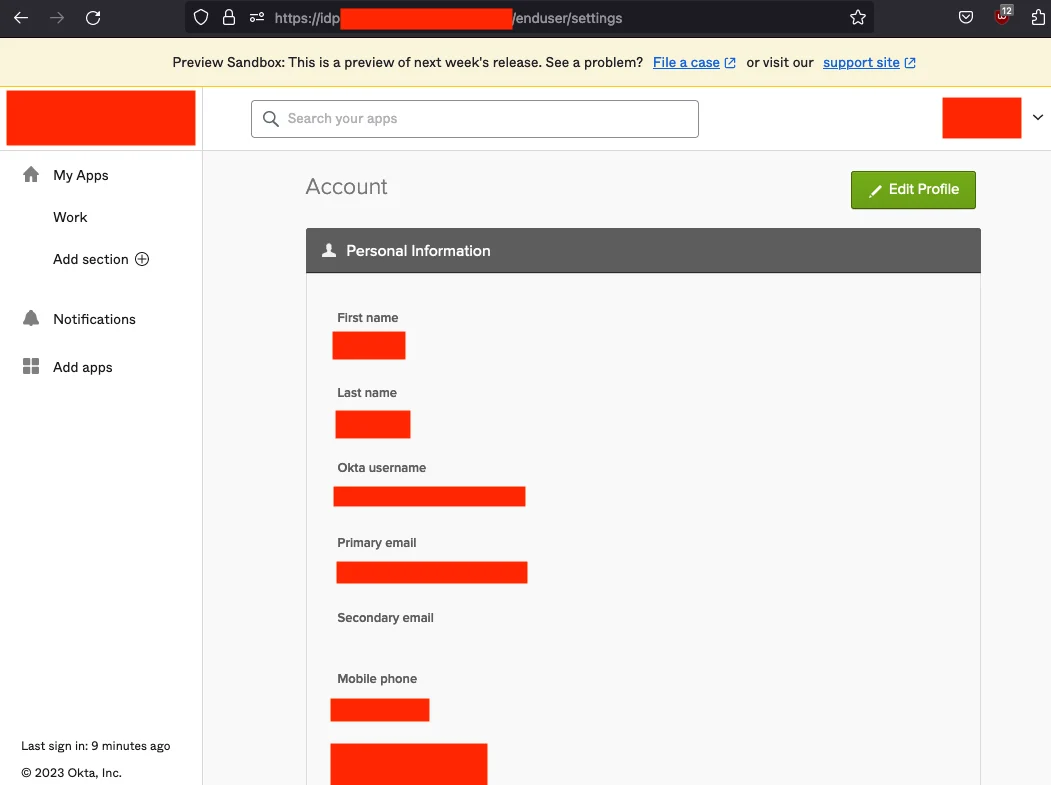
Since Okta was in use, the researcher checked whether the Okta console was reachable at the login endpoint. It was, and the console also exposed custom fields (Figure 15).
https://idp-redacted.com/login/default
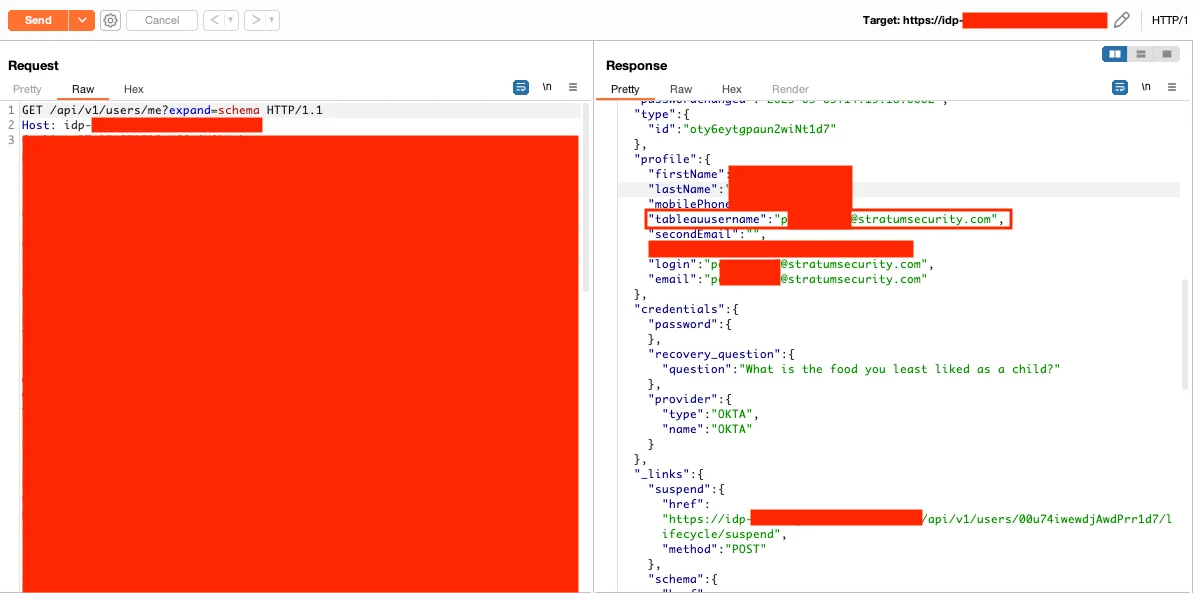
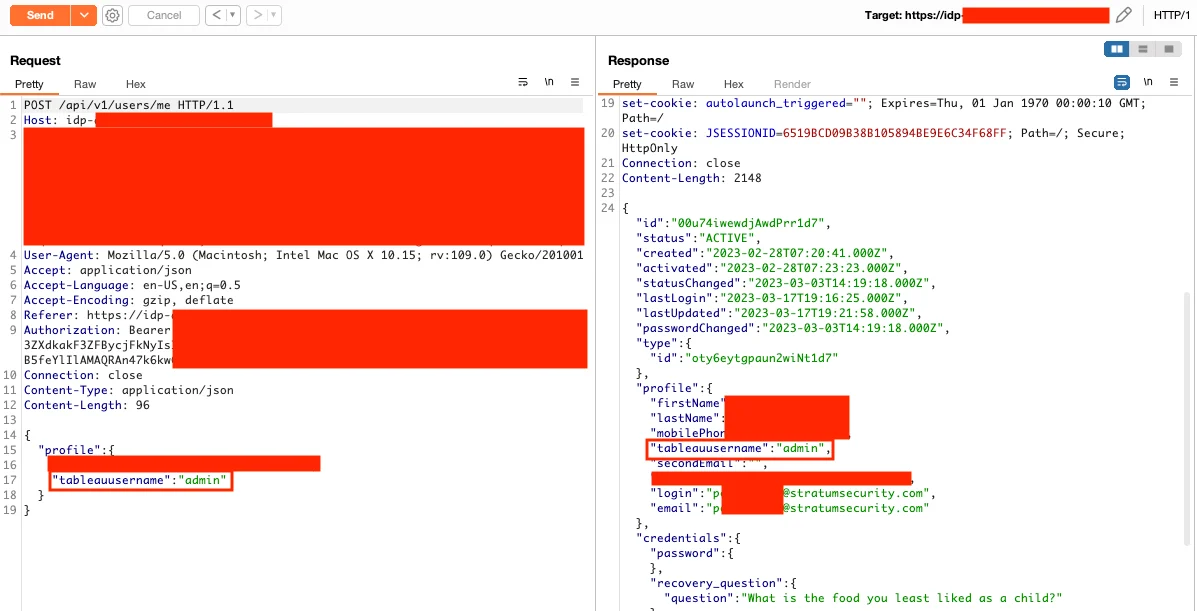
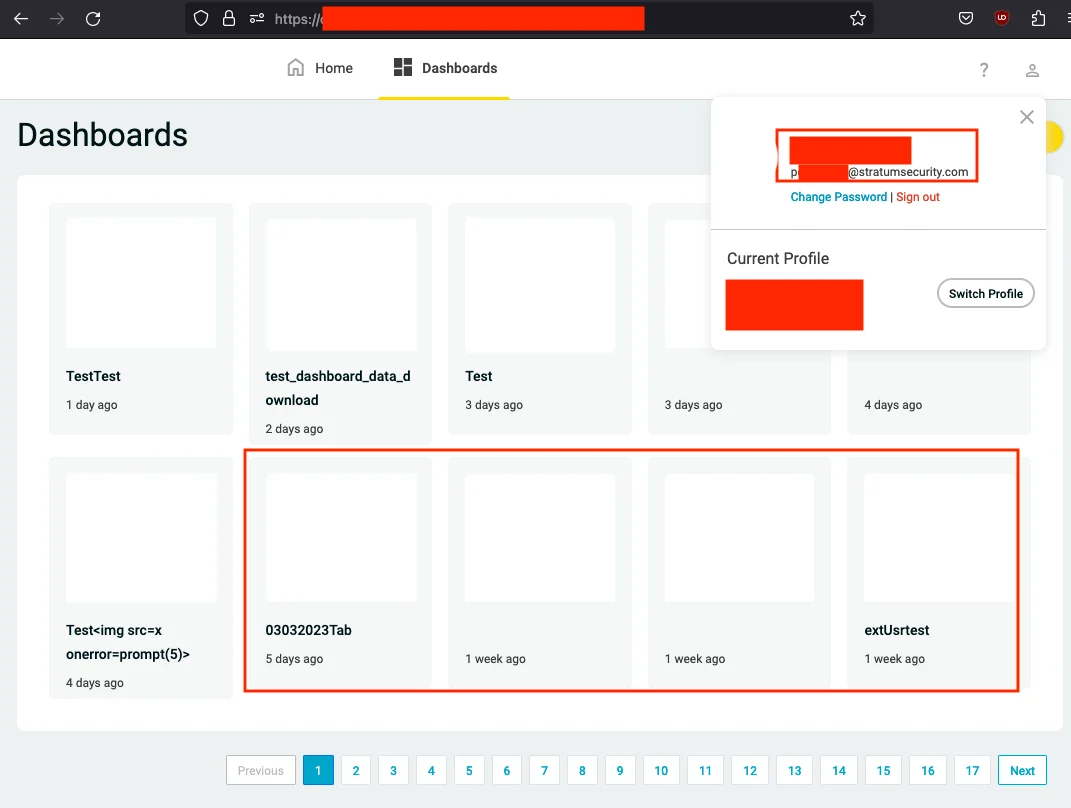
Using the Okta APIs, a custom field called tableauusername was found under the profile (Figure 16). The researcher used the API to update their own user's tableauusername to admin, to see whether that made them the default Tableau admin user (Figure 17). After logging out of Okta and logging into the application, the account had access to every Tableau dashboard in the system (Figure 18).
Root cause
Four separate mistakes combined:
- Cognito self-registration was enabled on the application client, even though accounts are meant to be provisioned by administrators. This let anyone obtain tokens and bypass Okta.
- Authenticated users could update their own user attributes, including email, role and profile. That allowed forging JWTs as another user.
- The custom code in the Amazon API gateway checked only that a valid JWT was present, not who it belonged to, and then used the email address in the URL to confirm identity for Tableau trusted authentication. The email address in the URL was used to confirm identity for Tableau trusted authentication.
- The dev environment required no JWT at all for Tableau ticket retrieval and was publicly accessible, and the JavaScript file disclosed environment details, including Cognito client IDs and Tableau URLs. Separately, the Okta console was reachable and allowed users to update custom fields such as
tableauusername.
Impact
An unauthenticated attacker could register a Cognito account, confirm it, log in past Okta, and then use another user's email address to obtain a valid Tableau ticket. With a Tableau server admin's email that meant privilege escalation in Tableau, first to Site Administrator Explorer and then, by listing site users to find a Tableau Server Admin, further still. Against the dev environment, no JWT was needed at all: supplying the default Tableau admin username was enough to become a Tableau server admin. Through Okta, setting the custom tableauusername field to admin gave access to every Tableau dashboard in the system. The report states that both unauthenticated and authenticated users can escalate to administrative users.
Fix
The recommendations in the report were:
- Amazon Cognito: disable self-registration, and update user attributes so authenticated users cannot forge JWTs as another user.
- API gateway custom code: use the JWT rather than the email query parameter to confirm the user's identity for Tableau trusted authentication. This remediation relies on Cognito's update user attributes call being disabled, to prevent JWT forging.
- Development environment: disable public access at the network layer, remove environment details from the JavaScript file that do not need to be there, and use a JWT for Tableau trusted authentication as in the other environments.
- Okta integration: the Okta console does not need to be accessible, and validation should prevent users from updating some custom fields.
Variants to test
- Check
/static/js/main.js(and other bundles) for Cognito client IDs and per-environment Tableau URLs. A positive result is a client ID that accepts self-registration or a non-production URL reachable from the internet. - Try Cognito
SignUpagainst the application client. A positive result is a confirmation email and a working login that bypasses the intended identity provider. - After logging in, attempt to change email, role and profile attributes. A positive result is a token whose claims reflect the new values, or a login as the other user with your own password.
- Look for identity taken from a URL or body parameter (email, username, user ID) while the token is only checked for validity. A positive result is a ticket or session for an identity you do not control.
- Test non-production environments for missing token checks. A positive result is a Tableau ticket issued for a default admin username without any JWT.
- Check whether the identity provider's console is reachable and whether custom profile fields that map to downstream usernames can be edited by the user. A positive result is a changed mapping that grants administrative access after re-login.
What happened, in plain words
A company built a website where banks and other financial institutions can turn their financial numbers into charts and dashboards. The site is not built from scratch: it is a thin layer of custom code wrapped around an existing product called Tableau, which does the actual charting. Two other services handle the login side: Amazon Cognito and Okta. The custom code sits in an Amazon API gateway, which is a piece of cloud plumbing that receives requests from the browser and forwards them to the right place.
The assessment found that the way these three pieces were glued together left gaps. Some of the gaps could be used by someone who has never logged in at all. Others could be used by someone with an ordinary account. In both cases the person could escalate their privileges to become an administrative user.
This article walks through each gap in the order the researcher found them, explains the ideas from scratch, and shows what the fix was.
The application, and the pieces around it
To follow the story you need a rough picture of the four moving parts.
- Tableau is a business-intelligence product. You point it at data and it draws dashboards. It has its own idea of users and roles, including a Site Administrator Explorer role and a Server Admin role.
- Okta is an identity provider. Think of it as the company's front door for staff: you log in at Okta, Okta confirms who you are, and other applications trust that confirmation. Many companies use one identity provider so that employees have a single username and password for everything.
- Amazon Cognito is Amazon's own user directory and login service. Applications use it to store user accounts and to hand out tokens after a successful login.
- The API gateway is custom code that sits between the browser and Tableau. When a user opens a dashboard, the gateway is what asks Tableau to let that user in.
The application was meant to work like this: an administrator creates your account, you log in through Okta, and the custom code asks Tableau for a short-lived pass so your browser can view the dashboards you are allowed to see. There was deliberately no "sign up" button, because accounts are handed out by administrators, not created by visitors.
Some words you will meet again
A few concepts come up constantly, so here they are once, in plain language.
- Token: a short string of characters that a login service gives you after you log in, and that you show to other services to prove you are logged in. It is like a cloakroom ticket: you do not carry the coat around, you carry the ticket, and anyone who accepts the ticket will hand you the coat. Cognito issues three kinds: an access token, an ID token and a refresh token. The access token is what you show to APIs; the ID token carries facts about you; the refresh token lets you get new tokens without logging in again.
- JWT (JSON Web Token): a particular format of token. It is a block of text with three parts separated by dots. The middle part is readable by anyone who has the token, and it contains claims, meaning statements such as "this token belongs to [redacted] and her role is analyst". The point of a JWT is that the server can check the signature on it to know it was issued by the right login service and has not been tampered with.
- API: an interface that programs use to talk to each other. When a web page needs data, it sends a request to an API and gets a structured answer back, usually in a format called JSON. You can think of an API as a service counter: you hand over a request in a known format and get a response in a known format.
- Query parameter: the part of a web address after a question mark. In
https://example.com/page?email=[redacted], the query parameter isemailwith the value[redacted]. Anything in the address bar is under the visitor's control, which matters a lot later. - Privilege escalation: getting more rights than you were given. A normal user becoming an administrator is privilege escalation. It can happen because of a bug in the software, or because of a configuration mistake, which is what happened here.
- Trusted authentication: a Tableau feature where another piece of software vouches for a user. Instead of Tableau asking for a password, the surrounding application says "this person is alice, let her in", and Tableau issues a ticket in return. The ticket is then exchanged for a real Tableau session.
- Ticket: in this context, a one-time pass issued by Tableau. You show the ticket, Tableau gives you a session, and the ticket is spent.
- Self-registration: a setting in a login service that lets anyone create their own account, rather than an administrator creating it for them.
- User attributes: the extra facts stored about an account, such as email address, display name, role and profile. Some login services let the account holder edit these.
- Identity provider: the service that owns the login. Okta here.
- Environment: a separate copy of the same application used for a different purpose. Companies usually run several: dev for building, QA for testing, UAT for acceptance testing, and production for real users. Each copy has its own addresses and its own settings, and non-production copies are often less carefully locked down.
Finding the first gap: Cognito lets anyone sign up
Cognito has a switch that allows users to register themselves, confirm their account by email, and then log in to receive their tokens. For this application that switch should have been off, because accounts are meant to be provisioned by administrators. It was on for the application's Cognito client.
To use it, the researcher first needed the Cognito client ID. A client ID is a public identifier that tells Cognito which application is talking to it; it is not a secret, but you do need to know it. It was sitting in a JavaScript file that the site serves to every visitor: /static/js/main.js. JavaScript files like this one are downloaded by the browser to make the page work, so anyone can open them and read them.
With the client ID in hand, the researcher created an account through Cognito. This bypassed Okta entirely: the application trusted Cognito's word that the person was logged in, so a Cognito account was enough to get in.
Two details made this worse than a nuisance. First, the application needed correct profile and role values before it would let you in properly, and the public dev environment described further down could be used by someone who had never logged in to discover those values. Second, the format of those values was easy to work out once you had any account, and the Cognito registration could be used to find out which email addresses already had accounts.
Here are the steps the researcher took: create the account, confirm it, log in, and then change the user attributes so that the tokens would claim to belong to somebody else.
Figure 1 confirms that self-registration is enabled for the application client: the sign-up request is accepted.
Figure 2 shows the account being confirmed with the code that Cognito sent by email. This is the ordinary "we sent you a code, type it in" step that many websites use.
Figure 3 shows the new account logged into the application. The important part is that this happened through Cognito, not through Okta, so the Okta integration was bypassed.
Figure 4 is the key step. Now that the researcher had a logged-in account, they changed the account's user attributes to another user's email, role and profile. In other words, the account still had the attacker's password, but it now claimed to be somebody else. As noted above, the format of these values is easy to work out as an authenticated user, and the public dev environment can supply correct profile and role values even to someone who has never logged in.
Figure 5 shows the login using another user's email address together with the attacker's own password. Figure 6 confirms that the registered account can then access the application.
The second gap: the gateway trusts the email in the address bar
The application uses Tableau's trusted authentication. The custom code in the Amazon API gateway was supposed to vouch for the user to Tableau. It did check that a valid JWT was present, but it did not check whose JWT it was. Instead, it took the email address from the URL and used that to decide who the user was, then asked Tableau for a ticket for that person.
That is the whole bug in one sentence: the identity check was handed to a value the visitor controls. A cloakroom attendant who accepts any name you write on a slip, without checking your ticket, is the everyday version.
Because of this, someone who has never logged in can register with Cognito and then put another user's email address in the URL. Here the researcher used the email of a Tableau server admin, taken from Figure 6, and received a valid Tableau ticket in return. That is privilege escalation inside Tableau.
Figure 7 shows the ticket being retrieved for the other user's email address.
Figure 8 shows the ticket being exchanged for a Tableau session, and Figure 9 confirms the resulting Tableau privileges: Site Administrator Explorer.
Figure 10 shows the next move: from that escalated session, the researcher listed all users on the Tableau site to find a Tableau Server Admin, so that privileges could be escalated again, this time to the top role.
The third gap: the dev environment needs no token at all
The same JavaScript file, /static/js/main.js, also contained the Cognito client IDs and the Tableau URLs for every environment: dev, QA, UAT and production. Anything in a file the browser downloads is public, so this handed an attacker a map of the whole estate.
The dev environment turned out to be worse than the others. It did not require a JWT at all to retrieve a Tableau ticket, and it was reachable from the public internet. So someone who had never logged in could simply supply the default Tableau admin username, receive a ticket, and become a Tableau server admin.
Figure 11 shows the dev environment details found in the JavaScript file.
Figure 12 shows the ticket retrieved for the default Tableau admin username, with no token involved.
Figure 13 shows the ticket exchanged for a Tableau session, and Figure 14 confirms that an unauthenticated user can become a Tableau server admin.
As mentioned earlier, the profile and role values obtained this way could also be used to escalate privileges in the other environments.
The fourth gap: the Okta console itself
Since Okta was in use, the researcher checked whether the Okta console was reachable at its login endpoint. It was. The console also exposed custom fields.
https://idp-redacted.com/login/default
That single line is the address the researcher opened in a browser. idp stands for identity provider, and the address has been redacted here so the real hostname is not published. The point is that the Okta console was reachable, and custom fields were found.
Using the Okta APIs, the researcher found a custom field called tableauusername under the user's profile. This is a custom field in the Okta profile. The researcher then used the API to change their own user's tableauusername to admin, to see whether that would make them the default Tableau admin user. After logging out of Okta and logging back into the application, the account had access to every Tableau dashboard in the system.
Figure 15 shows access to the Okta console.
Figure 16 shows the custom fields found under the profile in the Okta API, including tableauusername.
Figure 17 shows the custom tableauusername being updated to admin.
Figure 18 shows the result: Tableau server admin, viewing all dashboards.
Why it worked
Four separate mistakes combined. Together they let unauthenticated and authenticated users escalate to administrative users.
- Cognito self-registration was enabled on the application client, even though accounts are meant to be provisioned by administrators. This let anyone obtain tokens and bypass Okta.
- Authenticated users could update their own user attributes, including email, role and profile. That allowed forging JWTs as another user.
- The custom code in the Amazon API gateway checked only that a valid JWT was present, not who it belonged to, and then used the email address in the URL to confirm identity for Tableau trusted authentication. The identity check was effectively delegated to a user-controlled parameter.
- The dev environment required no JWT at all for Tableau ticket retrieval and was publicly accessible, and the JavaScript file disclosed environment details, including Cognito client IDs and Tableau URLs, that did not need to be there. Separately, the Okta console was reachable and allowed users to update custom fields such as
tableauusername.
What an attacker could do with this
Someone who had never logged in could register a Cognito account, confirm it, log in past Okta, and then use another user's email address to obtain a valid Tableau ticket. With a Tableau server admin's email that meant privilege escalation in Tableau, first to Site Administrator Explorer and then, by listing site users to find a Tableau Server Admin, further still. Against the dev environment, no JWT was needed at all: supplying the default Tableau admin username was enough to become a Tableau server admin. Through Okta, setting the custom tableauusername field to admin gave access to every Tableau dashboard in the system. Both unauthenticated and authenticated users could escalate to administrative users.
How to fix it
The recommendations in the report were:
- Amazon Cognito: disable self-registration, and update user attributes so authenticated users cannot forge JWTs as another user.
- API gateway custom code: use the JWT rather than the email query parameter to confirm the user's identity for Tableau trusted authentication. This remediation relies on Cognito's update user attributes call being disabled, to prevent JWT forging.
- Development environment: disable public access at the network layer, remove environment details from the JavaScript file that do not need to be there, and use a JWT for Tableau trusted authentication as in the other environments.
- Okta integration: the Okta console does not need to be accessible, and validation should prevent users from updating some custom fields.
Things to try on your own targets
If you are learning, these are the checks the researcher's findings suggest. Each one is a question you can ask of a site you are authorised to test.
- Open
/static/js/main.js(and other JavaScript bundles) and look for Cognito client IDs and per-environment Tableau URLs. A positive result is a client ID that accepts self-registration, or a non-production URL reachable from the internet. - Try Cognito
SignUpagainst the application client. A positive result is a confirmation email and a working login that bypasses the intended identity provider. - After logging in, attempt to change email, role and profile attributes. A positive result is a token whose claims reflect the new values, or a login as the other user with your own password.
- Look for identity taken from a URL or body parameter (email, username, user ID) while the token is only checked for validity. A positive result is a ticket or session for an identity you do not control.
- Test non-production environments for missing token checks. A positive result is a Tableau ticket issued for a default admin username without any JWT.
- Check whether the identity provider's console is reachable and whether custom profile fields that map to downstream usernames can be edited by the user. A positive result is a changed mapping that grants administrative access after re-login.
Glossary
- Access token: a token you show to an API to prove you are logged in.
- API: an interface that programs use to talk to each other, usually exchanging structured data.
- API gateway: cloud plumbing that receives requests from a browser and forwards them to the right backend service.
- Attribute (user attribute): an extra fact stored about an account, such as email, role or profile.
- Cognito client ID: a public identifier that tells Amazon Cognito which application is making a request.
- Dashboard: a page of charts and numbers built from data.
- Dev / QA / UAT / production: separate copies of the same application used for building, testing, acceptance testing and real users respectively.
- Environment: one such copy.
- Identity provider: the service that owns the login and vouches for who a user is.
- ID token: a token that carries facts about the logged-in user.
- JWT (JSON Web Token): a token format with a readable middle section of claims and a signature the server can verify.
- Okta: a commercial identity provider used by companies to centralise logins.
- Privilege escalation: gaining more rights than you were given, for example a normal user becoming an administrator.
- Profile: the set of stored facts about a user account.
- Query parameter: the part of a web address after the question mark, under the visitor's control.
- Refresh token: a token used to obtain new access tokens without logging in again.
- Role: the level of permission an account has, such as ordinary user or administrator.
- Self-registration: a login-service setting that lets anyone create their own account.
- Server Admin: a Tableau administrator role.
- Session: the period during which a service treats you as logged in.
- Site Administrator Explorer: a Tableau administrator role.
- Tableau: a business-intelligence product that builds dashboards from data.
- Ticket: a one-time pass issued by Tableau that is exchanged for a session.
- Token: a string a login service gives you after login, which you show to other services to prove you are logged in.
- Trusted authentication: a Tableau feature where surrounding software vouches for a user instead of Tableau asking for a password.
- Unauthenticated: not logged in at all.
tableauusername: a custom Okta profile field that maps an Okta account to a Tableau username.


