Apache Lucene Injection on Auth0 Integration
A multi-tenant application passed unsanitised user input into an Auth0 user-search query, which Auth0 runs using Lucene syntax. An attacker could break out of the intended tenant filter and read user records belonging to other tenants, including custom metadata fields.
 Published on blog.stratumsecurity.com
Apache Lucene Injection was discovered on a past assessment this year and I learned that this vulnerability wasn't mentioned much online. The reason for this is probably because Lucene Injection is limited compared to SQL Injection.
The full write-up lives on its author's site
It belongs to its author, so we link to it rather than copy it. The other two tabs are our own rewrites, checked against it.
Context
The target was a multi-tenant application that stores user information for all of its tenants in Auth0. The application's web server calls Auth0 to query the users assigned to the current tenant, so that cyber security incident cases can be shared with other users. Auth0 uses Lucene to query user information, and the API in question is only supposed to return users under the tenant the requesting user is assigned to.
The feature therefore has a narrow, well-defined job: given the current tenant, return that tenant's users. The index behind it, however, holds every tenant's users, which is exactly the situation where a query-injection flaw becomes interesting.
Setup
The write-up does not describe accounts, roles, tooling or versions. The only precondition it makes explicit is architectural: the application passes user input into an Auth0 user search, and the index that search runs against contains data for all tenants, not just the caller's.
Finding it
The researcher found Apache Lucene Injection during an assessment. The point made at the outset is that this class of bug is not widely written about, probably because it is more limited than SQL Injection: Lucene Injection can only be used to query the data (the index) that the application is already expected to query. It becomes exploitable when that index is sensitive and the caller is only supposed to see a subset of it, or only certain fields within it.
That is precisely the shape of this application. The index is the Auth0 user store for every tenant, and the caller should only ever see their own tenant's slice. The user input reaching the Auth0 query was not being handled properly, which allowed the injection.
Exploitation
Step 1: Read the query from the error output
The application returned error information that disclosed the Lucene query it had built, which made exploitation considerably easier. The disclosed query is the one that expects to return only users for a single tenant.
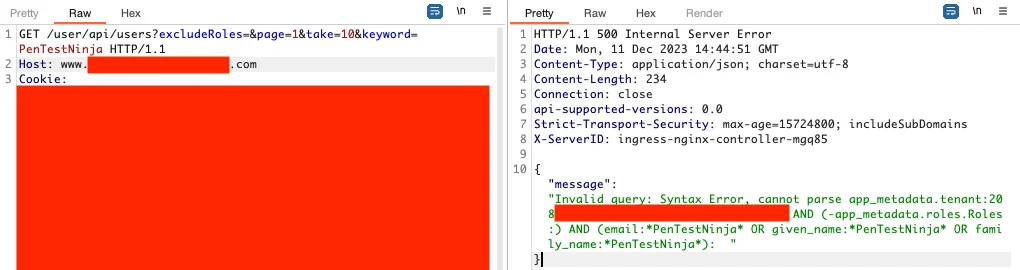
Lucene query disclosed
Having the generated query in front of you removes the guesswork: you can see the field being matched, the structure of the clauses, and therefore where a value can be broken out of.
Step 2: Break out and query all tenant users
The first payload breaks out of the original query and matches every user through the name field:
  // Break out of query and query all users using the name field
  1)+OR+(name:*)+OR+(name:*
The payload breaks out of the original query and matches every user through the name field. The result is the full user set across tenants rather than the caller's own.
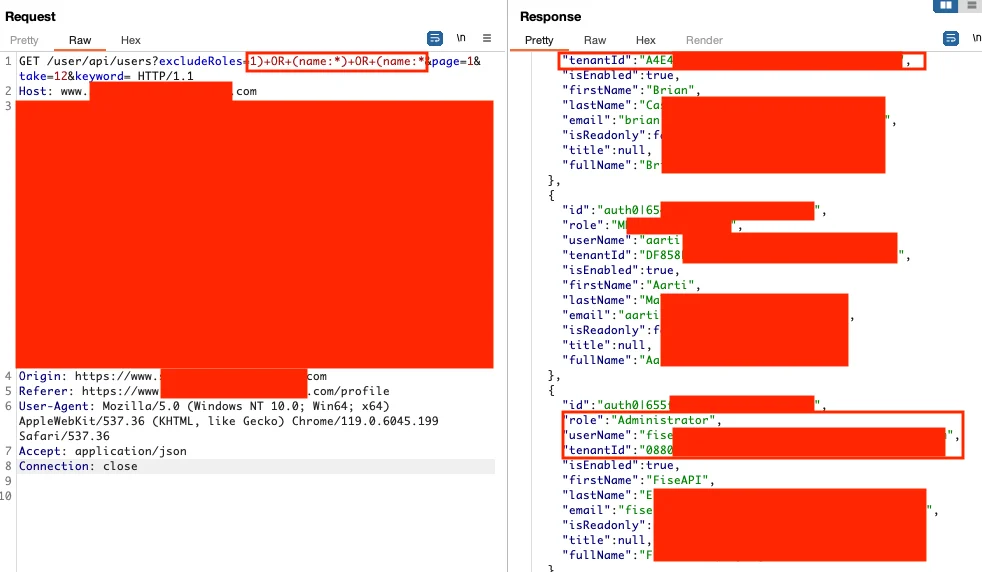
Lucene Injection to query all tenant users
Step 3: Test whether a field exists
With the tenant restriction gone, the next step is to learn what else lives on the user index. A boolean-based condition checks for the existence of a field:
  // Perform a boolean-based condition checking if the user_metadata.country field exists
  1)+OR+(name:*)+AND+(_exists_:user_metadata.country
If the field does not exist, an empty JSON array is returned. That gives a reliable oracle for field discovery on the index.
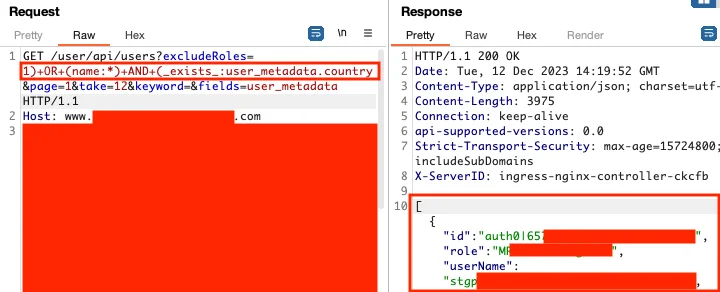
Lucene Injection to discover other fields on the user index
Step 4: Extract values one character at a time
Once a field is known to exist, its values can be recovered by prefix matching, extending the guess one character at a time:
  // Discover values searching one character at a time
  1)+OR+(name:*)+AND+(user_metadata.country:C*
  1)+OR+(name:*)+AND+(user_metadata.country:Ca*
  ...
The payloads search one character at a time, extending the prefix. The same technique applies to custom fields under app_metadata or user_metadata, and to other Auth0 profile fields such as phone numbers and IP addresses.
Root cause
The application passed user input into the Auth0 user search without handling it properly. Two things made the flaw worse in practice: the index held all tenants' users, so the injected query had something sensitive to reach, and the application echoed the generated query in error responses, handing the attacker the exact syntax needed to escape it.
Impact
An attacker who can reach the user-sharing search can query the whole Auth0 user index rather than their own tenant's users, disclosing other tenants' user records. Beyond the records themselves, the boolean oracle allows enumeration of fields on the index, and prefix matching allows extraction of values from custom metadata fields and other profile fields such as phone numbers and IP addresses. The impact is bounded by the nature of Lucene Injection: it queries the index the application is already entitled to query, so it does not extend beyond that data set.
Fix
Reading online, there was mention that Lucene supports prepared statements like SQL. As this was an Auth0 integration, the client likely encoded special characters before passing user input to Auth0.
Variants to test
- Error messages that echo the query. Submit a value containing Lucene metacharacters and look for the generated query in the response. A positive result is the query text appearing verbatim, which tells you the field names and clause structure to break out of.
- Tenant or owner filters expressed only in query text. Try closing the surrounding clause and appending
OR (field:*)on a field you know exists. A positive result is records belonging to other tenants or owners appearing in the response. - Field existence oracles. Append
AND (_exists_:candidate.fieldand compare responses. A positive result is a different result set (or a non-empty one) when the field exists versus an empty array when it does not. - Prefix extraction on metadata fields. Append
AND (user_metadata.field:X*, then extend the prefix character by character. A positive result is a result set that stays non-empty as the prefix grows, revealing the stored value. - Other profile fields. Repeat the prefix technique against fields such as phone numbers and IP addresses. A positive result is a non-empty match for a guessed prefix, confirming the value.
What happened, in plain words
A security researcher was testing a web application and found a bug called Lucene Injection. The application was a multi-tenant system, which means one installation of the software serves many separate customer organisations (each one is a "tenant"). All of those tenants' user details were stored in a service called Auth0, a popular product that companies use to keep track of their users and let them log in.
The application had a feature for sharing cyber security incident cases with other people. To show you the list of people you can share with, the application's web server asked Auth0 for the users belonging to your tenant. Auth0 finds users by running a search written in a query language called Lucene. The application was supposed to ask only for your tenant's users, but it did not handle your input properly. By typing special characters, the researcher could change the meaning of the search and make it return users from every tenant, plus other fields stored about those users.
This kind of bug is called an injection flaw: your input is treated as part of a command rather than as plain data. The most famous version is SQL Injection, where input changes a database query. Lucene Injection is the same idea applied to Lucene searches. It is more limited than SQL Injection, because it can only query the data the application was already expected to query. That is still serious when the searchable data contains every tenant's users and you should only see your own.
Background: what the application does
The application stores user information for all of its tenants in Auth0. When you use the incident-sharing feature, the application's web server calls Auth0 to look up the users assigned to your tenant, so it can show you who you might share a case with.
An API (Application Programming Interface) is a way for one piece of software to ask another piece of software to do something, like a waiter taking your order to the kitchen. Here, the application's server is the waiter and Auth0 is the kitchen: the server sends a request to Auth0's user-search API and gets a list of users back.
Auth0 uses Lucene to search its user records. A Lucene query is a line of text with a special syntax, for example a field name, a colon and a value. The API in question is only supposed to return users under the tenant the requesting user belongs to. The feature has a narrow job: given the current tenant, return that tenant's users.
The index behind it, however, holds every tenant's users. An index is the searchable store of records, roughly what a table is in a database. That mismatch, a narrow job running against a store that contains everyone's data, is exactly the situation where a query-injection flaw becomes interesting.
Setup
The write-up does not describe accounts, roles, tooling or versions. The only precondition it makes explicit is architectural: the application passes user input into an Auth0 user search, and the index that search runs against contains data for all tenants, not just the caller's.
Finding it
The researcher found Apache Lucene Injection during an assessment. The point made at the outset is that this class of bug is not widely written about, probably because it is more limited than SQL Injection: Lucene Injection can only be used to query the data (the index) that the application is already expected to query. It becomes exploitable when that index is sensitive and the caller is only supposed to see a subset of it, or only certain fields within it.
That is precisely the shape of this application. The index is the Auth0 user store for every tenant, and the caller should only ever see their own tenant's slice. The user input reaching the Auth0 query was not being handled properly, which allowed the injection.
Exploitation
Step 1: Read the query from the error output
The application returned error information that disclosed the Lucene query it had built, which made exploitation considerably easier. The disclosed query is the one that expects to return only users for a single tenant.
Lucene query disclosed
Having the generated query in front of you removes the guesswork: you can see the field being matched, the structure of the clauses, and therefore where a value can be broken out of. Think of it as a shop assistant reading your order back to you word for word: once you hear how the order is phrased, you know exactly which word to change.
Step 2: Break out and query all tenant users
The first payload breaks out of the original query and matches every user through the name field:
  // Break out of query and query all users using the name field
  1)+OR+(name:*)+OR+(name:*
Line by line, in plain words:
-
The first line is just a comment in the payload, explaining what the rest does.
-
1)is a value followed by a closing bracket, used to break out of the original query. -
ORis a Lucene keyword meaning "match either side". -
(name:*)means "any document that has anamefield with any value". The*is a wildcard meaning "anything". -
The second
OR (name:*)repeats the condition, so the overall query matches any document that has a name, regardless of tenant.
The result is the full user set across tenants rather than the caller's own.
Lucene Injection to query all tenant users
Step 3: Test whether a field exists
With the tenant restriction gone, the next step is to learn what else lives on the user index. A boolean-based condition is a test whose answer is simply yes or no, like a light switch. A boolean-based condition checks for the existence of a field:
  // Perform a boolean-based condition checking if the user_metadata.country field exists
  1)+OR+(name:*)+AND+(_exists_:user_metadata.country
Line by line:
- The first line is a comment describing the test.
1)again closes the clause the application opened around the input.
If the field does not exist, an empty JSON array is returned. JSON is a common text format for data, and an array is a list; an empty array [] means "no results". That gives a reliable oracle for field discovery on the index. An oracle here just means a way to get a yes or no answer out of the system by watching how it responds.
Lucene Injection to discover other fields on the user index
Step 4: Extract values one character at a time
Once a field is known to exist, its values can be recovered by prefix matching, extending the guess one character at a time. A prefix is the beginning of a word: for "Canada", the prefixes are "C", "Ca", "Can" and so on.
  // Discover values searching one character at a time
  1)+OR+(name:*)+AND+(user_metadata.country:C*
  1)+OR+(name:*)+AND+(user_metadata.country:Ca*
  ...
Line by line:
-
The first line is a comment describing the technique.
-
The
...means the pattern continues: each request adds one more character to the guess.
The payloads search one character at a time, extending the prefix. The same technique applies to custom fields under app_metadata or user_metadata, and to other Auth0 profile fields such as phone numbers and IP addresses.
Root cause
The application passed user input into the Auth0 user search without handling it properly. Concatenating means joining pieces of text end to end, like gluing words into a sentence. Because the input was glued in as if it were part of the query, special characters in the input changed the query's meaning.
Two things made the flaw worse in practice: the index held all tenants' users, so the injected query had something sensitive to reach, and the application echoed the generated query in error responses, handing the attacker the exact syntax needed to escape it.
Impact
An attacker who can reach the user-sharing search can query the whole Auth0 user index rather than their own tenant's users, disclosing other tenants' user records. Beyond the records themselves, the boolean oracle allows enumeration of fields on the index, and prefix matching allows extraction of values from custom metadata fields and other profile fields such as phone numbers and IP addresses. The impact is bounded by the nature of Lucene Injection: it queries the index the application is already entitled to query, so it does not extend beyond that data set.
Fix
Reading online, there was mention that Lucene supports prepared statements like SQL. A prepared statement is a way of sending a query where the data is kept separate from the query text, so the data can never be mistaken for part of the command. As this was an Auth0 integration, the client likely encoded special characters before passing user input to Auth0. Encoding means replacing characters that have a special meaning with a safe representation, so they are treated as ordinary text.
Variants to test
- Error messages that echo the query. Submit a value containing Lucene metacharacters and look for the generated query in the response. A positive result is the query text appearing verbatim, which tells you the field names and clause structure to break out of.
- Tenant or owner filters expressed only in query text. Try closing the surrounding clause and appending
OR (field:*)on a field you know exists. A positive result is records belonging to other tenants or owners appearing in the response. - Field existence oracles. Append
AND (_exists_:candidate.fieldand compare responses. A positive result is a different result set (or a non-empty one) when the field exists versus an empty array when it does not. - Prefix extraction on metadata fields. Append
AND (user_metadata.field:X*, then extend the prefix character by character. A positive result is a result set that stays non-empty as the prefix grows, revealing the stored value. - Other profile fields. Repeat the prefix technique against fields such as phone numbers and IP addresses. A positive result is a non-empty match for a guessed prefix, confirming the value.
Glossary
- API: a way for one piece of software to ask another to do something, like a waiter carrying your order to the kitchen.
- Auth0: a service companies use to store user accounts and handle login.
- Boolean-based condition: a test whose answer is only yes or no, used to ask the system questions indirectly.
- Concatenation: joining pieces of text end to end, which is how the unsafe query was built.
- Encoding: replacing characters that have a special meaning with a safe representation so they are treated as plain text.
- Index: the searchable store of records, roughly what a table is in a database.
- Injection: a flaw where user input is treated as part of a command instead of plain data, so it can change what the command does.
- JSON: a common text format for data; an array is a list, and an empty array means no results.
- Lucene: a search library, used by Auth0, with its own query syntax.
- Lucene Injection: injection into a Lucene query, letting input change which records are searched.
- Multi-tenant: one installation of software serving many separate customer organisations, each called a tenant.
- Oracle: a way to get a yes or no answer out of a system by watching how it responds.
- Payload: the crafted input sent to the application to trigger the flaw.
- Prefix: the beginning of a value, such as "Ca" for "Canada".
- Prepared statement: a way of sending a query where data is kept separate from query text, so data cannot be mistaken for a command.
- SQL Injection: injection into a database query, the better-known cousin of Lucene Injection.
- URL: the address of a web page or API request; spaces in it are written as
+or%20. - Wildcard: a symbol such as
*that stands for "anything".




