ProxyShell Step by Step: How Three Exchange Flaws Chain Into Remote Code Execution in a Lab
The article describes a chain of three Microsoft Exchange vulnerabilities (ProxyShell) that together allow an unauthenticated attacker to execute code on the server. The chain involves a path confusion in Autodiscover, a privilege elevation in the PowerShell backend, and an arbitrary file write that enables planting a web shell.
 Published on masimshahzad.medium.com
Bug Bounty
The full write-up lives on its author's site
It belongs to its author, so we link to it rather than copy it. The other two tabs are our own rewrites, checked against it.
Context
Microsoft Exchange runs the email of thousands of organisations, usually exposed to the internet and usually holding highly privileged network positions. ProxyShell is the name for a chain of three Exchange vulnerabilities that together let an unauthenticated attacker execute code on the server. This article walks the chain step by step in an isolated lab, with detection guidance and a verified fix.
A path confusion, a privilege elevation and a file write. Alone they look manageable. Chained, they own the mail server.
Cover image: AI generated illustration made in Canva.
The three flaws are:
- CVE 2021 34473, a pre authentication path confusion in the Autodiscover service that lets an attacker reach backend URLs as the Exchange machine account.
- CVE 2021 34523, a privilege elevation flaw in the Exchange PowerShell backend that lets the attacker impersonate a privileged user.
- CVE 2021 31207, a post authentication arbitrary file write that lets the attacker write a file the server will execute, which is how a web shell is planted.
The first two were patched in April 2021 in KB5001779 and the third in May 2021 in KB5003435, although the advisories for the first two were only published in July 2021. That gap is part of why so many servers stayed exposed. Clear public chain analyses are the Mandiant and Google Cloud writeup at https://cloud.google.com/blog/topics/threat-intelligence/pst-want-shell-proxyshell-exploiting-microsoft-exchange-servers and the Rapid7 analysis at http://www.rapid7.com/blog/post/2021/08/12/proxyshell-more-widespread-exploitation-of-microsoft-exchange-servers/
The core idea is trust confusion. Exchange front end and backend services decide who you are in different ways. The path confusion tricks the front end into forwarding a request the backend treats as coming from the server itself, with system level trust. Once the backend believes the request, privilege elevation supplies a user identity, and the file write turns that access into code execution.
Everything below is for an isolated lab you own, built with an unpatched Exchange version you install only for training. Never run these steps against a real mail server you do not own or have explicit written permission to test. Exchange exploitation in the wild has led directly to ransomware, so treat any real world sign of it as an incident.
Setup
Build the lab fully isolated. Exchange is heavy, so give the machines real resources and snapshot often.
- Create a virtual domain with a domain controller and a separate Exchange Server virtual machine, installed at a version below the April and May 2021 security updates, on an isolated virtual network with no internet route.
- Create one normal mailbox user and one administrator mailbox for identity steps, both owned by you.
- Snapshot both machines in the clean unpatched state.
- Use a third machine on the same isolated network as the attacker machine, with a browser, a proxy and scripting tools.
- Turn on IIS logging, Exchange PowerShell logging and file integrity watching on the Exchange web directories before you begin.
Confirm normal mail flow inside the lab first, so later failures are attributable to the exploitation steps and not to a broken install.
Finding it
The chain is not a single bug but three flaws that each look manageable alone. The front end and the backend authenticate in different ways, and the path confusion in Autodiscover lets a request be normalised into one the backend accepts as coming from the Exchange machine account itself. That is the first success signal in the lab: a backend response that should require authentication comes back without it.
Exploitation
Step 1: Probe Autodiscover
Send the lab server an Autodiscover request shaped so that the explicit logon part of the URL is removed during normalisation, which is the path confusion at the heart of CVE 2021 34473. Public analyses describe this as accessing an arbitrary backend URL as the Exchange machine account. In the lab, a backend response that should require authentication is your first success signal.
Step 2: Learn a target identity
Use the Autodiscover access to obtain the distinguished name of your lab mailbox user, then use the MAPI HTTP path described in public incident analyses to obtain that user security identifier. Both values belong to your own lab accounts. Record them exactly, because the next step needs them.
Step 3: Elevate through the PowerShell backend
Send a request to the PowerShell backend carrying the identity token material described in public analyses, so the backend restores the session as your lab administrator. A successful PowerShell session in the lab, obtained without that administrator password, proves CVE 2021 34523 in your build.
Step 4: Write the shell file
Use the privileged PowerShell access to export a mailbox item to a path inside a web accessible Exchange directory, which is the arbitrary file write of CVE 2021 31207. In the lab, the exported content contains a simple marker that prints a fixed word when called. Keep the marker harmless and unique.
Step 5: Call the marker
Browse to the written file from your attacker machine. If the fixed marker word returns, the full chain has produced remote code execution in the lab. Stop there. Do not dump credentials, do not move laterally and do not install persistence, even in the lab. The chain is proved.
Step 6: Preserve evidence and reset
Save the IIS logs, the PowerShell logs and the written file name, restore the snapshots, and repeat the detection review below against your own logs so you learn what each step looks like.
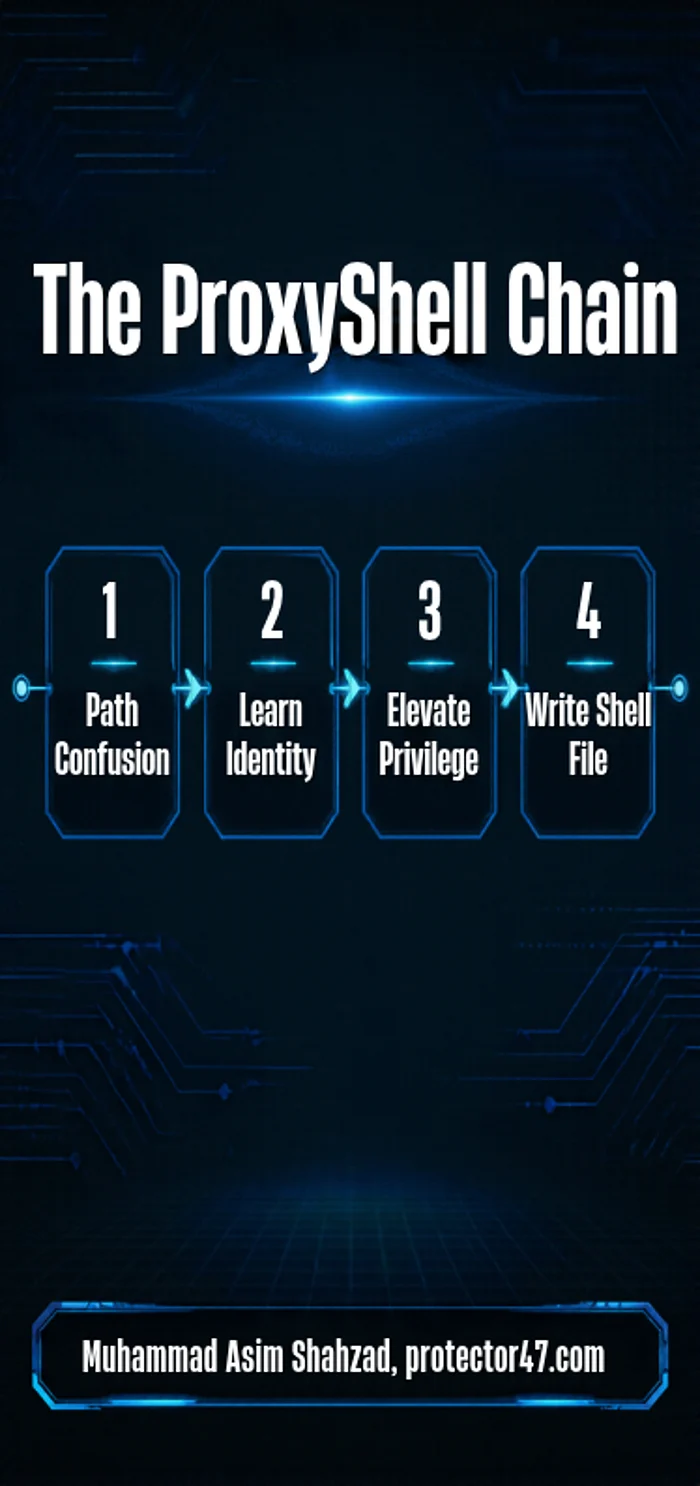
The ProxyShell Chain: path confusion, learn identity, elevate privilege, and write a shell file, in that order. This image is an AI generated illustration made in Canva.
Root cause
The core idea is trust confusion between the front end and the backend. Each flaw alone looks manageable; the chain is what produces unauthenticated code execution.
Impact
A successful ProxyShell chain gives code execution as SYSTEM on the Exchange server. In real incidents documented by Mandiant and others, attackers used that position to plant web shells, steal credentials, install ransomware and return to the same unpatched server repeatedly. Exchange also holds mailbox data directly and often sits close to domain privilege, so the blast radius is far larger than one web server.
Detection
- Hunt IIS logs for Autodiscover requests with unusual backend paths and for PowerShell backend access from external addresses, using the status code and path patterns described in the Mandiant writeup linked above.
- Watch Exchange web directories for new script files, especially outside patching or deployment windows.
- Enable and review PowerShell module, script block and transcription logging, and deploy endpoint detection on every Exchange server.
- Use file integrity monitoring on web roots, because the file write step must land somewhere the server serves.
- Assume compromise if an unpatched server was internet facing during an exploitation wave. Patching alone does not remove a shell that is already planted, so run a dedicated shell hunt and credential review.
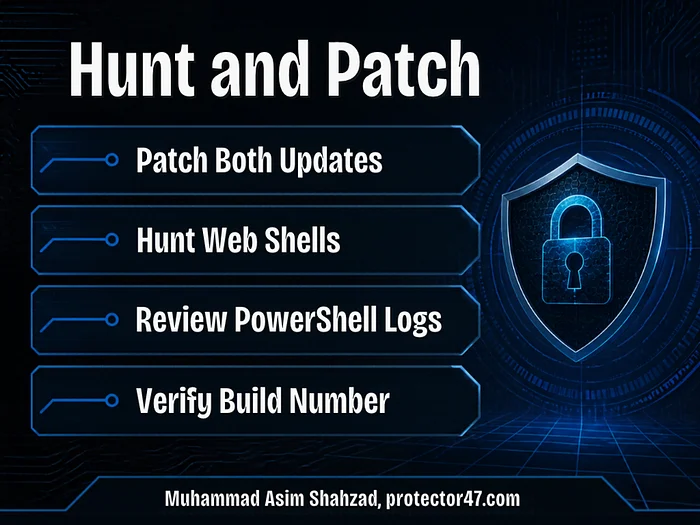
*Hunt and Patch: patch both updates, hunt web shells, review PowerShell logs, and verify the build number.
Fix
Install the Exchange security updates that close all three flaws, KB5001779 and KB5003435, or a later cumulative update that includes them, and confirm the build number matches the patched level using the Microsoft version reference named in the Mandiant guidance.
Where patching must wait hours rather than days, reduce exposure by restricting internet access to the Exchange server at the network edge. That is a short emergency measure only. It is not a fix.
Verify the fix in three ways. First, confirm the installed Exchange build number is at or above the patched build. Second, repeat the lab Autodiscover path confusion probe against the patched lab build and confirm the backend no longer answers as the machine account. Third, run a web shell hunt across the Exchange directories and review PowerShell and IIS logs for the period the server was unpatched, and only then close the finding.
Variants to test
- A positive result is a backend response that should require authentication coming back without it.
- A positive result is a working PowerShell session obtained without that account's password.
- A positive result is the file being served back when browsed to from another machine.
- A positive result means a patched server may still be compromised.
Closing takeaways
ProxyShell is a chain, not a single bug. Defenders who rated each flaw alone underestimated the combined result, which is unauthenticated code execution on a critical server.
Patch delay was the real enabler. The fixes existed before the public exploitation wave, and servers that applied them early were not part of that wave.
Verify with both a build check and a behaviour check, and hunt for shells whenever an unpatched server was exposed. A patched server with a planted shell is still a compromised server.
Sources credited in this article: the Mandiant and Google Cloud ProxyShell writeup and the Rapid7 ProxyShell analysis, both linked in the body above. All research is based on publicly disclosed material only, and all exploitation steps are described for an isolated lab only.
What happened, in plain words
Microsoft Exchange is the software many organisations use to run their email. It usually sits on a server that is reachable from the internet, and it usually holds a powerful position inside the company network. That combination makes it a valuable target.
ProxyShell is the name given to a chain of three separate security flaws in Exchange. Each one on its own looks survivable. Put them together in the right order and a stranger on the internet, with no username and no password, can make the mail server run code of their choosing. That is what security people call remote code execution: the attacker gets the server to execute instructions, from a distance, without ever logging in.
The three flaws are:
- CVE 2021 34473, a pre authentication path confusion in the Autodiscover service that lets an attacker reach backend URLs as the Exchange machine account.
- CVE 2021 34523, a privilege elevation flaw in the Exchange PowerShell backend that lets the attacker impersonate a privileged user.
- CVE 2021 31207, a post authentication arbitrary file write that lets the attacker write a file the server will execute, which is how a web shell is planted.
A few of those words need unpacking before the rest makes sense.
- A CVE is a public catalogue number for a known security flaw. Think of it like a case number the whole industry can quote. "CVE 2021 34473" means a flaw catalogued in 2021.
- Pre authentication means the flaw can be triggered before anyone has logged in. Post authentication means the attacker needs some kind of session first.
- Autodiscover is an Exchange feature that lets email programs (Outlook, phones, mail apps) find the right server settings automatically. You type your email address, and Autodiscover answers with the configuration. It is a convenience feature that lets mail programs find server settings automatically.
- Path confusion is a class of bug where software looks at a web address (a URL) and misreads part of it. Two components disagree about what the address means, and one of them trusts the other's wrong reading. A simple comparison: a receptionist reads a visitor's badge as "guest", waves them through, and the inner office door reads the same badge as "staff" because it only checks a different part of it.
- Privilege elevation means going from a low level of access to a higher one. In everyday terms, it is the difference between being allowed into the building and being allowed into the server room.
- Arbitrary file write means the attacker can make the server save a file of their choosing, in a place of their choosing. If that place is a folder the web server hands out to visitors, the attacker has effectively published a program on the internet.
- A web shell is a small script planted on a web server that lets the attacker run commands through the browser. It is the burglar's hidden key left under the mat.
- PowerShell is Microsoft's command-line tool for automating Windows. Exchange has its own PowerShell backend, a service that accepts commands over the network so administrators can manage mailboxes remotely.
- SYSTEM is the highest local account on a Windows machine. Code running as SYSTEM can do anything on that server.
The first two flaws were patched in April 2021 in KB5001779 and the third in May 2021 in KB5003435, although the advisories for the first two were only published in July 2021. That gap is part of why so many servers stayed exposed: the fix existed, but many administrators did not know they needed it yet. Clear public chain analyses are the Mandiant and Google Cloud writeup at https://cloud.google.com/blog/topics/threat-intelligence/pst-want-shell-proxyshell-exploiting-microsoft-exchange-servers and the Rapid7 analysis at http://www.rapid7.com/blog/post/2021/08/12/proxyshell-more-widespread-exploitation-of-microsoft-exchange-servers/
The core idea is trust confusion. Exchange is built in two layers: a front end that faces the internet and a backend that does the real work. They decide who you are in different ways. The path confusion tricks the front end into forwarding a request that the backend treats as coming from the server itself, with system level trust. Once the backend believes the request, privilege elevation supplies a user identity, and the file write turns that access into code execution.
A path confusion, a privilege elevation and a file write. Alone they look manageable. Chained, they own the mail server.
Cover image: AI generated illustration made in Canva.
Everything below is for an isolated lab you own, built with an unpatched Exchange version you install only for training. Never run these steps against a real mail server you do not own or have explicit written permission to test. Exchange exploitation in the wild has led directly to ransomware, so treat any real world sign of it as an incident.
Setup
Build the lab fully isolated. Exchange is heavy, so give the machines real resources and snapshot often.
A virtual machine is a computer simulated inside another computer. You can run several on one physical box, and you can take a snapshot, which is a saved copy of the machine's entire state at a moment in time. If something goes wrong, you restore the snapshot and you are back where you started. It is the undo button for a whole computer.
- Create a virtual domain with a domain controller and a separate Exchange Server virtual machine, installed at a version below the April and May 2021 security updates, on an isolated virtual network with no internet route.
- Create one normal mailbox user and one administrator mailbox for identity steps, both owned by you.
- Snapshot both machines in the clean unpatched state.
- Use a third machine on the same isolated network as the attacker machine, with a browser, a proxy and scripting tools.
- Turn on IIS logging, Exchange PowerShell logging and file integrity watching on the Exchange web directories before you begin.
Some of those terms in plain words:
- A domain controller is the server that keeps the list of users and passwords for a Windows network. It is the front desk that checks everyone's identity.
- IIS is Microsoft's web server software. It is the program that answers browser requests on a Windows machine, and it keeps a log, a running diary of every request it received.
- A proxy is a tool that sits between your browser and the target and lets you see and edit every request before it is sent. Think of it as an interpreter who repeats your words but lets you change them first.
- File integrity monitoring watches a folder and alerts when files appear, change or disappear.
Confirm normal mail flow inside the lab first, so later failures are attributable to the exploitation steps and not to a broken install. This is the same discipline as testing a new recipe with all the ingredients laid out: if something goes wrong, you know it was the cooking, not a missing egg.
Finding it
The chain is not a single bug but a sequence of trust decisions that each look reasonable in isolation. The front end and the backend authenticate in different ways, and the path confusion in Autodiscover lets a request be normalised into one the backend accepts as coming from the Exchange machine account itself. That is the first success signal in the lab: a backend response that should require authentication comes back without it.
Normalisation means tidying up a web address into a standard form before using it. Software often strips or rewrites parts of a URL to make it consistent. The bug is that the front end tidies the address one way and the backend reads the tidied version as something more trusted than it should be.
Exploitation
Step 1: Probe Autodiscover
Send the lab server an Autodiscover request shaped so that the explicit logon part of the URL is removed during normalisation, which is the path confusion at the heart of CVE 2021 34473. Public analyses describe this as accessing an arbitrary backend URL as the Exchange machine account. In the lab, a backend response that should require authentication is your first success signal.
Why this step: before you can do anything useful, you need the backend to answer you as if you were the server itself. The "explicit logon" part of the URL is the bit that normally says "this request is from a specific logged-in user".
Step 2: Learn a target identity
Use the Autodiscover access to obtain the distinguished name of your lab mailbox user, then use the MAPI HTTP path described in public incident analyses to obtain that user security identifier. Both values belong to your own lab accounts. Record them exactly, because the next step needs them.
- A distinguished name is the full, unique address of an object in a directory, like a postal address written out in full rather than just a name. It tells Exchange exactly which mailbox you mean.
- A security identifier, or SID, is the internal number Windows uses to identify a user. Names can change; the SID does not.
- MAPI HTTP is the protocol Outlook uses to talk to Exchange. It is the language the mail client and the mail server speak.
Why this step: the next step needs to claim to be a specific user. To do that convincingly, you need that user's exact identifiers, not just their name.
Step 3: Elevate through the PowerShell backend
Send a request to the PowerShell backend carrying the identity token material described in public analyses, so the backend restores the session as your lab administrator. A successful PowerShell session in the lab, obtained without that administrator password, proves CVE 2021 34523 in your build.
A token here is a piece of data that stands in for a logged-in session, a bit like a cloakroom ticket: whoever holds it gets the coat. If the backend accepts token material it should not, the attacker gets the administrator's session without ever knowing the password.
Step 4: Write the shell file
Use the privileged PowerShell access to export a mailbox item to a path inside a web accessible Exchange directory, which is the arbitrary file write of CVE 2021 31207. In the lab, the exported content contains a simple marker that prints a fixed word when called. Keep the marker harmless and unique.
Why this step: a file sitting on a disk is not yet code execution. It becomes code execution when the server will execute the written file. Exporting a mailbox item into a web-served folder is the trick that puts the attacker's content where the server will execute it.
Step 5: Call the marker
Browse to the written file from your attacker machine. If the fixed marker word returns, the full chain has produced remote code execution in the lab. Stop there. Do not dump credentials, do not move laterally and do not install persistence, even in the lab. The chain is proved.
- Lateral movement means moving from one compromised machine to another inside the same network.
- Persistence means planting something that survives a reboot, so the attacker can come back later.
Why stop: the point of the lab is to prove the chain works, not to practise being a criminal. A harmless marker word is enough evidence, and stopping keeps the exercise safe and repeatable.
Step 6: Preserve evidence and reset
Save the IIS logs, the PowerShell logs and the written file name, restore the snapshots, and repeat the detection review below against your own logs so you learn what each step looks like.
Why this step: the logs from your own attack are the best training material a defender can have. You know exactly what you did and when, so you can learn to spot the same pattern in someone else's logs.
The ProxyShell Chain: path confusion, learn identity, elevate privilege, and write a shell file, in that order. This image is an AI generated illustration made in Canva.
Root cause
The mistake is trust confusion between the front end and the backend. The path confusion tricks the front end into forwarding a request the backend treats as coming from the server itself, with system level trust. Each flaw alone looks manageable; the chain is what produces unauthenticated code execution.
A useful comparison is a building with two reception desks. If you can trick the outer desk into waving through a badge that says "building manager", the inner desk never asks another question.
Impact
A successful ProxyShell chain gives code execution as SYSTEM on the Exchange server. In real incidents documented by Mandiant and others, attackers used that position to plant web shells, steal credentials, install ransomware and return to the same unpatched server repeatedly. Exchange also holds mailbox data directly and often sits close to domain privilege, so the blast radius is far larger than one web server.
- Credentials are usernames and passwords, or the data that proves who you are.
- Ransomware is malicious software that encrypts files and demands payment to unlock them.
- Blast radius is how much damage one compromise can cause. A mail server is not just a mail server: it holds everyone's messages and often has a trusted relationship with the rest of the network.
Detection
- Hunt IIS logs for Autodiscover requests with unusual backend paths and for PowerShell backend access from external addresses, using the status code and path patterns described in the Mandiant writeup linked above.
- Watch Exchange web directories for new script files, especially outside patching or deployment windows.
- Enable and review PowerShell module, script block and transcription logging, and deploy endpoint detection on every Exchange server.
- Use file integrity monitoring on web roots, because the file write step must land somewhere the server serves.
- Assume compromise if an unpatched server was internet facing during an exploitation wave. Patching alone does not remove a shell that is already planted, so run a dedicated shell hunt and credential review.
A few terms:
- A status code is the three-digit number a web server sends back with every response. 200 means fine, 401 means not authorised, 404 means not found. Attack traffic often shows unusual codes for unusual paths.
- Endpoint detection is software on the server that watches for suspicious behaviour, like a guard dog rather than a fence.
- A web root is the folder the web server serves files from. Anything placed there can be requested by a browser.
- An exploitation wave is a period when many attackers use the same public technique against many targets at once.
*Hunt and Patch: patch both updates, hunt web shells, review PowerShell logs, and verify the build number.
Fix
Install the Exchange security updates that close all three flaws, KB5001779 and KB5003435, or a later cumulative update that includes them, and confirm the build number matches the patched level using the Microsoft version reference named in the Mandiant guidance.
A build number is the version string of the installed software. It is how you prove, rather than assume, that the update actually applied.
Where patching must wait hours rather than days, reduce exposure by restricting internet access to the Exchange server at the network edge. That is a short emergency measure only. It is not a fix.
Verify the fix in three ways. First, confirm the installed Exchange build number is at or above the patched build. Second, repeat the lab Autodiscover path confusion probe against the patched lab build and confirm the backend no longer answers as the machine account. Third, run a web shell hunt across the Exchange directories and review PowerShell and IIS logs for the period the server was unpatched, and only then close the finding.
Why three checks: a build number proves the software was updated. A behaviour check proves the flaw is actually gone. A shell hunt proves nobody got in before the update. Each answers a different question, and you need all three before you can say the server is clean.
Variants to test
- A positive result is a backend response that should require authentication coming back without it.
- A positive result is a working PowerShell session obtained without that account's password.
- A positive result is the file being served back when browsed to from another machine.
- A positive result means a patched server may still be compromised.
The first asks whether the path confusion exists on a build you have not tried. The second asks whether the identity trick works. The third asks whether the file write lands where the server will serve it. The fourth is a defender's check: even a patched server can still be hiding a shell planted before the patch.
Closing takeaways
ProxyShell is a chain, not a single bug. Defenders who rated each flaw alone underestimated the combined result, which is unauthenticated code execution on a critical server.
Patch delay was the real enabler. The fixes existed before the public exploitation wave, and servers that applied them early were not part of that wave.
Verify with both a build check and a behaviour check, and hunt for shells whenever an unpatched server was exposed. A patched server with a planted shell is still a compromised server.
Sources credited in this article: the Mandiant and Google Cloud ProxyShell writeup and the Rapid7 ProxyShell analysis, both linked in the body above. All research is based on publicly disclosed material only, and all exploitation steps are described for an isolated lab only.
Glossary
- API: an interface that lets one program ask another program to do something, without a human clicking anything.
- Arbitrary file write: a flaw that lets an attacker save a file of their choosing, in a location of their choosing.
- Autodiscover: an Exchange feature that automatically tells mail programs which server settings to use.
- Backend: the inner layer of a service that does the real work, usually not directly reachable from the internet.
- Blast radius: how much damage a single compromise can cause.
- Build number: the version string of installed software, used to confirm an update applied.
- CVE: a public catalogue number for a known security flaw.
- Credentials: usernames, passwords and other data that prove identity.
- Distinguished name: the full, unique address of an object in a directory.
- Domain controller: the Windows server that holds the list of users and checks passwords.
- Endpoint detection: software on a machine that watches for suspicious behaviour.
- Exploitation wave: a period when many attackers use the same technique against many targets.
- File integrity monitoring: watching a folder and alerting when files appear or change.
- Front end: the outer layer of a service that faces the internet and forwards requests inward.
- IIS: Microsoft's web server software, which answers browser requests and keeps logs.
- Lateral movement: moving from one compromised machine to another inside a network.
- Log: a running diary of events kept by software.
- MAPI HTTP: the protocol Outlook uses to talk to Exchange.
- Normalisation: tidying a web address into a standard form before using it.
- Path confusion: a bug where software misreads part of a URL and trusts the wrong reading.
- Persistence: planting something that survives a reboot so an attacker can return.
- Post authentication: a flaw that can only be triggered after some kind of session exists.
- PowerShell: Microsoft's command-line tool for automating Windows, including a remote backend in Exchange.
- Pre authentication: a flaw that can be triggered before anyone logs in.
- Privilege elevation: going from a low level of access to a higher one.
- Proxy: a tool that sits between your browser and a target and lets you see and edit requests.
- Ransomware: malicious software that encrypts files and demands payment.
- Remote code execution: making a remote server run instructions of your choosing.
- Security identifier (SID): the internal number Windows uses to identify a user.
- Snapshot: a saved copy of a virtual machine's entire state at a moment in time.
- Status code: the three-digit number a web server returns with each response.
- SYSTEM: the highest local account on a Windows machine.
- Token: a piece of data that stands in for a logged-in session.
- Virtual machine: a computer simulated inside another computer.
- Web root: the folder a web server serves files from.
- Web shell: a small script planted on a web server that lets an attacker run commands through a browser.


