Vulnerability Information
An authenticated user could delete the .htaccess files via a path traversal in the photo removal feature, then upload a PHP web shell to achieve remote code execution. The attacker could also delete arbitrary files on the server.

medium.com
Published on medium.com
This is a written guide that validates the PoC submitted for the qdPM 9.1 Authenticated RCE vulnerability (CVE-2020–7246) disclosed at the start of this year. This post features the following sections:
The full write-up lives on its author's site
It belongs to its author, so we link to it rather than copy it. The other two tabs are our own rewrites, checked against it.
Context
qdPM is a free, web-based LAMP project management tool aimed at small teams working across multiple projects. It is configurable and lets you manage projects, tasks and people, with a ticket system integrated into task management. The feature at the centre of this write-up is the profile photo upload on the "My Details" (myAccount) page, where a user can add or remove their own profile picture.
The vulnerability is CVE-2020-7246, described as a remote code execution (RCE) issue in qdPM 9.1 and earlier. The official description states that an attacker can upload a malicious PHP code file via the profile photo functionality, by leveraging a path traversal vulnerability in the users['photo_preview'] delete photo feature, allowing bypass of .htaccess protection. The description notes that the issue exists because of an incomplete fix for CVE-2015-3884.
This post validates the published PoC for that CVE against a fresh install of qdPM 9.1, walks through the manual exploitation, analyses a custom Python automation script, and closes with remediation thoughts.
Setup
The lab was an Ubuntu 19.10 Desktop VM. The author notes that a server distribution would be more realistic for a real deployment, but the GUI made installation and analysis easier.
qdPM is a classic LAMP application. LAMP was installed following a phoenixnap guide, and qdPM itself was installed following a LinuxCloudVPS step-by-step guide, since the official qdPM installation documentation was thin and mostly FAQs. Some MySQL commands needed troubleshooting before the database worked.
The application was configured with the following credentials:
Database information
- User: root
- Password: ubuntu
qdPM admin user
- User: [redacted]
- Password: qdpm
Once logged in as admin, a low-privilege user was created for the attack:
Low-privilege user
- Name: John Smith
- Email: [redacted]
- Password: password
The author acknowledges these credentials are poor but kept them simple for the lab.
Tools used: Firefox configured to send all HTTP traffic through Burp Suite, a nc listener, and later a custom Python script. The PHP reverse shell used throughout is the one published by pentestmonkey.
Finding it
Logging in as [redacted] and opening the "My Details" tab, the author tried to upload an initial photo (a generic businessman photo from Unsplash). This produced a PHP error. Troubleshooting showed the php-gd library was not installed; after installing it on Ubuntu, the photo uploaded without problems.
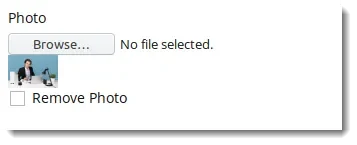
To see whether the upload feature had any protection at all, three files were uploaded:
- upload.txt (a simple .txt file): SUCCESS, viewable in the browser
- upload.py (a simple Python file): SUCCESS, prompted to download
- upload.php (a simple PHP file): SUCCESS, the results of the PHP echo statement were displayed
All three file types were accepted and accessible. That was surprising, since only image extensions would normally be allowed. A pentestmonkey PHP reverse shell was then uploaded and a nc listener set up locally to see whether it would execute. It did:
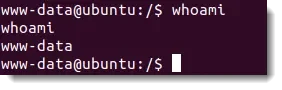
This created confusion: the most recent version of qdPM (9.1) was in use, and CVE-2015-3884 (note the year) was the first time this kind of arbitrary file upload had been reported on qdPM. According to that older CVE, the platform allowed an unrestricted file upload to a range of places, including the myAccount profile photo. The newer CVE, CVE-2020-7246, says a .htaccess file was implemented to stop malicious file types from executing, but that this was an improper fix: the .htaccess file could be removed via a directory traversal attack, after which a malicious PHP script could be uploaded to invoke RCE.
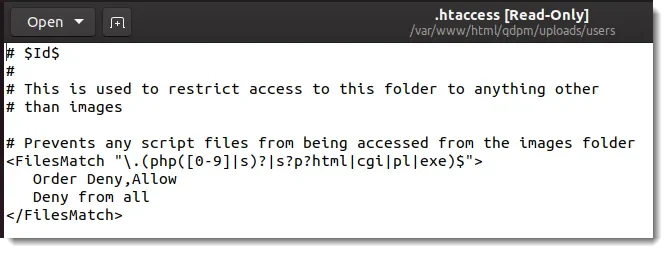
Looking in the root directory for a .htaccess file turned up nothing. The plan was to create one, since it is recommended to place a .htaccess file in the folder you want to protect. Digging further showed that qdPM shipped with a .htaccess file restricting executable uploads:
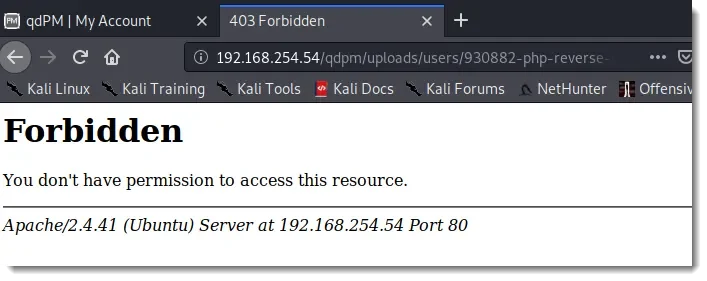
Assuming Apache was preventing the file from doing its job, troubleshooting revealed that the Apache service has to be configured to allow custom .htaccess files. After switching the settings in /etc/apache.conf to accept .htaccess and restarting Apache, a web shell upload was attempted again. The file uploaded successfully, but the resource could not be viewed, so the script did not execute:
Exploitation
The published PoC (a Google document linked from the official CVE entry; the author notes it is not clear who published it) lists these steps:
- Login as normal user & visit http://(site_domain)/qpdm/index.php/myAccount
- Check the "Remove photo" checkbox and save to intercept the request
- Intercept the request on submitting the form (
save) by selecting the checkbox 'Remove Photo' - Modify the request parameter
users['photp_preview']to../.htaccessand forward the request.
Step 1: capture the remove-photo request
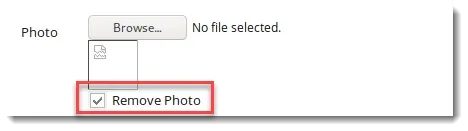
Burp Suite was launched and Firefox configured to point all HTTP traffic at the Burp proxy. On the myAccount page the "remove photo" box was checked:
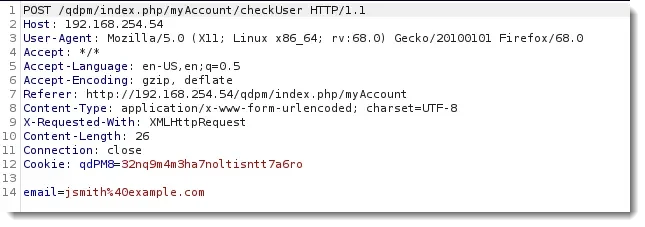
Submitting produced two requests to intercept. The first was simple and belongs to the "checkUser" script:
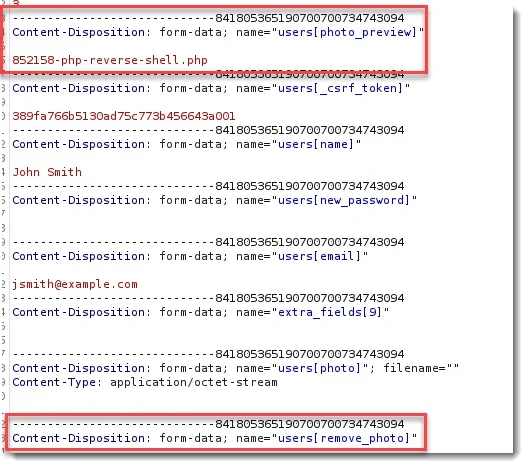
The second request carries the vulnerable information, pulled from the myAccounts form data. Two values in it are needed to leverage the attack:
Step 2: understand the delete logic
The second highlighted portion is the value pushed to the PHP script that deletes the photo. In the qdPM source, that script lives in /core/apps/qdPM/modules/myAccount/actions/actions.class.php:
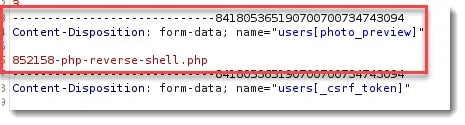
At this point the value is grabbing the old php-reverse-shell.php script that had been uploaded earlier, because the application thinks that is the current profile photo. Changing the old value to .htaccess makes the fully built URI produced by the script look like:
unlink("/uploads/users/.htaccess");
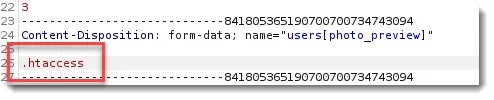
As predicted, and as described in the PoC, forwarding this request removed the .htaccess file from the /uploads/user directory. That gives the ability to bypass the protection and access uploaded PHP scripts.
The author stresses that the exploit is more than a way to upload scripts: it also lets an attacker remove any file they like from the server, within the scope of Apache.
Step 3: retry the web shell
After removing the .htaccess in /uploads/user, the PHP web shell was uploaded again (configured to reach back to the Kali machine) and accessed, but the same "forbidden" error appeared. The first thought was that Apache needed a restart to notice the missing .htaccess, but research showed .htaccess files are read in real time and do not require a restart.
Reading the PoC more carefully revealed that a .htaccess file also existed in the parent /uploads/ directory. An additional Burp request targeting ../.htaccess was needed to move up from /uploads/users/.htaccess to /uploads/.htaccess:

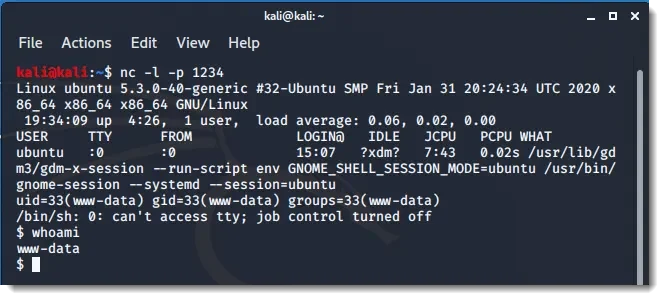
With both .htaccess files gone, a nc connection was successfully established through the PHP backdoor:
Step 4: automate it
The automated deployer was written in Python, chosen as the author's favourite scripting language with good libraries for web requests and HTML parsing. The goal was a Metasploit-like flow: exploit to shell in the same terminal. The plan:
- Create a unique
requestssession and log in - Send the requests needed to remove both default
.htaccessfiles - Upload a PHP web shell (the pentestmonkey one)
- Create a listener and handle data transmission
- Force the uploaded payload to run, connect to the listener and spawn a shell
The result is published in a GitHub repo:
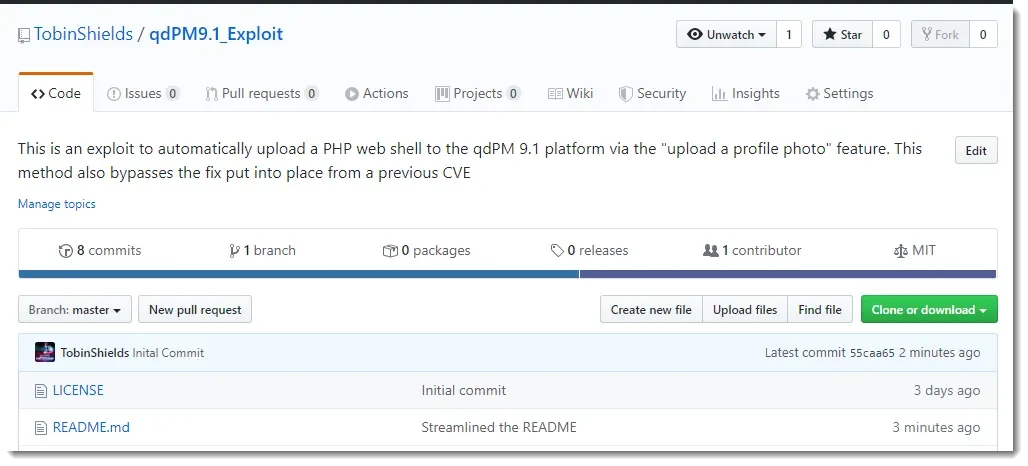
"Version 1" was put together quickly with a lot of redundant code. "Version 2" (the linked one) has more modular functions to reduce redundancy and improve readability, plus a lot of comments. A hypothetical "Version 3" would add error handling and possibly command-line arguments for custom values. The repo also includes the PHP payload used during testing, in case it is quirky with other setups, and an archived copy of the vulnerable qdPM 9.1 .zip in case anyone wants to work with the exploit later.
Step 5: compare with the exploit-db script
The author deliberately avoided reading the exploit-db script (47954) while building their own. On review, the exploit-db script was significantly less complex but did not create a listener and had some clunky code. It used far fewer imports and, notably, did not use Beautiful Soup to parse the requested HTML files; instead it parsed manually with the html function from the lxml library. One advantage it had was argparse, allowing arguments from the CLI rather than editing the script.
The author considers their script stronger because the exploit is more seamless and the code less redundant, but acknowledges that adding the listening socket increased complexity and could have been omitted in favour of a separate nc listener in another terminal.
Root cause
The author finds it baffling that when the original arbitrary file upload (CVE-2015-3884) was published, the developers did not revise the PHP code to validate uploaded files. The block of code that seems to be the culprit is in /core/apps/qdPM/modules/myAccount/actions/actions.class.php:
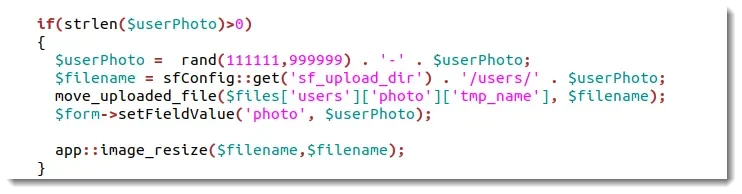
Nowhere in that block does the code check whether the $userPhoto string is an image rather than a PHP script. It blindly takes user input and uploads it to the uploads/user/ directory.
The .htaccess files shipped with qdPM were the defence against execution, and changing the value to .htaccess made the script build unlink("/uploads/users/.htaccess");, removing the protection itself. The author also notes that Apache must be configured to honour custom .htaccess files for that defence to work at all.
Impact
An authenticated low-privilege user can upload a PHP file through the profile photo feature and, by removing the .htaccess files via the delete-photo path traversal, get that file executed by the server, resulting in remote code execution. The same traversal also allows an attacker to remove any file they like from the server, within the scope of Apache. The exploit requires an authenticated account, and the file-removal capability is bounded by the scope of Apache.
Fix
The author argues the real fix is to validate uploads in the PHP code rather than relying on .htaccess. Suggested additions:
- Extension whitelisting (only allowing .png, .jpg, .gif, etc.)
- Checking the content-type of the uploaded file
- Using the PHP GD library for stronger image validation
A Stack Overflow answer on building a secure image upload is cited as a solid reference for these approaches.
Variants to test
What happened, in plain words
A piece of software called qdPM lets small teams manage projects online. It has a page where each user can upload a picture of themselves, called a profile photo. Someone found that this picture upload can be abused: a user can upload a file that is not a picture at all, but a small program written in a language called PHP, and then trick the server into running that program. When a server runs a program that an attacker sent, that is called remote code execution, or RCE for short. It is a serious class of flaw, because the attacker's code runs on the server.
The trick has two parts. First, the upload accepts any kind of file. Second, the server has a small guard file called .htaccess that is supposed to stop uploaded programs from running, but the "remove my photo" feature can be told to delete that guard file instead of a photo. Once the guard is gone, the uploaded program runs.
This write-up follows someone rebuilding that attack from scratch on their own computer, step by step, then writing a Python script to do it automatically. Below, every step is explained as if you have never done security work before. You only need to know how to use a browser.
The vulnerability, explained from zero
What qdPM is
qdPM is a free web-based project management tool built on what people call the LAMP stack. LAMP is just a bundle of four common pieces of software that together run a website:
- Linux: the operating system the server runs on.
- Apache: the web server, the program that answers browser requests.
- MySQL: the database, where information like user accounts is stored.
- PHP: the programming language the website itself is written in.
qdPM lets a team manage projects, tasks and people, and it has a ticket system for customers. The feature that matters here is the profile photo upload on the "My Details" page, also called the myAccount page. That is where a logged-in user can add or remove their own picture.
What the official description says
The vulnerability has an identifier, CVE-2020-7246. A CVE is a public catalogue number given to a known security flaw so people can refer to it unambiguously, a bit like a case number for a crime. The official description says:
A remote code execution (RCE) vulnerability exists in qdPM 9.1 and earlier. An attacker can upload a malicious PHP code file via the profile photo functionality, by leveraging a path traversal vulnerability in the
users['photo_preview']delete photo feature, allowing bypass of.htaccessprotection. NOTE: this issue exists because of an incomplete fix for CVE-2015-3884.
That paragraph contains several ideas worth unpacking:
- Remote code execution (RCE): the attacker, sitting at their own computer somewhere else, gets their own code to run on the victim's server.
- Malicious PHP code file: a file containing instructions in PHP. If the server runs it, it does whatever the attacker wrote.
- Path traversal: a way of writing a file location that climbs out of the folder you are supposed to be in. Imagine a building where you are only allowed in room 5, but the sign says "go to room 5, then up one floor, then into room 1". The
../sequence means "go up one folder", so../.htaccessmeans "the.htaccessfile one folder above where you are". .htaccessprotection:.htaccessis a small configuration file that Apache reads. Site owners use it to set rules for a folder, for example "never run PHP files in this folder". It is like a sign on a door saying "staff only".- CVE-2015-3884: an older flaw from 2015 in the same product, where uploads were unrestricted. The new flaw exists because the fix for the old one was incomplete.

Why this matters even before any attack
A normal, careful website only lets you upload image files as a profile picture, and it checks that the file really is an image. qdPM 9.1 did not do that properly. That is the seed of the whole problem.
Setting up a practice lab
To study an attack safely, you build a lab: a copy of the vulnerable software on a machine you control, so nothing real is harmed. The author used an Ubuntu 19.10 Desktop virtual machine. A virtual machine is a whole computer simulated inside your computer, like a computer within a computer, which you can break and reset freely. Ubuntu is a version of Linux. The author notes a server edition would be more realistic for real use, but the desktop's graphical interface made installing and poking around easier.
Installing the LAMP stack
Because qdPM is a LAMP application, the four LAMP pieces had to be installed first. The author followed an online guide from phoenixnap to do this. This is like assembling the kitchen before you can cook: web server, database and PHP all have to be present before qdPM can run.
Installing qdPM and creating a low-privilege user
The official qdPM installation documentation was thin, mostly a list of frequently asked questions, so the author followed a step-by-step guide from LinuxCloudVPS instead. Some MySQL commands needed troubleshooting before the database worked, but the platform was installed and configured.
The application was set up with these credentials:
Database information
- User: root
- Password: [redacted]
qdPM admin user
- User: [redacted]
- Password: [redacted]
Once logged in as the administrator, a second, ordinary user was created. This matters because the attack is meant to be carried out by a normal user, not an administrator. If a normal user can do this, the flaw is far more dangerous. The author calls this the low-privilege user:
Low-privilege user
- Name: [redacted]
- Email: [redacted]
- Password: [redacted]
The author admits these passwords are terrible, but kept them simple because it is only a lab.
The tools used
- Firefox, a normal web browser, but configured to send all its web traffic through a tool called Burp Suite.
- Burp Suite, a program that sits between your browser and the website and lets you pause, read and change each request before it is sent. Think of it as a post office clerk who lets you open every letter you send and rewrite it before it goes out.
nc, short for netcat, a small command-line tool that can listen on a network port and wait for a connection. A port is like a numbered door on a computer; a listener is someone standing at that door waiting for a knock.- A PHP reverse shell, a small PHP program that, when run on the victim server, connects back to the attacker's machine and hands over a command prompt. The one used throughout is published by pentestmonkey.
- Later, a custom Python script to automate the whole thing.
First look: does the upload check anything?
Logging in as the low-privilege user and opening the "My Details" tab, the author tried to upload a normal photo, a generic businessman picture from Unsplash. This produced a PHP error. Troubleshooting showed the php-gd library was missing. php-gd is a PHP add-on for handling images; without it, PHP cannot process the picture. After installing it on Ubuntu, the photo uploaded without problems.
This first step is just to confirm the feature works at all. You cannot study a broken upload until you have a working upload.
Trying three different file types
To see whether the upload feature had any protection, three files were uploaded:
- upload.txt (a simple .txt file): SUCCESS, and it could be viewed in the browser.
- upload.py (a simple Python file): SUCCESS, and the browser offered to download it.
- upload.php (a simple PHP file): SUCCESS, and the results of the PHP echo statement were displayed.
All three file types were accepted and accessible. That was surprising, because normally only image extensions such as .jpg or .png would be allowed. The fact that a .php file was accepted and its output shown in the browser was surprising, since normally only image extensions would be allowed.
Uploading a reverse shell
A pentestmonkey PHP reverse shell was then uploaded, and a nc listener was set up locally to see whether it would execute. It did:
The reverse shell ran, meaning the server executed the uploaded script. But something did not add up, which the next section explains.
Why the guard file did not seem to work
This created confusion. The most recent version of qdPM, 9.1, was in use. CVE-2015-3884, from 2015, was the first time this kind of arbitrary file upload had been reported on qdPM. According to that older CVE, the platform allowed an unrestricted file upload to a range of places, including the myAccount profile photo.
The newer CVE, CVE-2020-7246, says a .htaccess file was added to stop malicious file types from executing, but that this was an improper fix: the .htaccess file could be removed via a directory traversal attack, after which a malicious PHP script could be uploaded to invoke RCE.
So there should be a guard file. Looking in the root directory for a .htaccess file turned up nothing. The plan was to create one, since it is recommended to place a .htaccess file in the folder you want to protect. Digging further showed that qdPM shipped with a .htaccess file restricting executable uploads:
Making Apache honour the guard file
Assuming Apache was preventing the file from doing its job, troubleshooting revealed that the Apache service has to be configured to allow custom .htaccess files. The Apache service has to be configured to allow custom .htaccess files. After switching the settings in /etc/apache.conf to accept .htaccess and restarting Apache, a web shell upload was attempted again. The file uploaded successfully, but the resource could not be viewed, so the script did not execute:
This is an important lesson for a beginner: a security control only works if the surrounding system is configured to enforce it. The .htaccess file was present, but Apache was not listening to it until the configuration was changed. Now the lab matches the real-world setup the CVE describes.
Carrying out the attack by hand
The published proof of concept, or PoC, is a document that demonstrates the attack. A PoC is like a recipe someone else wrote; you follow it to confirm the dish turns out the same. It is a Google document linked from the official CVE entry, and the author notes it is not clear who published it. It lists these steps:
- Login as normal user & visit http://(site_domain)/qpdm/index.php/myAccount
- Check the "Remove photo" checkbox and save to intercept the request
- Intercept the request on submitting the form (
save) by selecting the checkbox 'Remove Photo' - Modify the request parameter
users['photp_preview']to../.htaccessand forward the request.
A request parameter is a piece of data the browser sends to the server, like a filled-in field on a form. Intercepting means pausing the request in Burp before it reaches the server, so you can edit it.
Step 1: capture the remove-photo request
Burp Suite was launched and Firefox configured to point all HTTP traffic at the Burp proxy. A proxy is a middleman: instead of talking to the website directly, the browser talks to the proxy, which passes the message on. On the myAccount page the "remove photo" box was checked:
Submitting produced two requests to intercept. The first was simple and belongs to the "checkUser" script:
The second request carries the vulnerable information, pulled from the myAccounts form data. Two values in it are needed to leverage the attack:
Why two requests? Web pages often do several things at once when you click a button. The first request is a routine check. The second is the one that actually deletes the photo, and that is where the interesting data lives.
Step 2: understand the delete logic
The second highlighted portion is the value pushed to the PHP script that deletes the photo. In the qdPM source, that script lives in /core/apps/qdPM/modules/myAccount/actions/actions.class.php:
At this point the value is grabbing the old php-reverse-shell.php script that had been uploaded earlier, because the application thinks that is the current profile photo. Changing the old value to .htaccess makes the fully built URI produced by the script look like:
unlink("/uploads/users/.htaccess");
Line by line, this is what that snippet means:
unlinkis a PHP function that deletes a file from the server's disk."/uploads/users/.htaccess"is the path of the file to delete. It points at the guard file inside the uploads folder.
The crucial point is that the application takes the value the user supplied and drops it straight into the delete command without checking it. If the user supplies ../.htaccess, the path climbs up one folder and deletes the guard file instead of a photo. That is the path traversal.
As predicted, and as described in the PoC, forwarding this request removed the .htaccess file from the /uploads/user directory. That gives the ability to bypass the protection and access uploaded PHP scripts.
The author stresses that the exploit is more than a way to upload scripts: it also lets an attacker remove any file they like from the server, within the scope of Apache. In other words, the delete feature is a weapon on its own, not just a stepping stone.
Step 3: retry the web shell
After removing the .htaccess in /uploads/user, the PHP web shell was uploaded again, configured to reach back to the Kali machine, and accessed, but the same "forbidden" error appeared. Kali is a Linux distribution made for security testing. The first thought was that Apache needed a restart to notice the missing .htaccess, but research showed .htaccess files are read in real time and do not require a restart.
Reading the PoC more carefully revealed that a .htaccess file also existed in the parent /uploads/ directory. An additional Burp request targeting ../.htaccess was needed to move up from /uploads/users/.htaccess to /uploads/.htaccess:
This is a good example of why reading a PoC carefully matters. There was more than one guard file, stacked like two locked doors. Removing one door does not open the corridor if there is another behind it.
With both .htaccess files gone, a nc connection was successfully established through the PHP backdoor:
A backdoor here means the uploaded PHP program, which now runs and connects back to the attacker, giving them a command prompt on the server.
Step 4: automate it
Doing this by hand is slow and error-prone. The automated deployer was written in Python, chosen as the author's favourite scripting language, with good libraries for web requests and HTML parsing. The goal was a Metasploit-like flow: exploit to shell in the same terminal. Metasploit is a well-known tool that bundles exploits and payloads so you can go from a target to a shell in one place. The plan:
- Create a unique
requestssession and log in - Send the requests needed to remove both default
.htaccessfiles - Upload a PHP web shell (the pentestmonkey one)
- Create a listener and handle data transmission
- Force the uploaded payload to run, connect to the listener and spawn a shell
A session here means the script keeps its login state, the same way a browser keeps you logged in between pages. A payload is the piece of code you want the victim to run, in this case the PHP reverse shell.
The result is published in a GitHub repo:
"Version 1" was put together quickly with a lot of redundant code. "Version 2", the linked one, has more modular functions to reduce redundancy and improve readability, plus a lot of comments. A hypothetical "Version 3" would add error handling and possibly command-line arguments for custom values. The repo also includes the PHP payload used during testing, in case it is quirky with other setups, and an archived copy of the vulnerable qdPM 9.1 .zip in case anyone wants to work with the exploit later.
Step 5: compare with the exploit-db script
The author deliberately avoided reading the exploit-db script, number 47954, while building their own. Exploit-db is a public archive of exploit code. On review, the exploit-db script was significantly less complex but did not create a listener and had some clunky code. It used far fewer imports and, notably, did not use Beautiful Soup to parse the requested HTML files; instead it parsed manually with the html function from the lxml library. Beautiful Soup is a Python library that makes it easy to pull data out of web pages. One advantage it had was argparse, a Python module that lets a script take options from the command line rather than being edited by hand.
The author considers their script stronger because the exploit is more seamless and the code less redundant, but acknowledges that adding the listening socket increased complexity and could have been omitted in favour of a separate nc listener in another terminal.
Root cause
The author finds it baffling that when the original arbitrary file upload, CVE-2015-3884, was published, the developers did not revise the PHP code to validate uploaded files. The block of code that seems to be the culprit is in /core/apps/qdPM/modules/myAccount/actions/actions.class.php:
Nowhere in that block does the code check whether the $userPhoto string is an image rather than a PHP script. It blindly takes user input and uploads it to the uploads/user/ directory.
The .htaccess files shipped with qdPM were the defence against execution, and changing the value to .htaccess made the script build unlink("/uploads/users/.htaccess");, removing the protection itself. The author also notes that Apache must be configured to honour custom .htaccess files for that defence to work at all.
In plain terms: the application trusted two things it should not have. It trusted the uploaded file to be an image, and it trusted the file path supplied by the user to point at a photo. Both trusts were misplaced.
Impact
An authenticated low-privilege user can upload a PHP file through the profile photo feature and, by removing the .htaccess files via the delete-photo path traversal, get that file executed by the server, resulting in remote code execution. The same traversal also allows an attacker to remove any file they like from the server, within the scope of Apache. The exploit requires an authenticated account, and the file-removal capability is bounded by the scope of Apache.
Fix
The author argues the real fix is to validate uploads in the PHP code rather than relying on .htaccess. Suggested additions:
- Extension whitelisting (only allowing .png, .jpg, .gif, etc.)
- Checking the content-type of the uploaded file
- Using the PHP GD library for stronger image validation
A Stack Overflow answer on building a secure image upload is cited as a solid reference for these approaches.
Variants to test
Glossary
- Apache: the web server software that answers browser requests and can read
.htaccessfiles. - API: a way for one program to talk to another; here, the web pages and form submissions the browser exchanges with the server.
- argparse: a Python module that lets a script accept options from the command line.
- Backdoor: a hidden way into a system, here the uploaded PHP program that connects back to the attacker.
- Beautiful Soup: a Python library for pulling data out of HTML pages.
- Burp Suite: a tool that sits between browser and website so you can pause, read and edit requests.
- Content-type: a label on a file or request saying what kind of data it is, such as an image or a script.
- CVE: a public catalogue number for a known security flaw.
- Directory traversal (path traversal): writing a file path with
../to climb out of the intended folder. - Exploit-db: a public archive of exploit code.
- Extension whitelisting: only allowing files whose name ends in an approved set of extensions, such as .png or .jpg.
.htaccess: a small Apache configuration file that sets rules for a folder, such as blocking PHP execution.- Kali: a Linux distribution made for security testing.
- LAMP: the bundle of Linux, Apache, MySQL and PHP that runs many websites.
- Listener: a program waiting on a network port for an incoming connection.
- Low-privilege user: an ordinary account without administrator rights.
- Metasploit: a tool that bundles exploits and payloads so you can go from target to shell in one place.
- MySQL: the database software where qdPM stores accounts and other data.
nc(netcat): a small command-line tool for opening network connections and listening on ports.- Parameter: a piece of data sent with a request, like a filled-in form field.
- Payload: the code you want the victim system to run.
- PHP: the programming language qdPM is written in.
php-gd: a PHP add-on for processing images.- PoC (proof of concept): a document or script that demonstrates an attack works.
- Port: a numbered door on a computer that network traffic uses.
- Proxy: a middleman that passes messages between your browser and a website.
- Python: a popular programming language, used here to automate the attack.
- qdPM: a free web-based project management tool built on LAMP.
- Remote code execution (RCE): getting your own code to run on someone else's server.
- Request: a message a browser sends to a server asking for something or submitting data.
- Reverse shell: a program that connects from the victim back to the attacker and gives a command prompt.
- Session: a way to keep a user logged in across several requests.
- Socket: a software endpoint for a network connection, used by a listener or a client.
- Stack Overflow: a question-and-answer site for programmers.
unlink(): a PHP function that deletes a file.- Virtual machine: a whole computer simulated inside another computer.
- Web shell: a script uploaded to a server that lets an attacker run commands through the browser or a connection.


