RCE on admin panel of web3 website
The Grav CMS admin panel on a subdomain was vulnerable to CVE-2021-21425, allowing an unauthenticated attacker to execute certain administrator controller methods and modify YAML configuration files. This could lead to changing site settings, hijacking an admin account, or executing operating system commands as the web-server user.

I hope everyone is doing great. Today, I’m going to tell you about how I hacked into a web3 company and gained remote command execution on their admin panel.
The full write-up lives on its author's site
It belongs to its author, so we link to it rather than copy it. The other two tabs are our own rewrites, checked against it.
Context
The target was a web3 company whose main domain was in scope for the bug bounty programme, but whose subdomains were not. The main domain had no user-facing features: it was a static webpage, and every tab or feature link redirected to a subdomain where signup, signin and the rest of the user activity lived. The company had also deployed its admin panel on that same subdomain.
The researcher had already found a bug in the subdomain, but it was treated as out of scope under the programme rules, even though the company paid for it. That experience is the backdrop for the finding described here: the admin panel itself sat on the out-of-scope subdomain.
Setup
No accounts were needed. The whole exploitation path is unauthenticated: the researcher entered random credentials at the admin login and worked from the resulting request. The tools used were a browser, Burp Suite (intercept and Repeater), a port scanner, directory fuzzing with a custom wordlist, and optionally the Metasploit Framework. The product was GravCMS with its Admin plugin, vulnerable to CVE-2021-21425.
Finding it
Testing started on the subdomain, since that is where the features were. Port scanning turned up nothing interesting. SQL injection, authentication bypass and SSRF attempts did not produce anything either. The researcher then moved to directory fuzzing, using a wordlist collected with the method described in a separate blog post.
Fuzzing surfaced several interesting directories. One of them was /admin, which turned out to be a GravCMS admin panel login. Searching for known vulnerabilities in GravCMS led to CVE-2021-21425, a known issue that can lead to RCE.
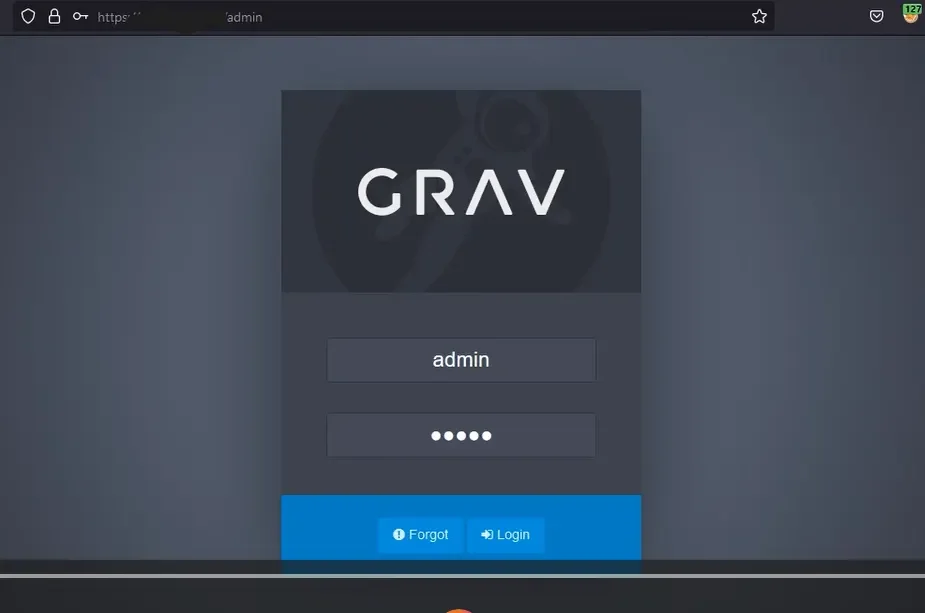
The image shows the GravCMS admin login page that the researcher reached at the /admin directory.
Exploitation
Step 1: reach the admin login
The target directory is opened in the browser:
https://target.xyz/admin
This is the Grav Admin plugin login form.
Step 2: capture a login request and the nonce
Random credentials are entered and the login request is intercepted in Burp. From the request and the login form, the researcher takes the session cookie and extracts the admin-nonce value.
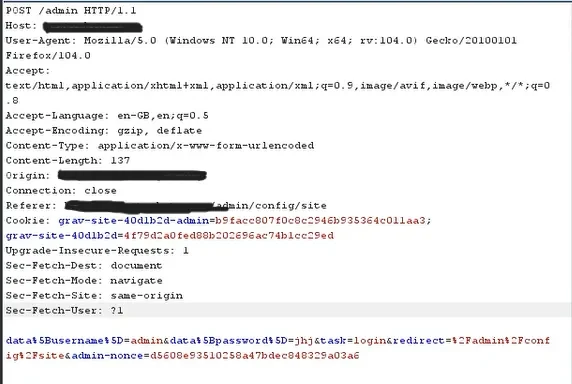
The screenshot shows the intercepted login request with the cookie and the admin-nonce value taken from the form.
Step 3: replay with modified parameters
The request is sent to Repeater and the parameters are changed to the following:
task=SaveDefault&data[title]=PWNED&admin-nonce=(value)
task=SaveDefault is the task parameter set in the modified request. data[title]=PWNED is the data parameter set in the modified request. admin-nonce=(value) carries the nonce extracted in the previous step.
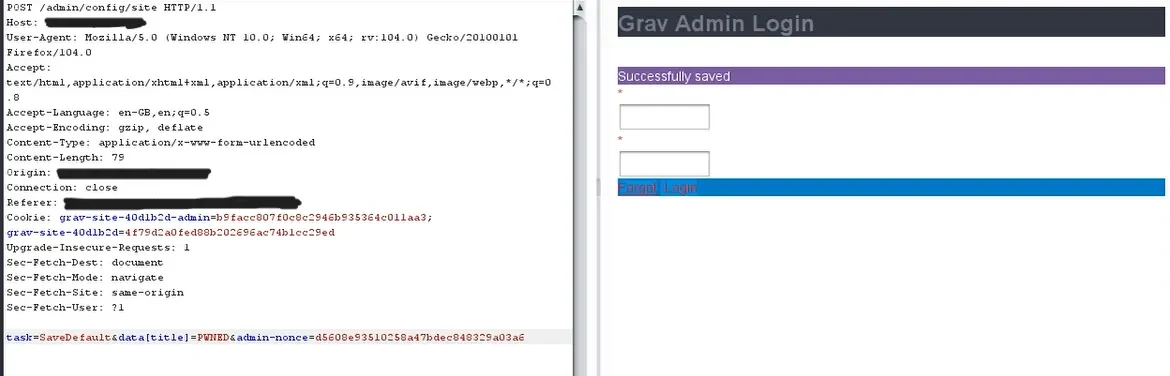
The screenshot shows the modified request in Repeater with the task, data[title] and admin-nonce parameters set.
Step 4: forward and confirm
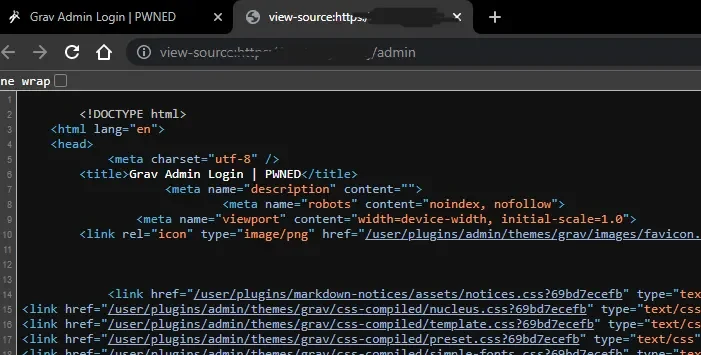
Forwarding the request returns 200 OK. The site title is changed to PWNED, an action that should require admin-level privileges.
The screenshot shows the 200 OK response after the modified request was forwarded.
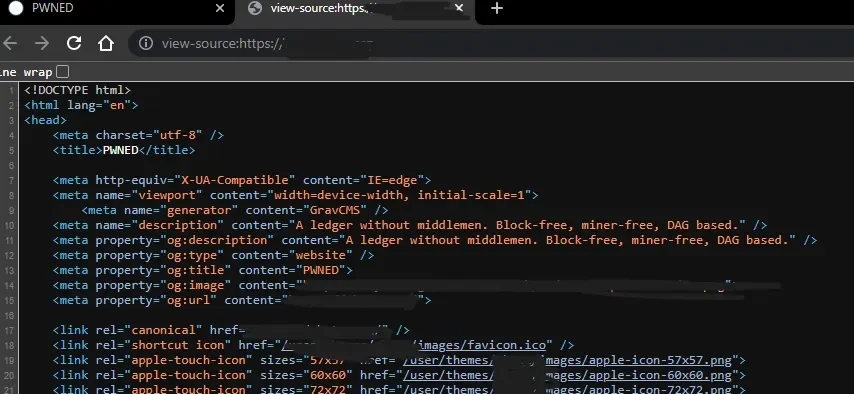
The screenshot shows the site with its title changed to PWNED.
The researcher also notes that the same vulnerability can be exploited by automating the process with the Metasploit Framework: search for the "GravCMS Remote Command Execution" module and set the required parameters.
Root cause
The Grav Admin plugin is an HTML interface that lets users configure Grav and create and modify pages. The flaw is that an unauthenticated user can execute certain methods of the administrator controller without any credentials. When those methods are reached, they can create arbitrary YAML files or modify existing ones on the system. That in turn allows changes to configuration, such as general site information or the definition of custom scheduler jobs. The nonce is taken from the login form and included in the replayed request.
Impact
Through the configuration changes, an adversary may be able to alter parts of a webpage, hijack an administrator account, or execute operating system commands under the context of the web-server user. The researcher describes the RCE as allowing an attacker to execute arbitrary code on the server hosting the CMS, take full control of the server and potentially compromise sensitive data. The demonstrated proof was the title change, which the researcher says is only possible with admin-level privileges.
Fix
The report does not describe the code change. The company initially marked the report as out of scope because the admin panel was not on the main domain. After the researcher explained the criticality and impact, they resolved it and paid the bounty.
Variants to test
- Fuzz for
/adminand similar paths on subdomains that are excluded from scope but host real functionality. A positive result is a Grav Admin login page or another CMS admin interface. - On any Grav Admin login, request the form and check whether an
admin-nonceis issued to an unauthenticated client. A positive result is a nonce that is accepted by administrator controller tasks such asSaveDefault. - Replay administrator controller tasks with the nonce and no session. A positive result is a
200 OKand a visible configuration change, such as the site title. - Check whether configuration writes can define custom scheduler jobs, which is the path from configuration change to command execution. A positive result is a job that runs under the web-server user.
- Run the Metasploit "GravCMS Remote Command Execution" module against a test instance to confirm the full RCE path rather than only the configuration write.
What happened, in plain words
A security researcher found a way to break into the admin area of a company's website and change things that only an administrator should be able to change. The company runs a website for a web3 project (web3 is a broad term for applications built on blockchain technology). The main website address (the domain) was listed as fair game for security testing in the company's bug bounty programme, but its subdomains were not. A subdomain is a prefix added to the main domain, like shop.example.com when the main site is example.com. The main domain was just a static page: it had no features, and every link sent visitors to a subdomain where signup, signin and everything else happened. The company had also put its admin panel on that same subdomain.
The researcher had already found one bug in the subdomain, but the programme rules said subdomains were out of scope, so that bug was officially out of scope. The company still paid for it. That experience is the background to this story: the admin panel itself was on the out-of-scope subdomain.
The researcher found the admin login page by guessing directory names. The login page was built with a product called GravCMS (a content management system, or CMS: software that lets people build and edit a website without writing code). A known security flaw in one of its add-ons, the Admin plugin, lets someone who is not logged in perform certain administrator actions. The researcher used that flaw to change the site's title to "PWNED", which should require admin rights. The company first said the report was out of scope because the admin panel was not on the main domain. After the researcher explained how serious the bug was, the company fixed it and paid a bounty.
The setup
No account was needed. The whole attack works without logging in: the researcher typed random credentials at the admin login and worked from the request that the browser sent. The tools were a browser, Burp Suite (a program that lets you watch and change the requests your browser sends; its Intercept feature pauses a request so you can edit it, and its Repeater feature lets you send the same request again and again with changes), a port scanner (a tool that checks which network doors, called ports, are open on a server), directory fuzzing with a custom wordlist (fuzzing means trying many possible names automatically; a wordlist is just a list of names to try), and optionally the Metasploit Framework (a toolkit that automates known attacks). The product was GravCMS with its Admin plugin, and the flaw is tracked as CVE-2021-21425. A CVE is a public catalogue number for a known vulnerability, so people can look it up.
Finding it
Testing started on the subdomain, because that is where the features were. Port scanning found nothing interesting. Attempts at SQL injection (tricking a database by putting commands into input fields), authentication bypass (getting in without valid credentials) and SSRF (server-side request forgery: making the server fetch a URL of your choosing) produced nothing either. The researcher then moved to directory fuzzing, using a wordlist collected with the method described in a separate blog post.
Fuzzing surfaced several interesting directories. One of them was /admin, which turned out to be a GravCMS admin panel login. Searching for known vulnerabilities in GravCMS led to CVE-2021-21425, a known issue that can lead to RCE. RCE stands for remote code execution: an attacker can make the server run commands of their choosing, which is about as bad as it gets.
The image shows the GravCMS admin login page that the researcher reached at the /admin directory.
Exploitation
Step 1: reach the admin login
The target directory is opened in the browser:
https://target.xyz/admin
This is the Grav Admin plugin login form. The address is the site's domain followed by /admin, the folder where the admin interface lives. Opening it in a browser is the same as typing the address and pressing Enter; the server responds with the login page.
Step 2: capture a login request and the nonce
Random credentials are entered and the login request is intercepted in Burp. From the request and the login form, the researcher takes the session cookie and extracts the admin-nonce value.
A cookie is a small piece of data that a website asks your browser to store and send back with later requests, so the site can recognise you between page loads. A nonce is a one-time number or string that a site includes in a form to prove that a request really came from that form and not from somewhere else. Here the nonce is meant as a security check, but it is handed out on the login page to anyone who asks, so it does not protect anything.
The screenshot shows the intercepted login request with the cookie and the admin-nonce value taken from the form.
Step 3: replay with modified parameters
The request is sent to Repeater and the parameters are changed to the following:
task=SaveDefault&data[title]=PWNED&admin-nonce=(value)
This is the part of the request that tells the server what to do. It is written as a series of name=value pairs joined by &, the same format a web form uses when it is submitted. Here is what each piece means:
task=SaveDefaultis the task parameter set in the modified request. Think oftaskas the name of the button being pressed on the server:SaveDefaultis the "save the default settings" button.data[title]=PWNEDis the data parameter set in the modified request.datais the group of settings being saved, and[title]picks the title field inside it. The value is the wordPWNED.admin-nonce=(value)carries the nonce extracted in the previous step. The(value)is a placeholder for the real nonce copied from the form.
The screenshot shows the modified request in Repeater with the task, data[title] and admin-nonce parameters set.
Step 4: forward and confirm
Forwarding the request returns 200 OK. 200 OK is the standard HTTP status code meaning the request succeeded. The site title is changed to PWNED, an action that should require admin-level privileges.
The screenshot shows the 200 OK response after the modified request was forwarded.
The screenshot shows the site with its title changed to PWNED.
The researcher also notes that the same vulnerability can be exploited by automating the process with the Metasploit Framework: search for the "GravCMS Remote Command Execution" module and set the required parameters. Metasploit is a collection of ready-made attack scripts; a module is one of those scripts, and you fill in the target details before running it.
Root cause
The Grav Admin plugin is an HTML interface that lets users configure Grav and create and modify pages. HTML is the language web pages are written in; an HTML interface is simply a set of web pages with forms and buttons. The flaw is that an unauthenticated user can execute certain methods of the administrator controller without any credentials. A controller is the part of the application that carries out an action when a request arrives. When those methods are reached, they can create arbitrary YAML files or modify existing ones on the system. YAML is a plain-text format for configuration files, a bit like a very tidy shopping list with indentation. That in turn allows changes to configuration, such as general site information or the definition of custom scheduler jobs. A scheduler job is a task the server runs automatically at set times, like a coffee machine set to brew at 7 a.m. The nonce is taken from the login form and included in the replayed request.
Impact
Through the configuration changes, an adversary may be able to alter parts of a webpage, hijack an administrator account, or execute operating system commands under the context of the web-server user. The web-server user is the low-privilege account the web server runs as, so commands run with that account's permissions. The researcher describes the RCE as allowing an attacker to execute arbitrary code on the server hosting the CMS, take full control of the server and potentially compromise sensitive data. The demonstrated proof was the title change, which the researcher says is only possible with admin-level privileges.
Fix
The report does not describe the code change. The company initially marked the report as out of scope because the admin panel was not on the main domain. After the researcher explained the criticality and impact, they resolved it and paid the bounty.
Variants to test
- Fuzz for
/adminand similar paths on subdomains that are excluded from scope but host real functionality. A positive result is a Grav Admin login page or another CMS admin interface. - On any Grav Admin login, request the form and check whether an
admin-nonceis issued to an unauthenticated client. A positive result is a nonce that is accepted by administrator controller tasks such asSaveDefault. - Replay administrator controller tasks with the nonce and no session. A positive result is a
200 OKand a visible configuration change, such as the site title. - Check whether configuration writes can define custom scheduler jobs, which is the path from configuration change to command execution. A positive result is a job that runs under the web-server user.
- Run the Metasploit "GravCMS Remote Command Execution" module against a test instance to confirm the full RCE path rather than only the configuration write.
Glossary
- Admin panel: the private area of a website where administrators manage settings and content.
- Authentication bypass: getting into a system without valid credentials.
- Bug bounty programme: a scheme where a company pays people for reporting security bugs.
- Burp Suite: a tool that lets you intercept, inspect and modify the requests your browser sends.
- CMS (content management system): software for building and editing a website without coding.
- Controller: the part of a web application that carries out an action when a request arrives.
- Cookie: a small piece of data a site stores in your browser and receives back on later requests.
- CVE: a public catalogue number for a known vulnerability.
- Directory fuzzing: automatically trying many possible folder names on a website to find hidden ones.
- Domain: the main address of a website, such as
example.com. - GravCMS: a content management system, with an Admin plugin that provides its web-based admin interface.
- HTML: the language web pages are written in.
- HTTP status code: a number a server returns to say how a request went;
200 OKmeans success. - Metasploit Framework: a toolkit of ready-made attack modules.
- Module (Metasploit): one ready-made attack script inside Metasploit.
- Nonce: a one-time value included in a form to prove a request came from that form.
- Out of scope: not covered by the rules of a bug bounty programme, so not eligible for a reward.
- Parameter: a name=value pair sent with a request to tell the server what to do.
- Port scanner: a tool that checks which network ports on a server are open.
- RCE (remote code execution): making a server run commands of your choosing.
- Repeater (Burp): a Burp feature for resending a request with changes.
- Scheduler job: a task a server runs automatically at set times.
- Session: the period a site remembers you as logged in, usually via a cookie.
- SQL injection: tricking a database by putting commands into input fields.
- SSRF (server-side request forgery): making a server fetch a URL of your choosing.
- Static webpage: a page with fixed content and no interactive features.
- Subdomain: a prefix on a domain, such as
shop.example.com. - Web-server user: the low-privilege account a web server runs as.
- Web3: applications built on blockchain technology.
- Wordlist: a list of names or words used for automated guessing.
- YAML: a plain-text format for configuration files.


