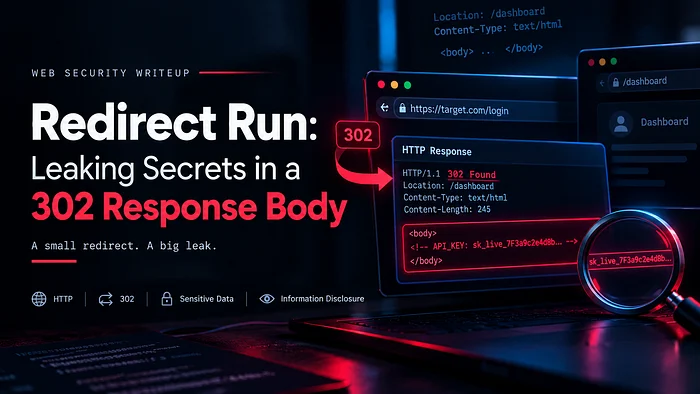
Redirect Run: Leaking Secrets in a 302 Response Body
A payments lab's shortlink redirect returned a 302 response whose HTML body still contained developer debug data, including an internal reference value. Anyone who intercepted the redirect with a proxy or script could read that data even though the browser never displays it.

medium.com
Published on medium.com
Cybersecurity
The full write-up lives on its author's site
It belongs to its author, so we link to it rather than copy it. The other two tabs are our own rewrites, checked against it.
Context
Quikpay is a fictional payments company used as the target of a lab. It generates short, shareable receipt URLs for merchants: opening one bounces the visitor to a friendly "thanks for your purchase" page. The lab briefing states that the redirect is not as silent as it looks, and that the engineering team forgot to strip something out of the intermediate response.
The challenge instance lives at:
https://795b9a6c-6357-redirect-run-718d5.challenges.webverselabs-pro.com/
Setup
The only tool used is Burp Suite, with Intercept enabled in the Proxy and Repeater for replaying requests. No account or role is needed: the demo shortlink on the landing page is public. The key precondition is that Repeater does not follow redirects automatically, so the raw 3xx response can be read instead of the final page.
Finding it
The landing page advertises receipt shortlinks and includes a live demo shortlink, /r/qp-r4-7821ab, with a Follow button.
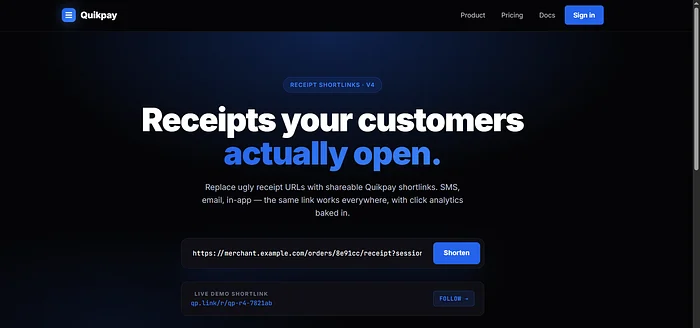
Clicking Follow takes the browser to /receipt. In the browser it looks like a normal receipt confirmation page, with nothing suspicious.
What made the redirect worth inspecting was the lab hint that the intermediate response carried something the team forgot to strip. The browser view alone gives no reason to suspect anything, which is exactly the point: the interesting bytes are in the response the browser consumes and discards.
Exploitation
Step 1: Intercept the redirect request
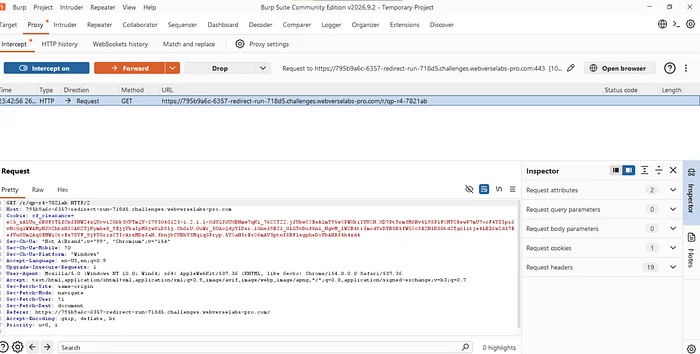
With Intercept on in Burp Suite, clicking Follow again caught the request:
GET /r/qp-r4-7821ab HTTP/2Host: 795b9a6c-6357-redirect-run-718d5.challenges.webverselabs-pro.com
This is a plain GET to the shortlink path /r/qp-r4-7821ab on the challenge host. There are no parameters, cookies or special headers involved; the shortlink identifier is the whole input.
Step 2: Send it to Repeater
The request was sent to Repeater (Ctrl+R) because Repeater does not follow redirects automatically. That is what allows the raw redirect response to be read rather than the destination page.
Step 3: Read the 302 response
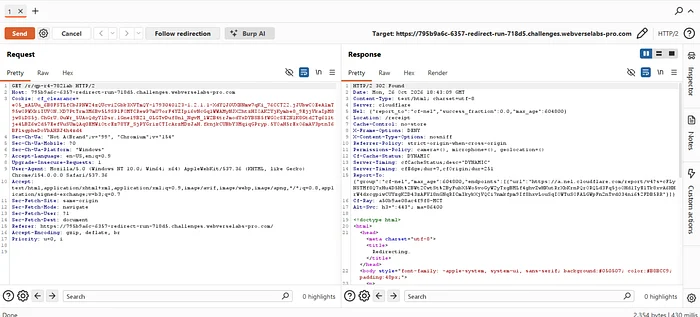
Clicking Send in Repeater returned a redirect:
HTTP/2 302 FoundContent-Type: text/html; charset=utf-8Location: /receiptCache-Control: no-store
Two details stood out:
- A normal redirect usually has an empty or tiny body, but this response was 2,354 bytes.
- The
Content-Typeistext/html, so there is an actual HTML body worth reading.
Step 4: Find the leak in the body
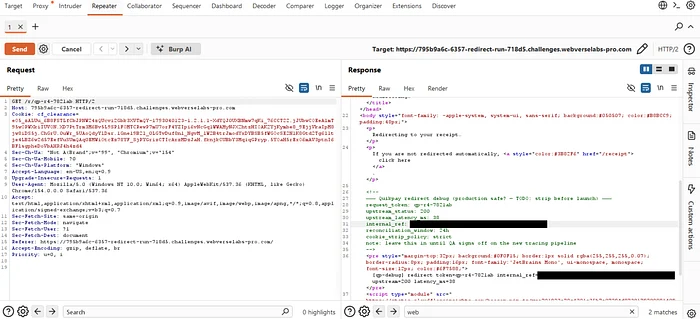
Scrolling down into the response body revealed an HTML comment left by the developers:
<!-- [qp-debug] redirect [redacted] internal_ref=WEBVERSE{*****REDACTED*****} upstream=200 latency_ms=38 -->
The same debug line was also repeated inside a visible <pre> block:
[qp-debug] redirect [redacted] internal_ref=WEBVERSE{*****REDACTED*****} upstream=200 latency_ms=38
The internal reference value is redacted in the published screenshots.
Root cause
Browsers follow Location headers automatically and never render the body of a 3xx response, so normal users never see it. The developers assumed that if the browser does not show it, nobody will see it, and used the response body as a scratch pad for debugging. But a response is delivered to the client in full: anyone using Burp, curl or a script can read every byte. The comment even said "TODO: strip before launch", a classic case of debug code reaching production.
Impact
In a real application, a leak like this could expose:
- Internal reference IDs and request tokens
- Upstream service details, latency and status information
- Tracing and reconciliation data that helps map the backend
- Secrets or session-related values, which can feed later attacks such as IDOR or authentication bypass
In this lab the exposed value is the internal reference in the debug line. The broader impact depends on what a given application writes into its redirect bodies; the report frames the above as possibilities for a real deployment rather than demonstrated consequences here.
Fix
The report does not describe a fix being applied. The implied remedy is to strip debug output from redirect responses before they reach production, as the TODO: strip before launch note itself says, and to treat the body of any response, including 3xx, as client-visible data.
Variants to test
- Other shortlink and redirect endpoints. Send each one to Repeater and read the raw 3xx body. A positive result is a body larger than a few bytes, or a
Content-Typesuch astext/htmlon a response that should carry no content. - Response size as a signal. Compare the
Content-Lengthor observed size of redirects across the application. A redirect with a large body, like the 2,354 bytes here, is worth reading in full. - HTML comments and hidden blocks. Search every response body for comments and
<pre>blocks. Developer notes often contain internal data, and here the same debug line appeared both as a comment and in a visible block. - Debug markers. Grep response bodies for strings such as
debug,token,internal_ref,upstreamandlatency. A positive result is any internal identifier, status or timing value that the UI never shows. - Other 3xx codes. Check 301, 303 and 307 responses as well as 302, since the same habit of writing into the body can appear on any redirect.
- Clients that ignore
Location. Fetch the shortlink with a tool that does not follow redirects, such as curl without-L, and inspect the full output. Anything present there but absent from the rendered page is a candidate leak.
Key takeaways
- Never trust "the browser hides it". Hidden in the UI does not mean hidden from the client.
- Always inspect intermediate responses. Check every 301/302/303/307 response, not just the final page.
- Look at response size. A redirect with a large body is suspicious.
- Read HTML comments. Developer notes often contain internal data.
The body of a redirect response is still visible to the client, so treat it like any other response. The habit that matters in real bug bounty and pentest work is to look at what happens between requests, not only at what the browser shows.
What happened, in plain words
Imagine you post a letter to a friend, and the friend writes back: "I have moved, here is my new address." That short note is a redirect. Your browser does the same thing when you open certain links: the server replies with a short note saying "the real page is over there", and the browser quietly goes there. You never see the note.
In this lab, a made-up payments company called Quikpay sends those short notes. The people who built it used the note as a scratch pad and wrote debugging information on it. They assumed that because the browser does not show the note, nobody would ever read it. That assumption is wrong. The note is a full message delivered to your computer, and any tool that can pause and look at network traffic can read every word of it.
The author of this write-up used a tool called Burp Suite to pause the traffic and read the redirect note. The whole exercise needs no account and no special access: the demo link on the public homepage is enough.
Background: what the product does
Quikpay is a fictional payments company used as the target of a practice lab. It makes short, shareable receipt links for shops. A shop gives a customer a short link, the customer opens it, and the browser is bounced to a friendly "thanks for your purchase" page.
The lab briefing tells you two things: the redirect is not as silent as it looks, and the engineering team forgot to remove something from the intermediate response. "Intermediate response" means the short note the server sends before the browser reaches the final page.
The practice instance lives at this address:
https://795b9a6c-6357-redirect-run-718d5.challenges.webverselabs-pro.com/
That address is just a web page, like any other. You open it in a browser.
The tools, explained from zero
The only tool used here is Burp Suite. Think of it as a transparent pipe you put between your browser and the internet. Normally your browser talks directly to a website. With Burp in the middle, every request your browser sends and every reply the server sends passes through Burp first, and Burp can pause them so you can read them.
Two parts of Burp matter here:
- Proxy with Intercept on. The Proxy is the pipe itself. "Intercept" means Burp holds each message and waits for you to look at it before letting it continue. It is like a mail room that stops every letter so you can read the envelope.
- Repeater. Repeater is a separate window where you paste a request and press Send as many times as you like. The important detail is that Repeater does not follow redirects automatically. If the server says "the page is over there", Repeater just shows you that note and stops. Your browser would have jumped straight to the destination and thrown the note away.
No account or role is needed. The demo shortlink on the landing page is public, so anyone can open it.
Step 1: Looking at the application
The landing page advertises receipt shortlinks. It includes a live demo shortlink, /r/qp-r4-7821ab, with a Follow button.
(Quikpay homepage with the demo shortlink and Follow button)
Clicking Follow takes the browser to /receipt. In the browser it looks like a normal receipt confirmation page, with nothing suspicious.
Why look at this at all? Because the lab hint says the intermediate response carries something the team forgot to remove. The browser view gives you no reason to suspect anything, and that is exactly the point: the interesting bytes are in the reply the browser reads and then discards. A shortlink is just a web address that stands in for a longer one, like a nickname for a page.
Step 2: Catching the redirect request
With Intercept turned on in Burp Suite, the author clicked Follow again. Burp caught the request before it reached the server:
GET /r/qp-r4-7821ab HTTP/2Host: 795b9a6c-6357-redirect-run-718d5.challenges.webverselabs-pro.com
Line by line, in plain words:
GET /r/qp-r4-7821ab HTTP/2is the request line.GETis the everyday verb a browser uses to ask for a page./r/qp-r4-7821abis the path being asked for, which is the shortlink identifier.HTTP/2is the version of the language the browser and server use to talk.Host: 795b9a6c-6357-redirect-run-718d5.challenges.webverselabs-pro.comtells the server which website the request is for. One server can host many sites, so the request has to name the one it wants.
There are no parameters, cookies or special headers involved. The shortlink identifier is the whole input. A parameter is an extra piece of information added to a request, usually after a ? in the address. A cookie is a small note a website asks your browser to keep and send back on later visits, often used to remember who you are. A header is a labelled line in a request or reply that carries extra information, like the Host line above.
(Burp Proxy showing the intercepted GET request to /r/qp-r4-7821ab)
Step 3: Sending it to Repeater
The request was sent to Repeater with the keyboard shortcut Ctrl+R. Why? Because Repeater does not follow redirects automatically. That is what lets you read the raw redirect reply instead of the destination page. If you used the browser, the browser would follow the redirect and you would only ever see the final page.
Step 4: Reading the 302 response
Clicking Send in Repeater returned a redirect:
HTTP/2 302 FoundContent-Type: text/html; charset=utf-8Location: /receiptCache-Control: no-store
Line by line:
HTTP/2 302 Foundis the status line.302is the standard code for "the thing you asked for is somewhere else, go there instead".Foundis just a human-readable label for that code.Content-Type: text/html; charset=utf-8says the body of this reply is HTML, the language web pages are written in, using the UTF-8 character encoding. This matters because it tells you there is a real page body to read, not just an empty note.Location: /receiptis the address the browser should go to next. This is the line the browser obeys automatically.Cache-Control: no-storetells any cache along the way not to keep a copy of this reply. A cache is a temporary storage that saves copies of pages to make later visits faster.
Two details stood out:
- A normal redirect usually has an empty or tiny body, but this response was 2,354 bytes. A byte is a unit of digital information; roughly, one character of text is about one byte. 2,354 bytes is a substantial amount of text for a note that is supposed to say only "go over there".
- The
Content-Typeistext/html, so there is an actual HTML body worth reading.
(Repeater showing the 302 Found response and the Location header)
Step 5: Finding the leak in the body
Scrolling down into the response body revealed an HTML comment left by the developers:
<!-- [qp-debug] redirect [redacted] internal_ref=WEBVERSE{*****REDACTED*****} upstream=200 latency_ms=38 -->
An HTML comment is text written between <!-- and -->. Browsers do not display it on the page, but it is still part of the file that arrives at your computer. Developers use comments to leave notes for each other.
Line by line:
<!--opens the comment and-->closes it. Everything between them is the note.[qp-debug]is a label marking this as debug output. Debug means information a program prints to help its own developers understand what it is doing.- `redirect [redacted] records the token for this redirect. A token is a short value used to identify or authorise something, like a claim ticket at a cloakroom. Here it matches the shortlink identifier.
internal_ref=WEBVERSE{*****REDACTED*****}is an internal reference value. It is redacted in the published screenshots, meaning the real value has been replaced with asterisks so it is not shared publicly.upstream=200records the status code returned by the service behind the scenes.200is the standard code for "OK, everything worked". Upstream means the next service in the chain, the one this server talks to.latency_ms=38records how long that upstream service took to answer, in milliseconds. Latency is delay, and a millisecond is one thousandth of a second.
The same debug line was also repeated inside a visible <pre> block:
[qp-debug] redirect [redacted] internal_ref=WEBVERSE{*****REDACTED*****} upstream=200 latency_ms=38
A <pre> block is an HTML element that shows text exactly as written, keeping spaces and line breaks. So the same debug line appeared twice: once as a comment and once inside a <pre> block. The internal reference is redacted in the published screenshots.
(Repeater response body showing the debug comment, with the flag redacted)
Why this works
- Browsers follow
Locationheaders automatically and never render the body of a 3xx response, so normal users never see it. A 3xx response is any reply whose status code starts with 3, meaning "look somewhere else". - The developers assumed that if the browser does not show it, nobody will see it, and used the response body as a scratch pad for debugging.
- But a response is delivered to the client in full. Anyone using Burp, curl or a script can read every byte. curl is a command-line tool for fetching web pages, and a script is a small program you write to do a task automatically.
- The comment even said "TODO: strip before launch", a classic case of debug code reaching production. Production is the live version of a website that real users see, as opposed to a test version.
Output encoding means transforming text so it cannot be misinterpreted, and filtering means removing unwanted content. Rendering is the process of turning HTML into the picture you see on screen.
Impact
In a real application, a leak like this could expose:
- Internal reference IDs and request tokens
- Upstream service details, latency and status information
- Tracing and reconciliation data that helps map the backend
- Secrets or session-related values, which can feed later attacks such as IDOR or authentication bypass
A few of those terms need unpacking. Tracing means following a request through the different services that handle it, and reconciliation means matching records between systems to check they agree. The backend is the part of a system users do not see, where the real work happens. IDOR stands for Insecure Direct Object Reference: a flaw where changing an identifier in a request lets you reach someone else's data. Authentication bypass means getting past a login check without the right credentials.
The broader impact depends on what a given application writes into its redirect bodies. The report frames the list above as possibilities for a real deployment rather than demonstrated consequences here.
Fix
The report does not describe a fix being applied. The implied remedy is to strip debug output from redirect responses before they reach production, as the TODO: strip before launch note itself says, and to treat the body of any response, including 3xx, as client-visible data.
Variants to test
- Other shortlink and redirect endpoints. Send each one to Repeater and read the raw 3xx body. A positive result is a body larger than a few bytes, or a
Content-Typesuch astext/htmlon a response that should carry no content. An endpoint is a specific address on a server that does a particular job. - Response size as a signal. Compare the
Content-Lengthor observed size of redirects across the application.Content-Lengthis a header stating how many bytes the body contains. A redirect with a large body, like the 2,354 bytes here, is worth reading in full. - HTML comments and hidden blocks. Search every response body for comments and
<pre>blocks. Developer notes often contain internal data, and here the same debug line appeared both as a comment and in a visible block. - Debug markers. Grep response bodies for strings such as
debug,token,internal_ref,upstreamandlatency. To grep is to search text for a word or pattern. A positive result is any internal identifier, status or timing value that the UI never shows. UI means user interface, the part of a site you see and interact with. - Other 3xx codes. Check 301, 303 and 307 responses as well as 302, since the same habit of writing into the body can appear on any redirect. These are all variants of "look somewhere else", with slightly different rules about how the browser should behave.
- Clients that ignore
Location. Fetch the shortlink with a tool that does not follow redirects, such as curl without-L, and inspect the full output. The-Loption tells curl to follow redirects; leaving it off keeps the raw reply. Anything present there but absent from the rendered page is a candidate leak.
Key takeaways
- Never trust "the browser hides it". Hidden in the UI does not mean hidden from the client. The client is your browser, or whatever program is making the request.
- Always inspect intermediate responses. Check every 301/302/303/307 response, not just the final page.
- Look at response size. A redirect with a large body is suspicious.
- Read HTML comments. Developer notes often contain internal data.
The body of a redirect response is still visible to the client, so treat it like any other response. The habit that matters in real bug bounty and pentest work is to look at what happens between requests, not only at what the browser shows. A bug bounty is a programme where companies pay people for reporting security flaws, and a pentest is a penetration test, an authorised attempt to break into a system to find its weaknesses.
Glossary
- 302 Found: the standard HTTP status code meaning the requested thing is somewhere else and the browser should go there instead.
- 3xx response: any HTTP reply whose status code starts with 3, meaning a redirect of some kind.
- API: a way for one program to talk to another, like a waiter taking your order to the kitchen.
- Authentication bypass: getting past a login check without the right credentials.
- Backend: the part of a system users do not see, where the real work happens.
- Bug bounty: a programme where companies pay people for reporting security flaws.
- Burp Suite: a tool that sits between your browser and the internet so you can pause, read and change traffic.
- Byte: a unit of digital information; roughly one character of text.
- Cache: temporary storage that keeps copies of pages to make later visits faster.
- Cache-Control: a header telling caches whether and how to keep a copy of a reply.
- Client: the program making a request, usually your browser.
- Content-Length: a header stating how many bytes the body of a reply contains.
- Content-Type: a header stating what kind of data the body holds, such as HTML.
- Cookie: a small note a website asks your browser to keep and send back on later visits.
- curl: a command-line tool for fetching web pages and other web resources.
- Debug: information a program prints to help its own developers understand what it is doing.
- Endpoint: a specific address on a server that does a particular job.
- Filtering: removing unwanted content from data.
- GET: the everyday HTTP verb a browser uses to ask for a page.
- Grep: to search text for a word or pattern.
- Header: a labelled line in a request or reply carrying extra information.
- Host: the header naming which website a request is for.
- HTML: the language web pages are written in.
- HTML comment: text between
<!--and-->that browsers do not display but that still arrives with the page. - HTTP/2: a version of the language browsers and servers use to talk to each other.
- IDOR: Insecure Direct Object Reference, a flaw where changing an identifier in a request lets you reach someone else's data.
- Intercept: a Burp Proxy setting that pauses each message so you can read it before it continues.
- Intermediate response: the reply a server sends before the browser reaches the final page, such as a redirect.
- Latency: delay, usually measured in milliseconds.
- Location: the header in a redirect telling the browser where to go next.
- Millisecond: one thousandth of a second.
- Output encoding: transforming text so it cannot be misinterpreted by the system receiving it.
- Parameter: an extra piece of information added to a request, usually after a
?in the address. - Pentest: penetration test, an authorised attempt to break into a system to find its weaknesses.
- Production: the live version of a website that real users see.
- Reconciliation: matching records between systems to check they agree.
- Redirect: a reply telling the browser that the requested page is somewhere else.
- Rendering: the process of turning HTML into the picture you see on screen.
- Repeater: a Burp window where you can resend a request and read the raw reply; it does not follow redirects automatically.
- Script: a small program written to do a task automatically.
- Shortlink: a short web address that stands in for a longer one.
- Token: a short value used to identify or authorise something, like a claim ticket.
- Tracing: following a request through the different services that handle it.
- UI: user interface, the part of a site you see and interact with.
- Upstream: the next service in the chain, the one a server talks to behind the scenes.
- UTF-8: a common way of encoding characters as bytes.



