Reflected XSS in a Public Event Waitlist Application
A language parameter on a public event waitlist page was reflected inside an HTML attribute without contextual encoding, allowing an attacker to break out of the attribute and inject an HTML element with an event handler. This let attacker-controlled JavaScript execute in a victim's browser under the application's origin, enabling page manipulation and phishing.

medium.com
Published on medium.com
Cybersecurity
The full write-up lives on its author's site
It belongs to its author, so we link to it rather than copy it. The other two tabs are our own rewrites, checked against it.
Context
The target was a public-facing event waitlist application. The feature under test was the public waitlist endpoint, which takes an event identifier and a language identifier, conceptually:
/event-waitlist?event=<EVENT>&lang=<LANGUAGE>
The lang parameter normally accepts short language identifiers. The value was reflected in several places on the waitlist page, including a hidden form field. The organisation and application are deliberately not identified in the writeup, and no target-specific URL is given.
The finding was a reflected XSS rated Medium, CVSS 3.1 6.1, CWE-79. The interesting part was not that the parameter was reflected, but that it was reflected inside an HTML attribute without contextual encoding, so the attribute could be terminated and arbitrary HTML injected.
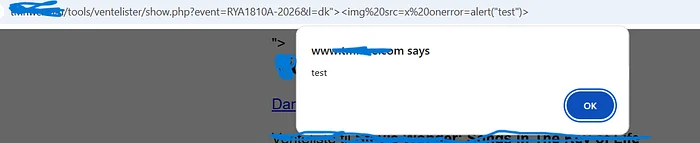
Setup
The writeup does not describe any accounts, roles or special tooling. The testing was done against the public waitlist functionality, with no authentication mentioned. Validation was performed in a real Chromium browser rather than relying only on inspecting HTTP responses, and DevTools was used to read a browser-side marker.
Finding it
The researcher began by replacing the expected short language value with a unique marker:
TEST123
The marker appeared in the server response. Reflection alone does not establish XSS, so the next question was where exactly the attacker-controlled value was being reflected. Inspecting the response showed the value was inserted into an HTML attribute, with markup conceptually similar to:
<input type="hidden" name="lang" value="USER_INPUT">
That was the critical discovery: attacker-controlled input was placed inside a quoted HTML attribute without appropriate output encoding. The obvious next test was whether the attribute could be terminated with:
Supplying lang=test"> produced markup conceptually equivalent to:
<input type="hidden" name="lang" value="test">
Once the existing attribute was terminated, additional attacker-controlled HTML could be introduced.
Exploitation
Step 1: Build a minimal injection primitive
The researcher used a minimal HTML injection payload:
"><img src=x onerror="window.__xss_fired='XSS_CONFIRMED_'+document.domain">
Three parts matter:
"terminates the existing attribute.>terminates the HTML element.<img ... onerror>introduces an executable event handler.
Step 2: URL-encode and submit
The payload was URL-encoded before being supplied to the vulnerable parameter, so the request followed this general structure:
/event-waitlist?event=<EVENT>&lang=<URL_ENCODED_PAYLOAD>
No target-specific URL is included in the writeup.
Step 3: Understand why it executes
The application effectively transformed the input into something similar to:
<input type="hidden" name="lang" value="test"><img src=x onerror="window.__xss_fired='XSS_CONFIRMED_'+document.domain">">
The browser no longer interpreted the injected content as part of the original attribute. It parsed the injected <img> as a new HTML element. Because the image source was intentionally invalid:
src=x
the browser triggered:
onerror
which executed the attacker-controlled JavaScript. The transition was: untrusted parameter, into an HTML attribute, attribute breakout, injected HTML element, JavaScript execution.
Step 4: Validate in a real browser
After navigating to the crafted URL in Chromium, the researcher checked:
window.__xss_fired
The value contained the application's origin, confirming the JavaScript had executed in the browser under the vulnerable origin. This established actual reflected XSS rather than simple HTML reflection, and confirmed the payload survived the application's request and response processing and was interpreted by the browser as executable markup.
Step 5: Look for other reflection sinks
The same user-controlled parameter appeared in multiple locations within the generated page: a hidden form field, an event-handler attribute, and link attributes. The hidden input was sufficient to achieve XSS. The additional reflection points were useful because they showed the underlying problem was not necessarily isolated to a single HTML element.
Step 6: Check Content Security Policy
The researcher checked whether a CSP prevented inline JavaScript execution. The affected page did not have a restrictive CSP that blocked the inline event handler used for validation, so the injected onerror="..." handler was able to execute. The absence of CSP was treated as a defence-in-depth issue, not the root cause; the fundamental vulnerability was unsafe insertion of attacker-controlled data into an HTML context.
Step 7: Investigate escalation
After confirming JavaScript execution, the researcher investigated the actual capabilities available to the injected script rather than assuming account takeover. Testing did not identify:
- Authentication cookies containing a usable session
- JWT credentials
- Sensitive browser storage
- An accessible same-origin administrative interface
- A demonstrated cross-origin authenticated API escalation
The vulnerable origin was checked for authentication material in cookies, JWTs, localStorage and sessionStorage, and none was found. The researcher also investigated whether the vulnerable origin was trusted by related authenticated APIs through permissive CORS configuration; the tested APIs did not grant the vulnerable origin the required cross-origin read access. Account takeover and cross-origin authenticated data theft could therefore not be demonstrated, and those claims were not used when determining severity.
Root cause
The root cause was improper output handling of attacker-controlled data. Conceptually, the vulnerable server-side logic behaved like:
echo '<input type="hidden" name="lang" value="' . $language . '">';
The problem is that $language originates from an HTTP request and is inserted directly into HTML. An attacker can therefore provide:
test"><payload>
and change the structure of the generated document. The application was placing the value inside a quoted HTML attribute without appropriate output encoding, and no restrictive CSP blocked the inline handler used for validation.
Impact
The demonstrated impact is browser-side control over the affected page, under the application's origin. The researcher explicitly did not demonstrate account takeover or cross-origin authenticated data theft, because no usable session cookies, JWT credentials, sensitive browser storage, accessible same-origin administrative interface or permissive CORS read access were found.
Within those limits, the vulnerability is more significant than visual defacement. The application contains a public waitlist form that collects information from visitors. Because injected JavaScript executes within the page, an attacker could manipulate the DOM and alter the behaviour or presentation of the form. A potential flow is: the attacker creates a malicious URL, the victim opens the legitimate waitlist page, the XSS executes, attacker-controlled JavaScript modifies the page, the victim interacts with the modified form, and attacker-controlled functionality processes the submitted information.
The attacker could also modify the legitimate page to display convincing phishing content, for example a fake login, payment or verification interface. The victim would still be interacting with the legitimate application's origin, which can increase the credibility of the social-engineering attack. The injected JavaScript can also modify page content, links and form elements, with potential consequences including defacement, malicious links, fake notifications, redirects, modified forms and social-engineering content.
Fix
Strict allowlisting
Because the language parameter is expected to contain only a small number of predefined values, strict validation is the preferred approach:
$allowedLanguages = ['en', 'dk'];
$language = $_GET['lang'] ?? 'en';if (!in_array($language, $allowedLanguages, true)) { $language = 'en';}
This prevents arbitrary input from reaching the HTML sink.
Context-aware output encoding
If arbitrary values are legitimately required, encode the value before inserting it into an HTML attribute:
echo '<input type="hidden" name="lang" value="' . htmlspecialchars( $language, ENT_QUOTES | ENT_HTML5, 'UTF-8' ) . '">';
The encoding must match the output context.
Content Security Policy
A restrictive CSP should also be deployed as defence in depth:
Content-Security-Policy: default-src 'self'; script-src 'self'; object-src 'none'; base-uri 'self';
CSP should not be considered a replacement for correct output encoding. The writeup does not say whether any of these changes were applied by the organisation.
Variants to test
The writeup closes with a repeatable hunting methodology that translates directly into things to try on other targets.
- Identify user-controlled parameters. Look for parameters such as
lang,language,search,query,name,redirect,next,return,urlandid. A positive result is finding such a parameter that the site accepts. - Test reflection. Send a unique marker such as
XSS_TEST_123and determine whether it appears in the response. A positive result is the marker appearing in the response. - Determine the context. Identify whether the reflection occurs inside HTML, HTML attributes, JavaScript, CSS, URLs or DOM-generated content.
- Test context termination. For an HTML attribute, investigate characters such as
"'>. - Introduce a minimal execution primitive. For example:
"><img src=x onerror=alert(1)>
- Replace the alert with deterministic validation. A browser-side marker is preferable for automated testing:
window.__xss_fired = true
- Validate with a real browser. Confirm the browser actually parses and executes the payload, rather than trusting the raw response.
- Investigate impact. After confirming XSS, examine authentication, cookies, browser storage, same-origin APIs, forms, administrative functionality, CORS and sensitive data.
- Document limitations. Clearly distinguish confirmed impact from theoretical impact. This prevents severity inflation and makes the report substantially more defensible.
What happened, in plain words
A website that lets people join a waiting list for an event had a bug in one of its web addresses. The address contained a small setting that told the site which language to show the page in. The site pasted whatever was in that setting into the page's code without encoding it for that context. By putting a piece of HTML (the language web pages are written in) into that setting, a person could make the page run JavaScript (the language browsers use to make pages interactive) that the site's owners never wrote. That is called reflected Cross-Site Scripting, or reflected XSS.
The person who found it rated it Medium, with a CVSS 3.1 score of 6.1 and the weakness category CWE-79. CVSS is a standard scoring system for how serious a security flaw is; CWE-79 is the catalogue entry for Cross-Site Scripting. The organisation and the application are deliberately not named in the writeup, and no real URL is given.
The interesting part was not that the setting showed up again on the page. It was where it showed up: inside an HTML attribute, which is a setting written on an HTML tag, such as the value of a form field. Because the value was not encoded (converted so the browser treats it as plain text rather than code), the attacker could close that attribute early and add their own HTML after it.
The product and the feature
An event waitlist is a page where visitors leave their details so they can be told when tickets or places become available. The page in question was public: no login was needed to reach it.
The page was reached through a web address with two settings in it, called parameters. A parameter is the part of a URL after a question mark, written as name=value, and it is a way of passing information to the server. The address looked conceptually like this:
/event-waitlist?event=<EVENT>&lang=<LANGUAGE>
Line by line:
/event-waitlistis the path of the page on the server.?marks the start of the parameters.event=<EVENT>says which event the waitlist belongs to.<EVENT>is a placeholder for a real event identifier.&separates one parameter from the next.lang=<LANGUAGE>says which language to display.<LANGUAGE>is a placeholder for a short code such asen.
The lang parameter normally accepts short language identifiers. The value was reflected in several places on the page, including a hidden form field. A hidden form field is an input that the visitor cannot see but that gets sent along with the form when it is submitted; sites use them to carry small pieces of information between pages.
Setting up
The writeup does not describe any accounts, roles or special tools. The testing was done against the public waitlist functionality, with no authentication mentioned. Authentication means proving who you are, usually by logging in; none of that was needed here.
The response is what the server sends back to the browser: the page's HTML plus some technical information about it.
Validation was done in a real Chromium browser (Chromium is the open-source browser engine behind Google Chrome and several other browsers) rather than only by reading the raw server response. The browser's DevTools were used to read a marker left behind by the injected script. DevTools is the built-in panel in most browsers, usually opened with F12, that lets you inspect the page and run small snippets of JavaScript in it.
Finding it
The first step was to replace the expected short language value with a unique marker:
TEST123
This is a single made-up word, chosen because it is unlikely to appear anywhere else on the page. The idea is simple: if you send something distinctive and then see it in the response, you know the site is copying your input into the page. It is like writing your name on a piece of paper and checking whether it comes back in the reply.
The marker appeared in the server response. But a value appearing in the response is not yet a vulnerability. Plenty of sites echo back what you typed, for example a search box that says "no results for TEST123", and that is harmless as long as the browser treats it as text. So the next question was: where exactly is the attacker-controlled value being reflected? Reflection means the site sends your input back to you in its response.
Inspecting the response showed the value was inserted into an HTML attribute, with markup conceptually similar to:
<input type="hidden" name="lang" value="USER_INPUT">
Line by line:
<input ...>is an HTML tag that creates a form field.type="hidden"makes that field invisible to the visitor.name="lang"gives the field a name, so the server knows which value it is when the form is submitted.value="USER_INPUT"is the field's contents.USER_INPUTis a placeholder for whatever the visitor supplied.- The closing
>ends the tag.
That was the critical discovery: attacker-controlled input was placed inside a quoted HTML attribute without appropriate output encoding. Output encoding means converting special characters such as " and < into safe stand-ins so the browser reads them as text instead of as code.
The obvious next test was whether the attribute could be terminated, that is, closed early, with:
This is two characters: a double quote and a greater-than sign. In HTML, a double quote ends an attribute value, and > ends the tag. Sending both together tells the browser "the attribute stops here and the tag stops here", which is exactly what an attacker wants if the site has pasted their input inside an attribute.
Supplying lang=test"> produced markup conceptually equivalent to:
<input type="hidden" name="lang" value="test">
Line by line:
- The site pasted
test">whereUSER_INPUThad been. - The
"closed thevalueattribute aftertest. - The
>closed the<input>tag. - The site's own trailing
">was left over as stray text, which the browser ignores.
Once the existing attribute was terminated, additional attacker-controlled HTML could be introduced. In other words, the attacker was no longer limited to filling in a value; they could add new tags of their own.
Exploitation
Step 1: Build a minimal injection primitive
The researcher used a minimal HTML injection payload:
"><img src=x onerror="window.__xss_fired='XSS_CONFIRMED_'+document.domain">
A payload is the piece of input that carries out the attack. Line by line:
"closes the attribute the site put the input into.>closes the tag the site was building.<img ...>starts a new HTML tag, an image.src=xtells the browser the image is at the addressx. That address does not exist, so the image will fail to load.onerror="..."is an event handler: a piece of JavaScript the browser runs when something happens. Here it runs when the image fails to load.window.__xss_fired='XSS_CONFIRMED_'+document.domainis the JavaScript that runs. It creates a variable called__xss_firedon the page'swindowobject (the global object that represents the browser tab) and stores a string in it. The string is the textXSS_CONFIRMED_joined todocument.domain, which is the site's own domain name. The double underscore in the name is just a naming convention to make it unlikely to clash with anything the site already uses.
Three parts matter:
"terminates the existing attribute.>terminates the HTML element.<img ... onerror>introduces an executable event handler.
Step 2: URL-encode and submit
The payload was URL-encoded before being supplied to the vulnerable parameter, so the request followed this general structure:
/event-waitlist?event=<EVENT>&lang=<URL_ENCODED_PAYLOAD>
URL encoding is a way of writing characters that are not allowed, or that have a special meaning, in a web address. A space becomes %20, for example, and a double quote becomes %22. Without it, characters such as & or # inside the payload would be read as part of the address structure rather than as data. The browser or a tool does this conversion for you; you do not have to do it by hand.
No target-specific URL is included in the writeup.
Step 3: Understand why it executes
The application effectively transformed the input into something similar to:
<input type="hidden" name="lang" value="test"><img src=x onerror="window.__xss_fired='XSS_CONFIRMED_'+document.domain">">
Line by line:
<input type="hidden" name="lang" value="test">is the field the site meant to build, now closed early because of the injected">.<img src=x onerror="...">is the attacker's new tag, sitting after the field as a separate element.- The final
">is the site's own leftover closing characters, now just stray text.
The browser no longer interpreted the injected content as part of the original attribute. It parsed the injected <img> as a new HTML element. Parsing is the browser's job of reading HTML and turning it into the page you see; it follows the rules of HTML, not the intentions of the site's author.
Because the image source was intentionally invalid:
src=x
the browser triggered:
onerror
which executed the attacker-controlled JavaScript. The browser tried to fetch an image from x, failed, and fired the error event, and the error event ran the code attached to it.
The transition was: untrusted parameter, into an HTML attribute, attribute breakout, injected HTML element, JavaScript execution. "Attribute breakout" simply means escaping from inside the attribute so that what follows is treated as new markup.
Step 4: Validate in a real browser
After navigating to the crafted URL in Chromium, the researcher checked:
window.__xss_fired
This is the name of the variable the payload created. Typing it into the browser's console asks the browser to show its current value. If the payload ran, the variable exists and holds a string; if it did not run, the variable does not exist at all.
The value contained the application's origin, confirming the JavaScript had executed in the browser under the vulnerable origin. The origin is the combination of scheme, host and port that identifies a site, for example https://example.com. It matters because browsers treat each origin as a separate security zone: code running under one origin can read that origin's data, and code from another origin cannot.
This established actual reflected XSS rather than simple HTML reflection, and confirmed the payload survived the application's request and response processing and was interpreted by the browser as executable markup. In plain terms: the site did not strip or alter the payload on the way through, and the browser really did run it.
Step 5: Look for other reflection sinks
The same user-controlled parameter appeared in multiple locations within the generated page: a hidden form field, an event-handler attribute, and link attributes. A sink is the place in the page where untrusted data ends up; the type of sink decides what an attacker can do there.
The hidden input was sufficient to achieve XSS. The additional reflection points were useful because they showed the underlying problem was not necessarily isolated to a single HTML element. If the same value is pasted in several places, fixing only one of them leaves the others open.
Step 6: Check Content Security Policy
The researcher checked whether a CSP prevented inline JavaScript execution. A Content Security Policy is a set of rules a site sends to the browser saying which sources of code are allowed to run. It is like a guest list at a door: anything not on the list is turned away. "Inline" JavaScript means code written directly inside the HTML, such as the onerror handler here, rather than loaded from a separate file.
The affected page did not have a restrictive CSP that blocked the inline event handler used for validation, so the injected onerror="..." handler was able to execute.
The absence of CSP was treated as a defence-in-depth issue, not the root cause. Defence in depth means adding extra layers of protection so that one mistake does not become a full compromise. The fundamental vulnerability was unsafe insertion of attacker-controlled data into an HTML context; the missing CSP only made the consequences easier to reach.
Step 7: Investigate escalation
After confirming JavaScript execution, the researcher investigated the actual capabilities available to the injected script rather than assuming account takeover. Account takeover means an attacker gains control of someone else's account. It is a common claim in XSS reports, and it is only true if the injected code can actually reach something valuable.
Testing did not identify:
- Authentication cookies containing a usable session
- JWT credentials
- Sensitive browser storage
- An accessible same-origin administrative interface
- A demonstrated cross-origin authenticated API escalation
Some terms here are worth unpacking. A cookie is a small piece of data a site stores in your browser and sends back with each request; a session cookie is the one that proves you are logged in, so stealing it is often equivalent to stealing the account. A JWT, or JSON Web Token, is a signed token often used in place of a cookie to prove identity. Browser storage means localStorage and sessionStorage, two places a page can keep data in the browser. An API is an interface a program uses to talk to another program, usually over the web; a same-origin API is one on the same site, and a cross-origin API is one on a different site. CORS, Cross-Origin Resource Sharing, is the mechanism by which a server tells browsers whether other origins may read its responses.
The vulnerable origin was checked for authentication material in cookies, JWTs, localStorage and sessionStorage, and none was found. The researcher also investigated whether the vulnerable origin was trusted by related authenticated APIs through permissive CORS configuration; the tested APIs did not grant the vulnerable origin the required cross-origin read access. Account takeover and cross-origin authenticated data theft could therefore not be demonstrated, and those claims were not used when determining severity.
This is an important habit: after proving code runs, find out what it can actually reach. A bug that runs code but cannot reach anything valuable is still a bug, but it is a smaller one.
Root cause
The root cause was improper output handling of attacker-controlled data. Conceptually, the vulnerable server-side logic behaved like:
echo '<input type="hidden" name="lang" value="' . $language . '">';
Line by line:
echois a PHP instruction that prints text into the page. PHP is a programming language commonly used on web servers.'<input type="hidden" name="lang" value="'is a fixed piece of text, the start of the field..joins pieces of text together.$languageis the value taken from the request, inserted with no cleaning.'">'is the fixed ending of the field.
The problem is that $language originates from an HTTP request and is inserted directly into HTML. An attacker can therefore provide:
test"><payload>
and change the structure of the generated document. The application was placing the value inside a quoted HTML attribute without appropriate output encoding, and no restrictive CSP blocked the inline handler used for validation.
Impact
The demonstrated impact is browser-side control over the affected page, under the application's origin. In plain terms: an attacker can make the real page do things it was not written to do, while the browser still believes it is the real site.
The researcher explicitly did not demonstrate account takeover or cross-origin authenticated data theft, because no usable session cookies, JWT credentials, sensitive browser storage, accessible same-origin administrative interface or permissive CORS read access were found.
Within those limits, the vulnerability is more significant than visual defacement. Defacement means changing how a page looks, which is annoying but limited. The application contains a public waitlist form that collects information from visitors. Because injected JavaScript executes within the page, an attacker could manipulate the DOM and alter the behaviour or presentation of the form. The DOM, Document Object Model, is the browser's live model of the page: the tree of elements that JavaScript can read and change.
A potential flow is: the attacker creates a malicious URL, the victim opens the legitimate waitlist page, the XSS executes, attacker-controlled JavaScript modifies the page, the victim interacts with the modified form, and attacker-controlled functionality processes the submitted information. The victim would still be interacting with the legitimate application's origin, which can increase the credibility of the attack.
The attacker could also modify the legitimate page to display convincing phishing content, for example a fake login, payment or verification interface. Phishing means tricking someone into entering information on a page that looks trustworthy. The victim would still be interacting with the legitimate application's origin, which can increase the credibility of the social-engineering attack. Social engineering means manipulating people rather than machines.
The injected JavaScript can also modify page content, links and form elements, with potential consequences including defacement, malicious links, fake notifications, redirects, modified forms and social-engineering content.
Fix
Strict allowlisting
Because the language parameter is expected to contain only a small number of predefined values, strict validation is the preferred approach:
$allowedLanguages = ['en', 'dk'];
Line by line:
$allowedLanguagesis a variable holding a list.['en', 'dk']is the list itself: two short language codes, English and Danish.
$language = $_GET['lang'] ?? 'en';if (!in_array($language, $allowedLanguages, true)) { $language = 'en';}
Line by line:
$_GET['lang']reads thelangparameter from the web address.?? 'en'means "if it is missing, useeninstead".in_array($language, $allowedLanguages, true)checks whether the value is one of the allowed codes; thetruemakes the comparison strict, so only exact matches count.!means "not", so theifruns when the value is not on the list.$language = 'en';replaces anything unexpected with the default.
This prevents arbitrary input from reaching the HTML sink. Allowlisting means deciding in advance what is acceptable and rejecting everything else, rather than trying to spot and remove bad input. It is like a door that only opens for two named keys.
Context-aware output encoding
If arbitrary values are legitimately required, encode the value before inserting it into an HTML attribute:
echo '<input type="hidden" name="lang" value="' . htmlspecialchars( $language, ENT_QUOTES | ENT_HTML5, 'UTF-8' ) . '">';
Line by line:
htmlspecialchars(...)is a PHP function that turns characters with special meaning in HTML into safe stand-ins.$languageis the value being cleaned.ENT_QUOTES | ENT_HTML5tells it to handle both single and double quotes, following HTML5 rules.'UTF-8'says the text is encoded in UTF-8, a standard character encoding.- The result is joined into the field instead of the raw value.
The encoding must match the output context. A value placed inside an HTML attribute needs different treatment from one placed inside a JavaScript block or a URL, because each context has its own rules for what counts as code.
Content Security Policy
A restrictive CSP should also be deployed as defence in depth:
Content-Security-Policy: default-src 'self'; script-src 'self'; object-src 'none'; base-uri 'self';
Line by line:
default-src 'self'says that, unless stated otherwise, resources may only come from the same origin.script-src 'self'says scripts may only be loaded from the same origin, which blocks inline handlers like the one used here.object-src 'none'blocks plugin content entirely.base-uri 'self'stops an attacker from changing the page's base address, which could redirect relative links.
CSP should not be considered a replacement for correct output encoding. The writeup does not say whether any of these changes were applied by the organisation.
Variants to test
The writeup closes with a repeatable hunting methodology that translates directly into things to try on other targets. Each step below is something you can do with a browser and a little patience.
- Identify user-controlled parameters. Look for parameters such as
lang,language,search,query,name,redirect,next,return,urlandid. These are places where the site takes something from the visitor. A positive result is finding such a parameter that the site accepts. - Test reflection. Send a unique marker such as
XSS_TEST_123and determine whether it appears in the response. A positive result is the marker appearing in the response. - Determine the context. Identify whether the reflection occurs inside HTML, HTML attributes, JavaScript, CSS, URLs or DOM-generated content.
- Test context termination. For an HTML attribute, investigate characters such as
"'>. - Introduce a minimal execution primitive. For example:
"><img src=x onerror=alert(1)>
Line by line: " closes the attribute, > closes the tag, <img src=x> creates an image that will fail to load, and onerror=alert(1) runs the browser's alert function, which shows a small pop-up.
- Replace the alert with deterministic validation. A browser-side marker is preferable for automated testing:
window.__xss_fired = true
Line by line: this sets a variable called __xss_fired on the page's global object to true. Unlike a pop-up, which a person has to see, a variable can be read by a script, so it works in automated tests.
- Validate with a real browser. Confirm the browser actually parses and executes the payload, rather than trusting the raw response. A response can look dangerous and still be harmless once the browser has parsed it, and the reverse is also true.
- Investigate impact. After confirming XSS, examine authentication, cookies, browser storage, same-origin APIs, forms, administrative functionality, CORS and sensitive data.
- Document limitations. Clearly distinguish confirmed impact from theoretical impact. This prevents severity inflation and makes the report substantially more defensible. Saying what you did not find is as useful as saying what you did.
Glossary
- API: an interface that lets one program request data or actions from another, usually over the web.
- Attribute: a setting written inside an HTML tag, such as
value="en". - Authentication: proving who you are, usually by logging in.
- Browser storage:
localStorageandsessionStorage, two places a page can keep data in the browser. - Chromium: the open-source browser engine behind Google Chrome and several other browsers.
- Content Security Policy (CSP): rules a site sends to the browser saying which sources of code may run.
- Cookie: a small piece of data a site stores in your browser and sends back with each request.
- CORS (Cross-Origin Resource Sharing): the mechanism by which a server tells browsers whether other origins may read its responses.
- Cross-origin: belonging to a different origin from the page being viewed.
- CVSS: a standard scoring system for the severity of a security flaw.
- CWE-79: the catalogue entry for Cross-Site Scripting.
- Defacement: changing how a page looks without changing what it does.
- Defence in depth: adding extra layers of protection so one mistake does not become a full compromise.
- DevTools: the built-in browser panel for inspecting a page and running JavaScript in it.
- DOM (Document Object Model): the browser's live model of the page, which JavaScript can read and change.
- Event handler: a piece of JavaScript the browser runs when something happens, such as an image failing to load.
- Hidden form field: an input the visitor cannot see but that is sent with the form.
- HTML: the language web pages are written in.
- HTTP request: the message a browser sends to a server asking for a page or sending data.
- Inline JavaScript: code written directly inside the HTML rather than loaded from a separate file.
- JavaScript: the programming language browsers use to make pages interactive.
- JWT (JSON Web Token): a signed token often used in place of a cookie to prove identity.
- Origin: the combination of scheme, host and port that identifies a site, such as
https://example.com. - Output encoding: converting special characters into safe stand-ins so the browser reads them as text instead of code.
- Parameter: a
name=valuepair in a URL after the question mark, used to pass information to the server. - Parsing: the browser's job of reading HTML and turning it into the page you see.
- Payload: the piece of input that carries out an attack.
- PHP: a programming language commonly used on web servers.
- Phishing: tricking someone into entering information on a page that looks trustworthy.
- Reflected XSS: a Cross-Site Scripting flaw where the malicious input is sent back in the response to the same request.
- Reflection: the site sending your input back to you in its response.
- Response: what the server sends back to the browser.
- Same-origin: belonging to the same origin as the page being viewed.
- Session cookie: the cookie that proves you are logged in.
- Sink: the place in the page where untrusted data ends up.
- Social engineering: manipulating people rather than machines.
- URL encoding: writing characters that are not allowed in a web address as
%codes, such as%22for a double quote. - XSS (Cross-Site Scripting): a flaw where a site lets attacker-supplied code run in a victim's browser under the site's own origin.




