Remote Command Execution in a Bank Server
The application allowed arbitrary file retrieval via filename and folder parameters, and an unlinked JSP file permitted unrestricted file upload. An attacker could upload a web shell and execute OS commands on the server.
 Published on medium.com
A detailed article on how I exploited Remote Command Execution (RCE) with the help of the Vulnerability Chain.
The full write-up lives on its author's site
It belongs to its author, so we link to it rather than copy it. The other two tabs are our own rewrites, checked against it.
Context
The target was a web portal belonging to a non-Indian banking website, described by the author as highly reputed. The portal's core function was to manage reports: annual reports, KYC reports, and invoice and billing related reports. Users could generate, download and analyse e-statements covering insurance, loan, investment and other financial details.
The assessment was grey box. The feature that started everything was the statement download: a user supplied a Customer ID, the application generated a hyperlink, and clicking that link downloaded a statement PDF. The download request carried two parameters, filename and folder, and the PDF was produced according to their values.
The author chained a series of issues to reach remote command execution: arbitrary file retrieval, a hidden internal directory listing parameter, an unlinked JSP file in the web root, and an unrestricted file upload. The overall flow is drawn in the diagram below.
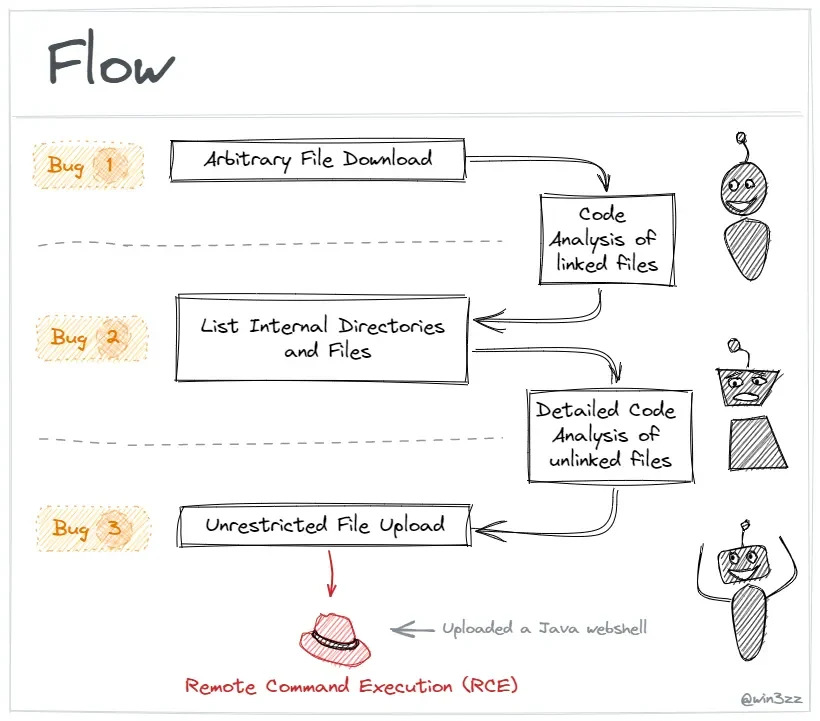
A simple pictorial representation of the entire flow.
Setup
The work was done with Burp Suite: the proxy for intercepting and replaying requests, the Target Analyzer within the Engagement Tools for collecting JSP page names, and Intruder for the fuzzing runs. The application was Java based, with JSP controllers such as PDFViewer.jsp, cr_master_invoice.jsp and cr_upload_bak11.jsp. No account details, roles or software versions are given in the report.
Finding it
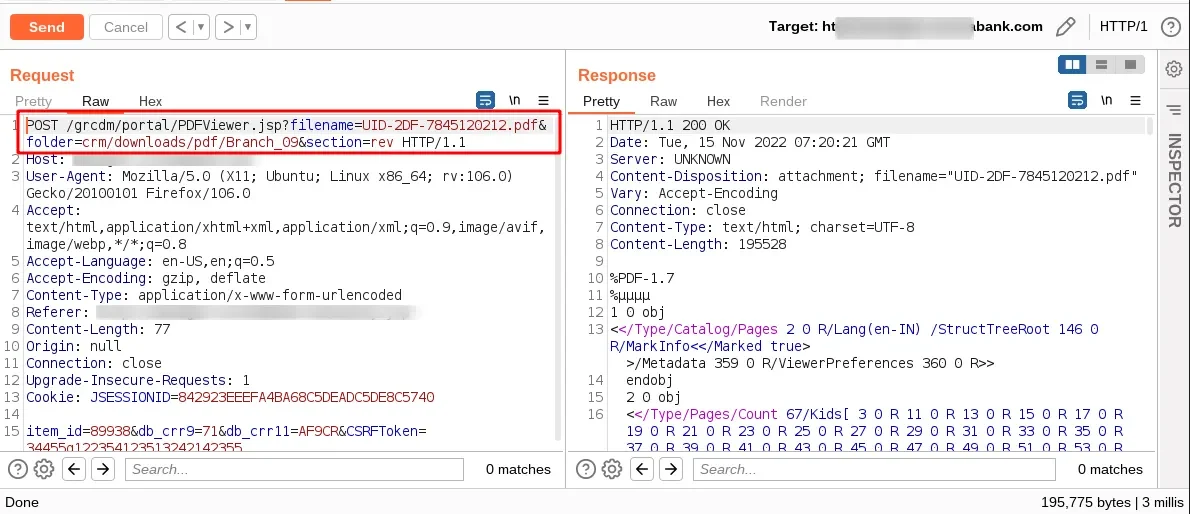
Intercepting the PDF download showed the request carrying the filename and folder parameters.
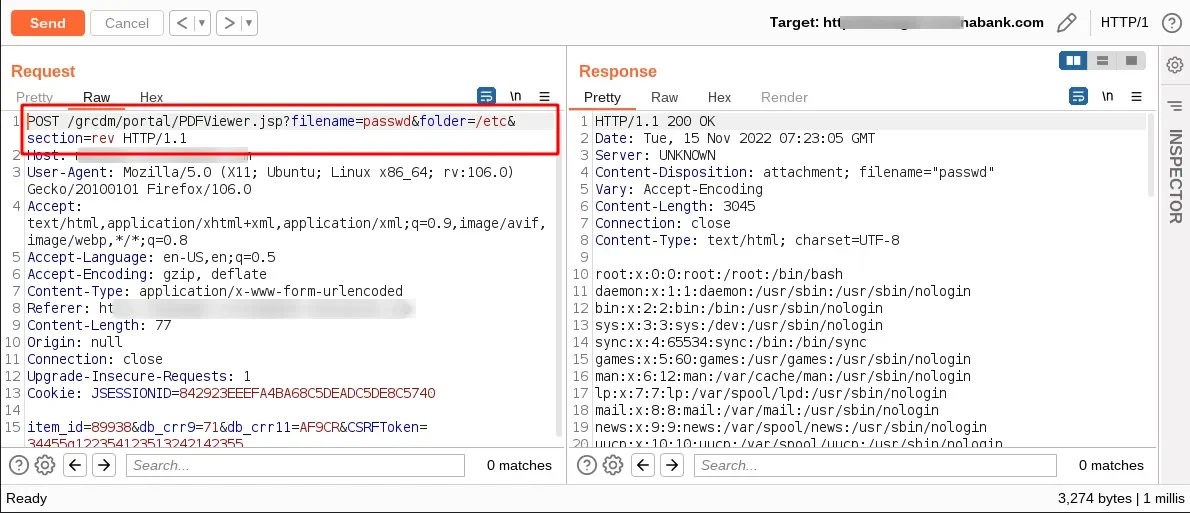
Sending passwd as the filename and /etc as the folder made the server return the Linux passwd file, so the two parameters were being used to build a file path with no restriction on which file was read.
There was a catch: the application rejected directory traversal payloads. The author states that '../', '%2e%2e%2f' and other such payloads were not allowed, so an attacker needed to know the absolute path of a file for a successful attack. Attempts to read default internal OS configuration files such as /proc/cpuinfo, /etc/environment, ~/.bashrc, ~/.bash_history, access.log and error.log mostly failed with errors saying the operation was not permitted or access was denied.
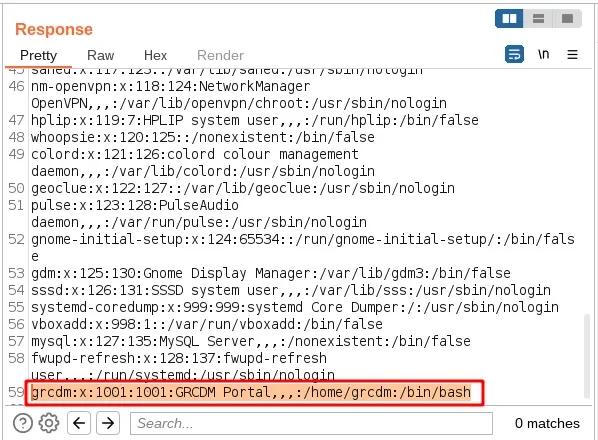
Looking again at the passwd file, the author noticed an interesting grcdm user.
The earlier attempt had used a tilde in the payload (~/.bash_history). This time the same file was requested through grcdm's home directory, /home/grcdm, without the tilde, and the complete command history of the grcdm user came back. .bash_history is the Linux file that stores the commands typed by a logged-in user.
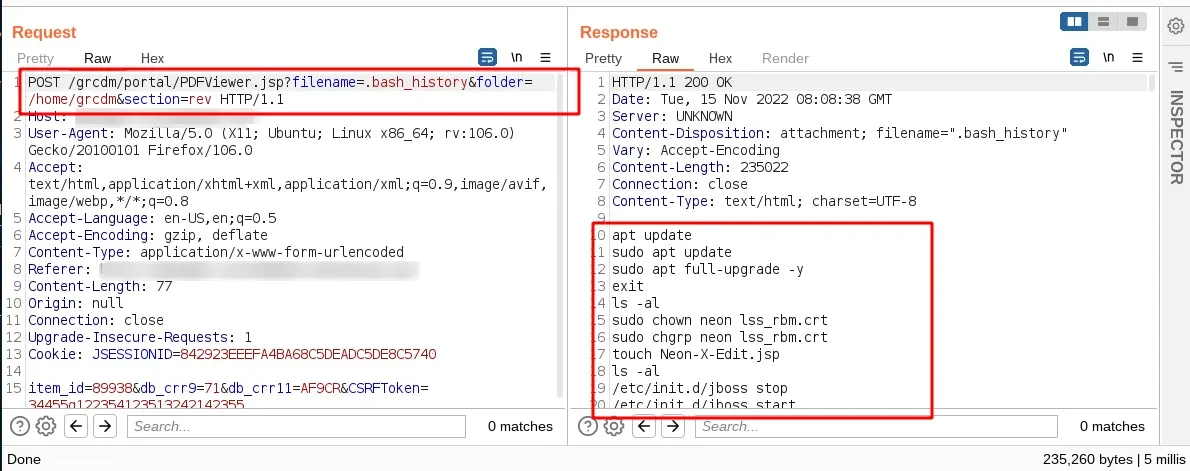
Reading through those commands revealed the web host's root path.
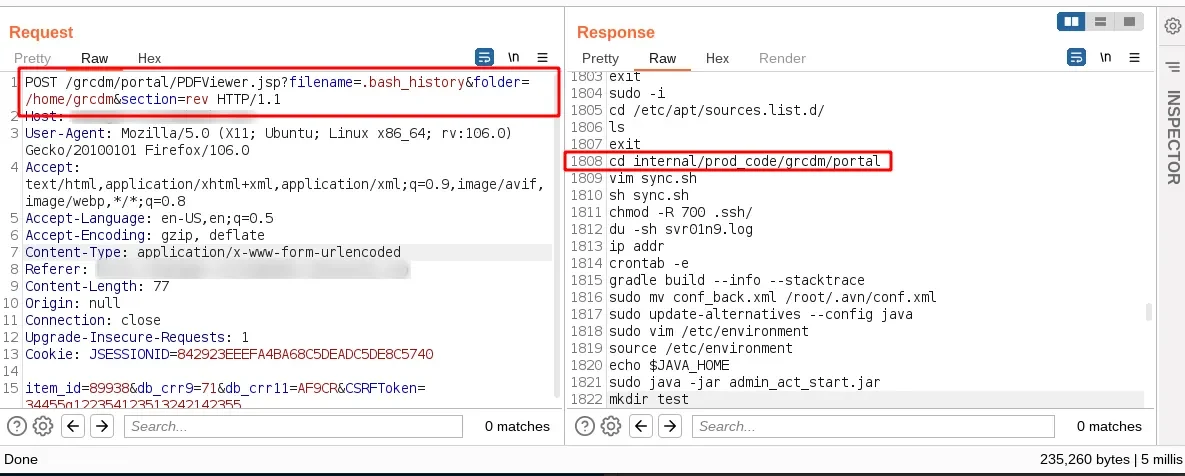
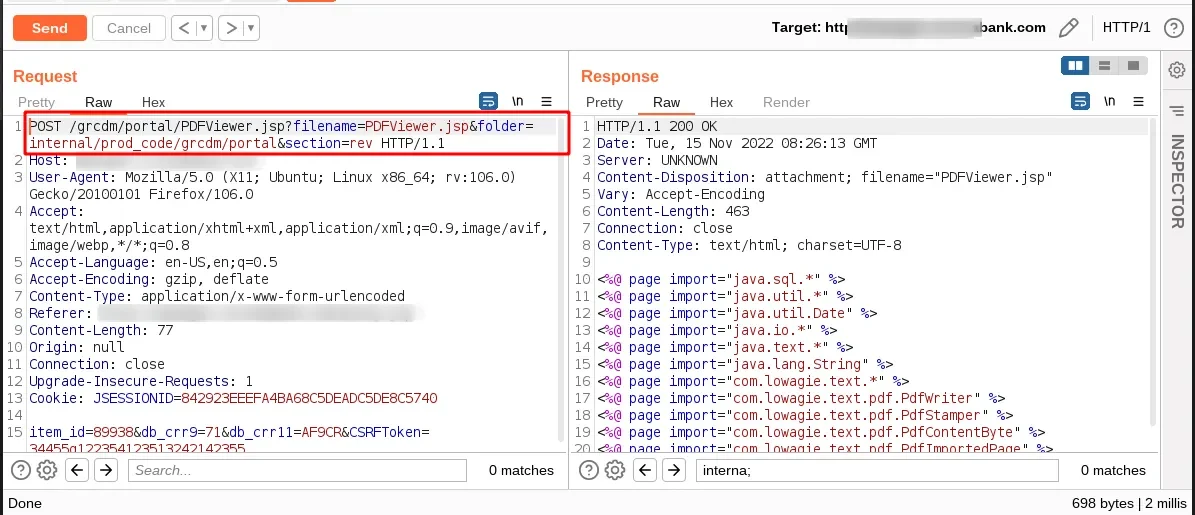
With the root path known, the source code of the vulnerable controller, PDFViewer.jsp, could be retrieved. It was written in Java.
The author classifies the bug as Arbitrary File Retrieval (AFR), explicitly not Local File Inclusion (LFI). The distinction given is execution: LFI returns the output of the executed file, while AFR returns raw file contents without executing them. LFI is more serious because it can be exploited through log poisoning or the /proc/self/environ method to reach direct command injection, whereas with AFR only the content of a readable file can be leaked.

A practical example showing the difference between LFI and AFR
The AFR was reported, and the bank's team agreed to allow further analysis and exploitation.
Exploitation
Step 1: Harvest JSP page names
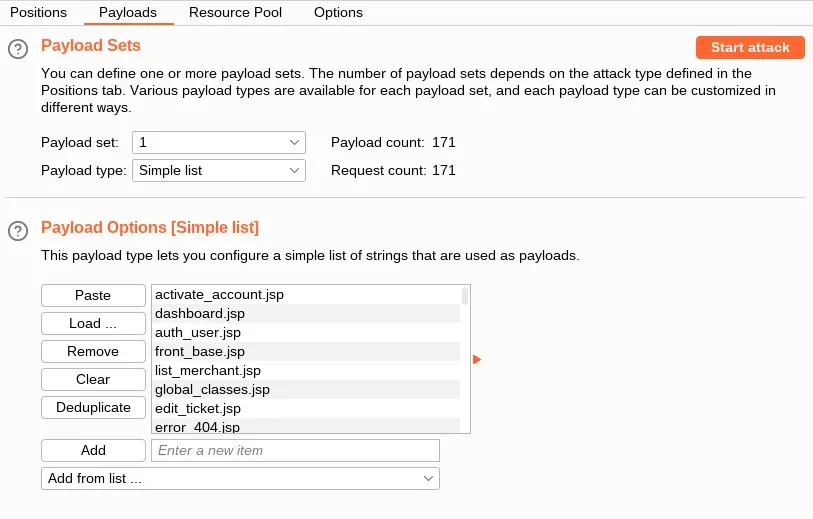
The application had already been crawled. The names of all JSP pages within the target domain were copied using the Target Analyzer in Burp Suite's Engagement Tools. Intruder was configured with the attack point set to the value of the filename parameter.
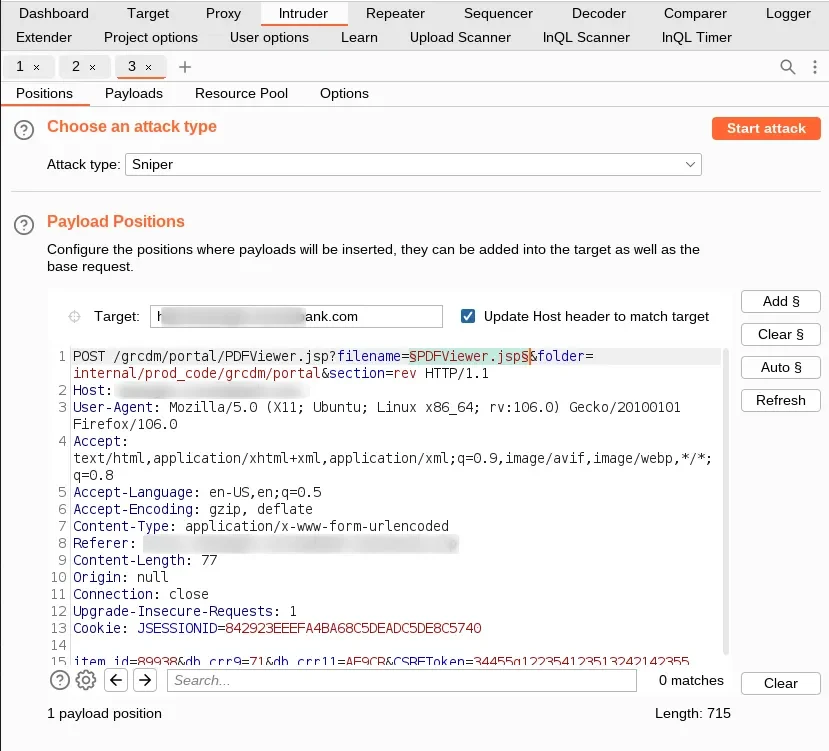
Intruder then repeated the same request with the list of JSP pages as payloads.
Step 2: Read the source of each page and find the directory listing
The Java code in the response to each request was reviewed. In cr_master_invoice.jsp the author found a code snippet vulnerable to webserver internal directory listing.
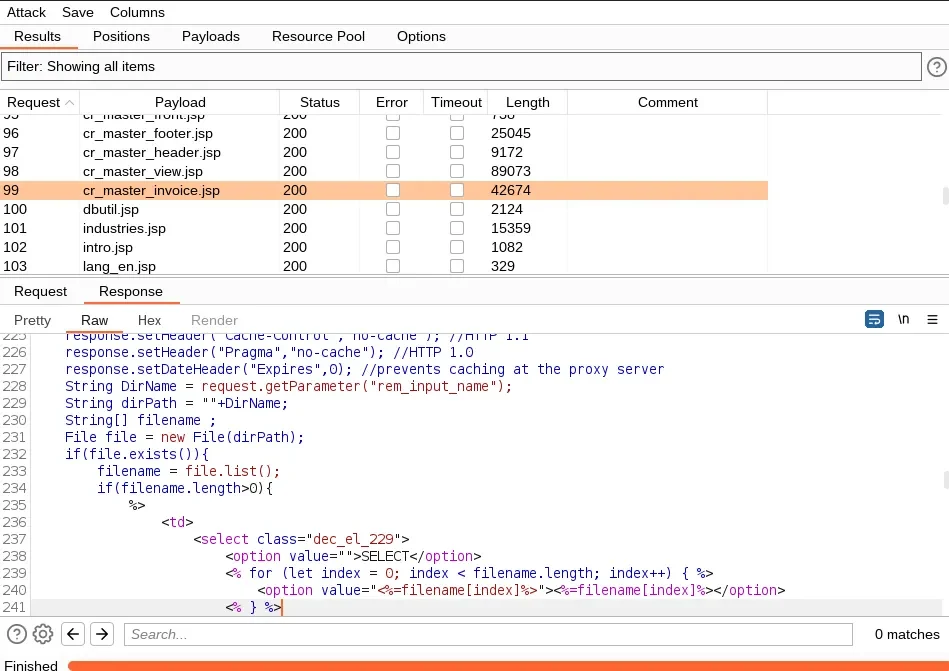
The snippet lists all files and sub-folders of a folder specified in the rem_input_name parameter.
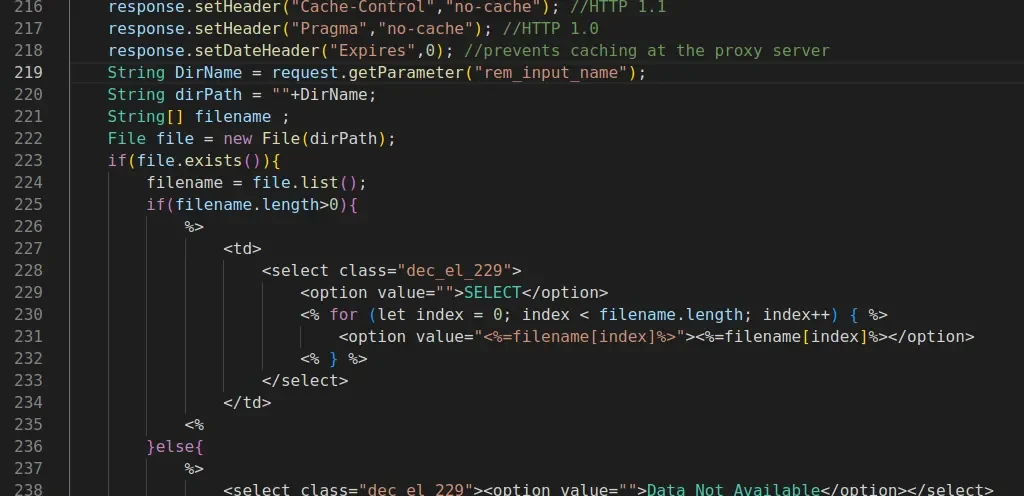
Source code snippet of cr_master_invoice.jsp
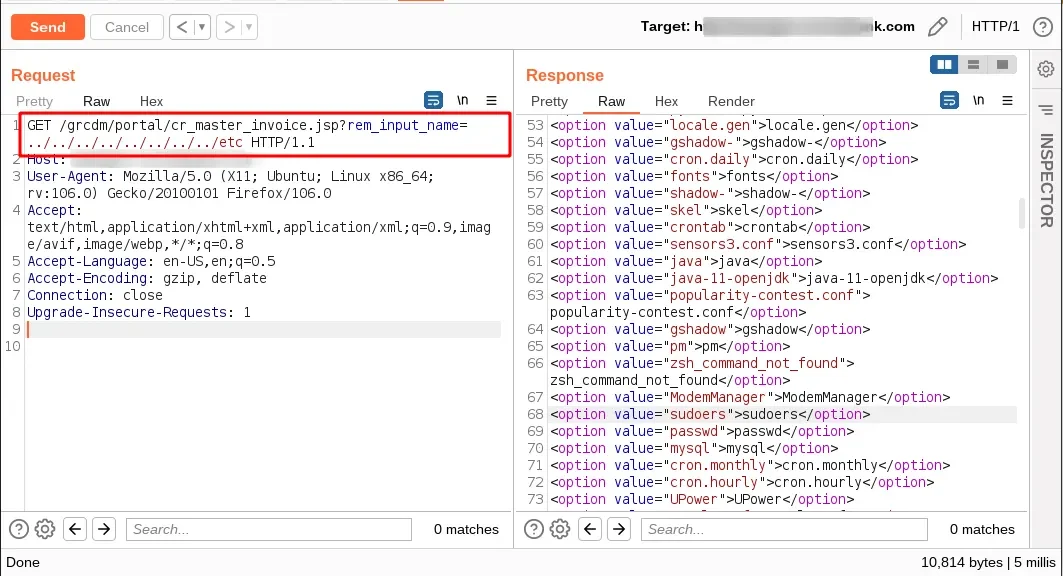
rem_input_name was an unused parameter, hidden or created by a developer for internal experiments. It lists files and directories inside HTML <option> tags. Passing ../../../../../../etc to rem_input_name listed all the contents of the etc directory.
Step 3: Find an unlinked JSP file
All folders were crawled with the help of the internal directory listing. While listing the contents of /grcdm/portal/content/ext/framework, the author saw an unlinked JSP file. Unlinked files are in the web root and reachable over the internet, but are not part of the web application.
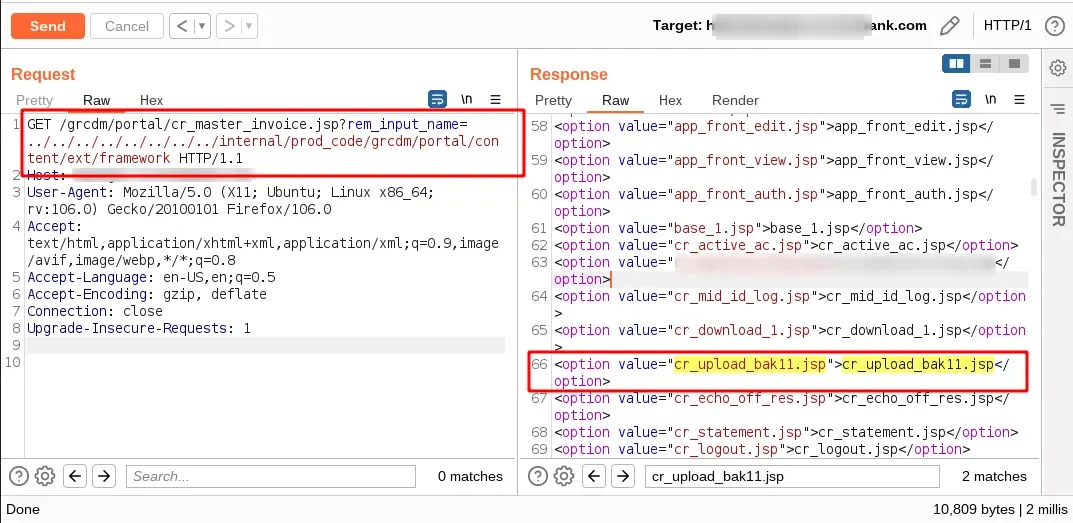
Its source code was retrieved, and reviewing it revealed buggy code vulnerable to unrestricted file upload.
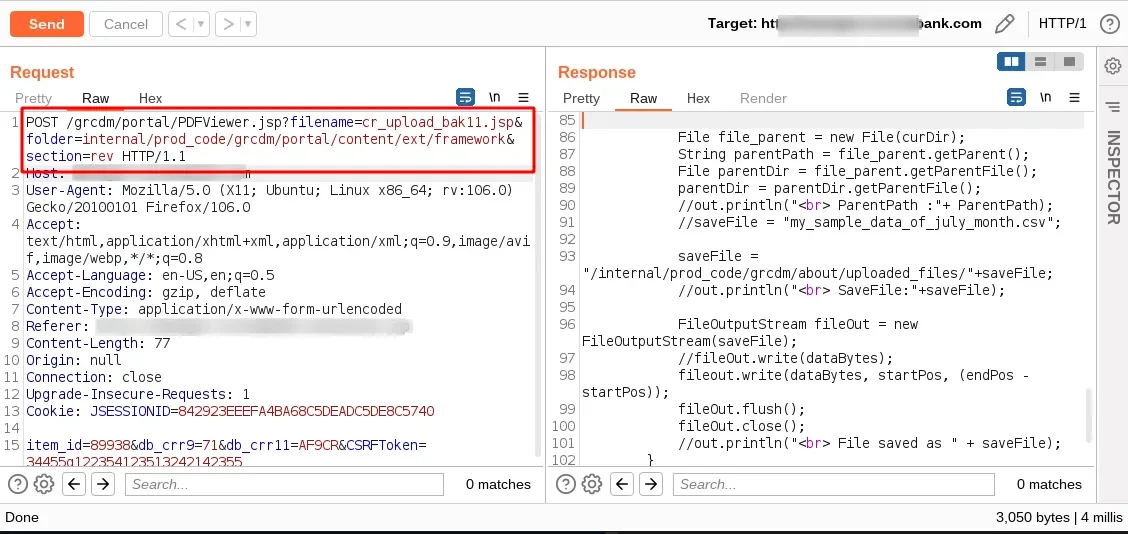
Step 4: Analyse the upload endpoint
The analysis concluded that the JSP endpoint did not validate the session (for authentication), the file extension, or the content type of the uploaded file (Code snippet 1). The second important point was where uploads landed: inside the web host's root path, at /grcdm/about/uploaded_files/, directly accessible from the browser (Code snippet 2).
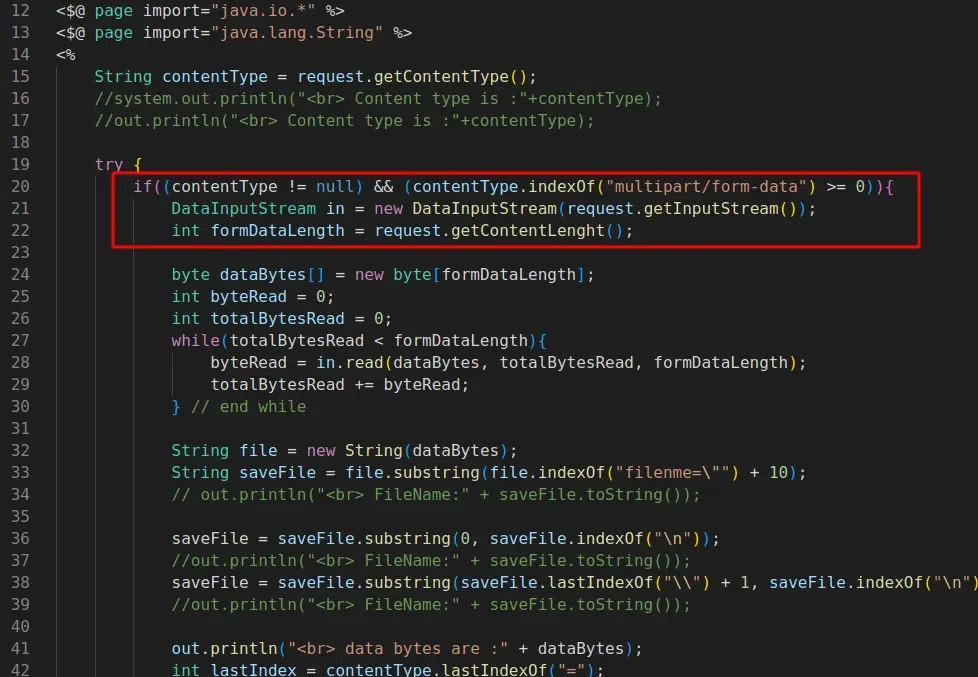
cr_upload_bak11.jsp, Code snippet 1
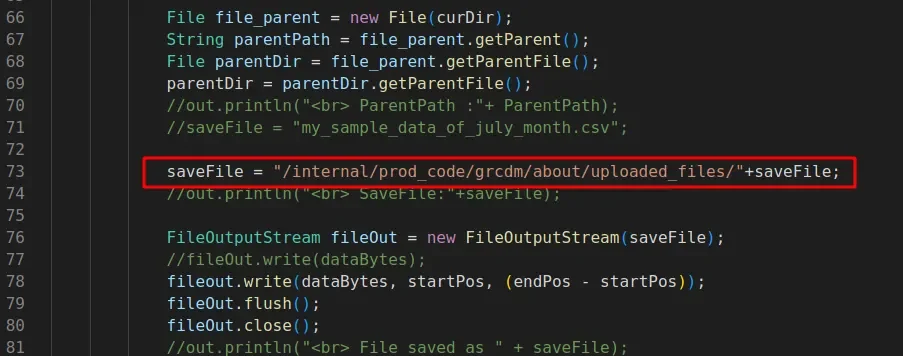
cr_upload_bak11.jsp, Code snippet 2
Step 5: Build an upload page and upload a web shell
An HTML upload page was created, with the vulnerable endpoint in the action attribute of the form tag.
<!DOCTYPE html><html> <body> <form action="https://[REDACTED].com/grcdm/portal/content/ext/framework/cr_upload_bak11.jsp" method="POST" enctype="multipart/form-data"> <input type="file" name="fileToUpload" /> <input type="submit" value="Upload file" /> </form> </body></html>
The form posts multipart data to cr_upload_bak11.jsp, with the file field named fileToUpload. The page was opened in the browser and a JSP web shell was selected for upload. A JSP web shell enables administration of the server through remote command execution.

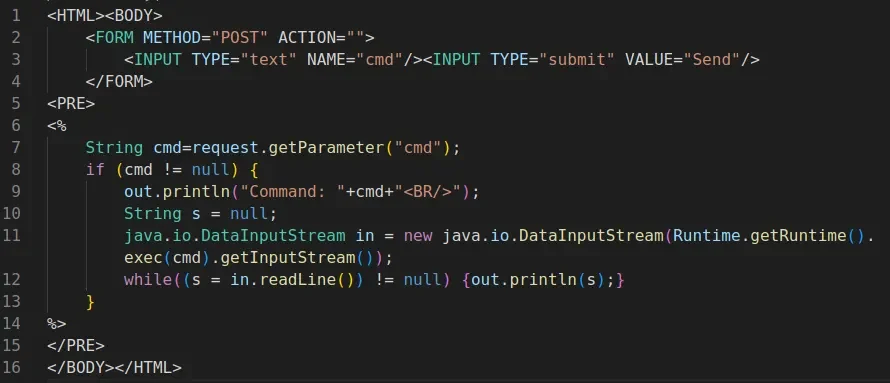
win3zz.jsp, A simple Java web shell (Strictly for learning purposes only, do not misuse it)
Step 6: Execute commands
The uploaded web shell was accessed and the id command was executed, confirming OS command execution on the target server.
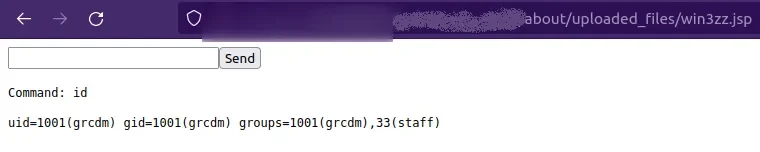
Because the application accepts any arbitrary file and stores it where the browser can reach it, an attacker can execute system-level commands and compromise the server. After taking a reverse shell, the author found several internal OS-level issues with the LinEnum tool, but those cannot be described because of client confidentiality. Two command outputs are shown:
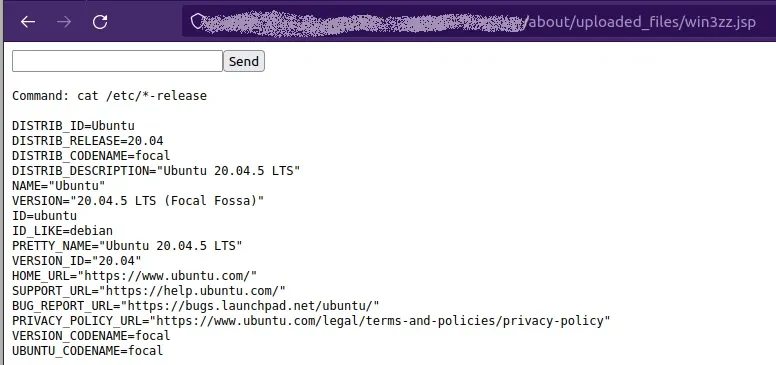
COMMAND: cat /etc/-release*

COMMAND: uname -a
Root cause
The chain rests on four separate mistakes:
- The PDF download builds a file path from the filename and folder parameters without restricting which files can be read. Traversal sequences are filtered, but absolute paths are not, so any file whose path is known can be read.
- cr_master_invoice.jsp exposes an unused rem_input_name parameter that lists directory contents, and it accepts traversal sequences such as ../../../../../../etc. The rem_input_name parameter accepted traversal sequences such as ../../../../../../etc.
- An old experimental file, cr_upload_bak11.jsp, was left in the web root. It is reachable over the internet but is not part of the application.
- That upload endpoint checks neither session, nor file extension, nor content type, and writes files into /grcdm/about/uploaded_files/, a directory under the web root served to browsers. A JSP file placed there is executed by the server.
The author's point is that chaining some medium-severity issues turns them into full server compromise.
Impact
With command execution on the web server, an attacker can use it as a pivot point into the organisation's internal network, and advanced payloads allow remote pivoting. In the author's list, a successful attack allows an attacker to:
- Extract lots of financial data and customer-sensitive data
- Compromise other interconnected devices
- Download all files including some SSH keys and other secrets
- Extract environment variables that may contain AWS secrets
- Elevate privileges to access other user accounts on the system
- Scan internal network
- Place a backdoor to retain access to systems even after the bug Fixed
- Launch a distributed denial of service (DDoS) attack
- Read website configuration files, and takeover databases
- Dump the source code of the entire application
The author notes that any skilled attacker with minimal access to the application can break into the entire app and reach critical internal resources by chaining medium-severity issues, disrupting business operations and in extreme cases causing financial and reputational damage to a financial institution.
Fix
The report does not describe the individual code changes. The author's conclusion is that the server was poorly configured and that over 100 bugs were found, including several critical severity issues. The advice given to the bank was to redesign the entire application with security in mind rather than fix it piecemeal; the author's rule of thumb is that if more than 50 medium bugs are found, the application should be rebuilt. The author says they immediately took appropriate steps, and the application is completely down now.
For digital business managers the advice is not to allow exceptions for medium and low severity vulnerabilities, and to follow a robust bug verification and secure code review process before deploying to production. After an internal source code review, applications should go to third-party pen-testing vendors. Architecture-level bugs, in the author's words, ruin months of hard work by developers.
Variants to test
- Path parameters on download endpoints. Send a known absolute path in a filename-style parameter, for example the passwd file, and see whether its contents come back. A positive result is the raw file content in the response rather than an error.
- Traversal filtering bypass by absolute path. Where '../' and encoded variants are blocked, try absolute paths directly. A positive result is any file outside the intended report directory being returned.
- Hidden parameters in JSP controllers. Fuzz parameter names on pages whose source you can read, looking for unused ones such as rem_input_name. A positive result is a parameter that changes behaviour, here a directory listing rendered inside HTML
<option>tags. - Traversal in the hidden parameter. Pass a deep traversal such as ../../../../../../etc to the listing parameter. A positive result is the contents of a directory outside the web root.
- Unlinked files in the web root. Crawl directories reachable through a listing bug and look for JSP files that are not referenced by the application, especially names suggesting backups or experiments. A positive result is a page that responds but is not linked anywhere in the app.
- Upload endpoints without checks. For any upload handler found, test whether it enforces session, extension and content type. A positive result is a server-side script extension being accepted and stored under a browser-reachable path, then executed when requested.
Difficulty
advanced
The chain requires reading Java source recovered through a file read, spotting a hidden parameter, and turning an unlinked upload endpoint into code execution, each step depending on the previous one.
What happened, in plain words
A security tester assessed a banking website. The site let customers download PDF statements of their accounts. The tester found that the part of the site that builds those PDFs could be tricked into reading any file on the server, not just the statement it was supposed to produce. From there, step by step, he found a way to make the server run his own commands. That is called remote command execution, or RCE: an outsider gets the server to do whatever they tell it to, as if they were sitting at its keyboard.
The author's point is that chaining some medium-severity issues turns them into a full takeover of the server. The lesson of the article is that medium flaws, chained together, become a full takeover of the server. The bank's security team allowed the story to be published so that other teams can learn from it.
Before the technical part, a quick note on the portal itself. It managed reports: annual reports, KYC reports (KYC means Know Your Customer, the identity checks banks are legally required to perform), and invoice and billing reports. Customers could generate, download and analyse e-statements covering insurance, loans, investments and other financial details.
The tester describes the assessment as grey box. Think of it as being let into the building with a visitor badge: you can walk around, but you were not handed the keys to every room.
The feature where everything started was the statement download. A user typed a Customer ID, the application produced a hyperlink, and clicking that link downloaded a statement PDF. Behind the scenes, the download request carried two parameters, filename and folder, and the PDF was produced according to their values. A parameter is simply a named value sent along with a request, like the fields on a paper form: the name of the field, and what you wrote in it.
The tester chained a series of issues to reach remote command execution:
- Arbitrary file retrieval: the server could be made to hand back the contents of files it should never show.
- A hidden internal directory listing parameter: a leftover switch that listed the contents of folders on the server.
- An unlinked JSP file sitting in the web root: a page reachable over the internet that was not part of the application proper.
- An unrestricted file upload: a page that accepted any file at all and stored it where the browser could reach it.
The diagram below shows the whole flow at a glance.
A simple pictorial representation of the entire flow.
The tools used
The work was done with Burp Suite. Burp is a program that sits between your browser and a website, like a recording device on a phone line. It lets you see every request your browser sends and every response the server sends back, and it lets you change a request before passing it on, or send the same request again and again with small variations.
Three parts of Burp matter here:
- The proxy intercepts and replays requests.
- The Target Analyzer, inside Burp's Engagement Tools, collects page names found while browsing the site.
- Intruder takes one request and repeats it many times, each time swapping in a different value from a list. Security testers call this fuzzing: throwing many variations at a system to see which ones behave differently.
The application was written in Java, and its pages were JSP files. JSP stands for JavaServer Pages: a page that the server runs as a small program before sending the result to your browser. The report names three of them: PDFViewer.jsp, cr_master_invoice.jsp and cr_upload_bak11.jsp. No account details, user roles or software versions are given in the report.
Finding it
The download request
When the tester intercepted the PDF download, he saw the request carrying the filename and folder parameters.
Why does this matter? Because the server was taking values supplied by the user and using them to decide which file to open. If a program builds a file path out of whatever the user typed, and does not check what the result points at, the user can point it at files the program never intended to touch. This class of bug is called path traversal, or directory traversal: escaping the folder you were meant to stay in by supplying a path that climbs upwards.
Reading the passwd file
He sent passwd as the filename and /etc as the folder, and the server returned the Linux passwd file. On Linux, /etc is the folder where system configuration lives, and passwd is a file listing the user accounts on the machine. It does not contain passwords in plain text, but it does reveal which accounts exist, which is useful reconnaissance.
So the two parameters were being used to build a file path, with no restriction on which file was read. The tester classifies this as Arbitrary File Retrieval, or AFR: the server returns the raw contents of any file it can read. It is not the same as Local File Inclusion, or LFI, and the difference is explained further down.
The catch: traversal was blocked
There was a catch. The application rejected directory traversal payloads. The author states that '../', '%2e%2e%2f' and other such payloads were not allowed. In a file path, '../' means go up one folder. '%2e%2e%2f' is the same thing written in URL encoding, a way of writing special characters so they survive being sent over the web; %2e is a dot and %2f is a slash. Blocking both forms is a sensible defence, and it worked.
The consequence is important: an attacker needed to know the absolute path of a file for a successful attack. An absolute path is the full address of a file from the very top of the disk, such as /etc/passwd, as opposed to a relative path that starts from wherever you currently are. If you cannot climb upwards with '../', you have to name the destination exactly.
He tried to read default internal OS configuration files such as /proc/cpuinfo, /etc/environment, ~/.bashrc, /.bash_history, access.log and error.log. Most failed with errors saying the operation was not permitted or access was denied. The tilde () in ~/.bashrc and ~/.bash_history is shorthand for the current user's home folder, and it evidently did not resolve here.
Spotting a user
Looking again at the passwd file, the tester noticed an interesting grcdm user.
This is a good habit to internalise: the first file you read is not just a trophy, it is a map. It tells you what else might be worth asking for.
Reading the command history
The earlier attempt had used a tilde in the payload (~/.bash_history). This time the same file was requested through grcdm's home directory, /home/grcdm, without the tilde, and the complete command history of the grcdm user came back. .bash_history is the Linux file that stores the commands typed by a logged-in user. Think of it as the shell's browsing history: every command that user ran, in order.
Why is that valuable? Because people type the paths of the things they work with. A developer's history often contains the folder where the website lives, the commands used to start it, and the names of files they edited.
Finding the web root
Reading through those commands revealed the web host's root path. The web root is the top folder from which the web server serves pages: everything a browser can reach lives underneath it.
Reading the source code
With the root path known, the source code of the vulnerable controller, PDFViewer.jsp, could be retrieved. It was written in Java. Source code is the human-written instructions of a program. Being able to read it is like being handed the blueprint of the building you are walking through: you stop guessing where the doors are and start seeing them.
AFR versus LFI
The tester classifies the bug as Arbitrary File Retrieval (AFR), explicitly not Local File Inclusion (LFI). The distinction given is execution. LFI returns the output of the executed file, while AFR returns raw file contents without executing them. LFI is more serious because it can be exploited through log poisoning or the /proc/self/environ method to reach direct command injection, whereas with AFR only the content of a readable file can be leaked.
In everyday terms: LFI is like getting the kitchen to cook a dish from a recipe you slipped into the pile, so the kitchen does work on your behalf. AFR is like photocopying a page from the recipe book: you learn what is written, but nobody cooks anything. Log poisoning, mentioned above, means writing your own content into a log file the server keeps, then asking the server to run that log file as if it were a program.
A practical example showing the difference between LFI and AFR
The AFR was reported, and the bank's team agreed to allow further analysis and exploitation.
Exploitation
Step 1: Harvest JSP page names
The application had already been crawled. Crawling means visiting the site and following its links, the way a search engine does, to build a list of every page you can find. The names of all JSP pages within the target domain were copied using the Target Analyzer in Burp Suite's Engagement Tools. Intruder was configured with the attack point set to the value of the filename parameter.
Intruder then repeated the same request with the list of JSP pages as payloads. In other words: take the download request that we know can read files, and instead of asking for a PDF, ask for every page name we collected, one at a time.
Why do this? Because the download feature reads files, and JSP pages are files. If the server hands back the source of a page instead of running it, the tester gets to read the code of the whole application, one page at a time.
Step 2: Read the source of each page and find the directory listing
The Java code in the response to each request was reviewed. In cr_master_invoice.jsp the author found a code snippet vulnerable to webserver internal directory listing. Directory listing means the server shows you the contents of a folder, like opening a drawer and seeing every file inside, instead of just handing you the one document you asked for.
The snippet lists all files and sub-folders of a folder specified in the rem_input_name parameter.
Source code snippet of cr_master_invoice.jsp
rem_input_name was an unused parameter, hidden or created by a developer for internal experiments. It lists files and directories inside HTML <option> tags. An <option> tag is the HTML element used for the choices in a dropdown menu, so the folder contents were being rendered as a list of selectable items on a page.
Passing ../../../../../../etc to rem_input_name listed all the contents of the etc directory.
The rem_input_name parameter accepted traversal sequences such as ../../../../../../etc. This is a recurring theme in real systems: a defence applied at one door is often missing at the next.
Step 3: Find an unlinked JSP file
All folders were crawled with the help of the internal directory listing. While listing the contents of /grcdm/portal/content/ext/framework, the tester saw an unlinked JSP file. Unlinked files are in the web root and reachable over the internet, but are not part of the web application.
Think of it as a spare key taped under a bench: not part of the house, not on any floor plan, but it opens a door all the same.
Its source code was retrieved, and reviewing it revealed buggy code vulnerable to unrestricted file upload. An unrestricted file upload is a form that accepts any file at all, without checking what kind of file it is or who is sending it.
Step 4: Analyse the upload endpoint
The analysis concluded that the JSP endpoint did not validate the session (for authentication), the file extension, or the content type of the uploaded file (Code snippet 1).
Three checks were missing, and each one matters:
- Session check. A session is how a website remembers that you are logged in. When you log in, the server gives your browser a small piece of data, often called a cookie or a token, and your browser sends it back with every request. Checking the session means asking: is this person actually logged in, and are they allowed to do this? Without that check, anyone who knows the address can use the form.
- File extension check. The extension is the part of a filename after the dot, such as .jpg or .pdf. It tells the server what kind of file it is. If the server does not check it, you can upload a .jsp file, which the server will treat as a program.
- Content type check. When a browser uploads a file, it labels it with a content type, a short description such as image/jpeg. If the server does not check the label, it cannot tell a picture from a script.
The second important point was where uploads landed: inside the web host's root path, at /grcdm/about/uploaded_files/, directly accessible from the browser (Code snippet 2). This is the difference between leaving a parcel in a locked storeroom and leaving it on the front step. A file stored under the web root can be requested by anyone with a browser, and if the server runs JSP files, a JSP file placed there will be run.
cr_upload_bak11.jsp, Code snippet 1
cr_upload_bak11.jsp, Code snippet 2
Step 5: Build an upload page and upload a web shell
An HTML upload page was created, with the vulnerable endpoint in the action attribute of the form tag. HTML is the language web pages are written in. A form is the part of a page with fields you fill in and a button you press. The action attribute is the address the form sends its contents to.
<!DOCTYPE html><html> <body> <form action="https://[REDACTED].com/grcdm/portal/content/ext/framework/cr_upload_bak11.jsp" method="POST" enctype="multipart/form-data"> <input type="file" name="fileToUpload" /> <input type="submit" value="Upload file" /> </form> </body></html>
Line by line, in plain words:
<!DOCTYPE html><html>declares that this is an HTML page.<body>starts the visible part of the page.<form action="..." method="POST" enctype="multipart/form-data">opens a form. The action is the address the form will send to, here the vulnerable upload page cr_upload_bak11.jsp. The method is POST, the way of sending data that carries a body along with the request. The enctype is multipart/form-data, the format used when a form includes a file, because a file is too big and too binary to fit in an ordinary text field.<input type="file" name="fileToUpload" />is the file picker. The name, fileToUpload, is the label the server will use to find the file in the request.<input type="submit" value="Upload file" />is the button that sends the form.</form></body></html>closes everything.
Why build a page at all? Because the tester wanted to send a file to an endpoint that had no page of its own in the application. Writing a tiny form is the simplest way to make a browser send exactly the request he wanted, without any special tooling.
The page was opened in the browser and a JSP web shell was selected for upload. A web shell is a small program uploaded to a server that lets the attacker run commands on it through the browser, as if they had a terminal open. A JSP web shell enables administration of the server through remote command execution.
win3zz.jsp, A simple Java web shell (Strictly for learning purposes only, do not misuse it)
Step 6: Execute commands
The uploaded web shell was accessed and the id command was executed, confirming OS command execution on the target server. The id command is a standard Linux command that prints which user you are running as. It is the smallest possible proof: it changes nothing and reveals nothing sensitive, but it can only work if the server really ran your command.
Because the application accepts any arbitrary file and stores it where the browser can reach it, an attacker can execute system-level commands and compromise the server. After taking a reverse shell, the tester found several internal OS-level issues with the LinEnum tool, but those cannot be described because of client confidentiality. A reverse shell is a connection the compromised server makes back out to the attacker, giving the attacker an interactive command line. LinEnum is a script that gathers information about a Linux machine to help find ways to escalate privileges, meaning to gain more rights than the initial account had.
Two command outputs are shown:
COMMAND: cat /etc/-release*
COMMAND: uname -a
The first, cat /etc/*-release, prints the contents of the release files in /etc, which describe the Linux distribution and its version. The second, uname -a, prints details about the kernel and the machine. Both are ordinary information-gathering commands: they tell the attacker what kind of system they are standing on.
Root cause
The chain rests on four separate mistakes:
- The PDF download builds a file path from the filename and folder parameters without restricting which files can be read. Traversal sequences are filtered, but absolute paths are not, so any file whose path is known can be read.
- cr_master_invoice.jsp exposes an unused rem_input_name parameter that lists directory contents, and it accepts traversal sequences such as ../../../../../../etc. The traversal filtering seen on the download endpoint is evidently not applied here.
- An old experimental file, cr_upload_bak11.jsp, was left in the web root. It is reachable over the internet but is not part of the application, so it escaped whatever review the live application received.
- That upload endpoint checks neither session, nor file extension, nor content type, and writes files into /grcdm/about/uploaded_files/, a directory under the web root served to browsers. A JSP file placed there is executed by the server.
The author's point is that chaining some medium-severity issues turns them into full server compromise. Severity is the rough measure of how much damage a single flaw can do. The author's point is that chaining them turns them into full server compromise.
Impact
With command execution on the web server, an attacker can use it as a pivot point into the organisation's internal network, and advanced payloads allow remote pivoting. A pivot is using one compromised machine as a stepping stone to reach others that are not directly reachable from the internet. In the author's list, a successful attack allows an attacker to:
- Extract lots of financial data and customer-sensitive data
- Compromise other interconnected devices
- Download all files including some SSH keys and other secrets
- Extract environment variables that may contain AWS secrets
- Elevate privileges to access other user accounts on the system
- Scan internal network
- Place a backdoor to retain access to systems even after the bug Fixed
- Launch a distributed denial of service (DDoS) attack
- Read website configuration files, and takeover databases
- Dump the source code of the entire application
A few of those terms deserve a plain explanation. SSH keys are files that let a computer log in to another computer without a password, so stealing them is like stealing a set of keys. Environment variables are named values a program reads from its surroundings, often used to hold configuration and sometimes credentials; AWS is Amazon Web Services, a large cloud provider, and its secrets would grant access to cloud resources. A backdoor is a way in that the attacker leaves behind so they can return later. A DDoS attack is flooding a service with traffic from many machines until it stops responding.
The author notes that any skilled attacker with minimal access to the application can break into the entire app and reach critical internal resources by chaining medium-severity issues, disrupting business operations and in extreme cases causing financial and reputational damage to a financial institution.
Fix
The report does not describe the individual code changes. The author's conclusion is that the server was poorly configured and that over 100 bugs were found, including several critical severity issues. The advice given to the bank was to redesign the entire application with security in mind rather than fix it piecemeal; the author's rule of thumb is that if more than 50 medium bugs are found, the application should be rebuilt. The author says they immediately took appropriate steps, and the application is completely down now.
For digital business managers the advice is not to allow exceptions for medium and low severity vulnerabilities, and to follow a robust bug verification and secure code review process before deploying to production. After an internal source code review, applications should go to third-party pen-testing vendors. Architecture-level bugs, in the author's words, ruin months of hard work by developers.
Variants to test
If you are learning, these are the same ideas expressed as things to try, each with what a positive result looks like. Only test systems you are authorised to test.
- Path parameters on download endpoints. Send a known absolute path in a filename-style parameter, for example the passwd file, and see whether its contents come back. A positive result is the raw file content in the response rather than an error.
- Traversal filtering bypass by absolute path. Where '../' and encoded variants are blocked, try absolute paths directly. A positive result is any file outside the intended report directory being returned.
- Hidden parameters in JSP controllers. Fuzz parameter names on pages whose source you can read, looking for unused ones such as rem_input_name. A positive result is a parameter that changes behaviour, here a directory listing rendered inside HTML
<option>tags. - Traversal in the hidden parameter. Pass a deep traversal such as ../../../../../../etc to the listing parameter. A positive result is the contents of a directory outside the web root.
- Unlinked files in the web root. Crawl directories reachable through a listing bug and look for JSP files that are not referenced by the application, especially names suggesting backups or experiments. A positive result is a page that responds but is not linked anywhere in the app.
- Upload endpoints without checks. For any upload handler found, test whether it enforces session, extension and content type. A positive result is a server-side script extension being accepted and stored under a browser-reachable path, then executed when requested.
Difficulty
Advanced. The chain requires reading Java source recovered through a file read, spotting a hidden parameter, and turning an unlinked upload endpoint into code execution, each step depending on the previous one.
Glossary
- Absolute path: the full address of a file from the top of the disk, such as /etc/passwd, rather than a path relative to where you currently are.
- AFR (Arbitrary File Retrieval): a flaw where the server returns the raw contents of any file it can read, without running it.
- Attribute (HTML): a setting written inside an HTML tag, such as the action of a form.
- Backdoor: a way into a system that an attacker leaves behind so they can return later.
- Burp Suite: a tool that sits between a browser and a website so requests and responses can be seen, changed and replayed.
- Content type: a short label describing what kind of file something is, such as image/jpeg.
- Cookie: a small piece of data a website stores in your browser and receives back with each request, often used to remember that you are logged in.
- Crawling: visiting a site and following its links to build a list of its pages.
- DDoS (distributed denial of service): flooding a service with traffic from many machines until it stops responding.
- Directory listing: a server showing the contents of a folder instead of only the file you asked for.
- Directory traversal (path traversal): escaping the folder you were meant to stay in by supplying a path that climbs upwards, typically with '../'.
- Endpoint: a specific address on a server that accepts requests and does something with them.
- Environment variable: a named value a program reads from its surroundings, often used for configuration and sometimes credentials.
- Extension: the part of a filename after the dot, such as .jpg or .jsp, that indicates the file type.
- Form (HTML): the part of a web page with fields you fill in and a button you press to send them.
- Fuzzing: sending many variations of a request to see which ones behave differently.
- Grey box: an assessment where the tester is given some information in advance, but not full access.
- HTML: the language web pages are written in.
- Intruder (Burp): the part of Burp that repeats one request many times, swapping in a different value each time.
- Java: a programming language, widely used for server-side applications.
- JSP (JavaServer Pages): a page the server runs as a small Java program before sending the result to the browser.
- KYC (Know Your Customer): the identity checks banks are legally required to perform on customers.
- LFI (Local File Inclusion): a flaw where the server runs a file you point it at and returns the output, which is more serious than merely reading it.
- LinEnum: a script that gathers information about a Linux machine to help find ways to gain more rights.
- Log poisoning: writing your own content into a log file the server keeps, then getting the server to run that log file as a program.
- Multipart/form-data: the format a form uses when it includes a file.
- Parameter: a named value sent along with a request, like a field on a form.
- Payload: the value you send in a request to test or exploit something.
- Pivot: using one compromised machine as a stepping stone to reach others.
- POST: the way of sending a request that carries a body of data along with it.
- Privilege escalation: gaining more rights on a system than the account you started with.
- Proxy: a program that sits between your browser and a website and passes traffic through, so it can be inspected and altered.
- RCE (remote command execution): getting a server to run commands of your choosing from a distance.
- Relative path: a path that starts from where you currently are, rather than from the top of the disk.
- Reverse shell: a connection the compromised server makes back out to the attacker, giving an interactive command line.
- Session: how a website remembers that you are logged in across requests.
- Severity: a rough measure of how much damage a single flaw can do.
- SSH key: a file that lets a computer log in to another computer without a password.
- Token: a piece of data, similar in role to a cookie, that proves who you are to a server.
- URL encoding: a way of writing special characters so they survive being sent over the web, such as %2e for a dot and %2f for a slash.
- Web root: the top folder from which a web server serves pages.
- Web shell: a small program uploaded to a server that lets an attacker run commands on it through the browser.
<option>tag: the HTML element used for the choices in a dropdown menu.


