RepoJacking: How 5 Unclaimed GitHub Usernames Enabled RCE on Self-Hosted Servers
Five GitHub usernames referenced in an official plugin registry had been renamed, leaving the old usernames claimable. An attacker who registered one of these usernames could serve malicious plugin code that executes automatically when a self-hosted server rebuilds.
 Published on medium.com
Cybersecurity
The full write-up lives on its author's site
It belongs to its author, so we link to it rather than copy it. The other two tabs are our own rewrites, checked against it.
Context
A major open-source forum platform maintains an official third-party plugin registry as a file in a GitHub repository. Administrators of self-hosted instances install plugins by adding a git clone command to the server configuration and then running a rebuild. The registry is the trusted list of which plugins are official and where they live on GitHub.
The attack described here is RepoJacking. When a GitHub user renames their account, GitHub creates a temporary 301 redirect from the old URL to the new one, but the old username immediately becomes available for re-registration, first come, first served. If any official documentation, registry or installer still references the old username, an attacker can register it, recreate the repository with malicious code, and silently intercept all traffic to that URL. The author notes that RepoJacking has been paid out across multiple major programs including Twitter/X and RubyGems.
Setup
The researcher works with a supply chain hunting methodology he calls BLH (Broken Link Hijacking): organisations maintain registries, documentation and installers that reference external resources, and sometimes those resources become unclaimed over time. The target is an official third-party plugin registry file maintained by the organisation on GitHub. The tooling is a shell, git, grep, curl and the GitHub API.
Finding it
The registry lists plugins by GitHub owner/repository path. The researcher cloned the registry, extracted every referenced username, and checked each one against GitHub. Five usernames returned HTTP/2 404, meaning the accounts no longer exist. Eight plugins across those five accounts were still listed as official. The next step was to confirm that the repositories still redirect to the renamed accounts, which shows the old usernames are unprotected.
Exploitation
Step 1: Clone the registry
git clone --depth=1 https://github.com/[target]/all-the-plugins
A shallow clone of the registry repository, enough to read the plugin list without history.
Step 2: Extract all referenced usernames
grep -oP '^[^/]+' third-party.txt | sort -u > usernames.txt
This takes the part of each line before the first slash, which is the GitHub owner, deduplicates it and writes the result to usernames.txt.
Step 3: Check each username against GitHub API
while read username; do status=$(curl -sI "https://github.com/$username" | grep HTTP | awk '{print $2}') echo "$username: $status"done < usernames.txt | grep 404
For each username it sends a HEAD request to the GitHub profile URL, extracts the status code and prints it. Only the 404 lines are kept.
Output, five usernames returning HTTP/2 404:
Toxuru: 404HMSAB: 404iunctis: 404Wolftallemo: [redacted]: 404

Five unclaimed usernames, eight plugins, all listed as official.
Step 4: Verify usernames are freely registerable
curl -s "https://api.github.com/users/Toxuru"
A query against the GitHub users API for one of the candidates, to confirm the account does not exist and the name can be claimed.
Step 5: Confirm repositories still redirect
for plugin in \ "Toxuru/discourse-sidebar-categories" \ "HMSAB/discourse-email-extraction" \ "iunctis/discourse-formatting-toolbar" \ "Wolftallemo/discourse-gcs-helper" \ "CambridgeDigitalBibleResearch/discourse-small-caps"; do echo "--- $plugin ---" curl -sI "https://github.com/$plugin" | grep -E "HTTP|location"done
For each of the five plugin paths it sends a HEAD request and prints the status line and the location header.
Output:
--- Toxuru/discourse-sidebar-categories ---HTTP/2 301location: https://github.com/evgip/discourse-sidebar-categories--- HMSAB/discourse-email-extraction ---HTTP/2 301location: https://github.com/hms-networks/discourse-email-extraction--- iunctis/discourse-formatting-toolbar ---HTTP/2 301location: https://github.com/MonDiscourse/discourse-formatting-toolbar--- Wolftallemo/discourse-gcs-helper ---HTTP/2 301location: https://github.com/Regalijan/discourse-gcs-helper--- CambridgeDigitalBibleResearch/discourse-small-caps ---HTTP/2 301location: https://github.com/Scriptura-org/discourse-small-caps
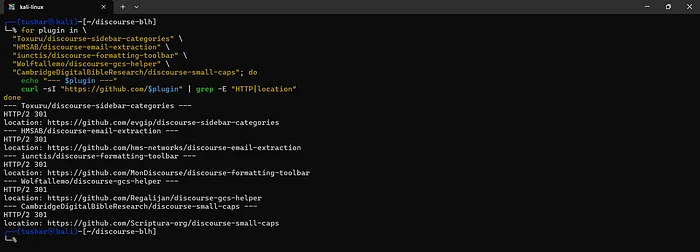
All five repositories redirect to renamed accounts, confirming the old usernames are unprotected.
Why this leads to RCE
Plugins are installed by adding a git clone command to the server configuration and running a rebuild:
hooks: after_code: - exec: cmd: - git clone https://github.com/Toxuru/discourse-sidebar-categories \ /var/www/discourse/plugins/discourse-sidebar-categories
During rebuild the server clones the repository. Any Ruby code placed in config/initializers/ executes automatically with server process privileges. The author labels the simulated malicious payload as NOT executed: no exploit, no CVE, just a free GitHub registration.
Proof of concept
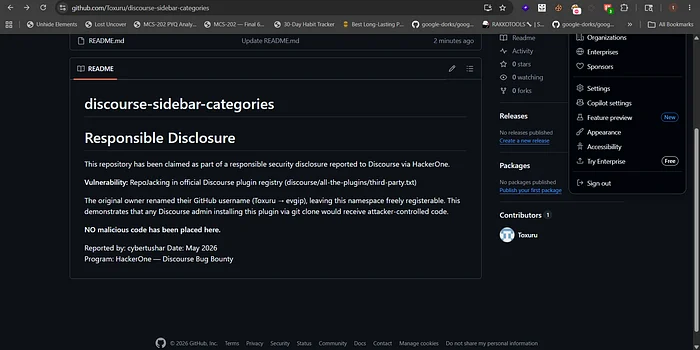
The researcher registered the Toxuru username and created the discourse-sidebar-categories repository containing a responsible disclosure notice only, with no malicious code.
Redirect intercepted:

curl -sI https://github.com/Toxuru/discourse-sidebar-categories | grep HTTP
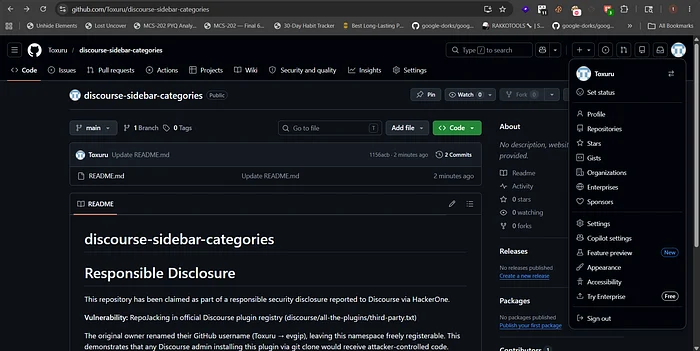
Before the PoC the path returned HTTP/2 301 to evgip/discourse-sidebar-categories; after the PoC it returned HTTP/2 200 from the researcher's repository. Any server administrator cloning this plugin would now receive the researcher's repository instead of the original.
Root cause
The registry keeps referencing GitHub owners by username. GitHub frees a username as soon as its owner renames the account, while the old path keeps redirecting for a while, so the registry entry looks valid to anyone testing it. The registry is trusted by definition, and nothing in the install path, the git clone or the rebuild warns the administrator that the owner has changed. The author frames it as stale references to usernames that no longer exist, with no vulnerability in the target's own code.
Impact
Any self-hosted server administrator who installs one of the eight affected plugins executes attacker-controlled Ruby code on their server during rebuild. The author lists the impact as full database read, admin credential extraction, persistent backdoor and pivot to underlying infrastructure. The scope is eight plugins across five usernames, all listed as official in the maintained registry, and the attack is completely silent: no warning during git clone or rebuild. The report was submitted via HackerOne, triaged, and a fix was developed.
Fix
The report states that a fix was developed but does not describe what it changes.
Variants to test
- Run the same three-step scan against any maintained list of GitHub
owner/repopaths: package manifests, installer scripts, documentation, CI configuration. A positive result is a set of owners returning 404 whose repository paths still return 301 to a different owner. - Check whether the redirect still resolves after the old username is claimed. A positive result is HTTP/2 200 served from the newly registered account instead of the 301.
- Look for installers that clone at build or deploy time rather than pinning a commit. A positive result is a clone command in configuration that follows the owner name, so a takeover changes what gets executed.
- Check for code paths that run automatically on install, such as initialisers or post-install hooks. A positive result is any file in such a directory that executes without an explicit administrator action.
- Apply the same idea to other hosting platforms that free names on rename, and to package registries where a scope or namespace can be re-registered. A positive result is a name that is free to claim while still referenced by a trusted list.
What happened, in plain words
A large open-source forum platform keeps a list of approved add-ons (called plugins) in a file on GitHub. GitHub is a website where people store and share code. The list says, for each plugin, which GitHub account owns it and where the code lives.
Some of the people who owned those plugins renamed their GitHub accounts. When you rename a GitHub account, the old name becomes free for anyone to take, like a cancelled phone number or a vacated flat. The list, however, still pointed at the old names. The researcher found five such old names that nobody owned any more, covering eight plugins that were still listed as official. He then took one of the names himself, without writing any malicious code, and showed that anyone installing that plugin would now download his repository instead of the real one.
Because of how these plugins are installed, code in them runs automatically on the server. So whoever controls the repository controls code that runs on other people's servers. That is the whole attack. No clever exploit, no breaking into anything: just registering a free username.
Background: what is RepoJacking?
To follow this you need three ideas.
A repository is a folder of code stored on GitHub, with its full history. Each one has an address like https://github.com/owner/repository. The first part after github.com is the account name (the owner), the second is the repository name.
A redirect is what a website does when a page has moved. It answers your request with a special code, 301, and a location header telling your browser where to go instead. Your browser follows it automatically, so you often never notice.
RepoJacking is the name for abusing this. When a GitHub user renames their account, GitHub keeps a temporary 301 redirect from the old address to the new one, so old links keep working. But the old username itself is released immediately and can be registered by anyone, first come, first served. If some trusted list, document or installer still uses the old username, an attacker can register it, create a repository with the same name, and quietly receive all traffic meant for the original.
The author notes that RepoJacking has been paid out across multiple major bug bounty programs, including Twitter/X and RubyGems. A bug bounty program is a scheme where companies pay people for reporting security problems.
Discovery: the BLH methodology
The researcher uses a hunting method he calls BLH (Broken Link Hijacking). The idea is simple: organisations keep lists, documentation and installers that point at things hosted elsewhere, and over time some of those things stop being owned by anyone. A broken link in a web page is annoying; a broken link in an installer is a security hole.
The target here is an official third-party plugin registry file, maintained by the organisation on GitHub. "Third-party" means the plugins are written by outside developers, not by the platform itself, but the platform still lists them as official.
The tools used are a shell (a text window where you type commands), git (the program that downloads repositories), grep (a program that searches text), curl (a program that fetches web addresses) and the GitHub API. An API is a way for programs to talk to a website: instead of a page designed for humans, you get structured data back. Think of it as the difference between reading a restaurant's menu on the wall and phoning the kitchen to ask what they have.
Finding it
The registry lists plugins by GitHub owner/repository path. The plan is: download the registry, pull out every owner name mentioned in it, and ask GitHub whether each of those accounts still exists. If an account is gone, its name may be free to claim.
Step 1: Clone the registry
git clone --depth=1 https://github.com/[target]/all-the-plugins
git clone downloads a copy of a repository to your computer. The address is the registry repository. --depth=1 means "only the latest version, skip the history". History can be huge and is not needed here: we only want to read the current list of plugins. It is like photocopying the current page of a noticeboard instead of the whole archive.
Step 2: Extract all referenced usernames
grep -oP '^[^/]+' third-party.txt | sort -u > usernames.txt
Line by line:
grepsearches text.-omeans "print only the matching part", not the whole line.-Penables a richer pattern language.'^[^/]+'is the pattern: from the start of the line (^), take one or more characters that are not a slash ([^/]+). In a line likeowner/repository, that captures justowner.- The
|symbol pipes the output of one command into the next. sort -usorts the names and removes duplicates (-ufor unique), so each owner appears once.> usernames.txtwrites the result into a file calledusernames.txt.
Why this step: the registry may mention the same owner many times. We want a clean list of distinct account names to check.
Step 3: Check each username against GitHub API
while read username; do status=$(curl -sI "https://github.com/$username" | grep HTTP | awk '{print $2}') echo "$username: $status"done < usernames.txt | grep 404
Line by line:
while read username; do ... done < usernames.txtloops over the file, putting each line into the variableusername.curl -sI "https://github.com/$username"fetches the GitHub profile address for that name.-Iasks only for the response headers, not the page body, which is faster.-ssilences progress output.grep HTTPkeeps only the line containing the protocol and status, something likeHTTP/2 404.awk '{print $2}'prints the second word of that line, which is the status code number.status=$(...)stores that number in a variable.echo "$username: $status"prints the name and its code.- The final
| grep 404keeps only the lines where the code was 404.
A status code is a three-digit number a web server sends with every answer. 200 means "here it is". 301 means "it moved, go here instead". 404 means "not found". So a 404 on a GitHub profile means the account does not exist.
Output, five usernames returning HTTP/2 404:
Toxuru: 404HMSAB: 404iunctis: 404Wolftallemo: [redacted]: 404
Five unclaimed usernames, eight plugins, all listed as official. "Unclaimed" means nobody currently owns the name.
Step 4: Verify usernames are freely registerable
curl -s "https://api.github.com/users/Toxuru"
This asks GitHub's users API about one candidate. The API answers with structured data rather than a web page.
Step 5: Confirm repositories still redirect
for plugin in \ "Toxuru/discourse-sidebar-categories" \ "HMSAB/discourse-email-extraction" \ "iunctis/discourse-formatting-toolbar" \ "Wolftallemo/discourse-gcs-helper" \ "CambridgeDigitalBibleResearch/discourse-small-caps"; do echo "--- $plugin ---" curl -sI "https://github.com/$plugin" | grep -E "HTTP|location"done
Line by line:
for plugin in ...; do ... doneloops over the five plugin paths listed, one per line, with backslashes continuing the command onto the next line.echo "--- $plugin ---"prints a separator so the output is readable.curl -sI "https://github.com/$plugin"fetches the headers for that repository address.grep -E "HTTP|location"keeps only the status line and thelocationheader.-Eallows the|inside the pattern to mean "or".
The location header is the part of a redirect that says where to go. If a repository still redirects, the old address is still alive and pointing somewhere, which means the old username is unprotected.
Output:
--- Toxuru/discourse-sidebar-categories ---HTTP/2 301location: https://github.com/evgip/discourse-sidebar-categories--- HMSAB/discourse-email-extraction ---HTTP/2 301location: https://github.com/hms-networks/discourse-email-extraction--- iunctis/discourse-formatting-toolbar ---HTTP/2 301location: https://github.com/MonDiscourse/discourse-formatting-toolbar--- Wolftallemo/discourse-gcs-helper ---HTTP/2 301location: https://github.com/Regalijan/discourse-gcs-helper--- CambridgeDigitalBibleResearch/discourse-small-caps ---HTTP/2 301location: https://github.com/Scriptura-org/discourse-small-caps
All five repositories redirect to renamed accounts, confirming the old usernames are unprotected. Each 301 points at a different owner name, which is the new name the original owner chose.
Why this leads to RCE
RCE stands for remote code execution: someone else's code runs on your machine. Here it happens without any exploit at all, through the normal install process.
Plugins are installed by adding a git clone command to the server configuration and running a rebuild. A rebuild is when the server re-reads its configuration and reinstalls everything, a bit like restarting a kitchen and restocking it from the suppliers on your list.
hooks: after_code: - exec: cmd: - git clone https://github.com/Toxuru/discourse-sidebar-categories \ /var/www/discourse/plugins/discourse-sidebar-categories
This is a configuration snippet. hooks are points in the rebuild where extra commands can run. after_code means "after the code step". exec with cmd gives a command to run. The command clones the plugin repository from GitHub into the server's plugins folder. The backslash at the end continues the line.
During rebuild the server clones the repository. Any Ruby code placed in config/initializers/ executes automatically with server process privileges. Ruby is a programming language; an initialiser is a file that runs when the application starts. "With server process privileges" means it runs with the same power the server software itself has, so it can do anything the server can do.
The author labels the simulated malicious payload as NOT executed: no exploit, no CVE, just a free GitHub registration. A CVE is a public identifier for a known software vulnerability. The point is that none is needed here.
Proof of concept
A proof of concept (PoC) is a minimal demonstration that a problem is real, done safely. The researcher registered the Toxuru username and created the discourse-sidebar-categories repository containing a responsible disclosure notice only, with no malicious code. A responsible disclosure notice is a note explaining the issue and how to contact the finder.
Redirect intercepted:
curl -sI https://github.com/Toxuru/discourse-sidebar-categories | grep HTTP
This fetches the headers for the old plugin address and keeps only the status line. It is the same check as before, repeated after the username was claimed.
Before the PoC the path returned HTTP/2 301 to evgip/discourse-sidebar-categories; after the PoC it returned HTTP/2 200 from the researcher's repository. In plain words: before, the address politely forwarded visitors to the real owner; after, it served the researcher's repository directly. Any server administrator cloning this plugin would now receive the researcher's repository instead of the original.
Root cause
The registry keeps referencing GitHub owners by username. GitHub frees a username as soon as its owner renames the account, while the old path keeps redirecting for a while, so the registry entry looks valid to anyone testing it. The registry is trusted by definition, and nothing in the install path, the git clone or the rebuild warns the administrator that the owner has changed. The author frames it as stale references to usernames that no longer exist, with no vulnerability in the target's own code.
Impact
Any self-hosted server administrator who installs one of the eight affected plugins executes attacker-controlled Ruby code on their server during rebuild. "Self-hosted" means the organisation runs the software on its own machines rather than using a hosted service.
The author lists the impact as full database read, admin credential extraction, persistent backdoor and pivot to underlying infrastructure. In plain words: read everything in the database, steal administrator logins, leave a way back in that survives restarts, and from there move on to other machines.
The scope is eight plugins across five usernames, all listed as official in the maintained registry, and the attack is completely silent: no warning during git clone or rebuild. The report was submitted via HackerOne, a bug bounty platform, triaged, and a fix was developed. "Triaged" means the receiving team reviewed it and accepted it as valid.
Fix
The report states that a fix was developed but does not describe what it changes. "Immutable" means it cannot change, such as a specific commit identifier rather than a name that can be reassigned.
Variants to test
- Run the same three-step scan against any maintained list of GitHub
owner/repopaths: package manifests, installer scripts, documentation, CI configuration. A positive result is a set of owners returning 404 whose repository paths still return 301 to a different owner. - Check whether the redirect still resolves after the old username is claimed. A positive result is HTTP/2 200 served from the newly registered account instead of the 301.
- Look for installers that clone at build or deploy time rather than pinning a commit. A positive result is a clone command in configuration that follows the owner name, so a takeover changes what gets executed.
- Check for code paths that run automatically on install, such as initialisers or post-install hooks. A positive result is any file in such a directory that executes without an explicit administrator action.
- Apply the same idea to other hosting platforms that free names on rename, and to package registries where a scope or namespace can be re-registered. A positive result is a name that is free to claim while still referenced by a trusted list.
Glossary
- API: a way for programs to talk to a website and get structured data back, instead of a page made for humans.
- BLH (Broken Link Hijacking): the author's hunting method of looking for trusted lists that point at external resources nobody owns any more.
- Bug bounty program: a scheme where organisations pay people for reporting security problems.
- CVE: a public identifier for a known software vulnerability.
- Clone: download a copy of a repository, with
git clone. - Commit: a saved snapshot of code in a repository; an immutable reference points at one specific snapshot.
- curl: a command-line program that fetches web addresses and shows the response.
- git: the program used to download and manage repositories.
- GitHub: a website for storing and sharing code repositories.
- grep: a command-line program that searches text for a pattern.
- Header: extra information a web server sends with a response, such as the status or where a redirect points.
- Hook: a point in a process where extra commands can be configured to run.
- Immutable reference: a pointer that cannot change, such as a specific commit, rather than a name that can be reassigned.
- Initialiser: a file that runs automatically when an application starts.
- Location header: the part of a redirect response that says where to go instead.
- Owner: the GitHub account that a repository belongs to, the first part of an
owner/repositorypath. - Plugin: an add-on that extends a platform's features, often written by outside developers.
- Proof of concept (PoC): a minimal, safe demonstration that a problem is real.
- RCE (remote code execution): when someone else's code runs on a machine you control.
- Redirect: a server answer (code 301) telling the client the page has moved, with the new address in the location header.
- Registry: an official list of approved plugins and where their code lives.
- Repository: a folder of code stored on GitHub, with its history, at an address like
https://github.com/owner/repository. - RepoJacking: taking over a freed GitHub username that a trusted list still references, so traffic meant for the original owner reaches the attacker.
- Responsible disclosure notice: a note explaining a security issue and how to contact the finder.
- Ruby: a programming language, used by the plugins in this report.
- Self-hosted: software run on an organisation's own machines rather than on a hosted service.
- Shell: a text window where you type commands.
- Status code: a three-digit number sent with every web response; 200 means OK, 301 means moved, 404 means not found.
- Triage: the receiving team's review that accepts a report as valid.
- Username: the account name on GitHub, which becomes free for anyone to register once its owner renames it.