State of things
The game's API was updated to encrypt request and response bodies with AES and to use a new MD5 salt, but the encryption keys and salt were stored in the app's memory. An attacker could extract these secrets by debugging the running app, then decrypt and forge requests to cheat.

medium.com
Published on medium.com
In my previous story, I successfully reverse-engineered a mobile Tower Defense game on Android, which uses Unity.
The full write-up lives on its author's site
It belongs to its author, so we link to it rather than copy it. The other two tabs are our own rewrites, checked against it.
Context
This is the second part of a reverse-engineering series about an Android Tower Defence game built on Unity. In the first part, the author had reverse-engineered the game's network protocol: the client built JSON bodies, appended a salt, MD5-hashed the result, and sent it to the server. After that article was published, the author had a few chats with the company behind the game, which was aware of the original write-up. The company then upgraded its API: it changed the hash salt and added encryption, so that both requests and responses are no longer plain JSON. The endpoint was updated as well.
The goal of this part is to recover the new AES key, the new IV and the new salt from the running game, so that messages can be encrypted, decrypted and forged again, as in the previous article.
Setup
The tools and preconditions used throughout:
- mitmproxy, to intercept the game's API traffic.
- The game's
libil2cpp.soandglobal-metadata.dat, dumped and processed with Il2CppDumper, then loaded into IDA. The DLL assembly output from Il2CppDumper was reversed with .NET Reflector to relabel fields and get cleaner pseudocode. - IDA's debugging server, installed and run on the Android device, with the port forwarded to the host machine over USB via ADB, so the IDA debugger can attach to a process on the device.
- A small C# program, reusing the .NET crypto classes, to decrypt a captured message.
The device library is ARMv7, so pointers are 4 bytes and memory addressing is 32-bit. The ARM instruction set is little-endian.
Finding it
With mitmproxy running again, the API calls had changed: the endpoint was updated and the data now looks encrypted in both the request and the response.
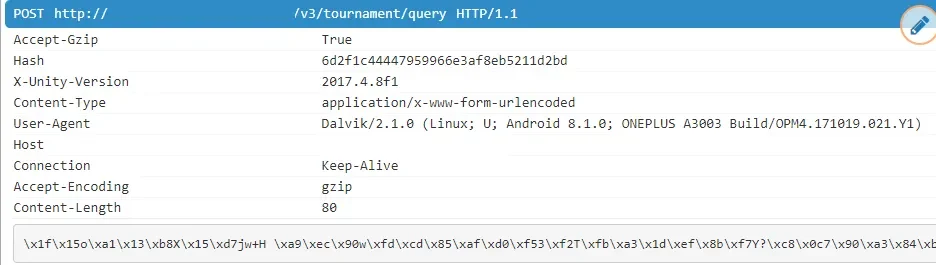
What used to be pure JSON is now unreadable bytes.
One thing had not changed: packet replay. Performing the same actions in the game to produce another tournament query led to the same POST body and the same Hash being generated.
Exploitation
Step 1: Read the new HttpPost in IDA
After dumping the new libil2cpp.so and global-metadata.dat, running the tools on them and loading the result into IDA, the author looked at the new and updated HttpPost method. Because the disassembly project was started clean, a few fields were relabelled based on the Il2CppDumper DLL assembly output, reversed with .NET Reflector, to get cleaner pseudocode.
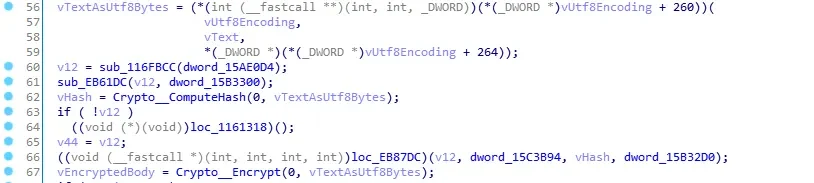
The pseudocode shows Crypto__ComputeHash, which computes the Hash value from the unencrypted bytes, and then the same bytes are fed into Crypto.Encrypt. So the body is encrypted before being sent.
Step 2: Identify the encryption scheme
Inspecting Crypto.Encrypt reveals Rijndael-based (AES) encryption.
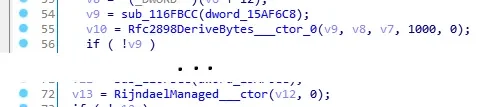
Because the game uses standard .NET crypto methods, the field descriptions and details are available directly in the .NET Framework documentation, along with example code to replicate the encryption and decryption process from MSDN.
Step 3: Locate the keys and salt
The keys and salts moved from the Crypto class to a separate CryptoConstants class. The C# fields even carry their size, which helps:
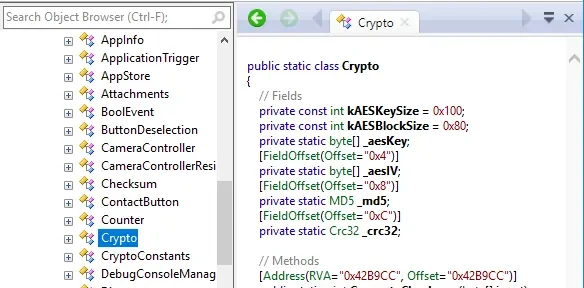
The offsets at which the computed key and IV are stored are known, so there is no need to calculate them manually. The author notes that calculating them properly from the base Salt and Password did not work for some reason, so using Key and IV directly was good enough.
What is needed to attack this revision is the AES key and the new salt. With those, messages can be encrypted and decrypted and some can be forged to the server, as in the previous article. Byte arrays cannot be accessed directly from static code, so the only way is to dump the device's (or emulator's) memory while the game is running, to get those bytes live.
Step 4: Attach the debugger to the live process
IDA's debugging server is installed on the device and run, and ADB forwards the port to the host machine through USB. The IDA debugger can then attach to any process on the device.
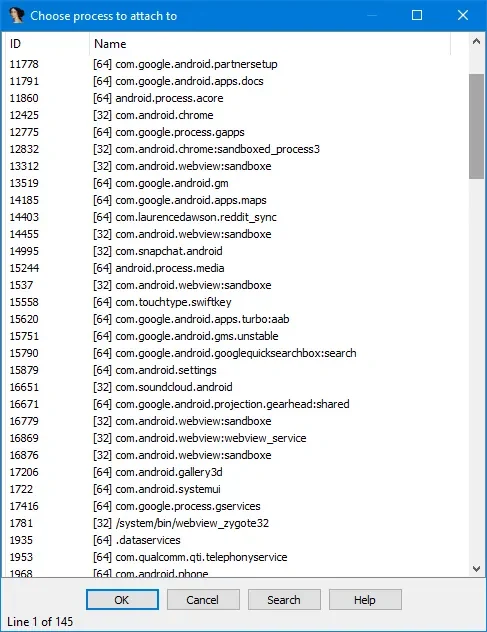
Before attaching, breakpoints are set in the pseudocode. This makes the process pause and IDA show the corresponding pseudocode when the line is about to be executed by the phone's CPU.
Step 5: Set breakpoints on the salt and on the encryption keys
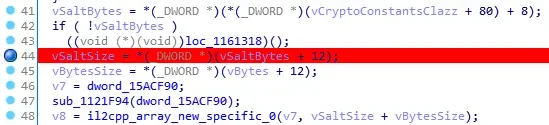
First, to dump the bytes appended to the JSON body before it is MD5-hashed, a breakpoint is set where the final salt array is appended:
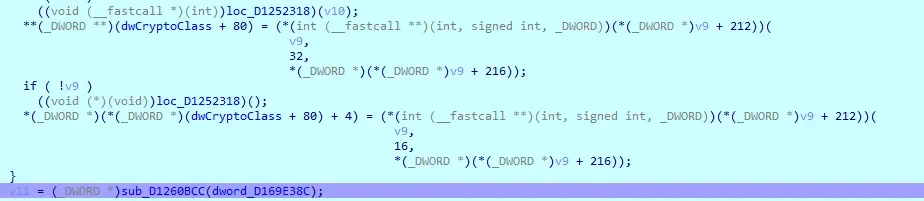
Then, to dump the AES key and IV memory blocks, a breakpoint is set where the encryption keys are used:
Two practical notes from the author:
- If you want to break in a portion of code that is executed very early and only once, you need to attach the debugger before those lines are executed. The author found no trick to make IDA run the app from scratch with the debugger immediately attached, but the Unity assembly takes some time to load, so tapping the app icon and immediately pressing Home pauses the game's execution, giving time to attach the IDA debugger and then resume the game. In this case the breakpoint is on any call to the
Decryptmethod, so attaching afterwards is fine. - The debugger catches a few signals sent by the Dalvik VM, caused by GC. Signals such as SIGPWR and SIGXCPU are expected, so they must be set as "ignore and pass to application" in the debugger setup, otherwise IDA breaks execution every time.
Step 6: Trigger the breakpoints
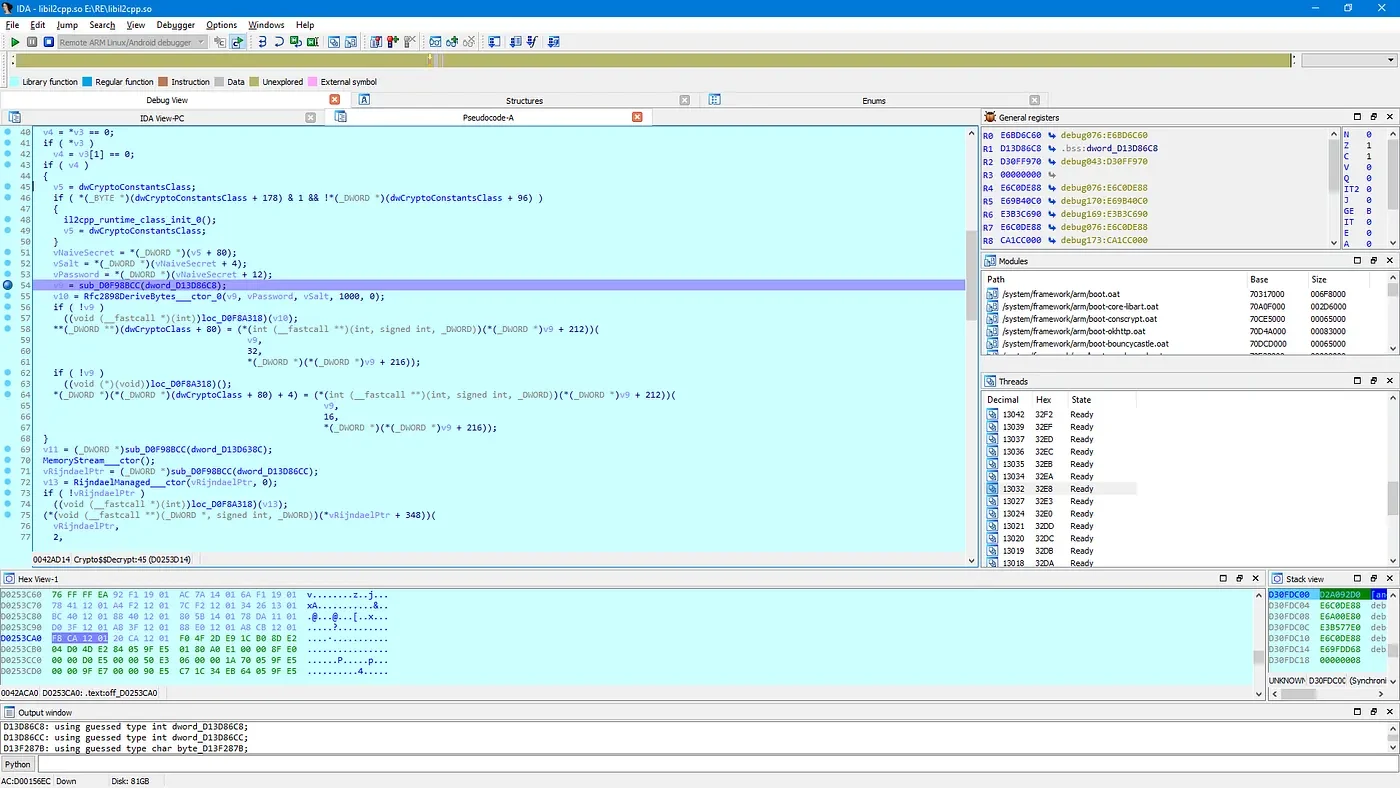
After attaching to the running game process, pressing a button that needs Decrypt and CalculateHash (any button that performs something online, such as the Tournament button) makes the debugger pause at the breakpoints set earlier.
Step 7: Dump the salt
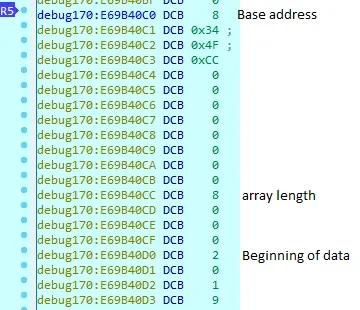
Double-clicking the value tagged vSalt reveals the memory value. The first 16 bytes (0x10) are skipped, as those are Mono's headers and metadata for byte arrays, and the salt value is then visible.
Step 8: Resolve the AES key and IV pointers by hand
The AES IV and Key are put in a raw memory address that IDA did not wrap as a variable, so manual pointer arithmetic from the pseudocode is needed:
(_DWORD **)(dwCryptoClass + 80)
*(_DWORD *)(*(_DWORD *)(dwCryptoClass + 80) + 4)
From the previous article, dwCryptoClass + 80 is a pointer to the value of the first field of the class, since fields start at offset 80 (0x50). The second field (the IV) is the next pointer (+ 4) at the value pointed to by dwCryptoClass + 80.
To get the actual values, take the dwCryptoClass pointer (0xCCA71300 in this case) and add 0x50. This gives the first pointer address (pointers are 4 bytes, since this is an ARMv7 library with 32-bit memory addressing):
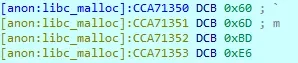
The ARM instruction set is little-endian, so the address has to be read from bottom to top: 0xE6BD6D60. Jumping there gives the actual pointers to each field's byte array:
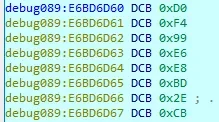
Two pointers sit next to each other. With the operator priority from the code extract above, the answers are 0xE699F4D0 for the first field (Crypto._aesKey) and 0xCB2EBDE8 for the second field (Crypto._ivKey). At each of those addresses, add 0x10 to get the actual array bytes:
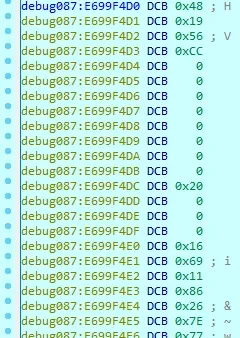
The IV is 16 bytes long and the key is 32 bytes long, as that is fairly standard and also noted in the Rfc2898DeriveBytes .NET documentation (the pseudocode showed that this class is used), so dumping enough bytes from those two memory addresses is sufficient. The same can be inferred from the pseudocode.
Step 9: Decrypt a captured message
A small encryption/decryption program could be written in Golang, but to avoid fiddling with the algorithm settings, the author reused C# and decrypted a message dumped earlier in mitmproxy:
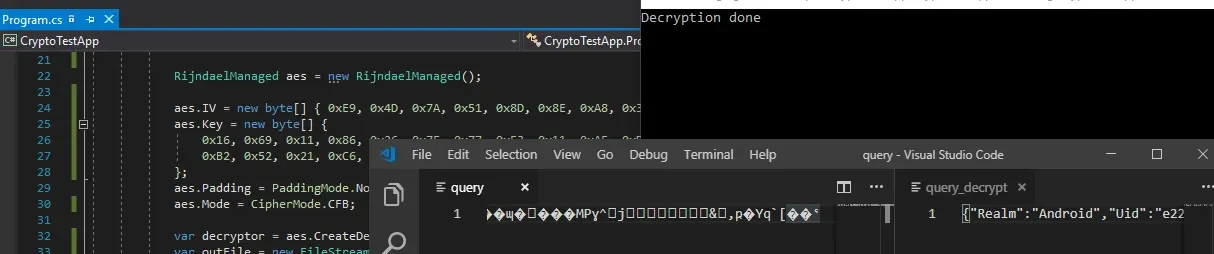
It works: on the left the encrypted query, on the right the decrypted JSON, with the small C# decryption program running behind.
Step 10: Dump the ComputeHash key
The same methodology dumps the ComputeHash key. Since there is a direct vSaltBytes variable that was mapped in IDA, double-clicking reveals the value. Updating the previous hash calculation and feeding it the decrypted query leads to the same hash as in the mitm'd request.
Root cause
The client holds everything needed to encrypt, decrypt and hash its own traffic: the AES key, the IV and the salt are all present in the process memory at runtime, and the game uses standard .NET crypto methods (Rijndael/AES and Rfc2898DeriveBytes), so the scheme is fully documented. The server therefore cannot distinguish a request produced by the genuine client from one produced by anyone who has extracted those values. The upgrade (new salt, encryption, updated endpoint) raised the effort but did not change the trust model: the secret lives on the client. The report also notes that packet replay was not addressed: the same tournament query produced the same POST body and Hash.
Impact
With the AES key and IV and the new 16-byte MD5 salt (versus 6 bytes in the previous article), the author could encrypt and decrypt the game's network messages and build a new game cheat app that sends forged requests to the server. More generally, the work demonstrates how to recover memory data from a running app on a live Android device, which lets you grab (or manipulate) encryption keys. These results apply to this game revision as analysed; the author frames the forged-request capability as something that could be built, not as something demonstrated against the live server in this article.
Fix
The report does not describe any fix applied by the developer beyond the API upgrade that motivated this part (new salt, encryption, updated endpoint). Since the key, IV and salt are recoverable from the client at runtime, a durable fix would have to move the trust decision to the server side; the report does not state which measures, if any, were adopted.
Variants to test
- Replay of captured requests. Re-send a captured POST body and Hash unchanged. A positive result is the server accepting it; the report only observed that the same tournament query produced the same body and hash.
- Static extraction of key material. Search the disassembly and metadata for the crypto constants and salt. A positive result is finding the key, IV or salt without runtime debugging, which the report did not manage.
- Runtime memory dump on other Unity/IL2CPP titles. Attach a debugger to the live process and break where the salt is appended and where the cipher is invoked. A positive result is readable key, IV and salt bytes after skipping the 0x10 Mono array header.
- Pointer-chain resolution. Where IDA does not wrap a field as a variable, follow the class pointer plus the field offset (0x50 for the first field, +4 for the next) and read the little-endian pointer. A positive result is a valid address whose data begins 0x10 bytes later.
- Standard crypto reuse. Check whether the target uses documented .NET (or other framework) crypto classes. A positive result means the algorithm settings can be replicated from public documentation.
What happened, in plain words
A mobile game on Android, a Tower Defence title built with the Unity engine, talks to its own servers over the internet. In an earlier article the author had worked out how that conversation was put together: the game built a block of data in a format called JSON, added a secret string called a salt to the end, ran the whole thing through a hashing function called MD5, and sent the result to the server. The server could then check the hash to be reasonably sure the message had not been tampered with.
After that first article was published, the author had a few chats with the company behind the game, which knew about the write-up. The company then changed how its API works: it swapped the old salt for a new one, added encryption so that neither requests nor responses are readable JSON any more, and moved the endpoint to a new address.
This second part is about undoing that upgrade. The goal is to pull the new encryption key, the new initialisation vector (IV) and the new salt out of the running game, so that messages can once again be encrypted, decrypted and forged, exactly as in the first article. The trick is that these values only exist in the phone's memory while the game is running, so the author attaches a debugger to the live process and reads them out.
Background you need first
A few ideas come up constantly below, so here they are from zero.
API. An API is the set of addresses and rules a program uses to talk to a server. Think of a restaurant: the menu is the API, the kitchen is the server, and you are the app. You can only order what is on the menu, and you send your order in the format the kitchen expects.
JSON. A way of writing data as text, using curly brackets and quotes, that both humans and programs can read easily. It looks like {"name": "value"}. Before the upgrade, the game's traffic was plain JSON.
Encryption. Scrambling data with a secret so that only someone who holds the same secret can unscramble it. A key is the secret. An IV (initialisation vector) is a second, non-secret value used alongside the key so that encrypting the same message twice does not produce identical output. AES is the most common modern encryption standard; Rijndael is the family of algorithms AES was chosen from, and .NET calls its implementation Rijndael.
Hash and salt. A hash is a fingerprint of some data: run the data through a function and you get a fixed-length string that changes completely if even one character of the input changes. A salt is extra secret data appended before hashing, so that an attacker cannot precompute fingerprints for common messages. MD5 is one such hashing function.
Reverse engineering. Taking a finished program apart to understand how it works, without having its source code. For Unity games the interesting code usually lives in a library file called libil2cpp.so, with a companion data file global-metadata.dat.
IDA. A program for looking at compiled code. It shows you the machine instructions, and often a readable approximation called pseudocode, which looks a bit like C. A debugger is the part of IDA that can pause a running program and let you inspect its memory.
Breakpoint. A marker you place on a line of code. When the running program reaches that line, it freezes, and you can look at what is in memory at that moment. Like putting a bookmark in a recipe and stopping cooking when you reach it.
Pointer and offset. A pointer is a memory address, a number that says where something is stored. An offset is a fixed distance added to an address to reach a particular field inside a structure. If a class starts at address X and its first field sits 80 bytes further on, the field is at X + 80.
Little-endian. A convention for storing multi-byte numbers in memory with the smallest part first. When you read such a number out of a memory dump, you have to read the bytes from bottom to top to get the value the CPU sees.
mitmproxy. A tool that sits between the phone and the internet and records the traffic, like a postman who opens every letter, copies it, and passes it on. "Man in the middle" is the general name for this position.
ADB. The Android Debug Bridge, a command-line tool that lets a computer talk to an Android device over USB.
Dalvik and GC. Dalvik is the virtual machine that runs Android apps. GC stands for garbage collection: the automatic cleanup of memory the app no longer uses. It occasionally sends signals (small notifications) to the process, which a debugger can mistake for something important.
The setup
The tools and preconditions used throughout:
- mitmproxy, to intercept the game's API traffic.
- The game's
libil2cpp.soandglobal-metadata.dat, dumped and processed with Il2CppDumper, then loaded into IDA. The DLL assembly output from Il2CppDumper was reversed with .NET Reflector to relabel fields and get cleaner pseudocode. - IDA's debugging server, installed and run on the Android device, with the port forwarded to the host machine over USB via ADB, so the IDA debugger can attach to a process on the device.
- A small C# program, reusing the .NET crypto classes, to decrypt a captured message.
The device library is ARMv7, so pointers are 4 bytes and memory addressing is 32-bit. The ARM instruction set is little-endian.
In plain terms: running Il2CppDumper on the two dumped files turns the compiled Unity code into something IDA can display usefully. .NET Reflector is another viewer for compiled .NET code, used here to give fields readable names. ARMv7 is a 32-bit processor design common in older Android phones, which is why every address in this article is four bytes long.
Finding it
With mitmproxy running again, the API calls had changed: the endpoint was updated and the data now looks encrypted in both the request and the response.
The screenshot shows what used to be pure JSON now appearing as unreadable bytes.
One thing had not changed: packet replay. Performing the same actions in the game to produce another tournament query led to the same POST body and the same Hash being generated.
Packet replay means capturing a valid message and sending it again later. If the server accepts the copy, an attacker does not need to understand the encryption at all: they can just repeat a legitimate request. The report only notes that the same action produced the same body and hash. The author noticed this weakness survived the upgrade, because the same in-game action produced byte-for-byte the same body and hash.
Exploitation
Step 1: Read the new HttpPost in IDA
After dumping the new libil2cpp.so and global-metadata.dat, running the tools on them and loading the result into IDA, the author looked at the new and updated HttpPost method. Because the disassembly project was started clean, a few fields were relabelled based on the Il2CppDumper DLL assembly output, reversed with .NET Reflector, to get cleaner pseudocode.
HttpPost is the function that builds and sends an HTTP POST request, the kind of request a client uses to submit data to a server. Reading it tells you the order of operations: what the game does to a message before it leaves the phone.
The pseudocode shows Crypto__ComputeHash, which computes the Hash value from the unencrypted bytes, and then the same bytes are fed into Crypto.Encrypt. So the body is encrypted before being sent.
This is the key observation of the step. The hash is calculated over the readable data first, and only afterwards is that same data encrypted. That means the hash is a fingerprint of the plaintext, not of the ciphertext, and it also means the plaintext exists in memory at a known moment, which is exactly what the debugger will exploit later.
Step 2: Identify the encryption scheme
Inspecting Crypto.Encrypt reveals Rijndael-based (AES) encryption.
Because the game uses standard .NET crypto methods, the field descriptions and details are available directly in the .NET Framework documentation, along with example code to replicate the encryption and decryption process from MSDN.
This matters because it removes all guesswork. If the developers had written their own cipher, the author would have had to reverse every detail of it. Because they used the built-in .NET classes, the algorithm, its parameters and its behaviour are all publicly documented, and Microsoft's own example code can be adapted to decrypt the captured traffic.
Step 3: Locate the keys and salt
The keys and salts moved from the Crypto class to a separate CryptoConstants class. The C# fields even carry their size, which helps:
The offsets at which the computed key and IV are stored are known, so there is no need to calculate them manually. The author notes that calculating them properly from the base Salt and Password did not work for some reason, so using Key and IV directly was good enough.
A class is a bundle of related data and functions. Moving the constants into their own class is a tidy-up by the developers, but it changes nothing for the attacker: the values still have to be in memory when the game runs. The field sizes shown in the decompiled C# are a gift, because they tell you exactly how many bytes to read once you find the address.
What is needed to attack this revision is the AES key and the new salt. With those, messages can be encrypted and decrypted and some can be forged to the server, as in the previous article. Byte arrays cannot be accessed directly from static code, so the only way is to dump the device's (or emulator's) memory while the game is running, to get those bytes live.
Static code means the instructions as they sit in the file on disk. A byte array is a block of raw bytes. The point being made is that the key and salt are not written as literal values in the code; they are computed or assembled at runtime, so reading the file is not enough. You have to look while the program is alive.
Step 4: Attach the debugger to the live process
IDA's debugging server is installed on the device and run, and ADB forwards the port to the host machine through USB. The IDA debugger can then attach to any process on the device.
The screenshot shows the list of processes on the device that the debugger can attach to.
Before attaching, breakpoints are set in the pseudocode. This makes the process pause and IDA show the corresponding pseudocode when the line is about to be executed by the phone's CPU.
Setting breakpoints before attaching is a practical necessity: if the interesting line runs before you are watching, you miss it. The debugger works by replacing the instruction at the chosen line with a special one that stops the processor, so the pause happens on the phone itself, and IDA then shows you where execution stopped.
Step 5: Set breakpoints on the salt and on the encryption keys
First, to dump the bytes appended to the JSON body before it is MD5-hashed, a breakpoint is set where the final salt array is appended:
The caption notes breaking immediately after the salt bytes are loaded in ComputeHash. At that instant the salt sits in a known place in memory, complete and unmodified, which is precisely what you want to copy.
Then, to dump the AES key and IV memory blocks, a breakpoint is set where the encryption keys are used:
Two practical notes from the author:
- If you want to break in a portion of code that is executed very early and only once, you need to attach the debugger before those lines are executed. The author found no trick to make IDA run the app from scratch with the debugger immediately attached, but the Unity assembly takes some time to load, so tapping the app icon and immediately pressing Home pauses the game's execution, giving time to attach the IDA debugger and then resume the game. In this case the breakpoint is on any call to the
Decryptmethod, so attaching afterwards is fine. - The debugger catches a few signals sent by the Dalvik VM, caused by GC. Signals such as SIGPWR and SIGXCPU are expected, so they must be set as "ignore and pass to application" in the debugger setup, otherwise IDA breaks execution every time.
The first note is about timing: some code runs once, at startup, and never again, so you have to be attached before it happens. Pressing Home pauses the game, buying a few seconds. The second note is about noise: the Android runtime sends signals during routine memory cleanup, and if the debugger treats them as breakpoints it will stop constantly for no reason. Telling it to ignore those two signals keeps the session usable.
Step 6: Trigger the breakpoints
After attaching to the running game process, pressing a button that needs Decrypt and CalculateHash (any button that performs something online, such as the Tournament button) makes the debugger pause at the breakpoints set earlier.
The screenshot shows the debugger paused at the chosen lines. The reason for pressing an online button is simple: the code that handles the salt and the encryption only runs when the game actually sends or receives something. Without triggering a network action, the breakpoints would never be reached.
Step 7: Dump the salt
Double-clicking the value tagged vSalt reveals the memory value. The first 16 bytes (0x10) are skipped, as those are Mono's headers and metadata for byte arrays, and the salt value is then visible.
Mono is the runtime Unity uses to run C# code. When it stores an array, it puts a small header in front of the actual contents, describing the array's type and length. So the address you see is not the start of the data; the data begins 16 bytes (0x10 in hexadecimal) later. Skipping that header is the difference between reading garbage and reading the salt.
Step 8: Resolve the AES key and IV pointers by hand
The AES IV and Key are put in a raw memory address that IDA did not wrap as a variable, so manual pointer arithmetic from the pseudocode is needed:
(_DWORD **)(dwCryptoClass + 80)
*(_DWORD *)(*(_DWORD *)(dwCryptoClass + 80) + 4)
Line by line, in plain words:
dwCryptoClassis the address where the crypto object lives in memory.+ 80adds 80 bytes to that address. 80 in decimal is 0x50 in hexadecimal, and that is where the first field of the class begins.- The outer
(_DWORD **)says: treat what you find at that address as another address. In other words, the field does not hold the key itself, it holds a pointer to the key. - The second line does the same thing again, then adds
+ 4. Four bytes is the size of one pointer on this 32-bit device, so adding 4 steps to the next pointer in the list, which is the IV.
From the previous article, dwCryptoClass + 80 is a pointer to the value of the first field of the class, since fields start at offset 80 (0x50). The second field (the IV) is the next pointer (+ 4) at the value pointed to by dwCryptoClass + 80.
To get the actual values, take the dwCryptoClass pointer (0xCCA71300 in this case) and add 0x50. This gives the first pointer address (pointers are 4 bytes, since this is an ARMv7 library with 32-bit memory addressing):
The screenshot shows the result of that addition in the debugger. The reason for doing the arithmetic by hand is that IDA did not recognise this memory location as a named variable, so it will not show you a friendly label; you have to compute the address yourself and then ask the debugger to show what is there.
The ARM instruction set is little-endian, so the address has to be read from bottom to top: 0xE6BD6D60. Jumping there gives the actual pointers to each field's byte array:
Little-endian means the bytes appear in memory in the reverse of the order you would write the number. Reading them bottom to top reconstructs the address the processor will actually use. Getting this wrong sends you to a meaningless location, which is why the author spells it out.
Two pointers sit next to each other. With the operator priority from the code extract above, the answers are 0xE699F4D0 for the first field (Crypto._aesKey) and 0xCB2EBDE8 for the second field (Crypto._ivKey). At each of those addresses, add 0x10 to get the actual array bytes:
The caption confirms the pattern: the pointer starts at 0xE699F4D0 and the data starts 0x10 bytes later, at 0xE699F4E0. That 0x10 is the same Mono array header from the previous step, so the rule learned with the salt applies to every byte array in the process.
The IV is 16 bytes long and the key is 32 bytes long, as that is fairly standard and also noted in the Rfc2898DeriveBytes .NET documentation (the pseudocode showed that this class is used), so dumping enough bytes from those two memory addresses is sufficient. The same can be inferred from the pseudocode.
Rfc2898DeriveBytes is a .NET class that turns a password and a salt into key material. Its documentation states the usual sizes, and the decompiled code confirmed the class was in use, so the author knew how many bytes to copy without guessing.
Step 9: Decrypt a captured message
A small encryption/decryption program could be written in Golang, but to avoid fiddling with the algorithm settings, the author reused C# and decrypted a message dumped earlier in mitmproxy:
The screenshot shows it working: on the left the encrypted query, on the right the decrypted JSON, with the small C# decryption program running behind. The reasoning behind using C# is that the game itself uses .NET crypto, so the same library will accept the same key, IV and settings with no conversion work. Golang would have worked too, but every parameter would have had to be matched by hand.
Step 10: Dump the ComputeHash key
The same methodology dumps the ComputeHash key. Since there is a direct vSaltBytes variable that was mapped in IDA, double-clicking reveals the value. Updating the previous hash calculation and feeding it the decrypted query leads to the same hash as in the mitm'd request.
This closes the loop. The author now has the salt, the key and the IV, and can reproduce both the hash and the ciphertext of a real request. Matching the hash seen in mitmproxy proves the recovered values are correct, not just plausible.
Root cause
The client holds everything needed to encrypt, decrypt and hash its own traffic: the AES key, the IV and the salt are all present in the process memory at runtime, and the game uses standard .NET crypto methods (Rijndael/AES and Rfc2898DeriveBytes), so the scheme is fully documented. The server therefore cannot distinguish a request produced by the genuine client from one produced by anyone who has extracted those values. The upgrade (new salt, encryption, updated endpoint) raised the effort but did not change the trust model: the secret lives on the client. The report also notes that packet replay was not addressed: the same tournament query produced the same POST body and Hash.
In everyday terms: if you give every customer a copy of the shop's safe key so they can lock their own parcels, any customer can also open the safe. Encryption on the client protects the traffic from a casual eavesdropper, but it cannot protect the secret from the owner of the device, because the device must hold the secret to do its job.
Impact
With the AES key and IV and the new 16-byte MD5 salt (versus 6 bytes in the previous article), the author could encrypt and decrypt the game's network messages and build a new game cheat app that sends forged requests to the server. More generally, the work demonstrates how to recover memory data from a running app on a live Android device, which lets you grab (or manipulate) encryption keys. These results apply to this game revision as analysed; the author frames the forged-request capability as something that could be built, not as something demonstrated against the live server in this article.
Fix
The report does not describe any fix applied by the developer beyond the API upgrade that motivated this part (new salt, encryption, updated endpoint). Since the key, IV and salt are recoverable from the client at runtime, a durable fix would have to move the trust decision to the server side; the report does not state which measures, if any, were adopted.
Variants to test
- Replay of captured requests. Re-send a captured POST body and Hash unchanged. A positive result is the server accepting it; the report only observed that the same tournament query produced the same body and hash.
- Static extraction of key material. Search the disassembly and metadata for the crypto constants and salt. A positive result is finding the key, IV or salt without runtime debugging, which the report did not manage.
- Runtime memory dump on other Unity/IL2CPP titles. Attach a debugger to the live process and break where the salt is appended and where the cipher is invoked. A positive result is readable key, IV and salt bytes after skipping the 0x10 Mono array header.
- Pointer-chain resolution. Where IDA does not wrap a field as a variable, follow the class pointer plus the field offset (0x50 for the first field, +4 for the next) and read the little-endian pointer. A positive result is a valid address whose data begins 0x10 bytes later.
- Standard crypto reuse. Check whether the target uses documented .NET (or other framework) crypto classes. A positive result means the algorithm settings can be replicated from public documentation.
Glossary
- ADB (Android Debug Bridge): a command-line tool that lets a computer communicate with an Android device over USB.
- AES: the most widely used modern symmetric encryption standard; the same key encrypts and decrypts.
- API: the defined set of addresses and rules one program uses to exchange data with another.
- APK: the installable package file for an Android app.
- ARMv7: a 32-bit processor design used in many Android devices, meaning memory addresses are four bytes long.
- Breakpoint: a marker that pauses a running program at a chosen line so memory can be inspected.
- Byte array: a block of raw bytes stored together in memory.
- C#: a programming language from Microsoft, used by Unity games.
- Class: a bundle of related data and functions in object-oriented code.
- Ciphertext: data after encryption, unreadable without the key.
- Dalvik: the virtual machine that runs Android applications.
- Debugger: a tool that can pause a running program and show or change its memory.
- Endpoint: a specific address on a server that an API call is sent to.
- Encryption: scrambling data with a secret so only holders of the secret can read it.
- Garbage collection (GC): automatic cleanup of unused memory by the runtime, which can emit signals.
- Hash: a fixed-length fingerprint computed from data, changing completely if the data changes.
- Hexadecimal (0x): a base-16 way of writing numbers, common for memory addresses and sizes.
- HTTP POST: a request type used to submit data to a server.
- IDA: a program for disassembling and debugging compiled code.
- Il2CppDumper: a tool that extracts code and metadata from Unity's IL2CPP build output.
- Initialisation vector (IV): a non-secret value used with a key so identical messages encrypt differently.
- JSON: a text format for structured data using brackets, quotes and colons.
- Key: the secret value that controls encryption and decryption.
- Little-endian: storing multi-byte numbers with the smallest part first, so dumps must be read bottom to top.
- MD5: a hashing function producing a fixed-length fingerprint.
- mitmproxy: a tool that sits between a device and the internet, recording and allowing modification of traffic.
- Mono: the runtime Unity uses to execute C# code; it stores arrays with a 16-byte header.
- Offset: a fixed distance added to an address to reach a particular field.
- Packet replay: capturing a valid message and sending it again later, hoping the server accepts it.
- Pointer: a number that is itself a memory address, pointing at where something is stored.
- Pseudocode: a readable, C-like approximation of compiled machine code produced by a disassembler.
- Rijndael: the family of algorithms from which AES was standardised; .NET names its AES implementation this way.
- Rfc2898DeriveBytes: a .NET class that derives key material from a password and a salt.
- Salt: extra secret data appended before hashing so fingerprints cannot be precomputed.
- Signal: a small notification sent to a running process by the operating system or runtime.
- Static code: the program's instructions as stored on disk, before it runs.
- Unity: a game engine; its IL2CPP mode compiles C# into native code.
- .NET Reflector: a tool for viewing and decompiling compiled .NET code.



