Securing Developer Tools: Git Integrations
Git's core.fsmonitor configuration directive allows execution of arbitrary commands when Git commands like git status or git diff are run in a repository with a malicious .git/config. Attackers could craft a malicious Git repository and distribute it as an archive; when a victim opens it in a vulnerable terminal prompt or code editor, the attacker's command executes.
 Published on blog.sonarsource.com
Attacks against developers are increasing and in the past year, dozens have been documented. For instance, a threat actor recently distributed a backdoored version of a .NET development tool to deploy multiple malicious payloads, like a clipboard hijacker and a crypto miner.
The full write-up lives on its author's site
It belongs to its author, so we link to it rather than copy it. The other two tabs are our own rewrites, checked against it.
Context
Developers are an attractive target for cybercriminals because they hold access to a company's core intellectual property: the source code. Compromising a single developer lets an attacker embed malicious code into a company's products, and if that product is used by other companies the malware can spread in a supply chain attack. This article looks at vulnerabilities and unexpected behaviours in tools developers use every day: Git integrations in terminals and code editors. The demonstration uses the official Git terminal prompt and Microsoft's Visual Studio Code, but the same scenario affects a broad range of products.
The common thread is Git's repository-local configuration. Git supports configuration from three sources, each level superseding the previous one: system (e.g. /etc/gitconfig), global (e.g. ~/.gitconfig) and later repository-local (e.g. .git/config). One directive in that local file, core.fsmonitor, is described in the upstream documentation as follows:
If set, the value of this variable is used as a command which will identify all files that may have changed since the requested date/time.
Most Git commands invoke the command specified in core.fsmonitor, if set, as soon as they need to query information about files present in the local repository, among them git status and git diff. A folder that arrives with a .git/config therefore carries a command that runs when a tool queries the repository.

Setup
The attack vector applies only to folders obtained through means other than Git, such as other source control management tools or website downloads. Cloning a remote repository does not retrieve the files necessary to conduct this attack. The plausible scenario is:
- An attacker crafts a malicious Git repository with a local configuration file.
- The attacker compresses these files in an archive and sends it to the victim, e.g. over email.
- The victim opens it in a vulnerable application.
- The victim's computer is now compromised by the attacker.
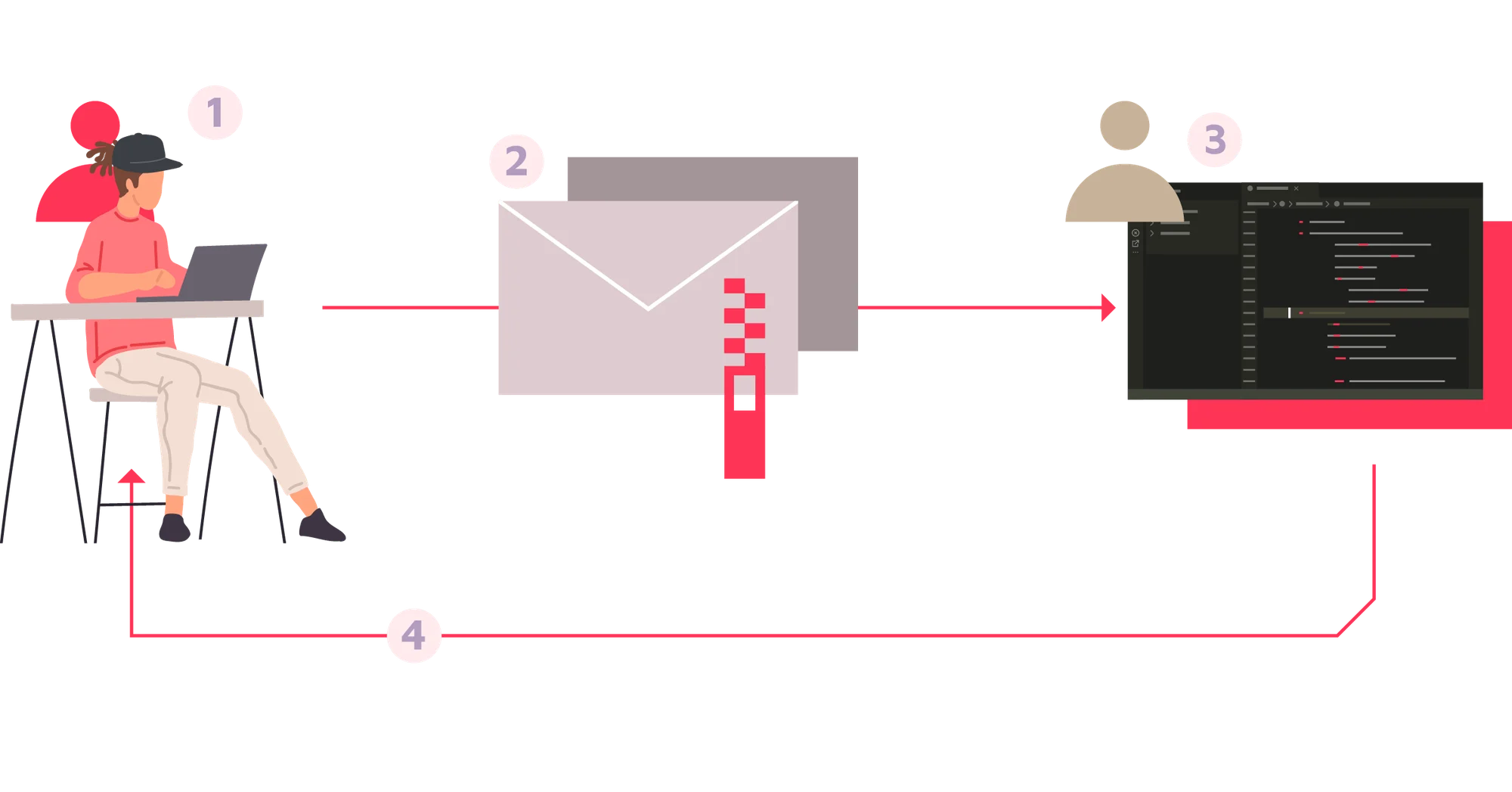
The researchers demonstrated the risk in three code editors, leading to a bypass of the trusted workspace feature of the first two:
| Product | Status |
|---|---|
| Microsoft Visual Studio Code < 1.63.1 | CVE-2021-43891 |
| JetBrains IDEs < 2021.3.1 | CVE-2022-24346 |
| GitHub Atom | not fixed |
They also demonstrated it across a broad range of Git integrations for terminals, such as the official Git implementation, Oh My Zsh and fish. After reaching out to the Git maintainers, it was concluded that there will always be potentially dangerous features in Git via this attack vector; the only solution is to change user security expectations when using Git integrations.
Finding it
The starting point is the core.fsmonitor directive. To show the behaviour without forcing anyone to read Git's code, the researchers created an empty folder and a .git/config with a core.fsmonitor set:
$ git init
$ echo 'fsmonitor = "id>/tmp/fsmonitor"' >> .git/config
$ git status
$ cat /tmp/fsmonitor
uid=501(user) gid=[...]
Running git status in an untrusted folder proved dangerous: the command configured in the local file ran and its output was written to /tmp/fsmonitor. The question that follows is what could be running such commands automatically, without the user's knowledge.
Exploitation
Step 1: the terminal Git prompt
The root cause is similar for most prompts, and the majority are vulnerable by default. As soon as a Git command with support for core.fsmonitor is invoked, the arbitrary command is executed. In the upstream implementation of the Git shell integration in Git (contrib/completion/git-prompt.sh), the script exports a function named __git_ps1 intended to be placed in the user's shell primary prompt ($PS1). It invokes git diff after detecting that it is in a work tree and the prompt configuration GIT_PS1_SHOWDIRTYSTATE is set:
contrib/completion/git-prompt.sh
__git_ps1 ()
{
    # [...]
    elif [ "true" = "$inside_worktree" ]; then
    if [ -n "${GIT_PS1_SHOWDIRTYSTATE-}" ] &&
        [ "$(git config --bool bash.showDirtyState)" != "false" ]
    then
            git diff --no-ext-diff --quiet || w="*"
            git diff --no-ext-diff --cached --quiet || i="+"
            if [ -z "$short_sha" ] && [ -z "$i" ]; then
                    i="#"
            fi
    fi
As a result, git diff triggers the core.fsmonitor directive and automatically executes a potentially malicious system command in the background.
Step 2: proof of concept, cd considered harmful
The researchers reproduced the scenario against a developer using git-prompt.sh with GIT_PS1_SHOWDIRTYSTATE=1. They verified that other Git prompts, like Oh My Zsh or fish, are generally vulnerable by default, and the exploitation steps are strictly similar. In the demo, a developer simply downloaded an archive from an untrusted source, extracted it, and entered the resulting directory with the shell. This harmless behaviour results in the execution of an arbitrary system command placed by the attacker, in this case opening a calculator:
Step 3: Visual Studio Code and Workspace Trust
Visual Studio Code is shipped with the Git extension enabled by default, and declares its features in vscode/extensions/git/package.json. Up until version 1.63.1, it explicitly stated that it runs in untrusted workspaces (e.g. the user is still looking at the Workspace Trust prompt, or marked the current folder as untrusted):
 "capabilities": {
   "virtualWorkspaces": true,
   "untrustedWorkspaces": {
     "supported": true
   }
That means the extension's features are invoked as soon as a folder is opened, before the Workspace Trust prompt is even displayed. The researchers dynamically traced the invocations of external commands (here with Objective-See's ProcessMonitor) and confirmed that Git is invoked several times before the prompt:
[...]
{"event":"ES_EVENT_TYPE_NOTIFY_EXEC", "process":{"name":"git", "arguments":["/usr/local/bin/git","rev-parse","--show-toplevel"]}
{"event":"ES_EVENT_TYPE_NOTIFY_EXEC", "process":{"name":"git", "arguments":["/usr/local/bin/git","rev-parse","--git-dir"]}
{"event":"ES_EVENT_TYPE_NOTIFY_EXEC", "process":{"name":"git", "arguments":["/usr/local/bin/git","status","-z","-u"]}
[...]
This comes from the willingness to show meaningful information to users as soon as they open the editor, but it also means the execution of core.fsmonitor happens immediately.
Step 4: proof of concept in the editor
The researchers reproduced the scenario against a developer who downloaded an archive from an untrusted source, extracted it in a temporary folder, and chose to open it in Visual Studio Code. It results in the execution of an arbitrary command, here a calculator:
The same exploitation scenario applies to the JetBrains IDEs suite and GitHub Atom. The former did not have the Git plugin behind the project trust feature, while the latter deliberately does not have this feature at all.
Root cause
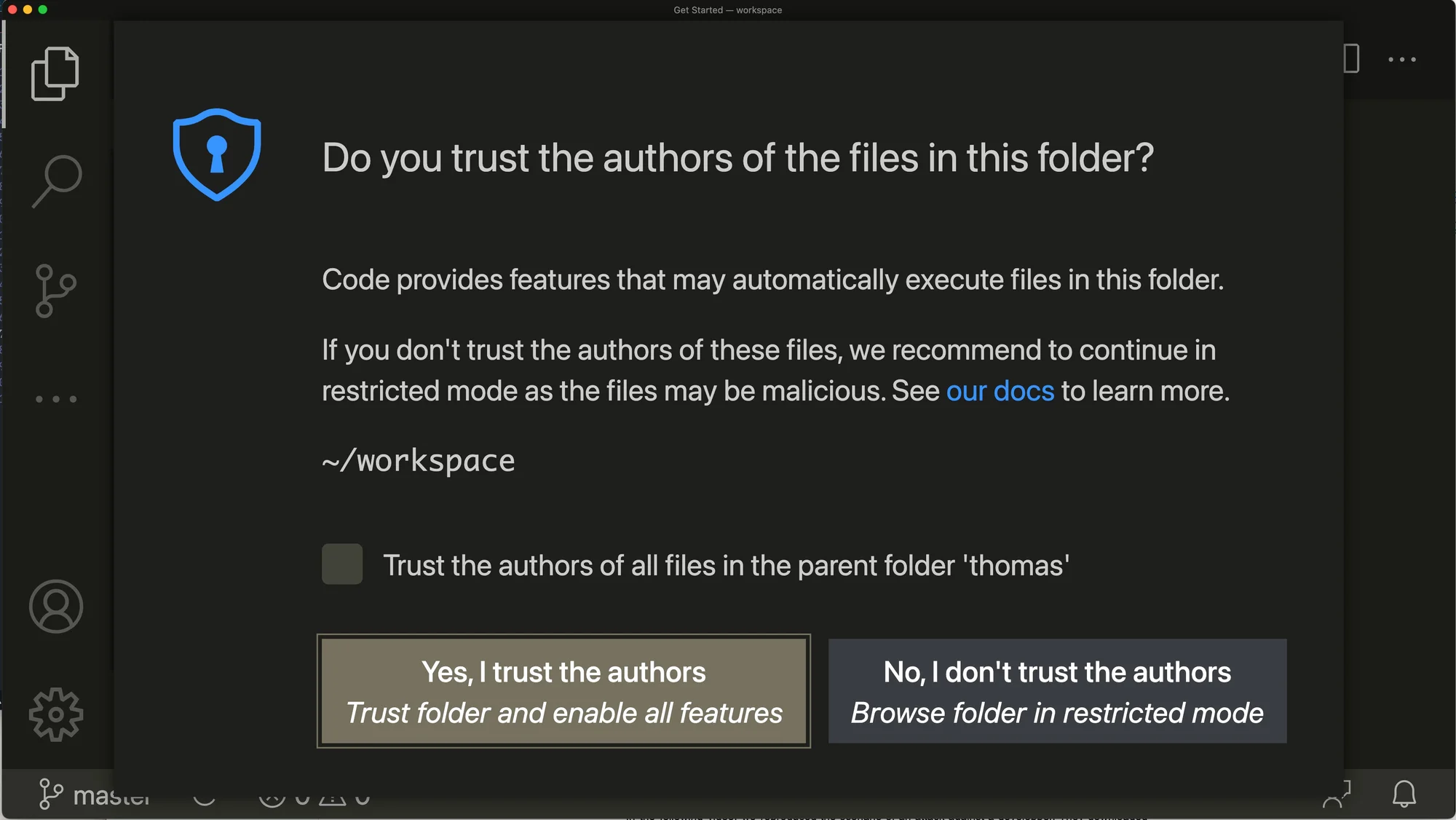
The mistake is a mismatch between Git's threat model and how Git is actually used. A repository-local configuration file is data that arrives with the folder, yet Git commands treat directives such as core.fsmonitor as instructions to execute. Any integration that runs Git commands automatically on a folder the user has merely opened or entered will run the attacker's command. Existing defences did not stop it: Visual Studio Code's Workspace Trust is a mechanism by which extensions can change their behaviour depending on the trust status of the current project, with the goal of preventing risky operations on untrusted codebases, but the Git extension declared itself supported in untrusted workspaces, so its features ran before the prompt appeared. The feature does not mean malicious projects cannot compromise the system, only that you have to manually mark it as trusted first, and this behaviour is documented in the official documentation and the Workspace Trust prompt itself:
Impact
The vulnerabilities all allow the execution of arbitrary commands upon access to a malicious folder planted on the victim's system, under the conditions described above: the folder must come from somewhere other than a Git clone, and the victim must open it in a vulnerable application or navigate into it with a shell that has a vulnerable Git integration. For a developer, that means an attacker who can deliver an archive can run commands with the developer's privileges, which is the foothold needed to reach source code and, through it, the company's products. The researchers believe the attack vector could also be used to compromise software working on user-supplied Git repositories; this is the original scenario pursued by Justin Steven in his research, leading to vulnerabilities in security tools that deliberately download remote Git configurations to the local system.
Fix
For Visual Studio Code, the maintainers decided to enable the Git extension only in trusted workspaces (commit 67d6356a). The patch is included starting from Visual Studio Code 1.63.2, and you likely already benefit from it if you did not disable automatic updates; if so, you should consider enabling them, as similar vulnerabilities are fixed several times per year. Microsoft assigned CVE-2021-43891 to this vulnerability, as well as a consequent monetary bounty that the researchers donated to charities. JetBrains took the same approach in the IntelliJ suite starting from 2021.3.1, assigning CVE-2022-24346. GitHub Atom chose not to fix the risk.
For terminals, the researchers are not aware of an easy way to mitigate the risk while using the official Git program: as soon as subcommands like git status are invoked in folders containing an untrusted Git repository, attackers will have ways to execute unintended commands. They believe it would be very hard to establish a list of safe configuration directives, as various other ways to force the hidden execution of commands with a local configuration would still exist. Instead, maintainers should not only try to override settings like core.fsmonitor, but rather disable Git integrations by default, or at least those that run without the user's prior consent.
# If you are using bash, zsh
PS1=\s-\v\$
# If you are using fish
function fish_prompt
printf '%s' $PWD ' $ '
end
Alternative Git implementations (e.g. JGit) may not always implement support for features like core.fsmonitor. As a general rule, it should be considered unsafe to open third-party source code in modern IDEs or to navigate through it with a terminal with shell integrations; disposable virtual machines should be used for such tasks, and code editors kept up to date.
Variants to test
- Other terminal prompts. Check whether a prompt runs
git statusorgit diffautomatically on entering a directory, and whether it is enabled by default. A positive result is the command from a local.git/configrunning as soon as youcdinto the folder, as in theid>/tmp/fsmonitortest. - Other editors and IDEs. Inspect the Git integration's manifest for a declaration that it supports untrusted workspaces, and trace external process invocations while opening a folder. A positive result is
git statusorgit diffrunning before any trust prompt is answered. - Tools that process user-supplied repositories. Look for software that downloads remote Git configurations to the local system. A positive result is a
core.fsmonitorcommand executing during that processing. - Other local configuration directives. The researchers note that various other ways to force hidden command execution with a local configuration exist beyond
core.fsmonitor; a positive result is any directive in.git/configthat causes a command to run on a routine Git query. - Alternative Git implementations. Test whether the implementation honours
core.fsmonitor; the researchers note that implementations such as JGit may not always support it, so a negative result here does not clear the integration of the broader risk.
Timeline
| Date | Action |
|---|---|
| 2021-08-30 | Visual Studio Code vulnerability reported to Microsoft. |
| 2021-09-01 | Vulnerability in the IntelliJ IDEs reported to JetBrains, who let the researchers know they were already aware of this risk. |
| 2021-09-02 | Vulnerability in Atom reported to GitHub. The submission was closed as Informative, being outside of their threat model. |
| 2021-11-01 | Microsoft released Visual Studio Code 1.63.2, with the Git extension behind Workspace Trust. |
| 2021-12-29 | JetBrains released IntelliJ 2021.3.1 with broader support of Trusted Projects. |
What happened, in plain words
Imagine you receive an email with a zip file from someone you do not know. You download it, unpack it, and open the folder. Nothing else. You did not run a program, you did not double-click an installer. Yet, just by looking at that folder, a command chosen by the sender runs on your computer.
That is the core of what this research describes. The researchers found that several tools developers use every day, including the official Git terminal prompt and some code editors, will run a command written inside a folder as soon as they look at that folder. The command comes from a small configuration file that travels inside the folder itself. The victim only has to open the folder in an editor or step into it with a terminal.
Why does this matter? Developers hold the source code of a company, which is its core intellectual property. If an attacker can run commands on one developer's machine, they can slip malicious code into the company's products. If other companies then use those products, the malware spreads further. This chain is called a supply chain attack, and it is the reason attackers increasingly target developers rather than only servers.
The article demonstrates the problem with the official Git terminal prompt and with Microsoft's Visual Studio Code, but the same scenario affects a broad range of products. Some of the findings were already known to the maintainers of the affected projects. The researchers coordinated their publication with Justin Steven, another security researcher who was investigating similar vulnerabilities, so that the technical details came out at the same time.
The background you need
Before the technical part, a few ideas explained from zero.
Git is a program that keeps track of changes in files, mostly source code. A repository (or repo) is a folder that Git manages. Inside every repository there is a hidden subfolder called .git that holds Git's own bookkeeping.
Configuration is how you tell Git how to behave. Git reads settings from three places, and each level overrides the one before it:
- System level, for the whole machine, for example
/etc/gitconfig. - Global level, for one user, for example
~/.gitconfig. - Repository-local level, for one folder only, for example
.git/config.
The third one is the important one here. It lives inside the repository folder, so it travels with the folder. If someone sends you a folder, they also send you its local configuration.
A directive is simply one setting line in a configuration file, written as a name and a value.
core.fsmonitor is one such directive. The official Git documentation describes it like this:
If set, the value of this variable is used as a command which will identify all files that may have changed since the requested date/time.
In plain words: if this setting exists, Git treats its value as a command to run on your computer. The command is supposed to report which files changed recently, so Git can work faster on big projects. Most Git commands will run that command, if it is set, as soon as they need to ask about the files in the repository. Among those commands are git status and git diff.
So a folder that arrives with a .git/config can carry a command that runs whenever a tool asks Git about the repository. That is the whole trick.
How it can impact you
One important limit first: this attack vector applies only to folders obtained through means other than Git, such as other source control management tools or website downloads. Cloning a remote repository does not retrieve the files necessary to conduct this attack. In other words, the malicious configuration has to reach you as a plain folder or archive, not through a normal git clone.
A plausible attack scenario looks like this:
- An attacker crafts a malicious Git repository with a local configuration file.
- The attacker compresses these files in an archive and sends it to the victim, e.g. over email.
- The victim opens it in a vulnerable application.
- The victim's computer is now compromised by the attacker.
The researchers demonstrated this risk in three code editors. In the first two, it bypassed the trusted workspace feature, which is the editor's built-in protection that is supposed to stop risky things from happening in folders you have not approved:
| Product | Status |
|---|---|
| Microsoft Visual Studio Code < 1.63.1 | CVE-2021-43891 |
| JetBrains IDEs < 2021.3.1 | CVE-2022-24346 |
| GitHub Atom | not fixed |
A CVE is a public identifier for a known security flaw, so people can refer to the same issue unambiguously.
They also demonstrated it across a broad range of Git integrations for terminals, such as the official Git implementation, Oh My Zsh and fish. A terminal is the text window where you type commands. A shell is the program inside it that reads and runs those commands. A prompt is the little piece of text the shell shows before your cursor, often containing your folder name and Git branch. A Git integration for a terminal is a script that decorates that prompt with Git information, for example whether you have uncommitted changes.
After reaching out to the Git maintainers, it was concluded that there will always be potentially dangerous features in Git via this attack vector. The only solution, then, is to change user security expectations when using Git integrations: users should assume that looking at an untrusted folder with Git tooling is risky.
Finding it: the experiment
The starting point is the core.fsmonitor directive. To show the behaviour without forcing anyone to read Git's source code, the researchers created an empty folder and a .git/config with a core.fsmonitor set:
$ git init
$ echo 'fsmonitor = "id>/tmp/fsmonitor"' >> .git/config
$ git status
$ cat /tmp/fsmonitor
uid=501(user) gid=[...]
Line by line:
$ git initturns the current empty folder into a Git repository. It creates the hidden.gitfolder and a default.git/configinside it. The$is just the shell prompt, not something you type.$ echo 'fsmonitor = "id>/tmp/fsmonitor"' >> .git/configadds one line to the local configuration file. The line setsfsmonitorto the commandid>/tmp/fsmonitor. The>>means append to the file. The commandidprints who you are (your user and group identifiers), and>redirects that output into the file/tmp/fsmonitor. So the setting says: when Git needs to know which files changed, runidand save the result.$ git statusasks Git for the state of the repository. This is an everyday command that any Git integration might run on your behalf.$ cat /tmp/fsmonitorprints the contents of the file the command wrote.catsimply displays a file.uid=501(user) gid=[...]is the output ofid: proof that the command configured in the local file actually ran.
Running git status in an untrusted folder proved dangerous: the command configured in the local file ran and its output was written to /tmp/fsmonitor. The question that follows is what could be running such commands automatically, without the user's knowledge. That is what the next sections answer.
Exploitation
Step 1: the terminal Git prompt
The root cause is similar for most prompts, and the majority are vulnerable by default. As soon as a Git command with support for core.fsmonitor is invoked, the arbitrary command is executed.
In the upstream implementation of the Git shell integration in Git, the file contrib/completion/git-prompt.sh, the script exports a function named __git_ps1. A function is a named block of commands that can be called by name. This one is intended to be placed in the user's shell primary prompt, the variable $PS1. It invokes git diff after detecting that it is in a work tree and the prompt configuration GIT_PS1_SHOWDIRTYSTATE is set:
contrib/completion/git-prompt.sh
__git_ps1 ()
{
    # [...]
    elif [ "true" = "$inside_worktree" ]; then
    if [ -n "${GIT_PS1_SHOWDIRTYSTATE-}" ] &&
        [ "$(git config --bool bash.showDirtyState)" != "false" ]
    then
            git diff --no-ext-diff --quiet || w="*"
            git diff --no-ext-diff --cached --quiet || i="+"
            if [ -z "$short_sha" ] && [ -z "$i" ]; then
                    i="#"
            fi
    fi
Line by line, in plain words:
__git_ps1 ()starts the definition of a function called__git_ps1. The()is how a shell marks a function name.{opens the body of the function.# [...]is a comment standing for code left out of the excerpt.elif [ "true" = "$inside_worktree" ]; thenchecks whether the current folder is inside a Git work tree, meaning a folder Git manages. If it is not, the rest is skipped.if [ -n "${GIT_PS1_SHOWDIRTYSTATE-}" ] &&checks that the settingGIT_PS1_SHOWDIRTYSTATEis set and not empty.-nmeans non-empty. The&&means the next condition must also be true.[ "$(git config --bool bash.showDirtyState)" != "false" ]asks Git for the settingbash.showDirtyStateand checks it is notfalse. This lets a user switch the dirty-state display off.thenbegins what happens when both conditions hold.git diff --no-ext-diff --quiet || w="*"runsgit diff, which compares the working files with the last saved version.--quietmakes it silent and only report through its exit status.||means: if the command reports a difference, set the variablewto*. The*is later shown in the prompt to mean there are unstaged changes.git diff --no-ext-diff --cached --quiet || i="+"does the same for staged changes, the ones you have marked to be saved, and setsito+if there are any.if [ -z "$short_sha" ] && [ -z "$i" ]; thenchecks whether the short commit identifier andiare both empty.-zmeans empty.i="#"setsito#in that case, another marker for the prompt.ficloses the innerif, and the secondficloses the outer one.
As a result, git diff triggers the core.fsmonitor directive and automatically executes a potentially malicious system command in the background. The user never typed that command; the prompt script ran it for them when it invoked git diff.
Step 2: proof of concept, cd considered harmful
The researchers reproduced the scenario against a developer using git-prompt.sh with GIT_PS1_SHOWDIRTYSTATE=1. They verified that other Git prompts, like Oh My Zsh or fish, are generally vulnerable by default, and the exploitation steps are strictly similar.
In the demo, a developer simply downloaded an archive from an untrusted source, extracted it, and entered the resulting directory with the shell. cd is the command that changes your current folder. This harmless behaviour results in the execution of an arbitrary system command placed by the attacker, in this case opening a calculator:
Step 3: Visual Studio Code and Workspace Trust
Visual Studio Code is a free code editor from Microsoft. It is shipped with the Git extension enabled by default. An extension is an add-on that gives the editor extra abilities; the Git extension is the part that talks to Git. Extensions declare their features in a manifest file, here vscode/extensions/git/package.json.
Up until version 1.63.1, that manifest explicitly stated that the Git extension runs in untrusted workspaces. A workspace is the folder or project you have open in the editor. Untrusted means the user is still looking at the Workspace Trust prompt, or marked the current folder as untrusted:
 "capabilities": {
   "virtualWorkspaces": true,
   "untrustedWorkspaces": {
     "supported": true
   }
Line by line:
"capabilities": {opens a block describing what the extension can do."virtualWorkspaces": truesays the extension works in virtual workspaces, which are projects that exist only in memory or remotely rather than as a normal local folder."untrustedWorkspaces": {opens the block about untrusted folders."supported": trueis the key line: it declares that the extension supports running in untrusted workspaces. In other words, it does not wait for the user to trust the folder.
That means the extension's features are invoked as soon as a folder is opened, before the Workspace Trust prompt is even displayed. The researchers dynamically traced the invocations of external commands, here with Objective-See's ProcessMonitor, a tool that records every program started on the machine, and confirmed that Git is invoked several times before the prompt:
[...]
{"event":"ES_EVENT_TYPE_NOTIFY_EXEC", "process":{"name":"git", "arguments":["/usr/local/bin/git","rev-parse","--show-toplevel"]}
{"event":"ES_EVENT_TYPE_NOTIFY_EXEC", "process":{"name":"git", "arguments":["/usr/local/bin/git","rev-parse","--git-dir"]}
{"event":"ES_EVENT_TYPE_NOTIFY_EXEC", "process":{"name":"git", "arguments":["/usr/local/bin/git","status","-z","-u"]}
[...]
Line by line:
[...]stands for log lines left out of the excerpt.- The first line records that a program was started (
ES_EVENT_TYPE_NOTIFY_EXEC). The program isgit, found at/usr/local/bin/git, and it was given the argumentsrev-parse --show-toplevel. That asks Git for the top folder of the repository. - The second line records another start of
git, this time withrev-parse --git-dir, which asks Git where its.gitfolder is. - The third line records
git status -z -u, which asks Git for the state of the files, including untracked ones (-u), in a machine-readable form (-z).
This comes from the willingness to show meaningful information to users as soon as they open the editor, but it also means the execution of core.fsmonitor happens immediately.
Step 4: proof of concept in the editor
The researchers reproduced the scenario against a developer who downloaded an archive from an untrusted source, extracted it in a temporary folder, and chose to open it in Visual Studio Code. It results in the execution of an arbitrary command, here a calculator:
The same exploitation scenario applies to the JetBrains IDEs suite and GitHub Atom. The former did not have the Git plugin behind the project trust feature, while the latter deliberately does not have this feature at all.
Root cause
The mistake is a mismatch between Git's threat model and how Git is actually used. A threat model is the set of assumptions a product makes about who might attack it and how. Git's model treats the repository-local configuration as data that belongs to the folder. But Git commands treat directives such as core.fsmonitor as instructions to execute. Any integration that runs Git commands automatically on a folder the user has merely opened or entered will run the attacker's command.
Existing defences did not stop it. Visual Studio Code's Workspace Trust is a mechanism by which extensions can change their behaviour depending on the trust status of the current project, with the goal of preventing risky operations on untrusted codebases. But the Git extension declared itself supported in untrusted workspaces, so its features ran before the prompt appeared.
The feature does not mean malicious projects cannot compromise the system, only that you have to manually mark it as trusted first. This behaviour is documented in the official documentation and the Workspace Trust prompt itself:
Impact
The vulnerabilities all allow the execution of arbitrary commands upon access to a malicious folder planted on the victim's system, under the conditions described above: the folder must come from somewhere other than a Git clone, and the victim must open it in a vulnerable application or navigate into it with a shell that has a vulnerable Git integration.
For a developer, that means an attacker who can deliver an archive can run commands with the developer's privileges. That is the foothold needed to reach source code and, through it, the company's products. The researchers believe the attack vector could also be used to compromise software working on user-supplied Git repositories. This is the original scenario pursued by Justin Steven in his research, leading to vulnerabilities in security tools that deliberately download remote Git configurations to the local system.
Fix
For Visual Studio Code, the maintainers decided to enable the Git extension only in trusted workspaces, in commit 67d6356a. A commit is a recorded change in a code repository, identified by a short code. The patch is included starting from Visual Studio Code 1.63.2, and you likely already benefit from it if you did not disable automatic updates. If you did disable them, you should consider enabling them, as similar vulnerabilities are fixed several times per year.
Microsoft assigned CVE-2021-43891 to this vulnerability, as well as a consequent monetary bounty that the researchers donated to charities. A bounty is a payment a company gives to someone who reports a security flaw responsibly.
JetBrains took the same approach in the IntelliJ suite starting from 2021.3.1, assigning CVE-2022-24346. GitHub Atom chose not to fix the risk.
For terminals, the researchers are not aware of an easy way to mitigate the risk while using the official Git program. As soon as subcommands like git status are invoked in folders containing an untrusted Git repository, attackers will have ways to execute unintended commands. They believe it would be very hard to establish a list of safe configuration directives, as various other ways to force the hidden execution of commands with a local configuration would still exist.
Instead, maintainers should not only try to override settings like core.fsmonitor, but rather disable Git integrations by default, or at least those that run without the user's prior consent. The only solution is to change user security expectations when using Git integrations.
Their sole recommendation is to disable SCM prompts when dealing with untrusted data. SCM stands for source control management, the general category Git belongs to.
# If you are using bash, zsh
PS1=\s-\v\$
# If you are using fish
function fish_prompt
printf '%s' $PWD ' $ '
end
Line by line:
# If you are using bash, zshis a comment saying which shells the next line is for.PS1=\s-\v\$sets the prompt variable to a plain form: the shell name (\s), its version (\v) and a dollar sign (\$). No Git information is drawn, so no Git command runs when the prompt appears.# If you are using fishis a comment for the fish shell, which uses a different syntax.function fish_promptstarts the definition of the function fish calls to draw its prompt.printf '%s' $PWD ' $ 'prints the current folder ($PWD) followed by a space, a dollar sign and a space. Again, no Git information.endcloses the function.
Alternative Git implementations, such as JGit, may not always implement support for features like core.fsmonitor. As a general rule, it should be considered unsafe to open third-party source code in modern IDEs or to navigate through it with a terminal with shell integrations. Disposable virtual machines should be used for such tasks, and code editors kept up to date. A virtual machine is a computer simulated inside your computer, which you can throw away after use, so anything malicious inside it disappears with it.
Variants to test
If you want to check your own tools, these are the angles the researchers suggest.
- Other terminal prompts. Check whether a prompt runs
git statusorgit diffautomatically on entering a directory, and whether it is enabled by default. A positive result is the command from a local.git/configrunning as soon as youcdinto the folder, as in theid>/tmp/fsmonitortest. - Other editors and IDEs. Inspect the Git integration's manifest for a declaration that it supports untrusted workspaces, and trace external process invocations while opening a folder. A positive result is
git statusorgit diffrunning before any trust prompt is answered. - Tools that process user-supplied repositories. Look for software that downloads remote Git configurations to the local system. A positive result is a
core.fsmonitorcommand executing during that processing. - Other local configuration directives. The researchers note that various other ways to force hidden command execution with a local configuration exist beyond
core.fsmonitor. A positive result is any directive in.git/configthat causes a command to run on a routine Git query. - Alternative Git implementations. Test whether the implementation honours
core.fsmonitor. The researchers note that implementations such as JGit may not always support it, so a negative result here does not clear the integration of the broader risk.
Timeline
| Date | Action |
|---|---|
| 2021-08-30 | Visual Studio Code vulnerability reported to Microsoft. |
| 2021-09-01 | Vulnerability in the IntelliJ IDEs reported to JetBrains, who let the researchers know they were already aware of this risk. |
| 2021-09-02 | Vulnerability in Atom reported to GitHub. The submission was closed as Informative, being outside of their threat model. |
| 2021-11-01 | Microsoft released Visual Studio Code 1.63.2, with the Git extension behind Workspace Trust. |
| 2021-12-29 | JetBrains released IntelliJ 2021.3.1 with broader support of Trusted Projects. |
Glossary
- Archive: a single file that packs several files together, like a zip, so they can be sent in one piece.
- Bounty: a payment a company gives to someone who reports a security flaw responsibly.
- CVE: a public identifier for a known security flaw, so people can refer to the same issue unambiguously.
- Commit: a recorded change in a code repository, identified by a short code.
- Configuration: the settings that tell a program how to behave.
- Directive: one setting line in a configuration file, written as a name and a value.
- Extension: an add-on that gives a program extra abilities.
- Function: a named block of commands that can be called by name.
- Git: a program that keeps track of changes in files, mostly source code.
- Git integration: a script or add-on that makes another tool, such as a terminal prompt or an editor, talk to Git.
- Global configuration: settings that apply to one user on a machine, for example
~/.gitconfig. - Local privilege escalation: running commands with the rights of the user who opened the malicious folder, which is what happens here.
- Prompt: the little piece of text a shell shows before your cursor, often containing your folder name and Git branch.
- Repository (repo): a folder that Git manages, including its hidden
.gitsubfolder. - Repository-local configuration: settings that live inside one repository folder, for example
.git/config, and therefore travel with it. - SCM: source control management, the general category of tools that track changes in files, which Git belongs to.
- Shell: the program inside a terminal that reads and runs the commands you type.
- Supply chain attack: an attack that spreads by infecting a product one company makes, so that the customers of that company are infected too.
- System configuration: settings that apply to the whole machine, for example
/etc/gitconfig. - Terminal: the text window where you type commands.
- Threat model: the set of assumptions a product makes about who might attack it and how.
- Trusted workspace: a folder the user has explicitly marked as safe in an editor, so that risky features are allowed to run.
- Virtual machine: a computer simulated inside your computer, which you can throw away after use.
- Workspace: the folder or project you have open in an editor.
- Work tree: the folder of files Git manages, as opposed to its internal bookkeeping.