Sensitive data leak using IDOR in integration service
The integration feature used a form_id parameter in GET and PATCH requests without checking ownership, so an attacker could replace it with a victim's form ID. This let the attacker link their own Zendesk Sell account to the victim's form and receive all future form responses.
 Published on ronak-9889.medium.com
This write up is about Bug, Which I found in private program before six months and resolved before two months. As I mentioned in my previous blog posts, I go by functionality to hunt for Bugs.
The full write-up lives on its author's site
It belongs to its author, so we link to it rather than copy it. The other two tabs are our own rewrites, checked against it.
Context
This write-up covers a bug I found in a private program six months before writing it up; it was resolved two months before publication. Because the program is private I cannot name it, so throughout this post I call it Redacted.com. For context, it is an application for generating forms for surveys, quizzes and similar purposes, collecting responses from those forms, and integrating with other services.
My usual approach is to hunt by functionality rather than follow a fixed methodology: some basic recon, understand the normal flow of the application, then go hunting. I mostly look for business logic flaws, IDORs and server-side bugs.
The bug was in the integration functionality. There was a section to connect a form's responses to different platforms such as Google Analytics, Facebook Pixels and more. An owner could integrate their form with one of these apps and receive form responses in the integrated app.
Among the available platforms I came across the option to integrate with Zendesk Sell, an application for analysing sales data such as leads and contacts. The normal flow was: once the integration process is started, it takes the form id and transfers the request flow to the third-party application, where you are asked to configure your Zendesk Sell account, grant authorisation and map the form's questions to the fields in Zendesk Sell. Once that is done successfully, the form's responses are mapped to the Zendesk Sell fields.
Setup
I had two accounts created to test the application, one as an attacker and another as a victim. I intercepted the requests to observe and modify the request flow. No other tooling or versions are mentioned in the report.
Finding it
Observing the request flow, I found that a first GET request to initiate the integration was generated, then requests to the third party to configure authentication and mapping, and lastly a PATCH request to enable the integration. Both the GET and the PATCH requests were vulnerable to IDOR in the form_id parameter.
Exploitation
Step 1: Start the integration and swap the form id in the GET request
I started the integration, intercepted the GET request and replaced the form id with the victim's form id.
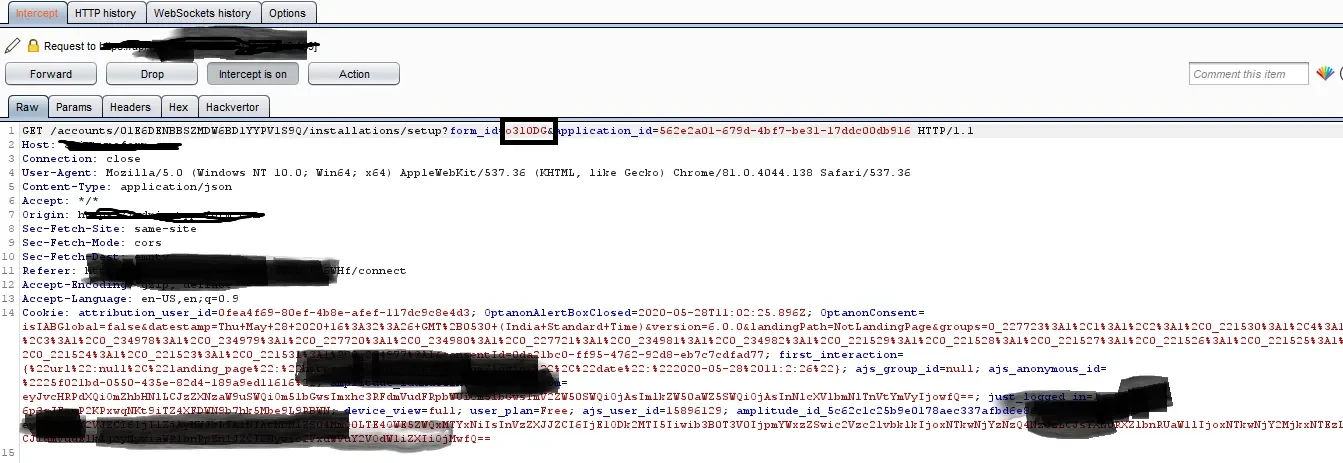
The screenshot is captioned with the victim's form_id. After replacing the form id with the victim's id, I turned off interception and landed on the authentication and mapping page.
Step 2: Authorise the attacker's Zendesk Sell account
I configured a Zendesk Sell account as the attacker and granted authorisation. The page fetched the victim form's questions to map with the attacker's Zendesk Sell account fields.
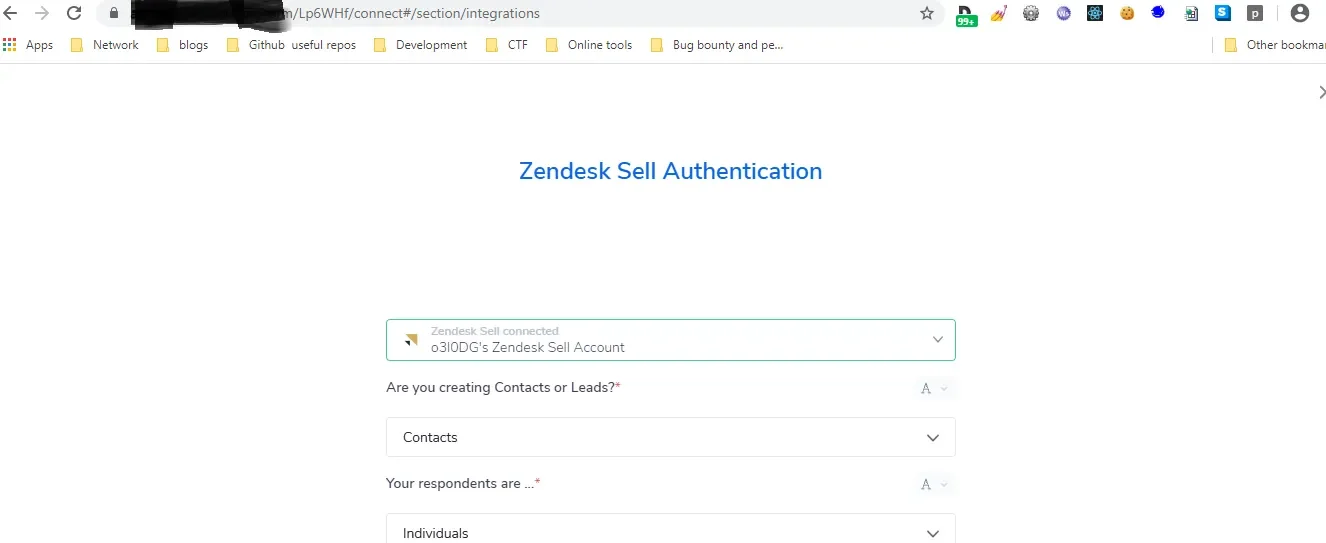
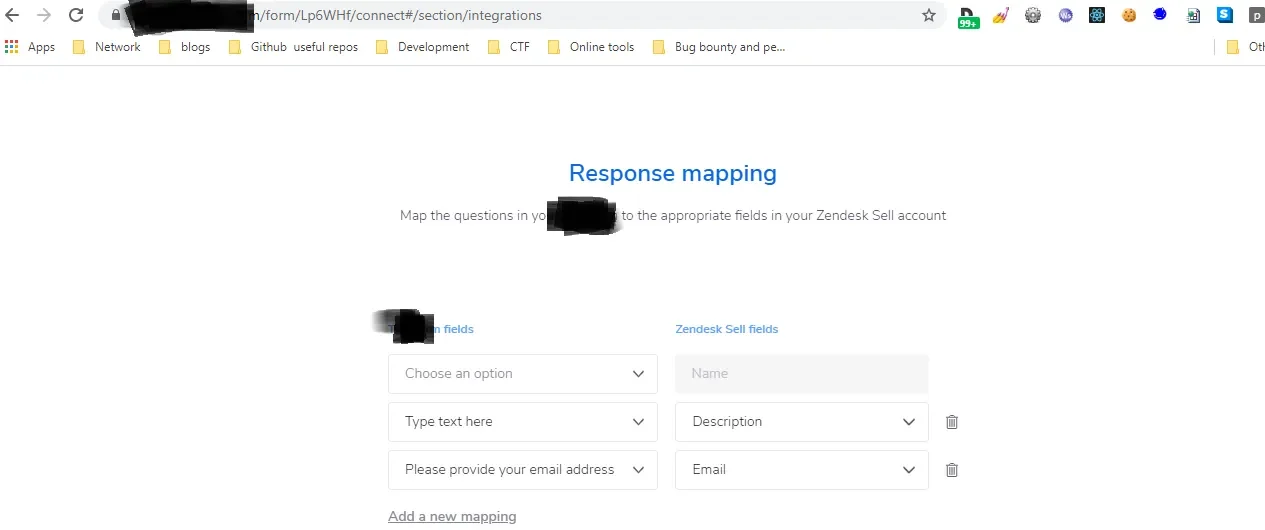
The first screenshot shows the Zendesk Sell authorisation step; the second shows the victim form's questions being mapped to the attacker's Zendesk Sell fields.
Step 3: Enable the integration with the victim's form id in the PATCH request
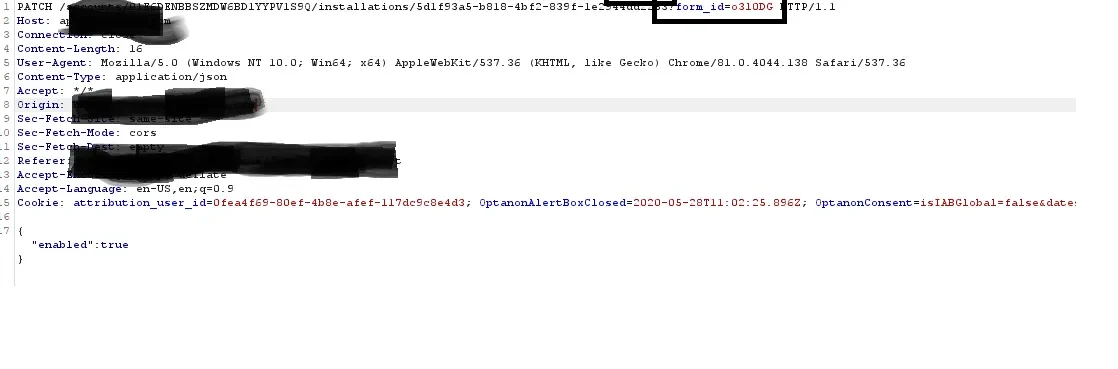
After finishing this configuration, I intercepted the next request, which was the PATCH request to enable the integration, and replaced the form id with the victim's form id.
Step 4: Confirm the integration was enabled on the victim's form
After finishing the integration process on the attacker's account, I logged in to the victim's account to check whether it worked, and found the integration had been enabled.
Step 5: Submit a response as a visitor and check where it lands
To test further, I filled up the form as a visitor and checked the response received in the victim's account and in the attacker's Zendesk Sell account. The attacker received the form response in his Zendesk Sell account.
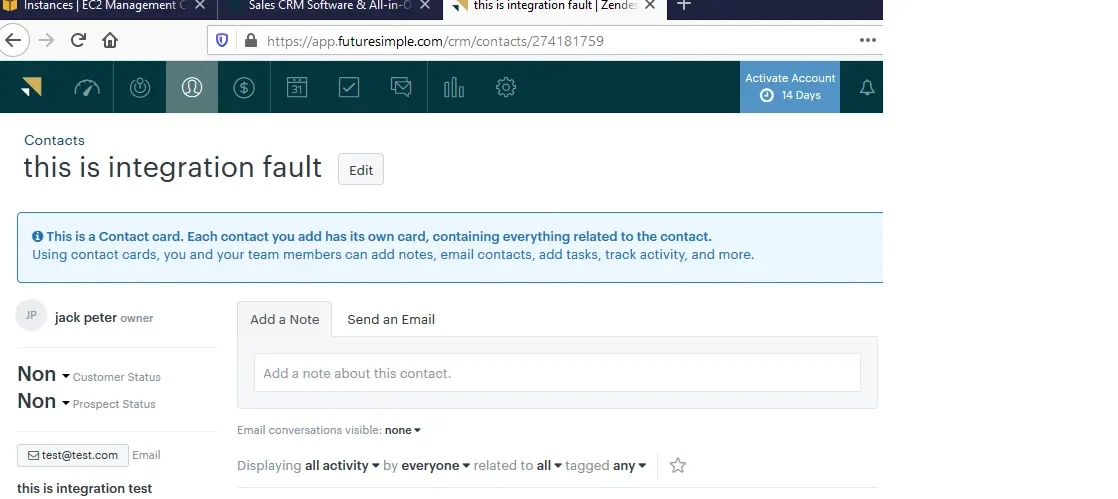
Step 6: Enumerating form ids
The remaining question was how to enumerate form ids in order to integrate forms with our Zendesk account. Enumeration was a very simple task: the link for sharing a form contained the form_id value, which can be used to integrate with our Zendesk account and simply receive all sensitive data being filled into those forms. A simple Google dork revealed form ids.
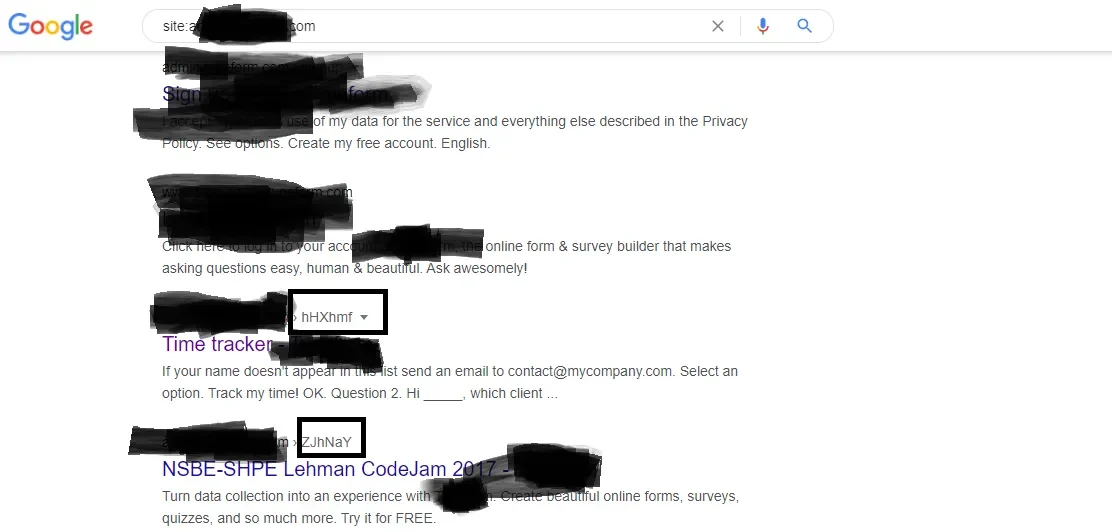
Root cause
Both the GET request that initiates the integration and the PATCH request that enables it were vulnerable to IDOR in the form_id parameter. The attacker could complete the whole integration against a form they do not own. The report does not describe the server-side checks that were or were not present beyond this behaviour.
Impact
Using the IDOR in this integration process, an attacker could integrate his Zendesk Sell account with any form without any kind of user interaction, and could fetch all sensitive data received as a form response. The victim does not need to approve anything; the form's id is exposed in the form's sharing link and can be enumerated with a search engine dork.
Fix
The report does not state what change was made to fix the issue; it only notes that the bug was resolved before publication.
Variants to test
- Integration initiation endpoints. On other form builders, start an integration and change the form id in the initiating request to another account's form. A positive result is the third-party authorisation and field-mapping pages loading the other account's questions.
- Integration enablement requests. Intercept the request that finalises an integration and swap in a foreign form id. A positive result is the integration appearing as enabled when you log in to the other account.
- Third-party mapping steps. Check whether the mapping step itself trusts a form id supplied by the client. A positive result is field lists from a form you do not own being offered for mapping.
- Form id discovery. Look at sharing links and public form URLs for sequential or guessable ids, and try search engine dorks against the platform's domain. A positive result is a set of valid ids you can feed into the steps above.
- Response delivery. After a successful integration, submit a response as a visitor and check the attacker-controlled third-party account. A positive result is the response content arriving there.
What happened, in plain words
A form-building website let people create surveys, quizzes and similar forms, collect the answers, and connect those answers to other online services. One of those services was Zendesk Sell, a tool for keeping track of sales contacts. The connection feature was vulnerable to IDOR in the form_id parameter. By changing the form id in the requests, an attacker could connect their own Zendesk Sell account to somebody else's form and receive the answers submitted to it. The form's owner never had to approve anything, and the form's id appears in the form's sharing link.
This is called an IDOR, short for Insecure Direct Object Reference. The name sounds complicated, but the idea is simple. Imagine a hotel where every room key is just the room number written on a card. If the receptionist hands you key number 12 but never checks that room 12 is the one you booked, you can walk up to any door, write a different number on the card and get in. The "object" is the room, the "reference" is the number, and the mistake is trusting the number without checking who is asking. In a web application the object is usually a record such as a form, an order or a user profile, and the reference is an id in a URL or in the body of a request.
I found this bug in a private bug bounty program, which is a scheme where a company invites selected researchers to test its systems and pays them for reporting problems. Because the program is private I cannot name the company, so throughout this post I call it Redacted.com. I found the bug six months before writing this up and it was resolved two months before publication.
The product and the feature
Redacted.com is an application for generating forms for surveys, quizzes and more, collecting responses from those forms, and integrating with other services. "Integrating" means connecting the form to another product so that data flows between them automatically. Instead of copying answers out of the form tool by hand, you tell the form tool to send each new answer to, say, a spreadsheet or a marketing tool.
There was a section to connect a form's responses to different platforms such as Google Analytics, Facebook Pixels and more. An owner could integrate their form with one of these apps and receive form responses in the integrated app. The owner is simply the account that created the form.
Among the available platforms I came across the option to integrate with Zendesk Sell, an application for analysing sales data such as leads and contacts. A lead is a potential customer and a contact is a record of a person you deal with. The normal flow was:
- The owner starts the integration process in Redacted.com.
- Redacted.com takes the form id and transfers the request flow to the third-party application, in this case Zendesk Sell.
- In Zendesk Sell you configure your account, grant authorisation and map the form's questions to the fields in Zendesk Sell. "Mapping" means saying which form question goes into which Zendesk field, for example "What is your email address?" goes into the Email field.
- Once that is done successfully, the form's responses are mapped to the Zendesk Sell fields, so each new answer becomes a new contact or lead in Zendesk Sell.
A form id is a short identifier the application uses to tell one form apart from another. It is not a secret in the way a password is, but it is the handle the application uses to look up the right form. If the application accepts a form id from the browser and acts on it without checking that the logged-in user owns that form, the handle becomes a way in.
How I approached it
My usual approach is to hunt by functionality rather than follow a fixed methodology: some basic recon, understand the normal flow of the application, then go hunting. Recon, short for reconnaissance, means looking around the application the way a normal user would: clicking through menus, reading help pages, watching what the browser sends. Understanding the normal flow first matters because you cannot spot an abnormal request until you know what the normal one looks like. I mostly look for business logic flaws, IDORs and server-side bugs. A business logic flaw is a case where the application does exactly what it was programmed to do, but the rules themselves are wrong, for example allowing a discount to be applied twice. A server-side bug is a problem in the code that runs on the company's computers rather than in your browser.
Watching the requests
Every time you click something on a website, your browser sends a request to a server and the server sends back a response. A request has a method, which is a verb telling the server what kind of action you want. The common ones are:
- GET: please give me something, such as a page or a list.
- PATCH: please change part of an existing record.
- POST: please create something or submit data.
A request also has a URL, which says what you are asking for, and often a body, which carries extra data. When you are logged in, the browser also sends a cookie or a token so the server knows who you are. A cookie is a small piece of data the site stored in your browser earlier, and the browser hands it back with every request, like a wristband at an event that proves you paid to get in. A token is a similar proof of identity, usually a long string of characters, that is sent in a header or a parameter. A header is a labelled line of extra information attached to a request, such as what type of content you accept.
To see and change these requests I intercepted them. A proxy sits between your browser and the server, like a postal worker who opens every letter, reads it, and can rewrite it before passing it on. With interception turned on, the proxy pauses each request so you can look at it, edit it, and then let it continue.
Setup
I had two accounts created to test the application, one as an attacker and another as a victim. Two accounts are essential for this kind of test: you need one account to act as the honest user whose data should stay private, and another to play the intruder. If you only use one account you cannot tell whether a request succeeded because it was allowed or because it was your own data.
Finding it
Observing the request flow, I found that a first GET request to initiate the integration was generated, then requests to the third party to configure authentication and mapping, and lastly a PATCH request to enable the integration. Both the GET and the PATCH requests were vulnerable to IDOR in the form_id parameter. A parameter is a named value carried in a request, in this case one called form_id whose value is the identifier of the form being integrated.
In other words, the application asked the browser "which form are we integrating?" and then believed the answer. It should have asked the server "does the logged-in user own this form?" and refused if the answer was no.
Exploitation
Step 1: Start the integration and swap the form id in the GET request
I started the integration, intercepted the GET request and replaced the form id with the victim's form id.
The screenshot is captioned with the victim's form_id. I did this because the first request is where the application decides which form the whole integration is about. If that decision is made from a value the browser supplies, changing the value changes the target. After replacing the form id with the victim's id, I turned off interception and landed on the authentication and mapping page. Turning interception off lets the modified request travel to the server and the response come back normally, so I could see what the application did with my changed value.
Step 2: Authorise the attacker's Zendesk Sell account
I configured a Zendesk Sell account as the attacker and granted authorisation. Authorisation here means giving Redacted.com permission to send data into my Zendesk Sell account, the same way you might let a calendar app read your email. The page fetched the victim form's questions to map with the attacker's Zendesk Sell account fields.
The first screenshot shows the Zendesk Sell authorisation step; the second shows the victim form's questions being mapped to the attacker's Zendesk Sell fields. This is the moment the bug becomes visible: the questions belong to a form I do not own, yet they are offered to me for mapping into my own account.
Step 3: Enable the integration with the victim's form id in the PATCH request
After finishing this configuration, I intercepted the next request, which was the PATCH request to enable the integration, and replaced the form id with the victim's form id.
The PATCH request is the one that actually switches the integration on. The first request only started the process; this one commits it. I changed the id here as well because both the GET and the PATCH requests were vulnerable to IDOR in form_id. If only the first request had been vulnerable, the integration would have failed at this final step.
Step 4: Confirm the integration was enabled on the victim's form
After finishing the integration process on the attacker's account, I logged in to the victim's account to check whether it worked, and found the integration had been enabled. Logging in as the victim is the honest way to confirm the effect: you are looking at the victim's own settings page and seeing a change you never made there.
Step 5: Submit a response as a visitor and check where it lands
To test further, I filled up the form as a visitor and checked the response received in the victim's account and in the attacker's Zendesk Sell account. A visitor is just someone filling in the form without being logged in, the ordinary person the form is meant for. The attacker received the form response in his Zendesk Sell account.
This is the proof of impact: real answers typed by a real visitor, delivered to somebody who has nothing to do with the form.
Step 6: Enumerating form ids
The remaining question was how to enumerate form ids in order to integrate forms with our Zendesk account. Enumeration means working through a list of possible values one by one to find the ones that exist. Enumeration was a very simple task: the link for sharing a form contained the form_id value, which can be used to integrate with our Zendesk account and simply receive all sensitive data being filled into those forms. A simple Google dork revealed form ids. A Google dork is a search query that uses advanced operators to find pages matching a pattern, for example pages on a particular site that contain a particular kind of link. Search engines index public pages, so anything a site publishes openly can end up in search results.
Why it worked
Both the GET request that initiates the integration and the PATCH request that enables it were vulnerable to IDOR in the form_id parameter. "The client" means the browser, which is under the attacker's control, so any value it sends should be treated as untrusted. The attacker could complete the whole integration against a form they do not own. The report does not describe the server-side checks that were or were not present beyond this behaviour.
Impact
Using the IDOR in this integration process, an attacker could integrate his Zendesk Sell account with any form without any kind of user interaction, and could fetch all sensitive data received as a form response. "Without user interaction" means the victim does not have to click a link, approve a prompt or do anything at all. The form's id is exposed in the form's sharing link and can be enumerated with a search engine dork. In practical terms, an attacker who can find a form's sharing link can arrange to receive the sensitive data submitted to that form.
Fix
The report does not state what change was made to fix the issue; it only notes that the bug was resolved before publication.
Variants to test
If you want to look for the same pattern on other form builders, these are the places to try. Each one follows the same idea: change an id you are allowed to send and see whether the server checks who owns it.
- Integration initiation endpoints. On other form builders, start an integration and change the form id in the initiating request to another account's form. A positive result is the third-party authorisation and field-mapping pages loading the other account's questions.
- Integration enablement requests. Intercept the request that finalises an integration and swap in a foreign form id. A positive result is the integration appearing as enabled when you log in to the other account.
- Third-party mapping steps. Check whether the mapping step itself trusts a form id supplied by the client. A positive result is field lists from a form you do not own being offered for mapping.
- Form id discovery. Look at sharing links and public form URLs for sequential or guessable ids, and try search engine dorks against the platform's domain. A positive result is a set of valid ids you can feed into the steps above.
- Response delivery. After a successful integration, submit a response as a visitor and check the attacker-controlled third-party account. A positive result is the response content arriving there.
Glossary
- API: a way for one piece of software to talk to another, like a waiter taking your order to the kitchen and bringing back the food.
- Authorisation: the process of giving an application permission to act on your behalf in another service, for example letting a form tool write into your Zendesk Sell account.
- Body: the part of a request that carries data, as opposed to the URL and headers.
- Business logic flaw: a bug where the application follows its programmed rules correctly but the rules themselves allow something harmful.
- Client: the software on your side, usually your browser, which the attacker controls and whose input the server should not trust.
- Cookie: a small piece of data a site stores in your browser and the browser sends back with later requests, often used to prove you are logged in.
- Enumeration: trying a series of possible values to discover which ones exist, such as walking through form ids.
- Form id: the identifier the application uses to tell one form apart from another.
- GET: a request method meaning "give me this page or data".
- Google dork: a search query using advanced operators to find pages that match a specific pattern.
- Header: a labelled line of extra information attached to a request or response.
- IDOR (Insecure Direct Object Reference): a bug where the application accepts an identifier from the user and acts on the record it points to without checking that the user is allowed to access it.
- Integration: a connection between two online services that lets data flow automatically from one to the other.
- Intercepting proxy: a tool that sits between your browser and the server, letting you read and modify requests before they are sent.
- Lead: a potential customer recorded in a sales system.
- Mapping: deciding which form question goes into which field of another application.
- Parameter: a named value carried in a request, such as
form_id. - PATCH: a request method meaning "change part of an existing record".
- POST: a request method meaning "create something or submit data".
- Private program: a bug bounty scheme where only invited researchers may test the company's systems.
- Recon: short for reconnaissance, looking around an application the way a normal user would to understand how it works.
- Request: the message your browser sends to a server asking for something or submitting something.
- Response: the message the server sends back.
- Server-side bug: a flaw in the code running on the company's computers rather than in your browser.
- Token: a long string of characters used as proof of identity or permission, sent with requests.
- Visitor: someone filling in a form without being logged in.
- Zendesk Sell: an application for analysing sales data such as leads and contacts.