Solr Injection by abusing Local Parameters on Zomato.com
The search suggestion endpoint on Zomato.com reflected double quotes into a backend Solr query, causing a 500 error with odd numbers of quotes and a normal response with even numbers. This indicated a Solr injection, though the author did not demonstrate a working exploit.
 Published on medium.com
Solr
The full write-up lives on its author's site
It belongs to its author, so we link to it rather than copy it. The other two tabs are our own rewrites, checked against it.
Context
Zomato is a restaurant discovery and food ordering site. The feature in scope here is the search box on the food ordering pages, which lets a user search for restaurants and cuisines in their location. Typing into that box triggers an autosuggest request to a backend PHP endpoint, and the report is about what happens when user input reaches the search platform behind that endpoint.
The bug turned out to be Solr injection, specifically injection through Solr's local parameters feature. Solr is an open source search platform built by the Apache project. The researcher notes that Solr injection is not widely known in the community, which is the reason for writing the finding up.
Setup
No accounts, roles or special access are described. The only tool named is Burp, used to observe the requests the site generates while browsing. The precondition is simply being able to reach the public site and use the search functionality on the order food pages.
Finding it
The researcher's stated approach is to test an application by first going through the functionalities directly visible on the webpages and observing each request generated, using Burp.
Opening the main page at www.zomato.com shows a link for Order food.
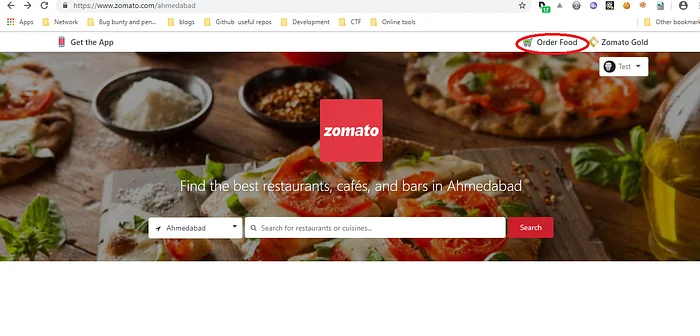
Clicking that link navigates to the ordering page, which contains the search functionality for restaurants and cuisines in the user's location.
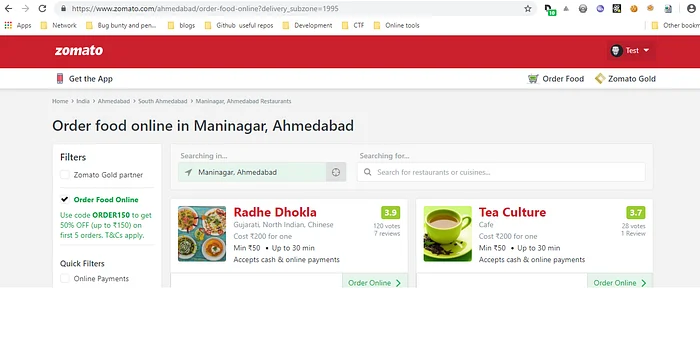
Searching for a restaurant generated a request to this endpoint:
https://www.zomato.com/php/delivery_live_suggest.php?q=restaurant &delivery_subzone_id=number&
Looking at that request, the researcher decided to check the delivery_subzone_id parameter manually for SQL injection.
Exploitation
Step 1: probe the parameter with quotes and random strings
The first step was to include single quotes, double quotes and random strings in the delivery_subzone_id parameter. The observation was that the server responds to the injection of double quotes on that parameter.
With an odd number of double quotes the server returned a 500 internal server error, and with an even number of double quotes it returned a normal 200 OK response. That difference is a strong indication that the double quotes are being injected into the query.
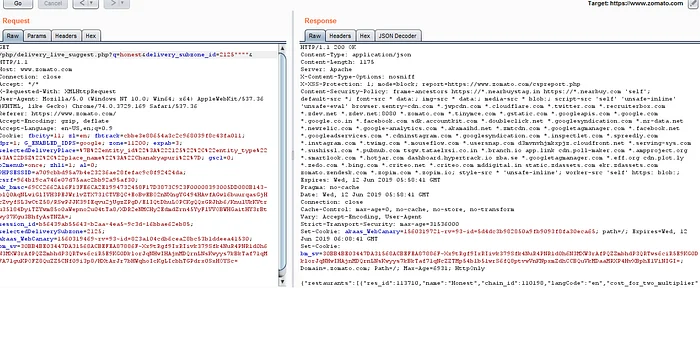
Even number of double quotes injected
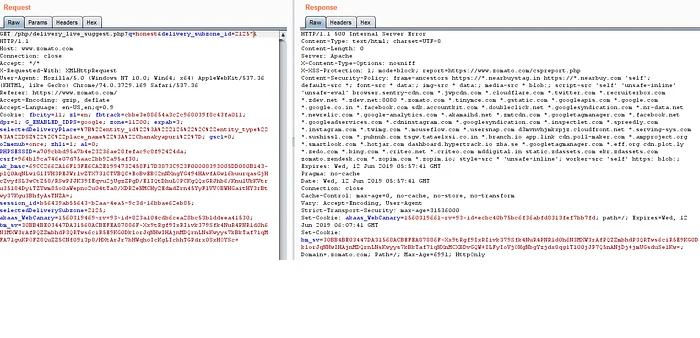
Odd number of double quotes injected
Step 2: try to identify the backend
The second step was to work out which technology, database or kind of query the input was being injected into. The researcher assumed SQL and tried various payloads and techniques to identify the backend technology and build an exploit, following the manual SQL testing approach described by Gerben Javado in an article on manual SQL injection discovery. No sign of SQL injection appeared in the response.
Step 3: report without a working exploit
At that point the researcher considered moving on and not reporting the behaviour, because there was no working exploit to build a proof of concept with. The issue was nevertheless reported to the Zomato security team with the findings above.
Zomato's security team investigated and resolved the issue within two hours. The researcher was awarded a bounty of 500 USD plus 200 USD as a bonus for the uniqueness of the bug. The team told the researcher that it was Solr injection.
For the technical detail of how local parameters injection works, the report points to an article on abusing the Solr local parameters feature rather than repeating the details.
Root cause
The report does not describe the server-side code. What it shows is that double quotes in delivery_subzone_id change the server's behaviour: an odd number produces a 500 and an even number a 200, which the researcher read as the input reaching the query.: an odd number of double quotes breaks it and produces a 500, an even number keeps it balanced and produces a 200. The team identified the issue as Solr injection, and the title refers to local parameters, but the report does not show how the input reaches Solr. The exact query construction is not shown, so the specific mistake in the code is not stated.
Impact
The report does not set out what an attacker could extract or change. The researcher had a strong feeling about injection at the vulnerable endpoint but could not demonstrate exploitation, and the SQL-oriented attempts produced no sign of SQL injection. The observable effect documented here is the difference between a 500 response for an odd number of double quotes and a 200 for an even number on the search endpoint.
Fix
Zomato's security team investigated and resolved the issue within two hours of the report.
Variants to test
- Search and autosuggest endpoints that take a location or subzone identifier. Send an odd number of double quotes and then an even number, and compare status codes; a 500 for odd and 200 for even suggests the input reaches the query unescaped.
- The same parameter with single quotes and random strings, to see whether the error behaviour differs from the double quote behaviour.
- Parameters that look numeric but are passed through to a search backend, such as IDs for subzones, categories or cities. Try local parameter syntax in them, since the report's title refers to local parameters injection rather than SQL injection; look for a change in the response that tracks the injected structure rather than the search term.
- Endpoints that return suggestions, since they often query the search platform directly and may skip the validation applied to the main search page.
What happened, in plain words
Zomato is a website where you can look up restaurants and order food. One of its pages has a search box: you type a restaurant name or a cuisine, and the site suggests matches as you type. Behind that box, the site sends your text to a server, and the server passes it on to a search engine called Solr, which does the actual looking up.
The researcher found that one of the values sent along with the search text, a number identifying a delivery area, changed the server's behaviour when he put double quotes into it. By putting double quote characters into that value, he could make the server return an error or a normal page depending on whether the number of quotes was odd or even. That pattern is a classic sign that your text is being pasted straight into a query, the instruction the server gives to its search engine.
He could not build a full exploit, meaning a demonstration that actually extracts or changes data. He reported what he had anyway. Zomato's security team investigated, fixed it within two hours, and told him the bug was Solr injection. He was paid 500 USD plus a 200 USD bonus for the uniqueness of the bug.
This article walks through the same steps he took, explaining each idea from scratch.
Some background before we start
A few terms come up constantly, so here they are in everyday language.
- A request is what your browser sends to a website when you do something: load a page, click a link, type in a search box. It is a message asking the server for something.
- A response is the server's reply. It carries a status code, a number that says how it went. 200 means "here is your page, all fine". 500 means "something broke on my side".
- An endpoint is a specific address on a server that accepts requests, like a particular counter in a large shop. The site's pages are one kind of endpoint; small helper addresses that return data rather than a full page are another.
- A parameter is a named value attached to a request. In a web address, everything after the
?is a list of parameters, written asname=valueand separated by&. When you search for "pizza" on a site, your browser often sends?q=pizza, whereqis the parameter name andpizzais its value. - Burp (Burp Suite) is a tool that sits between your browser and the website and shows you every request and response, so you can read exactly what was sent. Think of it as a glass panel in the counter: you still order normally, but now you can see the paperwork.
- SQL is the language most databases use to store and fetch data. SQL injection is when a user's input is pasted into an SQL query without being neutralised, so the input can change the meaning of the query. It is like writing your name on a form and having the clerk read part of your name as an instruction.
- Solr is an open source search platform built by the Apache project. Instead of a database that stores records, it is built for searching text quickly, and websites use it to power search boxes and suggestions.
- Solr injection is the same idea as SQL injection, but the query being changed is a Solr query rather than an SQL one.
- Local parameters are a feature of Solr's query syntax: a way of writing extra settings inside the query itself. The report's title says the injection abused this feature. The report does not spell out the syntax; it links to another article for that.
- A proof of concept (PoC) is a small demonstration that proves a bug is real, usually by showing something an attacker should not be able to do.
- A bounty is a payment a company makes to a researcher who reports a security bug responsibly.
The researcher's approach
His stated method is simple and worth copying: open the site, use the features a normal visitor would use, and watch every request the site generates with Burp. No special accounts or access are involved. The only precondition is being able to reach the public site and use the search on the order food pages.
Finding the search box
Opening the main page at www.zomato.com shows a link for Order food.
The screenshot shows the main page with that Order food link visible.
Clicking the link takes you to the ordering page, which has the search functionality for restaurants and cuisines in your location.
The second screenshot shows that ordering page with its search box.
Searching for a restaurant generated a request to this endpoint:
https://www.zomato.com/php/delivery_live_suggest.php?q=restaurant &delivery_subzone_id=number&
Line by line, in plain words:
https://www.zomato.com/php/delivery_live_suggest.phpis the address of a small server-side script. The name suggests it returns live suggestions as you type, rather than a full page.?starts the list of parameters.q=restaurantis the search text:qstands for query, and its value here is the wordrestaurant.&separates one parameter from the next.delivery_subzone_id=numberis a second parameter whose value identifies a delivery subzone, a small area used to decide which restaurants can deliver to you. In the report the value is written as the placeholdernumber, not an actual figure.- The trailing
&is just how the request appeared when captured.
Seeing that request, the researcher decided to test the delivery_subzone_id parameter by hand for SQL injection. The reasoning: it looks like a number, so the site probably expects a number there, and numbers are often dropped into queries without much checking.
Step 1: send quotes and random strings
He put single quotes, double quotes and random strings into the delivery_subzone_id parameter. The server reacted to the double quotes.
With an odd number of double quotes, the server returned a 500 internal server error. With an even number, it returned a normal 200 OK response. That difference is a strong indication that the double quotes are being injected into the query.
Why does the odd/even pattern matter? In many query languages, text values are wrapped in quote characters, like "value". If you send one extra quote, the wrapping gets unbalanced and the query becomes malformed, so the server errors. If you send two extra quotes, they pair up with each other and the query stays balanced, so the server answers normally. A page that behaves differently depending on whether your quotes come in odd or even numbers is telling you that your characters are being read as part of the query, not as plain text.
Even number of double quotes injected
Odd number of double quotes injected
The two screenshots show the two responses side by side: the normal 200 response for an even number of quotes, and the 500 error for an odd number.
Step 2: try to work out what is behind it
Next he wanted to know which technology, database or kind of query his input was landing in. He assumed SQL, and tried various payloads and techniques to identify the backend and build an exploit, following the manual SQL testing approach described by Gerben Javado in an article on manual SQL injection discovery. No sign of SQL injection appeared in the response.
In other words: the quote test said "your input reaches a query", but every SQL-specific trick he tried came back empty. That is a useful lesson. The odd/even quote behaviour tells you there is an injection point; it does not tell you what kind of query it is. The backend could be a database, a search engine, or something else entirely.
Step 3: report it anyway
At that point he considered moving on without reporting, because he had no working exploit to build a proof of concept with. He reported it to the Zomato security team anyway, with the findings above.
Zomato's security team investigated and resolved the issue within two hours. He was awarded a bounty of 500 USD plus 200 USD as a bonus for the uniqueness of the bug. The team told him it was Solr injection.
So the answer to the Step 2 question was: not SQL, but Solr, the Apache search platform. The report points readers to an article on abusing the Solr local parameters feature for the technical detail of how that injection works, rather than repeating it.
The practical takeaway for a beginner: a clear, reproducible observation is worth reporting even without a full exploit. Here the observation was precise (odd quotes give 500, even quotes give 200, on a named parameter of a named endpoint), and the team could act on it immediately.
Why it worked
The report does not describe the server-side code. What it shows is that double quotes in delivery_subzone_id change the server's behaviour: an odd number produces a 500 and an even number a 200, which the researcher read as the input reaching the query.: an odd number of double quotes breaks it and produces a 500, an even number keeps it balanced and produces a 200. The team identified the issue as Solr injection, and the title refers to local parameters, but the report does not show how the input reaches Solr. The exact query construction is not shown, so the specific mistake in the code is not stated.
What an attacker could do
The report does not set out what an attacker could extract or change. The researcher had a strong feeling about injection at the vulnerable endpoint but could not demonstrate exploitation, and the SQL-oriented attempts produced no sign of SQL injection. The observable effect documented here is the difference between a 500 response for an odd number of double quotes and a 200 for an even number on the search endpoint.
The fix
Zomato's security team investigated and resolved the issue within two hours of the report.
Things to try on other sites
These are the variants worth testing, written for someone with just a browser and Burp:
- Search and autosuggest endpoints that take a location or subzone identifier. Send an odd number of double quotes and then an even number, and compare status codes. A 500 for odd and 200 for even suggests the input reaches the query unescaped.
- The same parameter with single quotes and random strings, to see whether the error behaviour differs from the double quote behaviour.
- Parameters that look numeric but are passed through to a search backend, such as IDs for subzones, categories or cities. Try local parameter syntax in them, since the report's title refers to local parameters injection rather than SQL injection. A positive result is a change in the response that tracks the injected structure rather than the search term.
- Endpoints that return suggestions, since they often query the search platform directly and may skip the validation applied to the main search page.
Glossary
- 200 OK: the status code a server returns when a request succeeded and the response follows.
- 500 internal server error: the status code a server returns when something went wrong on its side while handling the request.
- API: a set of addresses a program or website exposes so other software can ask it for data or actions, rather than serving a full page.
- Autosuggest: the list of suggestions a site shows while you type in a search box, fetched from the server as you go.
- Bounty: a payment a company makes to a researcher who reports a security bug responsibly.
- Burp (Burp Suite): a tool that sits between your browser and a website and shows every request and response.
- Endpoint: a specific address on a server that accepts requests.
- Exploit: a concrete technique that turns a weakness into an actual effect, such as reading data you should not see.
- Injection: a weakness where user input is pasted into a query or command without being neutralised, so the input can change what the query means.
- Local parameters: a feature of Solr's query syntax for writing extra settings inside the query itself.
- Parameter: a named value attached to a request, written
name=valuein a web address. - Payload: the specific piece of input a tester sends to try to trigger a behaviour, such as a quote character or a string of quotes.
- Proof of concept (PoC): a small demonstration that proves a bug is real.
- Request: the message your browser sends to a website asking for something.
- Response: the server's reply to a request, including a status code and content.
- Solr: an open source search platform built by the Apache project, used to power search and suggestions.
- Solr injection: injection where user input changes the structure of a Solr query.
- SQL: the language most databases use to store and fetch data.
- SQL injection: injection where user input changes the structure of an SQL query.
- Status code: the number in a response that says how the request went, such as 200 or 500.
- Subzone: a small delivery area used to decide which restaurants can deliver to a given location.