Reflected XSS in zomato
An OAuth authorisation endpoint reflected user-supplied parameter values into the response without proper encoding, allowing an attacker to inject script. The attacker could execute JavaScript in the context of the authentication domain, though a WAF blocked some functions.
 Published on medium.com
Bugbounting
The full write-up lives on its author's site
It belongs to its author, so we link to it rather than copy it. The other two tabs are our own rewrites, checked against it.
Context
Zomato runs a number of services that authenticate users through a central OAuth 2.0 authorisation endpoint at auth2.zomato.com. One of those services is secretx.zomato.com, a small site whose landing page contains a single button, "sign in with Zomato". Clicking it starts a standard authorisation-code flow: the browser is sent to auth2.zomato.com/oauth2/auth with a client_id, a redirect_uri and a state value, and Zomato then asks the user to accept or reject the request ("SecretX Client wants to access you Zomato Account. Accept or Recject").
The bug described here lives in how that authorisation endpoint handles its parameters: a parameter value is reflected back into the HTML of the error page.
Setup
No accounts, roles or special tooling were needed beyond a browser. The researcher found the subdomain through subdomain enumeration, opened the site, read its source, and then manipulated the OAuth URL by hand. The only external resources used were a payload list and the AwesomeXSS cheatsheet by Somdev (https://github.com/s0md3v/AwesomeXSS).
Finding it
The starting point was subdomain enumeration. While reading Mastering Modern Web Penetration Testing, the researcher learned that WolframAlpha can be used for this, so zomato.com was entered into its search bar. It returned around ten subdomains, and also shows the "daily visitors" for each one, which is useful when you are looking for less-visited areas. The last domain in the list stood out because its visitor count was very low compared with the others.
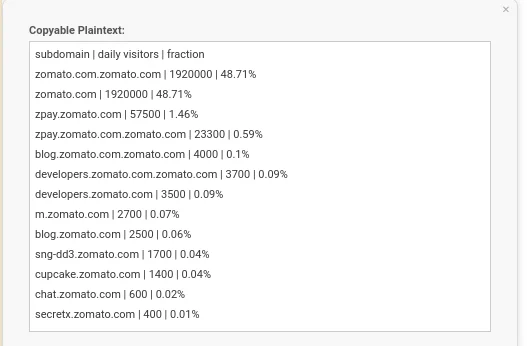
That domain was secretx.zomato.com. Opening it showed nothing but the "sign in with Zomato" button, and the page source contained nothing interesting.
Clicking the button redirected to zomato.com, where a consent box appeared asking whether SecretX Client could access the Zomato account. Going back to the site and reading its source revealed the URL that is loaded when the button is clicked:
https://auth2.zomato.com/oauth2/auth?response_type=code&client_id=80b39918-90be-49d2-ac52-4a8b1a25bcf1&redirect_uri=https%3A%2F%2Fsecretx.zomato.com%2Fuser%2Foauth2%2Fredirect_uri&state=2BHoBnVFFKP29L6SerHgEb7OCnBDPO
This is a normal authorisation request: response_type=code asks for an authorisation code, client_id identifies the SecretX client, redirect_uri is where the code should be delivered, and state is the anti-CSRF value generated for the session.
Exploitation
Step 1: provoke an error and look at the reflection
Junk values were added to the parameters to check for OAuth misconfiguration. The endpoint responded with an error page.
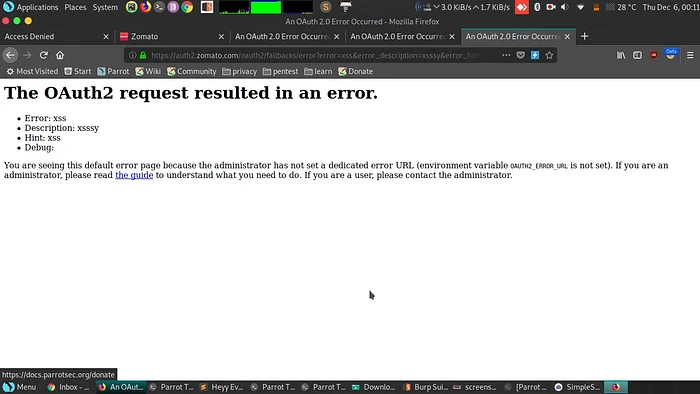
The parameter value was reflected in the source code of that error page. The next check was whether < and > were filtered. They were not.
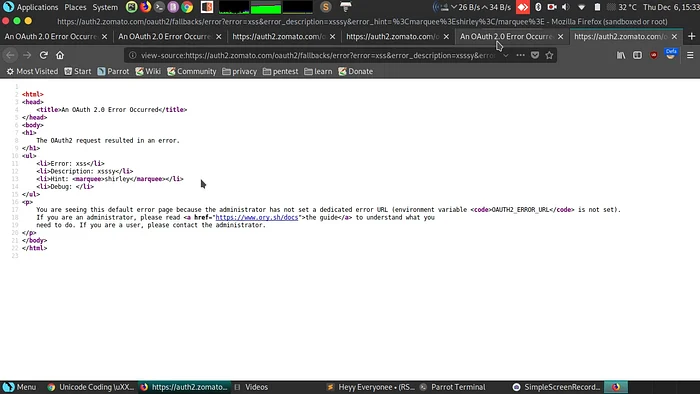
Step 2: get past the WAF with a payload list
A direct XSS attempt did not work because a WAF was in front of the endpoint. Time was spent on it without progress, and the researcher then went through XSS reports, WAF bypass blogs and a list of XSS payloads. One payload from that list produced the popup:
<marquee loop=1 width=0 onfinish=alert`1`>XSS</marquee>
The onfinish handler fires when the zero-width marquee finishes its single loop, which runs the alert without needing a script tag.
Step 3: the popup fires but the DOM is out of reach
Even with execution, the DOM could not be accessed because alert(), confirm() and prompt() were being blocked by the WAF. URL-encoding the payload and other variations did not help. At that point it was around 3:40 am and the researcher went to bed.
Step 4: unicode encoding to reach the DOM
After coming back, more articles and blogs were reviewed, and the AwesomeXSS cheatsheet came to mind. From it came this technique:
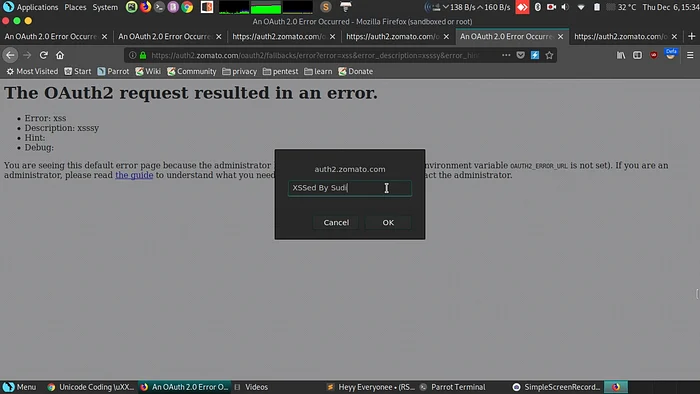
co\u006efirm()
By encoding the character in unicode, the DOM became accessible.
Root cause
The authorisation endpoint at auth2.zomato.com/oauth2/auth reflects a supplied parameter value into the HTML of its error page without adequate output encoding, so a value containing < and > is rendered as markup. The WAF in front of the endpoint blocked the obvious payloads and the dialog functions, but the marquee/onfinish construction and a unicode-escaped function name still worked. In the report, Prateek Tiwari attributed the underlying problem to Hydra, the OAuth 2.0 and OpenID Connect provider Zomato uses for authentication on its services.
Impact
The report does not spell out a concrete attack scenario. What it establishes is reflected script execution in the origin of the central authentication endpoint, auth2.zomato.com, which Zomato services use for authentication. The practical consequence depends on how a victim can be made to follow a crafted authorisation URL, and the report does not analyse that.
Fix
The report does not describe a fix. The report does not describe a fix.
Variants to test
- Send junk values in each OAuth parameter (
client_id,redirect_uri,state,response_type) one at a time and inspect the error page source for the value appearing unencoded. A positive result is your marker string rendered as markup rather than as text. - Where
<and>survive, try event-handler payloads that do not need a script tag, such as themarquee/onfinishform above. A positive result is a dialog or other observable execution. - When dialog functions are blocked, try unicode-escaped function names such as
co\u006efirm(). A positive result is the dialog firing where the plain name was blocked. - Run the same reflection checks against other authorisation servers built on Hydra, since the report attributes the flaw to that provider. The report does not suggest this. A positive result is the same unencoded reflection on their error pages.
Disclosure
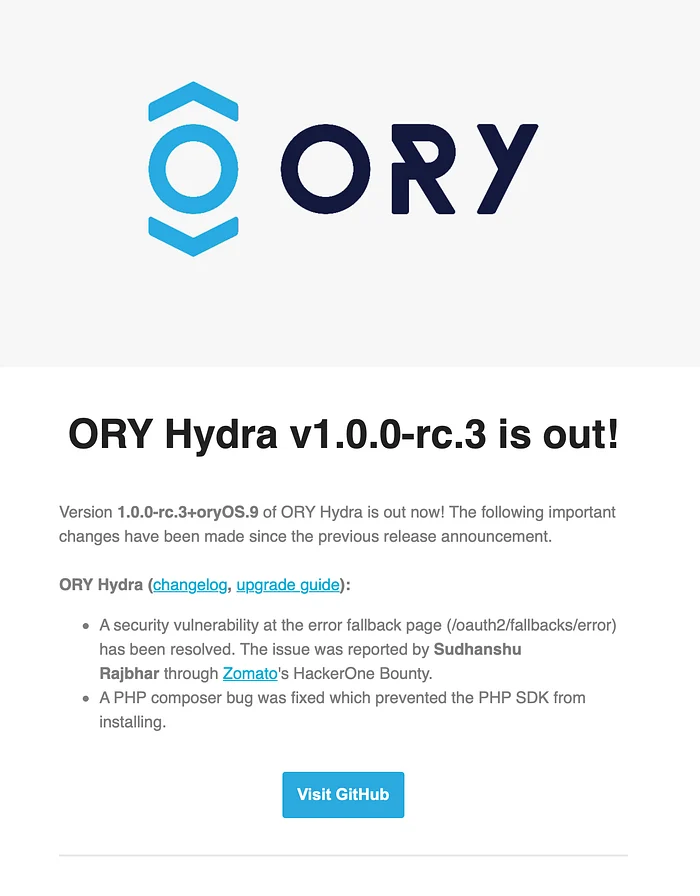
The report was submitted to Zomato, triaged, and rewarded with 250 USD. Hydra mentioned the researcher's name in their newsletter. The public report is at https://hackerone.com/reports/456333.
What happened, in plain words
A security researcher found a way to make a Zomato login page run code that an attacker chooses, just by getting a victim to open a specially crafted link. The page in question is the central login service that many Zomato websites use to sign people in. When the login service received a malformed request, it showed an error page and copied part of the request into that page without cleaning it up. That meant a value containing HTML tags was treated as part of the page, so a script could run in the browser of anyone who opened the link. The researcher reported it, the report was triaged, and the researcher was paid a 250 USD bounty. This article walks through the whole story from the beginning, explaining every term as it comes up.
Background: what OAuth is and why it matters
Many websites let you sign in with an account you already have somewhere else, for example "sign in with Google". The website you are visiting does not see your password. Instead, it asks the other company's login service to confirm who you are. The standard way this is done is called OAuth 2.0. Think of it like a hotel: instead of giving the hotel your house key, you get a key card that only opens the door you are allowed to use.
Zomato runs a central login service at auth2.zomato.com. Several Zomato websites send their users there to sign in. One of those websites is secretx.zomato.com, a small site whose only visible feature is a button labelled "sign in with Zomato". When you click that button, your browser is sent to the central login service with a request that contains several pieces of information:
client_id: a public identifier for the website that is asking (here, SecretX).redirect_uri: where the login service should send you back after you sign in.state: a random value that the website generates to protect against a type of attack called CSRF (cross-site request forgery). Think of it as a numbered ticket the website gives you so it can recognise you when you come back.response_type=code: tells the login service that the website wants a short-lived code that it can exchange for access.
After you click, Zomato shows a consent box: "SecretX Client wants to access you Zomato Account. Accept or Recject". That is the normal flow.
The bug described here is in how the central login service handles requests where one of those values is invalid. Instead of rejecting the request cleanly, it shows an error page and copies the bad value into the page's HTML without escaping it. That is called reflected XSS (cross-site scripting): the attacker's input is reflected back to the victim's browser and executed as code.
Finding the target
The researcher started by looking for subdomains of zomato.com. A subdomain is a prefix added to a domain name, like secretx in secretx.zomato.com. Companies often have many subdomains for different services, and some are less well known or less visited than the main site. Less-visited services are interesting because they may have received less security attention.
While reading the book Mastering Modern Web Penetration Testing, the researcher learned that the website WolframAlpha can be used to list subdomains. WolframAlpha is a search engine for facts and calculations; if you type a domain name into it, it can show related subdomains and an estimate of daily visitors for each. The researcher typed zomato.com into WolframAlpha's search bar and got around ten subdomains. The last one in the list had a very low visitor count compared with the others, which made it stand out.
That subdomain was secretx.zomato.com. Opening it showed only the "sign in with Zomato" button. The researcher viewed the page source (the HTML that the browser receives) and found nothing interesting there.
Clicking the button redirected to zomato.com, where the consent box appeared. Going back to secretx.zomato.com and reading its source again revealed the URL that the button loads. That URL is:
https://auth2.zomato.com/oauth2/auth?response_type=code&client_id=80b39918-90be-49d2-ac52-4a8b1a25bcf1&redirect_uri=https%3A%2F%2Fsecretx.zomato.com%2Fuser%2Foauth2%2Fredirect_uri&state=2BHoBnVFFKP29L6SerHgEb7OCnBDPO
Line by line, in plain words:
https://auth2.zomato.com/oauth2/authis the address of the central login service's authorisation endpoint. An endpoint is simply a URL that a program or a browser can send a request to.?starts the query string, the part of a URL that carries parameters.response_type=codetells the service that the website wants an authorisation code.client_id=80b39918-90be-49d2-ac52-4a8b1a25bcf1identifies the SecretX website to the login service. This is a public identifier, not a secret.redirect_uri=https%3A%2F%2Fsecretx.zomato.com%2Fuser%2Foauth2%2Fredirect_uriis where the login service should send the user after sign-in. The%3Aand%2Fare URL encoding: special characters like:and/are written in a percent-encoded form so they do not break the URL structure. Decoded, this value ishttps://secretx.zomato.com/user/oauth2/redirect_uri.state=2BHoBnVFFKP29L6SerHgEb7OCnBDPOis the random anti-CSRF value generated for this session.
Exploitation
Step 1: provoke an error and look at the reflection
The researcher added junk values to the parameters to see whether the login service handled invalid input safely. This is a common first check: if a service misbehaves when given unexpected input, that misbehaviour can sometimes be turned into an attack. The endpoint responded with an error page.
The error page contained the parameter value in its source code. In other words, the value was reflected: whatever was sent in the request appeared in the HTML of the response. The next question was whether the characters < and > were filtered. Those two characters are what delimit HTML tags, so if they pass through unescaped, an attacker can inject new tags. The researcher checked, and they were not filtered.
Step 2: get past the WAF with a payload list
A direct XSS attempt did not work because a WAF (web application firewall) was in front of the endpoint. A WAF is a filter that inspects incoming requests and blocks ones that look malicious. The researcher spent some time trying to get around it without success, then looked at XSS reports, WAF bypass blogs and a list of XSS payloads. One payload from that list produced a popup:
<marquee loop=1 width=0 onfinish=alert`1`>XSS</marquee>
Line by line, in plain words:
<marquee>is an old HTML tag that makes text scroll across the page. It is obsolete but still understood by browsers.loop=1tells the marquee to scroll once.width=0makes it zero pixels wide, so it is invisible.onfinish=alert1`` is an event handler: code that runs when the marquee finishes its loop. The backticks around1are an alternative way to write a string in JavaScript, so this callsalert(1), which shows a popup with the number 1.>XSS</marquee>is the text inside the marquee and the closing tag.
The trick is that the payload does not use a <script> tag. The onfinish event fires when the zero-width marquee finishes its single loop, which runs the alert.
Step 3: the popup fires but the DOM is out of reach
Even though the popup fired, the researcher could not access the DOM. The DOM (Document Object Model) is the browser's in-memory representation of the page: the tree of elements, text and attributes that JavaScript can read and change. Being able to run alert proves code execution, but to do more (read cookies, change the page, send requests) you need access to the DOM. The WAF was blocking alert(), confirm() and prompt(), the three built-in browser dialog functions. URL-encoding the payload and other variations did not help. At that point it was around 3:40 am and the researcher went to bed.
Step 4: unicode encoding to reach the DOM
After coming back, the researcher read more articles and blogs and remembered the AwesomeXSS cheatsheet by Somdev, available at https://github.com/s0md3v/AwesomeXSS. From it came this technique:
co\u006efirm()
Line by line, in plain words:
cois the start of the wordconfirm.\u006eis a unicode escape for the lettern. In JavaScript,\u006einside a string or identifier is interpreted as the character with code point 006e, which isn.firm()completes the word, so the whole thing isconfirm(), the browser function that shows a confirmation dialog.
By encoding the character in unicode, the DOM became accessible.
Root cause
The authorisation endpoint at auth2.zomato.com/oauth2/auth reflects a supplied parameter value into the HTML of its error page without adequate output encoding. Output encoding means converting characters like < and > into safe forms such as < and > so they are displayed as text rather than interpreted as markup. Because that was missing, a value containing < and > was rendered as markup. The WAF in front of the endpoint blocked the obvious payloads and the dialog functions, but the marquee/onfinish construction and a unicode-escaped function name still worked. In the report, Prateek Tiwari attributed the underlying problem to Hydra, the OAuth 2.0 and OpenID Connect provider Zomato uses for authentication on its services. OpenID Connect is an identity layer built on top of OAuth 2.0; Hydra is an open-source implementation of both.
Impact
The report does not spell out a concrete attack scenario. What it establishes is reflected script execution in the origin of the central authentication endpoint, auth2.zomato.com, which Zomato services use for authentication. The practical consequence depends on how a victim can be made to follow a crafted authorisation URL, and the report does not analyse that.
Fix
The report does not describe a fix. The report does not describe a fix.
Variants to test
- Send junk values in each OAuth parameter (
client_id,redirect_uri,state,response_type) one at a time and inspect the error page source for the value appearing unencoded. A positive result is your marker string rendered as markup rather than as text. - Where
<and>survive, try event-handler payloads that do not need a script tag, such as themarquee/onfinishform above. A positive result is a dialog or other observable execution. - When dialog functions are blocked, try unicode-escaped function names such as
co\u006efirm(). A positive result is the dialog firing where the plain name was blocked. - Run the same reflection checks against other authorisation servers built on Hydra, since the report attributes the flaw to that provider. The report does not suggest this. A positive result is the same unencoded reflection on their error pages.
Disclosure
The report was submitted to Zomato, triaged, and rewarded with 250 USD. Hydra mentioned the researcher's name in their newsletter. The public report is at https://hackerone.com/reports/456333.
Glossary
- API: a set of URLs and rules that let one program talk to another. In this story, the OAuth endpoint is an API that websites call to sign users in.
- Authorisation code: a short-lived value that a website receives after a user signs in, which it can exchange for access.
- Client ID: a public identifier for a website that is asking a login service to authenticate a user.
- CSRF (cross-site request forgery): an attack where a malicious site tricks a logged-in user's browser into sending a request the user did not intend. The
stateparameter helps prevent it. - DOM (Document Object Model): the browser's in-memory tree of the page's elements, which JavaScript can read and change.
- Endpoint: a URL that accepts requests.
- Event handler: code attached to an HTML element that runs when something happens, such as
onfinishwhen a marquee finishes. - Hydra: an open-source OAuth 2.0 and OpenID Connect provider, used by Zomato for authentication.
- OAuth 2.0: a standard that lets a website ask another service to confirm a user's identity without sharing the password.
- OpenID Connect: an identity layer built on top of OAuth 2.0.
- Output encoding: converting characters like
<and>into safe forms such as<and>so they are displayed as text rather than interpreted as markup. - Query string: the part of a URL after
?that carries parameters. - Reflected XSS: a vulnerability where input from a request is copied into the response page and executed as code in the victim's browser.
- Subdomain: a prefix added to a domain name, like
secretxinsecretx.zomato.com. - Unicode escape: a way to write a character by its code point, such as
\u006eforn. - URL encoding: writing special characters in a percent-encoded form, such as
%3Afor:. - WAF (web application firewall): a filter that inspects incoming requests and blocks ones that look malicious.