XSS in artsexperiments.withgoogle.com
A reflected XSS was found on a withgoogle.com subdomain where URL parameters reflected characters without sanitisation, allowing script execution. Two IDORs in appsheet.com allowed access to other users' app details, including owner email and Firebase token, by supplying the correct app version parameter.
 Published on sudhanshur705.medium.com
I know it’s been a quite long time since I shared any of my findings sorry about that, I am back now don’t worry :)
The full write-up lives on its author's site
It belongs to its author, so we link to it rather than copy it. The other two tabs are our own rewrites, checked against it.
Context
This write-up covers three bugs the researcher reported to the Google VRP, all now fixed: a reflected XSS on a withgoogle.com subdomain, and two IDORs in AppSheet (appsheet.com), a product that Google acquired. The XSS was found on the artsexperiments.withgoogle.com host, on the living-archive page, which takes a token parameter. The IDORs were found in AppSheet's API, on endpoints that take an {appId} path segment and return details about an application.
Setup
For the XSS hunt the researcher used two tools:
- ParamSpider, which finds parameters from web archives of a domain and its subdomains.
- kxss, which looks for the reflection of characters such as
",>,<and'to indicate whether an endpoint may be vulnerable to XSS.
The input to the script is a filename containing a list of subdomains. A for loop iterates over that list, finds URLs that carry parameters, and pipes the output to kxss.
For the IDOR work the researcher used Burp Suite to send and modify requests. The AppSheet findings required an account on appsheet.com, and the researcher created a new app of their own to compare behaviour. No special role or privilege is described.
Finding it
The reflected XSS
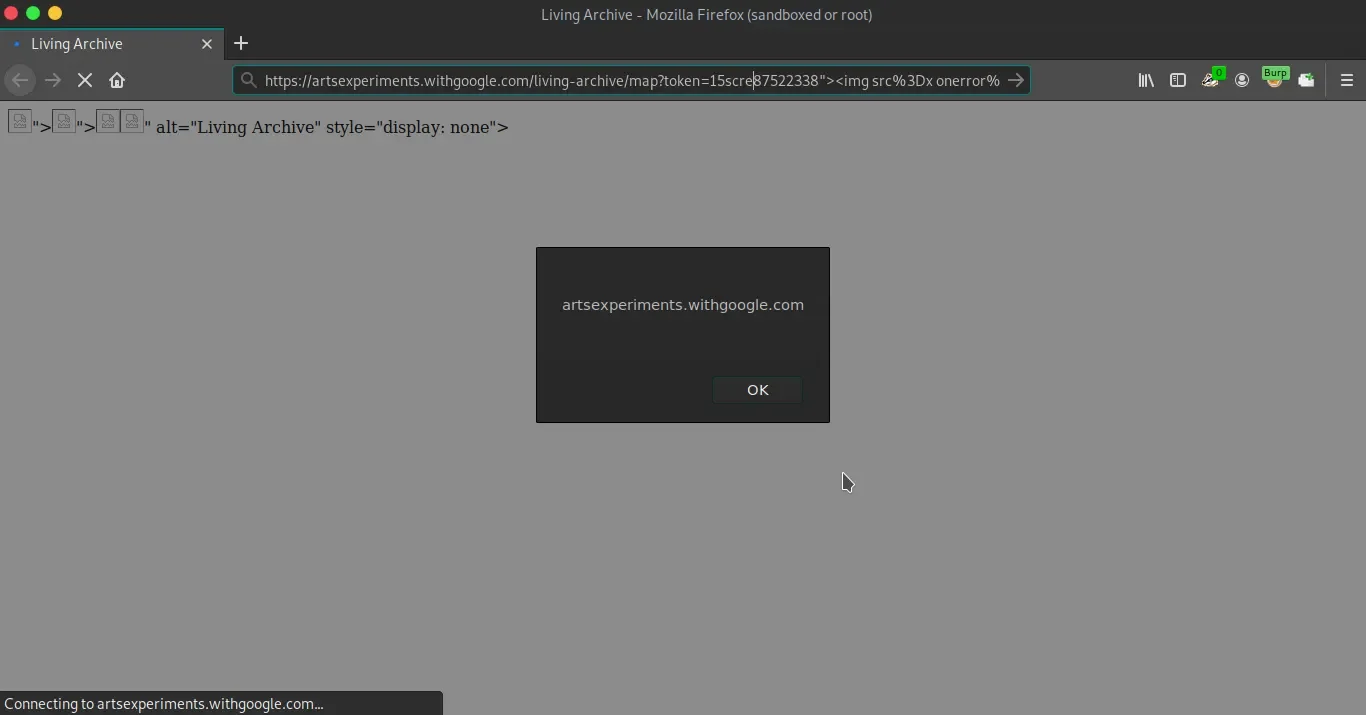
The researcher collected the list of subdomains of withgoogle.com, passed it to the script, and found that the characters ", >, < and ' were reflected as they are. The URL was:
https://artsexperiments.withgoogle.com/living-archive/?[redacted]
Any common payload could be used there, for example:
"><img src=x onerror=alert(document.domain)>
The first IDOR
The researcher learned about AppSheet, and about an IDOR in it, from a Medium article titled "The short tale of two bugs on Google Cloud product (Google VRP resolved)". The author has since deleted that write-up, but it established that AppSheet was in scope for the Google VRP and described the IDOR. The researcher set out to find the same issue, quoting Zseano: "If there's one IDOR... there will be plentyyy more". It took less than an hour.
The endpoint was the same as in the article, and so was the parameter. The only difference was the request method. The endpoint is:
https://www.appsheet.com/api/template/{appId}/
The IDOR was fixed in the GET method, but the same IDOR still existed in POST, where there was also some data in the body of the request.
Exploitation
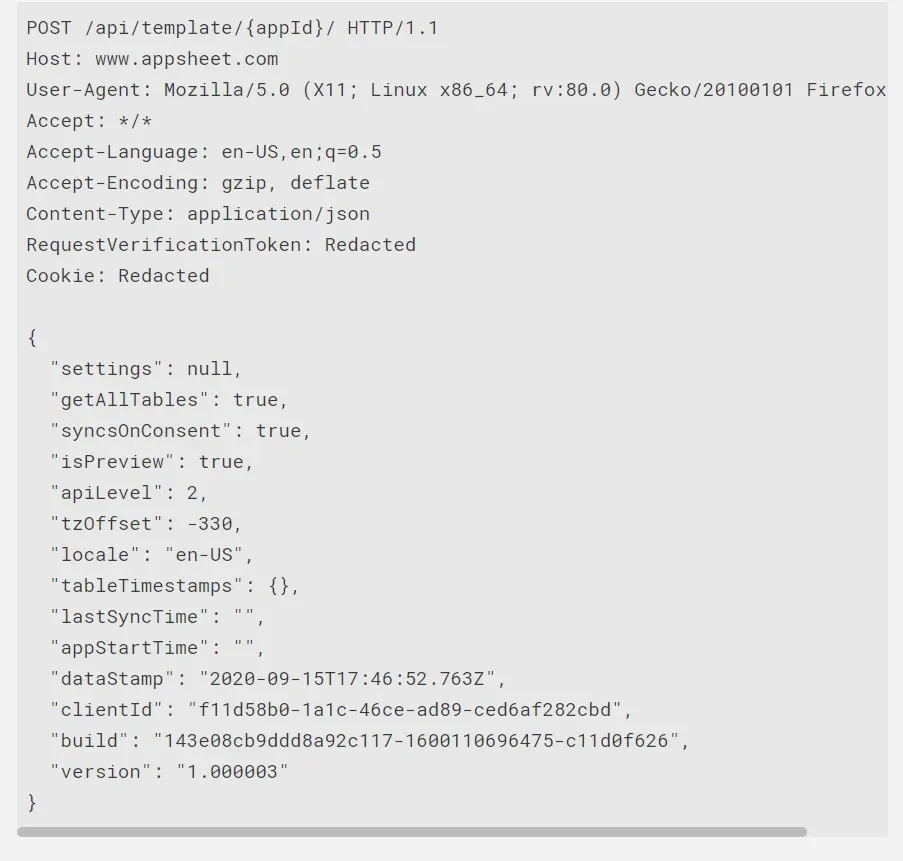
Step 1: send the POST request with another user's appId
This is the full request where the IDOR was found:
Step 2: read the response
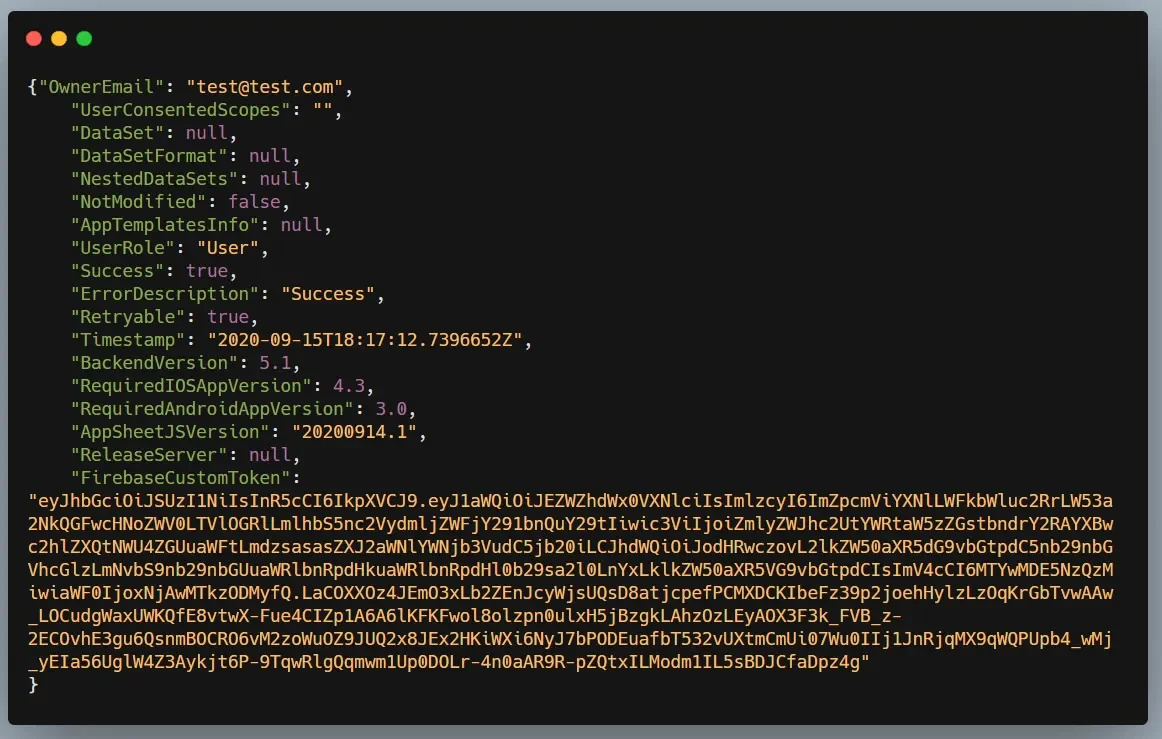
In the response you get all the details of the app, including the owner's email and the Firebase token.
Step 3: get the report reproduced
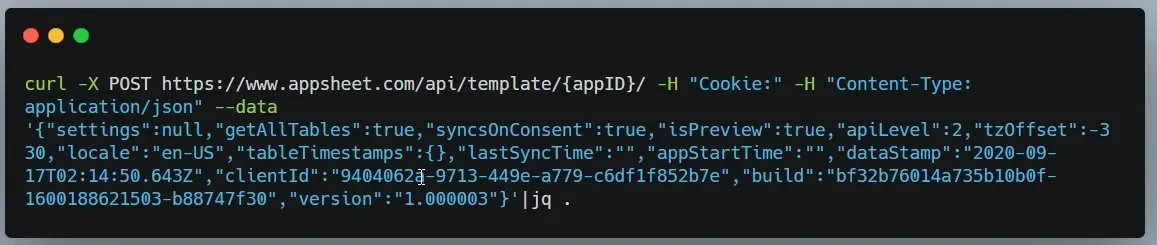
The report was submitted quickly. The team replied that they could not reproduce the IDOR: when they used another user's appId in the request, they got a forbidden error. The researcher provided additional information and, to make reproduction easy, a list of appId values along with a curl request containing their own cookies.
The report was accepted and the bounty of $500 was paid the next day.
Step 4: the report is questioned
Four months later, someone from the Google team replied that this might not actually be a bug, and asked the researcher to look at their app settings to verify things such as which users are allowed to view the app, whether it is set to public, and so on. The researcher replied that they had used the default settings and made no changes. The team replied again that what was reported might be working as intended, that there was no security vulnerability, and that they had been confused.
The researcher asked for an appId they should not have access to, arguing that if they could get information related to that appId then it was indeed a bug that should be fixed, and otherwise the report could be closed as intended behaviour. The team provided an appId. With Burp Suite, the researcher found they got the same error as before:
Your account sudi***@gmail.com id 2342347 does not have access to XXXX-1422495.
They told the team they were right that this was not a bug, since no information related to the app could be viewed.
Step 5: retry with a new app and find the version difference
The next day the researcher created a new app, explored its features, and decided to check the IDOR again. Using the appId the Google team member had provided, the request worked this time and the details of that application could be viewed. The researcher replied that the previous message should be ignored, that they had tried again and were able to get information for the app, and noted that the email was of the form [redacted].
Looking closely at the request body parameter values, the only thing that had changed from earlier was the version. When the IDOR was first confirmed in the POST body, the version parameter value was set to 1.00003. On the next day, with a new app, the version parameter value was 1.000010:
{ "settings": null, "getAllTables": true, "syncsOnConsent": true, "isPreview": true, "apiLevel": 2, "tzOffset": -330, "locale": "en-US", "tableTimestamps": {}, "lastSyncTime": "", "appStartTime": "", "dataStamp": "2021-01-17T11:32:42.705Z", "clientId": "4d9ef5e1-5cb0-400f-b432-660adcd24739", "build": "edf35e60c1c1fcaaa72a-1610841603810-bd06078", "version": "1.000010"}
The conclusion was that for the IDOR to work, the request has to supply the specific version associated with the app: the researcher's application had version 1.00003, and the Google staff member's application had version 1.000010. That difference in version is why neither side could reproduce the bug properly. With everything clear, the researcher explained it again to the team.
The replies received after that explanation:
Hi Sudhanshu,Nice, that's my testing application! Definitely a bug - thanks!Regards,XXXX, Google Security Team-------------------------------------------------------------------Hi Sudhanshu,Thanks again for your report. I can confirm that this is indeed a valid bug. I've also sent this report again to the VRP panel so they can have a look again.Regards,XXXXX, Google Security Team
A couple of weeks later the bug was fixed, and as a surprise another $500 was awarded.
Step 6: the second IDOR
The other IDOR was on this endpoint:
https://www.appsheet.com/api/loadApp/{appId}/?checkConsistency=true
The information disclosed in the response here did not include sensitive information such as the owner's email. The issue was fixed, but no bounty was awarded for it.
Root cause
The first IDOR is an authorisation failure on /api/template/{appId}/: the server returns application details for an appId the caller does not own. The GET method of the same endpoint had been fixed, but the POST path was left with the same missing check, so the fix covered only one method. The second IDOR is the same class of failure on /api/loadApp/{appId}/.
The reproduction difficulty points to a second factor: the request body carries a version value, and the server appears to require the version that belongs to the target app before it serves the data. The report does not explain why the Google team's attempt with another user's appId returned a forbidden error. The report does not describe the server-side logic beyond this observed behaviour.
Impact
With the first IDOR, supplying another user's appId can retrieve all the details of that application, including the owner's email address and the Firebase token. The researcher demonstrated this against an application belonging to a Google staff member. The second IDOR disclosed less: no sensitive information such as the owner's email was present in the response.
Fix
Both IDORs were fixed by Google. The lesson from the first one is that fixing an authorisation check on one HTTP method does not fix the endpoint: every method that reaches the same object lookup needs the same ownership check.
Variants to test
- Method switching on a fixed endpoint. Take an endpoint where an object-level authorisation bug was fixed and replay the same request with other methods (POST, PUT, PATCH, DELETE). A positive result is the same object data coming back through a method that was not covered by the fix.
- Version or build parameters in the body. Where a request body carries a
version,buildor similar field, try the value that belongs to the target object rather than your own. A positive result is data for an object you do not own being returned once the matching version is supplied. - Reflection triage with automation. Run a parameter discovery tool over a subdomain list and pipe the URLs into a reflection checker for
",>,<and'. A positive result is those characters appearing unencoded in the response, which is then worth a payload such as the one above. - Sibling endpoints. When one endpoint of a product leaks object details, test the other endpoints that take the same
{appId}-style identifier, as with/api/loadApp/{appId}/. A positive result is another response containing object data you should not see.
What happened, in plain words
A security researcher found three bugs in Google-owned websites and reported them through Google's bug bounty programme, the scheme where Google pays people for telling it about security holes. All three are fixed now, which is why the details can be shared.
One bug was a reflected XSS on a page under withgoogle.com. In plain terms, the page took a value from the address bar and printed it back into the page without cleaning it, so a crafted link could make the browser run code the page author never intended. The other two were IDORs in AppSheet, a product Google acquired. An IDOR is when a website lets you ask for someone else's data just by changing an identifier in the request, because it never checks that the data belongs to you. Think of a cloakroom that hands over any coat as long as you read out the ticket number, without checking that the ticket is yours.
The story is worth reading in full because the first IDOR was paid, then questioned, then proven again, and the reason it was hard to reproduce turned out to be a single field in the request body.
The two kinds of bug, from zero
Before the steps, two ideas need to be clear.
XSS (cross-site scripting). A web page is built from text that the server sends to your browser. Some of that text is meant to be displayed, and some of it is instructions (code) that the browser runs. If a page takes something you typed or put in the address bar and places it into the page as if it were instructions, your text becomes code. A reflected XSS means the value comes in with the request and bounces straight back in the response, so the malicious value lives in a link you send to a victim. The usual test is to send characters that have special meaning in HTML, such as ", >, < and ', and see whether they come back unchanged. If they do, the page is not cleaning its input, and a payload can be built from them.
IDOR (insecure direct object reference). Many web applications store things under an identifier, a short string or number that names the object, such as an order number or, here, an appId. When you open your own order, your browser sends a request containing that identifier. If the server looks up whatever identifier it is given and returns the data without checking that the logged-in user owns it, you can change the identifier to someone else's and read their data. The fix is an authorisation check: the server must confirm that this user is allowed to see this object.
Two more terms appear constantly below.
- An API is the part of a website that programs talk to, rather than people. When the AppSheet web page needs data, its own JavaScript code calls the API and gets data back, usually as JSON (a text format of labelled values). You can call the same API yourself with a tool.
- A cookie is a small piece of text your browser stores for a site and sends back with every request, so the site knows who you are. It is effectively your logged-in session. A token in a URL is a similar idea: a value that identifies a session or a resource.
Finding the XSS
The researcher used two small tools to look for easy XSS at scale:
- ParamSpider, which finds URLs that carry parameters, using web archives of a domain and its subdomains.
- kxss, which checks whether characters such as
",>,<and'are reflected in the response, a sign that an endpoint may be vulnerable to XSS.
The input to the script is a filename containing a list of subdomains. A for loop goes over that list one subdomain at a time, finds URLs that have parameters, and pipes the output into kxss. The point of the loop is simply to repeat the same check for every subdomain without doing it by hand.
The researcher collected the subdomains of withgoogle.com, ran the script, and found that the characters ", >, < and ' were reflected as they are. The URL was:
https://artsexperiments.withgoogle.com/living-archive/?[redacted]
Reading that URL: the host is artsexperiments.withgoogle.com, the page is living-archive, and it takes one parameter called token with the value 158753034. The parameter is the part after the ?. Because the value of token came back in the page unchanged, any common payload could be used there, for example:
"><img src=x onerror=alert(document.domain)>
Line by line, this payload does the following. The leading "> closes whatever HTML attribute the page had placed the value inside, so the rest is treated as new HTML rather than as text. <img src=x ...> asks the browser to load an image from a source called x, which does not exist. onerror= is an attribute that tells the browser what to run if loading the image fails, and it will fail because x is not a real image. alert(document.domain) is the code that runs: it shows a pop-up containing the domain of the page, which proves code is executing in the context of that site.
Finding the first IDOR
The researcher learned about AppSheet, and about an IDOR in it, from a Medium article titled "The short tale of two bugs on Google Cloud product (Google VRP resolved)". The author has since deleted that write-up, but it established that AppSheet was in scope for the Google VRP and described the IDOR. The researcher set out to find the same issue, quoting Zseano: "If there's one IDOR... there will be plentyyy more". It took less than an hour.
The endpoint was the same as in the article, and so was the parameter. The only difference was the request method. The endpoint is:
https://www.appsheet.com/api/template/{appId}/
A request method is the verb at the start of an HTTP request that says what you want to do. GET means "give me this"; POST means "here is some data, act on it". The {appId} part is a placeholder: in a real request you put an actual application identifier there. The IDOR was fixed in the GET method, but the same IDOR still existed in POST, where there was also some data in the body of the request. The body is the part of a request that carries data, as opposed to the URL.
Exploitation, step by step
Step 1: send the POST request with another user's appId
This is the full request where the IDOR was found:
The reason for trying POST at all is the lesson from the article: the GET version had been fixed, so the interesting question was whether the fix covered every method that reaches the same lookup.
Step 2: read the response
In the response you get all the details of the app, including the owner's email and the Firebase token. A Firebase token here is a credential used by Google's Firebase service; leaking it matters because it can grant access to the app's backend.
Step 3: get the report reproduced
The report was submitted quickly. The team replied that they could not reproduce the IDOR: when they used another user's appId in the request, they got a forbidden error. The researcher provided additional information and, to make reproduction easy, a list of appId values along with a curl request containing their own cookies. curl is a command-line tool for sending HTTP requests; including the cookies means the request arrives already logged in as the researcher.
The report was accepted and the bounty of $500 was paid the next day.
Step 4: the report is questioned
Four months later, someone from the Google team replied that this might not actually be a bug, and asked the researcher to look at their app settings to verify things such as which users are allowed to view the app, whether it is set to public, and so on. This is a fair question: if an app is set to public, anyone reading its details is expected behaviour, not a vulnerability. The researcher replied that they had used the default settings and made no changes. The team replied again that what was reported might be working as intended, that there was no security vulnerability, and that they had been confused.
The researcher asked for an appId they should not have access to, arguing that if they could get information related to that appId then it was indeed a bug that should be fixed, and otherwise the report could be closed as intended behaviour. This is a good way to settle a disagreement: agree on a test that both sides accept. The team provided an appId. With Burp Suite, a tool for intercepting and editing web requests, the researcher found they got the same error as before:
Your account sudi***@gmail.com id 2342347 does not have access to XXXX-1422495.
That message says the account does not have access to the named app, so the server refused. They told the team they were right that this was not a bug, since no information related to the app could be viewed.
Step 5: retry with a new app and find the version difference
The next day the researcher created a new app, explored its features, and decided to check the IDOR again. Using the appId the Google team member had provided, the request worked this time and the details of that application could be viewed. The researcher replied that the previous message should be ignored, that they had tried again and were able to get information for the app, and noted that the email was of the form [redacted].
Looking closely at the request body parameter values, the only thing that had changed from earlier was the version. When the IDOR was first confirmed in the POST body, the version parameter value was set to 1.00003. On the next day, with a new app, the version parameter value was 1.000010:
{ "settings": null, "getAllTables": true, "syncsOnConsent": true, "isPreview": true, "apiLevel": 2, "tzOffset": -330, "locale": "en-US", "tableTimestamps": {}, "lastSyncTime": "", "appStartTime": "", "dataStamp": "2021-01-17T11:32:42.705Z", "clientId": "4d9ef5e1-5cb0-400f-b432-660adcd24739", "build": "edf35e60c1c1fcaaa72a-1610841603810-bd06078", "version": "1.000010"}
This is a JSON object: a set of names and values in braces, separated by commas. Reading the fields that matter here: settings is null (empty), getAllTables and syncsOnConsent are true, isPreview is true, apiLevel is 2, tzOffset is -330, locale is en-US, tableTimestamps is an empty object, lastSyncTime and appStartTime are empty strings, dataStamp is a timestamp, clientId is an identifier, build is a build string, and version is 1.000010. The field to watch is the last one.
The conclusion was that for the IDOR to work, the request has to supply the specific version associated with the app: the researcher's application had version 1.00003, and the Google staff member's application had version 1.000010. That difference in version is why neither side could reproduce the bug properly: each was sending a version that did not match the app being asked about. With everything clear, the researcher explained it again to the team.
The replies received after that explanation:
Hi Sudhanshu,Nice, that's my testing application! Definitely a bug - thanks!Regards,XXXX, Google Security Team-------------------------------------------------------------------Hi Sudhanshu,Thanks again for your report. I can confirm that this is indeed a valid bug. I've also sent this report again to the VRP panel so they can have a look again.Regards,XXXXX, Google Security Team
A couple of weeks later the bug was fixed, and as a surprise another $500 was awarded.
Step 6: the second IDOR
The other IDOR was on this endpoint:
https://www.appsheet.com/api/loadApp/{appId}/?checkConsistency=true
Here the path is /api/loadApp/{appId}/ and the query string carries checkConsistency=true, a flag the API reads. The information disclosed in the response here did not include sensitive information such as the owner's email. The issue was fixed, but no bounty was awarded for it.
Why the bugs existed
The first IDOR is an authorisation failure on /api/template/{appId}/: the server returns application details for an appId the caller does not own. The GET method of the same endpoint had been fixed, but the POST path was left with the same missing check, so the fix covered only one method. The second IDOR is the same class of failure on /api/loadApp/{appId}/.
The reproduction difficulty points to a second factor: the request body carries a version value, and the server appears to require the version that belongs to the target app before it serves the data. The report does not explain why the Google team's attempt with another user's appId returned a forbidden error. The report does not describe the server-side logic beyond this observed behaviour.
What an attacker could get
With the first IDOR, supplying another user's appId can retrieve all the details of that application, including the owner's email address and the Firebase token. The researcher demonstrated this against an application belonging to a Google staff member. The second IDOR disclosed less: no sensitive information such as the owner's email was present in the response.
How it was fixed
Both IDORs were fixed by Google. The lesson from the first one is that fixing an authorisation check on one HTTP method does not fix the endpoint: every method that reaches the same object lookup needs the same ownership check.
Things to try yourself
- Method switching on a fixed endpoint. Take an endpoint where an object-level authorisation bug was fixed and replay the same request with other methods (POST, PUT, PATCH, DELETE). A positive result is the same object data coming back through a method that was not covered by the fix.
- Version or build parameters in the body. Where a request body carries a
version,buildor similar field, try the value that belongs to the target object rather than your own. A positive result is data for an object you do not own being returned once the matching version is supplied. - Reflection triage with automation. Run a parameter discovery tool over a subdomain list and pipe the URLs into a reflection checker for
",>,<and'. A positive result is those characters appearing unencoded in the response, which is then worth a payload such as the one above. - Sibling endpoints. When one endpoint of a product leaks object details, test the other endpoints that take the same
{appId}-style identifier, as with/api/loadApp/{appId}/. A positive result is another response containing object data you should not see.
Glossary
- API: the part of a website that programs talk to, rather than people, usually exchanging data in a structured format.
- Authorisation check: the server confirming that the logged-in user is allowed to access the object being requested.
- Body: the part of an HTTP request that carries data, as opposed to the URL.
- Bug bounty programme: a scheme where an organisation pays people for reporting security problems.
- Burp Suite: a tool for intercepting, inspecting and editing web requests between your browser and a server.
- Cookie: a small piece of text your browser stores for a site and sends back with each request, so the site knows who you are.
- curl: a command-line tool for sending HTTP requests.
- Firebase token: a credential used by Google's Firebase service, which can grant access to an app's backend.
- GET: an HTTP method meaning "give me this resource".
- HTML: the language web pages are written in, where characters such as
<,>and"have special meaning. - IDOR (insecure direct object reference): a bug where changing an identifier in a request lets you read or change someone else's data because the server does not check ownership.
- JSON: a text format of labelled values, used to exchange data between programs.
- Parameter: a named value in a URL, after the
?, or a named value in a request body. - Payload: the crafted input that triggers a vulnerability.
- POST: an HTTP method meaning "here is some data, act on it".
- Reflected XSS: a cross-site scripting bug where a value from the request is echoed back into the page and executed by the browser.
- Request method: the verb at the start of an HTTP request (
GET,POST, and so on) that says what you want to do. - Token: a value that identifies a session or a resource.