Bypassing CSP via URL Parser Confusions : XSS on Netlify’s Image CDN
Netlify's image CDN endpoint served user-uploaded HTML files with a strict CSP, but a URL parser confusion allowed bypassing that CSP by using a path that the CSP-setting layer did not match while the backend still served the image. An attacker could upload an HTML file with script to the CDN and then trick a victim into visiting a crafted URL, leading to XSS and potential account takeover via OAuth token theft.
 Published on sudhanshur705.medium.com
In this blogpost I am going to talk about my finding which was a XSS on Netlify’s Image CDN used in https://app.netlify.com and how I managed to bypass this CSP Content-Security-Policy: script-src ‘none’ (for those of you who aren’t much familiar with this CSP , in simple terms it means no script execution will be…
The full write-up lives on its author's site
It belongs to its author, so we link to it rather than copy it. The other two tabs are our own rewrites, checked against it.
Context
Netlify sites can use the Netlify Image CDN, a feature that transforms images on demand. Many static site generators ship a similar image optimisation endpoint, and the researcher lists the common shapes:
/_next/image?url=/_gatsby/image/:url/.netlify/image?url=/_ipx/w_200/:url
On Netlify the endpoint is:
/.netlify/images?url=
An example request is https://app.netlify.com/.netlify/images?url=https://app.netlify.com/favicon.ico. Additional parameters can return the image at a different width or height. The url parameter is meant to fetch files only from whitelisted hosts, configured in netlify.toml:
[images] remote_images = [ "https://my-images.com/.*", "https://animals.more-images.com/[bcr]at/.*"]
Same-origin URLs are accepted by default. The configuration uses regex, so small mistakes in a pattern can have side effects. The target of the research was https://app.netlify.com, which uses the endpoint and serves a strict CSP on it.
Setup
The researcher had been testing Netlify for a couple of days (the upload request below is made against an account id and a team overview page). No special tooling is described beyond a browser and an HTTP client able to replay requests. The relevant precondition is that app.netlify.com whitelists a CDN domain, https://d33wubrfki0l68.cloudfront.net, for the url parameter. That CDN hosts user-uploaded content such as profile pictures.
Finding it
Netlify's image endpoint does not check whether the requested URL actually returns a valid image. The researcher requested the index page through it, and the response for the requested URL is fetched server side:
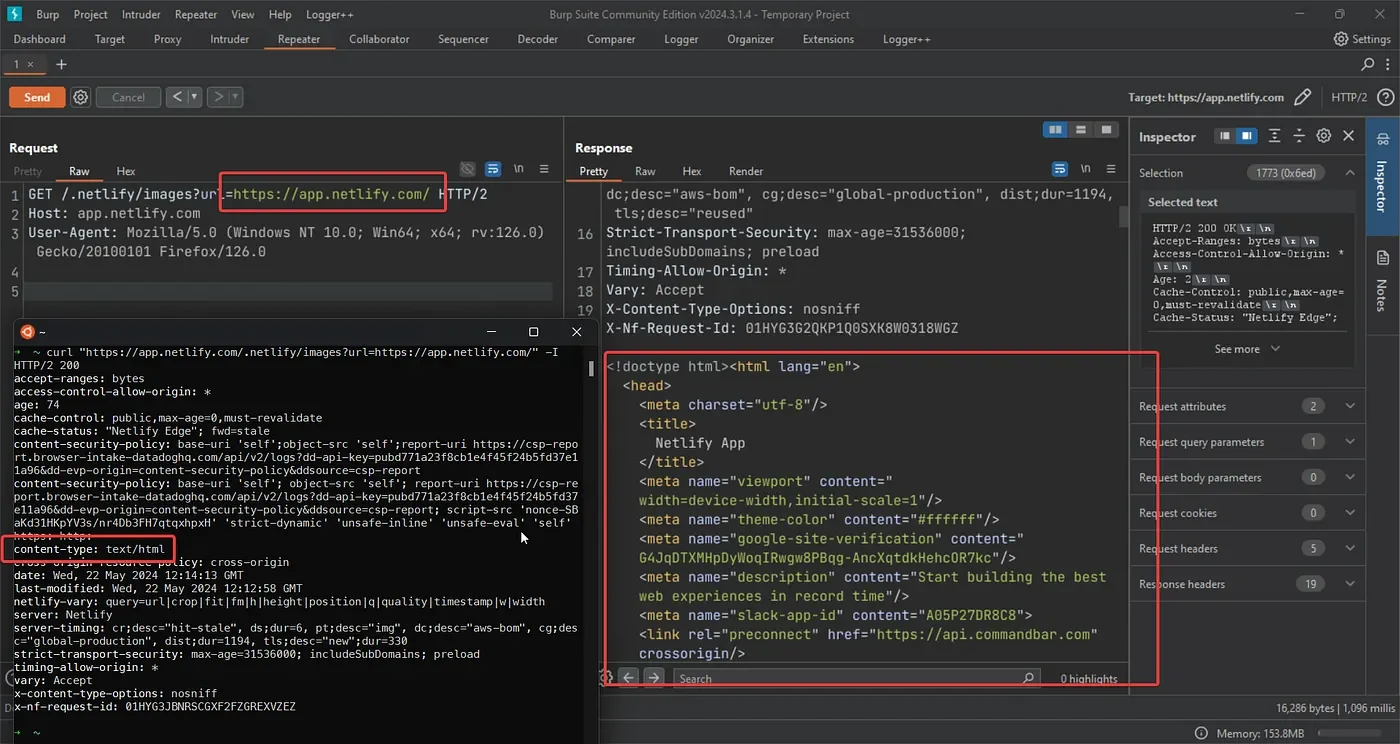
That behaviour is also a possible SSRF candidate if the configuration allows requests to any URL. The chain the researcher had in mind was: find an arbitrary file upload on the whitelisted CDN domain, point /.netlify/image?url at the uploaded file, and get XSS on app.netlify.com.
The upload endpoint did check that the user uploads an image. An SVG was rejected:
{"code":422,"message":"Logo must be an image"}
Exploitation
Step 1: upload an HTML file to the whitelisted CDN
The check was based on the declared MIME type. Setting Content-Type: image/png on the uploaded part, one of the whitelisted types, bypassed it and allowed any file to be uploaded to the CDN domain:
POST /access-control/bb-api/api/v1/accounts/5d77dc9150223b44a44df1f3/logo HTTP/2Host: app.netlify.comCookie: [redacted]User-Agent: Mozilla/5.0 (Windows NT 10.0; Win64; x64; rv:123.0) Gecko/20100101 Firefox/123.0Accept: */*Accept-Language: en-US,en;q=0.5Accept-Encoding: gzip, deflate, brContent-Type: multipart/form-data; boundary=---------------------------[redacted]: https://app.netlify.com/teams/sudi/overviewContent-Length: 606Origin: https://app.netlify.comSec-Fetch-Dest: emptySec-Fetch-Mode: corsSec-Fetch-Site: same-originTe: trailers-----------------------------[redacted]-Disposition: form-data; name="file"; filename="xss.html"Content-Type: image/png<h1>shirley</h1><script>alert()</script>-----------------------------26024016321888288818835600843--
The multipart part is named file, the filename is xss.html, and the part's Content-Type is image/png while the body is HTML with a script. The server accepted it and returned the URL of the stored file:
{ "url": "https://d33wubrfki0l68.cloudfront.net/5d77dc9150223b44a44df1f3/37319cf93ea440b93ea5/xss.html"}
The stored file keeps the .html extension. Checking the Content-Type of the response confirms it is served as HTML:
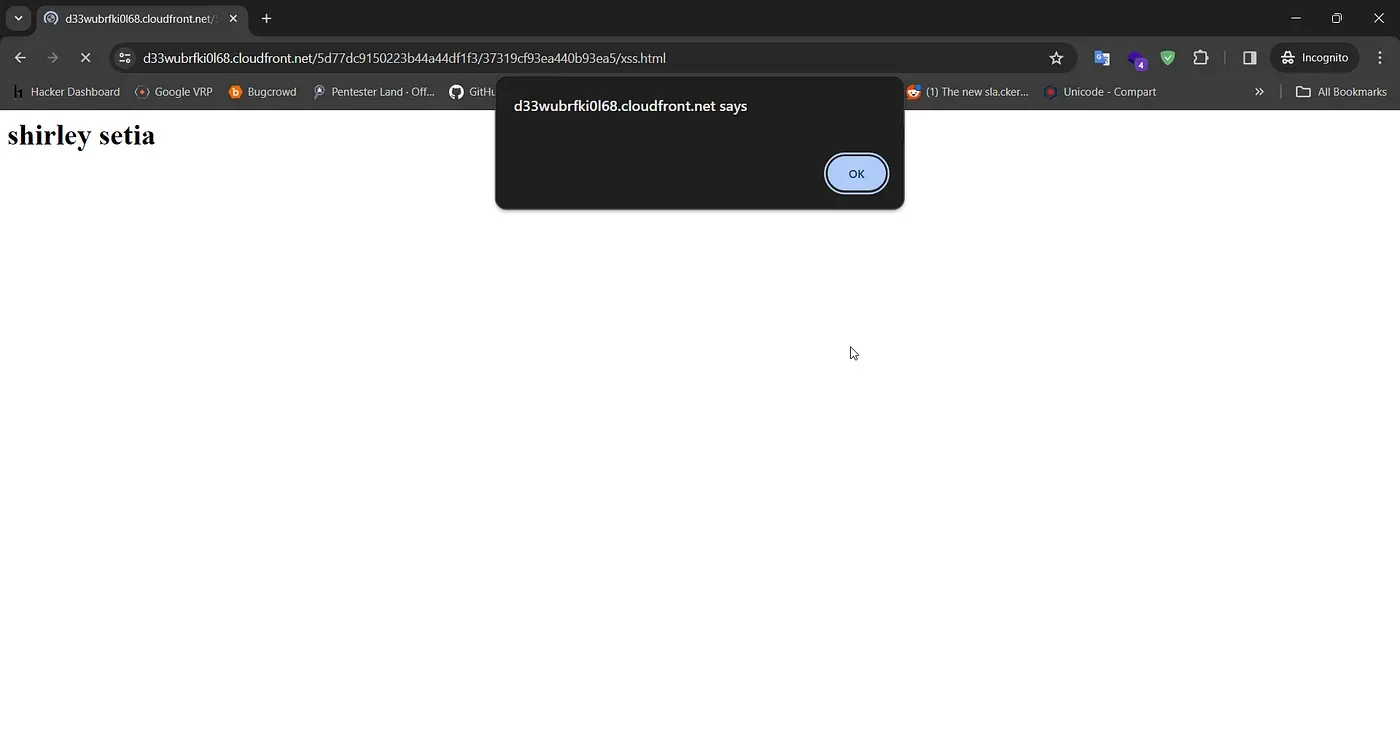
At this point there is a working XSS on the CDN domain. The next step is to reach it through /.netlify/images?url= on app.netlify.com.
Step 2: hit the CSP on the image endpoint
The endpoint returns the HTML body, but the script does not execute because of the CSP:
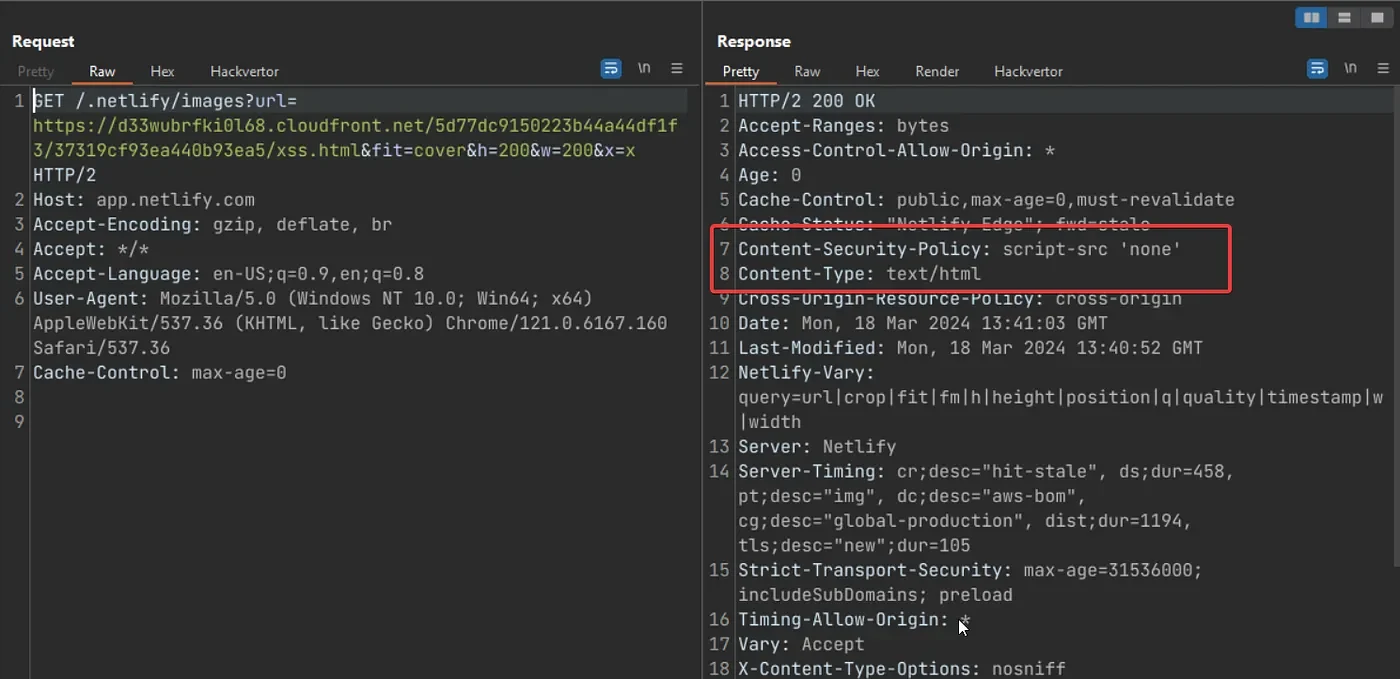
Content-Security-Policy: script-src 'none'
script-src 'none' leaves no room for a bypass on its own. Other endpoints on the application have a relaxed CSP, but this endpoint returns a different, very strict one. The researcher reasoned that the backend checks the path of the requested URL and serves a different CSP for it, and sketched how that might look in nginx:
location /.netlify/images { # Set Content Security Policy add_header Content-Security-Policy "script-src 'none'";
Step 3: URL parser confusion between the CSP layer and the backend
The idea: if the component that adds the CSP and the component that fetches the resource parse the path differently, a path that does not match the location directive could still be normalised by the backend to /.netlify/images, returning the image response without the strict CSP. The first attempt used a dot segment:
GET /./.netlify/images?url=https://d33wubrfki0l68.cloudfront.net/5d77dc9150223b44a44df1f3/37319cf93ea440b93ea5/xss.html&fit=cover&h=200&w=200&x=x HTTP/2Host: app.netlify.com
HTTP/2 200 OKContent-Security-Policy: script-src 'nonce-ak9jJ87J3kkfSFdbapb1h7sEJ/RjVtSQ' 'strict-dynamic' 'unsafe-inline' 'unsafe-eval' 'self' https: http: 'none'; report-uri /.netlify/functions/__csp-violationsContent-Type: text/html
The theory held: the same response came back with a different, relaxed CSP. But a browser normalises /./.netlify/images to /.netlify/images before sending the request, so this path cannot be used to deliver the payload to a victim.
Step 4: encoded slash
Encoding the slash in the path worked and produced XSS:
/.netlify%2fimages
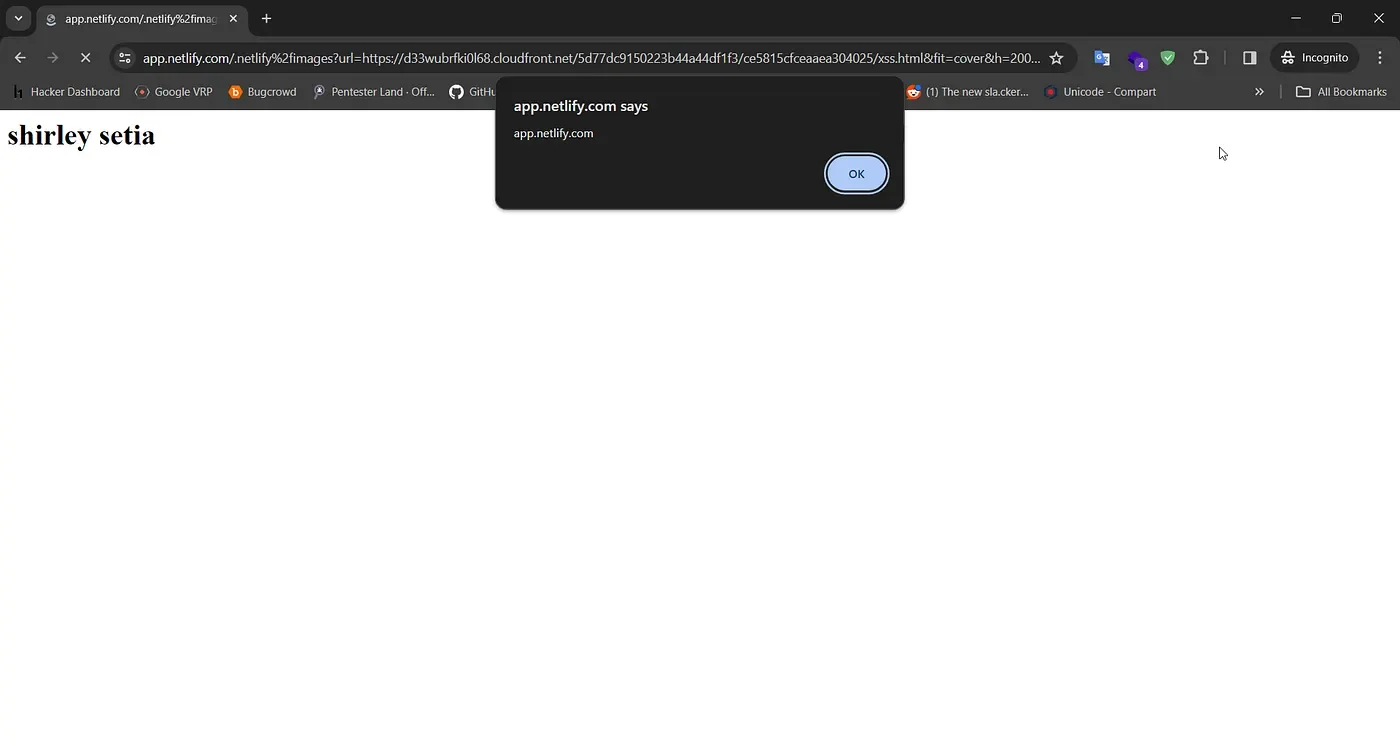
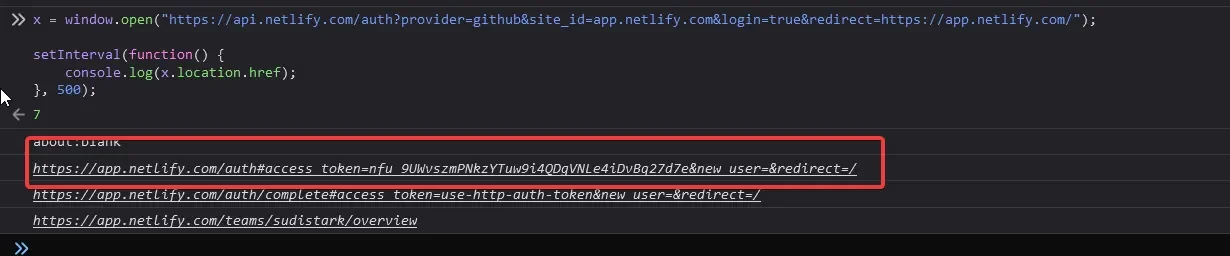
With the payload executing on app.netlify.com, the researcher used a simple proof of concept to leak the authorisation code from the GitHub OAuth flow:
x = window.open("https://api.netlify.com/auth?provider=github&site_id=app.netlify.com&login=true&redirect=https://app.netlify.com/");setInterval(function() { console.log(x.location.href);}, 500);
The leaked access_token in the query parameter is effectively the victim's main session cookie, so the URL can be used to log in to the victim's account.
Step 5: bypass after the first fix
Netlify attempted a fix, and the researcher found another bypass by adding a slash before the path:
//.netlify/images
This bypass still worked at the time of writing. The live example given is:
https://app.netlify.com//.netlify/images?url=https://d33wubrfki0l68.cloudfront.net/5d77dc9150223b44a44df1f3/ce5815cfceaaea304025/xss.html&fit=cover&h=200&w=200&x=x
The URL points to an old uploaded HTML file.
Root cause
Two issues combine. First, the upload endpoint validated the file type from the client-supplied Content-Type of the multipart part rather than the content, so an HTML file could be stored on the whitelisted CDN domain and served as text/html. Second, the image endpoint applied its strict CSP based on a path match, while the backend normalised the path differently. A path that did not match the CSP rule (/./.netlify/images, /.netlify%2fimages, //.netlify/images) was still routed to the image handler, which returned the fetched HTML with the relaxed application CSP. The strict script-src 'none' was not bypassed; the routing around it was.
Impact
An attacker who can upload a file to the whitelisted CDN domain can execute JavaScript in the origin of app.netlify.com by pointing the image endpoint at the uploaded HTML. In the demonstrated case this allowed leaking the GitHub OAuth authorisation code and, through the access_token in the query parameter, taking over the victim's account. The SSRF angle through the url parameter is mentioned only as a possibility if the configuration allows requests to any URL.
Fix
Netlify fixed the issue by disallowing the upload of arbitrary files on their CDN domain. The URL parser bug was left as it is: without a way to upload an arbitrary file that leads to XSS, they consider the issue fixed.
Variants to test
- Path normalisation against CSP rules. On any endpoint that returns a different CSP based on the path, try
/./,%2f, and//variants before the protected path. A positive result is the same response body with a relaxed CSP header. - MIME type trust on upload. Upload an HTML or SVG file with a part
Content-Typeofimage/pngor another whitelisted type. A positive result is a stored file served back astext/html. - Image proxy without content validation. Request the site's index page through the image endpoint's
urlparameter. A positive result is HTML returned with atext/htmlcontent type. - Whitelist regex mistakes. Review
remote_imagespatterns for unanchored or overly broad regex. A positive result is a URL on an attacker-controlled host being fetched. - SSRF through the image fetcher. Point
urlat internal addresses if the configuration permits it. A positive result is a response fetched from a host the client could not reach directly.
What happened, in plain words
Netlify is a company that hosts websites. When you build a site on Netlify, the site can use a feature called the Netlify Image CDN. A CDN (content delivery network) is a network of servers that store copies of files close to visitors so pages load faster. The Image CDN takes an image that lives somewhere else and re-serves it, optionally resized, so the site does not have to ship huge pictures.
To do that, the Image CDN has a special web address (an endpoint) that accepts a link to an image and fetches it for you. The researcher found that this endpoint could be tricked into fetching and returning an HTML page instead of an image. HTML pages can contain JavaScript, the programming language that runs inside your browser and can do things on your behalf, such as read your session or click buttons. Getting your own JavaScript to run inside someone else's website is called cross-site scripting, or XSS.
There was one obstacle: the endpoint sent a security header called a Content Security Policy (CSP) that told the browser "do not run any scripts here". The researcher found a way to make the server send a different, weaker CSP for the same content, by writing the address in a slightly unusual way. The browser and the server disagreed about what the address meant, and that disagreement was the bug.
This is the story of how that was found, step by step, including the exact requests that were sent.
Background: what an image CDN does
Many website-building tools have a feature that optimises images on the fly. Instead of storing ten sizes of every picture, the site stores one and asks a service to resize it when a visitor loads the page. The researcher lists the common shapes these endpoints take on different frameworks:
/_next/image?url=/_gatsby/image/:url/.netlify/image?url=/_ipx/w_200/:url
Each line is a different framework's version of the same idea. The part after ?url= is where you put the address of the image you want. On Netlify the endpoint is:
/.netlify/images?url=
An example request looks like this: https://app.netlify.com/.netlify/images?url=https://app.netlify.com/favicon.ico. Read it as: "go to app.netlify.com, use the images endpoint, and fetch the file at the address after url=". Extra parameters can ask for a different width or height.
Because the server fetches whatever address you give it, the service keeps a list of allowed hosts, called a whitelist. Only addresses on that list are fetched. The list is configured in a file called netlify.toml:
[images] remote_images = [ "https://my-images.com/.*", "https://animals.more-images.com/[bcr]at/.*"]
Line by line: [images] starts a section of settings about images. remote_images is the list of allowed remote hosts. Each quoted string is a pattern. .* means "anything after this point", so https://my-images.com/.* allows any path on that host. [bcr]at means "one character that is b, c or r, followed by at", so it matches bat, cat or rat. These patterns are regular expressions, a mini-language for describing text. Small mistakes in a pattern can let through more than intended.
By default, addresses on the same site are also accepted. The target of the research was https://app.netlify.com, which uses this endpoint and sends a strict CSP on it.
The setup
The researcher had spent a couple of days testing Netlify. The upload request shown later is made against an account id and a team overview page. Nothing exotic was needed: a browser and a way to replay HTTP requests (the messages your browser sends to a server) were enough.
The important precondition is that app.netlify.com whitelists a CDN domain, https://d33wubrfki0l68.cloudfront.net, for the url parameter. That CDN hosts content uploaded by users, such as profile pictures. If an attacker could get a malicious file onto that CDN, the image endpoint would happily fetch it, because the CDN is on the allowed list.
Finding it
Netlify's image endpoint does not check whether the address it fetches actually returns a valid image. The researcher asked it for the site's index page, and the server fetched that page and returned it:
This behaviour is also a possible SSRF candidate. SSRF, server-side request forgery, means tricking a server into making a request on your behalf, for example to an internal address you could not reach yourself. It only becomes a real problem if the configuration allows requests to any address.
The chain the researcher had in mind was: find a way to upload an arbitrary file to the whitelisted CDN domain, point /.netlify/image?url at the uploaded file, and get XSS on app.netlify.com.
The upload endpoint did check that the user uploads an image. An SVG (a picture format that can contain scripts) was rejected:
{"code":422,"message":"Logo must be an image"}
This is a JSON response, a common format for data exchanged between programs. code 422 is an HTTP status meaning the server understood the request but refused the content. The message says the file was not accepted as an image.
Exploitation
Step 1: upload an HTML file to the whitelisted CDN
The check was based on the declared MIME type. A MIME type is the label a file carries saying what kind of file it is, such as image/png for a PNG picture or text/html for a web page. The browser or client sends this label with the upload, and the server trusted it. Setting Content-Type: image/png on the uploaded part, one of the whitelisted types, bypassed the check and allowed any file to be uploaded to the CDN domain:
POST /access-control/bb-api/api/v1/accounts/5d77dc9150223b44a44df1f3/logo HTTP/2Host: app.netlify.comCookie: [redacted]User-Agent: Mozilla/5.0 (Windows NT 10.0; Win64; x64; rv:123.0) Gecko/20100101 Firefox/123.0Accept: */*Accept-Language: en-US,en;q=0.5Accept-Encoding: gzip, deflate, brContent-Type: multipart/form-data; boundary=---------------------------[redacted]: https://app.netlify.com/teams/sudi/overviewContent-Length: 606Origin: https://app.netlify.comSec-Fetch-Dest: emptySec-Fetch-Mode: corsSec-Fetch-Site: same-originTe: trailers-----------------------------[redacted]-Disposition: form-data; name="file"; filename="xss.html"Content-Type: image/png<h1>shirley</h1><script>alert()</script>-----------------------------26024016321888288818835600843--
Line by line: POST is the method used to send data to a server. The path after it is the upload endpoint for a logo on a specific account. Host says which site the request is for. Cookie carries the session cookie, a small piece of data the server gave the browser after login so it can recognise the user; it is redacted here because it is a secret. User-Agent identifies the browser. Accept and Accept-Language say what kind of response and language the client prefers. Content-Type: multipart/form-data means the body is split into parts, like a form with a file attached; boundary is the separator string between parts. Referer says which page the request came from. Content-Length is the body size. Origin says which site the request originates from. The Sec-Fetch-* headers are hints the browser adds about the request's context. Te: trailers is a transfer-encoding hint.
The body is the interesting part. The multipart part is named file, the filename is xss.html, and the part's Content-Type is image/png while the body is HTML with a script. In other words, the file is a web page pretending to be a picture. The server accepted it and returned the URL of the stored file:
{ "url": "https://d33wubrfki0l68.cloudfront.net/5d77dc9150223b44a44df1f3/37319cf93ea440b93ea5/xss.html"}
The stored file keeps the .html extension. Checking the Content-Type of the response confirms it is served as HTML:
At this point there is a working XSS on the CDN domain. The next step is to reach it through /.netlify/images?url= on app.netlify.com.
Step 2: hit the CSP on the image endpoint
The endpoint returns the HTML body, but the script does not execute because of the CSP:
Content-Security-Policy: script-src 'none'
A CSP is a header the server sends to tell the browser which resources a page may load. script-src 'none' means "no scripts at all may run on this page". It leaves no room for a bypass on its own. Other endpoints on the application have a relaxed CSP, but this endpoint returns a different, very strict one. The researcher reasoned that the backend checks the path of the requested URL and serves a different CSP for it, and sketched how that might look in nginx, a common web server:
location /.netlify/images { # Set Content Security Policy add_header Content-Security-Policy "script-src 'none'";
location /.netlify/images is a rule that matches requests whose path starts with /.netlify/images. add_header adds a header to the response. So this sketch says: whenever the path matches, add the strict CSP.
Step 3: URL parser confusion between the CSP layer and the backend
The idea: if the component that adds the CSP and the component that fetches the resource parse the path differently, a path that does not match the location directive could still be normalised by the backend to /.netlify/images, returning the image response without the strict CSP. Normalising means turning a messy path into its clean, standard form, the way a/../b becomes b. The first attempt used a dot segment, a path piece that is just a dot:
GET /./.netlify/images?url=https://d33wubrfki0l68.cloudfront.net/5d77dc9150223b44a44df1f3/37319cf93ea440b93ea5/xss.html&fit=cover&h=200&w=200&x=x HTTP/2Host: app.netlify.com
GET asks for a resource. The path is /./.netlify/images, which contains a dot segment. The url parameter points at the uploaded HTML file. fit=cover, h=200 and w=200 are image options (fit mode, height, width). x=x is an extra parameter the researcher added.
HTTP/2 200 OKContent-Security-Policy: script-src 'nonce-ak9jJ87J3kkfSFdbapb1h7sEJ/RjVtSQ' 'strict-dynamic' 'unsafe-inline' 'unsafe-eval' 'self' https: http: 'none'; report-uri /.netlify/functions/__csp-violationsContent-Type: text/html
HTTP/2 200 OK means the request succeeded. The CSP here is very different: it allows inline scripts ('unsafe-inline'), scripts from the same site ('self'), and scripts from any https: or http: address. 'nonce-...' is a one-time random value that marks a specific script as trusted. report-uri tells the browser where to send reports of CSP violations. Content-Type: text/html confirms the response is a web page.
The theory held: the same response came back with a different, relaxed CSP. But a browser normalises /./.netlify/images to /.netlify/images before sending the request, so this path cannot be used to deliver the payload to a victim. The browser would clean up the address before the server ever saw it.
Step 4: encoded slash
Encoding the slash in the path worked and produced XSS:
/.netlify%2fimages
%2f is the URL encoding of the slash character /. But the server, when it decodes the path, sees a slash and routes the request to the image handler. That mismatch is the bypass.
With the payload executing on app.netlify.com, the researcher used a simple proof of concept to leak the authorisation code from the GitHub OAuth flow:
x = window.open("https://api.netlify.com/auth?provider=github&site_id=app.netlify.com&login=true&redirect=https://app.netlify.com/");setInterval(function() { console.log(x.location.href);}, 500);
Line by line: window.open(...) opens a new browser window at the given address. That address is Netlify's login flow using GitHub as the identity provider (OAuth is a standard way for one site to ask another site to confirm who you are). setInterval(function() { ... }, 500) runs the inner function every 500 milliseconds. console.log(x.location.href) prints the current address of the opened window. The idea is to watch the login window's address and catch the authorisation code that appears in it.
The leaked access_token in the query parameter is effectively the victim's main session cookie, so the URL can be used to log in to the victim's account. A token is a string that proves you are logged in; whoever holds it can act as you.
Step 5: bypass after the first fix
Netlify attempted a fix, and the researcher found another bypass by adding a slash before the path:
//.netlify/images
This bypass still worked at the time of writing. The live example given is:
https://app.netlify.com//.netlify/images?url=https://d33wubrfki0l68.cloudfront.net/5d77dc9150223b44a44df1f3/ce5815cfceaaea304025/xss.html&fit=cover&h=200&w=200&x=x
The URL points to an old uploaded HTML file.
Root cause
Two issues combine. First, the upload endpoint validated the file type from the client-supplied Content-Type of the multipart part rather than the content, so an HTML file could be stored on the whitelisted CDN domain and served as text/html. Second, the image endpoint applied its strict CSP based on a path match, while the backend normalised the path differently. A path that did not match the CSP rule (/./.netlify/images, /.netlify%2fimages, //.netlify/images) was still routed to the image handler, which returned the fetched HTML with the relaxed application CSP. The strict script-src 'none' was not bypassed; the routing around it was.
Impact
An attacker who can upload a file to the whitelisted CDN domain can execute JavaScript in the origin of app.netlify.com by pointing the image endpoint at the uploaded HTML. In the demonstrated case this allowed leaking the GitHub OAuth authorisation code and, through the access_token in the query parameter, taking over the victim's account. The SSRF angle through the url parameter is mentioned only as a possibility if the configuration allows requests to any URL.
Fix
Netlify fixed the issue by disallowing the upload of arbitrary files on their CDN domain. The URL parser bug was left as it is: without a way to upload an arbitrary file that leads to XSS, they consider the issue fixed.
Variants to test
- Path normalisation against CSP rules. On any endpoint that returns a different CSP based on the path, try
/./,%2f, and//variants before the protected path. A positive result is the same response body with a relaxed CSP header. - MIME type trust on upload. Upload an HTML or SVG file with a part
Content-Typeofimage/pngor another whitelisted type. A positive result is a stored file served back astext/html. - Image proxy without content validation. Request the site's index page through the image endpoint's
urlparameter. A positive result is HTML returned with atext/htmlcontent type. - Whitelist regex mistakes. Review
remote_imagespatterns for unanchored or overly broad regex. A positive result is a URL on an attacker-controlled host being fetched. - SSRF through the image fetcher. Point
urlat internal addresses if the configuration permits it. A positive result is a response fetched from a host the client could not reach directly.
Glossary
- CDN (content delivery network): a network of servers that store copies of files close to visitors so pages load faster.
- Endpoint: a specific web address on a server that accepts requests and does something with them.
- JavaScript: the programming language that runs inside your browser and can interact with the page and your session.
- XSS (cross-site scripting): getting your own JavaScript to run inside someone else's website, so it acts with that site's permissions.
- CSP (Content Security Policy): a header the server sends to tell the browser which resources a page may load and run.
- Header: extra information sent alongside a request or response, such as the content type or a cookie.
- Whitelist: a list of things that are allowed, here the hosts the image endpoint may fetch from.
- Regular expression (regex): a mini-language for describing text patterns, used to match addresses.
- SSRF (server-side request forgery): tricking a server into making a request on your behalf, for example to an internal address you could not reach yourself.
- SVG: a picture format that can contain scripts.
- JSON: a common text format for exchanging data between programs.
- HTTP status code: a number in the response saying what happened, such as 200 for success or 422 for a refused request.
- MIME type: the label a file carries saying what kind of file it is, such as
image/pngortext/html. - Multipart form data: a way of sending a request body split into parts, used for file uploads.
- Session cookie: a small piece of data the server gave the browser after login so it can recognise the user.
- Token: a string that proves you are logged in; whoever holds it can act as you.
- OAuth: a standard way for one site to ask another site to confirm who you are.
- Normalisation: turning a messy path into its clean, standard form, the way
a/../bbecomesb. - URL encoding: writing special characters in a URL as
%followed by two hex digits, such as%2ffor/. - nginx: a common web server that can match paths and add headers.
- Origin: the combination of scheme, host and port that a browser uses to decide which site a page belongs to.