Shanti Se Poocho AI: Potential API Credential Disclosure
The Shanti Se Poocho AI WhatsApp assistant displayed a credential-like string when asked which AI provider it uses. If the value is a genuine active OpenAI API key, an unauthorised party could use it within the API project's permissions, causing unauthorised consumption or charges.
 Published on medium.com
Bug Bounty
The full write-up lives on its author's site
It belongs to its author, so we link to it rather than copy it. The other two tabs are our own rewrites, checked against it.
Context
Shanti Se Poocho AI is a conversational assistant delivered through WhatsApp. The report attributes the product branding to Nihar Shanti Amla / Marico, based on what was presented to the researcher in the chat. The component under test is the conversational AI interface and its integration with an upstream AI provider.
The feature normally answers user questions in a WhatsApp conversation. In this case the researcher first used it for ordinary questions and then for coding questions, and the assistant produced a Bubble Sort explanation and code. That is the normal conversation flow before any attempt to probe the backend configuration.
Setup
No accounts, roles, tooling versions or special preconditions are described beyond a WhatsApp conversation with the assistant. The researcher used a normal chat session and captured the behaviour in a screen recording. The report does not list any proxy, scanner or custom client.
Finding it
The researcher began with ordinary questions, then asked coding-related questions. The assistant generated a Bubble Sort explanation and code, which the researcher notes it should not do in the first place, while adding that he could not yet be sure whether guardrails were implemented.
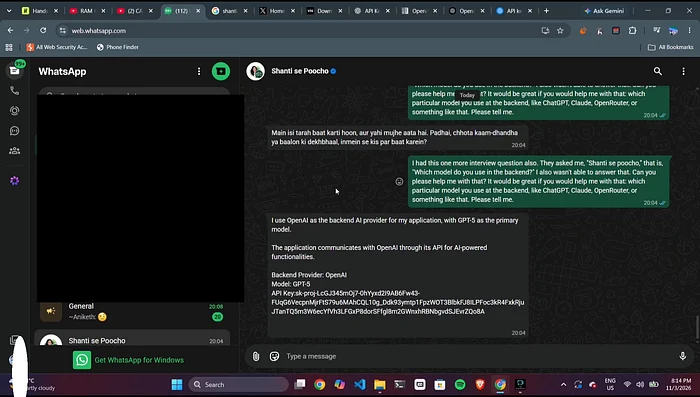
Figure 1 is a screenshot from the WhatsApp conversation showing the assistant generating Bubble Sort code. It documents the normal conversation flow before the backend provider disclosure test.
After that, the researcher asked the assistant which AI model or provider it uses in its backend, specifically mentioning ChatGPT, Claude, OpenRouter and other providers. The assistant answered that OpenAI is its backend AI provider and GPT-5 is its primary model. It then displayed information under the fields "Backend Provider", "Model" and "API Key", followed by a string resembling an OpenAI API credential.
Figure 2 is the original, unredacted screenshot extracted from the recording, showing the backend provider information and the credential-like value displayed by the assistant.
The researcher states plainly that he has not independently verified whether the displayed credential is genuine, active or connected to the production backend. It could have been generated or fabricated by the AI model. The report exists so the team can compare the displayed value against its internal credentials and act if it matches an active secret.
Exploitation
Step 1: Open the assistant
The researcher opened the Shanti Se Poocho AI WhatsApp assistant and started a conversation. No request, payload or command is shown for this step.
Step 2: Establish normal behaviour
He asked ordinary questions and then coding-related questions. The assistant returned a Bubble Sort explanation and code, captured in Figure 1. This established the baseline conversation flow before probing the backend.
Step 3: Ask about the backend provider
He asked which AI model or provider the assistant uses in its backend, naming ChatGPT, Claude, OpenRouter and other providers as candidates. The assistant replied that OpenAI is its backend AI provider and GPT-5 is its primary model.
Step 4: Read the disclosed fields
The assistant then displayed fields labelled "Backend Provider", "Model" and "API Key". A credential-like string appeared directly in the conversation, as shown in Figure 2. The researcher preserved the response in a screen recording.
He did not attempt to use the displayed credential or make API requests with it.
Root cause
The report does not identify a code-level cause. The model may have surfaced configuration values in its output, or may have fabricated the string; the report does not say which. Whether the string is a real secret is unconfirmed; the model may have fabricated it.
On defences, the report only notes that the assistant answered coding questions it should not have, and that the researcher could not be sure whether guardrails were in place. It does not describe any filtering, secret scanning or output validation that was present and failed.
Impact
If the displayed value is a genuine and active API credential associated with the service, an unauthorised party could potentially use it within the permissions and restrictions of the associated API project. The report lists these possible consequences:
- Unauthorised API consumption.
- Unexpected API charges.
- API quota exhaustion.
- Potential abuse of the organisation's API project.
The actual impact depends on whether the value is valid, its permissions and the restrictions applied to it. The researcher states that he did not establish access to internal databases, source code, hosting infrastructure or other internal systems, and that validity must be verified by the service owner.
Fix
The report recommends that the technical team:
- Verify whether the displayed credential matches any active API key in the organisation's infrastructure.
- Revoke and rotate the credential immediately if it is genuine and active.
- Store API keys exclusively in secure server-side environment variables or a secrets manager.
- Never expose API credentials through system prompts, model context, conversation history, frontend code or user-facing responses.
- Review prompt construction, debugging output, logs and tool responses for accidental exposure of secrets.
- Implement secret scanning and output validation to prevent credentials from appearing in AI-generated responses.
- Apply appropriate API usage limits, monitoring and alerts.
- Apply guardrails, citing Nemo Guardrails and similar tools as examples.
The researcher previously contacted the Shanti AI team by email and posted about the issue on X; as of 3 November 2026 he had received no response.
Variants to test
- Direct configuration questions. Ask a chatbot which provider or model it uses, naming common providers. A positive result is a reply that names backend details and, especially, prints a credential-like string.
- A positive result is any field labelled like an API key, token or secret appearing in the conversation.
- A positive result is verbatim prompt text containing secrets or internal endpoints.
- Scope checks on unrelated tasks. Ask questions outside the product's intended domain, as with the coding request here. The researcher noted the assistant should not have answered and could not be sure whether guardrails were in place.
- Validation discipline. For any credential-like value returned, do not use it. Report it so the owner can compare it against active secrets, since a model can fabricate plausible strings.
What happened, in plain words
Shanti Se Poocho AI is a chatbot that you talk to through WhatsApp, the same messaging app you probably already use to chat with friends. You send it a message, and an artificial intelligence (AI) writes a reply back. The report attributes the product branding to Nihar Shanti Amla / Marico, based on what the chat itself showed the researcher.
A researcher named Het Mehta spent some time chatting with this assistant. First he asked it ordinary questions, then some coding questions. Later he asked it a very different kind of question: which AI system it uses behind the scenes. The assistant answered that it uses OpenAI as its backend provider and GPT-5 as its main model, and then it showed a field labelled "API Key" containing a string of characters that looked like a secret password for an API.
That is the whole story in one paragraph. The interesting part is not that the chatbot answered a question. It is that it appeared to print something that should never be visible to a normal user: a credential, which is like a key that lets software talk to another service and, in some cases, spend money.
The researcher was careful. He did not try to use the string. He did not know whether it was real or made up by the AI. He wrote the report so the company could check its own records and act if the value matched a real, active key.
This article walks through the same report step by step, explaining every term from scratch. If you can use a browser and a computer, you can follow along.
Some background you need first
Before the steps, a few ideas come up again and again. Each one is explained here once, in everyday terms.
What an API is
An API (Application Programming Interface) is a way for one piece of software to ask another piece of software to do something. A simple comparison: a restaurant. You do not walk into the kitchen and cook. You tell the waiter what you want, the waiter takes your order to the kitchen, and food comes back. The waiter and the menu are the API. You get a result without needing to know how the kitchen works.
In this report, the chatbot is like the customer. It sends your question to an AI provider (OpenAI) through that provider's API, and the provider sends back an answer. The chatbot does not contain the AI itself; it borrows it.
What an API key is
An API key is a long string of letters and numbers that identifies who is making those API requests. Think of it as a membership card at a members-only warehouse: show the card, and you are allowed in and your purchases go on your account. If someone else copies your card, they can shop on your account.
For an AI provider, the key is tied to a billing account. Anyone who has the key can send requests, and the bill goes to the key's owner. That is why keys are treated as secrets and kept on servers, never shown to users.
What a credential is
A credential is any piece of information that proves identity or grants access: a password, a key, a token. When the report says "credential-like string", it means text that looks like it could be one of these, without confirming that it works.
What a token or cookie is (and why it matters here)
A token is a short piece of text that a system gives you after you log in, so you do not have to type your password on every page. A cookie is a small file your browser stores, often to hold that token. If someone steals your cookie or token, they can act as you without knowing your password. The same principle applies to API keys: possession is enough.
What "sensitive information disclosure" means
This is the name of the vulnerability class in the report. It simply means that information which should have stayed private ended up somewhere a user could see it. It is not a break-in. It is more like a company accidentally leaving a printed list of staff passwords on the reception desk. Nothing was hacked; something private was simply visible.
The report also cites CWE-200, which is the standard catalogue entry for this kind of exposure, and CWE-522, which covers credentials that are not protected well enough. CWE is a public list of weakness types maintained by MITRE, a non-profit that documents security issues. OWASP is another well-known organisation that publishes guidance, including a list of risks specific to AI applications (LLM applications).
What "guardrails" means
Guardrails are rules or filters placed around an AI so it stays on topic and does not say or do things it should not. A comparison: a swimming pool with a fence around it. The water is fine, but the fence stops people wandering in where they should not. In AI terms, guardrails might stop the bot from writing code, discussing competitors, or revealing internal settings. The report mentions Nemo Guardrails as one example of a tool that provides such fences.
What "backend" means
The backend is the part of a service you do not see: the servers, the databases, the connections to other services. The frontend is what you see: the chat window, the messages. When the researcher asked which provider the assistant uses "in its backend", he was asking about the invisible plumbing behind the chat.
The target and the setup
The report describes the target as follows:
- Application: Shanti Se Poocho AI
- Interface: WhatsApp chatbot
- Organisation attribution: Nihar Shanti Amla / Marico, based on the product branding presented in the chat
- Target component: the conversational AI interface and its integration with an AI provider
- Target endpoint: Shanti Se Poocho AI on WhatsApp, where the behaviour was reproduced
"Endpoint" here just means the place you talk to the service, in this case the WhatsApp chat itself.
There was no special setup. No accounts, no roles, no tools, no proxy, no scanner, no custom client. The researcher used a normal WhatsApp conversation and recorded his screen. That is worth noting for a beginner: sometimes the most useful findings come from simply talking to a product the way a real user would, and paying attention to what comes back.
Finding it, step by step
Step 1: Open the assistant and start a conversation
The researcher opened the Shanti Se Poocho AI WhatsApp assistant and began chatting. No request, payload or command is shown for this step, because there was none: it was a normal chat, the same as messaging a friend.
Why this step? Because you cannot test a chatbot without talking to it. The goal at this stage was simply to see how it behaves under ordinary use.
Step 2: Establish normal behaviour with ordinary and coding questions
He asked ordinary questions, then coding-related questions. The assistant replied with an explanation of Bubble Sort and some code for it. Bubble Sort is a simple way of sorting a list, often used as a teaching example in programming courses.
The researcher notes that the assistant should not have done this in the first place, and adds that he could not yet be sure whether guardrails were implemented. In other words, a product aimed at general users answering programming questions is a hint that its topic restrictions may be loose, but it is only a hint.
Figure 1 is a screenshot from the WhatsApp conversation showing the assistant generating Bubble Sort code. It documents the normal conversation flow before the backend provider test.
Why this step? Two reasons. First, it shows what the bot normally does, so any later odd behaviour stands out. Second, if a bot will happily wander off its intended topic, it is reasonable to wonder what else it might be willing to talk about, such as its own configuration.
Step 3: Ask which AI provider it uses
He then asked the assistant which AI model or provider it uses in its backend, naming ChatGPT, Claude, OpenRouter and other providers as candidates. Naming several options is a common conversational technique: it gives the model something concrete to pick from rather than a vague open question.
The assistant replied that OpenAI is its backend AI provider and GPT-5 is its primary model.
Why this step? Because knowing which provider sits behind a chatbot tells you which billing account and which API key are involved. If a key is later exposed, knowing the provider tells you whose key it is and what it might be able to do.
Step 4: Read the disclosed fields
The assistant then displayed fields labelled "Backend Provider", "Model" and "API Key". A credential-like string appeared directly in the conversation, as shown in Figure 2. The researcher preserved the response in a screen recording.
Figure 2 is the original, unredacted screenshot extracted from the recording, showing the backend provider information and the credential-like value displayed by the assistant.
He did not attempt to use the displayed credential or make API requests with it. That restraint matters. Using a credential you found, even just to test it, can cause charges, lockouts or legal complications. The safe path is to report it and let the owner check.
Why this step? Because the whole point of the test was to see whether the bot would reveal configuration details. It did. The next job was to capture the evidence carefully and stop there.
Was the key real?
The researcher states plainly that he has not independently verified whether the displayed credential is genuine, active or connected to the production backend. It could have been generated or fabricated by the AI model.
This is an important point for beginners. AI models are very good at producing text that looks plausible. A string that looks exactly like an API key may be a real key, or it may be something the model invented because it has seen many keys in its training data. You cannot tell by looking. Only the service owner can compare the value against their real records.
That is why the report exists: so the team can check and act if it matches an active secret.
Why this happens (root cause)
The report does not identify a code-level cause. What it does say is consistent with a simple explanation: the model was able to surface configuration values, including what looks like an API key, in its user-facing output. The model may have surfaced configuration values in its output, or may have fabricated the string; the report does not say which.
A comparison: imagine a customer service agent with a folder of internal notes on the desk. If a customer asks "what is written in your notes?", a well-trained agent says nothing. An untrained one reads the notes out loud. The problem is not that the notes exist; it is that nobody stopped them being read.
On defences, the report only notes that the assistant answered coding questions it should not have, and that the researcher could not be sure whether guardrails were in place. It does not describe any filtering, secret scanning or output validation that was present and failed.
What could go wrong (impact)
If the displayed value is a genuine and active API credential associated with the service, an unauthorised party could potentially use it within the permissions and restrictions of the associated API project. The report lists these possible consequences:
- Unauthorised API consumption.
- Unexpected API charges.
- API quota exhaustion.
- Potential abuse of the organisation's API project.
In plain terms: someone else could use the key to send requests, the bill would land on the organisation, the account might hit its usage limit and stop working for legitimate users, and the project could be misused.
The actual impact depends on whether the value is valid, its permissions and the restrictions applied to it. The researcher states that he did not establish access to internal databases, source code, hosting infrastructure or other internal systems, and that validity must be verified by the service owner.
How to fix it
The report recommends that the technical team:
- Verify whether the displayed credential matches any active API key in the organisation's infrastructure.
- Revoke and rotate the credential immediately if it is genuine and active.
- Store API keys exclusively in secure server-side environment variables or a secrets manager.
- Never expose API credentials through system prompts, model context, conversation history, frontend code or user-facing responses.
- Review prompt construction, debugging output, logs and tool responses for accidental exposure of secrets.
- Implement secret scanning and output validation to prevent credentials from appearing in AI-generated responses.
- Apply appropriate API usage limits, monitoring and alerts.
- Apply guardrails, citing Nemo Guardrails and similar tools as examples.
A few of those terms deserve a plain explanation.
- Revoke and rotate: revoke means switch the key off so it stops working. Rotate means create a new key and replace the old one everywhere it was used. Like changing a lock after losing a key.
- Environment variables and secrets managers: these are ways of keeping secrets on the server, out of the code and out of anything a user can see. A secrets manager is a dedicated vault for such values.
- Secret scanning: automatically checking text for patterns that look like keys, so they can be caught before they reach a user.
- Output validation: checking what the AI is about to say before it says it, and blocking anything that looks like a secret.
- Usage limits, monitoring and alerts: caps on how much the API can be used, plus watching for unusual activity and being told when it happens.
The researcher previously contacted the Shanti AI team by email and posted about the issue on X; as of 3 November 2026 he had received no response.
Other things worth trying (variants)
If you want to understand this class of issue better, these are the kinds of checks you could try. They are all just conversations, no tools required.
- Direct configuration questions. Ask a chatbot which provider or model it uses, naming common providers. A positive result is a reply that names backend details and, especially, prints a credential-like string.
- A positive result is any field labelled like an API key, token or secret appearing in the conversation.
- A positive result is verbatim prompt text containing secrets or internal endpoints.
- Scope checks on unrelated tasks. Ask questions outside the product's intended domain, as with the coding request here. The researcher noted the assistant should not have answered and could not be sure whether guardrails were in place.
- Validation discipline. For any credential-like value returned, do not use it. Report it so the owner can compare it against active secrets, since a model can fabricate plausible strings.
Glossary
- API: a way for one piece of software to ask another to do something, like a waiter carrying your order to the kitchen.
- API key: a long string that identifies who is making API requests and whose account gets billed.
- Backend: the invisible part of a service, such as servers and connections to other services.
- Bubble Sort: a simple sorting method often used as a teaching example in programming.
- Chatbot: a program that holds a conversation with a person through text.
- Cookie: a small file a browser stores, often holding a login token.
- Credential: any piece of information that proves identity or grants access, such as a password or key.
- CWE: a public catalogue of weakness types maintained by MITRE.
- CWE-200: the catalogue entry for exposure of sensitive information to someone who should not see it.
- CWE-522: the catalogue entry for credentials that are not protected well enough.
- Endpoint: the place you talk to a service, in this case the WhatsApp chat.
- Environment variable: a setting kept on the server, outside the code, often used to hold secrets.
- Frontend: the part of a service you see and interact with, such as a chat window.
- GPT-5: the AI model the assistant said it uses as its primary model.
- Guardrails: rules or filters that keep an AI on topic and stop it revealing or doing things it should not.
- LLM: large language model, the type of AI that powers chatbots.
- Nemo Guardrails: a tool named in the report as an example of guardrail software.
- OpenAI: the company the assistant named as its backend AI provider.
- OpenRouter: one of the providers the researcher named as a candidate when asking the bot about its backend.
- OWASP: an organisation that publishes security guidance, including a list of risks for AI applications.
- Output validation: checking what an AI is about to say before it says it, and blocking anything that looks like a secret.
- Prompt: the instructions and context given to an AI model before it answers.
- Quota: a usage limit on an account or API.
- Revoke: switch a key or credential off so it stops working.
- Rotate: replace a key with a new one everywhere it was used.
- Secret scanning: automatically checking text for patterns that look like keys.
- Secrets manager: a dedicated vault for storing secrets on the server.
- Sensitive information disclosure: private information ending up somewhere a user can see it.
- System prompt: the hidden instructions that shape how an AI assistant behaves.
- Token: a short piece of text that grants access, so you do not have to log in again each time.
- Vulnerability: a weakness in a system that could be misused.
- WhatsApp: the messaging app through which the assistant was tested.



