Sleep SQL injection on Name Parameter While Updating Profile
A profile update request contained a name parameter that was passed into a database query without proper handling, so a time-based SQL injection payload caused the server to pause. An attacker could use this to extract or manipulate database contents, though the report only demonstrates the delay.
 Published on medium.com
Hi everyone, I am an Independent Cyber Security Researcher and a Bug Bounty Hunter from Pakistan.
The full write-up lives on its author's site
It belongs to its author, so we link to it rather than copy it. The other two tabs are our own rewrites, checked against it.
What the report shows
The researcher, Umer Yousuf, was invited to a private program that covered all assets belonging to the organisation. After the usual reconnaissance, an hour of testing turned up an unusual response when updating the profile picture. The report does not name the endpoint, the parameter, or the request body beyond the payload itself.
Suspecting SQL injection, the researcher sent a time-based payload built around a conditional sleep(5). The database paused for five seconds, and the researcher used the payload again and it worked.
The payload used was:
0'XOR(if(now()=sysdate(),sleep(5),0))XOR’Z
The request that carried it was the profile update request, with the payload inserted through Burp Intruder. The report shows the request in a screenshot rather than as text:
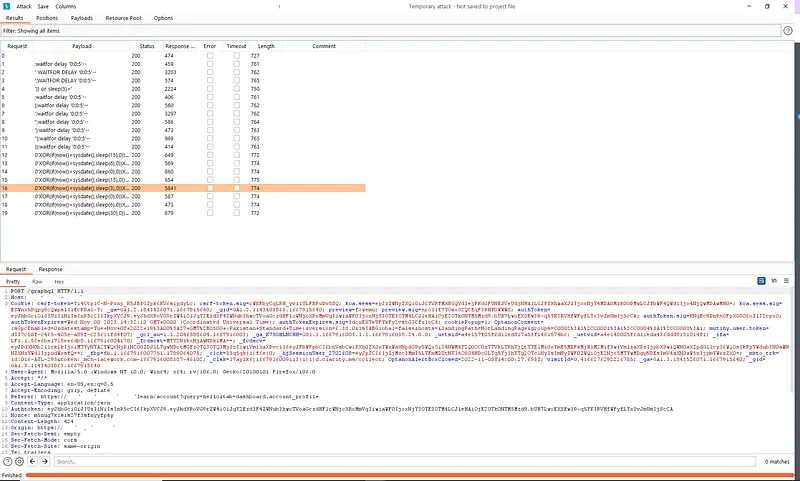
The finding was rewarded with a €500 bounty. The report does not give a severity rating, a CVSS score, a CWE identifier, or any detail about how the issue was fixed.

The researcher's closing advice is to check every parameter manually.
Root cause
The behaviour it demonstrates, a user-supplied value from the profile update influencing query timing, shows the input reaches a SQL query. The payload's structure supports this reading. It closes a quoted string with 0', uses XOR to combine conditions, and calls if(now()=sysdate(),sleep(5),0) so that the delay only fires when the condition holds. That kind of expression only evaluates if the input is being parsed as SQL rather than treated as data.
Impact
What the report establishes is that an attacker who can reach the profile update feature can make the database wait on demand. That is enough to prove injection, and in a real attack the same channel can be used to ask the database yes/no questions and extract data slowly through timing. The finding was rewarded with €500.
How this kind of bug works
SQL injection happens when an application builds a query by joining strings, so part of the user's input is interpreted as SQL syntax rather than as a value. In a quoted context, a single quote in the input ends the string literal early, and whatever follows is parsed as part of the statement. Boolean-based payloads change what the query returns; time-based payloads like the one here change how long it takes, which is useful when the response body gives nothing away.
The if(now()=sysdate(),sleep(5),0) construct is a conditional delay: if the two time expressions match, the database sleeps, otherwise it returns zero immediately. Wrapping it in XOR lets the attacker keep the surrounding expression valid while the condition decides the timing. Because the delay is observable from outside, the attacker can encode one bit per request and reconstruct data over many requests.
The defence is parameterised queries, where the value is sent separately from the statement and can never change its structure. Stored procedures with bound parameters, strict allow-lists for values that cannot be bound (such as sort column names), and least-privilege database accounts reduce the damage if a mistake slips through. Input filtering alone is fragile because SQL syntax is large and context-dependent.
How to test for it
- Map every feature that writes to the database: profile updates, registration, password change, search, filters, sorting, pagination, and any JSON or form field that ends up in a query.
- For each parameter, send a value that would break a quoted string, such as a single quote, and watch for errors, changed responses, or a different status code. Errors are a signal, not proof.
- Move to time-based tests. Send a conditional delay payload and measure the response time against a baseline request with a harmless value. Repeat both several times: a real injection delays consistently, while a slow network or a heavy query does not correlate with the payload.
- Try the same parameter in different encodings and positions, including JSON bodies, multipart forms, and headers that the application might log or store.
- When a delay appears, confirm it is caused by the payload by changing the condition so it should be false, and check that the delay disappears.
Common false positives include server-side rate limiting, caches that make one request fast and another slow, background jobs that occasionally slow a response, and payloads that trigger a validation error page which itself takes time to render. Always compare against a control request and repeat measurements.
How it is fixed
Replace string concatenation with parameterised queries or prepared statements in every code path that touches the database. Where a value cannot be bound, such as a column name in an ORDER BY, validate it against a fixed allow-list. Add server-side input validation as defence in depth, but do not rely on it as the primary control. Run the application's database account with the minimum privileges it needs, and turn off detailed database error messages in production so that error-based probing yields less information.
Hunting notes
Profile and account settings pages are good hunting grounds because they often accept many fields, are updated less often than login flows, and may be written by different teams. The same applies to admin panels, reporting and export features, and any endpoint that accepts a filter or sort parameter. Recon signals worth following include parameters whose names suggest database columns, responses that change shape when a quote is added, and features that echo stored values back.
To make a report land, show reproducibility: the exact request, the payload, the measured delay, and a control request without the payload. State clearly what the delay proves and avoid claiming data extraction you have not performed.
What happened, in plain words
A security researcher, Umer Yousuf, was invited to a private bug bounty program. A bug bounty program is an arrangement where an organisation pays people to look for security weaknesses in its systems and report them privately instead of exploiting them. This particular program covered all the assets belonging to the organisation, meaning every website and service it runs.
After the usual reconnaissance (the early stage of exploring a target to see what it is made of), an hour of testing turned up something odd. When the researcher updated the profile picture, the response looked unusual. The report does not name the exact page, the field, or the rest of the request beyond the payload itself.
Suspecting SQL injection, the researcher sent a payload designed to make the database pause. A database is the part of a website that stores and retrieves information, such as user accounts and profile details. SQL is the language used to talk to it. SQL injection is when a user's input is treated as part of that language instead of as plain data, so the user can change what the database is asked to do.
The payload used was:
0'XOR(if(now()=sysdate(),sleep(5),0))XOR’Z
Here is what each piece does, in plain terms:
The database paused for five seconds. The researcher used the payload again and it worked.
The request that carried the payload was the profile update request, with the payload inserted through Burp Intruder. Burp is a tool for intercepting and modifying web traffic; Intruder is its component for sending many variations of a request. The report shows the request in a screenshot rather than as text:
The finding was rewarded with a €500 bounty. The report does not give a severity rating, a CVSS score, a CWE identifier, or any detail about how the issue was fixed.
The researcher's closing advice is to check every parameter manually. A parameter is a named piece of data sent with a request, such as a form field or a value in the address bar.
In general, how this kind of bug works
SQL injection happens when a website builds a database query by gluing strings together, so part of what the user typed is read as SQL instructions rather than as a value. A useful comparison is a form letter: if someone writes their name as "Alice, and also please send me the file", and the letter is assembled by pasting that text into a sentence, the extra instruction becomes part of the letter. Parameterised queries avoid this by sending the value separately from the instructions, so it can never change the structure of the query.
Time-based payloads like the one above are useful when the page gives nothing away. Instead of trying to read data from the response, the attacker asks the database a yes/no question and watches how long the answer takes. One bit of information per request can be collected over many requests.
In general, to test for this:
- Map every feature that writes to the database: profile updates, registration, password change, search, filters, sorting, pagination, and any form or JSON field that ends up in a query.
- For each parameter, send a value that would break a quoted string, such as a single quote, and watch for errors, changed responses, or a different status code. Errors are a signal, not proof.
- Move to time-based tests. Send a conditional delay payload and measure the response time against a baseline request with a harmless value. Repeat both several times: a real injection delays consistently, while a slow network or a heavy query does not correlate with the payload.
- Try the same parameter in different encodings and positions, including JSON bodies, multipart forms, and headers that the application might log or store.
- When a delay appears, confirm it is caused by the payload by changing the condition so it should be false, and check that the delay disappears.
Common false positives include server-side rate limiting, caches that make one request fast and another slow, background jobs that occasionally slow a response, and payloads that trigger a validation error page which itself takes time to render. Always compare against a control request and repeat measurements.
In general, the fix is to replace string concatenation with parameterised queries or prepared statements in every code path that touches the database. Where a value cannot be bound, such as a column name in an ORDER BY, validate it against a fixed allow-list. Add server-side input validation as defence in depth, but do not rely on it as the primary control. Run the application's database account with the minimum privileges it needs, and turn off detailed database error messages in production so that error-based probing yields less information.
Profile and account settings pages are good hunting grounds because they often accept many fields, are updated less often than login flows, and may be written by different teams. The same applies to admin panels, reporting and export features, and any endpoint that accepts a filter or sort parameter. Recon signals worth following include parameters whose names suggest database columns, responses that change shape when a quote is added, and features that echo stored values back.
To make a report land, show reproducibility: the exact request, the payload, the measured delay, and a control request without the payload. State clearly what the delay proves and avoid claiming data extraction you have not performed.
Glossary
- Bug bounty program: an arrangement where an organisation pays people to find and report security weaknesses privately.
- Reconnaissance: the early stage of exploring a target to learn what it is made of.
- Database: the part of a website that stores and retrieves information.
- SQL: the language used to talk to a database.
- SQL injection: when user input is treated as part of a database query instead of as plain data.
- Payload: the piece of input crafted to trigger a vulnerability.
- Parameter: a named piece of data sent with a request, such as a form field or a value in the address bar.
- Request: the message a browser sends to a website asking for something or submitting data.
- Response: the message a website sends back.
- Burp Intruder: a component of the Burp tool for sending many variations of a request.
- Time-based injection: a technique where the attacker infers information from how long the database takes to answer.
- Conditional delay: a delay that only happens when a condition is true.
- Parameterised query: a way of sending values separately from the query instructions so they cannot change its structure.
- Prepared statement: a pre-built query with placeholders for values, a form of parameterised query.
- Allow-list: a fixed list of permitted values.
- Least privilege: giving an account only the permissions it actually needs.
- False positive: a result that looks like a vulnerability but is not.
- CVSS: a scoring system for rating the severity of a vulnerability.
- CWE: a catalogue of common weakness types.



