Somebody Call The Plumber, GraphQL is Leaking Again…
An unauthenticated GraphQL endpoint allowed introspection and a query that returned sensitive customer data, including names, locations, email addresses, and phone numbers. The attacker could access this data without authentication.

Hello Everyone, I have a story for you today. It primarily will be about a GraphQL vulnerability I was recently awarded for though a public program hosted on BugCrowd’s platform.
The full write-up lives on its author's site
It belongs to its author, so we link to it rather than copy it. The other two tabs are our own rewrites, checked against it.
Context
This is a story about a GraphQL information disclosure found on a public bug bounty program hosted on BugCrowd. The program does not allow disclosure, so the researcher redacts or edits details where needed to stay within the rules. The write-up also covers a dispute over the bounty payout that followed.
GraphQL, as the author describes it, is a technology that allows database query and manipulation via API interactions. It was developed by Facebook and used only internally until 2015, when it was released to the public. It is common in larger companies. BugCrowd is the platform that sits between bug bounty hunters and the organisations that pay it to act as referee.
The target is the primary .com domain of a company. The author noticed the site's /api endpoint and its child endpoints, and most of these endpoints leveraged GraphQL queries.
Setup
The author works as a pentester and threat hunter, and does bounty work in whatever time is left. That means most of his bounty time goes into recon: finding parts of a web application that have not been explored much, or, as here, parts that should not be accessible to the public at all.
The main tool is Burp Suite, using its Target tab to track endpoints, its Repeater tab to send queries, and the GraphQL "InQL Scanner" BApp (add-on) to run introspection queries against a URL. No accounts or special roles are mentioned; the whole point of the finding is that the query worked without authentication.
Finding it
While browsing the target's primary .com domain, the author looked in the Burp Suite Target tab and noticed the /api endpoint along with its child endpoints. Most were discovered passively while browsing and working through normal functions on the website. A couple were found by directory brute-forcing to uncover as many API endpoints as possible.
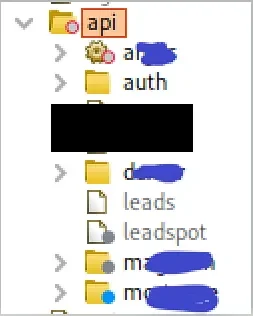
Semi-redacted as usual
Most of the child API endpoints limited the data that could be obtained by requiring authentication. Others returned data used only to populate the website interface, such as avatars and side bar logos. Nothing of use from a vulnerability standpoint.
What stood out was that most of these endpoints leveraged GraphQL queries.
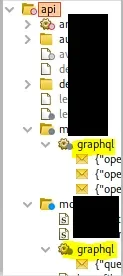
The author's view is that GraphQL is rarely set up correctly initially, and that many companies have had unsecured GraphQL endpoints called out in bug bounty reports. That is understandable given the complexity of GraphQL on top of the technologies it bridges. Having tested GraphQL endpoints on a couple of other public programs and a private program without finding anything, he kept going, motivated by reports such as the one where HackerOne paid out $20,000 to a bounty hunter who found sensitive data leaking from their GraphQL instance.

Exploitation
Step 1: Introspection, and not only on the obvious endpoints
The first step is typically to run introspection queries against the endpoints. If successful, an introspection query gives a lot of information about the schema and data configuration: what type of information exists, how it is connected, what format it accepts, how to query the data, and how to manipulate it.
Almost every article on testing GraphQL tells you to look for these endpoints:
- /graphql
- /graphiql
- /graphql.php
- /graphql/console
With the InQL Scanner BApp in Burp Suite, all you have to do is type out the URL you want to send an introspection query to. The author's point is that this list is not all-inclusive: just because those endpoints indicate the presence of GraphQL does not mean they are the only ones worth querying if you suspect a target runs an instance. Some *graphql* endpoints were visible in the screenshot above, but the endpoint that returned juicy details from the introspection query was not labelled *graphql* at all.
The real endpoint name is withheld for confidentiality and referred to as */api/vulnerable*. The author stresses that graphql was not the name of the endpoint, since that is the point he is making. The URL sent to the InQL Scanner was:
Sure enough, tons of interesting-looking data queries were potentially available based on the queries supported by this endpoint.
Step 2: A first query with a guessed ID
A query called *customer.query* was sent to the Repeater tab, with the *ID* parameter filled in with a guess of *1* to see if any user data came back. The response was basically an error saying the ID format is not accepted.

I also see a part of a SQL statement, and that "Psycopg2" is in use. Which tells me they are using Python, and PostgresSQL most likely.
From the error, the author concluded he was looking for a UUID, which would be too complex to guess.
Step 3: The plural query, with no ID at all
Looking at the other possible queries from the initial introspection query, he saw *customers.query*, with customers plural. That query only required two parameters: the number of results per page, and which page to query. No guessing needed, so hopefully the query would run without authentication.
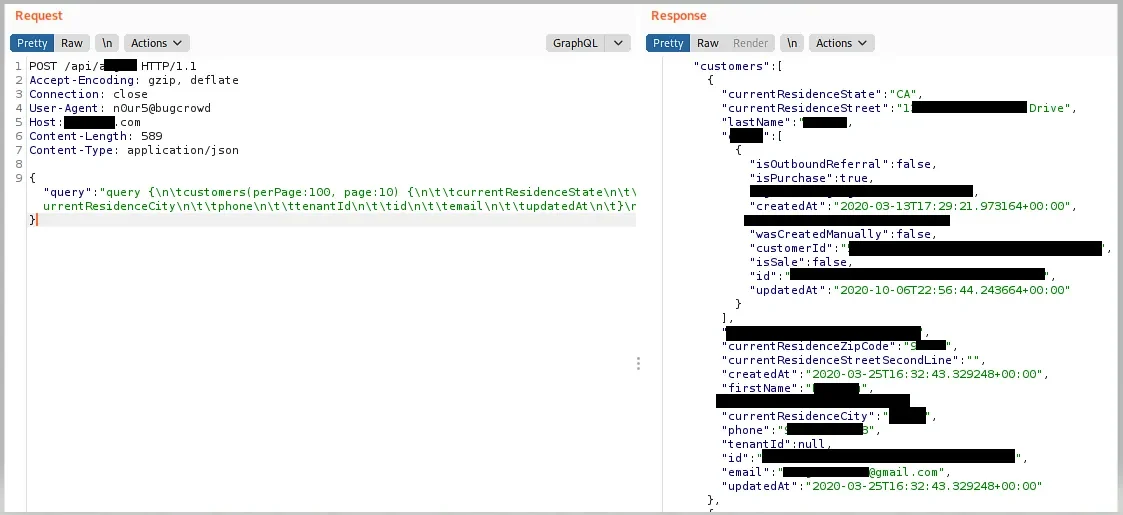
It did. The author is careful about the wording: he surely did not "hack" anything, but he did find a bunch of sensitive information that he does not think he should have had.
Step 4: Exploring the other queries
The next logical step was to explore the other queries available. There was more sensitive information on various partners and users related to the platform in other ways, somewhat like contractors. He also found some API keys along with external webhook URLs, but those URLs were out of scope, so he could not do much beyond mentioning them in the BugCrowd report.
Step 5: Report and severity
He compiled the data, tried to drive impact as much as possible, and submitted the report. While selecting the category, he noticed this was likely to be considered a "P1" severity because it results in "Sensitive Secrets" leaking. Looking at the program's payout for P1s, he realised it could be a decent payout if all went well. The report was submitted on a Saturday night, and he expected review on Monday.

Step 6: The PoC dispute
Monday arrived and most of the day passed before the response came: the proof of concept sent in the report was not producing the same results when the program ran it. He sent alternative payloads that he knew would circumvent the copy/paste formatting issue he believed was the cause of the original Curl proof of concept not working. More time passed with no word. Around midnight on Monday a BugCrowd employee joined the report, which the author assumes was to nudge the target to move forward. On Tuesday morning the target responded:
The finding was legitimate and as a result we pulled the site. The data in use was fake, however we do recognize the researcher would not have known that and we are evaluating the bounty. We appreciate the good work, and will be awarding shortly.

Thanks.
The author's gut said the data did not seem fake; it seemed like he was digging around in production. And if the data was fake, why pull the page entirely and so quickly? Something did not add up.
Step 7: Verifying the data against public profiles
He pivoted back into recon mode. He took a few customer names from the earlier query and searched them on Facebook and LinkedIn. He found numerous people whose names and locations matched perfectly with the names and locations in the PII. He fought back on the report thread with a screenshot of some of the users on Facebook, with names and towns side-by-side matched up to the PII from the customers.query proof of concept. He had their email address, phone number, and some of their Facebook pages too. He jokes about asking the users themselves whether they use the target web site, and makes clear he is kidding about that part.
The last thing he wanted was to be in a situation where he was calling out a program on BugCrowd for lying, so he tried to word things as nicely as possible in case there was a genuine misunderstanding on their side. And again he waited.

I should probably try to watch Narcos again. Seems like a good show. Subtitles get exhausting sometimes though.
Step 8: Outcome
Two days later he gave them a nudge. They responded to say the payout was coming but never really responded to his comments about the data being real. He thinks the delayed response came from some internal confusion about the data. Ultimately they applied a "p3" severity ("Moderate" severity; apparently there is a "p3" version of "Sensitive Secrets Disclosed") and sent the bounty, with some kind words.
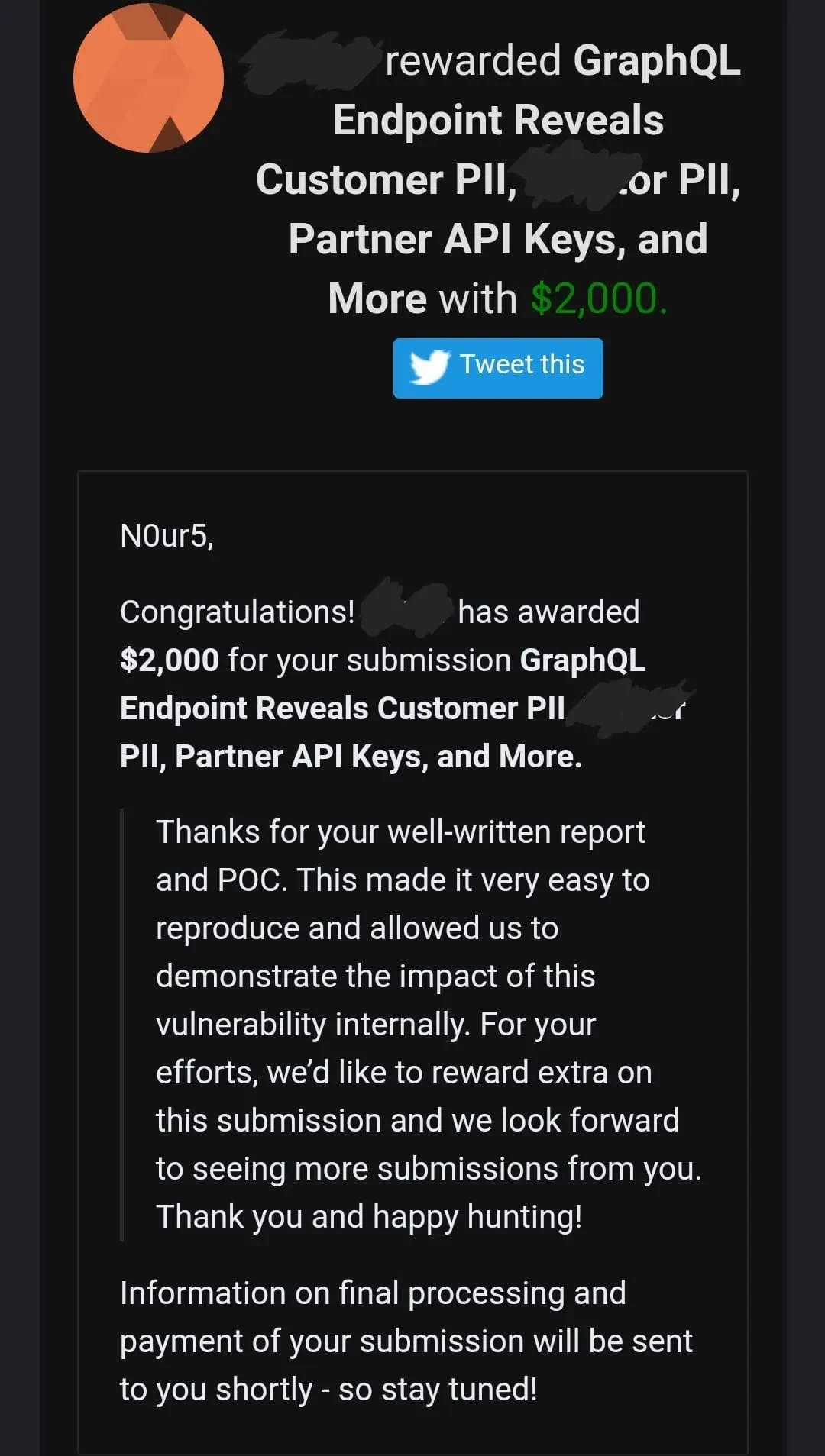
…annnnd off to buy some home gym equipment 😃
Root cause
Introspection was enabled on a public GraphQL endpoint, and at least one query, customers.query, could be run without authentication. The endpoint was not named after GraphQL, so it sat outside the list of usual suspects that testers try first. The author notes that there are very few reasons to allow introspection queries to be run by public users on GraphQL endpoints, yet he believes it was, and possibly still is, the default setting in a GraphQL instance. The introspection query listed the queries supported by the endpoint, which is how he found customers.query.
Impact
An unauthenticated user could query customer data through the endpoint, and there was more sensitive information on partners and users related to the platform in other ways, somewhat like contractors. Some API keys and external webhook URLs were also found, but those URLs were out of scope, so the author could only mention them in the report. The program stated that the data in use was fake, while the author's cross-check against public profiles suggested the names and locations matched real people; the report does not resolve that disagreement beyond the p3 rating and payout.
Fix
The report does not describe a fix applied by the program. The author's recommendations are:
- Monitor web logs, ideally with a SIEM and web server logs forwarded for correlation. He acknowledges the difficulty of feeding a public bug bounty target's logs into a SIEM, and suggests filtering bounty traffic by the special string programs ask researchers to put in the User-Agent header, then using a WAF to blacklist obviously rookie testers, allow proper User-Agents through, and monitor what does not meet either category. He also notes the cat-and-mouse problem: an attacker could use an accepted User-Agent and go unmonitored while being malicious.
- Do not allow introspection queries to be run by public users on GraphQL endpoints. Do not trust default settings on anything, and read the "security concerns" section of everything you implement, especially if web facing.
Variants to test
- Run introspection against API endpoints that do not have
graphqlin the name, such as the/api/vulnerablestyle path here. A positive result is a schema listing queries, types and parameters. - Look for plural and singular variants of the same query (
customer.queryversuscustomers.query). A positive result is a query that takes only paging parameters and returns records without authentication. - Try queries that need no ID or only a page number and page size. A positive result is data coming back without credentials.
- Read error messages from rejected parameters for backend hints, as the UUID format error and the SQL fragment with Psycopg2 did here. A positive result is information about the expected format or the backend technology.
- Check other queries exposed by introspection for partner, contractor or user data, API keys and webhook URLs. A positive result is any sensitive field returned unauthenticated.
- Cross-check returned PII against public profiles when a program claims the data is fake, as the author did here. A positive result is names and locations matching real people.
What happened, in plain words
A security researcher was spending some spare time on a public bug bounty program, which is a scheme where companies invite outside people to look for security mistakes in their websites and pay for the good finds. The program runs on a platform called BugCrowd, which sits in the middle between the hunters and the companies and acts a bit like a referee. The program does not allow findings to be made public, so the researcher hides or changes some details to stay within the rules.
While browsing the company's main website, he noticed in his Burp Suite Target tab a part of it called /api and its child endpoints. Most of those endpoints leveraged GraphQL queries, and one of them turned out to hand over customer information to anyone who asked, with no login at all. He reported it, the company first said the data was fake, he checked the data against public profiles and pushed back, and in the end he was paid a bounty.
This article walks through the same steps he did, explaining each idea from scratch along the way.
The two technologies involved
GraphQL
Most websites talk to their own servers through an API, which stands for Application Programming Interface. Think of a restaurant: you do not walk into the kitchen and cook; you read the menu, tell the waiter what you want, and the waiter brings it. An API is that waiter. Your browser asks for something in a fixed format, and the server answers with data.
GraphQL is one particular way of designing that menu and those orders. It was developed by Facebook and used only inside the company until 2015, when it was released to the public. It is very common in larger companies today. Instead of many separate addresses for many separate things, GraphQL usually has one address, and you send it a written request describing exactly which fields you want back. The server answers with just those fields.
A useful comparison: a traditional API is like a set menu, where asking for a burger always brings the burger, the fries and the drink whether you want them or not. GraphQL is like a form where you tick exactly which items you want, and the kitchen sends exactly those.
BugCrowd
BugCrowd is a company that middlemans the interaction between bug bounty hunters and the organisations that pay it to essentially play referee. The organisation sets the rules, the platform hosts the reports and the discussion, and the researcher gets paid for accepted findings.
Before the finding: how the researcher works
The author works as a pentester and threat hunter, and does bounty work in whatever time is left. He is a dad, a husband, a gamer and a DIYer, so time is tight. That means most of his bounty time goes into recon, short for reconnaissance: looking around to find parts of a web application that have not been explored much, or, as in this case, parts that should not be accessible to the public at all.
His main tool is Burp Suite, a program that sits between your browser and the website and lets you see and change every request and response. Two parts of it matter here:
- The Target tab, which keeps a list of every address (endpoint) the browser has talked to.
- The Repeater tab, which lets you take one request and send it again and again, changing it each time, to see what comes back.
He also uses a Burp Suite add-on (called a BApp) named InQL Scanner, which is built for GraphQL: you give it a web address and it sends the special request that asks a GraphQL server to describe itself.
No accounts or special roles are mentioned anywhere. That is the whole point of the finding: the query worked without authentication, meaning without logging in.
Finding it
While poking around on the target's primary .com domain, he looked in his Burp Suite Target tab and noticed the /api endpoint along with its child endpoints. An endpoint is simply a web address that a program can send requests to, like a specific counter in a large building. /api is the counter for the API, and its children are the individual services behind it.
Most of these were discovered passively while just browsing and working through normal functions on the website. A couple of them he also discovered while directory brute-forcing, which means trying a long list of common names one after another to see which ones exist, the way you might try every key on a big keyring to see which one opens a door.
Semi-redacted as usual
Each of these different child API endpoints for the most part limited the data that could be obtained by requiring authentication. In plain terms: they asked for a login first. Others were giving data that simply was used to populate the website interface, things like avatars and side bar logos. In other words, nothing of use to a bug hunter, at least vulnerability-wise.
What stood out was that most of these endpoints leveraged GraphQL queries.
If there is one thing he has learned about GraphQL, it is that it is rarely set up correctly initially. Many companies have had unsecured GraphQL endpoints floating around and called out on bug bounty reports. That is understandable given the complexity of GraphQL on top of the existing technologies it aims to bridge. But once he noticed this, he started down his GraphQL testing path. He had tested GraphQL endpoints on a couple of other public programs and a private program and never quite found anything, but he had read enough bug reports to know it was only a matter of time. One report that helps keep you motivated is the one where HackerOne paid out $20,000 to a bounty hunter who found a bunch of sensitive data leaking from their GraphQL instance.
Exploitation
Step 1: Asking the server to describe itself
His first step is typically to try to run introspection queries against the endpoints. Introspection is a feature of GraphQL that lets a client ask the server: tell me about yourself. If it succeeds, it gives you a ton of information about the schema, which is the data configuration: what type of information exists, how it all is connected, what format it accepts, how to query the data, and how to manipulate the data.
A comparison: introspection is like finding the restaurant's full menu, including the dishes not shown to regular customers, the exact ingredients, and the order codes the kitchen uses. Normally that menu is for staff only.
Almost every article you will read about testing a GraphQL instance will tell you to look for the following endpoints:
- /graphql
- /graphiql
- /graphql.php
- /graphql/console
These are the obvious names, the ones a developer would pick when setting GraphQL up. If you use the InQL Scanner BApp in Burp Suite, all you have to do is type out the URL you want to send an introspection query to.
But the author thinks it is important to realise that just because those endpoints listed above indicate the presence of GraphQL, that does not mean it should be considered an all-inclusive list of endpoints to run introspection queries against if you suspect a target is running an instance. For example, you can indeed see some *graphql* endpoints in the screenshot above. But the endpoint he actually got juicy details from when running the introspection query was not labelled *graphql* at all.
He does not want to and cannot really say the actual endpoint's name, to keep confidentiality squared up with the target, so he calls it */api/vulnerable* to keep things easy. The point he is making is precisely that graphql was not the name of the endpoint. The address he sent to the InQL Scanner was:
Line by line:
https://is the secure version of the protocol browsers use to fetch pages. Thesmeans the traffic is encrypted.[redacted].comstands in for the company's real domain name, which he is not allowed to reveal./api/vulnerableis the path on that server, the specific counter he is walking up to. In reality it had some other name that gave no hint of GraphQL.
Sure enough, tons of interesting-looking data queries were potentially available based on the queries supported by this endpoint. In other words, the server answered the introspection request and listed what it could do.
Step 2: A first query with a guessed ID
He quickly sent a query called *customer.query* over to the Repeater tab and filled in the *ID* parameter with just a guess of *1* to see if any user data came back. A parameter is an input field in a request, like the blank on a form. Here the query expected an identifier for one customer, and he guessed the simplest possible value.
But he was basically given an error that says the ID format is not accepted.
I also see a part of a SQL statement, and that "Psycopg2" is in use. Which tells me they are using Python, and PostgresSQL most likely.
What the screenshot shows, and why it matters:
- The error message is not just a refusal. It leaks a fragment of the database language SQL, which is how applications talk to relational databases.
- It also names Psycopg2, a library that lets the Python programming language talk to a PostgreSQL database. From that, the author infers the backend is written in Python and most likely uses PostgreSQL.
- Error messages like this are a classic information leak: the server tells you more about its insides than it should.
From the error, he concluded he was looking for a UUID, which is a long random-looking identifier, something like a very long serial number. That would be too complex to guess.
Step 3: The plural query, with no ID at all
So he looked at the other possible queries available from the initial introspection query he ran, and he saw *customers.query*, with customers plural this time. That small difference matters: the singular query asks for one customer by ID, while the plural one asks for a list.
That query only required two parameters: the number of results per page, and what page to query. No guessing needed at all. He hoped the query would run without authentication.
It did. The author is careful about the wording: he surely did not "hack" anything. But he did just find a bunch of sensitive information that he does not think he should have.
Why this worked, in plain terms: the server had been set up so that this particular query could be run by anyone, with no login check in front of it. The only inputs it wanted were paging controls, the same kind of thing as "show 10 results, page 2" on a shopping site. Nothing secret was needed to ask, so nothing stopped the answer coming back.
Step 4: Exploring the other queries
The next logical step was just to explore the other queries he was able to play with. There was some more sensitive information on various partners and users related to the platform in other ways, kind of like contractors. He found some API keys along with external webhook URLs as well.
Two terms here:
- An API key is a secret string that a program uses to prove its identity to another service, like a password that a piece of software carries instead of a person.
- A webhook URL is an address that one system calls automatically to deliver an event to another system, like a doorbell wired to ring in a different building.
But those URLs were out of scope, meaning they were not part of what the program had authorised him to test, so he was not able to really do much besides mention them in the report on BugCrowd.
Step 5: Report and severity
He compiled his data, tried to drive impact as much as possible, and shipped the report off. Impact means the real-world harm a finding could cause: whose data, how much of it, and what someone could do with it. A report that shows impact is far stronger than one that just says "this looked odd".
While selecting the category he believed the vulnerability would fit into, he noticed this was likely to be considered a P1 severity, based on the fact it results in "Sensitive Secrets" leaking. Severity ratings are the platform's way of ranking how serious a finding is, with P1 usually the most serious. He then looked at the program's payout on P1s and quickly realised he could be getting a decent payout if all went well.
He submitted the report on a Saturday night, so he anxiously awaited the review that he assumed would not happen until Monday.
Step 6: The proof of concept dispute
A proof of concept, or PoC, is the set of exact steps and requests that lets someone else reproduce your finding. Without one that works, a report is just a claim.
Monday arrived and most of the day passed before he simply got a response that the proof of concept he sent in the report was not producing the same results when they ran it. He sent some alternative payloads that he knew would circumvent the copy/paste formatting issue that he believed was the cause of the original Curl proof of concept not working.
Two terms:
- A payload here means the exact request content you send to the server.
- Curl is a command-line tool for sending web requests. Its commands are easy to copy and paste, but line breaks and quote characters can get mangled in the process, which is a common reason a working request fails when someone else tries it.
Then more time passed and he did not hear a word. Around midnight on Monday a BugCrowd employee jumped on the report, which he assumes was to nudge the target to move forward on the report. He woke up Tuesday to the following from the target:
The finding was legitimate and as a result we pulled the site. The data in use was fake, however we do recognize the researcher would not have known that and we are evaluating the bounty. We appreciate the good work, and will be awarding shortly.

Thanks.
Line by line:
- "The finding was legitimate" means they accept the vulnerability was real.
- "as a result we pulled the site" means they took the affected part offline.
- "The data in use was fake" is their claim that the records he saw were not real customer records.
- "we do recognise the researcher would not have known that" acknowledges he could not have told the difference.
- "we are evaluating the bounty" and "will be awarding shortly" mean payment is being decided and will follow.
Inside, his gut said that the data did not seem fake. It seemed like he was digging around in production, meaning the live system real customers actually use. And if the data was fake, why pull the page entirely and so quickly? Something did not add up.
Step 7: Checking the data against public profiles
He pivoted back into recon mode. He took a few customer names off of his query from earlier and popped their names into the Facebook and LinkedIn search bars. PII, or personally identifiable information, is any data that can identify a specific person: names, addresses, phone numbers, email addresses and so on. He found numerous people whose names and locations matched perfectly with the names and locations in the PII.
So he fought back on the report thread with a screenshot of some of the users on Facebook whose names and towns side-by-side matched up to the PII from his customers.query proof of concept. What could they say now? He had their email address, phone number, and some of their Facebook pages too. He jokes about going to ask the users themselves whether they use the target web site, and makes clear he is kidding about that part.
The last thing he wanted was to get into a situation where he was calling out a program on BugCrowd for lying about this, so he tried to word things as nicely as possible in case there was some genuine misunderstanding on their side. And again he waited.
I should probably try to watch Narcos again. Seems like a good show. Subtitles get exhausting sometimes though.
Step 8: Outcome
Two days later he gave them a nudge. They responded to let him know his payout was coming but never really responded to his comments about the data being real. He thinks the delayed response came from some internal confusion about the data for sure. Ultimately they just slapped a p3 severity on it, which is "Moderate" severity. Apparently there is a p3 version of "Sensitive Secrets Disclosed". He will take it. They sent him his bounty, with some kind words.
…annnnd off to buy some home gym equipment 😃
Why it happened
Two settings combined to cause this:
- Introspection was enabled on a public GraphQL endpoint. That let anyone, logged in or not, ask the server to list its queries, their parameters and their data types. The author notes there are very few reasons to allow introspection queries to be run by public users on GraphQL endpoints, yet he believes it was, and possibly still is, the default setting in a GraphQL instance.
- At least one query,
customers.query, could be run without authentication. The introspection query listed the queries supported by the endpoint, which is how he foundcustomers.query.
A third factor made it harder to spot: the endpoint was not named after GraphQL, so it sat outside the list of usual suspects that testers try first.
What someone could have done with it
An unauthenticated user could query customer data through the endpoint, and there was more sensitive information on partners and users related to the platform in other ways, somewhat like contractors. Some API keys and external webhook URLs were also found, but those URLs were out of scope, so the author could only mention them in the report.
The program stated that the data in use was fake, while the author's cross-check against public profiles suggested the names and locations matched real people. The report does not resolve that disagreement beyond the p3 rating and the payout.
How to prevent it
The report does not describe a fix applied by the program. The author's recommendations are:
- Monitor your web logs. Ideally this means putting a SIEM in place, which is a system that collects logs from many sources and lets you search and correlate them, and ensuring web server logs are being forwarded for log correlation. He admits the madness of dumping a public bug bounty target's web server logs into a SIEM. One idea: most programs ask researchers to include a special string in the User-Agent header, which is the part of a request that says which browser or tool is calling. You could drop or filter out all the bounty traffic that way. You would still get pummelled by people who do not read the Rules of Engagement or know how to configure their tools to modify the User-Agent header. In theory you could then use a WAF, a web application firewall that filters traffic to a site, to blacklist IP addresses with malicious behaviour who are obvious rookie testers, allow the proper User-Agents through, and monitor logs from the web server that do not meet either of those two categories. He notes the cat-and-mouse problem: an attacker could just use a bug-bounty accepted User-Agent and go unmonitored while actually being malicious.
- Do not allow introspection queries to be run by public users on GraphQL endpoints. Do not trust default settings on anything. Read the "security concerns" section of everything you implement, especially if it is web facing.
Things worth trying on your own targets
- Run introspection against API endpoints that do not have
graphqlin the name, such as the/api/vulnerablestyle path here. A positive result is a schema listing queries, types and parameters. - Look for plural and singular variants of the same query (
customer.queryversuscustomers.query). A positive result is a query that takes only paging parameters and returns records without authentication. - Try queries that need no ID or only a page number and page size. A positive result is data coming back without credentials.
- Read error messages from rejected parameters for backend hints, as the UUID format error and the SQL fragment with Psycopg2 did here. A positive result is information about the expected format or the backend technology.
- Check other queries exposed by introspection for partner, contractor or user data, API keys and webhook URLs. A positive result is any sensitive field returned unauthenticated.
- Cross-check returned PII against public profiles when a program claims the data is fake, as the author did here. A positive result is names and locations matching real people.
Closing thoughts from the author
On bug bounty hunting, his own logic is that "Recon Is King", just like many others. He has heard the opposing argument from the P1 Warriors that sometimes just being thorough with what is in plain sight is a better option. It is all based on your own strengths, and you will end up moulding your own methods over time. People have put together extensive reports filled with complex steps for a couple hundred bucks. He found an open endpoint and spent maybe an hour querying it to find impact before submitting a bug with a 2k payout. Money should not be the main motivator, since it makes it harder to learn if that is your primary driver. But even if you do not love recon deep dives, they clearly have some value.
No hacking occurred during this bounty 😉.
Glossary
- API: the agreed way for one piece of software to ask another for data or actions, like a waiter taking your order to the kitchen.
- API key: a secret string a program uses to prove its identity to another service, like a password carried by software instead of a person.
- Authentication: proving who you are, usually by logging in. A request without it is unauthenticated.
- BApp: a Burp Suite add-on, an extra module that adds features to the tool.
- Bug bounty program: a scheme where an organisation invites outside researchers to find security problems and pays for valid reports.
- BugCrowd: a platform that hosts bug bounty programs and mediates between researchers and organisations.
- Burp Suite: a tool that sits between your browser and a website so you can inspect and modify every request and response.
- Curl: a command-line tool for sending web requests, often used to write reproducible proof-of-concept commands.
- Endpoint: a specific web address that accepts requests, like one counter in a large building.
- GraphQL: a way of designing an API where the client writes a request describing exactly which fields it wants, and the server returns just those.
- Header: extra information attached to a web request or response, such as which browser or tool is calling.
- Impact: the real-world harm a security finding could cause, such as whose data is exposed and what could be done with it.
- InQL Scanner: a Burp Suite add-on built for testing GraphQL endpoints, including sending introspection queries.
- Introspection query: a GraphQL request that asks the server to describe its own schema, listing queries, types and parameters.
- Parameter: an input field in a request, like a blank on a form.
- Payload: the exact content of a request you send to a server.
- PII: personally identifiable information, any data that can identify a specific person, such as a name, address, email or phone number.
- PoC (proof of concept): the exact steps and requests that let someone else reproduce a finding.
- Production: the live system that real users actually use, as opposed to a test environment.
- Psycopg2: a library that lets Python programs talk to a PostgreSQL database.
- P1 / p3: severity ratings used by bounty platforms, where P1 is typically the most serious and p3 is moderate.
- Recon (reconnaissance): exploring a target to find parts of it that are unknown, under-tested or not meant to be public.
- Repeater: the Burp Suite tab where you resend and edit a single request repeatedly.
- Schema: the description of what data a GraphQL server holds, how it is connected, and which queries and parameters it accepts.
- Severity: a ranking of how serious a finding is.
- SIEM: a system that collects logs from many sources and lets you search and correlate them.
- SQL: the language applications use to query relational databases.
- Target tab: the Burp Suite tab that keeps a list of every address the browser has contacted.
- User-Agent: the header that says which browser or tool is making a request.
- UUID: a long, effectively random identifier, too complex to guess.
- WAF (web application firewall): a filter placed in front of a website that can block or allow traffic based on rules.
- Webhook URL: an address one system calls automatically to deliver an event to another system.
- Directory brute-forcing: trying a long list of common names one after another to discover which addresses exist.




