Spring4Shell Step by Step: How CVE 2022 22965 Turns Data Binding Into Remote Code Execution in a Lab
A Spring MVC application that binds request parameters onto objects without an allowlist lets an attacker walk nested properties from the bound object into the class loader and Tomcat logging configuration. By rewriting the access log destination and pattern, the attacker can write a script file into the web root and execute it as a web shell.
 Published on masimshahzad.medium.com
Bug Bounty
The full write-up lives on its author's site
It belongs to its author, so we link to it rather than copy it. The other two tabs are our own rewrites, checked against it.
Spring applications bind request parameters onto Java objects automatically. That convenience is the feature. Spring4Shell is what happens when an attacker can keep walking past the intended object, through its class properties, and into the web server logging configuration itself. This article explains that chain in a lab only, with detection and a verified fix.
Everything below is for an isolated lab you own, built from a deliberately vulnerable training application. Never run these steps against a system you do not own or have explicit written permission to test.
Context
CVE 2022 22965, widely called Spring4Shell, is a remote code execution flaw in Spring MVC data binding. The official record is at https://nvd.nist.gov/vuln/detail/CVE-2022-22965.
Data binding normally sets fields the developer chose, such as a name or an age on a form object. Spring4Shell abuses nested property access. By naming properties that lead from the bound object to its class, then to the class loader, then to Tomcat resources and logging objects, an attacker changes the access log configuration of Tomcat itself. The log file name, location and pattern are rewritten so that a later request writes attacker controlled text into a file with a script extension inside the web application. Visiting that file executes it as a web shell.
A clear public analysis of this mechanism, including the property chain into the logging pipeline, is available at https://www.sentinelone.com/vulnerability-database/cve-2022-22965/ and a plain language explainer with exact patched versions is at https://dev.to/vulert_official/spring4shell-explained-is-your-spring-application-still-vulnerable-31m8.
Setup
The flaw needs a specific combination. The application must use Spring MVC, run on JDK 9 or later, and be deployed as a WAR file on a standalone Tomcat server. A typical Spring Boot application packaged as an executable jar with embedded Tomcat does not follow the main exploit chain, and JDK 8 applications are not affected by this chain.
Build the lab on an isolated virtual network with no route to your real network or the internet beyond package downloads you control.
- Create a virtual machine with JDK 11 and a standalone Tomcat 9 installation.
- Deploy a known vulnerable Spring MVC training application as a WAR file, using Spring Framework 5.3.17 or another version below 5.3.18.
- Take a snapshot before exploitation so you can reset cleanly.
- Place a second virtual machine on the same isolated network as your attacker machine, with a browser, an intercepting proxy and a simple HTTP client.
- Turn on Tomcat access logging and watch the web application directory, because the exploitation writes a new file there.
Confirm the lab answers normally first. Submit the training form once and check that binding works and that a normal access log line appears.
Finding it
The starting observation is that the endpoint binds request parameters onto an object without an allowlist. Your goal in the first step is to prove exactly that. The question then becomes how far the property path can travel: from the form object, to its class, to the class loader, and from there into the Tomcat logging pipeline. A vulnerable application accepts such a path instead of rejecting it. An error or a changed behaviour is your first signal.
Exploitation
Step 1. Confirm binding
Send the normal form request through your proxy and note the parameter names the application binds. Your goal is to prove the endpoint binds request parameters onto an object without an allowlist.
Step 2. Walk the property path
In your lab request, replace a normal parameter with a nested property path that reaches the class loader logging chain described in the public analysis above. The path names the class property, the module, the class loader, the resources, the context, the parent and the logging pipeline. A vulnerable application accepts this path instead of rejecting it.
Step 3. Rewrite the log destination
Using that same property access, set the logging pipeline values so the access log is written inside the web application folder, with a script file extension, and with a log pattern made only of a value you control. Each property is set in its own request in most public lab walkthroughs.
Step 4. Plant the shell content
Send a request whose header or parameter value contains a small lab marker command, matching the pattern you set. Tomcat writes that value into the new log file, which is now a script file in the web root.
Step 5. Call the file
Browse to the new file in your lab application and pass your marker command. If the page returns your marker output, remote code execution is proved in the lab. Stop at the marker. There is no need to go further, and in a real assessment this point is where reporting begins.
Step 6. Reset and repeat once
Restore the snapshot, repeat the chain once to confirm your notes, and record the exact Spring and JDK versions, because version evidence is what makes a report credible.
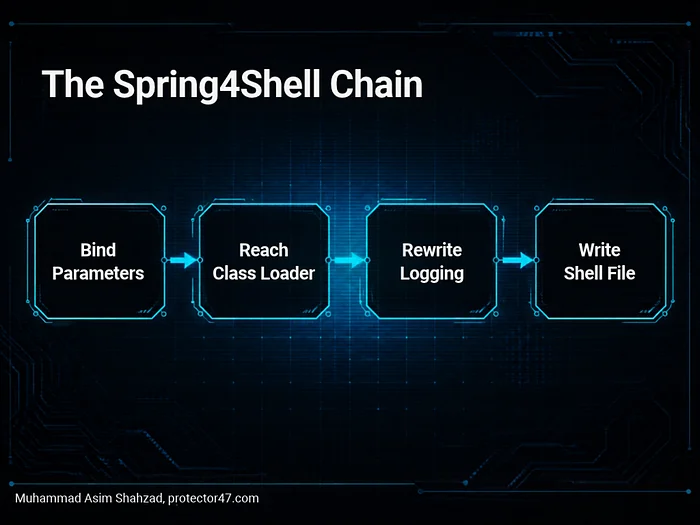
The Spring4Shell Chain: bind parameters, reach the class loader, rewrite logging, and write a shell file, in that order.
Root cause
The mistake is reachable objects. Data binding normally sets fields the developer chose, but Spring4Shell abuses nested property access: user input can name properties beyond the form fields, and the binder follows them. The path leads from the bound object to its class, then to the class loader, then to Tomcat resources and logging objects, and finally to the access log configuration of Tomcat itself.
The endpoint binds request parameters onto an object without an allowlist. The conditions decide real risk: JDK version, deployment style and framework version together decide whether this chain works at all.
Impact
Successful exploitation gives code execution with the permissions of the Tomcat service account. From there an attacker in a real incident could read application configuration and secrets, reach internal databases the application trusts, install persistence and move sideways. In the lab, the lesson is narrower and more useful: a binding feature became a file write, and a file write became code execution, all without any login.
Those conditions narrowed the real world population, even though the severity score is critical at 9.8.
Detection
- Search web logs for requests containing class property paths, especially the class loader and logging pipeline property names from public detection rules.
- Alert on new script files appearing in web application directories outside a deployment window.
- Watch for Tomcat access log configuration changes and for Java processes spawning shells or unexpected child processes.
- Scan for vulnerable versions. Public vendor guidance explains how to inventory Spring Beans jars inside WAR files and confirm framework versions, for example at https://ridgesecurity.ai/blog/spring4shell-vulnerability-detection-with-ridgebot/.
Treat any confirmed exploitation attempt against a production server as an incident, not only a patching task, because a written shell may already exist.
Fix
Upgrade Spring Framework to 5.3.18 or later, or to 5.2.20 or later on the older branch. For Spring Boot, move to 2.6.6 or later, or to 2.5.12 or later on the older branch. Rebuild and redeploy the application.
As a temporary measure only, restrict data binding by disallowing the class property patterns in your binder configuration, as described in the public explainer linked above. A temporary binding rule is not a substitute for the upgrade.
Verify the fix in three ways. First, print the resolved dependency tree and confirm the patched Spring version is what actually deployed. Second, repeat the lab property path requests against the patched build and confirm they are rejected and create no file. Third, confirm the normal form still binds correctly, so the fix did not break the application.
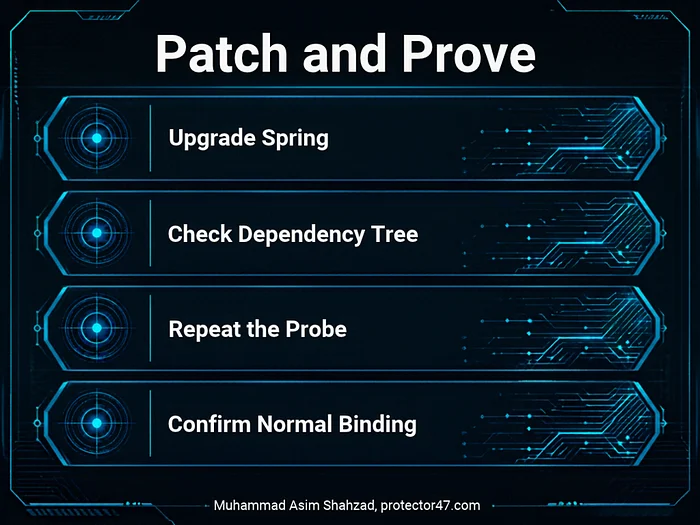
Patch and Prove: upgrade Spring, check the dependency tree, repeat the probe, and confirm normal binding still works.
- Other endpoints that bind without an allowlist. Submit the training form on a different controller and try replacing a normal parameter with a nested property path. A positive result is the application accepting the path instead of rejecting it, or an error or changed behaviour that shows the binder followed it.
- Different deployment styles. Test the same chain against a WAR on standalone Tomcat versus an executable jar with embedded Tomcat. A positive result is the chain working on the WAR deployment and not following the main exploit chain on the embedded jar, which confirms the deployment condition matters.
- JDK versions. Repeat the probe on JDK 8 and on JDK 9 or later. A positive result is the chain working only on JDK 9 or later, which confirms the JDK condition.
- Log destination changes. After a successful property path, check whether the access log is written inside the web application folder with a script file extension and a pattern made only of a value you control. A positive result is a new script file appearing in the web root.
- Patched builds. Repeat the lab property path requests against the patched build. A positive result for the fix is the requests being rejected and no file being created, while the normal form still binds correctly.
Closing takeaways
Spring4Shell is a lesson in reachable objects. If user input can name properties beyond the form fields, binding becomes an attack surface.
Conditions decide real risk. JDK version, deployment style and framework version together decide whether this chain works at all, which is why accurate inventory matters more than headlines.
Patch, then prove the patch. Version checks plus a failed repeat of the lab chain are the evidence that closes the finding.
What happened, in plain words
Imagine a hotel receptionist who takes your booking form and fills in the hotel's own records for you. You write your name and your room preference, and the receptionist copies those details into the right boxes. That is helpful. Now imagine the form has a hidden line that lets you write not just your name, but the name of the filing cabinet, then the name of the room the cabinet sits in, then the name of the building, and finally the name of the hotel's fire alarm system. If the receptionist blindly follows every line you write, you can end up reprogramming the fire alarm. That is roughly what Spring4Shell is: a helpful feature that copies your input into the server's own objects, abused so that your input reaches places it was never meant to reach.
The feature is called data binding. In a Spring web application, when you submit a form, the framework takes the values you typed and places them into a Java object on the server. If the form has a field called name, the framework calls the object's setName method with your value. If the form has a field called age, it calls setAge. The developer writes the object and its fields, and the framework fills them in. This saves the developer from writing tedious copying code for every form.
The problem is that the framework does not only accept the fields the developer wrote. It also accepts nested property paths: names that walk from the form object into other objects attached to it. A path like address.city means "go into the address object, then set its city field". That is still reasonable. But if the path can keep walking, from the form object to its Java class, from the class to the thing that loaded the class (the class loader), and from there into the web server's own logging configuration, then your form input is no longer setting a form field. It is rewriting how the server writes its log files.
That is the whole trick. The attacker sends a request whose parameter name is a long nested path. A vulnerable server accepts the path and changes its own logging settings. The log file is redirected into the public web folder, given a script file extension, and given a pattern that consists only of text the attacker controls. Then a later request carries that text, the server writes it into the new log file, and because the file now sits in the public web folder with a script extension, visiting it in a browser runs it as a web shell: a small script that lets the attacker run commands on the server.
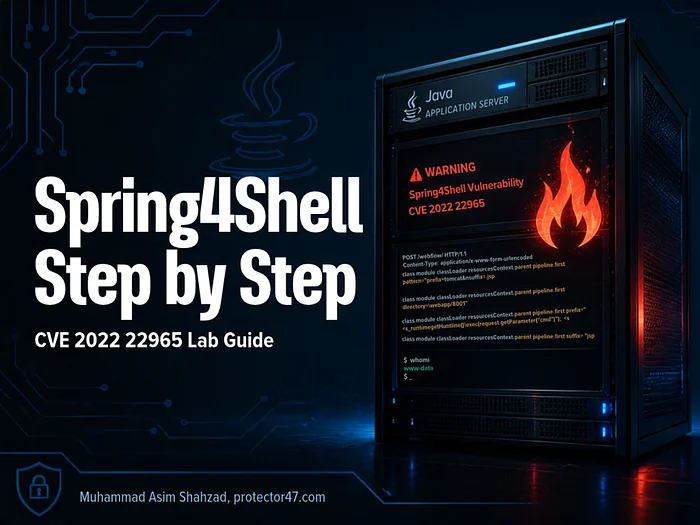
Cover image: AI generated illustration made in Canva.
The vulnerability has an official identifier, CVE 2022 22965, and the security community calls it Spring4Shell. A CVE is a catalogue number for a publicly known security flaw, like a reference number on a case file. The official record is at https://nvd.nist.gov/vuln/detail/CVE-2022-22965.
The flaw does not work everywhere. It needs a specific combination of conditions, and understanding those conditions is half the lesson. The application must use Spring MVC (the part of Spring that handles web requests), it must run on JDK 9 or later (the Java runtime, version 9 upwards), and it must be deployed as a WAR file on a standalone Tomcat server. A WAR file is a packaged web application you drop into a server; Tomcat is one such server. A typical Spring Boot application packaged as an executable jar with Tomcat built in does not follow the main exploit chain, and JDK 8 applications are not affected by this chain. A severity score is a number from 0 to 10 that tries to express how bad a flaw is; 9.8 is near the top.
Everything below is for an isolated lab you own, built from a deliberately vulnerable training application. Never run these steps against a system you do not own or have explicit written permission to test. A lab is a separate, throwaway computer setup where breaking things is the point.
The vulnerability, explained simply
CVE 2022 22965, widely called Spring4Shell, is a remote code execution flaw in Spring MVC data binding. Remote code execution means an attacker somewhere else on the network can make the server run commands of their choosing. That is usually the most serious kind of web flaw, because from running one command an attacker can often do anything the server's user account can do.
The flaw needs a specific combination. The application must use Spring MVC, run on JDK 9 or later, and be deployed as a WAR file on a standalone Tomcat server. A typical Spring Boot application packaged as an executable jar with embedded Tomcat does not follow the main exploit chain, and JDK 8 applications are not affected by this chain. Those conditions narrowed the real world population, even though the severity score is critical at 9.8.
Data binding normally sets fields the developer chose, such as a name or an age on a form object. Spring4Shell abuses nested property access. By naming properties that lead from the bound object to its class, then to the class loader, then to Tomcat resources and logging objects, an attacker changes the access log configuration of Tomcat itself. The log file name, location and pattern are rewritten so that a later request writes attacker controlled text into a file with a script extension inside the web application. Visiting that file executes it as a web shell.
A clear public analysis of this mechanism, including the property chain into the logging pipeline, is available at https://www.sentinelone.com/vulnerability-database/cve-2022-22965/ and a plain language explainer with exact patched versions is at https://dev.to/vulert_official/spring4shell-explained-is-your-spring-application-still-vulnerable-31m8.
Lab setup
Before the steps, a few words on the pieces you will meet. A virtual machine (VM) is a computer simulated inside your real computer, so you can break it and throw it away. A snapshot is a saved copy of a VM's entire state at one moment, like a save point in a game: you can restore it and be back exactly where you were. An intercepting proxy is a tool that sits between your browser and the server and lets you see and edit every request before it is sent. An HTTP client is a simpler tool that sends a single request and shows the reply, useful when you do not need a browser.
Build the lab on an isolated virtual network with no route to your real network or the internet beyond package downloads you control. "Isolated" means the lab machines can talk to each other but not to anything else, so a mistake cannot escape.
- Create a virtual machine with JDK 11 and a standalone Tomcat 9 installation. JDK 11 is the Java runtime; Tomcat 9 is the web server that will host the application.
- Deploy a known vulnerable Spring MVC training application as a WAR file, using Spring Framework 5.3.17 or another version below 5.3.18. The training application is deliberately built to be breakable, so you are not attacking anything real.
- Take a snapshot before exploitation so you can reset cleanly. After the chain runs, the server will have a new file in its web folder; the snapshot lets you undo that in seconds.
- Place a second virtual machine on the same isolated network as your attacker machine, with a browser, an intercepting proxy and a simple HTTP client. This is your workbench: the browser for normal use, the proxy to edit requests, the client for quick single requests.
- Turn on Tomcat access logging and watch the web application directory, because the exploitation writes a new file there. Access logging is Tomcat's habit of writing one line per request into a log file; the whole attack hijacks that habit.
Confirm the lab answers normally first. Submit the training form once and check that binding works and that a normal access log line appears. This baseline matters: if the form does not work before you start, you will not be able to tell whether a later failure is the attack or a broken lab.
Finding it
The starting observation is that the endpoint binds request parameters onto an object without an allowlist. An endpoint is a specific URL on the server that does something, like /register or /profile. An allowlist is a list of names that are permitted; anything not on the list is refused. Without an allowlist, the binder will accept any parameter name you send, including nested paths.
Your goal in the first step is to prove exactly that. Once you know the endpoint accepts arbitrary parameter names and maps them onto the bound object, the question becomes how far the property path can travel: from the form object, to its class, to the class loader, and from there into the Tomcat logging pipeline. A vulnerable application accepts such a path instead of rejecting it. An error or a changed behaviour is your first signal. In other words, you are not looking for a dramatic success on the first try; you are looking for the server reacting differently to a path it should have refused.
Exploitation
Step 1. Confirm binding
Send the normal form request through your proxy and note the parameter names the application binds. Your goal is to prove the endpoint binds request parameters onto an object without an allowlist.
Why this step: you need to know what a normal request looks like before you can change it. The proxy shows you the raw request, which is just text.
Line by line: the first line says this is a POST (a request that sends data) to the path /training/register, using HTTP version 1.1. The Host line names the server. The Content-Type line says the body is form data encoded as key=value pairs joined by &. The blank line separates headers from the body. The body contains two parameters, name with value alice and age with value 30. When you see the server accept this and store the values, you know binding is happening. The question is whether it will also accept names the developer never wrote.
Step 2. Walk the property path
In your lab request, replace a normal parameter with a nested property path that reaches the class loader logging chain described in the public analysis above. The path names the class property, the module, the class loader, the resources, the context, the parent and the logging pipeline. A vulnerable application accepts this path instead of rejecting it.
Why this step: this is the moment the feature turns against the server. Instead of name=alice, you send a parameter name that walks out of the form object and into the server's internals. The exact path is the one documented in the public analysis linked above; the point for a beginner is the shape of it. Each dot in the name means "go one level deeper". The first segment is a property of the form object. The next segments lead to the object's class, then to the class loader, then to Tomcat's resources, then to a context, then to a parent, and finally to the logging pipeline. If the server answers with an error or behaves differently from the normal request, the binder followed your path, which is the signal you are after.
Step 3. Rewrite the log destination
Using that same property access, set the logging pipeline values so the access log is written inside the web application folder, with a script file extension, and with a log pattern made only of a value you control. Each property is set in its own request in most public lab walkthroughs.
Why this step: a log file is normally written to a safe folder and named something like access.log. Here you are changing three things: where the file goes (into the public web folder, so a browser can fetch it), what it is called (a script extension, so the server will run it rather than show it), and what each log line contains (only your text, so the file's contents are entirely yours). A log pattern is the template Tomcat uses for each line; if the template is just your value, every line is your value. Doing each property in its own request keeps the changes easy to follow and easy to undo.
Step 4. Plant the shell content
Send a request whose header or parameter value contains a small lab marker command, matching the pattern you set. Tomcat writes that value into the new log file, which is now a script file in the web root.
Why this step: the log file exists but is empty of useful content. Tomcat writes one line per request, and you have told it that each line is exactly the value you send. So you send a request carrying a harmless marker command, and Tomcat dutifully writes that command into the file. The web root is the folder whose contents the web server publishes; anything inside it can be fetched by URL. A header is a labelled line at the top of a request, such as User-Agent; a parameter is a value in the body or the URL. Either can carry your marker.
Step 5. Call the file
Browse to the new file in your lab application and pass your marker command. If the page returns your marker output, remote code execution is proved in the lab. Stop at the marker. There is no need to go further, and in a real assessment this point is where reporting begins.
Why this step: this is the proof. You are not guessing that the file is a working script; you are asking the server to run it and show you the result. If the reply contains your marker output, the server executed your command. Stopping there is a professional habit: the goal is evidence, not damage. In a real assessment, the moment you have proof is the moment you write it up, not the moment you push further.
Step 6. Reset and repeat once
Restore the snapshot, repeat the chain once to confirm your notes, and record the exact Spring and JDK versions, because version evidence is what makes a report credible.
Why this step: a finding you can reproduce is a finding someone will believe. Restoring the snapshot proves the chain works from a clean state, not because of leftovers from earlier attempts. Writing down the exact Spring and JDK versions matters because, as we saw, the flaw only works under specific conditions; a report that says "Spring 5.3.17 on JDK 11, WAR on standalone Tomcat 9" is checkable, while "some old Spring" is not.
The Spring4Shell Chain: bind parameters, reach the class loader, rewrite logging, and write a shell file, in that order. This image is an AI generated illustration made in Canva.
Root cause
The mistake is reachable objects. Data binding normally sets fields the developer chose, but Spring4Shell abuses nested property access: user input can name properties beyond the form fields, and the binder follows them. The path leads from the bound object to its class, then to the class loader, then to Tomcat resources and logging objects, and finally to the access log configuration of Tomcat itself.
A useful comparison: think of a hotel key card that opens your room. If the card also opens the staff corridor, the manager's office and the control room, the problem is not that the card works; the problem is that it reaches too far. In Java terms, every object knows its own class, every class knows the class loader that loaded it, and the class loader can reach the server's resources. The binder was never meant to follow that chain from user input.
The endpoint binds request parameters onto an object without an allowlist. The conditions decide real risk: JDK version, deployment style and framework version together decide whether this chain works at all.
Impact
Successful exploitation gives code execution with the permissions of the Tomcat service account. A service account is the user the server runs as; whatever that user can read or write, the attacker can read or write. From there an attacker in a real incident could read application configuration and secrets, reach internal databases the application trusts, install persistence and move sideways. Persistence means leaving something behind so access survives a restart; moving sideways means using this server to reach others on the same network.
In the lab, the lesson is narrower and more useful: a binding feature became a file write, and a file write became code execution, all without any login. That last part is worth pausing on. No password was guessed, no account was created. A feature that copies form fields did all the work.
Detection
If you run servers, how would you notice this happening? Detection means looking for traces, not just patching and hoping.
- Search web logs for requests containing class property paths, especially the class loader and logging pipeline property names from public detection rules. The attack leaves its parameter names in your logs, and those names look nothing like normal form fields.
- Alert on new script files appearing in web application directories outside a deployment window. A deployment window is the planned time when you put new code on the server; a script file appearing at 3 a.m. is not a deployment.
- Watch for Tomcat access log configuration changes and for Java processes spawning shells or unexpected child processes. A process is a running program; a Java server suddenly starting a shell is a strong warning sign.
- Scan for vulnerable versions. Public vendor guidance explains how to inventory Spring Beans jars inside WAR files and confirm framework versions, for example at https://ridgesecurity.ai/blog/spring4shell-vulnerability-detection-with-ridgebot/. Inventory means knowing what versions you actually run, not what you think you run.
Treat any confirmed exploitation attempt against a production server as an incident, not only a patching task, because a written shell may already exist. Patching closes the door; it does not remove the intruder who is already inside.
*Patch and Prove: upgrade Spring, check the dependency tree, repeat the probe, and confirm normal binding still works.
How to fix it and verify the fix
Upgrade Spring Framework to 5.3.18 or later, or to 5.2.20 or later on the older branch. For Spring Boot, move to 2.6.6 or later, or to 2.5.12 or later on the older branch. Rebuild and redeploy the application. A branch here means a line of releases kept alive for older projects; if you are on the 5.2 line, you take 5.2.20, and if you are on 5.3, you take 5.3.18.
As a temporary measure only, restrict data binding by disallowing the class property patterns in your binder configuration, as described in the public explainer linked above. A temporary binding rule is not a substitute for the upgrade. Think of it as putting tape over the dangerous line on the form while you wait for the new form to be printed.
Verify the fix in three ways. First, print the resolved dependency tree and confirm the patched Spring version is what actually deployed. A dependency tree is the list of libraries your application pulls in, including indirect ones; printing it shows what really shipped, not what you intended to ship. Second, repeat the lab property path requests against the patched build and confirm they are rejected and create no file. Third, confirm the normal form still binds correctly, so the fix did not break the application. That third check is the one people skip, and it is the one your users will notice.
Variants to test
Once the basic chain works, these variations teach you why the conditions matter. Each one changes a single thing and asks what happens.
- Other endpoints that bind without an allowlist. Submit the training form on a different controller and try replacing a normal parameter with a nested property path. A controller is the part of the application that handles a particular URL.
- Different deployment styles. Test the same chain against a WAR on standalone Tomcat versus an executable jar with embedded Tomcat.
- JDK versions. Repeat the probe on JDK 8 and on JDK 9 or later.
- Log destination changes. After a successful property path, check whether the access log is written inside the web application folder with a script file extension and a pattern made only of a value you control.
- Patched builds. Repeat the lab property path requests against the patched build.
Closing takeaways
Spring4Shell is a lesson in reachable objects. If user input can name properties beyond the form fields, binding becomes an attack surface. An attack surface is everything an attacker can touch from outside.
Conditions decide real risk. JDK version, deployment style and framework version together decide whether this chain works at all, which is why accurate inventory matters more than headlines.
Patch, then prove the patch. Version checks plus a failed repeat of the lab chain are the evidence that closes the finding.
Glossary
- Allowlist: a list of names or values that are permitted; anything not on the list is refused.
- Attack surface: everything an attacker can reach from outside a system, such as URLs, forms and parameters.
- Branch: a line of software releases kept alive for older projects, for example the 5.2 line versus the 5.3 line.
- Class: in Java, the blueprint that describes an object's fields and behaviour.
- Class loader: the part of Java that finds and loads classes into memory; from it, other server resources can be reached.
- Controller: the part of a web application that handles requests for a particular URL.
- CVE: a catalogue number for a publicly known security flaw, like a case file reference.
- Data binding: the feature that copies values from a request into an object on the server automatically.
- Dependency tree: the full list of libraries an application pulls in, including indirect ones.
- Deployment window: the planned time during which new code is put on a server.
- Endpoint: a specific URL on a server that performs an action.
- Header: a labelled line at the top of an HTTP request or response, such as
HostorUser-Agent. - HTTP client: a tool that sends a single HTTP request and shows the reply.
- Intercepting proxy: a tool that sits between browser and server and lets you view and edit requests.
- JDK: the Java runtime and tools needed to run Java applications; versions 9 and later matter for this flaw.
- Log pattern: the template a server uses for each line it writes to a log file.
- Moving sideways: using one compromised server to reach others on the same network.
- Nested property path: a parameter name with dots that walks from one object into another, such as
address.city. - Parameter: a named value sent in a request, either in the URL or in the body.
- Persistence: something left behind so an attacker's access survives a restart.
- Process: a running program on a computer.
- Remote code execution: a flaw that lets an attacker elsewhere on the network make the server run commands of their choosing.
- Service account: the user account a server program runs as, which limits what it can read and write.
- Severity score: a number from 0 to 10 expressing how serious a flaw is; 9.8 is near the top.
- Snapshot: a saved copy of a virtual machine's entire state at one moment, restorable later.
- Spring Boot: a way of packaging Spring applications, often as an executable jar with Tomcat built in.
- Spring MVC: the part of the Spring framework that handles web requests and form binding.
- Standalone Tomcat: a Tomcat web server installed separately, hosting WAR files, rather than built into the application.
- Virtual machine: a computer simulated inside your real computer, which can be broken and thrown away.
- WAR file: a packaged web application that you deploy into a server such as Tomcat.
- Web root: the folder whose contents a web server publishes, so anything inside can be fetched by URL.
- Web shell: a small script placed on a server that lets an attacker run commands through the browser.


