SpringBoot ‘DevTools’ Insecure Deserialization — Analysis & Exploit
Spring Boot DevTools remote debugging feature uses a weak, guessable secret token and allows unsafe deserialization of serialized objects. An attacker who can reach the endpoint could brute-force the token and then send a malicious serialized payload to achieve remote code execution.

medium.com
Published on medium.com
SpringBoot ‘DevTools’ is one of the common tools which is used to make an easier job for the developers. The tools can be included by just adding it in the dependencies section and then developers can make use of its features.
The full write-up lives on its author's site
It belongs to its author, so we link to it rather than copy it. The other two tabs are our own rewrites, checked against it.
Context
Spring Boot DevTools is a module that developers add to a project's dependencies to make local development easier. The author lists its documented features: property defaults, automatic restart, LiveReload, global settings and remote applications. The fifth one, remote application support, is the interesting one, because it lets a developer connect to a running application over the network rather than only on the same machine.
The report is a piece of vulnerability research by a team that reviews open-source frameworks and libraries for the way their development teams use them. The author, Ahmed Sherif, noticed how widely DevTools was being used and decided to look at the remote support feature more closely, starting from the official Spring documentation.
The documentation quoted in the report says:
The Spring Boot developer tools are not just limited to local development. You can also use several features when running applications remotely. Remote support is opt-in, to enable it you need to make sure that
devtoolsis included in the repackaged archive
Remote support is therefore off by default. To turn it on, a developer has to set a secret password for remote debugging. The report's argument is about what happens once that switch is flipped, and about how the documentation and tutorials teach developers to flip it.
Setup
The researcher deployed a simple application with DevTools enabled and examined it. The report does not give the Spring Boot version, the application code, the deployment platform or the exact configuration used to enable remote support. The analysis of the client side was done by reading the DevTools source code on GitHub.
No accounts, roles or special tooling are described beyond that: the testing is against an application the researcher controls, and the attack scenario is described from the point of view of a red teamer or ethical hacker who can reach such an application on a network.
Finding it
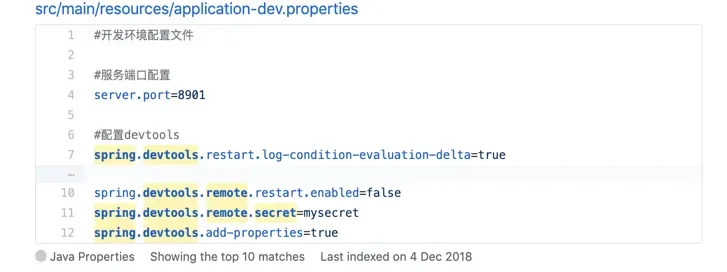
Two things drew attention before any testing. The first was the secret itself. The official documentation shows a secret password for remote debugging, and the example value is very weak.
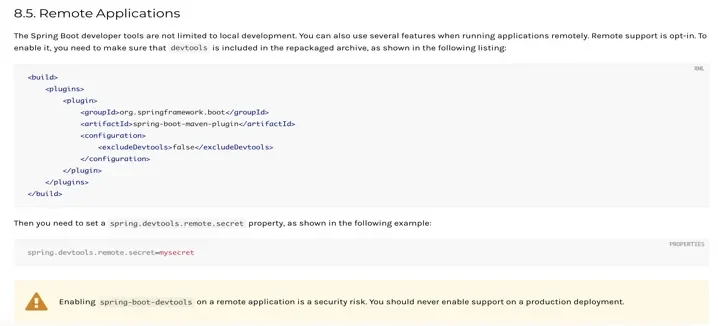
The screenshot shows the weak secret as it appears in the official documentation. The report also points at the official tutorials from Pivotal, which likewise show the use of the weak secret. Pivotal had already warned about enabling the feature in production, but the researcher asks whether it still poses a risk when enabled in other environments, and answers yes: developers use DevTools for debugging on local laptops or in testing environments, and those sit inside the organisation's internal network.
The comparison drawn is with the low-hanging fruit that red teams look for during operations, such as Tomcat or Jenkins instances with weak passwords. DevTools carries a similar risk, because an attacker who reaches a running instance can compromise it and gain an initial foothold in the network.
The second observation came from the source code. DevTools consists of a server and a client, and the client uploads "classloaderfiles" to the server.
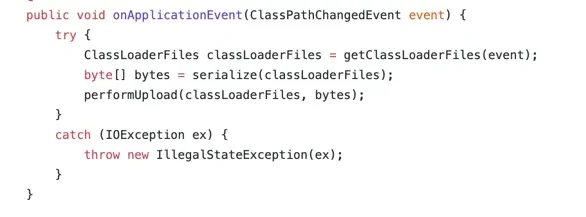
The screenshot of the client source shows that the client uploads the classLoaderFiles as a serialised object. That indicates clearly that deserialisation happens on the server side.
Exploitation
Step 1: reach the endpoint over HTTP
With the application deployed and DevTools enabled, the first issue is that DevTools can be used over plain HTTP. Anyone able to intercept the traffic can therefore obtain the secret token, and the token is easily guessed in most cases anyway.
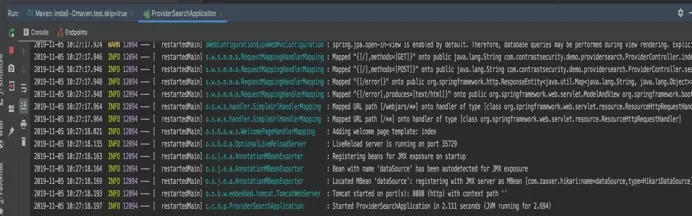
Step 2: note the weak secret and its treatment
The second issue is that there are no restrictions on the secret. The official documentation and the tutorial give developers the impression that the secret token is not important, or does not need to be unique. Looking at GitHub, the researcher found that many developers have made this mistake.
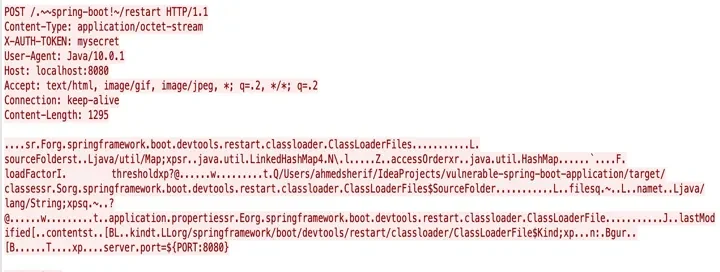
Step 3: enumerate the secret token
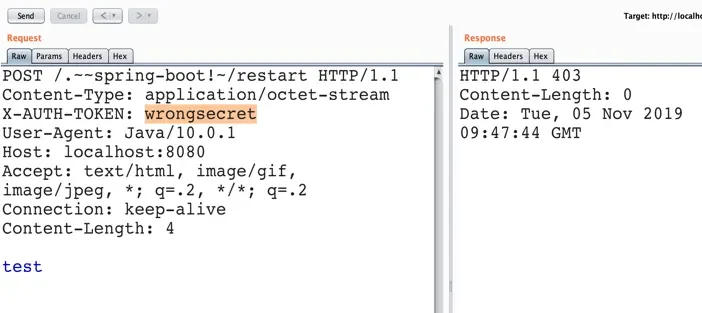
The third issue is that the secret token can be enumerated. If the attacker knows the endpoint of the enabled DevTools, they can brute-force the token, because the endpoint returns different responses depending on the token supplied. A wrong secret produces a 403 Forbidden response.
A correct secret produces a 500 Internal Server Error response.
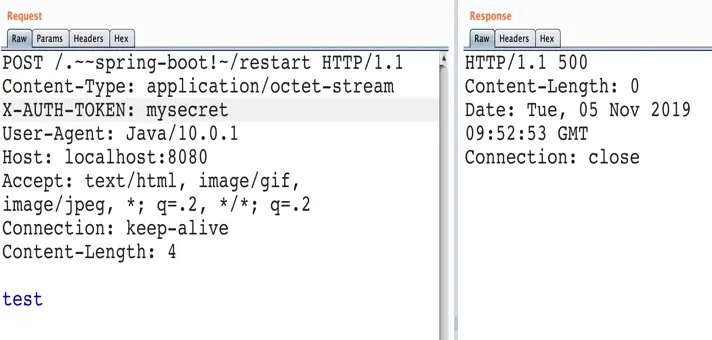
That difference is enough of an oracle to tell a guessed token from a wrong one.
Step 4: unsafe deserialisation
The fourth issue is the deserialisation itself. The remote debugger allows any kind of deserialisation, and no mitigation is in use in this case.
Step 5: the full attack
The attack scenario is described as follows:
- Red teamers or ethical hackers look for endpoints related to DevTools, for example
/.~~spring-boot!~/restart. - They start brute-forcing the
AUTH-TOKEN. - They build a serialised gadget with ysoserial or another tool, depending on which library is used in the running project.
The report includes screenshots captioned as the exploit from the attacker machine and from the developer's (victim) machine.
Root cause
The design flaw is that the remote debugging channel accepts serialised objects from the client and deserializes them on the server without any mitigation. The client uploads classLoaderFiles as a serialised object, so the server side necessarily deserializes attacker-supplied data once the attacker is past the token check. Insecure deserialisation, as the report's own footnote puts it, happens when integrity checks are not in place and deserialised data is not sanitised or validated.
The token check is the only barrier, and it is weak in three ways described above: it can travel over HTTP and be intercepted, it is often a weak or non-unique value because the documentation and tutorials model it that way, and it can be brute-forced because wrong and right tokens produce distinguishable responses (403 versus 500).
Impact
An attacker who can reach an application with DevTools remote support enabled can obtain or guess the secret token, then send a serialised gadget and achieve code execution on the running instance. The report frames this as an initial foothold in the organisation's internal network, in the same class as exposed Tomcat or Jenkins instances with weak passwords. The conditions are that remote support is enabled and that the attacker can reach the endpoint; the report notes that Pivotal warned against enabling the feature in production, and argues the risk remains in other environments such as developer laptops and testing systems inside the internal network.
Fix
The issue was reported to Pivotal. The company decided to open an issue and to change only the recommendations, not to take any further steps on the other issues. The linked issue is titled "Improve security-related recommendations for DevTools' remote application support" and notes that remote application support is currently documented as a security risk, that the use of SSL is recommended and that the need to use a unique secret should be documented. The report does not describe any code change to the deserialisation path.
Variants to test
- Look for DevTools endpoints on hosts you are authorised to test, starting with the path pattern the report gives,
/.~~spring-boot!~/restart. A positive result is an endpoint that responds to the DevTools path. - Send a wrong
AUTH-TOKENand then a candidate token, and compare the responses. A 403 for the wrong value and a different status, such as the 500 seen here, for the right one confirms the oracle and makes brute force practical. - Check whether the endpoint is reachable over plain HTTP rather than TLS. A positive result is the endpoint accepting the token over plain HTTP.
- Try the weak secret shown in the official documentation and tutorials.
- Once a token is accepted, send a serialised gadget built for the libraries in the running project.
What happened, in plain words
A security researcher named Ahmed Sherif, working with a team that reviews open-source software, took a close look at a helper tool that many Java developers use called Spring Boot DevTools. This tool is meant to make a programmer's daily work easier. You add it to a project, and it gives you handy features while you build and test software on your own computer.
One of those features is called remote applications. Normally DevTools only works on the same machine as the application. Remote support lets a developer connect to a running application over a network from somewhere else. That is useful, but it also means the application is now listening for connections from outside, and that is where the trouble starts.
The researcher found that once this remote feature is switched on, several things are weak. The password that protects it (called a secret token) is shown in the official documentation as a very simple, guessable value. The connection can run over plain, unencrypted HTTP, so anyone watching the network can read the token. The server answers differently depending on whether the token is right or wrong, which lets an attacker try many guesses and tell when one works. And most seriously, the server accepts data from the client and rebuilds it into live objects in memory, a process called deserialisation, without checking whether that data is safe. An attacker who gets past the token can send crafted data that makes the server run the attacker's code.
The researcher reported all of this to Pivotal, the company behind Spring. Pivotal opened a public issue and decided to improve the written recommendations only, not to change the underlying code.
Below I walk through the whole thing from the beginning, explaining each idea as it comes up, so you can follow it even if you have never done security work before.
Background: what Spring Boot and DevTools are
Spring Boot is a popular framework for building applications in the Java programming language. Think of a framework as a big box of ready-made parts: instead of writing every piece of an application from scratch, a developer assembles the parts the framework provides. A Spring Boot application is typically a program that runs on a server and answers requests from other computers.
DevTools is an optional add-on to Spring Boot. A developer turns it on by adding one line to the project's list of dependencies. A dependency is simply another piece of software that your project relies on, like listing an ingredient in a recipe so the shop knows to include it. The report lists the features DevTools provides:
- Property defaults
- Automatic restart
- LiveReload
- Global settings
- Remote applications
The first four are conveniences for working on your own machine. Automatic restart, for example, reloads the application when you change the code, so you do not have to stop and start it by hand. The fifth feature, remote applications, is the one that matters here, because it opens a door from the network into the running application.
The researcher's team spends its time checking open-source frameworks and libraries to see whether development teams are using them safely. They noticed that DevTools was becoming widely used, so they decided to look closely at it, starting from the official Spring documentation.
The documentation's own words
The report quotes the official documentation:
The Spring Boot developer tools are not just limited to local development. You can also use several features when running applications remotely. Remote support is opt-in, to enable it you need to make sure that
devtoolsis included in the repackaged archive
In plain terms: DevTools is not only for your own laptop. You can use some of its features when the application runs somewhere else on the network. This remote support is opt-in, meaning it is off unless you deliberately turn it on, and to turn it on you have to make sure the DevTools component is included in the packaged application file (the archive that gets deployed).
So remote support is off by default. That is good. But to switch it on, a developer has to set a secret password for remote debugging. The rest of the report is about what happens once that switch is flipped, and about how the documentation and tutorials teach developers to flip it.
Setting up the test
The researcher deployed a simple application with DevTools enabled and examined it. Deploying means putting the application onto a machine where it runs and can be reached. The report does not give the Spring Boot version, the application code, the deployment platform or the exact configuration used to enable remote support. The analysis of the client side was done by reading the DevTools source code on GitHub. Source code is the human-written text of a program before it is compiled into something the computer runs; reading it is like reading a recipe rather than tasting the dish.
No accounts, roles or special tooling are described beyond that. The testing is against an application the researcher controls, and the attack scenario is described from the point of view of a red teamer or ethical hacker who can reach such an application on a network. A red teamer is a security professional who plays the role of an attacker, with permission, to find weaknesses before real criminals do.
Finding it: two early warning signs
Two things drew attention before any testing. The first was the secret itself. The official documentation shows a secret password for remote debugging, and the example value is very weak.
The screenshot shows the weak secret as it appears in the official documentation. A secret here works like a password: the client must present it to prove it is allowed to connect. If the documentation's example is something trivial, developers copy it, and then every installation shares the same easily guessed password.
The report also points at the official tutorials from Pivotal, which likewise show the use of the weak secret. Pivotal had already warned about enabling the feature in production. Production means the live system that real users depend on. The researcher asks whether it still poses a risk when enabled in other environments, and answers yes. Developers use DevTools for debugging on local laptops or in testing environments, and those machines sit inside the organisation's internal network. An internal network is the private set of computers a company uses among its own staff, behind the firewall, not reachable from the open internet. A weakness there still lets an intruder who is already inside, or who finds a way in, move around.
The comparison drawn is with the low-hanging fruit that red teams look for during operations, such as Tomcat or Jenkins instances with weak passwords. Tomcat is a common web server for Java applications, and Jenkins is a tool for automating software builds; both are often exposed with default or weak logins. DevTools carries a similar risk, because an attacker who reaches a running instance can compromise it and gain an initial foothold in the network. A foothold is the first small bit of access an attacker gets, from which they try to expand.
The second observation came from the source code. DevTools consists of a server and a client, and the client uploads "classloaderfiles" to the server. A client is the program that connects to a server; the server is the program that waits for connections and answers them. Classloader files are files that tell the running application how to load its code into memory.
The screenshot of the client source shows that the client uploads the classLoaderFiles as a serialised object. Serialisation is the process of turning a live object in a program's memory into a stream of bytes that can be sent over a network or saved to disk. Deserialisation is the reverse: turning that stream of bytes back into a live object. It is like packing furniture into flat boxes to ship it, then unpacking and reassembling it at the other end. The danger is that if an attacker controls the box, they can put something unexpected inside, and the person unpacking it will build whatever the instructions say. That indicates clearly that deserialisation happens on the server side, which means the server is the one doing the unpacking, and therefore the server is the one at risk.
Exploitation: four problems, one after another
Step 1: reach the endpoint over HTTP
With the application deployed and DevTools enabled, the first issue is that DevTools can be used over plain HTTP. HTTP is the ordinary language browsers and servers use to exchange web pages and data. Plain HTTP is not encrypted, so anyone positioned on the network path, such as someone on the same Wi-Fi or a router in between, can read everything that passes. HTTPS is the encrypted version, where the traffic looks like gibberish to a watcher.
Anyone able to intercept the traffic can therefore obtain the secret token, and the token is easily guessed in most cases anyway. A token is a short string of characters used like a ticket: whoever holds it is treated as allowed. If it travels in the clear, it is like shouting your ticket number across a crowded room.
Step 2: note the weak secret and its treatment
The second issue is that there are no restrictions on the secret. Nothing forces it to be long, random or unique. The official documentation and the tutorial give developers the impression that the secret token is not important, or does not need to be unique. Looking at GitHub, the researcher found that many developers have made this mistake. GitHub is a website where developers store and share code, so searching it shows how real projects are configured in practice.
Step 3: enumerate the secret token
The third issue is that the secret token can be enumerated. Enumerating means trying possibilities one by one, systematically, until one works. If the attacker knows the endpoint of the enabled DevTools, they can brute-force the token, because the endpoint returns different responses depending on the token supplied. An endpoint is a specific address on a server, like a particular counter in a large building; you have to know which counter to walk up to. Brute-forcing means guessing many values quickly by machine rather than by hand.
The key weakness is that the server's answer tells you whether you were right. A wrong secret produces a 403 Forbidden response. A status code like 403 is a short number the server sends back to say what happened; 403 means "I understood you, but you are not allowed."
A correct secret produces a 500 Internal Server Error response. A 500 means "something went wrong on my side while handling your request." It is not a success message, but it is a different message, and that is what matters.
That difference is enough of an oracle to tell a guessed token from a wrong one. An oracle, in security, is any signal that leaks information. It is like a locked door that clicks differently when the key is close: you cannot see the lock, but the sound guides you.
Step 4: unsafe deserialisation
The fourth issue is the deserialisation itself. The remote debugger allows any kind of deserialisation, and no mitigation is in use in this case. A mitigation is any safeguard that reduces the risk, such as checking the data before unpacking it or refusing unexpected types. Here there is none, so once the token check is passed, the server will unpack whatever it is sent.
Step 5: the full attack
The attack scenario is described as follows:
- Red teamers or ethical hackers look for endpoints related to DevTools, for example
/.~~spring-boot!~/restart. - They start brute-forcing the
AUTH-TOKEN. - They build a serialised gadget with ysoserial or another tool, depending on which library is used in the running project.
Let me unpack each line.
Line 1 gives a sample path, /.~~spring-boot!~/restart. A path is the part of a web address after the site name, like the folder and file names in a filing cabinet. Attackers scan for such paths to find applications that have DevTools switched on.
Line 2 says they guess the AUTH-TOKEN. AUTH-TOKEN is the name of the field carrying the secret. Because the server answers differently for right and wrong values, guessing can be automated.
Line 3 mentions a serialised gadget built with ysoserial. A gadget, in this context, is a cleverly arranged piece of data that, when the server unpacks it, causes the server to run code the attacker chose. ysoserial is a well-known tool that produces such data for Java applications. Which gadget works depends on which libraries the running project has loaded, because the gadget uses those libraries' own features against them.
The report includes screenshots captioned as the exploit from the attacker machine and from the developer's (victim) machine.
Root cause: why this works at all
The design flaw is that the remote debugging channel accepts serialised objects from the client and deserializes them on the server without any mitigation. The client uploads classLoaderFiles as a serialised object, so the server side necessarily deserializes attacker-supplied data once the attacker is past the token check. Insecure deserialisation, as the report's own footnote puts it, happens when integrity checks are not in place and deserialised data is not sanitised or validated. Integrity checks are ways of confirming data has not been tampered with, like a wax seal on an envelope. Sanitising means cleaning data of anything dangerous before using it. Validating means checking it matches what you expect.
The token check is the only barrier, and it is weak in three ways described above: it can travel over HTTP and be intercepted, it is often a weak or non-unique value because the documentation and tutorials model it that way, and it can be brute-forced because wrong and right tokens produce distinguishable responses (403 versus 500).
Impact: what an attacker could do
An attacker who can reach an application with DevTools remote support enabled can obtain or guess the secret token, then send a serialised gadget and achieve code execution on the running instance. Code execution means the attacker's instructions run on the victim's machine, which is about as bad as it gets: they can then read data, change files or use that machine to reach others. The report frames this as an initial foothold in the organisation's internal network, in the same class as exposed Tomcat or Jenkins instances with weak passwords. The conditions are that remote support is enabled and that the attacker can reach the endpoint. The report notes that Pivotal warned against enabling the feature in production, and argues the risk remains in other environments such as developer laptops and testing systems inside the internal network.
Fix: what the vendor did
The issue was reported to Pivotal. The company decided to open an issue and to change only the recommendations, not to take any further steps on the other issues. The linked issue is titled "Improve security-related recommendations for DevTools' remote application support" and notes that remote application support is currently documented as a security risk, that the use of SSL is recommended and that the need to use a unique secret should be documented. SSL is the older name for the encryption that HTTPS uses. The report does not describe any code change to the deserialisation path.
Variants to test: how you would check your own systems
If you are authorised to test a system, these are the checks the report suggests, in plain terms.
- Look for DevTools endpoints on hosts you are authorised to test, starting with the path pattern the report gives,
/.~~spring-boot!~/restart. A positive result is an endpoint that responds to the DevTools path. - Send a wrong
AUTH-TOKENand then a candidate token, and compare the responses. A 403 for the wrong value and a different status, such as the 500 seen here, for the right one confirms the oracle and makes brute force practical. - Check whether the endpoint is reachable over plain HTTP rather than TLS. TLS is the encryption technology behind HTTPS. A positive result is the endpoint accepting the token over plain HTTP.
- Try the weak secret shown in the official documentation and tutorials.
- Once a token is accepted, send a serialised gadget built for the libraries in the running project.
Glossary
- API: a defined way for one program to talk to another, like a service counter with set rules for what you can ask for.
- Archive: a single file that bundles many files together, such as a packaged application ready to deploy.
- Brute-force: guessing many possible values quickly by machine until one works.
- Classloader: the part of a Java program that finds and loads code into memory.
- Classpath: the list of locations where a Java program looks for the code it needs.
- Client: a program that connects to another program (the server) to request something.
- Code execution: the attacker's own instructions running on the victim's machine.
- Dependency: another piece of software that a project relies on.
- Deserialisation: turning a stream of bytes back into a live object in memory.
- Endpoint: a specific address on a server that accepts requests.
- Enumerate: to try possibilities one by one in a systematic way.
- Foothold: the first small bit of access an attacker gains, used to expand further.
- Gadget: a crafted piece of serialised data that, when unpacked, makes the server run attacker-chosen code.
- GitHub: a website where developers store and share source code.
- HTTP: the ordinary, unencrypted language browsers and servers use to exchange data.
- HTTPS: the encrypted version of HTTP.
- Integrity check: a way of confirming data has not been tampered with.
- Internal network: a company's private set of computers, behind the firewall.
- Mitigation: any safeguard that reduces a risk.
- Oracle: any signal that leaks information, such as different responses for right and wrong guesses.
- Path: the part of a web address after the site name, pointing to a specific resource.
- Production: the live system that real users depend on.
- Red teamer: a security professional who plays the attacker, with permission, to find weaknesses.
- Remote debugging: connecting to a running application over a network to inspect and control it.
- Sanitise: clean data of anything dangerous before using it.
- Secret token: a short string used like a password to prove a client is allowed to connect.
- Serialisation: turning a live object in memory into a stream of bytes for sending or saving.
- Server: a program that waits for connections and answers requests.
- Source code: the human-written text of a program before it is compiled.
- SSL: the older name for the encryption used by HTTPS.
- Status code: a short number a server sends back to say what happened, such as 403 or 500.
- TLS: the encryption technology behind HTTPS.
- Token: see secret token.
- Validate: check that data matches what you expect.
- ysoserial: a tool that produces serialised data for Java applications that triggers code execution when unpacked.
- 403 Forbidden: a status code meaning the server understood the request but refuses to allow it.
- 500 Internal Server Error: a status code meaning something went wrong on the server while handling the request.
- 404 Not Found: a status code meaning no such page or resource exists.




