SQLI in forget password fucntion
The password reset form on an ASP.NET site was vulnerable to SQL injection in its email field, shown by error and timing differences when quotes were submitted. An attacker could delay database responses and, using an automated tool, extract database names and user credentials stored in clear text.
 Published on medium.com
This is my first time on Medium and I wanted to share with you my first SQL injection bug reported to a private bug bounty program let’s name it “example.com” which I discovered in forget password function which I usually look for logical bugs in this function instead of SQLi.
The full write-up lives on its author's site
It belongs to its author, so we link to it rather than copy it. The other two tabs are our own rewrites, checked against it.
Context
This is a write-up of a SQL injection found in the forgotten-password function of a private bug bounty program, referred to here as example.com. The researcher, Khaled Gaber, notes that he usually looks for logical bugs in password reset flows rather than SQL injection, and this was his first SQL injection report.
The feature in question takes an email address and looks the user up, returning one message when the address belongs to an existing user and another when it does not. The page involved had a .aspx extension, which the researcher used to infer an ASP.NET back end and, from that, an MSSQL database engine.
Setup
The report does not describe any accounts, roles or tool versions. The tools used were a browser for the manual probing, Burp Suite to intercept and save the vulnerable request, and SQLMap to automate the time-based extraction. The only precondition was access to the forgotten-password form on the target.
Finding it
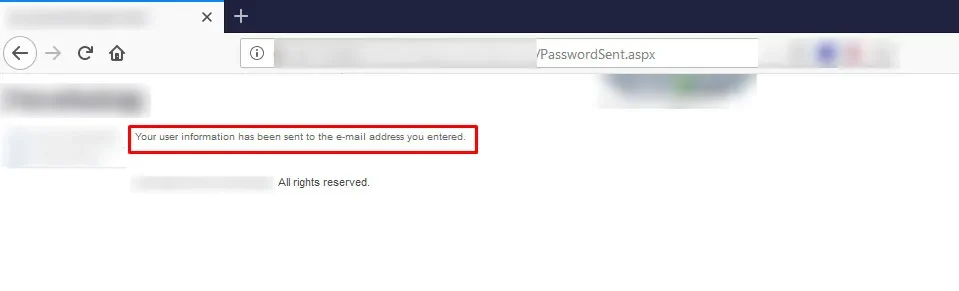
The researcher's first step was to establish the normal behaviour of the function before touching the input. Submitting an email address that already belonged to a user produced one response.
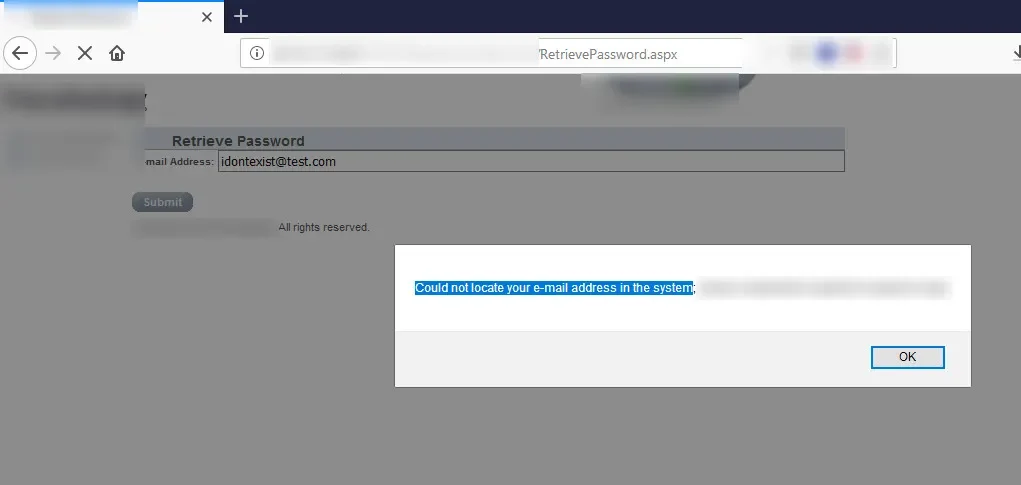
Submitting an address that did not exist, such as [redacted], produced a different response.
With the baseline recorded, he ended the input with a single quote. The response changed to "Unable to access data", which he found suspicious.
He then applied the rule that a single quote repeated twice is treated as a literal character rather than a special one, and submitted the address with two trailing quotes:
[redacted]''
This returned the normal response for a non-existent mail, which he took as close to proof that the function was vulnerable. The lesson he draws is that understanding the application's normal responses is what makes the anomaly visible.
He also treated back-end fingerprinting as part of enumeration. The RetrievePassword.aspx page extension told him the back end was ASP.NET, which he expected to be paired with MSSQL, and that expectation made it easier to craft targeted payloads.
Exploitation
Step 1: break and fix the query
The basic approach is to break the query with a quote, then repair it with a comment character, and inject whatever is needed in between. After trying a number of payloads and special characters, the following payload both injected and fixed the query:
[redacted]') —
Step 2: confirm with a time-based delay
With the query under control, he used a time-based technique, which delays the database server's response by a chosen amount. In MSSQL, WAIT FOR DELAY 'hh:mm:ss' suspends execution for the specified time. As a proof of concept he delayed the server response by up to 30 seconds with:
anyInput') WAITFOR DELAY '0:0:30' —
Step 3: automate with SQLMap
Because the injection is time-based, manual exploitation and data exfiltration are impractical, so he moved to SQLMap. The vulnerable request was submitted and intercepted with Burp Suite, the E-mail value was replaced with an * so that SQLMap would treat it as a custom injection point, and the request was saved.
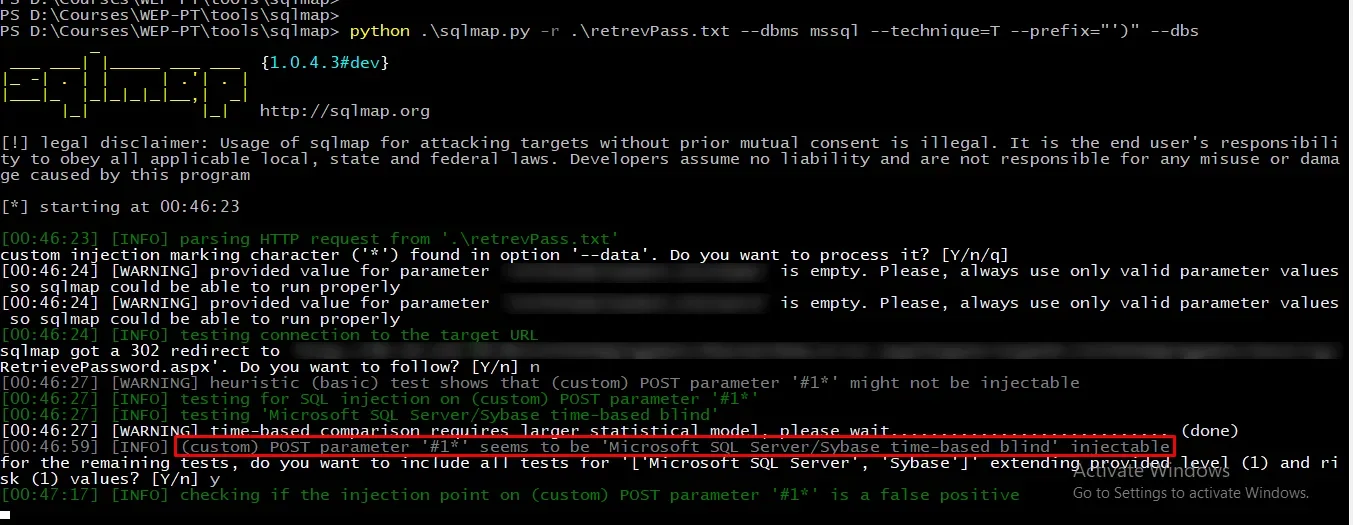
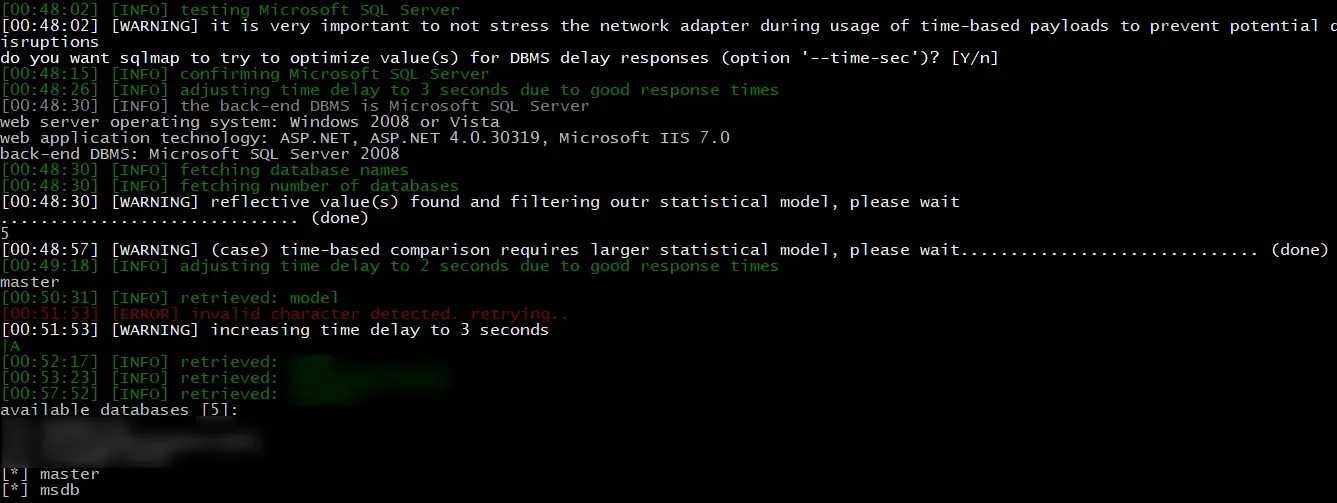
After a couple of attempts with SQLMap options, the final command used to exploit the injection and extract the database names is shown in the screenshots below.
Step 4: enumerate and dump
The remaining steps were the usual sequence: identify the application database, then its tables and columns, then dump the interesting columns such as usernames, emails and passwords. The passwords were stored in clear text.
Root cause
The quote in the input changed the structure of the query, which the two-quote test and the closing payload demonstrated. The two-quote test showed that the input reached the query as SQL rather than as a bound value, and the ') plus comment payload showed that the surrounding query could be closed and neutralised. The report does not describe any server-side defence that was present or bypassed, so the absence of parameterised queries is the likely explanation for why nothing stopped it.
Impact
An attacker using the forgotten-password form could read data from the application database, including usernames, emails and passwords, and the passwords were stored in clear text. The report does not quantify how many records were exposed or describe the program's severity rating.
Fix
The appropriate fix would be to stop the input from changing the query structure, and to stop storing passwords in clear text.
Variants to test
- Submit an existing address and a non-existent address and record both responses, then repeat each with a trailing single quote and with two trailing quotes. A change in response to the single quote that disappears with the doubled quote points to string concatenation.
- Try closing the query with
')followed by a comment and a delay such asWAITFOR DELAY '0:0:30'on MSSQL targets. A response that arrives roughly 30 seconds later confirms execution. - Check page extensions and response headers for the back-end stack, then pick delay syntax that matches the DBMS rather than guessing.
- Intercept the request in Burp Suite, mark the email value with
*, save it to a file and hand it to SQLMap as a custom injection point, then enumerate databases, tables and columns. - Look at other fields in the reset flow, such as the reset token or the user identifier, for the same concatenation pattern.
What happened, in plain words
A security researcher found a way to make a website's "forgot your password" form run database commands that the site's authors never intended. The form asks for your email address and then looks it up in the site's database. The researcher discovered that whatever you typed into that box ended up changing the database's instruction (the query) instead of being treated as harmless text. By typing special characters, he could change what the database did. In the end he could make the database wait on command, and then use a tool to pull out lists of database names, tables, columns, and finally user records including usernames, emails and passwords. The passwords were stored in plain readable text, not scrambled.
This kind of flaw is called SQL injection. SQL is the language databases speak. A website builds SQL sentences and sends them to the database to fetch or store information. If a website glues your input straight into that sentence, you can add your own words and change the sentence's meaning. A simple comparison: imagine a form that says "Find the file named ____". If you write report.pdf it finds that file. If you write report.pdf and also delete everything, and the assistant reads the whole line literally, it may do more than you asked. SQL injection is the same idea, with a database instead of a filing assistant.
The researcher, Khaled Gaber, says this was his first SQL injection report, submitted to a private bug bounty program. A bug bounty program is an arrangement where a company invites outside researchers to look for security problems and report them, sometimes for a reward. "Private" means only invited researchers can take part. The program is referred to here as example.com.
He also notes something interesting about his own habits: in password reset forms he usually hunts for logic bugs, meaning flaws in how the steps of a process are ordered or checked (for example, a reset link that works more than once, or one that lets you reset someone else's account), rather than SQL injection. This time the flaw turned out to be SQL injection.
The feature being tested
The forgotten-password function does a simple job. You type an email address, the site checks whether that address belongs to a registered user, and it shows you a message. The message is different depending on whether the address exists. That difference is the first clue: the site is telling you something about what is inside its database.
One detail mattered a lot: the page involved had the extension .aspx. A file extension is the tail end of a name, like .jpg for a picture or .pdf for a document. On the web, .aspx usually means the page was built with ASP.NET, a framework from Microsoft for building websites. The researcher used that to guess the back end, meaning the software running on the server rather than in your browser. From ASP.NET he expected the database to be MSSQL, Microsoft's database product. That guess made it much easier to write payloads that fit that particular database.
A payload here simply means the text you put into the input box to test or exploit the flaw.
Setup
The report does not describe any accounts, roles or tool versions. The tools involved were:
- A normal browser, used to submit the form by hand and watch the responses.
- Burp Suite, a tool that sits between your browser and the website and lets you see and edit the requests going out and the responses coming back. Think of it as a transparent post office where you can open every letter, rewrite it, and put it back in the envelope before it is delivered.
- SQLMap, a free tool that automates SQL injection. You give it a request, and it tries payloads, works out whether the site is injectable, and then extracts data step by step.
The only precondition was being able to reach the forgotten-password form on the target site.
Finding it
Step 1: learn what normal looks like
The researcher's first move was to establish the normal behaviour of the function before touching the input at all. This is a habit worth copying. If you do not know what a normal answer looks like, you cannot recognise an abnormal one. He describes it as making hunting easier and finding bugs faster.
He submitted an email address that already belonged to a user. The response was:
Then he submitted an address that did not exist, [redacted]. The response was different:
So the site has two distinct answers: one for "this user exists" and one for "this user does not exist". Both are now recorded as the baseline.
Step 2: the single quote test
With the baseline in hand, he ended the input with a single quote character ('). The response changed to "Unable to access data". That was suspicious. Why would adding one character break the lookup entirely?
The reason is that in SQL, a single quote marks the beginning or end of a piece of text. If the site builds its query like this (this is an illustration of the idea, not code from the report):
then typing [redacted]' produces:
Now the quotes are unbalanced. The database sees a text value that never closes, and it refuses to run the query. The site catches that failure and shows "Unable to access data". A broken query caused by one extra quote is a strong hint that your input is being treated as part of the SQL sentence.
Step 3: the two-quote test
He then applied a rule of SQL: a single quote repeated twice is treated as a literal character, not as a special one. In other words, '' inside a text value means "one actual quote character, nothing more". So he submitted the address with two trailing quotes:
[redacted]''
What does this line do? It is an email-looking string followed by two single quotes. If the site wraps the input in quotes as shown above, the two quotes you typed close and reopen the text value neatly, and the query stays balanced. The database simply looks for an email address that ends in a quote character, finds none, and returns the normal "user does not exist" response.
That is exactly what happened: the normal response for a non-existent mail came back. For the researcher this was close to proof that the function was vulnerable. The single quote broke the query; the doubled quote repaired it. That pattern only makes sense if the input is being pasted into SQL.
He draws a lesson from this: understanding the application's normal responses is what makes the anomaly visible. Without the baseline from Step 1, "Unable to access data" would have looked like an ordinary error.
Step 4: fingerprint the back end
He also treated identifying the back-end language and technologies as part of enumeration. Enumeration means systematically collecting small facts about a target: what software it runs, what pages exist, how it responds. The .aspx extension on RetrievePassword.aspx told him the back end was ASP.NET, which he expected to be paired with MSSQL. That expectation made it easier to craft targeted payloads, because different databases have different syntax for the same tricks.
Exploitation
Step 1: break and fix the query
The basic approach to SQL injection is three moves: break the query with a quote, repair it with a comment character, and inject whatever you need in between. A comment character tells the database "ignore the rest of this line". In MSSQL that is --. So if the site's query is:
then a payload that closes the quote, adds your own SQL, and comments out the remainder lets you run your own instructions while keeping the query syntactically valid.
After trying a number of payloads and special characters, the following payload both injected and fixed the query:
[redacted]') —
Line by line, in plain words:
[redacted]is ordinary text, so the query still looks like a normal email lookup to anyone glancing at it.'closes the text value that the site opened around your input.)closes a bracket that the site's query had opened before your input. The payload closes a bracket that the site's query had opened before your input.—is a dash-like character followed by a space. In the report it is written with a long dash, but the intent is the SQL comment marker, which makes the database ignore whatever the site appended after your input. That is the "fix" part: the query stays valid instead of breaking.
With this payload the query is under his control. He can now put his own SQL between the closing bracket and the comment.
Step 2: confirm with a time-based delay
With the query under control, he used a time-based technique. The idea is simple: instead of trying to read data directly, you ask the database to do something slow, and you watch how long the page takes to answer. If the page takes about as long as you asked for, your SQL ran. This is useful because it works even when the site shows no data and no error messages.
In MSSQL, WAIT FOR DELAY 'hh:mm:ss' suspends execution for the specified time. hh is hours, mm is minutes, ss is seconds. As a proof of concept he delayed the server response by up to 30 seconds with:
anyInput') WAITFOR DELAY '0:0:30' —
Line by line:
anyInputis a placeholder for whatever email you type. It does not need to exist.'closes the text value around your input.)closes the bracket the site opened.WAITFOR DELAY '0:0:30'is the MSSQL instruction to pause for 0 hours, 0 minutes and 30 seconds.—again stands in for the comment marker, so the rest of the site's query is ignored and the sentence stays valid.
That is the confirmation.
Step 3: automate with SQLMap
Because the injection is time-based, doing it by hand is impractical. Every single character of data you want to extract would require a separate request and a separate wait. Extracting a database name that way could take hours. So he moved to SQLMap, which automates the whole loop.
The process was:
- Submit the vulnerable request and intercept it with Burp Suite. Intercepting means catching the request before it reaches the server so you can inspect and edit it.
- Replace the
E-mailvalue with an*. The asterisk is SQLMap's marker for "this is the spot to inject into". It tells the tool exactly where in the request your payload should go, which is called a custom injection point. - Save the request to a file.
After a couple of attempts with SQLMap options, the final command used to exploit the injection and extract the database names is shown in the screenshots below.
Step 4: enumerate and dump
With the injection automated, the remaining steps followed the usual sequence:
- Identify the application database.
- List its tables. A table is a grid of rows and columns, like a spreadsheet, where a database keeps one kind of record.
- List the columns inside those tables. A column is one field of a record, such as
emailorpassword. - Dump the interesting columns, such as usernames, emails and passwords. Dumping means copying the contents out.
The passwords were stored in clear text. Clear text means not scrambled, not hashed, not encrypted: anyone who can read the database can read the passwords directly. A hash would be a one-way scramble that the site can check against but cannot reverse.
Root cause
The email value from the forgotten-password form changed the structure of the SQL query. Concatenation means gluing strings together, like taping a note onto a letter. Parameterisation means sending the user's value separately from the SQL sentence, so the database treats it purely as data and never as instructions. Think of a form where you write your name on a line: parameterisation is like putting your name in a sealed envelope that the clerk opens only to read the name, never to follow instructions written on it.
The two-quote test showed that the input reached the query as SQL rather than as a bound value, and the ') plus comment payload showed that the surrounding query could be closed and neutralised. The report does not describe any server-side defence that was present or bypassed, so the absence of parameterised queries is the likely explanation for why nothing stopped it.
Impact
An attacker using the forgotten-password form could read data from the application database, including usernames, emails and passwords, and the passwords were stored in clear text. Unauthenticated means without logging in: no account on the site was needed. The report does not quantify how many records were exposed or describe the program's severity rating.
Fix
The appropriate fix would be to stop the input from changing the query structure, and to stop storing passwords in clear text.
Variants to test
These are the same ideas generalised, so you can try them on other sites you are authorised to test:
- Submit an existing address and a non-existent address and record both responses, then repeat each with a trailing single quote and with two trailing quotes. A change in response to the single quote that disappears with the doubled quote points to string concatenation.
- Try closing the query with
')followed by a comment and a delay such asWAITFOR DELAY '0:0:30'on MSSQL targets. A response that arrives roughly 30 seconds later confirms execution. - Check page extensions and response headers for the back-end stack, then pick delay syntax that matches the DBMS rather than guessing. Response headers are the small lines of metadata a server sends alongside the page, such as the server software name.
- Intercept the request in Burp Suite, mark the email value with
*, save it to a file and hand it to SQLMap as a custom injection point, then enumerate databases, tables and columns. - Look at other fields in the reset flow, such as the reset token or the user identifier, for the same concatenation pattern. A reset token is the unique code in a password reset link that proves you are allowed to reset that account.
Glossary
- ASP.NET: a Microsoft framework for building websites, often recognised by
.aspxpage extensions. - Back end: the software running on the server, as opposed to the part you see in your browser.
- Baseline: the normal response you record before testing, so you can spot changes later.
- Bug bounty program: an arrangement where a company invites outside researchers to find and report security problems, sometimes for a reward.
- Burp Suite: a tool that sits between your browser and a website so you can inspect and edit requests and responses.
- Clear text: data stored without any scrambling, readable by anyone who can access it.
- Column: one field of a record in a database table, such as
email. - Comment character: a symbol that tells a database to ignore the rest of a line, used to keep an injected query valid.
- Concatenation: gluing strings together, which is how user input ends up inside a SQL sentence in this bug.
- Custom injection point: the marker (
*) that tells SQLMap exactly where in a saved request to inject. - Database: organised storage for a website's data, queried with SQL.
- DBMS: database management system, the software that runs a database, such as MSSQL.
- Dump: to copy data out of a database.
- Enumeration: systematically collecting facts about a target, such as software, pages and responses.
- File extension: the tail of a filename, like
.aspx, that hints at the technology behind a page. - Hash: a one-way scramble of data, so the original cannot be recovered from it.
- Intercept: to catch a request before it reaches the server so you can inspect or edit it.
- Logic bug: a flaw in how a process is ordered or checked, rather than in low-level parsing.
- MSSQL: Microsoft's database product, which uses syntax such as
WAITFOR DELAY. - Parameterisation: sending user input separately from the SQL sentence so it is treated only as data.
- Payload: the text you put into an input to test or exploit a flaw.
- Proof of concept (PoC): a minimal demonstration that a flaw is real.
- Query: the SQL sentence a website sends to its database.
- Response headers: metadata lines a server sends with a page, such as the server software name.
- Reset token: the unique code in a password reset link that proves you may reset that account.
- SQL: the language databases use to fetch and store data.
- SQL injection: a flaw where user input is pasted into a SQL query and can change its meaning.
- SQLMap: a tool that automates SQL injection testing and data extraction.
- Table: a grid of rows and columns in a database, holding one kind of record.
- Time-based injection: a technique that confirms injection by making the database pause and measuring the delay.
- Unauthenticated: without logging in.



