SQL Injection in GraphQL
A GraphQL endpoint accepted a user-controlled sort parameter that was inserted into a SQL query without sanitisation, allowing an attacker to inject a time-delay SQL command. The attacker could confirm the injection by observing a delayed response.

GraphQL Was Initially Developed and Used By Facebook as an Internal Query Language and so The Features of GraphQL Mostly Revolve Around Internal and Development Areas.
The full write-up lives on its author's site
It belongs to its author, so we link to it rather than copy it. The other two tabs are our own rewrites, checked against it.
Context
This write-up describes a SQL injection reached through a GraphQL endpoint. The researcher, Ahmed Gad (@0xGAD), found the endpoint during reconnaissance on a subdomain and used the GraphQL schema to work out how the service handled its data before moving to exploitation. The report does not name the target program, the product or the feature behind the endpoint, so the description below stays at the level of the endpoint itself: a GraphQL service that exposes queries for pages, the current user, components, templates, fonts and partners.
GraphQL, as the report notes, was initially developed and used by Facebook as an internal query language, and its features mostly revolve around internal and development areas. It executes queries using a type system with the data defined. An important but often ignored feature is the ability to ask the GraphQL schema about the supported queries through the introspection system.
Setup
The report does not describe any accounts, roles or specific tool versions. The preconditions shown are:
- A subdomain that returned 403 on normal access.
- A GraphQL endpoint on that subdomain that returned 500 Internal Server Error when fuzzed.
- A way to send POST requests with a JSON body, demonstrated with
curl. - An
Authorizationheader carrying a JWT, which appears in the request below.
Finding it
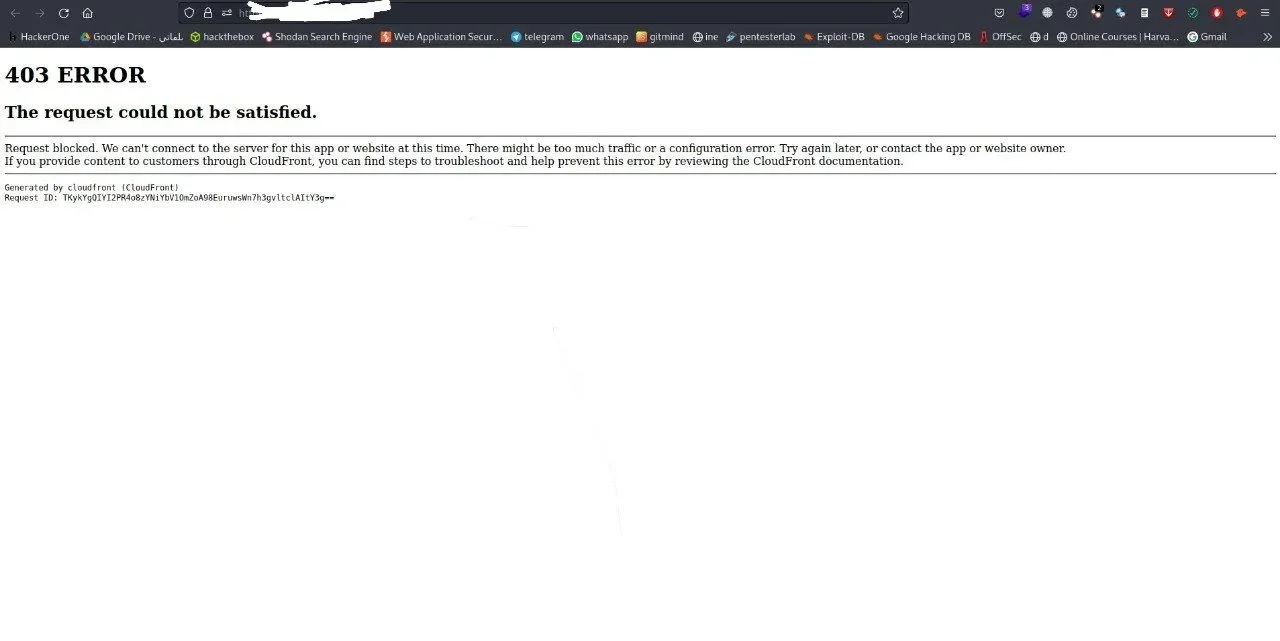
After reconnaissance the researcher got a 403 on the subdomain.
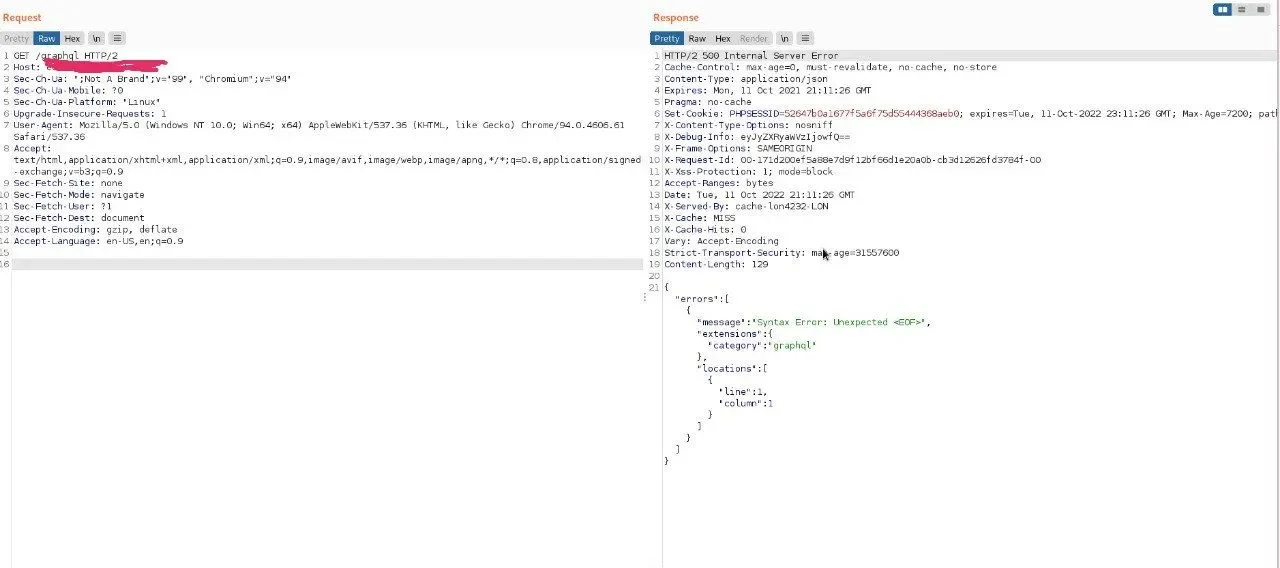
Fuzzing the subdomain produced a 500 Internal Server Error on the GraphQL endpoint.
From there the researcher moved to the introspection system to learn what the schema supported.
Exploitation
Step 1: Understand the type system
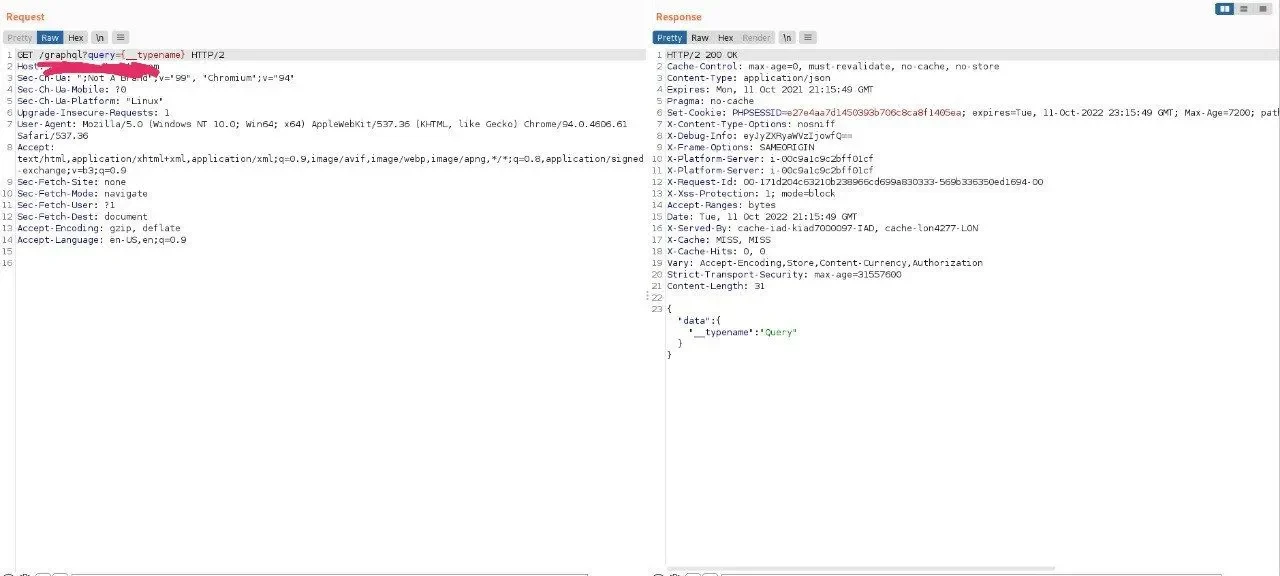
Given that there are situations where you do not know what type you will get back from the GraphQL service, you need some way to determine how to handle that data on the client. GraphQL allows you to request __typename, a meta field, at any point in a query to get the name of the object type at that point.
Step 2: Run an introspection query
The following GraphQL introspection query completely reveals the defined system with all required details:
{"query": "query IntrospectionQuery {__schema {queryType { name },mutationType { name },subscriptionType { name },types {...FullType},directives {name,description,args {...InputValue},onOperation,onFragment,onField}}}\nfragment FullType on __Type {kind,name,description,fields(includeDeprecated: true) {name,description,args {...InputValue},type {...TypeRef},isDeprecated,deprecationReason},inputFields {...InputValue},interfaces {...TypeRef},enumValues(includeDeprecated: true) {name,description,isDeprecated,deprecationReason},possibleTypes {...TypeRef}}\nfragment InputValue on __InputValue {name,description,type { ...TypeRef },defaultValue}\nfragment TypeRef on __Type {kind,name,ofType {kind,name,ofType {kind,name,ofType {kind,name}}}}}"}
The researcher credits a public gist as the reference for this query.
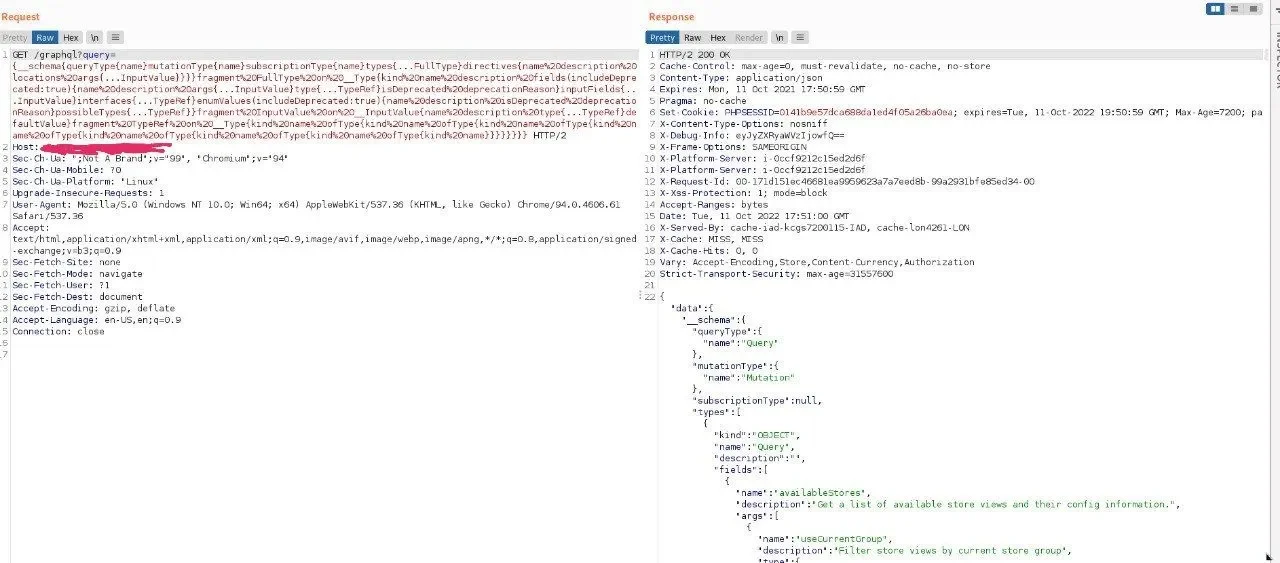
Introspection returns the query, mutation and subscription types, the full type definitions, and the directives.
Step 3: Time-based blind SQL injection through a sort argument
The researcher ran a curl command with timing and checked the response time, using sleep(10):
curl -i -s -k -X $'POST' \ -H $'Host: example.com' -H $'User-Agent: Mozilla/5.0 (Macintosh; Intel Mac OS X 10.14; rv:68.0) Gecko/20100101 Firefox/68.0' -H $'Accept: */*' -H $'Accept-Language: en-US,en;q=0.5' -H $'Accept-Encoding: gzip, deflate' -H $'Referer: http://example.com/dashboard' -H $'content-type: application/json' -H $'Authorization: [redacted]' -H $'Origin: http://example.com' -H $'Content-Length: 663' -H $'DNT: 1' -H $'Connection: close' \ --data-binary $'{"operationName":"pages","variables":{"offset":0,"limit":10,"sortc":"name OR SLEEP(10)","sortrev":false},"query":"query pages($offset: Int!, $limit: Int!, $sortc: String, $sortrev: Boolean) {\n pages(offset: $offset, limit: $limit, sortc: $sortColumn, sortReverse: $sortReverse) {\n id\n n\n __typen\n }\n me {\n firstN\n lastN\n usern\n __typen\n }\n components {\n title\n __typen\n }\n templates {\n title\n __typen\n }\n fonts {\n n\n __typen\n }\n partners {\n id\n n\n banners {\n n\n __typen\n }\n __typen\n }\n}\n"}'
What the important parts do:
-X $'POST'withcontent-type: application/jsonsends a GraphQL POST request.- The
Authorizationheader carries a JWT, so the request is made as an authenticated user. - The body is a JSON object with
operationName,variablesandquery. - The
variablesobject setsoffsetto0,limitto10,sortctoname OR SLEEP(10)andsortrevtofalse. - The
queryselectspageswithoffset,limit,sortcandsortReverse, plusme,components,templates,fontsandpartners, each with__typenfields.
The payload is in the sortc variable: name OR SLEEP(10). The researcher ran the command with timing and checked the response time, using sleep(10).
Root cause
GraphQL's type system does not help here: sortc is declared as a String, so any string the client sends is accepted by the GraphQL layer and passed on to the resolver.
Impact
With a time-based blind technique, an attacker can ask yes/no questions of the database one at a time, which in principle allows extracting data the query can read.
Fix
The fix implied by the finding is to stop passing client-controlled strings into SQL. Validate sortc against an allowlist of known column names and map each allowed value to a fixed identifier, or use parameterised queries where the database supports them for the clause in question. Reject any value that is not on the list rather than trying to filter dangerous characters.
Variants to test
- Other sort and filter arguments. Run introspection and list every argument typed as
Stringthat ends up in a query, such as sort columns, sort directions, search terms and filter values. Send a time-based payload in each and compare response times with and without it. A repeatable delay is a positive result. - Sort direction arguments. Arguments like
sortrevorsortReverseare often concatenated asASCorDESC. Send a payload that breaks out of that position and watch for a delay or an error that reveals the query. - Nested object arguments. Fields such as
partnersandbannersin the query above take their own arguments. Test each nested field's arguments the same way, since resolvers for nested types may build separate queries. - Introspection left enabled. If the introspection query returns the full schema, the endpoint is exposing its type system to any client that can reach it. A positive result is a complete list of types, fields and arguments in the response.
- Error-based confirmation. Where the 500 response includes database error text, send a payload that forces a syntax error in the sort position and check whether the error message names the database or the query. Any leaked query text confirms the injection point.
What happened, in plain words
A security researcher, Ahmed Gad (@0xGAD), was looking around a website's subdomains (extra addresses that belong to the same organisation, like shop.example.com next to example.com). He found a hidden service that speaks GraphQL, a way for programs to ask a server for exactly the data they want. The report does not state the cause; it shows a request with a sort value containing a database sleep instruction. This is called a blind SQL injection: blind because the attacker does not see the database's answer directly, only side effects such as a delay.
The report does not name the company, the product or the feature behind the endpoint. What it does show is a GraphQL service that offers queries for pages, the current user, components, templates, fonts and partners.
A few ideas first, because everything below depends on them:
- API: a door on a server through which other software asks for data or actions, instead of a human clicking pages. Think of a restaurant: the menu is the API, the kitchen is the database, and the waiter carries your order back and forth.
- GraphQL: a particular style of API where the client sends one request describing exactly which fields it wants, and the server answers with a matching shape of data. Facebook created it for internal use, and as the report notes, its features mostly revolve around internal and development areas.
- Type system: GraphQL describes every object and every field with a declared type (text, number, true/false and so on). The server checks incoming requests against that description before running them.
- Introspection: GraphQL can be asked to describe itself: which queries exist, which fields each object has, which arguments each field accepts. It is like asking the restaurant to hand you the full menu with ingredients, not just today's specials.
- SQL: the language databases use to store and fetch rows of data. A typical fetch looks like
SELECT ... FROM pages ORDER BY name. - SQL injection: when a value that came from the user is glued into a SQL command as if it were part of the command, the user can change the command's meaning. Imagine a form that asks for your name and writes it into a sentence; if you write "Alice and also delete everything", the sentence now says something the author never intended.
- Token (JWT): a long string a server gives you after login, which you send back on each request to prove who you are. It works like a wristband at an event: the door staff check the band instead of your ID every time.
- curl: a command-line tool that sends HTTP requests, useful for testing APIs by hand.
Finding the endpoint
After reconnaissance (the information-gathering phase: looking at subdomains, addresses and services that are not linked from the main site), the researcher got a 403 on the subdomain. A 403 is the server saying "I understood you, but you are not allowed here".
That alone is not a dead end. A 403 often means something is there and protected, so the next step was fuzzing: sending many requests with different paths and watching which ones behave differently. Fuzzing is like trying many keys on a lock and listening for the one that makes a different sound.
Fuzzing the subdomain produced a 500 Internal Server Error on the GraphQL endpoint.
That is worth following.
Understanding GraphQL before attacking it
GraphQL executes queries using a type system with the data defined. An important but often ignored feature is the ability to ask the GraphQL schema (the full description of what the service offers) about the supported queries through the introspection system.
There are situations where you do not know what type you will get back from the GraphQL service, and you need some way to determine how to handle that data on the client. GraphQL allows you to request __typename, a meta field, at any point in a query to get the name of the object type at that point. A meta field is a field that describes the data rather than being part of it, like a label on a box telling you what is inside.
Step 1: Ask the service to describe itself
The following GraphQL introspection query completely reveals the defined system with all required details:
{"query": "query IntrospectionQuery {__schema {queryType { name },mutationType { name },subscriptionType { name },types {...FullType},directives {name,description,args {...InputValue},onOperation,onFragment,onField}}}\nfragment FullType on __Type {kind,name,description,fields(includeDeprecated: true) {name,description,args {...InputValue},type {...TypeRef},isDeprecated,deprecationReason},inputFields {...InputValue},interfaces {...TypeRef},enumValues(includeDeprecated: true) {name,description,isDeprecated,deprecationReason},possibleTypes {...TypeRef}}\nfragment InputValue on __InputValue {name,description,type { ...TypeRef },defaultValue}\nfragment TypeRef on __Type {kind,name,ofType {kind,name,ofType {kind,name,ofType {kind,name}}}}}"}
Line by line, in plain words:
- The whole thing is a JSON object with one key,
query, whose value is the GraphQL text to run. JSON is just a text format for structured data, like a very strict shopping list. query IntrospectionQuery { ... }names the operation and opens the list of things to fetch.__schemaasks for the schema itself, the service's self-description.queryType { name },mutationType { name }andsubscriptionType { name }ask for the names of the three kinds of operations GraphQL supports: reading data (query), changing data (mutation) and live updates (subscription).types {...FullType}asks for every type in the system, with the details filled in by theFullTypefragment below.directives {name,description,args {...InputValue},onOperation,onFragment,onField}asks for the directives: modifiers the service supports, with their names, descriptions, arguments and where they can be applied.fragment FullType on __Type { ... }is a reusable block describing what to fetch for each type: its kind, name, description, fields (including deprecated ones), the arguments of each field, the type of each field, whether a field is deprecated and why, its input fields, the interfaces it implements, its enum values and its possible types.fragment InputValue on __InputValue { ... }describes what to fetch for each argument: name, description, type and default value.fragment TypeRef on __Type { ... }describes how to fetch a reference to a type, nested a few levels deep so that wrapped types (for example a list of a type) can be described too.
The researcher credits a public gist as the reference for this query.
Why this step matters: the answer is a map of every argument the service accepts. Without it you are guessing names; with it you can see, for example, that a query takes a sort column argument, which is exactly the kind of value that often ends up inside a database command.
Step 2: Test a sort argument with a delay
The researcher ran a curl command with timing and checked the response time, using sleep(10):
curl -i -s -k -X $'POST' \ -H $'Host: example.com' -H $'User-Agent: Mozilla/5.0 (Macintosh; Intel Mac OS X 10.14; rv:68.0) Gecko/20100101 Firefox/68.0' -H $'Accept: */*' -H $'Accept-Language: en-US,en;q=0.5' -H $'Accept-Encoding: gzip, deflate' -H $'Referer: http://example.com/dashboard' -H $'content-type: application/json' -H $'Authorization: [redacted]' -H $'Origin: http://example.com' -H $'Content-Length: 663' -H $'DNT: 1' -H $'Connection: close' \ --data-binary $'{"operationName":"pages","variables":{"offset":0,"limit":10,"sortc":"name OR SLEEP(10)","sortrev":false},"query":"query pages($offset: Int!, $limit: Int!, $sortc: String, $sortrev: Boolean) {\n pages(offset: $offset, limit: $limit, sortc: $sortColumn, sortReverse: $sortReverse) {\n id\n n\n __typen\n }\n me {\n firstN\n lastN\n usern\n __typen\n }\n components {\n title\n __typen\n }\n templates {\n title\n __typen\n }\n fonts {\n n\n __typen\n }\n partners {\n id\n n\n banners {\n n\n __typen\n }\n __typen\n }\n}\n"}'
What the important parts do:
curlis the tool sending the request.-iasks for the response headers as well as the body,-ssilences the progress meter, and-ktells curl to ignore certificate problems, which is common when testing hosts by hand.-X $'POST'says this is a POST request, the kind used to send data to a server rather than just ask for a page.-Hadds a header, a small labelled line attached to the request.Hostsays which site the request is for,User-Agentpretends to be a normal Firefox browser, andcontent-type: application/jsonannounces that the body is JSON.- The
Authorizationheader carries a JWT, so the request is made as an authenticated user. RefererandOriginsay the request appears to come from the site's own dashboard, which is what a browser would normally send.--data-binarysends the body exactly as written. The body is a JSON object with three keys:operationName,variablesandquery.operationNameispages, matching the named operation insidequery.variablessupplies the values the query expects:offsetis0(start at the first row),limitis10(return ten rows),sortcisname OR SLEEP(10)andsortrevisfalse(do not reverse the order).- The
querytext declaresquery pages($offset: Int!, $limit: Int!, $sortc: String, $sortrev: Boolean), meaning it accepts two required whole numbers and two optional values, one text and one true/false. Note thatsortcis declared asString: the GraphQL layer will accept any text there. - Inside the query,
pages(offset: $offset, limit: $limit, sortc: $sortColumn, sortReverse: $sortReverse)fetches the pages list, and the fieldsid,nand__typenare requested for each page. - The same request also asks for
me(the current user, withfirstN,lastN,usern),componentsandtemplates(each withtitle),fonts(withn), andpartners(withid,nand nestedbannerswithn). Each object also asks for__typen.
The payload is in the sortc variable: name OR SLEEP(10). SLEEP(10) is a database instruction meaning "do nothing for ten seconds". If the server passes the sort column straight into a SQL ORDER BY clause, the database evaluates name OR SLEEP(10), and the response is delayed by ten seconds. The researcher ran the command with timing and checked the response time, using sleep(10).
Why it works
GraphQL's type system does not help here: sortc is declared as a String, so any text the client sends is accepted by the GraphQL layer and passed on to the code that builds the database query.
What it could mean
With a time-based blind technique, an attacker can ask yes/no questions of the database one at a time, which in principle allows extracting data the query can read.
How to fix it
The fix implied by the finding is to stop passing client-controlled text into SQL. Check sortc against an allowlist of known column names and map each allowed value to a fixed identifier, or use parameterised queries (where the database treats the value as data, never as command text) where the database supports them for the clause in question. Reject any value that is not on the list rather than trying to filter dangerous characters.
Other places to look
- Other sort and filter arguments. Run introspection and list every argument typed as
Stringthat ends up in a query, such as sort columns, sort directions, search terms and filter values. Send a time-based payload in each and compare response times with and without it. A repeatable delay is a positive result. - Sort direction arguments. Arguments like
sortrevorsortReverseare often concatenated asASCorDESC. Send a payload that breaks out of that position and watch for a delay or an error that reveals the query. - Nested object arguments. Fields such as
partnersandbannersin the query above take their own arguments. Test each nested field's arguments the same way, since the code behind nested types may build separate queries. - Introspection left enabled. If the introspection query returns the full schema, the endpoint is exposing its type system to any client that can reach it. A positive result is a complete list of types, fields and arguments in the response.
- Error-based confirmation. Where the 500 response includes database error text, send a payload that forces a syntax error in the sort position and check whether the error message names the database or the query. Any leaked query text confirms the injection point.
Glossary
- 403: an HTTP status meaning the server understood the request but refuses to authorise it.
- 500 Internal Server Error: an HTTP status meaning the server failed while handling the request.
- API: a defined way for software to ask a server for data or actions.
- Allowlist: a list of values that are explicitly permitted; anything not on it is rejected.
- Authentication: proving who you are to a service, usually with a token or a login.
- Blind SQL injection: SQL injection where the attacker cannot see query results directly and infers them from side effects such as delays or errors.
- curl: a command-line tool for sending HTTP requests.
- Directive: in GraphQL, a modifier that changes how a query is executed or where it can be applied.
- Fragment: in GraphQL, a reusable block of field selections that can be included in several places.
- Fuzzing: sending many varied requests to discover paths, parameters or behaviours that differ from the norm.
- GraphQL: a query language and API style where the client describes exactly which fields it wants.
- Header: a labelled line of metadata attached to an HTTP request or response.
- HTTP: the protocol browsers and servers use to exchange requests and responses.
- Introspection: GraphQL's ability to describe its own schema, including types, fields and arguments.
- JSON: a text format for structured data, made of objects, lists, strings, numbers and true/false values.
- JWT: a signed token, often used to carry a user's identity between requests.
- Meta field: a field that describes the data rather than being part of it, such as
__typename. - Mutation: in GraphQL, an operation that changes data.
- ORDER BY: the part of a SQL query that decides the order of returned rows.
- Parameterised query: a database query where values are sent separately from the command text, so they cannot change its meaning.
- Payload: the crafted value an attacker sends to trigger a vulnerability.
- POST: an HTTP method used to send data to a server.
- Query: in GraphQL, an operation that reads data; also, generally, a request for data from a database.
- Reconnaissance: the information-gathering phase before an attack, such as finding subdomains and services.
- Resolver: the server-side function that produces the data for a GraphQL field.
- Schema: the full description of a GraphQL service's types, fields and arguments.
- SLEEP: a database function that pauses for a given number of seconds.
- SQL: the language used to store and retrieve data in relational databases.
- SQL injection: inserting user-controlled text into a SQL command so that it changes the command's meaning.
- Subdomain: an address that belongs to the same organisation as a main domain, such as
shop.example.com. - Subscription: in GraphQL, an operation for receiving live updates.
- Time-based: a blind technique that infers success from how long a response takes.
- Token: a string issued by a server that a client sends back to prove its identity or permissions.
- Type system: GraphQL's declared description of every object and field, used to check requests.
__typename: a GraphQL meta field that returns the name of the object type at that point in a query.




