Stealing local storage data through XSS
The post shows how a cross-site scripting flaw can be used to read data a site keeps in the browser's local storage and send it to a server the attacker controls. An attacker who can run script in the page could therefore steal stored tokens or other data.
 Published on blog.h4rsh4d.com
{{media:0}} |
The full write-up lives on its author's site
It belongs to its author, so we link to it rather than copy it. The other two tabs are our own rewrites, checked against it.
What the report shows
The write-up is titled Stealing local storage data through XSS and is published on the researcher's own blog, blog.h4rsh4d.com. It describes a cross-site scripting issue whose payoff is the theft of data that a web application keeps in the browser's local storage. The report records a bounty of 800.00 USD. It does not name the affected program, the vulnerable endpoint, the parameter that carried the payload, or the browser and server versions involved, and it gives no severity rating or CVSS score.
The researcher's argument runs in three steps.
- Local storage holds data that the application trusts, and that data is readable from JavaScript running in the page's origin.
- If an attacker can execute script in that origin through XSS, the same script can read local storage and send it elsewhere.
- The exfiltration is demonstrated by redirecting the browser, or the data, towards a server the attacker controls.
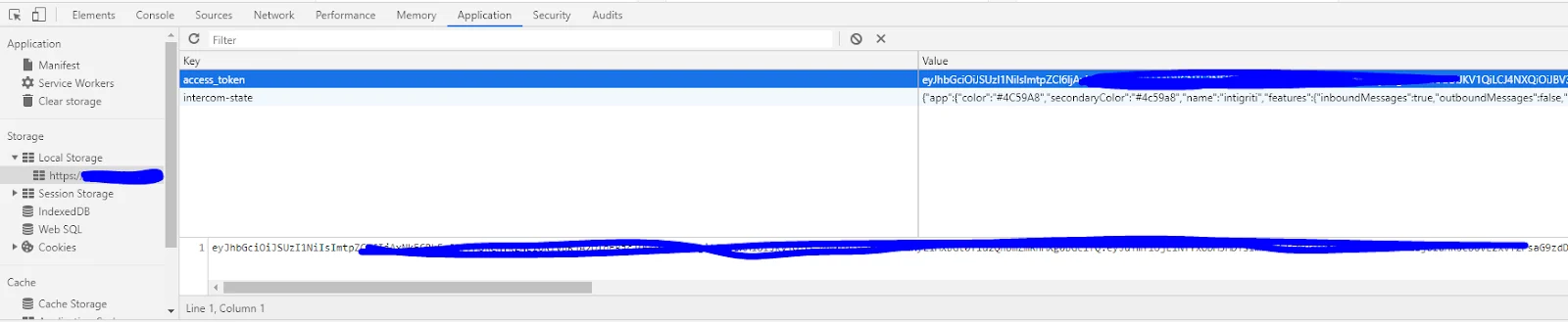
The first screenshot shows the local storage contents of the application as seen in the browser's developer tools, which is the data the researcher set out to steal.
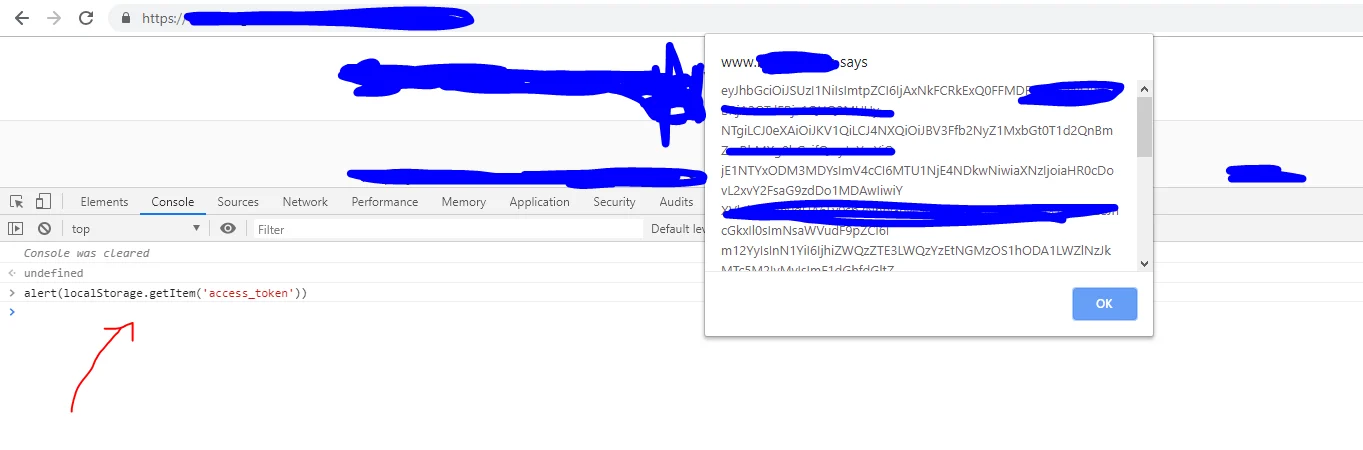
The second screenshot is a simple example run through the browser console, showing local storage being read from script.
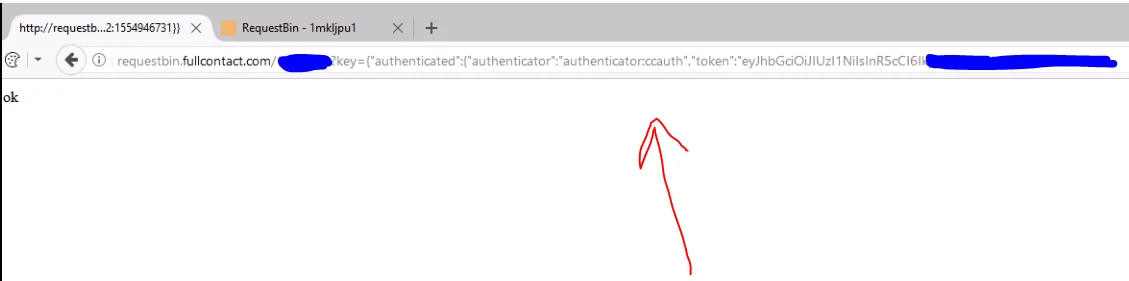
The third screenshot shows the redirection towards the attacker's server, the step that moves the stolen data off the victim's machine.
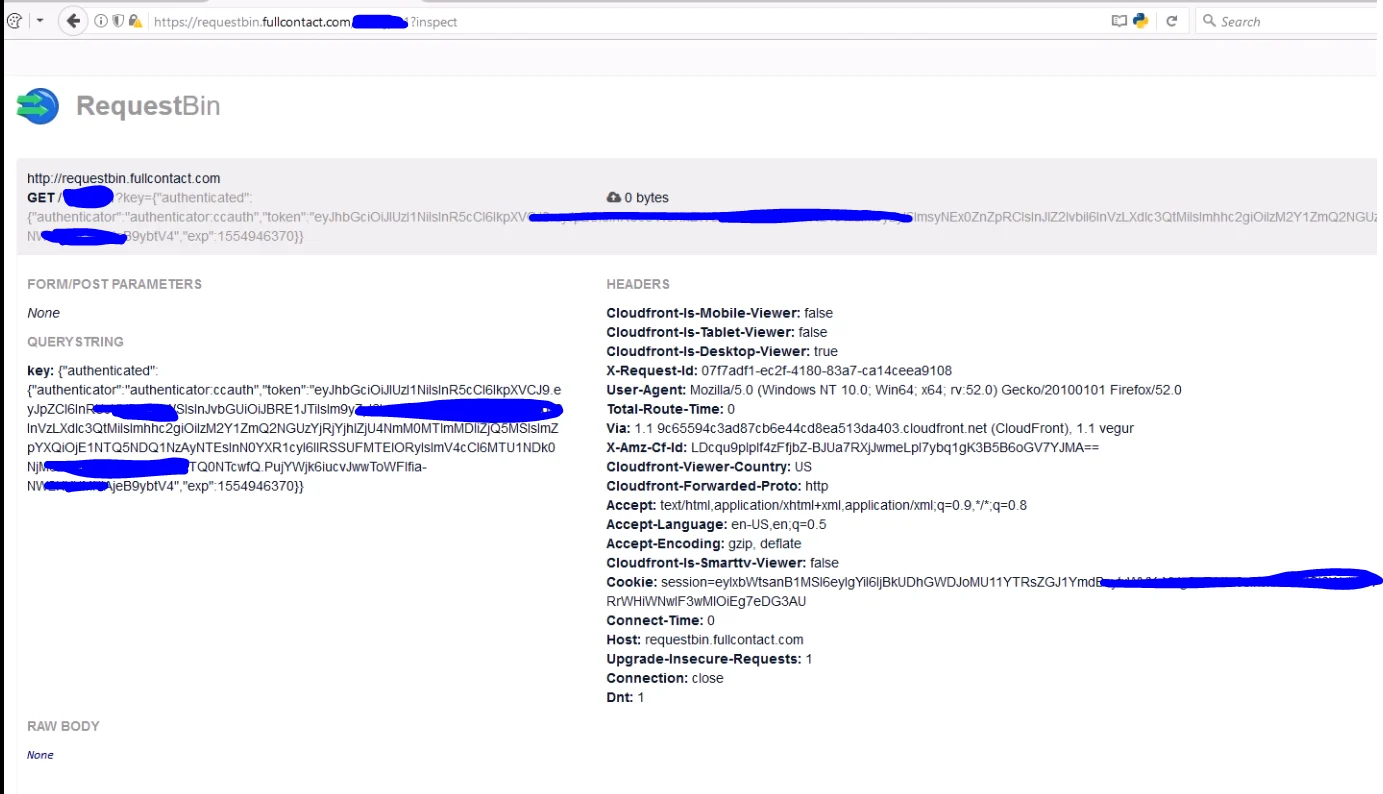
The final screenshot shows the attacker server receiving the locally stored data.
The report does not include the XSS payload, the request that delivered it, or the code used to read and transmit local storage. It stops at the demonstration of the data arriving on the attacker's server.
Root cause
The report is about XSS leading to local storage theft, but it does not describe the injection itself. The report does not identify the specific sink or source, so the exact coding error is not established here. The application keeps data in local storage, which any script in the origin can read.
Impact
With script running in the origin, an attacker can read everything the application keeps in local storage and send it to a server they control, as the report demonstrates. What that is worth depends entirely on what the application stores there: session identifiers, tokens, personal data or application state. The general consequence is that the confidentiality of whatever the application persists client-side is lost for any user who triggers the injection.
How this kind of bug works
Local storage is a per-origin key-value store exposed to JavaScript through the localStorage object. It is not sent automatically with requests the way cookies are, and it is not marked HttpOnly, so any script executing in the origin can enumerate its keys and read their values. That makes it a common place for single-page applications to keep access tokens and cached user data, and it makes XSS in such an application equivalent to credential theft.
The injection itself is the usual cross-site scripting mechanism: untrusted input is reflected, stored or written into the DOM without context-appropriate encoding, so the browser parses it as markup or script. Stored variants are more dangerous because one injection affects every user who loads the page. The exfiltration step needs no special trick: the injected script reads the store and issues a request, an image load or a navigation to a host the attacker controls, carrying the data in the URL or body.
Defences work at two levels. Preventing the injection means output encoding for the correct context, sanitising rich HTML with a maintained library, a restrictive Content Security Policy, and framework features that escape by default. Reducing the value of a successful injection means not keeping long-lived secrets in local storage, preferring short-lived tokens, and binding them so that a stolen copy is hard to replay.
How to test for it
- Map every place where input from the request or from stored data appears in a response or is written into the DOM by client-side code. Include URL fragments,
postMessagehandlers and values read back from storage. - Send a benign marker that would be inert if encoded, such as a short alphanumeric string wrapped in characters that would break out of the current context, and observe where it lands: HTML text, an attribute, a script block, a URL or a JavaScript string.
- If the marker survives unencoded, escalate to a payload appropriate to that context and confirm execution with a harmless action such as an alert or a callback to a listener you control.
- Once execution is confirmed, check what the origin exposes: enumerate local storage keys and note whether their values are sensitive. Demonstrate reading one key and sending it to your listener.
- For stored variants, submit the payload through the persistence path and reload the page as a different user to confirm it fires for them.
A positive result is script of your choosing executing in the target origin, plus proof that data from that origin reached your listener. Common false positives are markers that appear encoded but are later decoded by client-side code, payloads that only fire in your own browser because of an extension, self-XSS where the input can only be typed by the victim into their own console, and reflected output inside a context the browser never executes.
How it is fixed
Encode output for the context it lands in, and sanitise any HTML that must be accepted with a well-maintained allow-list library. Apply a Content Security Policy that blocks inline and third-party script where the application allows it. Avoid writing untrusted data into dangerous DOM sinks such as innerHTML; use text-setting APIs instead. On the storage side, keep secrets out of local storage where possible, use short-lived tokens, and treat any XSS as a full compromise of client-side state.
Hunting notes
This class hides wherever an application keeps state in the browser and renders user input nearby: single-page apps with token-based sessions, dashboards that cache profile data, and features that echo names, search terms or error messages. Recon signals include JavaScript bundles that reference localStorage or sessionStorage, login flows that return tokens in a response body rather than a cookie, and parameters reflected into client-rendered templates. When you find injection, show impact by reading a specific key and delivering it to your own listener, and describe what that key grants. A clear demonstration of stolen session material is far more persuasive than an alert box.
Difficulty
beginner
The report illustrates a well-known XSS-to-storage-theft pattern with screenshots and no payload details.
What happened, in plain words
This write-up is called Stealing local storage data through XSS and was published on the researcher's own blog, blog.h4rsh4d.com. It illustrates how a bug in a website could be used to read data the site saved in your browser and send it to an attacker's server. The report records a bounty of 800.00 USD. It does not name the affected program, the page or parameter where the bug lived, or the browser and server versions involved, and it gives no severity rating or CVSS score.
Two ideas sit behind the whole report, so it is worth meeting them first.
Local storage is a small storage area that every website gets inside your browser. Think of it as a labelled drawer that belongs to one website: the site can put things in, take things out, and read them later, even after you close the tab. It is separate from cookies, which are small pieces of data the browser sends to the server automatically with every request. Local storage is never sent automatically; only code running on the page can read it. Websites often keep things there such as login tokens (a token is a short string that proves who you are, a bit like a wristband at an event) or cached profile details.
Cross-site scripting, usually shortened to XSS, is a bug where a website lets an attacker's JavaScript run inside its own pages. JavaScript is the programming language that runs in your browser and makes pages interactive. If a site takes something a user typed or submitted and puts it into the page without properly neutralising it, the browser may treat that text as code and execute it. The dangerous part is that this code runs in the website's origin, so it can do what the site's own scripts can do, including reading that site's local storage drawer.
The researcher's argument runs in three steps.
- Local storage holds data the application trusts, and any script running on the page can read it.
- If an attacker can get script to run on the page through XSS, that same script can read local storage and send it elsewhere.
- The theft is demonstrated by sending the browser, or the data, towards a server the attacker controls.
The first screenshot shows the local storage contents of the application as seen in the browser's developer tools. Developer tools are the built-in panel in browsers, usually opened with F12, where you can inspect a page and its stored data. This is the data the researcher set out to steal.
The second screenshot is a simple example run through the browser console, showing local storage being read from script. The console is a text prompt inside developer tools where you can type JavaScript and run it immediately against the current page.
The third screenshot shows the redirection towards the attacker's server. This is the step that moves the stolen data off the victim's machine: the script makes the browser contact a host the attacker chose, carrying the data with it.
The final screenshot shows the attacker server receiving the locally stored data.
The report does not include the XSS payload, the request that delivered it, or the code used to read and transmit local storage. It stops at the demonstration of the data arriving on the attacker's server.
In general, how this kind of bug works
Local storage is a per-origin key-value store exposed to JavaScript through the localStorage object. An origin is the combination of scheme, host and port, so https://example.com and https://other.example.com are different origins with separate drawers. A key-value store simply means data is saved under a name (the key) and read back by that name. Because local storage is not sent with requests the way cookies are, and because it has no HttpOnly flag (a cookie setting that hides the cookie from JavaScript), any script running on the page can list its keys and read their values. That makes it a common place for modern web apps to keep access tokens and cached user data, and it makes XSS in such an app equivalent to stealing credentials.
The injection itself is the usual XSS mechanism: untrusted input is reflected, stored or written into the page without encoding suited to where it lands, so the browser parses it as markup or script. A stored variant is more dangerous because one injection affects every user who loads the page. The exfiltration step needs no special trick: the injected script reads the store and issues a request, loads an image or navigates to a host the attacker controls, carrying the data in the URL or body.
Defences work at two levels. Preventing the injection means encoding output for the correct context, sanitising rich HTML with a maintained library, applying a restrictive Content Security Policy (a browser rule set that limits which scripts may run), and using framework features that escape by default. Reducing the value of a successful injection means not keeping long-lived secrets in local storage, preferring short-lived tokens, and binding them so a stolen copy is hard to replay.
In general, how to test for it
- Map every place where input from the request or from stored data appears in a response or is written into the page by client-side code. Include URL fragments,
postMessagehandlers (code that receives messages from other windows) and values read back from storage. - Send a harmless marker that would stay inert if properly encoded, such as a short alphanumeric string wrapped in characters that would break out of the current context, and observe where it lands: page text, an attribute, a script block, a URL or a JavaScript string.
- If the marker survives unencoded, escalate to a payload appropriate to that context and confirm execution with a harmless action such as an alert or a callback to a listener you control.
- Once execution is confirmed, check what the origin exposes: list local storage keys and note whether their values are sensitive. Demonstrate reading one key and sending it to your listener.
- For stored variants, submit the payload through the path that saves it, then reload the page as a different user to confirm it fires for them.
A positive result is script of your choosing running in the target origin, plus proof that data from that origin reached your listener. Common false positives are markers that appear encoded but are later decoded by client-side code, payloads that only fire in your own browser because of an extension, self-XSS where the input can only be typed by the victim into their own console, and reflected output inside a context the browser never executes.
In general, how it is fixed
Encode output for the context it lands in, and sanitise any HTML that must be accepted with a well-maintained allow-list library. Apply a Content Security Policy that blocks inline and third-party script where the application allows it. Avoid writing untrusted data into dangerous page sinks such as innerHTML; use text-setting APIs instead. On the storage side, keep secrets out of local storage where possible, use short-lived tokens, and treat any XSS as a full compromise of client-side state.
Glossary
- Local storage: a per-origin key-value store inside the browser that page scripts can read and write, and that is never sent to the server automatically.
- Cookie: a small piece of data the browser sends to the server with requests, often used for sessions.
- Token: a string that proves identity or grants access, similar to a wristband.
- XSS (cross-site scripting): a bug that lets an attacker's JavaScript run inside a website's own pages.
- JavaScript: the programming language executed by browsers to make pages interactive.
- Origin: the combination of scheme, host and port that defines which storage and permissions a page belongs to.
- Developer tools: the built-in browser panel for inspecting pages and their stored data.
- Console: a prompt inside developer tools where JavaScript can be typed and run against the current page.
- Payload: the piece of input crafted to trigger a bug.
- HttpOnly: a cookie flag that hides the cookie from JavaScript.
- Content Security Policy: a browser rule set that restricts which scripts a page may run.
- Sanitisation: cleaning input so that dangerous parts cannot be interpreted as code.
- Encoding: converting characters so the browser displays them as text rather than executing them.
- Sink: a place in code where data is written into the page and could be interpreted as code.
innerHTML: a property that writes raw HTML into an element, which can execute injected markup.postMessage: a browser mechanism for sending messages between windows, which needs careful handling.- Self-XSS: a case where the victim must paste the malicious input into their own console, so no real attacker is involved.
- False positive: a test result that looks like a bug but is not exploitable.
- CVSS: a scoring system for rating the severity of vulnerabilities.