Story of a very lethal IDOR.
An address book edit endpoint used a sequential numeric identifier without checking ownership, so a logged-in user could change another user's address details. Because the stored XSS payload in the address fields was saved, the attacker could take over the victim's account.
 Published on vedanttekale20.medium.com
Hello all! My name is Vedant, also known as Vegeta(on twitter).
The full write-up lives on its author's site
It belongs to its author, so we link to it rather than copy it. The other two tabs are our own rewrites, checked against it.
Context
The target was an online shopping website with a large number of features. The researcher refers to it as target.com and describes it as an RDP. The feature at the centre of the finding is the address book: a logged-in user can add and edit addresses, and each address is reachable at a URL that contains a numeric identifier.

Setup
No special tooling beyond a proxy was needed. The researcher created a normal account on the site, turned on Burp, and captured the requests generated by registration, login, password reset and the profile and address book sections. A second account was created later, purely to confirm the cross-account behaviour. No recon was performed before starting.
Finding it
While registering, the researcher entered the name as <h1>tester</h1> to check for HTML injection and XSS. After logging in and visiting the dashboard, the h1 tag did not execute, and none of the profile fields turned out to be vulnerable to stored XSS.
The address book section behaved differently. The same payload was entered into all fields, and this time it worked in the first name and last name fields. The payload was then changed to a simple XSS payload:
<svg onload=alert(document.cookie)>
After clicking save changes, the stored XSS triggered successfully.
Exploitation of that XSS was not straightforward. A blind XSS payload was placed in the first name and last name fields and the researcher waited two days for an admin to visit the profile, but no admin interaction followed. An attempt to combine the stored XSS with a CSRF attack also failed. At that point the stored XSS was almost abandoned and other vulnerability classes were tested across the target without success.
Exploitation
Step 1: notice the identifier in the address book URL
Returning to the address book section, the self stored XSS triggered again. Clicking edit address to remove the payload revealed the URL, which looked like this:
The trailing number is the address identifier. Changing it from 30916 to 30915, in the hope of seeing another user's address book, produced the message:
you are not allowed to perform this action
So the page itself enforced an ownership check on that identifier.
Step 2: intercept the edit request
Going back to the edit address section to remove the XSS payload again, the researcher intercepted the save request instead of letting it through. The request contained an identifier parameter.

Step 3: change the identifier in the request
The identifier in the intercepted request was changed from 30916 to 30915 and the request was forwarded. The response said:
Address changed successfully
The stored XSS triggered again, but this time the researcher understood what had happened: the address book of a different user had been modified. The page-level check seen in step 1 did not apply to this endpoint.
Step 4: confirm with a second account
To confirm the behaviour, a second account was created and its address identifier recorded. From the first account, the edit address section was opened and save changes was clicked with the XSS payload left in place. The request was intercepted, the identifier was changed from the first account's identifier to the second account's identifier, and the request was forwarded. It worked as expected.
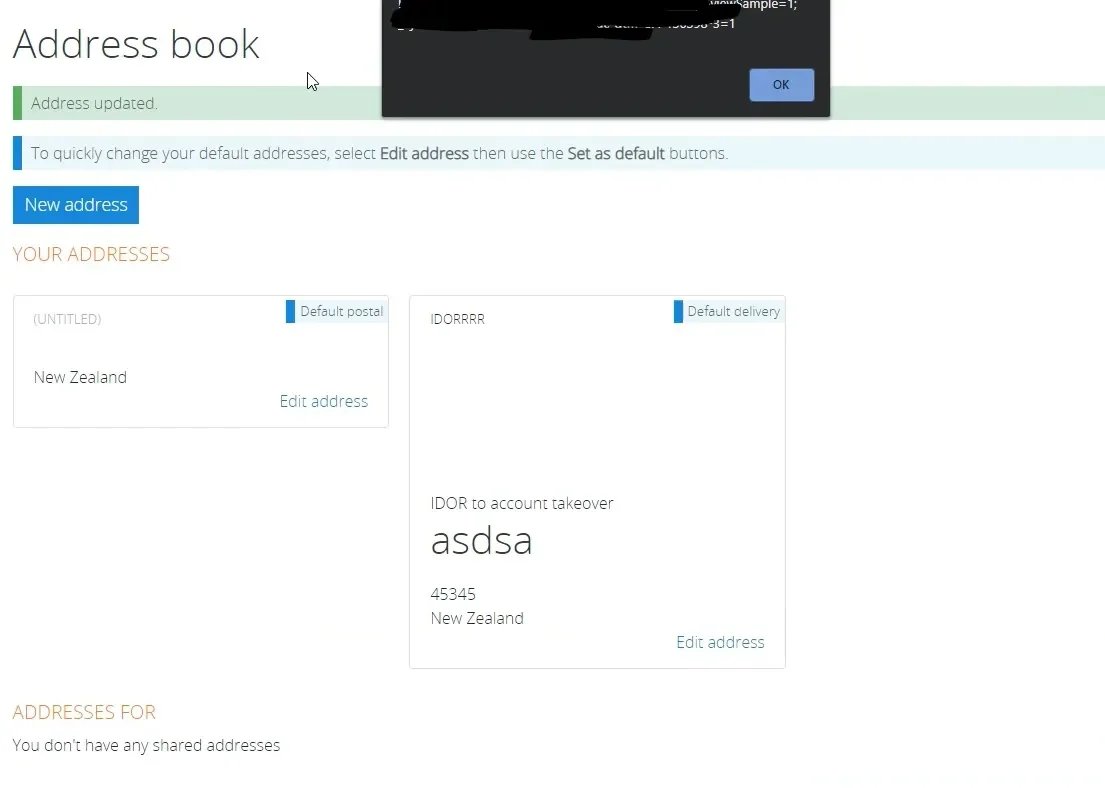
Because the identifiers were easily guessable and there was no rate limiting on any endpoint, any user's account could be taken over. The chain was: self stored XSS, then IDOR, then account takeover.
Root cause
The address book page checked ownership of the identifier in the URL, but the endpoint that actually saves an address edit trusted the identifier supplied in the request without an equivalent authorisation check. That is a classic insecure direct object reference: the object is selected by a client-supplied value and the server does not verify that the value belongs to the authenticated user.
Two properties of the identifiers made the flaw practical. They were sequential and therefore easily guessable, and there was no rate limiting on any endpoint, so identifiers could be walked without friction. The stored XSS in the first name and last name fields was part of the chain the researcher describes.
Impact
An authenticated attacker could modify the address book of any other user by changing the identifier in the save request. The researcher states that, with guessable identifiers and no rate limiting, any user's account could be taken over. The researcher states that any user's account could be taken over, given guessable identifiers and the absence of rate limiting. The programme was a private one and no bounty was paid.
Fix
The report does not describe any fix applied by the programme. The change that addresses the root cause is to enforce an ownership check on the server side of the save endpoint, verifying that the address identifier in the request belongs to the authenticated session before applying the update, in the same way the address book page already did. Identifiers should not be relied upon as the only access control, and output encoding of the name fields should prevent the stored XSS from executing in the first place.
Variants to test
- Compare the page that renders an object with the endpoint that mutates it. If the page returns an authorisation error for a foreign identifier but the save request succeeds, the mutation endpoint is missing the check. A positive result is a success message for an identifier that belongs to another account.
- Walk sequential identifiers on every endpoint that accepts one, including edit, delete and view actions. A positive result is any response that returns or changes another user's data.
- Test whether rate limiting exists on identifier-based endpoints. A positive result is a long run of requests without throttling, which makes enumeration of the identifier space practical.
- Look for stored input fields that are rendered back to other users, such as names in an address book, and check whether a payload stored through one account executes when the record is viewed from another. A positive result is script execution in the victim's session.
What happened, in plain words
A security researcher was testing an online shopping website. He found a way to change other people's saved addresses, and because the address form also accepted a small piece of code that runs in a browser, he could use that to take over other people's accounts. The chain was: a stored cross-site scripting bug (XSS) in his own address book, then an insecure direct object reference (IDOR) that let him edit someone else's address, then account takeover.
This article walks through the same steps in the same order, explaining every term from scratch. If you can use a browser, you can follow it.
The target
The website was an online shop with lots of features. The researcher calls it target.com throughout, which is a stand-in name, not the real address. The researcher describes it as an RDP. The feature at the centre of the finding is the address book: when you are logged in, you can add and edit delivery addresses, and each address has its own web address (URL) that ends in a number.
Setting up
No special tools were needed beyond a proxy. A proxy is a program that sits between your browser and the website and lets you see and change every request before it is sent. The researcher used Burp, a well-known proxy for this kind of work.
- He created a normal account on the site.
- He turned on Burp and captured the requests the site made when he registered, logged in, reset his password, and used the profile and address book sections.
- Later he created a second account, purely to confirm that what he found worked across accounts.
He did no recon first. Recon means gathering information about a target before testing, such as listing its pages or finding out what software it runs. He skipped that and went straight to using the site like a normal customer.
Finding it
While registering, he typed his name as <h1>tester</h1>. The <h1> tag is HTML, the language web pages are written in, and it means "big heading". He used it as a harmless test: if the site shows the text as a big heading, it is treating what you typed as code rather than as plain text, which is the first sign of an injection problem.
After logging in and visiting his dashboard, the h1 tag did not execute. None of the profile fields turned out to be vulnerable to stored XSS either. Stored XSS means the site saves what you typed and later shows it to someone else (or back to you) as live code, so the code runs in that person's browser.
The address book behaved differently. He entered the same payload into all the fields, and this time it worked in the first name and last name fields. He then changed the payload to a simple XSS payload:
<svg onload=alert(document.cookie)>
Line by line:
<svg ...>starts an SVG element, a way of drawing graphics in a web page. Browsers support it, so it is a valid tag to slip into a page.onload=is an event handler: a piece of code the browser runs automatically when the element has finished loading.alert(document.cookie)is the code that runs.alertopens a pop-up box.document.cookieis the browser's way of reading the cookies for the current page.
A cookie is a small piece of data a website asks your browser to store and send back with every request. Login sessions usually rely on a cookie: after you log in, the site gives your browser a cookie that proves who you are, so you do not have to type your password on every page. If someone can read your cookie, they can often pretend to be you. That is why the payload reads document.cookie: it is a demonstration that the code can reach the session data.
After clicking save changes, the stored XSS triggered successfully. In other words, the site saved the payload and ran it whenever the address was displayed.
Exploiting that XSS was not straightforward. He tried a blind XSS payload in the first name and last name fields and waited two days for an admin to visit his profile, but no admin interaction followed. Blind XSS means you plant code and wait, without seeing the result yourself, hoping someone with more privileges views the page. He also tried to combine the stored XSS with a CSRF attack, and that failed too. CSRF (cross-site request forgery) is a trick where a malicious page makes your browser send a request to another site while you are logged in there. At that point he almost abandoned the stored XSS and tested other kinds of vulnerabilities across the site without success.
Exploitation
Step 1: notice the number in the address book URL
He went back to the address book section, and the self stored XSS triggered again. Clicking edit address to remove the payload revealed the URL, which looked like this:
Line by line:
https://www.target.comis the site./my/addressbook/is the section of the site that shows your address book.30916is the identifier of one particular address. An identifier (often called an ID) is a value the site uses to tell records apart, like a ticket number.
He changed the number from 30916 to 30915, hoping to see another user's address book. Instead he got the message:
you are not allowed to perform this action
So the page itself checked that the address belonged to him. That check is called an ownership check: the site confirms the record you asked for is yours before showing it.
Step 2: intercept the edit request
He went back to the edit address section to remove the XSS payload again, and this time he intercepted the save request instead of letting it through. Intercepting means the proxy pauses the request so you can look at it and change it before it reaches the server. The request contained an identifier parameter. A parameter is a named value sent with a request, like a field on a form.
Step 3: change the identifier in the request
He changed the identifier in the intercepted request from 30916 to 30915 and forwarded it. Forwarding means letting the paused request continue to the server. The response said:
Address changed successfully
The stored XSS triggered again, but this time he understood what had happened: he had modified a different user's address book. The check he saw in step 1 did not apply to this endpoint. An endpoint is a specific address on a server that does one job, such as "save an address" or "show an address book". The page that shows an address and the endpoint that saves one are separate pieces of software, and they can enforce different rules.
Step 4: confirm with a second account
To confirm the behaviour, he created a second account and noted its address identifier. From the first account, he opened the edit address section and clicked save changes with the XSS payload left in place. He intercepted the request, changed the identifier from the first account's identifier to the second account's identifier, and forwarded it. It worked as expected.
Because the identifiers were easily guessable and there was no rate limiting on any endpoint, any user's account could be taken over. Rate limiting is a cap on how many requests you can make in a period of time; without it, you can try one number after another without being slowed down. The chain was: self stored XSS, then IDOR, then account takeover.
IDOR stands for insecure direct object reference. It means the site lets you pick a record by sending its identifier, and the server does not check that the record belongs to you. It is like a hotel that gives you a key card for room 101 but never checks the number on the door, so you can walk into any room whose number you guess. Account takeover means getting control of someone else's account.
Why it worked
The address book page checked ownership of the identifier in the URL, but the endpoint that actually saves an address edit trusted the identifier supplied in the request without an equivalent authorisation check. Authorisation is the process of deciding whether a logged-in user is allowed to do a particular thing. That is a classic IDOR: the record is chosen by a value the client sends, and the server does not verify that the value belongs to the logged-in user.
Two properties of the identifiers made the flaw practical. They were sequential, meaning they went up by one each time, so they were easy to guess. And there was no rate limiting on any endpoint, so identifiers could be walked through without friction. The stored XSS in the first name and last name fields was part of the chain the researcher describes.
Impact
A logged-in attacker could modify the address book of any other user by changing the identifier in the save request. The researcher states that, with guessable identifiers and no rate limiting, any user's account could be taken over. The researcher states that any user's account could be taken over, given guessable identifiers and the absence of rate limiting. The programme was private and no bounty was paid.
Fix
The report does not describe any fix applied by the programme. The change that addresses the root cause is to enforce an ownership check on the server side of the save endpoint, verifying that the address identifier in the request belongs to the logged-in session before applying the update, in the same way the address book page already did. Identifiers should not be relied upon as the only access control, and output encoding of the name fields should prevent the stored XSS from running in the first place. Output encoding means converting characters like < and > into harmless text so the browser displays them instead of treating them as code.
Variants to test
- Compare the page that shows a record with the endpoint that changes it. If the page returns an authorisation error for someone else's identifier but the save request succeeds, the save endpoint is missing the check. A positive result is a success message for an identifier that belongs to another account.
- Walk sequential identifiers on every endpoint that accepts one, including edit, delete and view actions. A positive result is any response that returns or changes another user's data.
- Test whether rate limiting exists on identifier-based endpoints. A positive result is a long run of requests without throttling, which makes guessing the identifier space practical.
- Look for stored input fields that are shown back to other users, such as names in an address book, and check whether a payload stored through one account runs when the record is viewed from another. A positive result is code running in the victim's session.
Glossary
- Account takeover: gaining control of another person's account.
- Authorisation: the process of deciding whether a logged-in user is allowed to perform a particular action.
- Blind XSS: planting code that you cannot see run, and waiting for someone else, often an admin, to trigger it.
- Burp: a proxy tool used to capture, inspect and change web requests.
- Cookie: a small piece of data a site asks your browser to store and send back with each request, often used to prove you are logged in.
- CSRF (cross-site request forgery): a trick where a malicious page makes your browser send a request to another site while you are logged in there.
- Endpoint: a specific address on a server that performs one job, such as saving an address.
- HTML: the language web pages are written in; tags like
<h1>describe how content should be displayed. - IDOR (insecure direct object reference): a flaw where a site lets you pick a record by sending its identifier without checking that the record belongs to you.
- Identifier (ID): a value a site uses to tell records apart, like a ticket number.
- Intercept: pausing a request in a proxy so you can read or change it before it reaches the server.
- Output encoding: converting special characters into harmless text so a browser displays them instead of running them as code.
- Ownership check: a check that the record you asked for belongs to you.
- Parameter: a named value sent with a request, like a field on a form.
- Private programme (RDP): a bug bounty scheme where the company invites selected researchers rather than accepting anyone.
- Proxy: a program that sits between your browser and a website and lets you see and change the traffic.
- Rate limiting: a cap on how many requests you can make in a period of time.
- Recon: gathering information about a target before testing it.
- Sequential identifiers: identifiers that go up by one each time, making them easy to guess.
- Stored XSS: a flaw where a site saves what you typed and later runs it as code in someone's browser.
- SVG: a format for drawing graphics in a web page, which browsers support as a normal element.
- URL: the address of a page or resource on the web.
- XSS (cross-site scripting): a flaw that lets an attacker get code to run in another user's browser.




