Strange Admin Panel Bypass Story | | Bug Bounty
An admin panel login page was found to reveal which email addresses were valid through different HTTP response codes, and the author used publicly collected email addresses to guess a working one and gain access. The text does not explain the exact mechanism beyond the differing responses.
 Published on geekboyranjeet.medium.com
Hello Friends, My name is Ranjeet Singh and currently I am pursuing B-Tech from LPU and a part time bug hunter. I am doing bug hunting from past 3 years & I am still noob so if I will do some mistake then please notify me so I can correct it.
The full write-up lives on its author's site
It belongs to its author, so we link to it rather than copy it. The other two tabs are our own rewrites, checked against it.
Context
This is a story about a private target shared with the researcher by a friend. The domain is referred to only as <redacted>.com, and the scope was wide: *.redacted.com. The researcher, Ranjeet Kumar Singh, describes himself as a part-time bug hunter with three years of experience. The target had a main application plus a large number of subdomains, and among those subdomains were several admin panels. One subdomain showed a login prompt, and fuzzing there led to an interface where an email-based login could be brute forced into an administrator session.

The image above is the welcome banner of the write-up.
Setup
The scope was the broad wildcard *.redacted.com. The tooling was a mix of public tools chained together, plus the researcher's own private recon tool. The public pieces named in the report are:
- Amass and Assetfinder for subdomain enumeration.
- httprobe for checking which subdomains are alive.
- nmap for checking open ports.
- EyeWitness for taking screenshots of the live hosts.
The researcher notes that anyone comfortable with bash scripting can build the same pipeline themselves. The point of the pipeline is that recon tells you how things work, how developers think, and which subdomains are interesting.
Finding it
The first two days of testing were unproductive. On day one the main application was checked, every functionality and endpoint, with nothing interesting found. On day two SQL injection payloads were tried against the admin panels, again with no result. After that, each admin panel was visited and its JavaScript files were reviewed, hoping for something useful, and again nothing turned up.
After recon the researcher checked the screenshots taken during recon, then picked each subdomain one by one, visiting subdomain.redacted.com to see what it looked like on first visit. One of them presented a username and password login prompt.
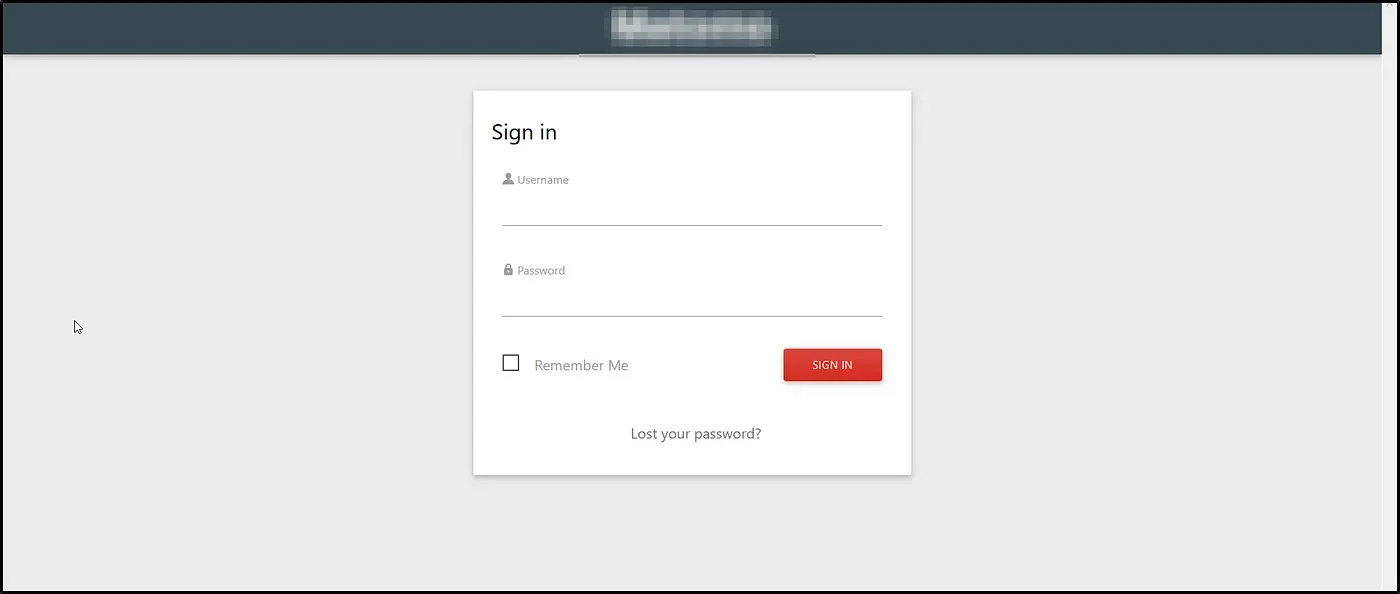
The screenshot shows that login prompt on the subdomain.
From there the researcher started fuzzing for directories and JavaScript files. That fuzzing found one endpoint, which redirected to a second endpoint, and the interface at the end of that redirect was the interesting part.
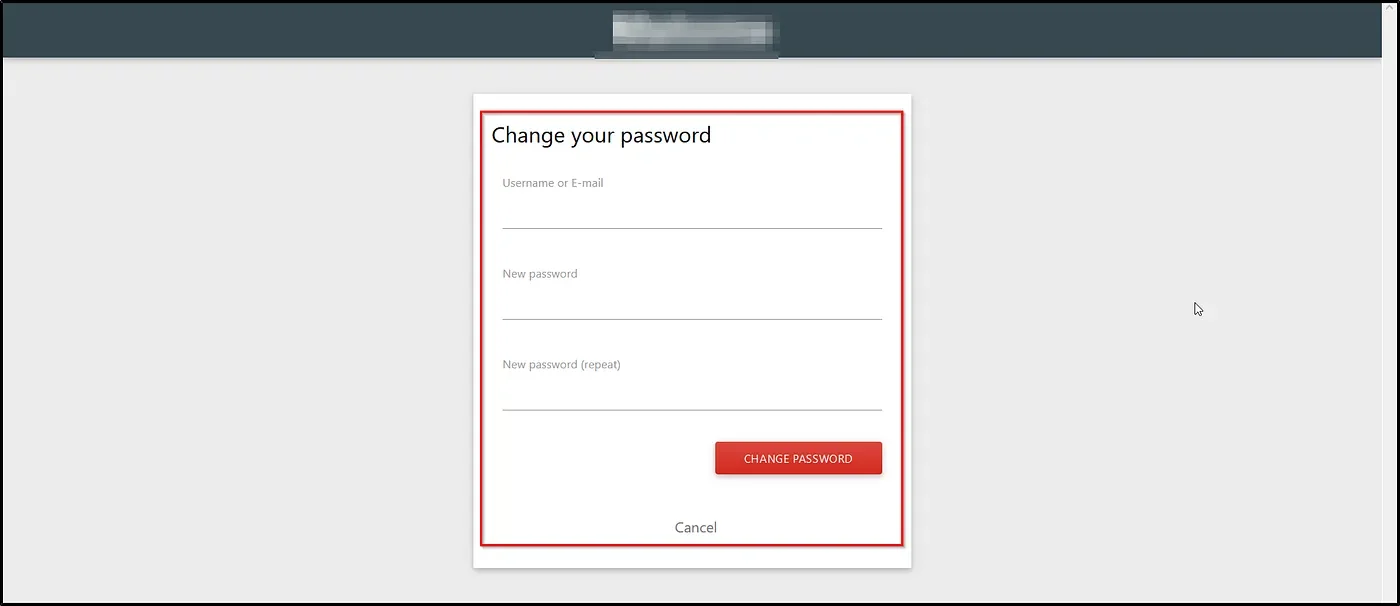
The screenshot shows the interface reached after the redirect. The researcher's reaction in the write-up is that this was the first time in three years of hunting that something like this had been found.
Exploitation
Step 1: Reach the redirected interface
Directory and JavaScript file fuzzing against the subdomain that showed the login prompt produced one endpoint. Requesting it redirected to another endpoint, and that second endpoint served an interface the researcher found interesting. The report does not give the paths, the parameters or the exact responses, only that the redirect chain ended at this interface.
Step 2: Collect email addresses
The researcher gathered a large number of email addresses for the @redacted.com domain. The sources were Google search and GitHub search, described as collecting "ton's of emails" from everywhere possible.
Step 3: Brute force the email parameter
Those addresses were then used to brute force the email parameter. Out of the set, approximately 3 to 5 addresses returned a 2xx response, while the rest returned 4xx responses. The 2xx responses were the signal that those particular addresses were accepted.
Step 4: Log in with an accepted address
Logging in with one of the email addresses that had produced a 2xx response succeeded, and the researcher was inside the admin panel.
Step 5: Report and disclosure
The issue was reported. According to the write-up, it was patched after 4 to 5 days and a bounty was paid.
Root cause
The report does not describe the server-side code, so the exact mistake is not stated. What the behaviour shows is that submitting email addresses produced 2xx responses for a few and 4xx for the rest, and that logging in with a 2xx address succeeded. That difference is what made the brute force practical, because the attacker did not need to interpret page content, only the status code.
Impact
An attacker who can reach the redirected interface and collect corporate email addresses can find addresses that return 2xx and log in with one of them, reaching the admin panel. In this case the researcher reached the admin panel with a harvested address.
Fix
The report says only that the issue was patched within 4 to 5 days. Based on the behaviour, a fix would need to remove the status-code difference, for example by returning a uniform response for valid and invalid addresses.
Variants to test
- Fuzz directories and JavaScript files on every subdomain that shows a login prompt. A positive result is an endpoint that redirects to an interface reachable without the credentials the first page asked for.
- Harvest corporate email addresses from Google and GitHub, then submit them to any email-accepting endpoint and compare status codes. A positive result is a small set of 2xx responses among mostly 4xx responses.
- Log in with each address that returned 2xx. A positive result is a session inside the panel.
- Check whether the same status-code difference exists on password reset and registration endpoints, where valid and invalid addresses are often handled differently.
- Check the screenshots from recon, since the interesting subdomain here was spotted among them.
The researcher closes with a note that everything depends on observation, that not finding high-severity issues does not mean someone is a bad hunter, and that duplicate reports are no reason to stop looking for something more interesting.
What happened, in plain words
A security researcher was given a private website to test. The site had one main application and many subdomains (a subdomain is a prefix like shop.example.com; the main site is example.com). Among those subdomains were several admin panels. An admin panel is a private page where the people who run the site manage it: they can see data, change settings and control other users. Normally you need a username and password to get in.
The researcher spent two days finding nothing. Then he went back to screenshots he had taken earlier of every subdomain and looked at them one by one. One subdomain showed a login box asking for a username and password. He fuzzed that subdomain for directories and JavaScript files, found one endpoint that redirected to another, and the second page showed an interesting interface.
He then collected lots of email addresses ending in @redacted.com from Google and GitHub. He tried each one on that interface. Most were rejected, but a few (about 3 to 5) were accepted. He logged in with one of the accepted addresses and was inside the admin panel. He reported it, and it was fixed within 4 to 5 days, and he was paid a bounty.
The image above is the welcome banner of the write-up.
The setup
The scope was everything under *.redacted.com. The * is a wildcard: it means every subdomain of redacted.com, not just www. No special account or role was given to him. He used a mix of public tools and his own private tool. The public tools named in the report are:
- Amass and Assetfinder, for finding subdomains. A subdomain is a name like
mail.example.comthat points to a separate service. Finding them is called subdomain enumeration. - httprobe, for checking which subdomains are alive (that is, which ones answer when you visit them).
- nmap, for checking which ports are open on a machine. A port is like a numbered door on a computer; a web server usually listens on port 80 or 443.
- EyeWitness, for taking screenshots of the live hosts automatically. A host is a machine or service reachable on the network.
The researcher notes that anyone who knows a little bash scripting (writing small commands for the Linux command line) can build the same chain themselves. The reason to do all this is that recon (short for reconnaissance, meaning looking around before attacking) tells you how the site works, how the developers think, and which subdomains are worth a closer look.
Finding it
The first two days produced nothing. On day one he checked the main application: every feature and every endpoint. An endpoint is a specific URL that the application uses to do something, like /login or /api/users. On day two he tried SQL injection payloads against the admin panels. SQL injection is a trick where you put database commands into a form field in the hope that the site runs them; a payload is the actual text you send. Nothing worked.
After that he visited each admin panel and read its JavaScript files. JavaScript is the code that runs in your browser and makes pages interactive; reading it can reveal hidden URLs and how the site talks to the server. Again nothing.
So he checked the screenshots from recon, then picked each subdomain one by one, visiting subdomain.redacted.com to see what it looked like on first visit. One of them showed a username and password login prompt.
The screenshot shows that login prompt on the subdomain.
From there he started fuzzing for directories and JavaScript files. Fuzzing means trying a long list of common names automatically, like /admin, /backup, /api, to see which ones exist. That fuzzing found one endpoint, which redirected to a second endpoint. A redirect is when the server answers with a message that says "go look at this other URL instead". The interface at the end of that redirect was the interesting part.
The screenshot shows the interface reached after the redirect. The researcher's reaction in the write-up is that this was the first time in three years of hunting that he had found something like this.
Exploitation
Step 1: Reach the redirected interface
Fuzzing directories and JavaScript files on the subdomain that showed the login prompt produced one endpoint. Requesting it redirected to another endpoint, and that second endpoint served an interface the researcher found interesting. The report does not give the paths, the parameters or the exact responses, only that the redirect chain ended at this interface.
Step 2: Collect email addresses
The researcher gathered a large number of email addresses for the @redacted.com domain. The sources were Google search and GitHub search, described as collecting "ton's of emails" from everywhere possible. The reason to do this is that if the interface only checks the email address, then knowing real addresses is half the work.
Step 3: Brute force the email parameter
Those addresses were then used to brute force the email parameter. Brute forcing means trying many values automatically until one works. A parameter is a named value you send to the server, like email=[redacted]. Out of the set, approximately 3 to 5 addresses returned a 2xx response, while the rest returned 4xx responses. A response code (HTTP status code) is a three-digit number the server sends back: 2xx means success, 4xx means the request was refused (for example, 404 means not found, 401 means not authorised). The 2xx responses were the signal that those particular addresses were accepted.
Step 4: Log in with an accepted address
Logging in with one of the email addresses that had produced a 2xx response succeeded, and the researcher was inside the admin panel.
Step 5: Report and disclosure
The issue was reported. According to the write-up, it was patched after 4 to 5 days and a bounty was paid.
Root cause
The report does not describe the server-side code, so the exact mistake is not stated. What the behaviour shows is that submitting email addresses produced 2xx responses for a few and 4xx for the rest, and that logging in with a 2xx address succeeded. That difference is what made the brute force practical, because the attacker did not need to read the page content, only the status code. An oracle here means a way to ask the server a yes/no question (is this address valid?) and get a reliable answer.
Impact
An attacker who can reach the redirected interface and collect corporate email addresses can find addresses that return 2xx and log in with one of them, reaching the admin panel. In this case the researcher reached the admin panel with a harvested address.
Fix
The report says only that the issue was patched within 4 to 5 days. Based on the behaviour, a fix would need to remove the status-code difference, for example by returning a uniform response for valid and invalid addresses.
Variants to test
- Fuzz directories and JavaScript files on every subdomain that shows a login prompt. A positive result is an endpoint that redirects to an interface reachable without the credentials the first page asked for.
- Harvest corporate email addresses from Google and GitHub, then submit them to any email-accepting endpoint and compare status codes. A positive result is a small set of 2xx responses among mostly 4xx responses.
- Log in with each address that returned 2xx. A positive result is a session inside the panel.
- Check whether the same status-code difference exists on password reset and registration endpoints, where valid and invalid addresses are often handled differently.
- Check the screenshots from recon, since the interesting subdomain here was spotted among them.
The researcher closes with a note that everything depends on observation, that not finding high-severity issues does not mean someone is a bad hunter, and that duplicate reports are no reason to stop looking for something more interesting.
Glossary
- Admin panel: a private web page where site staff manage data, settings and users.
- Amass: a public tool that finds subdomains.
- Assetfinder: a public tool that finds subdomains.
- Authentication: the process of proving who you are, usually with a username and password.
- Bash scripting: writing small programs for the Linux command line.
- Bounty: money paid by a company for a valid security report.
- Brute force: trying many values automatically until one works.
- Credential: a piece of proof of identity, such as a username, password or email address.
- Directory fuzzing: automatically trying a list of common folder names on a website to see which exist.
- Endpoint: a specific URL that an application uses to do something.
- Enumeration: listing things systematically, such as all subdomains of a domain.
- EyeWitness: a public tool that takes screenshots of live hosts.
- Fuzzing: automatically trying many inputs to find one that behaves differently.
- Host: a machine or service reachable on a network.
- HTTP status code: a three-digit number a server sends back; 2xx means success, 4xx means refused.
- httprobe: a public tool that checks which subdomains are alive.
- JavaScript: code that runs in your browser and makes pages interactive.
- nmap: a public tool that checks which ports are open on a machine.
- Oracle: a way to ask a server a yes/no question and get a reliable answer.
- Parameter: a named value sent to the server, like
email=[redacted]. - Payload: the actual text sent in an attack.
- Port: a numbered door on a computer; web servers usually listen on 80 or 443.
- Recon: short for reconnaissance, looking around before attacking.
- Redirect: a server answer that tells the browser to go to another URL.
- Response code: same as HTTP status code.
- SQL injection: putting database commands into a form field in the hope the site runs them.
- Subdomain: a name like
mail.example.comthat points to a separate service. - Subdomain enumeration: finding subdomains.
- Wildcard scope: permission to test every subdomain of a domain, written
*.example.com.




