Subdomain Takeover: A Real Bug I Found️
A subdomain of the company pointed via a dangling CNAME to Mailgun, and the external service resource was unclaimed. The author claimed it with a free Mailgun account, allowing them to serve content from the victim's subdomain.

medium.com
Published on medium.com
Cybersecurity
The full write-up lives on its author's site
It belongs to its author, so we link to it rather than copy it. The other two tabs are our own rewrites, checked against it.
Context
This write-up describes a subdomain takeover found during a bug bounty engagement. The company is anonymised as XYZ Company, and the affected host is email.sub.xyzcompany.com, a subdomain used for email sending. The subdomain was configured with a CNAME record pointing at Mailgun, the third-party email delivery service, but the corresponding domain had never been claimed inside a Mailgun account. Because the DNS record still existed while the external resource behind it was unclaimed, anyone who could register that domain in their own Mailgun account could serve content from the company's subdomain.
A subdomain takeover, as the author defines it, happens when a subdomain points to an external service that has been deleted, expired or misconfigured, yet the DNS entry still exists. If an attacker can claim that external resource, they can serve content directly from the victim's subdomain.
Setup
The work was done as part of a bug bounty engagement on a program whose details are anonymised. A free Mailgun account was created to test whether the domain could be claimed. The tooling was standard reconnaissance and takeover detection:
- a set of subdomain enumeration tools, whose output was merged and deduplicated into a single list;
- Nuclei, with the takeover templates from the
http/takeovers/directory; - Subzy, for a second opinion on takeover candidates;
dig, for manual DNS confirmation.
No specific versions are given in the report.
Finding it
The recon phase started with large-scale subdomain enumeration. Several tools were run to maximise coverage, and their results were merged and deduplicated into one clean list. That list was then passed through Nuclei templates and Subzy to flag subdomains showing signs of being vulnerable to takeover.
Both tools flagged email.sub.xyzcompany.com as a potential takeover candidate. Both tools flagged email.sub.xyzcompany.com as a potential takeover candidate, and the author moved to manual verification before trusting the automated results.
Exploitation
Step 1: Flagging candidates with Nuclei
The merged subdomain list was scanned with the takeover template set:
nuclei -list all_subdomains.txt -t /home/kido/nuclei-templates/http/takeovers/ -rl 30 -c 30 -timeout 10 -retries 2 -H "User-Agent: Mozilla/5.0 (Windows NT 10.0; Win64; x64) AppleWebKit/537.36" -stats
-list supplies the input file of subdomains, -t points at the directory of takeover templates, -rl 30 caps the request rate at 30 per second, -c 30 sets 30 concurrent templates, -timeout 10 and -retries 2 control how patient the scan is per request, and -H sets a browser-like User-Agent header on the requests. -stats prints progress. The scan flagged email.sub.xyzcompany.com.
Step 2: Confirming with Subzy
The same list was run through Subzy as a second check:
subzy run --targets all_subdomains.txt --hide_fails --verify_ssl
--targets takes the input list, --hide_fails suppresses subdomains that did not match, and --verify_ssl enables SSL verification in Subzy. Subzy also flagged email.sub.xyzcompany.com, matching the Nuclei result.
Step 3: Manual DNS verification
Before trusting the automated output, the author confirmed the CNAME directly:
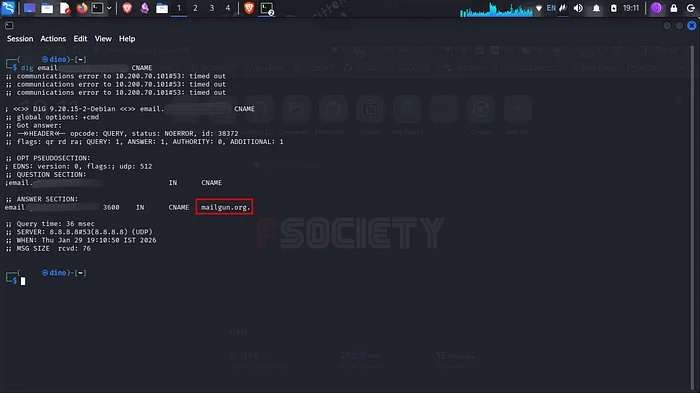
dig email.sub.xyzcompany.com CNAME;; ANSWER SECTION:email.sub.xyzcompany.com. 300 IN CNAME mailgun.org.
The answer section shows email.sub.xyzcompany.com as a CNAME with a TTL of 300 seconds pointing at mailgun.org. This confirmed the subdomain was pointing at Mailgun's infrastructure but was not tied to an active, claimed account: a classic dangling CNAME setup.
Step 4: Claiming the domain in Mailgun
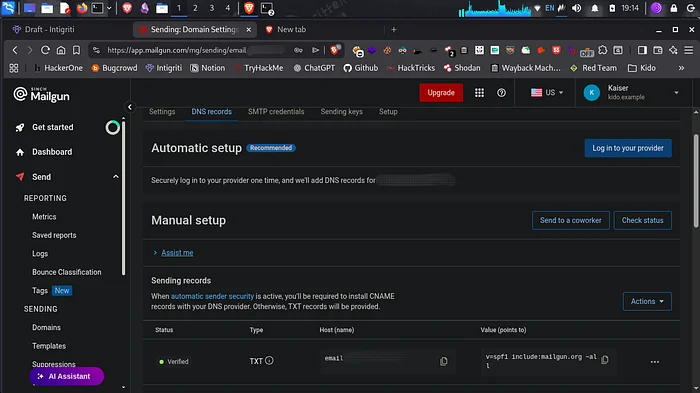
The author created a free Mailgun account and attempted to add email.sub.xyzcompany.com as a sending domain. Normally Mailgun blocks this with a "domain already exists" or ownership-conflict error if the domain is tied to an active account. In this case the domain was added successfully to the author's account, which confirmed the subdomain was unclaimed and takeover-able.
Step 5: Reporting and triage
The issue was reported to the company, explaining that the author had been able to add their subdomain to a personal Mailgun account. The team reviewed the report, confirmed the issue, and rewarded the author with a bounty. The report does not state the bounty amount, the severity rating or the CVSS score.
Root cause
The DNS record for email.sub.xyzcompany.com still pointed at mailgun.org, but no Mailgun account held a claim on the domain name. The CNAME still resolved to mailgun.org, but no Mailgun account held a claim on the domain name. Mailgun normally blocks adding a domain with a "domain already exists" or ownership-conflict error if it is tied to an active account. With no claim, the first person to add the domain wins it. The report does not describe how the record came to be orphaned, so the exact sequence that produced the dangling CNAME is not stated.
Impact
With the domain claimed in an attacker-controlled Mailgun account, the attacker can serve content directly from the victim's subdomain. The report does not go further into which specific attacks were demonstrated or which users would be affected; the impact described is limited to the ability to serve content from the subdomain.
Fix
The general fix for a dangling CNAME is to remove the DNS record, or to point it at a resource the organisation actually controls, and to keep an inventory of external service records so that they are cleaned up when the corresponding service is decommissioned.
Variants to test
The same pattern applies to any subdomain whose DNS record points at a third-party service that may no longer be claimed:
- Run takeover templates and a dedicated takeover scanner over a deduplicated subdomain list, and treat agreement between tools as a lead rather than a finding.
- For each candidate, confirm the record type and target with
dig, as above. A positive result is a CNAME pointing at a provider's infrastructure with no active claim behind it. - Attempt to register or claim the resource in a free account on the provider. A positive result is the provider accepting the domain without an ownership-conflict error.
- Repeat for other providers that host claimable resources behind DNS records, since the same dangling-record condition can arise wherever a service is decommissioned without the DNS entry being removed.
What happened, in plain words
A security researcher was taking part in a bug bounty programme. A bug bounty programme is an arrangement where a company invites outside people to look for security weaknesses in its systems and pays them for reporting what they find, instead of punishing them.
While looking around, the researcher found a small piece of the company's internet presence, a subdomain, that was set up to hand its email sending over to an outside company called Mailgun. Mailgun is a service that sends email on behalf of other businesses. The problem was that the subdomain was not tied to an active, claimed Mailgun account. The pointer existed, but the thing it pointed at was free for anyone to grab.
So the researcher grabbed it: they created a free Mailgun account and added the company's subdomain to it. Mailgun accepted it without complaint, which proved the subdomain was unclaimed. The researcher reported this to the company, the company confirmed it, and the researcher was paid a bounty.
This kind of weakness is called a subdomain takeover. The rest of this article walks through it slowly, assuming you have never done security work before.
Some background you need first
Before the steps make sense, a few everyday ideas need explaining.
A domain name is the readable address of a website, like example.com. It is what you type into the browser's address bar. Behind it sits a numeric address that computers actually use, but people never have to remember that.
A subdomain is a name that sits in front of a domain, separated by a dot. If xyzcompany.com is the main address, then email.sub.xyzcompany.com is a subdomain of it. Companies use subdomains to split things up: one for the shop, one for support, one for sending email. To a visitor, a subdomain looks like part of the same organisation, because it ends in the same domain name.
DNS stands for Domain Name System. Think of it as the internet's phone book: you look up a name, and it tells you where to go. When your browser wants to reach a subdomain, it asks DNS for the answer.
A CNAME record is one kind of entry in that phone book. CNAME stands for Canonical Name, and it means "this name is really just another name for that other name over there". It is like a mail forwarding note on a letterbox: post sent to this address should be passed on to a different address. Companies use CNAME records to hand a subdomain over to an outside service, so that the outside service can answer requests while the name still belongs to the company.
A dangling CNAME is a forwarding note that points at a place nobody owns any more. The note is still stuck on the letterbox, but the destination is empty. Anyone who can move into that destination starts receiving the post addressed to the original name.
A subdomain takeover is what happens when someone moves into that empty destination. The company's name still appears in the address bar, but the content is now under someone else's control. The researcher's own definition is worth keeping: a subdomain takeover occurs when a subdomain points to an external service that has been deleted, expired or misconfigured, yet the DNS entry still exists. If an attacker can claim that external resource, they can serve content directly from the victim's subdomain.
A bug bounty engagement is a period of authorised testing under a programme's rules. The researcher was allowed to look, and the company had agreed in advance to receive reports.
Reconnaissance, or recon, is the information-gathering stage: finding out what names and systems a company has on the internet before testing anything.
Subdomain enumeration is the specific recon job of discovering as many of a company's subdomains as possible. You cannot test what you have not found.
Nuclei is a free, widely used scanning tool. It works from small recipe files called templates, each of which describes one check to run against a target. There are community template collections for many kinds of weakness, including takeovers.
Subzy is a smaller tool with one job: check a list of subdomains for signs that they can be taken over.
dig is a command-line tool for asking DNS questions directly. Where a browser hides the lookup, dig shows you the raw answer.
A User-Agent is a short line of text that a browser, or a tool pretending to be one, sends with every request to say what kind of client it is. Websites see it and often behave differently depending on what it says.
TLS is the encryption that puts the padlock in your browser and protects traffic between you and a site. Checking TLS means confirming that the certificate a site presents is valid for the name being tested.
A bounty is the payment a programme makes for a valid report. The report does not state the amount, the severity rating or the CVSS score, so none of those are known here.
The story begins
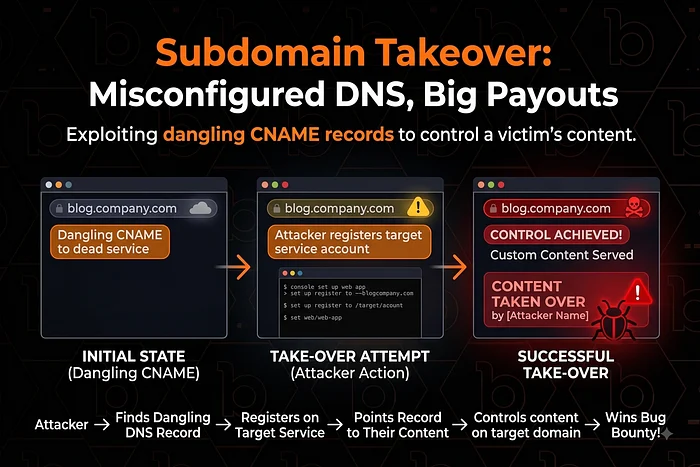
The image at the top is the article's title card: "Subdomain Takeover: A Real Bug I Found", by Kido, dated Aug 16, 2026, with a reading time of 3 minutes.
During a bug bounty engagement on a programme whose details are anonymised, the researcher found a subdomain pointing to Mailgun that no one had claimed, and claimed it. The plan for the article is simple: how it was found, how it was confirmed, and how it was reported.
What a subdomain takeover is
As above: a subdomain points at an outside service that has been deleted, expired or misconfigured, but the DNS entry pointing there is still in place. If an attacker can claim that outside resource, they can serve content directly from the victim's subdomain.
Finding it: the recon phase
The work started with large-scale subdomain enumeration. Several tools were run to maximise coverage. The outputs were then merged and duplicates removed, leaving one clean list. That list was passed through Nuclei templates and Subzy to flag subdomains that showed signs of being vulnerable to takeover.
The list is the input to both, so the effort of building it is paid back twice.
Running Nuclei
The merged list was scanned with the takeover template set:
nuclei -list all_subdomains.txt -t /home/kido/nuclei-templates/http/takeovers/ -rl 30 -c 30 -timeout 10 -retries 2 -H "User-Agent: Mozilla/5.0 (Windows NT 10.0; Win64; x64) AppleWebKit/537.36" -stats
Line by line, in plain words:
nucleiis the name of the program being run.-list all_subdomains.txttells it to read the targets from a text file calledall_subdomains.txt, one subdomain per line. This is the merged, deduplicated list from the recon step.-t /home/kido/nuclei-templates/http/takeovers/points at the folder of takeover templates. Instead of running every check Nuclei knows, this restricts it to the recipes that look for takeover conditions.-rl 30caps the request rate at 30 requests per second.-c 30sets 30 concurrent templates.-timeout 10sets a 10 second timeout.-retries 2sets two retries.-H "User-Agent: Mozilla/5.0 (Windows NT 10.0; Win64; x64) AppleWebKit/537.36"sets a browser-like User-Agent header.-statsprints progress while the scan runs, so you can see it is working.
The scan flagged email.sub.xyzcompany.com as a potential takeover candidate.
Running Subzy
The same list was run through Subzy as a second check:
subzy run --targets all_subdomains.txt --hide_fails --verify_ssl
Line by line:
subzy runstarts Subzy in its checking mode.--targets all_subdomains.txttakes the input list, the same file Nuclei used.--hide_failshides failed results.--verify_sslenables SSL verification.
Subzy also flagged email.sub.xyzcompany.com, matching the Nuclei result. Both tools flagged email.sub.xyzcompany.com, and the author then verified it manually.
Checking by hand
Before trusting the automated results, the researcher confirmed the CNAME directly with dig:
dig email.sub.xyzcompany.com CNAME;; ANSWER SECTION:email.sub.xyzcompany.com. 300 IN CNAME mailgun.org.
What this shows, piece by piece:
digis the DNS lookup tool being run.email.sub.xyzcompany.comis the name being asked about.CNAMEsays the question is specifically about the CNAME record, not any other kind of entry.;; ANSWER SECTION:marks the start of the reply.email.sub.xyzcompany.com.is the name the answer is about.300is the TTL, or time to live, in seconds. It tells other DNS servers how long they may keep this answer before asking again.INis the class of record, short for Internet. It is boilerplate in practice.CNAMErepeats the record type.mailgun.org.is the destination: the name this subdomain is really an alias for.
So the subdomain was pointing at Mailgun's infrastructure, but was not tied to an active, claimed account. That is the classic dangling CNAME setup: the forwarding note is still on the letterbox, and the destination is empty.
The screenshot relates to the manual CNAME confirmation.
Claiming it
The researcher created a free Mailgun account and attempted to add email.sub.xyzcompany.com as a sending domain.
Normally Mailgun blocks this with a "domain already exists" or ownership-conflict error if the domain is tied to an active account. In this case, the domain was added successfully to the researcher's account. That confirmed the subdomain was unclaimed and takeover-able.
The screenshot relates to the domain being added to the researcher's Mailgun account.
Reporting it
The issue was reported to the company, explaining that the researcher had been able to add their subdomain to a personal Mailgun account. The team reviewed the report, confirmed the issue, and rewarded the researcher with a bounty.
The company can then check its own records and fix the configuration.
Why it happened
The DNS record for email.sub.xyzcompany.com still pointed at mailgun.org, but no Mailgun account held a claim on the domain name. The CNAME still resolved to mailgun.org, but no Mailgun account held a claim on the domain name. Mailgun normally blocks adding a domain with a "domain already exists" or ownership-conflict error if it is tied to an active account.
The report does not describe how the record came to be orphaned, so the exact sequence that produced the dangling CNAME is not stated.
What the impact is
With the domain claimed in an attacker-controlled Mailgun account, the attacker can serve content directly from the victim's subdomain.
The report does not go further into which specific attacks were demonstrated or which users would be affected; the impact described is limited to the ability to serve content from the subdomain.
How it gets fixed
The general fix for a dangling CNAME is to remove the DNS record, or to point it at a resource the organisation actually controls, and to keep an inventory of external service records so that they are cleaned up when the corresponding service is decommissioned.
The same pattern elsewhere
The same pattern applies to any subdomain whose DNS record points at a third-party service that may no longer be claimed. A beginner can follow the same shape of work:
- Run takeover templates and a dedicated takeover scanner over a deduplicated subdomain list, and treat agreement between tools as a lead rather than a finding.
- For each candidate, confirm the record type and target with
dig, as above. A positive result is a CNAME pointing at a provider's infrastructure with no active claim behind it. - Attempt to register or claim the resource in a free account on the provider. A positive result is the provider accepting the domain without an ownership-conflict error.
- Repeat for other providers that host claimable resources behind DNS records, since the same dangling-record condition can arise wherever a service is decommissioned without the DNS entry being removed.
A closing note on permission
The researcher was working inside a bug bounty programme, which is what made the testing authorised. The article's own disclaimer says the content is for educational purposes only, and that you should always ensure you have proper authorisation before conducting security assessments.
Glossary
- Bug bounty programme: an arrangement where a company invites outside researchers to find and report security weaknesses, usually paying for valid reports.
- Bounty: the payment a programme makes for a valid report.
- Domain name: the readable address of a site, such as
example.com. - Subdomain: a name placed in front of a domain, separated by a dot, such as
email.sub.xyzcompany.com. - DNS (Domain Name System): the internet's naming system that turns names into the locations computers use.
- CNAME record: a DNS entry saying one name is an alias for another name.
- TTL (time to live): how long, in seconds, a DNS answer may be cached before it is looked up again.
- Dangling CNAME: a CNAME pointing at an outside resource that nobody currently owns or has claimed.
- Subdomain takeover: claiming an unowned external resource that a victim's subdomain still points at, so content can be served from the victim's name.
- Reconnaissance (recon): the information-gathering stage of a security assessment.
- Subdomain enumeration: discovering as many of an organisation's subdomains as possible.
- Nuclei: a scanning tool that runs small recipe files called templates against targets.
- Template: a recipe file describing one check for Nuclei to perform.
- Subzy: a tool that checks a list of subdomains for signs of being takeover-able.
dig: a command-line tool for querying DNS directly and showing the raw answer.- User-Agent: a line of text a client sends to say what browser or tool it is.
- TLS: the encryption behind the padlock in a browser, protecting traffic between client and server.
- Sending domain: a domain added to an email service so the service is allowed to send email on its behalf.
- Ownership-conflict error: a provider's refusal to add a domain because another active account already claims it.
- Severity rating: a label for how serious a weakness is. Not stated for this report.
- CVSS: a standard scoring system for weakness severity. Not stated for this report.



