Subdomain takeover and Text injection on a 404 error page-$100 bounty
A subdomain pointed to a deleted Heroku service, allowing an attacker to claim it and serve content. The 404 page also reflected user-supplied text, enabling content injection.
 Published on medium.com
Hello everyone! I’m Jeewan Bhatta and I am here with my first hackerone bug write-up.
The full write-up lives on its author's site
It belongs to its author, so we link to it rather than copy it. The other two tabs are our own rewrites, checked against it.
Context
This is a short write-up by Jeewan Bhatta (@thenullkid) about his first HackerOne report, which paid a $100 bounty. The target is referred to only as target.com; the report does not name the organisation or the affected subdomain, which it writes as subdomain.target.com. Two weaknesses are described together: a subdomain takeover and text injection (content spoofing) on a 404 error page.
The report defines both concepts up front. A subdomain takeover happens when a subdomain such as subdomain.example.com points to a service (the report gives Heroku pages and Unbounce as examples) whose resource has been removed or deleted. An attacker can then set up a page on that service and point it to the subdomain. Content spoofing, also called content injection or arbitrary text injection, is an attack in which an application does not properly handle user-supplied data, typically a parameter value, and reflects it back to the user.
Setup
The researcher describes the work as a normal reconnaissance process. The tools mentioned are:
- A subdomain collection step for the target, producing a list of candidate subdomains.
httpstatus.io, used to check the HTTP status code returned by each subdomain.- Manual checking of every subdomain that returned a 404.
dig, used to inspect the CNAME record of the subdomain that looked interesting.
No accounts, roles or software versions are given. The one stated limitation is on the attacker side: because of a paid subscription requirement, the researcher could not add a custom domain on Heroku, so he could not complete the takeover himself.
Finding it
After collecting the possible subdomains of the target, the researcher sent them to httpstatus.io to check their status codes and then manually went through all the subdomains returning 404. One of them, subdomain.target.com, showed a 404 error message. Two things made it stand out:
- Its CNAME pointed to herokudns, the Heroku DNS endpoint.
- The 404 page itself was vulnerable to text injection: the researcher was able to modify the content of the page.
The CNAME check was done with:
dig subdomain.target.com
dig queries DNS for the name and shows its records; the relevant output here is the CNAME target, herokudns. A CNAME to a Heroku DNS endpoint means the subdomain is delegated to Heroku, which is the precondition for a takeover.
Exploitation
Step 1: Identify a dangling subdomain
Enumerate subdomains, check status codes in bulk with httpstatus.io, and keep the ones returning 404. A 404 on a subdomain that is still delegated in DNS is worth a second look, because the error may come from the hosting provider rather than from an application the organisation still controls.
Step 2: Confirm the CNAME target
Run dig against the candidate. In this case the CNAME pointed to herokudns.
Step 3: Claim the resource
The intended next step is to register the corresponding resource on the service the CNAME points to, so that requests to the subdomain are served by the attacker's content. The researcher could not complete this step: adding a custom domain on Heroku required a paid subscription, so the takeover was not demonstrated end to end. The report was filed on the strength of the dangling CNAME and the injection on the error page.
Step 4: Text injection on the 404 page
The same 404 page reflected user-supplied input, and the researcher was able to modify the content of the page. The report does not include the request, the parameter name or the payload used for the injection, so the exact mechanism is not documented here.
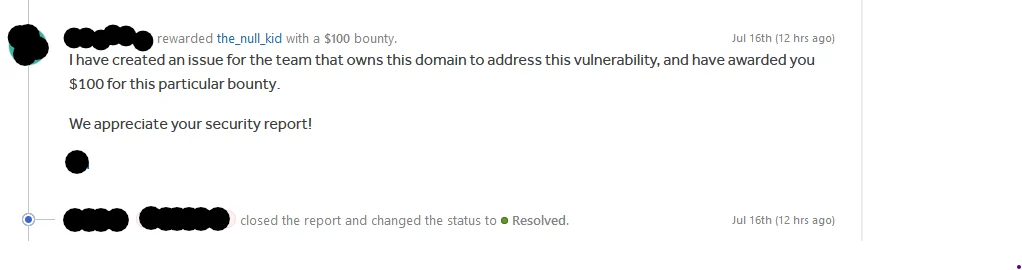
The screenshot accompanies the sentence about modifying the page content and being unable to add a custom domain on Heroku because of the paid subscription; the report says the team triaged the report and resolved the issue.
Timeline and outcome
| Stage | Date |
|---|---|
| Reported | 15 July 2022 |
| Reviewed, triaged and resolved | 16 July 2022 |
| Bounty | $100 |
The team triaged the report and resolved the issue the day after it was submitted.
Root cause
Two separate mistakes are involved.
For the takeover, the subdomain's DNS contained a CNAME to herokudns. Nothing in the organisation's DNS hygiene removed the stale record, so the name remained delegated to a third-party service where anyone able to register the matching resource could serve content under the organisation's domain. The report does not describe any monitoring or ownership check that would have caught the dangling record.
For the injection, the 404 error page reflected user-supplied data without proper handling. The report states the general cause (an application not properly handling user-supplied data, typically a parameter value reflected back to the user) but does not show the code path, so the specific missing encoding or validation is not known.
Impact
The takeover, if completed, would let an attacker serve their own content on a subdomain of the target's domain. In this case the researcher could not finish the takeover because of the Heroku subscription requirement, so the impact was argued from the dangling CNAME rather than demonstrated.
The text injection allowed an attacker to alter the visible content of the error page, which supports content spoofing against users who reach that page.
Fix
The measures that address the two findings are: remove or repoint the dangling CNAME so the subdomain no longer resolves to a third-party service the organisation does not control, and encode or otherwise handle user-supplied data on the error page so it cannot be reflected as content.
Variants to test
- Dangling CNAMEs to other providers. Run the same status-code sweep and
digagainst every subdomain, not just those returning 404. A positive result is a CNAME pointing to a hosting or page-builder service (the report names Heroku pages and Unbounce) where the backing resource no longer exists, and where the provider lets you claim the name. - Error pages as injection sinks. Request non-existent paths with parameters and check whether the 404 page reflects them.
- Takeover feasibility check. For each dangling CNAME, confirm whether registering the resource requires a paid plan, as it did on Heroku here. A positive result is a free path to claim the name, which turns a reported dangling record into a demonstrable takeover.
- DNS hygiene after decommissioning. When an application or page-builder site is retired, check whether its DNS records are removed at the same time. A positive result is a subdomain that still resolves to the provider after the resource is gone.
What happened, in plain words
A security researcher called Jeewan Bhatta found two problems on the same web address belonging to a company he was testing. The company is only ever called target.com in his write-up, and the affected address is written as subdomain.target.com. He reported the problems, the team triaged the report and resolved the issue, and paid him $100. It was his first report on the HackerOne platform.
The two problems are:
-
A subdomain takeover. A subdomain is a smaller address that sits under a company's main address, like
shop.example.comunderexample.com. Companies often point subdomains at outside services, for example a hosting company that runs a page for them. If the company later deletes its page on that outside service but forgets to remove the pointer in its own address system, the pointer is left dangling. Anyone who can create a page on that outside service can then claim the name and serve their own content under the company's domain. That is a subdomain takeover. -
Text injection on a 404 page. A 404 page is the page a website shows when you ask for something that does not exist. Some 404 pages repeat back part of what you typed in the address. If the site does not handle that text carefully, an attacker can make the page display words of their choosing. This is called content spoofing, content injection or arbitrary text injection.
The researcher found the subdomain during routine reconnaissance (the information-gathering phase at the start of any test), noticed its pointer went to Heroku (a hosting service), and noticed the 404 page would display text he supplied. He could not finish the takeover himself because Heroku required a paid subscription to add a custom domain, but the report was accepted anyway and fixed the next day.
The two weaknesses, explained from zero
Before the story, the report defines both problems. It is worth slowing down on these definitions, because everything else depends on them.
Subdomain takeover
The report's definition: subdomain takeover vulnerabilities occur when a subdomain (subdomain.example.com) is pointing to a service (e.g. Heroku pages, Unbounce, etc.) that has been removed or deleted. This allows an attacker to set up a page on the service that was being used and point their page to that subdomain.
To unpack that, you need three ideas:
- Domain and subdomain. A domain is the name you type to reach a site, like
example.com. A subdomain adds a word in front, likeblog.example.comorshop.example.com. The company controls all of them through its DNS, the internet's address book. - DNS record and CNAME. DNS is the system that turns names into destinations. A CNAME record is a special entry that says "this name is really just another name, go look there instead". It is like a mail forwarding note: post sent to your old flat gets redirected to your new one. Companies use CNAMEs to hand a subdomain over to an outside provider without running any server themselves.
- Dangling pointer. If the company stops paying for, or deletes, its page at the outside provider, but leaves the CNAME in place, the forwarding note still points at the provider. The provider no longer has a page for that name. If the provider lets anyone register that name, an attacker registers it and now controls what visitors to
subdomain.example.comsee.
Why it matters: visitors see the company's real domain in the address bar, so they trust the page. An attacker can use that trust for phishing (fake login pages that steal passwords) or to spread malware.
Content spoofing / text injection
The report's definition: content spoofing, also referred to as content injection, "arbitrary text injection" is an attack targeting a user made possible by an injection vulnerability in a web application. When an application does not properly handle user-supplied data, an attacker can supply content to a web application, typically via a parameter value, that is reflected back to the user.
In simpler words:
- User-supplied data is anything a visitor types or sends: a search term, a name in a form, part of a web address.
- A parameter is a named value attached to a web address, the part after a question mark, like
?name=hello. The site reads it and often shows it back ("Hello, hello!"). - Reflection means the site puts your input into the page it sends back.
- The flaw is that the site does not treat that input as untrusted text. It drops it into the page as if it were the site's own words. An attacker can therefore make the page say something the company never wrote, which is why it is called spoofing: the content looks official but is not.
How he found it
The researcher describes the work as a normal reconnaissance process. The tools he mentions are:
- A subdomain collection step for the target, producing a list of candidate subdomains.
httpstatus.io, a website that checks what HTTP status code a web address returns.- Manual checking of every subdomain that returned a 404.
dig, a command-line tool that looks up DNS records, used on the subdomain that looked interesting.
A quick word on status codes, since they drive the whole method. When your browser asks a server for a page, the server answers with a number. 200 means "here it is". 404 means "I do not have that". 500 means "something broke on my side". Checking these numbers in bulk is a fast way to sort a long list of subdomains into ones that host something and ones that do not.
No accounts, roles or software versions are given in the report. The one stated limitation is on the attacker side: because of a paid subscription requirement, the researcher could not add a custom domain on Heroku, so he could not complete the takeover himself.
Finding it
After collecting the possible subdomains of the target, the researcher sent them to httpstatus.io to check their status codes, then manually went through all the subdomains returning 404. One of them, subdomain.target.com, showed a 404 error message. Two things made it stand out:
- Its CNAME pointed to herokudns, the Heroku DNS endpoint.
- The 404 page itself was vulnerable to text injection: the researcher was able to modify the content of the page.
Why check the CNAME at all? A 404 alone proves nothing. Plenty of subdomains legitimately return 404 because the company's own server is saying "no such page". The interesting case is a 404 that comes from an outside provider, because that means the name is still handed over to that provider. The CNAME tells you who is really answering. The check was done with:
dig subdomain.target.com
Line by line:
digis the command name. It asks a DNS server for the records belonging to a name.subdomain.target.comis the name being looked up. You replace this with whichever subdomain you are investigating.
When you run it, dig prints a block of text. The part that matters here is the answer section, where a CNAME record shows the name it points to. In this case that target was herokudns. A CNAME to a Heroku DNS endpoint means the subdomain is delegated to Heroku, which is the precondition for a takeover. Think of it as a forwarding address that still works even though nobody lives at the destination any more.
Exploitation
Step 1: Identify a dangling subdomain
Enumerate subdomains, check status codes in bulk with httpstatus.io, and keep the ones returning 404. A 404 on a subdomain that is still delegated in DNS is worth a second look, because the error may come from the hosting provider rather than from an application the organisation still controls.
Why this order? The status sweep is cheap and narrows thousands of names down to a handful. Only then is it worth spending time on DNS lookups for each survivor.
Step 2: Confirm the CNAME target
Run dig against the candidate. In this case the CNAME pointed to herokudns. This step is what separates a boring 404 from a real lead: it tells you the name is still handed to a third party.
Step 3: Claim the resource
The intended next step is to register the corresponding resource on the service the CNAME points to, so that requests to the subdomain are served by the attacker's content. In everyday terms: the forwarding note says "go to this hosting company", so you go to that hosting company and create the page it is looking for. From then on, visitors to the company's subdomain see your page.
The researcher could not complete this step: adding a custom domain on Heroku required a paid subscription, so the takeover was not demonstrated end to end. The report was filed on the strength of the dangling CNAME and the injection on the error page. In other words, he could show the door was unlocked but could not walk through it himself, and the company accepted that evidence.
Step 4: Text injection on the 404 page
The same 404 page reflected user-supplied input, and the researcher was able to modify the content of the page. The report does not include the request, the parameter name or the payload used for the injection, so the exact mechanism is not documented here.
The screenshot accompanies the sentence about modifying the page content and being unable to add a custom domain on Heroku because of the paid subscription; the report says the team triaged the report and resolved the issue.
Timeline and outcome
| Stage | Date |
|---|---|
| Reported | 15 July 2022 |
| Reviewed, triaged and resolved | 16 July 2022 |
| Bounty | $100 |
The team triaged the report and resolved the issue the day after it was submitted. "Triaged" means the security team read the report, confirmed the problem was real, and put it into their workflow; "resolved" means the fix was in place.
Root cause
Two separate mistakes are involved.
For the takeover, the subdomain's DNS contained a CNAME to herokudns. Nothing in the organisation's DNS hygiene removed the stale record, so the name remained delegated to a third-party service where anyone able to register the matching resource could serve content under the organisation's domain. The report does not describe any monitoring or ownership check that would have caught the dangling record.
A useful comparison: it is like cancelling a phone number but leaving the number printed on your business cards. Anyone who gets that number now speaks for your business.
For the injection, the 404 error page reflected user-supplied data without proper handling. The report states the general cause (an application not properly handling user-supplied data, typically a parameter value reflected back to the user) but does not show the code path, so the specific missing encoding or validation is not known. "Encoding" here means converting special characters into a harmless form so the browser displays them as text instead of treating them as part of the page.
Impact
The takeover, if completed, would let an attacker serve their own content on a subdomain of the target's domain. A cookie is a small piece of data a site stores in your browser, often to keep you logged in; if it is set for the whole parent domain, a page on any subdomain may be able to read or influence it. In this case the researcher could not finish the takeover because of the Heroku subscription requirement, so the impact was argued from the dangling CNAME rather than demonstrated.
The text injection allowed an attacker to alter the visible content of the error page, which supports content spoofing against users who reach that page. The report does not describe any further consequence, such as script execution, and does not claim one. That distinction matters: showing text is not the same as running code, and the report stays within what was actually seen.
Fix
The measures that address the two findings are: remove or repoint the dangling CNAME so the subdomain no longer resolves to a third-party service the organisation does not control, and encode or otherwise handle user-supplied data on the error page so it cannot be reflected as content.
Variants to test
If you want to try the same approach on a target you are authorised to test, these are the variations worth covering:
- Dangling CNAMEs to other providers. Run the same status-code sweep and
digagainst every subdomain, not just those returning 404. A positive result is a CNAME pointing to a hosting or page-builder service (the report names Heroku pages and Unbounce) where the backing resource no longer exists, and where the provider lets you claim the name. - Error pages as injection sinks. Request non-existent paths with parameters and check whether the 404 page reflects them.
- Takeover feasibility check. For each dangling CNAME, confirm whether registering the resource requires a paid plan, as it did on Heroku here. A positive result is a free path to claim the name, which turns a reported dangling record into a demonstrable takeover.
- DNS hygiene after decommissioning. When an application or page-builder site is retired, check whether its DNS records are removed at the same time. A positive result is a subdomain that still resolves to the provider after the resource is gone.
Glossary
- 404 page: the page a website shows when the address you asked for does not exist.
- Bounty: a reward a company pays a researcher for reporting a valid security problem.
- Browser: the program you use to visit websites, such as Chrome or Firefox.
- CNAME record: a DNS entry that says one name is an alias for another, like a mail forwarding note.
- Content injection / content spoofing / arbitrary text injection: making a website display text the attacker supplied, so the page appears to say something the company never wrote.
- Cookie: a small piece of data a site stores in your browser, often used to keep you logged in.
- DNS: the internet's address book, which turns names like
example.cominto destinations. - Domain: the main name of a website, such as
example.com. - Dangling CNAME: a CNAME that still points at an outside service even though the company's resource there has been deleted.
dig: a command-line tool that looks up DNS records for a name.- Encoding: converting special characters into a harmless form so they are displayed as text rather than treated as part of the page.
- Heroku: a hosting service on which companies can run pages and apps; the report also mentions herokudns, its DNS endpoint.
- HackerOne: a platform where researchers report security problems to companies and can receive bounties.
- HTTP status code: the number a server returns with every response, such as 200 (found), 404 (not found) or 500 (server error).
httpstatus.io: a website that checks the status code returned by a web address.- Parameter: a named value attached to a web address after a question mark, such as
?name=hello. - Phishing: a fake page or message that tricks people into giving away passwords or other data.
- Reconnaissance: the information-gathering phase at the start of a security test.
- Reflection: when a site puts your input back into the page it sends you.
- Subdomain: a smaller name under a main domain, such as
shop.example.comunderexample.com. - Subdomain takeover: claiming a subdomain by registering the outside resource its dangling DNS record still points to.
- Triaged: reviewed by the security team and confirmed as a real issue to be worked on.
- Unbounce: a page-builder service named in the report as another example of a service a subdomain can point to.
- User-supplied data: anything a visitor types or sends to a website.



