Subdomain Takeover Via Flywheel
A subdomain pointed to a Flywheel-hosted site that was no longer in use, allowing anyone to claim it by signing up for a Flywheel account and adding the domain. An attacker could then host arbitrary content on that subdomain, enabling phishing, cookie theft, or account takeover.

0xelmalky.medium.com
Published on 0xelmalky.medium.com
Bug Bounty
The full write-up lives on its author's site
It belongs to its author, so we link to it rather than copy it. The other two tabs are our own rewrites, checked against it.
Context
Flywheel is managed WordPress hosting aimed at designers and creative agencies who need to build, scale and manage large numbers of WordPress sites. The author notes that a site can be set up in under two minutes without complex configuration. The feature that matters here is the ability for a customer to attach their own domain to a hosted site through the Flywheel panel.
The weakness is a subdomain takeover. A subdomain of some other organisation still has a DNS record pointing at Flywheel infrastructure, but no Flywheel site claims that hostname any more. Because Flywheel lets any paying customer attach an arbitrary domain to a site they control, whoever registers a site and adds that dangling hostname first gets to serve content on it.
The author is explicit that this is not Flywheel's fault in the strict sense, since Flywheel is not a managed DNS provider. The dangling record belongs to the domain owner who left it behind. The report references prior public work on the same class of issue:
- https://github.com/EdOverflow/can-i-take-over-xyz/issues/220
- https://github.com/EdOverflow/can-i-take-over-xyz/issues/242
- https://twitter.com/Itumeleng_Les/status/1454532272271601668
Setup
The only precondition is a paid Flywheel subscription. The author used the cheapest plan, at 15$ per month, and notes that the subscription allows creating only one site. No other tooling is required for the exploitation itself; a nuclei template is offered for finding candidates (see below).
Finding it
The vulnerable subdomain is an A record pointing at a Flywheel address. The author shows the record as the starting point:
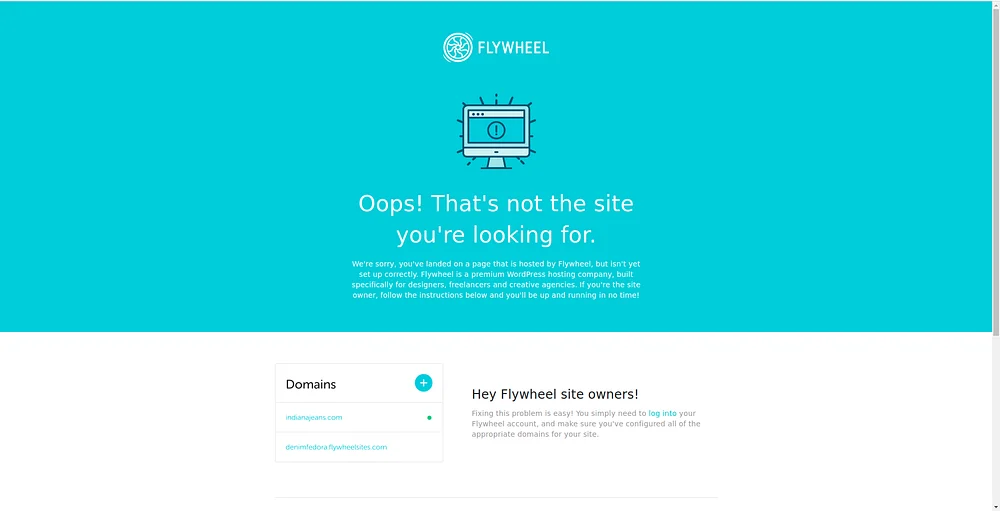
The Vulnerable Subdomain
The record type is stated at the end of the report: it is an A record, and the address it points to belongs to Flywheel.
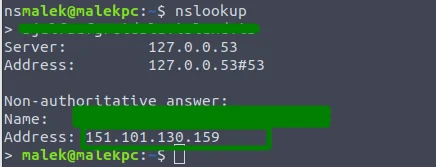
This IP belongs to flywheel
So the signal is a hostname whose DNS still resolves to Flywheel hosting while no Flywheel site is configured to answer for it. The author frames the underlying cause as an auditing gap on the domain owner's side: unused DNS entries are not cleaned up, which is described as one of the main pain points leading to subdomain takeovers.
Exploitation
Step 1: Buy the smallest subscription
A subscription on Getflywheel is enough, specifically the cheapest one at 15$ per month.
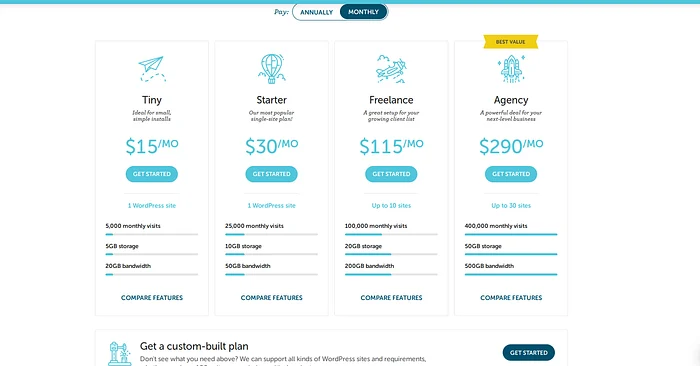
The Subscription page
Step 2: Create a site
After registration and payment, create a site under the subscription. The plan permits only one site, which is sufficient for a single takeover.
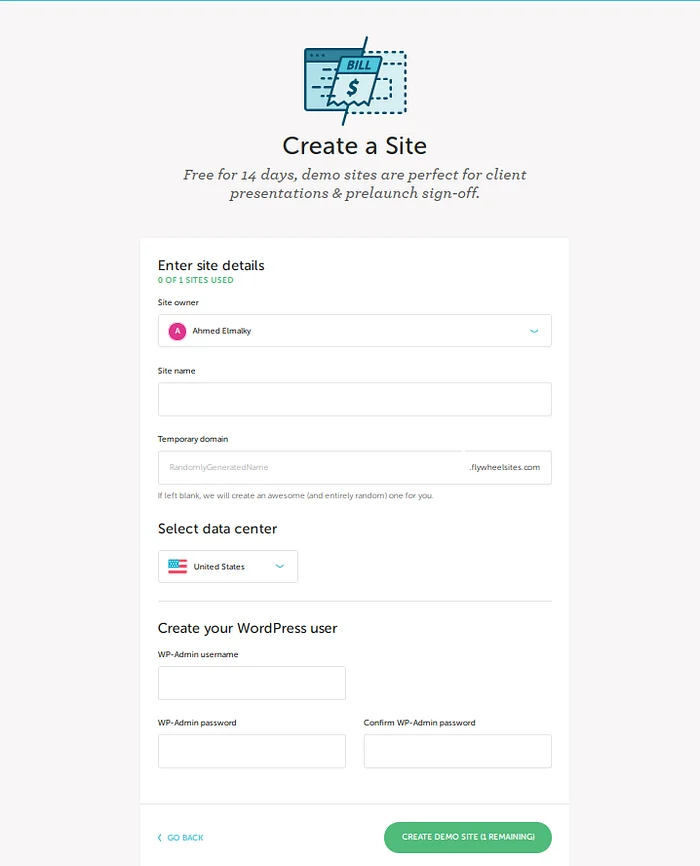
Creating Page
After filling in the site information, the creation screen appears:
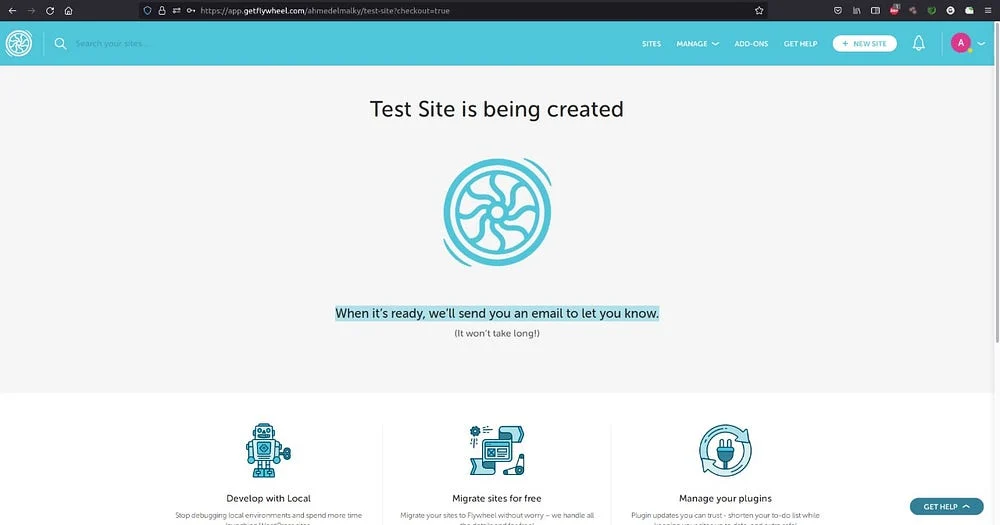
When creation finishes, an email confirmation arrives.
Step 3: Attach the dangling subdomain
The new site now needs to be connected to the vulnerable subdomain.
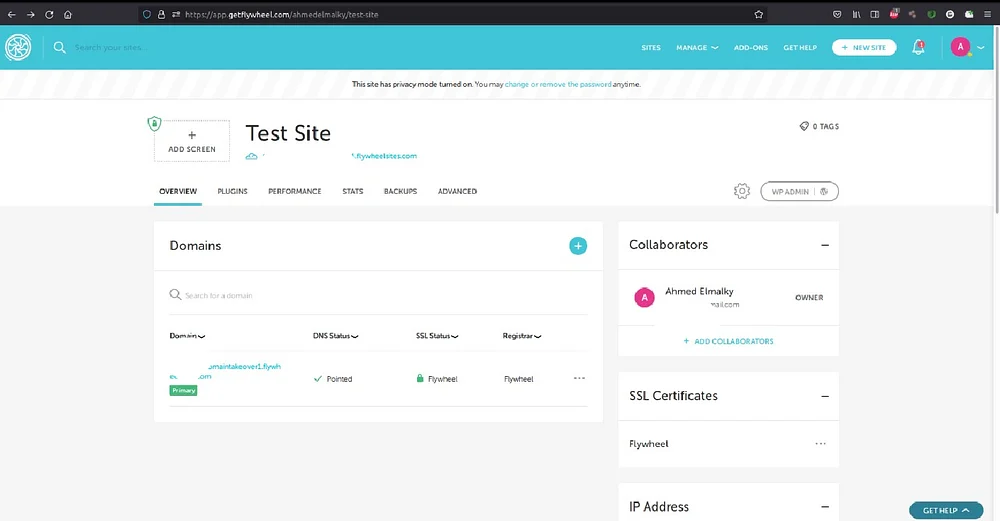
Press the add domain button:
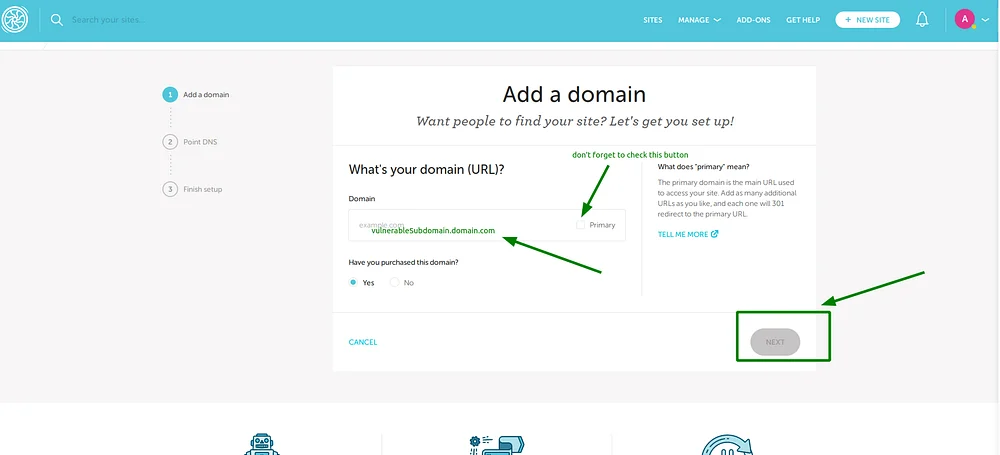
Final Step from Exploit.
Once the hostname is added, Flywheel serves the new site on it. The subdomain is now under the attacker's control:
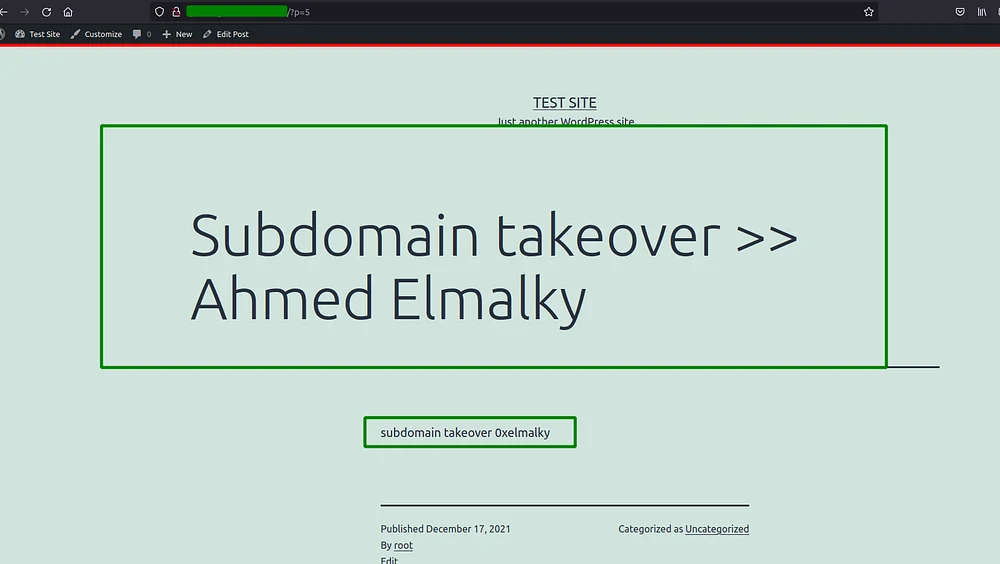
The Subdomain After Exploit.
No request or response is reproduced in the report; the flow is entirely through the Flywheel panel, and the only artefact shown is the resulting page on the taken-over hostname.
Finding candidates at scale
The author points to a nuclei template for detecting the condition:
https://github.com/projectdiscovery/nuclei-templates/blob/[redacted]/takeovers/flywheel-takeover.yaml
Root cause
Two things combine. First, the domain owner leaves an A record pointing at Flywheel after the hosted site is gone, so the hostname is unclaimed but still routable to Flywheel. Second, the author suggests Flywheel could verify that a customer controls a domain before it is added. The author suggests several checks that would close the second half of the problem:
- verification via TXT record
- verification via a CNAME record
- validation of domain via e-mail (code to be sent to e-mail visible in WHOIS records)
Any of these would require the person adding the domain to demonstrate control of the DNS zone. The report does not describe which, if any, of these Flywheel has since implemented.
Impact
The author rates severity as High. With the subdomain under attacker control, an attacker can:
- take over the subdomain and publish arbitrary content
- run malicious JavaScript in the browser of anyone visiting the hostname
- harvest credentials through a phishing page hosted on the trusted domain
- deface a website
- steal user cookies if those cookies are scoped to the parent domain, escalating to account takeover
The cookie-theft path is the most serious and is conditional: it only applies where cookies are set on the parent domain rather than the specific hostname.
Fix
The remediation given is on the domain owner's side: the DNS entry for the subdomain should be removed from DNS records if it is not in use. On the provider side, the author suggests possible improvements such as verification via TXT record, CNAME record or email. The report does not say whether Flywheel changed its behaviour.
Variants to test
-
Enumerate A records across in-scope domains and resolve them; a positive result is a hostname pointing at a hosting provider's address range with no live site answering for that hostname.
-
Run the nuclei flywheel-takeover template over the same host list; a positive result is a match on a hostname you can then try to claim with a paid account.
-
After claiming a hostname, inspect cookies set by the parent domain in a browser; a positive result is a session cookie whose scope includes the parent domain, which would be sent to the taken-over host.
What happened, in plain words
A company called Flywheel rents out hosting for WordPress websites. WordPress is a popular tool for building websites, and hosting means running that website on a computer (a server) that is connected to the internet all the time. Flywheel's customers are designers and creative agencies who want to build and manage lots of WordPress sites without dealing with the technical setup. The author notes that a site can be set up in under two minutes without any complex configuration.
The report shows that a customer can add their own domain name to a site hosted at Flywheel. A domain name is the address people type into a browser, like example.com. To make a domain point at a hosting company, the owner of the domain edits something called DNS records. DNS is the internet's address book: it translates a name people can read into the numeric address of a server.
The problem in this report is called a subdomain takeover. A subdomain is a name that sits under a main domain, for example shop.example.com under example.com. Some organisation had a subdomain whose DNS record still pointed at Flywheel's servers. The name was therefore unclaimed but still routed to Flywheel. Because Flywheel lets any paying customer attach an arbitrary domain to a site they control, whoever registers a site and adds that leftover name first gets to serve their own content on it. In everyday terms: someone moved out of a flat but the letterbox still has their name on it, and the building lets anyone who pays rent put their own name on that letterbox and receive the post.
The author is explicit that this is not Flywheel's fault in the strict sense, because Flywheel is not a managed DNS provider. A managed DNS provider is a company whose job is to look after your DNS records for you. Here the leftover record belongs to the domain owner who left it behind. The report points to earlier public work on the same kind of issue:
- https://github.com/EdOverflow/can-i-take-over-xyz/issues/220
- https://github.com/EdOverflow/can-i-take-over-xyz/issues/242
- https://twitter.com/Itumeleng_Les/status/1454532272271601668
Setup
The only thing you need before starting is a paid Flywheel subscription. The author used the cheapest plan, at 15$ per month, and notes that the subscription allows creating only one site. No other tooling is required for the exploitation itself. A nuclei template is offered for finding candidates, and nuclei is a scanner: a program that automatically checks many hosts for a known pattern. That part comes later.
Finding it
The vulnerable subdomain is an A record pointing at a Flywheel address. An A record is the simplest kind of DNS record: it maps a name directly to a numeric server address. This record was left in place after the site it once served was removed. The author shows the record as the starting point:
The Vulnerable Subdomain
The record type is stated at the end of the report: it is an A record, and the address it points to belongs to Flywheel.
This IP belongs to flywheel
So the signal you are looking for is a hostname whose DNS still resolves to Flywheel hosting while no Flywheel site is configured to answer for it. "Resolves" means the DNS lookup succeeds and returns an address. The author frames the underlying cause as an auditing gap on the domain owner's side: unused DNS entries are not cleaned up, which is described as one of the main pain points leading to subdomain takeovers. Auditing here simply means regularly reviewing your own records and deleting the ones you no longer use.
Exploitation
Step 1: Buy the smallest subscription
A subscription on Getflywheel is enough, specifically the cheapest one at 15$ per month. The plan allows creating only one site.
The Subscription page
Step 2: Create a site
After registration and payment, create a site under the subscription. The plan permits only one site, which is sufficient for a single takeover.
Creating Page
After filling in the site information, the creation screen appears:
When creation finishes, an email confirmation arrives. When creation finishes, an email arrives.
Step 3: Attach the dangling subdomain
The new site now needs to be connected to the vulnerable subdomain.
Press the add domain button:
Final Step from Exploit.
Once the hostname is added, Flywheel serves the new site on it. The subdomain is now under the attacker's control:
The Subdomain After Exploit.
No request or response is reproduced in the report; the flow is entirely through the Flywheel panel, and the only artefact shown is the resulting page on the taken-over hostname. In other words, you never type a raw HTTP request by hand here. You click through a web control panel, and the panel does the work behind the scenes.
Finding candidates at scale
The author points to a nuclei template for detecting the condition:
https://github.com/projectdiscovery/nuclei-templates/blob/[redacted]/takeovers/flywheel-takeover.yaml
This is a single line: a web address pointing at a file in a public collection of nuclei templates. A template is a saved recipe that tells the scanner what to look for. The address has three parts worth understanding. github.com is the website that hosts the collection. projectdiscovery/nuclei-templates is the project and repository name, meaning the folder where the templates live. The long string of letters and numbers before /takeovers/ is a commit identifier, a fixed snapshot of the project at one moment, so the link keeps pointing at the same version of the file even if the project changes later. takeovers/flywheel-takeover.yaml is the file itself, in a folder for takeover checks, written in YAML, a plain-text format for configuration files.
"In scope" means the hostnames you are allowed to test, for example because a bug bounty programme lists them. A bug bounty programme is an arrangement where an organisation invites outside researchers to look for problems and pays for valid reports.
Root cause
Two things combine. First, the domain owner leaves an A record pointing at Flywheel after the hosted site is gone, so the hostname is unclaimed but still routable to Flywheel. Second, the author suggests Flywheel could verify that a customer controls a domain before it is added. The author suggests several checks that would close the second half of the problem:
- verification via TXT record
- verification via a CNAME record
- validation of domain via e-mail (code to be sent to e-mail visible in WHOIS records)
A TXT record is a DNS record that holds free text, often used for exactly this kind of proof. A CNAME record is a DNS record that says "this name is an alias for that other name". WHOIS is the public directory of who registered a domain, which often includes a contact email. Any of these checks would require the person adding the domain to demonstrate control of the DNS zone. The DNS zone is the full set of records for a domain. The report does not describe which, if any, of these Flywheel has since implemented.
Impact
The author rates severity as High. Severity is a rough label for how much damage a problem could cause. With the subdomain under attacker control, an attacker can:
- take over the subdomain and publish arbitrary content
- run malicious JavaScript in the browser of anyone visiting the hostname
- harvest credentials through a phishing page hosted on the trusted domain
- deface a website
- steal user cookies if those cookies are scoped to the parent domain, escalating to account takeover
A few of those need unpacking. JavaScript is the programming language that runs inside web pages in your browser; if an attacker controls the page, they control the JavaScript, and it can do things like read what you type or send data elsewhere. Phishing means building a fake login page that looks real, so visitors hand over their username and password. Defacing means replacing a website's normal content with something else. A cookie is a small piece of data a website stores in your browser so it can recognise you on your next request, which is how you stay logged in. Cookies have a scope: a rule about which names they are sent to. If a cookie is scoped to the parent domain, the browser sends it to every subdomain under that domain, including the one the attacker now controls. Account takeover means the attacker ends up logged in as the victim.
The cookie-theft path is the most serious and is conditional: it only applies where cookies are set on the parent domain rather than the specific hostname.
Fix
The remediation given is on the domain owner's side: the DNS entry for the subdomain should be removed from DNS records if it is not in use. On the provider side, the author suggests possible improvements such as verification via TXT record, CNAME record or email. The report does not say whether Flywheel changed its behaviour.
Variants to test
-
Enumerate A records across in-scope domains and resolve them. Enumerate means list them out systematically. A positive result is a hostname pointing at a hosting provider's address range with no live site answering for that hostname.
-
Run the nuclei flywheel-takeover template over the same host list. A positive result is a match on a hostname you can then try to claim with a paid account.
-
After claiming a hostname, inspect cookies set by the parent domain in a browser. A positive result is a session cookie whose scope includes the parent domain, which would be sent to the taken-over host.
Glossary
- A record: a DNS record that maps a domain name directly to a numeric server address.
- Account takeover: a situation where an attacker gains access to someone else's account.
- Auditing (DNS): regularly reviewing your DNS records and removing ones you no longer use.
- Bug bounty programme: an arrangement where an organisation invites outside researchers to test its systems and pays for valid reports.
- CNAME record: a DNS record that says one name is an alias for another name.
- Commit identifier: a fixed snapshot reference in a code repository, so a link keeps pointing at the same version.
- Cookie: a small piece of data a website stores in your browser so it can recognise you on later requests.
- Cookie scope: the rule that decides which names a cookie is sent to.
- Credentials: a username and password, or similar proof of identity.
- Deface: to replace a website's normal content with something else.
- DNS: the internet's address book, translating readable names into server addresses.
- DNS zone: the full set of DNS records belonging to a domain.
- Domain name: the readable address of a site, like example.com.
- Enumerate: to list out systematically.
- Flywheel: a company that hosts WordPress websites for designers and agencies.
- Hosting: running a website on a server that is connected to the internet all the time.
- In scope: the set of systems you are allowed to test.
- JavaScript: the programming language that runs inside web pages in the browser.
- Managed DNS provider: a company that looks after your DNS records on your behalf.
- Nuclei: a scanner that checks many hosts for known patterns using templates.
- Phishing: building a fake page that looks real so visitors hand over their details.
- Resolve: to look up a name in DNS and get an address back.
- SaaS: software you use over the internet instead of installing it yourself.
- Severity: a rough label for how much damage a problem could cause.
- Subdomain: a name that sits under a main domain, like shop.example.com under example.com.
- Subdomain takeover: claiming a subdomain whose DNS still points at a service that no longer has a site for it.
- Template (nuclei): a saved recipe telling the scanner what to look for.
- TXT record: a DNS record holding free text, often used to prove domain control.
- WHOIS: the public directory of who registered a domain.
- WordPress: a popular tool for building websites.
- YAML: a plain-text format for configuration files.




