Taking Over Employee Accounts by Managers with Zero Employee Interaction
The live chat support feature allowed HTML injection into the chat transcript email sent to the user. An attacker could inject malicious HTML or images into emails sent from the company's domain, potentially enabling phishing or reputational damage.
 Published on medium.com
Hi everyone, It’s my first blog about bug bounty so today I’m going to share that how I earned $250 with simple HTML Injection. I hope you’ll enjoy it!
The full write-up lives on its author's site
It belongs to its author, so we link to it rather than copy it. The other two tabs are our own rewrites, checked against it.
Context
This is a write-up of a private HackerOne invitation the researcher received. The program had a large scope, but only the main domains were in scope. The researcher describes the target as redacted.com and explains a personal habit: when testing main domains, they avoid the core functionalities such as signup, signin and password reset, and instead look at endpoints like contact us, newsletters and support.
On this site the contact us page offered several ways to reach the company. One of them was live chat support. Clicking it opened a chat box, which asked for a name and an email address and then moved the visitor to a chatting page where they could talk with the support team.
The feature that mattered was an option to get a copy of the chat with support. The researcher clicked it, ended the chat session, and went to the mail inbox to verify. The exact copy of the chat arrived by email.
Setup
The report does not describe any accounts, roles, tools or versions. The only precondition is access to the live chat support feature on the main domain and an email inbox to receive the chat transcript. The researcher used a temporary mail site for the first tests, which is relevant to what happened next.
Finding it
The researcher typed some random words into the chat, noticed the option to receive a copy of the chat, clicked it, ended the session, and confirmed that the transcript arrived by email. The interesting question was what the transcript does with the text the visitor typed. The researcher repeated the same process, unchanged, but replaced the random words with an XSS payload and checked the inbox. The payload triggered as soon as the inbox was opened, because the inbox was on a temporary mail site.
That result was on a third-party mail site, so the researcher moved to a payload that would show the same class of problem in a way that does not depend on script execution: an image tag pointing at an external URL.
Exploitation
Step 1: Open the chat and start a session
The researcher opened the contact us page, chose live chat support, filled in the name and email fields, and was taken to the chatting page.
Step 2: Request a copy of the chat
After typing into the chat, the researcher used the option to get a copy of the chat and ended the session. The transcript was delivered to the email address supplied at the start of the chat.
Step 3: Confirm the transcript reflects the input
The first run used random words, and the inbox received the exact copy of the chat. This established that the message body is reproduced in the email.
Step 4: Try an XSS payload in the chat
The researcher repeated the same process and entered an XSS payload instead of random words. The payload triggered when the inbox was opened. The report does not give the payload itself, and the trigger happened in a temporary mail site, so this step is described as an observation rather than as a result on the target's own mail infrastructure.
Step 5: Use an image payload with the researcher's own email
The researcher repeated the process once more, this time entering their own email address and the following payload as the chat message:
<img src=”https://test.com/mrbean.jpg”>
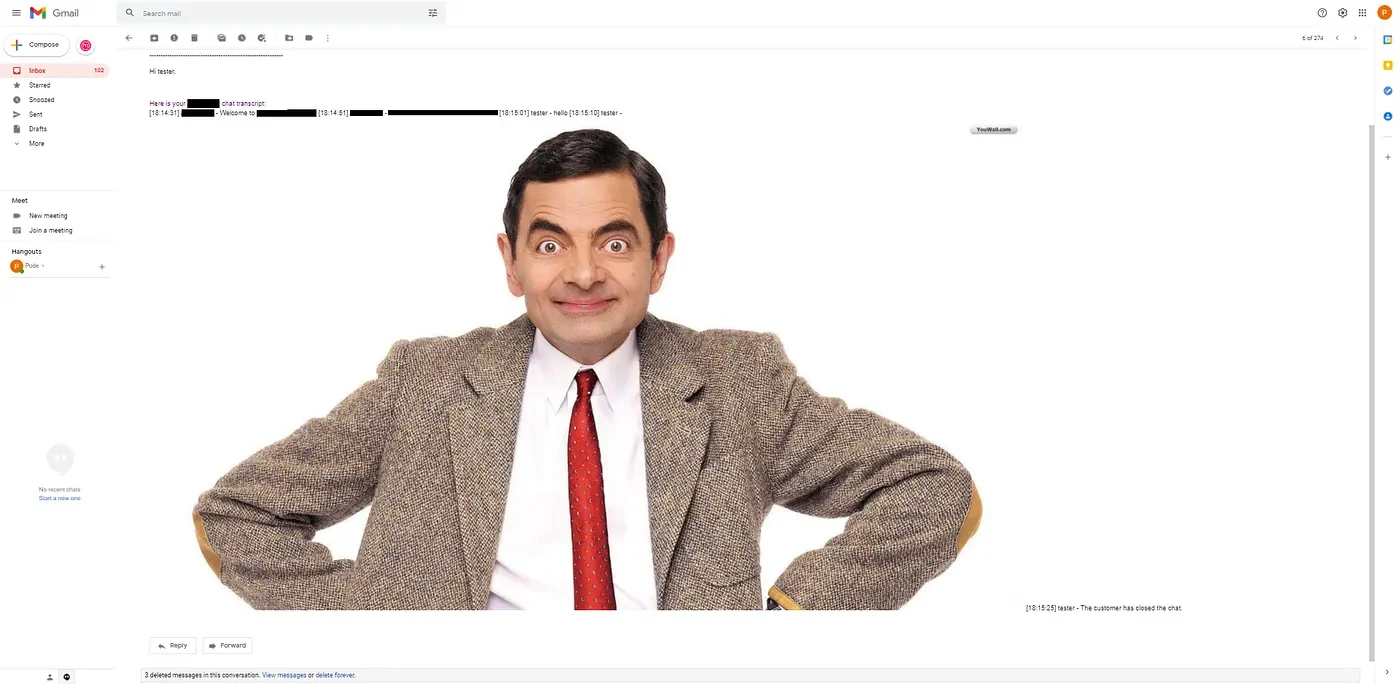
The payload is an image tag whose src points at an external host. If the transcript email renders it as HTML rather than as text, the recipient's mail client will request that URL from the external host. The researcher went to the inbox and received the email containing the image payload.
Step 6: Report and triage
The researcher made a proof of concept and reported it. The next morning the report was triaged, and that same afternoon it was rewarded with $250.
Root cause
The chat transcript email is built from the visitor's chat messages without encoding them for the HTML context of the email body. The message text is placed into the email as markup, so tags supplied by the visitor are interpreted by the mail client rather than displayed as characters.
The XSS observation shows the same missing encoding can lead to script execution in a client that runs scripts in email.
Impact
In the researcher's words, an attacker can enter anyone's email address to send this kind of mail, and those mails may contain malicious links and unwanted phishing content. An attacker can also insert pictures, which may result in a bad reputation for the company, because the email comes directly from the company. The impact depends on the recipient opening the transcript email and on the mail client rendering the injected markup; the report does not claim control over any account or server.
Fix
The fix implied by the finding is to HTML-encode chat message content before it is placed into the transcript email, so that tags supplied by the visitor are displayed as text and never interpreted as markup.
Variants to test
- A positive result is that a tag such as an image pointing at a host you control is rendered when the email is opened, and your host receives the request.
- The same features with the recipient set to a different address than the one used to submit, to see whether the transcript is sent to an arbitrary address. A positive result is delivery to an address that was not verified as belonging to the submitter.
- Name and email fields themselves, not just the message body, since they are also reproduced in the transcript. A positive result is the same rendering behaviour from a field other than the message.
- Other output contexts that reuse the same chat content, such as an agent-side dashboard or an exported transcript. A positive result is the payload rendering there as well.
- Script payloads in a mail client that executes scripts, to confirm the XSS observation beyond the temporary mail site. A positive result is script execution when the transcript is opened.
What happened, in plain words
A security researcher found a website that let visitors chat with its support team through a live chat box. When a chat ended, the site offered to email you a copy of the conversation. The researcher discovered that whatever you typed into the chat was copied into that email without being cleaned up first. That meant a visitor could type HTML code (the language web pages and many emails are built from) and the email would treat it as real code rather than as plain text. The researcher proved this by sending an image tag, a small piece of HTML that tells a mail program to load a picture from a web address, and the picture appeared in the email. The company paid a $250 bounty, a reward some companies give to people who report security problems responsibly. This article walks through the same story for someone who has never done security testing before.
Background: the invitation and the habit
The researcher received a private invitation on HackerOne, a platform where companies list their programs and researchers submit findings. A program is a company's official offer to pay for security reports about its systems. This program had a large scope, meaning many of the company's systems were eligible for testing, but only the main domains were in scope. A domain is the part of a web address after the @ in an email or before the first slash in a URL, such as example.com. "In scope" means you are allowed to test it and will be paid for valid findings; testing anything out of scope is off limits.
The researcher describes the target as redacted.com, a placeholder name used to keep the real company private. They also share a personal habit: when testing main domains, they avoid the core functionalities such as signup, signin and password reset. Instead the researcher looks at endpoints like contact us, newsletters and support. An endpoint is simply a specific address or feature on a website that does something when you interact with it, like a door in a building.
On this site the contact us page offered several ways to reach the company. One of them was live chat support: a small window, usually in the corner of the page, where you type messages and a support person replies in real time. Clicking it opened a chat box, which asked for a name and an email address and then moved the visitor to a chatting page where they could talk with the support team.
The feature that mattered was an option to get a copy of the chat with support. The researcher clicked it, ended the chat session, and went to the mail inbox to verify. The exact copy of the chat arrived by email.
Setup: what you need to try this
The report does not describe any accounts, roles, tools or versions. The only precondition is access to the live chat support feature on the main domain and an email inbox to receive the chat transcript. A transcript is the written record of a conversation. The researcher used a temporary mail site for the first tests. A temporary mail site is a website that gives you a disposable email address that expires after a while, useful when you do not want to give your real address to a service. This detail matters because of what happened next.
Finding it: from random words to a payload
The researcher typed some random words into the chat, noticed the option to receive a copy of the chat, clicked it, ended the session, and confirmed that the transcript arrived by email. The interesting question was what the transcript does with the text the visitor typed. Does it show the text as plain characters, or does it treat it as instructions? In web terms, does it encode the text, meaning convert special characters like < and > into harmless codes so they display literally, or does it insert the raw text into the page?
The researcher repeated the same process, unchanged, but replaced the random words with an XSS payload and checked the inbox. XSS stands for cross-site scripting: a class of bug where a website takes input from a user and puts it into a page without encoding it, so the input runs as code in someone's browser. A payload is the piece of input you send to test for that. The payload triggered as soon as the inbox was opened, because the inbox was on a temporary mail site. In other words, the code ran when the temporary mail site displayed the email. That result was on a third-party mail site, not on the company's own systems, so the researcher moved to a payload that would show the same class of problem in a way that does not depend on script execution: an image tag pointing at an external URL.
Exploitation
Step 1: Open the chat and start a session
The researcher opened the contact us page, chose live chat support, filled in the name and email fields, and was taken to the chatting page. Why this step? Because the chat is the input point. Everything you type there is data the site will later reuse, and reused data is where injection bugs live.
Step 2: Request a copy of the chat
After typing into the chat, the researcher used the option to get a copy of the chat and ended the session. The transcript was delivered to the email address supplied at the start of the chat. Why this step? Because the email is a second place where your text appears. A bug in one place (the chat page) might be fixed, but the same text may be handled differently in another place (the email), and that difference is often where the flaw hides.
Step 3: Confirm the transcript reflects the input
The first run used random words, and the inbox received the exact copy of the chat. This established that the message body is reproduced in the email. Why this step? Before testing for a bug, you confirm the normal behaviour. If the email did not contain your words at all, there would be nothing to inject into.
Step 4: Try an XSS payload in the chat
The researcher repeated the same process and entered an XSS payload instead of random words. The payload triggered when the inbox was opened. The report does not give the payload itself, and the trigger happened in a temporary mail site, so this step is described as an observation rather than as a result on the target's own mail infrastructure. Why this step? Because if the email treats your text as code, a script payload is the most direct proof.
Step 5: Use an image payload with the researcher's own email
The researcher repeated the process once more, this time entering their own email address and the following payload as the chat message:
<img src=”https://test.com/mrbean.jpg”>
Line by line: <img starts an image tag, the HTML instruction that tells a program to display a picture. src= is the attribute that says where the picture lives. ”https://test.com/mrbean.jpg” is the web address of the picture, here a file called mrbean.jpg on a host called test.com. The closing > ends the tag. Note the curly quotation marks around the address; they are copied exactly as they appear in the report. The payload is an image tag whose src points at an external host. If the transcript email renders it as HTML rather than as text, the recipient's mail client will request that URL from the external host. In plain terms: the email program sees a picture instruction and goes to fetch the picture, which tells the researcher that their code was treated as code. The researcher went to the inbox and the image payload was rendered.
The screenshot shows the email as it arrived, containing the image payload. Why this step? Because it proves the bug without needing scripts to run. Any mail program that displays images will show the result.
Step 6: Report and triage
The researcher made a proof of concept and reported it. A proof of concept, or PoC, is a short, repeatable demonstration that the bug is real, usually a few screenshots and steps. Triage is the first review a report gets: the company's team checks that the finding is valid and in scope before passing it to engineers. The next morning the report was triaged, and that same afternoon it was rewarded with $250.
Root cause
The chat transcript email is built from the visitor's chat messages without encoding them for the HTML context of the email body. The message text is placed into the email as markup, so tags supplied by the visitor are interpreted by the mail client rather than displayed as characters. A useful comparison: imagine a form letter where a clerk is supposed to write your name in a blank. Encoding is the clerk refusing to write anything except plain letters. A template is a reusable page with blanks that get filled in.
The XSS observation shows the same missing encoding can lead to script execution in a client that runs scripts in email. Filtering means removing dangerous input; sanitisation means cleaning it; a content security policy is a set of rules a browser follows about which code it may run.
Impact
In the researcher's words, an attacker can enter anyone's email address to send this kind of mail, and those mails may contain malicious links and unwanted phishing content. Phishing is a fake message designed to trick someone into clicking a link or giving away information. An attacker can also insert pictures, which may result in a bad reputation for the company, because the email comes directly from the company. The impact depends on the recipient opening the transcript email and on the mail client rendering the injected markup; the report does not claim control over any account or server.
Fix
The fix implied by the finding is to HTML-encode chat message content before it is placed into the transcript email, so that tags supplied by the visitor are displayed as text and never interpreted as markup. In everyday terms: the clerk writes your name exactly as characters, and if you hand over instructions, they appear on the page as words, not as actions.
Variants to test
- A positive result is that a tag such as an image pointing at a host you control is rendered when the email is opened, and your host receives the request.
- The same features with the recipient set to a different address than the one used to submit, to see whether the transcript is sent to an arbitrary address. A positive result is delivery to an address that was not verified as belonging to the submitter.
- Name and email fields themselves, not just the message body, since they are also reproduced in the transcript. A positive result is the same rendering behaviour from a field other than the message.
- Other output contexts that reuse the same chat content, such as an agent-side dashboard or an exported transcript. A positive result is the payload rendering there as well.
- Script payloads in a mail client that executes scripts, to confirm the XSS observation beyond the temporary mail site. A positive result is script execution when the transcript is opened.
Glossary
- Bounty: a reward, often money, paid by a company to someone who reports a valid security problem in its systems.
- Bug bounty program: a company's official offer to pay for security reports, with rules about what may be tested.
- HackerOne: a platform where companies publish bug bounty programs and researchers submit reports.
- Scope: the list of systems a researcher is allowed to test and be paid for.
- Domain: the part of a web address that names a site, such as
example.com. - Endpoint: a specific address or feature on a website that performs an action when you interact with it.
- Live chat support: a small window on a website where a visitor types messages and a support person replies in real time.
- Transcript: the written record of a conversation, here the copy of a chat sent by email.
- Temporary mail site: a website that gives you a disposable email address that expires after a while.
- HTML: the language web pages and many emails are built from, made of tags that describe content.
- Tag: an instruction in HTML, such as
<img>, that tells a program what to display. - Attribute: a setting inside a tag, such as
src, that gives extra information. src: the attribute of an image tag that holds the web address of the picture.- Payload: the piece of input a tester sends to see whether a bug can be triggered.
- XSS (cross-site scripting): a bug where a site puts user input into a page without encoding it, so the input runs as code in a browser.
- Encoding (HTML encoding): converting special characters like
<and>into harmless codes so they display as text instead of being interpreted as markup. - Markup: text that is treated as instructions by a program rather than shown as characters.
- Rendering: how a program displays content, for example turning HTML into a visible page or email.
- Mail client: the program or website you use to read email.
- Proof of concept (PoC): a short, repeatable demonstration that a bug is real.
- Triage: the first review of a report, where a company checks that the finding is valid and in scope.
- Filtering: removing dangerous input before it is used.
- Sanitisation: cleaning input so that only safe parts remain.
- Content security policy: a set of rules a browser follows about which code it may run.
- Phishing: a fake message designed to trick someone into clicking a link or giving away information.
- Server-side code: the program running on the company's computers that builds pages and emails.
- Template: a reusable page or email with blanks that get filled in with content.




