Telegram Desktop: From Proxy to RCE in 35 Seconds
A malicious proxy configured in Telegram Desktop on Windows could make the Qt networking library authenticate to the proxy using the signed-in Windows account without asking the user. The attacker could relay that authentication to other services, and a separate bug leaked pieces of process memory, allowing credential theft and, in the lab, remote code execution.

medium.com
Published on medium.com
Telegram
The full write-up lives on its author's site
It belongs to its author, so we link to it rather than copy it. The other two tabs are our own rewrites, checked against it.
Context
Telegram Desktop is the Windows desktop client for Telegram. Proxies are a built-in feature: they route the app's connection through another server, helping users get online when direct access is blocked. In countries where the authorities block Telegram, sharing a proxy is a routine way to get the app working again.
ExPatch Vulnerability Research (Aleksander Rostilov and Denis Rostilov) examined what a malicious proxy can do to an official, unmodified Telegram Desktop client on Windows. Two separate issues were involved: an NTLM relay chain that led to remote code execution, and a memory disclosure bug that leaked process memory. The relay chain is the path to RCE; the memory leak is a distinct problem.
Setup
The tests used an official, unmodified Telegram Desktop client, version 6.8.2, against a controlled Windows test domain. The lab included a workstation and a domain controller, a Domain Admin account, and a corporate certificate service that was vulnerable to authentication relay, described as a standard setup across corporations. The client connected to a proxy controlled by the researchers.
Finding it
The starting point is that Telegram Desktop uses a networking library called Qt. A malicious proxy could ask Qt for Windows authentication, and Qt could respond using the signed-in user's account without asking permission. That response is an NTLM authentication exchange, and the proxy operator can forward it to another service that accepts it. This is NTLM relay: using someone's authentication to sign in elsewhere without knowing their password.
A second, separate Qt bug made authentication responses include pieces of process memory, data the application had held in its buffers. The connection could continue working without a visible warning, so the user had no signal that anything was wrong.
Exploitation
Step 1: the developer connects to the proxy
A developer opens Telegram at the start of the workday and cannot connect because Telegram is blocked. Someone shares a proxy, the developer adds it, and messages load. The proxy is now the entry point.
Step 2: the proxy requests Windows authentication
The malicious proxy asks Qt for Windows authentication. Qt responds using the signed-in user's account without asking permission. The developer's computer receives an NTLM challenge from the proxy, signs it, and sends it back. From the user's side everything works normally: the chat keeps loading and the developer keeps talking to colleagues.
Step 3: relay to a service that accepts the authentication
The operator forwards the exchange to another service that accepts it. In the test, the receiving service was a corporate certificate service vulnerable to authentication relay, and it issued a certificate for the victim's account. All nine relay attempts succeeded.
Step 4: authenticate as the victim and run commands
With the certificate, the researchers authenticated as the victim and ran commands on company systems, including the domain controller, the server that manages the company's Windows accounts. Within approximately 30 to 35 seconds of the client connecting to the proxy, they had SYSTEM privileges on a workstation and a domain controller, and could run commands remotely with high Windows privileges: remote code execution.
In the scenario the report describes, the operator obtains an NTLM hash and can send it to Windows Server, Outlook and the VPN, authenticating to the corporate infrastructure with the lead developer's credentials. The antivirus notices nothing because the traffic is legitimate.
The demonstration video is at https://www.youtube.com/watch?v=pm3KCNDc9eY, described as Telegram Desktop 6.8.2, an unmodified client, and a controlled Windows test domain.
The memory disclosure path
Separately, the Qt memory bug made authentication responses include pieces of process memory. One response could expose roughly 65 KB. Repeating the exchange 100 times produced about 6.5 MB in five minutes, including HTTP headers, network data and earlier authentication messages. What leaked depended on the contents of memory.
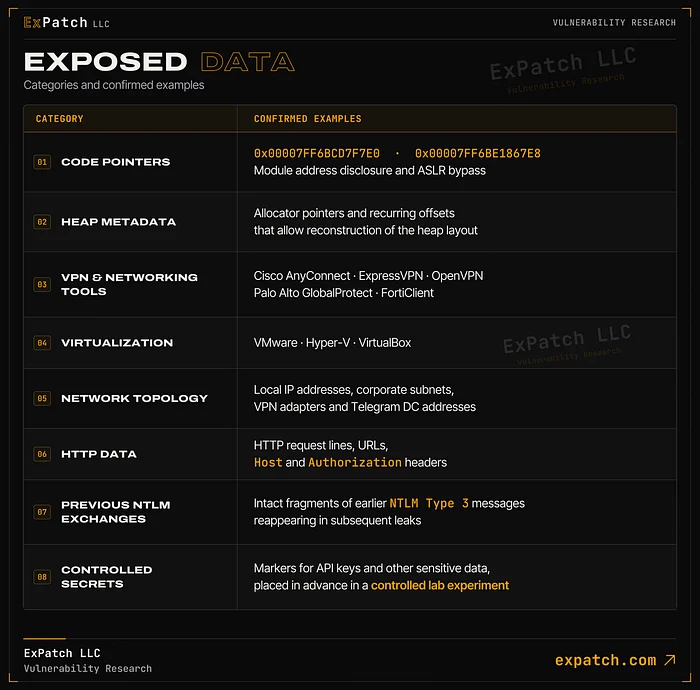
The categories of process data recovered during the laboratory tests were:
- Logins and identity clues: Windows username, computer name and corporate domain. These could link a pseudonymous user to a workplace or a real identity.
- Hashes and authentication data: NTLMv2 challenge-response data, often called NetNTLMv2 hashes, plus earlier authentication messages recovered from memory.
- Passwords and API keys: test passwords and an API secret were recovered. Real passwords and API keys could also leak if present in the exposed buffers. The password exposure came from process memory.
- Network details: internal addresses, infrastructure information, VPN software and network adapters.
The memory disclosure demonstration video is at https://www.youtube.com/watch?v=hMg8Vm8TZCU.
Root cause
The relay chain comes from Qt answering a proxy's request for Windows authentication with the signed-in user's credentials, without asking permission. Because the proxy controls that exchange, it can forward the authentication to any service that accepts it. The receiving service in the test issued a certificate for the victim's account, which was then used to authenticate as the victim. The victim's permissions determined how far the attack could go; the proxy supplied the entry point.
The memory disclosure is a separate Qt bug in which authentication responses include pieces of process memory held in the application's buffers. The connection keeps working, so nothing warns the user.
Impact
In the lab, an official, unmodified client connected to the proxy and the researchers gained SYSTEM privileges on a workstation and a domain controller within approximately 30 to 35 seconds, with remote code execution. The outcome depended on the victim's permissions and on the environment: the test used a Domain Admin account and a certificate service vulnerable to authentication relay.
Beyond RCE, the findings created risks of deanonymisation and credential exposure. A malicious proxy could expose the Windows username, computer name and corporate domain, NTLMv2 challenge-response data and earlier authentication messages, passwords and API keys present in exposed buffers, and network details such as internal addresses, infrastructure information, VPN software and network adapters. For people living under censorship and state surveillance, connecting to a malicious proxy could expose information that helped identify the user and their employer, so an attempt to bypass restrictions and preserve privacy could lead to deanonymisation.

Fix
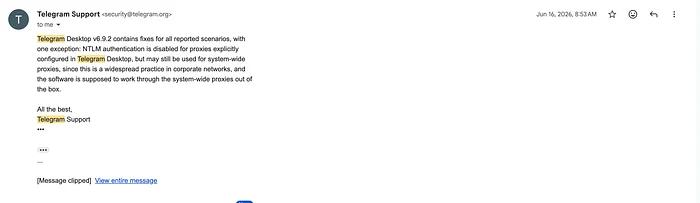
On June 16, 2026, Telegram told the researchers that Desktop 6.9.2 addressed the reported scenarios, with an exception for system-wide proxies. NTLM was disabled for proxies configured inside Telegram. It remained available for system proxy configurations. The patches also corrected the memory disclosure bug.
Users should keep Telegram Desktop updated. Corporate administrators should also review system proxy settings and protection against NTLM relay.
On disclosure: the findings were reported on June 6. By June 8, patches had appeared in Telegram's dependency repository, and related Qt changes followed. In the Qt change history the researchers reviewed, there was no mention of ExPatch or the researchers, and they had not been informed of coordination with the Qt developers. The matching changes support their concerns but do not establish exactly how the information reached Qt. They are asking Telegram and Qt to clarify that history and credit the research where appropriate.
Variants to test
- Other Qt applications behind a proxy. Point a Qt-based client at a proxy you control and request Windows authentication. A positive result is the client answering with the signed-in user's credentials without asking permission.
- Relay to certificate services. Forward a captured authentication exchange to a corporate certificate service. A positive result is a certificate issued for the victim's account, which can then be used to authenticate as that user.
- Relay to other accepting services. Try Windows Server, Outlook and VPN endpoints, as the report lists. A positive result is a successful authentication using the relayed exchange.
- Memory disclosure volume. Repeat the authentication exchange and measure the response size. A positive result is roughly 65 KB per response, or about 6.5 MB over 100 exchanges in five minutes, with process memory in the responses.
- System-wide proxy configurations. Test clients configured through system proxy settings rather than inside the application, since the fix left NTLM available there. A positive result is the same automatic authentication behaviour when the proxy comes from system settings.
What happened, in plain words
Telegram is a messaging app. Telegram Desktop is the version you install on a Windows computer, as opposed to the one on your phone. In some countries the authorities block Telegram, and the usual way around that is a proxy: a middle server that the app connects to instead of connecting directly, so the traffic can get through. People share proxy addresses with each other, and adding one is a normal, everyday action inside the app.
ExPatch Vulnerability Research, the team of Aleksander Rostilov and Denis Rostilov, looked at what happens when that shared proxy is run by someone with bad intentions. They used an official, unmodified Telegram Desktop client, version 6.8.2, on Windows, and pointed it at a proxy they controlled. Two separate problems showed up.
The first is the serious one. Telegram Desktop is built on a piece of software called Qt, which handles networking. A proxy could ask Qt to perform a Windows login on the user's behalf, and Qt would do it using the account the person was already signed in to, without asking permission. The proxy operator could then take that login and replay it somewhere else, a technique called NTLM relay. In the lab this ended with the researchers running commands on company machines, including the domain controller, the server that manages everyone's Windows accounts. They call this remote code execution, or RCE. It took roughly 30 to 35 seconds from the moment the client connected to the proxy.
The second problem is quieter. A separate bug in Qt made some authentication responses carry chunks of the application's memory, the working area where the program keeps data it is using. The connection kept working normally, so the user had no reason to suspect anything. In the lab, one response could expose about 65 KB, and repeating the exchange 100 times produced about 6.5 MB in five minutes.
Telegram told the researchers that Desktop 6.9.2 addressed both issues, with one exception: NTLM remained available for proxies configured through the Windows system settings rather than inside Telegram. The researchers also describe a disagreement about credit, which I cover at the end.
Some words you will meet
Before going further, a few terms, because the rest of the article leans on them.
- Client: the program on your computer that talks to a service. Telegram Desktop is a client.
- Server: the computer on the other side that answers the client.
- Proxy: a server that sits between your client and the real service. Your client talks to the proxy, and the proxy talks to the service. It is like asking a friend to pass a letter to someone because the post office will not deliver to you directly.
- API: a defined way for one program to ask another program to do something. Think of it as a menu of requests a program offers, with rules about what each request needs and what it returns.
- Credentials: the proof of who you are, usually a username plus something secret such as a password or a cryptographic signature.
- Authentication: the process of proving you are who you claim to be.
- Memory: the temporary workspace a running program uses to hold data. It contains whatever the program is working with at that moment, which can include secrets.
- Vulnerability: a flaw in software that lets someone make it behave in a way its authors did not intend, usually to their advantage.
- Remote code execution (RCE): when an attacker can make a program run commands of their choosing on a machine they are not sitting at. It is the most severe class of vulnerability, because from there the attacker can do almost anything the program's user could do.
The setup
The tests used an official, unmodified Telegram Desktop client, version 6.8.2, against a controlled Windows test domain. A domain, in the Windows corporate sense, is a group of computers and accounts managed together by a central server. The lab contained a workstation (an ordinary employee computer) and a domain controller (the server that manages the accounts and permissions for the whole domain). It also had a Domain Admin account, which is an account with the highest level of control over the domain, and a corporate certificate service that was vulnerable to authentication relay. The researchers describe that certificate service setup as standard across corporations. The client connected to a proxy the researchers controlled.
Why build all this? Because to show that a proxy can lead to control of a company, you need something that looks like a company. A single laptop would not demonstrate what happens when the stolen login is replayed against real corporate services.
Finding it
The starting point is that Telegram Desktop uses a networking library called Qt. A library is a bundle of ready-made code that an application uses instead of writing everything itself; Qt handles things like network connections. A malicious proxy could ask Qt for Windows authentication, and Qt could respond using the signed-in user's account without asking permission. That response is an NTLM authentication exchange. NTLM is an older Windows login protocol in which the client proves it knows the account's secret by signing a challenge the server sends, rather than sending the password itself. The proxy operator can forward that exchange to another service that accepts it. This is NTLM relay: using someone's authentication to sign in elsewhere without knowing their password.
A second, separate Qt bug made authentication responses include pieces of process memory, data the application had held in its buffers. A buffer is a fixed-size area of memory a program uses to hold data temporarily, for example while a message is being assembled. The connection could continue working without a visible warning, so the user had no signal that anything was wrong.
Why does the distinction matter? Because the relay chain is the path to RCE, while the memory leak is a distinct problem. They are separate bugs, and fixing one would not fix the other.
Exploitation
Step 1: the developer connects to the proxy
A developer opens Telegram at the start of the workday and cannot connect because Telegram is blocked. Someone shares a proxy, the developer adds it, and messages load. The proxy is now the entry point.
This step is not a technical trick. It is the social part of the attack: the proxy has to reach the victim somehow, and in a blocked country sharing working proxies is routine. The attacker only needs the victim to add it once.
Step 2: the proxy requests Windows authentication
The malicious proxy asks Qt for Windows authentication. Qt responds using the signed-in user's account without asking permission. The developer's computer receives an NTLM challenge from the proxy, signs it, and sends it back. From the user's side everything works normally: the chat keeps loading and the developer keeps talking to colleagues.
Why does this work at all? Because on Windows, a program can ask the operating system to authenticate on behalf of the signed-in user, and the operating system will do it. The flaw is that Qt did this when a proxy asked, without a prompt. A prompt would have given the user a chance to say no; there was none.
Step 3: relay to a service that accepts the authentication
The operator forwards the exchange to another service that accepts it. In the test, the receiving service was a corporate certificate service vulnerable to authentication relay, and it issued a certificate for the victim's account. All nine relay attempts succeeded.
A certificate here is a cryptographic credential issued by a service that confirms an identity. If the certificate service can be convinced that the relayed login is genuine, it hands out a certificate in the victim's name, and that certificate can then be used to log in as the victim. The relay is like someone intercepting a signed form you filled in for one office and submitting it to a different office that accepts the same signature.
Step 4: authenticate as the victim and run commands
With the certificate, the researchers authenticated as the victim and ran commands on company systems, including the domain controller, the server that manages the company's Windows accounts. Within approximately 30 to 35 seconds of the client connecting to the proxy, they had SYSTEM privileges on a workstation and a domain controller, and could run commands remotely with high Windows privileges: remote code execution.
SYSTEM is the highest local privilege level on a Windows machine, above ordinary administrator accounts. In the scenario the report describes, the operator obtains an NTLM hash and can send it to Windows Server, Outlook and the VPN, authenticating to the corporate infrastructure with the lead developer's credentials. A hash is a fixed-length value computed from data; in NTLM, the challenge-response data is often called a NetNTLMv2 hash, and it can be replayed to services that accept it. The antivirus notices nothing because the traffic is legitimate: the logins really are coming from the developer's machine, with valid credentials, so there is nothing obviously malicious to detect.
The demonstration video is at https://www.youtube.com/watch?v=pm3KCNDc9eY, described as Telegram Desktop 6.8.2, an unmodified client, and a controlled Windows test domain.
The memory disclosure path
Separately, the Qt memory bug made authentication responses include pieces of process memory. One response could expose roughly 65 KB. Repeating the exchange 100 times produced about 6.5 MB in five minutes, including HTTP headers, network data and earlier authentication messages. What leaked depended on the contents of memory.
HTTP headers are the small lines of metadata that travel with every web request and response, such as the address being requested and the kind of content expected. If they end up in the leaked memory, they tell the attacker what the application was doing. The arithmetic is simple: 65 KB times 100 is about 6.5 MB, and if each exchange takes a few seconds, 100 of them fit in five minutes. The attacker does not need one big leak; many small ones add up.
The categories of process data recovered during the laboratory tests were:
- Logins and identity clues: Windows username, computer name and corporate domain. These could link a pseudonymous user to a workplace or a real identity.
- Hashes and authentication data: NTLMv2 challenge-response data, often called NetNTLMv2 hashes, plus earlier authentication messages recovered from memory.
- Passwords and API keys: test passwords and an API secret were recovered. Real passwords and API keys could also leak if present in the exposed buffers. The password exposure came from process memory.
- Network details: internal addresses, infrastructure information, VPN software and network adapters.
Why does this list matter beyond the RCE? Because it turns an anonymous proxy user into a named person at a named company. For someone using a proxy to get around censorship, that is the opposite of what they were trying to achieve.
The memory disclosure demonstration video is at https://www.youtube.com/watch?v=hMg8Vm8TZCU.
Root cause
The relay chain comes from Qt answering a proxy's request for Windows authentication with the signed-in user's credentials, without asking permission. Because the proxy controls that exchange, it can forward the authentication to any service that accepts it. The receiving service in the test issued a certificate for the victim's account, which was then used to authenticate as the victim. The victim's permissions determined how far the attack could go; the proxy supplied the entry point.
The memory disclosure is a separate Qt bug in which authentication responses include pieces of process memory held in the application's buffers. The connection keeps working, so nothing warns the user.
In plain terms: the first bug is about trust. The app trusted a proxy enough to hand it a Windows login. The second is about hygiene. The app put more into its responses than it should have, and the extra was whatever happened to be in memory.
Impact
In the lab, an official, unmodified client connected to the proxy and the researchers gained SYSTEM privileges on a workstation and a domain controller within approximately 30 to 35 seconds, with remote code execution. The outcome depended on the victim's permissions and on the environment: the test used a Domain Admin account and a certificate service vulnerable to authentication relay.
That caveat is important. A Domain Admin account is the most powerful kind of account in a Windows domain, and a certificate service that accepts relayed logins is a specific weakness. A victim with fewer permissions, or a company without that certificate setup, would not give the attacker the same reach. The proxy supplies the entry point; the victim's permissions decide how far the attacker travels.
Beyond RCE, the findings created risks of deanonymisation and credential exposure. A malicious proxy could expose the Windows username, computer name and corporate domain, NTLMv2 challenge-response data and earlier authentication messages, passwords and API keys present in exposed buffers, and network details such as internal addresses, infrastructure information, VPN software and network adapters. For people living under censorship and state surveillance, connecting to a malicious proxy could expose information that helped identify the user and their employer, so an attempt to bypass restrictions and preserve privacy could lead to deanonymisation.
Fix
On June 16, 2026, Telegram told the researchers that Desktop 6.9.2 addressed the reported scenarios, with an exception for system-wide proxies. NTLM was disabled for proxies configured inside Telegram. It remained available for system proxy configurations. The patches also corrected the memory disclosure bug.
A system-wide proxy is one configured in the Windows settings, so every application on the machine uses it, rather than one typed into Telegram's own settings. The fix therefore covers the common case, a proxy added inside the app, but not the case where the proxy comes from the operating system.
Users should keep Telegram Desktop updated. Corporate administrators should also review system proxy settings and protection against NTLM relay.
On disclosure: the findings were reported on June 6. By June 8, patches had appeared in Telegram's dependency repository, and related Qt changes followed. A dependency repository is where the third-party code a project relies on is kept. In the Qt change history the researchers reviewed, there was no mention of ExPatch or the researchers, and they had not been informed of coordination with the Qt developers. The matching changes support their concerns but do not establish exactly how the information reached Qt. They are asking Telegram and Qt to clarify that history and credit the research where appropriate.
Variants to test
These are the checks the researchers suggest for anyone who wants to look for the same behaviour elsewhere. Each one is a way to confirm a specific part of the finding.
- Other Qt applications behind a proxy. Point a Qt-based client at a proxy you control and request Windows authentication. A positive result is the client answering with the signed-in user's credentials without asking permission.
- Relay to certificate services. Forward a captured authentication exchange to a corporate certificate service. A positive result is a certificate issued for the victim's account, which can then be used to authenticate as that user.
- Relay to other accepting services. Try Windows Server, Outlook and VPN endpoints, as the report lists. A positive result is a successful authentication using the relayed exchange.
- Memory disclosure volume. Repeat the authentication exchange and measure the response size. A positive result is roughly 65 KB per response, or about 6.5 MB over 100 exchanges in five minutes, with process memory in the responses.
- System-wide proxy configurations. Test clients configured through system proxy settings rather than inside the application, since the fix left NTLM available there. A positive result is the same automatic authentication behaviour when the proxy comes from system settings.
Glossary
- API: a defined way for one program to ask another program to do something, with rules about what each request needs and returns.
- API key: a secret string a program uses to prove its identity to an API, similar to a password for software.
- Buffer: a temporary area of memory a program uses to hold data while working on it.
- Certificate: a cryptographic credential issued by a service that confirms an identity, usable to log in as that identity.
- Certificate service: a corporate service that issues certificates after checking an identity.
- Credentials: the proof of who you are, such as a username plus a password or a cryptographic signature.
- Deanonymisation: revealing who a person really is when they were trying to stay anonymous.
- Dependency repository: a place where the third-party code a project relies on is stored and updated.
- Domain (Windows): a group of computers and accounts managed together by a central server.
- Domain Admin: an account with the highest level of control over a Windows domain.
- Domain controller: the server that manages accounts and permissions for a Windows domain.
- Hash: a fixed-length value computed from data; in NTLM, the challenge-response data is often called a NetNTLMv2 hash and can be replayed to services that accept it.
- HTTP headers: small lines of metadata sent with every web request and response, such as the address requested and the kind of content expected.
- Memory: the temporary workspace a running program uses to hold data, which can include secrets.
- NTLM: an older Windows login protocol in which the client signs a challenge from the server instead of sending the password.
- NTLM relay: using someone's authentication exchange to sign in to another service without knowing their password.
- Process: a running program, with its own memory and resources.
- Proxy: a server that sits between your client and the real service, passing traffic through.
- Qt: a library of ready-made code, including networking, that Telegram Desktop uses.
- SYSTEM: the highest local privilege level on a Windows machine, above ordinary administrator accounts.
- System-wide proxy: a proxy configured in the Windows settings so every application on the machine uses it.
- Vulnerability: a flaw in software that lets someone make it behave in a way its authors did not intend.
- Workstation: an ordinary employee computer in a corporate network.


