The 30000$ Bounty Affair.
An internet-facing server for a financial company exposed a MongoExpress panel and a Jenkins instance without authentication. The Jenkins script console allowed arbitrary command execution, and the MongoExpress panel allowed reading and editing databases including admin credentials.
 Published on medium.com
It was one of the hottest day in the hottest district of Kerala, i.e, Palakkad. I was bug hunting all day and the sweat was soaking me all over.
The full write-up lives on its author's site
It belongs to its author, so we link to it rather than copy it. The other two tabs are our own rewrites, checked against it.
Context
This is a two-part story about a single IP address belonging to a financial company, referred to throughout as redacted.com. The IP hosted several services on ports 80, 443, 8080 and 8081. Two of them turned out to be reachable without authentication: a MongoExpress panel on port 8081 and a Jenkins instance on port 8080 whose script console was open. The first exposed the MongoDB databases behind it without authentication; the second gave remote command execution on the host.
The report does not describe what the company's applications normally do. What matters here is the supporting infrastructure: MongoExpress is a web front end for MongoDB, and the Jenkins script console is a Groovy console that runs code inside the Jenkins JVM, which is why an open one is equivalent to command execution.
Setup
The researcher was hunting the company's different domains on a day when nothing had been found by noon. No accounts, credentials or special access were used at any point: both services were reachable anonymously. The tools involved were:
- Censys and Shodan, used to enumerate IP addresses and the services running on them.
- The SSL Shopper SSL checker, used to confirm that an IP address belonged to the target.
- ffuf, used for directory fuzzing against port 8080.
- A browser, to open the panels and the script console.
The report gives no product versions for either MongoExpress or Jenkins.
Finding it
The researcher's stated fallback methodology on a bad day is to dig through Censys and Shodan. Searching Censys for the IP addresses of redacted.com turned up an interesting address with many open ports: 80, 443, 8081, 8080 and others. The Censys sidebar associated the address with MongoExpress and Jenkins, which made ports 8080 and 8081 look suspicious.
Before touching those ports, the researcher checked whether the IP really belonged to redacted.com using the SSL checker at https://www.sslshopper.com/ssl-checker.html. It did, and it was also associated with many other online properties of the same company. That confirmation showed the address belonged to the company.
Exploitation
Step 1: The unauthenticated MongoExpress panel on port 8081
The first port opened was 8081:
https://ipaddress:8081
It returned an exposed MongoExpress panel without any authentication.

With free access to the panel, the researcher could configure existing databases, create new databases and delete existing ones.
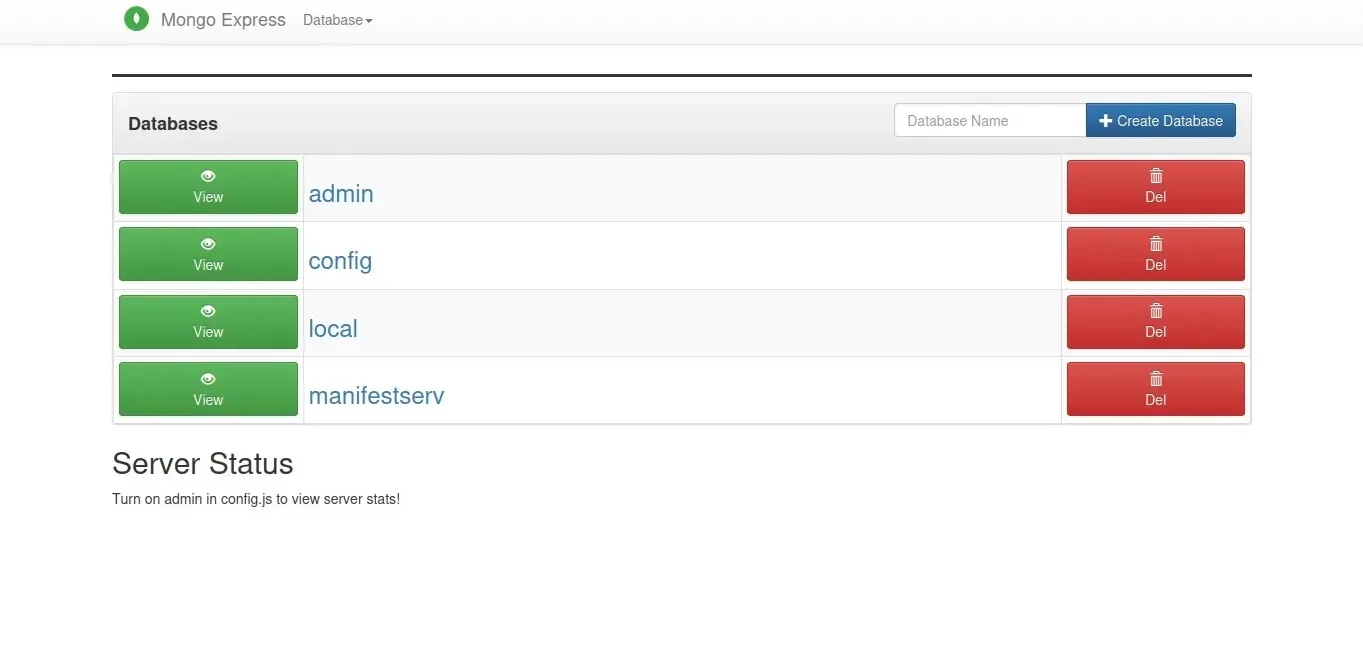
The report attributes this to a severe misconfiguration and lists the following paths as reachable as well:
http://ip:8081/db/config/
http://ip:8081/db/config/system.sessions
http://ip:8081/db/admin/system.users
http://ip:8081/db/admin/system.version
http://ip:8081/db/local/startup_log
These are the internal MongoDB databases: config (including the sessions collection), admin (including the users collection and the server version document) and local (including the startup log). Most importantly, the admin credentials were found in the admin database in salted form, and an attacker was able to edit them.
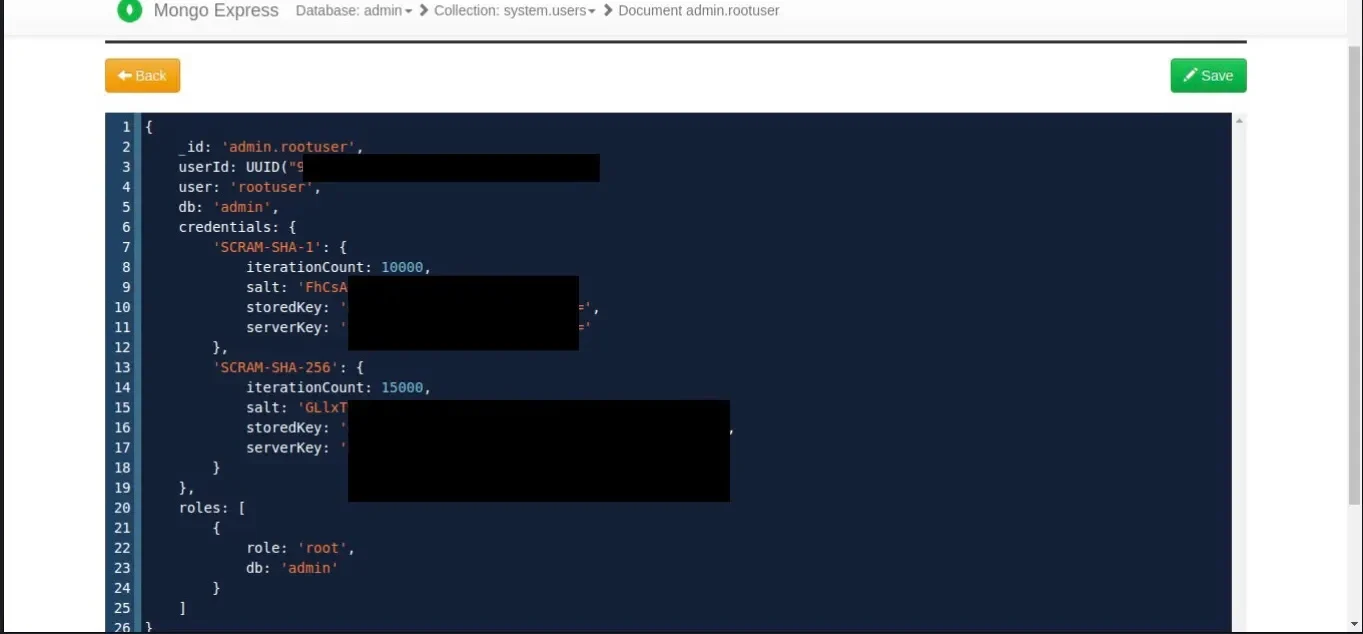
The researcher reported this to the company immediately, explaining everything, and rated it CRITICAL.
Step 2: The 404 page on port 8080
Port 8081 was tested before 8080 for one reason: 8080 returned a 404 error page, which looked like a dead end.
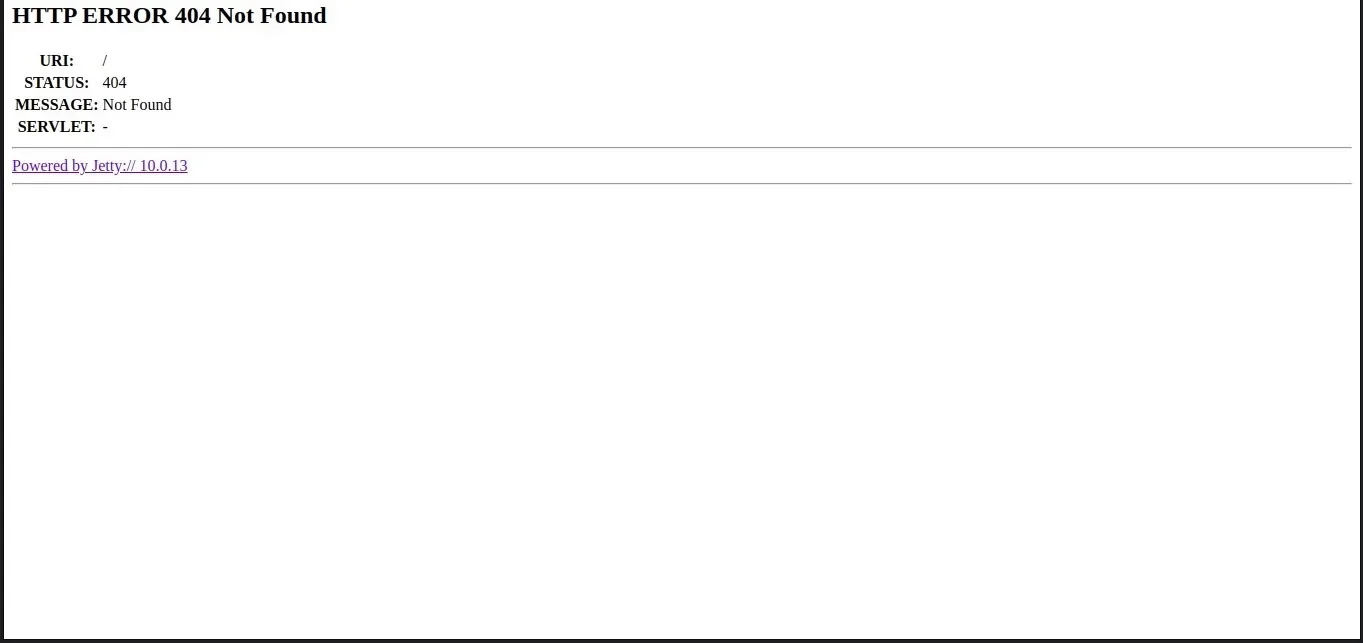
The lesson drawn is not to close the tab on a 404 and move to another instance. The researcher was fuzzing for directories regardless of status code, whether 200, 404 or 403, because the interesting findings are often behind those pages.
Step 3: Fuzzing finds /jenkins/script
Fuzzing was run against port 8080 with ffuf and a wordlist:
http:ip:8080/
Only one word returned 200 OK: /jenkins/script. The researcher recommends adding this path to fuzzing lists.
Step 4: The open Jenkins script console
Opening the path:
http://ip:8080/jenkins/script
led into an unauthenticated Jenkins panel. Many paths and information were available there, which the report does not detail. The important part is that access was open and the /script console was open, so the same URL led to the console itself.
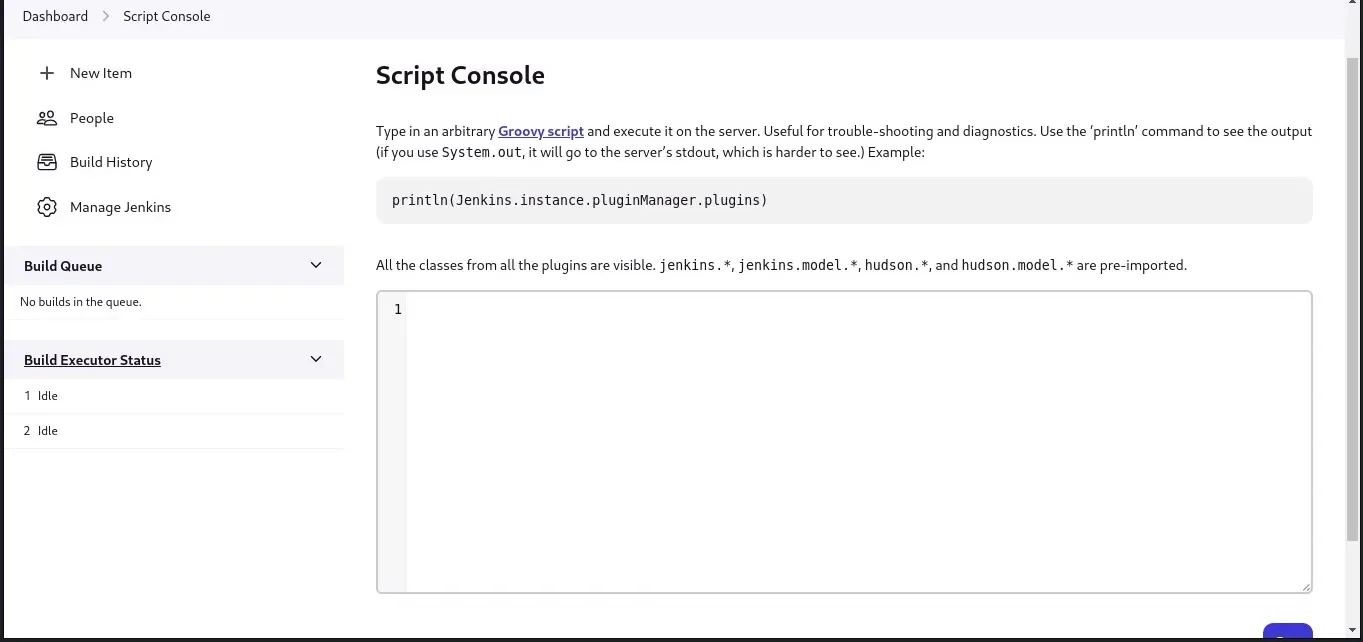
Recalling tweets about RCE on Jenkins instances and previously available Jenkins RCE reports on HackerOne, the researcher recognised the opportunity and injected simple commands into the script console:
"ls /".execute().text
"ps aux".execute().text
println "whoami".execute().text
These commands produce proper outputs from inside the machine. For example, the println "whoami".execute().text command returns Jenkins as the output, confirming the identity the Jenkins process runs as.
With that, proof of concepts were prepared and reported to the team as report number 2.
Root cause
Both findings come down to services exposed to the internet with no authentication in front of them. The MongoExpress panel accepted anonymous visitors and gave them the full administrative interface, including the internal admin, config and local databases, so the admin credentials stored there could be read and edited. The Jenkins instance likewise allowed anonymous access, and the /script console, which executes Groovy inside the Jenkins JVM, was reachable without login.
The 404 on port 8080 is also part of the story: the root of the service looked like a dead end, and only fuzzing revealed the /jenkins/script path behind it.
Impact
On port 8081, an unauthenticated attacker could configure existing databases, create new databases and delete existing ones, and could read and edit the admin credentials stored in the admin database. On port 8080, an unauthenticated attacker had command execution on the host through the Jenkins script console, with commands running as the Jenkins user.
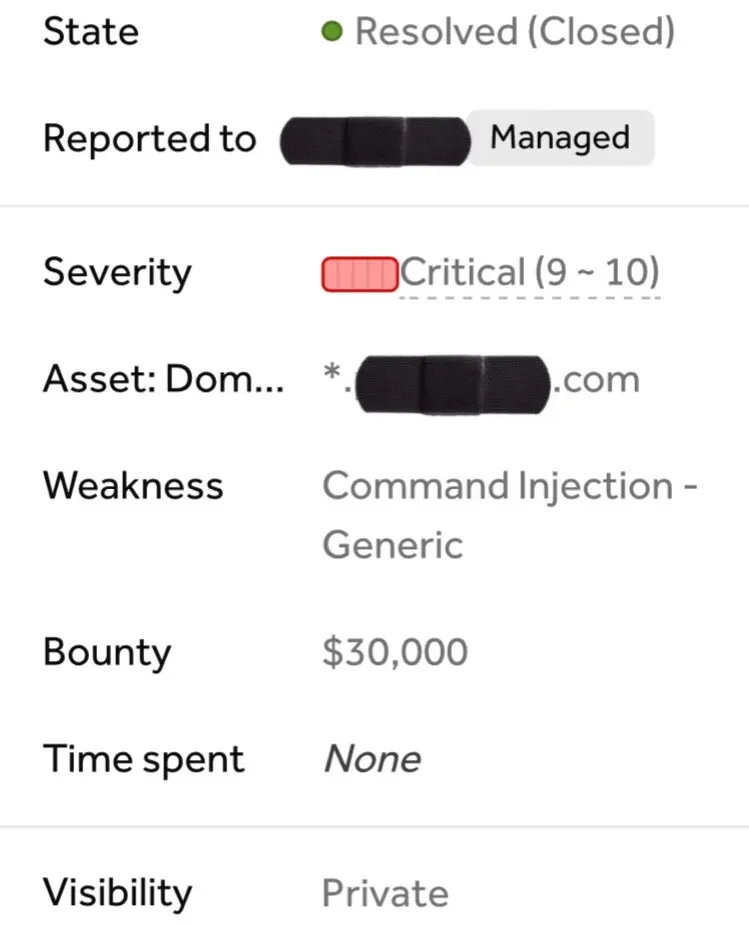
The company treated the RCE seriously and duplicated the MongoExpress exposure, since a fix would be effective on both instances. The bounty was twice what the researcher expected.
Fix
Variants to test
The report closes with concrete search and fuzzing ideas:
- Use a simple Censys search for the target domain together with the Jenkins product filter:
(target.com) and services.software.product=`jenkins`
A positive result is a host belonging to the target that Censys identifies as running Jenkins.
- Use Shodan queries such as:
Set-Cookie: mongo-express=" "200 OK"
A positive result is a MongoExpress instance answering 200 OK, which is worth checking for missing authentication.
- Add
/jenkins/scriptto your wordlist. A positive result is a 200 OK on that path, which means the script console is reachable and should be tested for anonymous access.
The two major takeaways are to never believe a 404 page and to treat Censys and Shodan as real friends.

What happened, in plain words
A security researcher spent a hot day hunting for bugs in the websites of a financial company, which the story calls redacted.com. By noon he had found nothing. So he fell back on a habit: when a day is going badly, he looks up the company's computers on two public search engines for internet-connected devices, Censys and Shodan. Think of them as a phone book for machines on the internet: they scan the whole internet and record which addresses answer, on which doors (ports), and often what software is behind each door.
That search turned up one address belonging to the company with many doors open: 80, 443, 8080, 8081 and more. Two of those doors looked interesting, 8080 and 8081, because Censys labelled the machine as running MongoExpress and Jenkins. Before touching anything, he checked that the address really belonged to the company. It did. Then he opened door 8081 and found a database management panel with no login at all. Later he opened door 8080, which at first looked like an empty error page, and behind it found a Jenkins automation server whose script console was also open to anyone. That console lets you run commands on the machine, so the second finding was remote code execution: the ability to make the server run your commands from afar.
He reported both. The company treated the command execution as serious and duplicated the database panel finding, because one fix would be effective on both instances. The reward was twice what he expected.
The words you need before we start
A few ideas come up again and again, so here they are once, in everyday terms.
- IP address: the numeric address of a machine on the internet, like a street address for a building. A domain name such as redacted.com is a friendlier label that points to one or more of these addresses.
- Port: one machine can run many services at once, and each service listens on a numbered door called a port. Port 80 is the usual door for plain web traffic, 443 for encrypted web traffic, and other numbers are used by whatever software the owner installed. Opening
https://ipaddress:8081means "go to that machine's address and knock on door 8081". - Authentication: proving who you are, usually with a username and password. A service "without authentication" lets anyone in, the way a shop with no lock and no staff lets any passer-by walk behind the counter.
- MongoDB: a popular database program. A database is an organised store of information, like a very large, very strict spreadsheet collection.
- MongoExpress: a web page that sits in front of a MongoDB database so a human can browse and edit it in a browser instead of typing commands. It is meant to be protected; if it is open, anyone who finds it can manage the database.
- Jenkins: a tool that automates building and testing software. It has a web interface, and one of its features, the script console, runs small programs (written in a language called Groovy) inside Jenkins itself. That is powerful by design, which is why it must never be open to strangers.
- RCE (remote code execution): the worst kind of bug, where an outsider can make a server run commands of their choosing. It usually means the attacker can do anything the server's own user can do.
- Fuzzing: trying a long list of common names against a website to see which ones exist. Like trying every key on a big keyring on a door to see which one turns.
- 404: the standard web answer meaning "nothing here at this address". It is often a lie: the page may exist but be hidden behind a path you have not guessed yet.
- Cookie: a small piece of text a website asks your browser to store and send back on every visit, so the site can remember you. Some cookies identify a logged-in session, which is why they are sensitive.
Part 1: the secrets on port 8081
The researcher's stated habit on a bad day is to dig through Censys and Shodan. So he searched Censys for the IP addresses belonging to redacted.com and went through them one by one. After a while one address stood out because so many ports were open: 80, 443, 8081, 8080 and so on. The Censys sidebar said the machine was related to MongoExpress and Jenkins, which made ports 8080 and 8081 look suspicious.
He was not yet sure the machine really belonged to the company, so before exploring he checked it with the SSL checker at https://www.sslshopper.com/ssl-checker.html. That site looks at the certificate a server presents, the same kind of certificate that makes the padlock appear in your browser, and reports which names it is valid for. The check showed the address did belong to redacted.com and was also linked to many other online properties of the same company. That confirmation showed the address belonged to the company.
He opened port 8081 first:
https://ipaddress:8081
Line by line: https means an encrypted web connection, the same protocol your browser uses for banking sites. ipaddress is the numeric address of the machine, standing in for the real one. :8081 is the port, the numbered door to knock on. So the whole line says: open an encrypted web page on that machine, at door 8081.
What came back was an exposed MongoExpress panel without any authentication. In plain terms, he had walked into the database's control room and nobody asked who he was.
Because he had free access to the panel, he could do whatever he wanted with the databases behind it, including:
- Configure existing databases.
- Create new databases.
- Delete existing databases, and more.
He puts this down to a severe misconfiguration, meaning the software was installed and left running with its safety settings effectively off. He was also able to reach the following paths, which are the database's own internal storage areas:
http://ip:8081/db/config/
This asks the panel to show the database named config. That is one of MongoDB's built-in databases, used for internal settings. The http here is unencrypted web traffic, and ip is the machine's address.
http://ip:8081/db/config/system.sessions
This opens a collection called system.sessions inside config. A collection is like a table in a spreadsheet. Sessions are records of who is logged in, so this is the kind of data that should never be public.
http://ip:8081/db/admin/system.users
This opens system.users inside the admin database: the list of database user accounts. Reading it is like finding the staff list with everyone's keys.
http://ip:8081/db/admin/system.version
This opens system.version, a small record of which database version is installed.
http://ip:8081/db/local/startup_log
This opens startup_log inside the local database, a log written when the database starts up.
Most importantly, he found the admin credentials in the admin database, stored in salted form, and an attacker was able to edit them. A salt is random text mixed into a password before it is scrambled (hashed), so that two identical passwords do not look identical in storage. Salting is a good practice, but it does not stop someone who can reach the records from reading or changing them. Here the panel let him read and change the records, so the protection was beside the point.
He reported this to the company immediately, explaining everything, and rated it CRITICAL, the top of the usual severity scale.
Part 2: the gem on port 8080
He had been checking every port on this address. Port 8081 was done. Some readers may wonder why he tried 8081 before 8080. There was one reason: port 8080 answered with a 404 error page, so he assumed it was a dead end.
His advice is not to close the tab on a 404 and move on to another machine. In those days he had started fuzzing for directories regardless of the status code, whether 200 (found), 404 (not found) or 403 (forbidden), because the interesting things are often hidden behind those pages. A 404 at the front door does not mean the building is empty; it may just mean the front door is not the way in.
So he ran ffuf, a tool that tries a long list of common paths (a wordlist) against a site very quickly, against port 8080:
http:ip:8080/
Line by line: http is the unencrypted web protocol, ip is the machine's address, :8080 is the port, and the trailing / is the root of the site, the front page. This is the address ffuf was pointed at. He was not expecting much, but exactly one word in the list came back 200 OK, meaning "this exists and works": /jenkins/script. He recommends everyone add that path to their fuzzing lists.
He opened it straight away:
http://ip:8080/jenkins/script
Line by line: same machine, same port 8080, then the path /jenkins/script. The first part, /jenkins, is where the Jenkins web interface lives. The second part, /script, is the script console page. So this URL asks for the console directly.
His heartbeat rose. Port 8081 had been an open door to MongoExpress, but 8080 was more special: an open door to Jenkins. He entered the Jenkins panel without logging in. Many paths and pieces of information were available there, which he chooses not to describe. The key point is that access was open and, more importantly, the /script console was open, so the same URL took him into the console itself.
He remembered seeing tweets about RCE on Jenkins instances, and he had read previously published Jenkins RCE reports on HackerOne, a public bug bounty platform. So he understood what the moment meant and acted at once. All he had to do was type simple commands into the script console:
"ls /".execute().text
Line by line: "ls /" is a piece of text containing a command, ls /, which on a Linux machine lists the contents of the root folder, the top of the file system. .execute() tells Jenkins to run that text as a program on the machine. .text takes whatever the program printed and hands it back as text. So the whole line means: run ls / on the server and show me the output.
"ps aux".execute().text
Line by line: "ps aux" is the command ps aux, which lists the programs currently running on the machine. .execute() runs it, .text returns its output. This tells the researcher what the server is doing and under which accounts.
println "whoami".execute().text
Line by line: "whoami" is the command whoami, which prints the name of the user the command runs as. .execute() runs it, .text captures the output, and println prints that output on the console page. For example, this one returns Jenkins, which confirms the identity the Jenkins process runs under.
These commands produce real output from inside the machine. That is the proof: the server is running his commands. He prepared all the proofs of concept and reported to the team as report number 2.
Why it worked
Both findings come down to the same thing: services reachable from the open internet with nothing asking for a login. The MongoExpress panel accepted anonymous visitors and handed them the full administrative interface, including the internal admin, config and local databases, so the admin credentials stored there could be read and edited. The Jenkins instance also allowed anonymous access, and its /script console, which runs Groovy inside Jenkins, was reachable without logging in. The report does not describe any proxy, network restriction or login layer that should have been in place.
The 404 on port 8080 is part of the story too: the front of the service looked empty, and only fuzzing revealed the /jenkins/script path behind it.
What an attacker could have done
On port 8081, an anonymous attacker could configure existing databases, create new ones and delete existing ones, and could read and edit the admin credentials stored in the admin database. On port 8080, an anonymous attacker had command execution on the machine through the Jenkins script console, with commands running as the Jenkins user.
The company took the RCE seriously and merged the MongoExpress exposure into it, since one fix would be effective on both instances. The bounty was twice what the researcher expected.
The fix
The report does not say what the company changed.
Things you can try yourself
The report closes with concrete search and fuzzing ideas:
- Use a simple Censys search for the target domain together with the Jenkins product filter:
(target.com) and services.software.product=`jenkins`
Line by line: (target.com) limits the search to hosts associated with that domain. and means both conditions must hold. services.software.product=jenkins`` asks Censys for hosts where the detected software product is Jenkins. A positive result is a host belonging to the target that Censys identifies as running Jenkins.
- Use Shodan queries such as:
Set-Cookie: mongo-express=" "200 OK"
Line by line: Set-Cookie: is a standard response header, a line a web server sends back to the browser to give it a cookie. mongo-express= is the name of the cookie MongoExpress sets. " "200 OK" is the response status text, the "everything is fine" answer. Together the query asks Shodan for machines that answer 200 OK and set a MongoExpress cookie. A positive result is a MongoExpress instance worth checking for missing authentication.
- Add
/jenkins/scriptto your wordlist. A positive result is a 200 OK on that path, which means the script console is reachable and should be tested for anonymous access.
The two major takeaways are to never believe a 404 page and to treat Censys and Shodan as real friends.
Glossary
- Authentication: the process of proving who you are, usually with a username and password, before a service lets you in.
- Bounty: a reward a company pays to someone who reports a security problem to it responsibly.
- Bug bounty: a programme where a company invites outsiders to look for security problems in its systems and pays for valid reports.
- Censys: a public search engine that scans the internet and records which machines answer, on which ports, and often what software they run.
- Collection: in MongoDB, a group of records, roughly like a table in a spreadsheet.
- Cookie: a small piece of text a website asks your browser to store and send back on later visits, often used to remember a logged-in session.
- Credentials: the details used to log in, such as a username and password.
- CRITICAL: the highest level on the usual severity scale for a security bug.
- Database: an organised store of information that software can read and write.
- Directory fuzzing: trying a long list of common folder and file names against a website to discover hidden pages.
- ffuf: a command-line tool that sends many requests quickly, used to discover hidden paths on a website.
- 404: the standard web response meaning the requested page was not found.
- 403: the standard web response meaning the request was understood but refused.
- 200 OK: the standard web response meaning the request succeeded.
- Groovy: a programming language that runs on the Java platform; Jenkins uses it for its script console.
- HackerOne: a public platform where companies run bug bounty programmes and researchers submit reports.
- Hash: the scrambled output of a one-way function applied to data such as a password, so the original cannot easily be recovered from it.
- Header: an extra line of information sent with a web request or response, such as
Set-Cookie. - IP address: the numeric address of a machine on the internet.
- Jenkins: an automation server used to build and test software, with a web interface and a script console.
- JVM: the Java Virtual Machine, the environment that runs Java programs; code run inside it runs on the host.
- MongoDB: a popular database program.
- MongoExpress: a web interface for browsing and editing a MongoDB database.
- Port: a numbered door on a machine that a particular service listens on.
- Proof of concept (PoC): a small, safe demonstration that a security problem is real.
- RCE (remote code execution): a flaw that lets an outsider make a server run commands of their choosing.
- Salt: random text mixed into a password before hashing, so identical passwords do not produce identical stored values.
- Script console: the Jenkins page that runs Groovy code inside Jenkins itself.
- Session: a period during which a website remembers that you are logged in, usually tracked with a cookie.
- Shodan: a public search engine for internet-connected devices, similar in purpose to Censys.
- SSL checker: a website that inspects a server's certificate and reports which domain names it is valid for.
- Status code: the three-digit number in a web response saying how the request went, such as 200, 403 or 404.
- Wordlist: a file of common names that a fuzzing tool tries one after another.


