The AES Key That Bypassed Every Fix: From Mass PII Exposure to 2FA Bypass
An AES key was exposed in frontend JavaScript and used to encrypt API responses, so the encryption added as a fix for earlier access-control bugs could be undone. The same key protected a 2FA verification value, and changing a flag from N to Y and re-encrypting let the server accept the 2FA step as complete.
 Published on medium.com
Bug Bounty
The full write-up lives on its author's site
It belongs to its author, so we link to it rather than copy it. The other two tabs are our own rewrites, checked against it.
Context
This is a write-up about an application the author had tested before. Earlier reports on the same application covered several APIs that returned sensitive information without proper access controls, including company and contact data. The author links to a previous article describing five bounties on the same platform.
The APIs shown in this report are under a proxy service and take a tenantCode parameter:
GET /api/proxy-service/companies?tenantCode=PIL&companyRegistrationNumber=1
GET /api/proxy-service/reference-data/USER_ROLE?tenantCode=PIL
GET /api/proxy-service/admin/bl/companies
Those issues were fixed. As part of the fix, the company changed how API responses were handled: rather than restricting access to the APIs properly, they started encrypting the API responses so the returned data was no longer directly readable. The application also has a 2FA verification flow, which is where the second half of this report takes place.
Setup
The report does not describe accounts, roles, tooling versions or any special preconditions. The only requirement visible in the text is the ability to download the publicly accessible frontend JavaScript files and to capture API responses, including the response from the 2FA verification flow. The decryption and re-encryption scripts are written in Node.js using the built-in crypto module.
Finding it
While testing the application, the author looked through the publicly accessible JavaScript files and found this line:
REACT_APP_AES_KEY = "<REDACTED>"
The key was inside the frontend JavaScript. At that point its purpose was unknown, and the author deliberately did not assume that finding an AES key meant there was a vulnerability. The question was what the key was actually used for.
Remembering the earlier reports gave a direction. The previous APIs had been fixed, and the fix had introduced encryption of API responses. The hypothesis was that this key was the one introduced to protect those responses after the earlier reports. That was the first thing to test.
Exploitation
Step 1: decrypt an API response with the exposed key
The author took one of the encrypted API responses and wrote a small script that used the exposed AES key to decrypt it. The flow was:
Get encrypted API response ↓Use exposed AES key ↓Decrypt response ↓Read original JSON
The script:
const crypto = require("crypto");const key = Buffer.from("<AES-KEY>");const data = Buffer.from("<encrypted_response>", "base64");const iv = data.slice(0, 12);const encrypted = data.slice(12);const tag = encrypted.slice(-16);const text = encrypted.slice(0, -16);const decipher = crypto.createDecipheriv("aes-256-gcm", key, iv);decipher.setAuthTag(tag);let decrypted = decipher.update(text, null, "utf8");decrypted += decipher.final("utf8");console.log(decrypted);
The script base64-decodes the response, takes the first 12 bytes as the IV, the last 16 bytes as the GCM authentication tag, and everything in between as the ciphertext. It then decrypts with aes-256-gcm using the key from the frontend and verifies the tag with setAuthTag.
No part of AES was broken and the key did not have to be guessed: it was already sitting in the frontend. After implementing the same AES-GCM logic used by the application, the author tested it against a real API response and it worked.
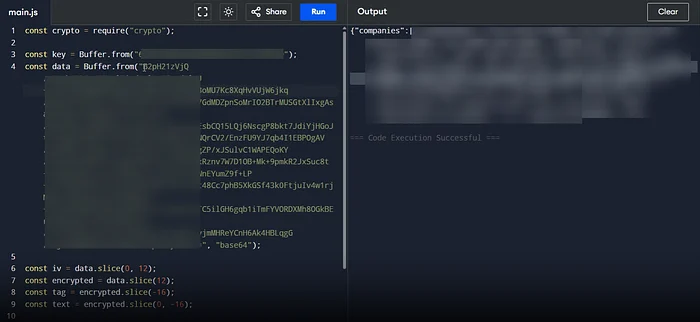
The report places a screenshot here, without describing its contents.
Step 2: recognise what the decryption means
The application had fixed the previous reports by introducing encryption to stop someone from simply reading the API responses. But the encryption key was available to anyone who could download the JavaScript, so the new protection could be bypassed. The decrypted responses contained sensitive information such as company and contact data.
The point was not that an AES key existed in JavaScript. The point was that the exposed key allowed the author to defeat the encryption that had been introduced as part of the security fix.
Step 3: find the same key in the 2FA flow
After confirming the key worked against the API responses, the author looked for other places where the same encryption was used. The application also used encrypted data during the 2FA verification flow.
The author captured the encrypted verification response and decrypted it with the same key. After decryption, the plaintext looked like this:
[redacted]:null:1776557237487:N
The important part was the last value, N, which represented the verification state.
Step 4: change the verification state and re-encrypt
To see whether the server actually validated the value properly, the author changed N to Y:
[redacted]:null:1776557237487:Y
The modified value was then re-encrypted with the same AES key:
const crypto = require("crypto");const key = Buffer.from("<AES-KEY>");const plaintext = "<Decrypted modified Verification Response>";const iv = crypto.randomBytes(12);try { const cipher = crypto.createCipheriv("aes-256-gcm", key, iv); let encrypted = cipher.update(plaintext, "utf8"); encrypted = Buffer.concat([encrypted, cipher.final()]); const tag = cipher.getAuthTag(); const result = Buffer.concat([iv, encrypted, tag]).toString("base64"); console.log(result);} catch (err) { console.error("❌ Error:", err.message);}
This script generates a fresh 12-byte IV, encrypts the modified plaintext with aes-256-gcm, obtains the authentication tag, and concatenates IV, ciphertext and tag before base64-encoding the result. The output is base64-encoded IV, ciphertext and tag, and was sent back to the application.
The overall process was:
Original encrypted response ↓Decrypt using exposed key ↓Change N → Y ↓Encrypt again using the same key ↓Send modified response
Step 5: send it back
The modified value was sent back to the application and it worked. The server accepted the modified encrypted response as valid without the actual verification step being completed. That demonstrated a 2FA bypass.
The full chain:
Original API vulnerabilities ↓ Fixed ↓API responses encrypted ↓AES key exposed in JavaScript ↓Key extracted ↓API responses decrypted ↓Same key found in 2FA flow ↓N changed to Y ↓Response re-encrypted ↓2FA bypass
Root cause
There are two related mistakes.
First, the AES key was placed in frontend JavaScript. Encryption of API responses was used as the fix for the earlier access control problems, but a symmetric key shipped to every client is available to anyone who can download the JavaScript, so the encryption provides no confidentiality against an attacker. The encryption introduced as the fix could therefore be bypassed.
Second, the 2FA verification state was carried in a client-controlled encrypted value. Because the client holds the key, it can decrypt the value, change the verification flag from N to Y, and re-encrypt it. The server accepted the modified response as valid, which means it trusted a client-controlled value to determine whether 2FA had been completed. Encryption with a shared, client-side key gives no integrity against the client either, since the client can produce a valid tag for its own modified plaintext.
Impact
Under the conditions shown in the report, an attacker who can download the frontend JavaScript can decrypt the encrypted API responses and read the sensitive information they contain, including company and contact data. The same attacker can modify the verification state in the 2FA flow and have the server accept it, completing a 2FA bypass without the actual verification step. The report does not state which accounts or how many records were affected, nor whether the bypass was demonstrated on the author's own account or another user's.
Fix
The report gives three recommendations:
- The AES key should not be placed in frontend JavaScript.
- The server should never trust a client-controlled value to determine whether 2FA has been completed.
- The 2FA state should be maintained and verified server-side.
Variants to test
- Search bundled JavaScript for configuration names such as
REACT_APP_*_KEY,*_SECRETand*_AES_KEY. A positive result is a key that decrypts a real response from the application. - Take any encrypted or signed response body and try to decrypt it with keys found in the frontend. A positive result is readable JSON containing sensitive fields.
- Look for state flags inside decrypted values, such as a single-character verification or status field. A positive result is the server accepting a modified flag after re-encryption with the same key.
- Check whether the server validates the authentication tag against a server-held key rather than a client-held one. A positive result for the attacker is a modified ciphertext that the server accepts.
- Test other flows that carry encrypted blobs, such as password reset or step-up authentication, for the same pattern of client-side encryption with a shared key.
Thanks to Mohamed Abdelmoatie (3at3ot) for the collaboration.
What happened, in plain words
A website had a security problem. Some of its internal data, such as company details and contact information, could be read by anyone who knew the right web address. The person who found this reported it, and the company fixed it.
But the way they fixed it was weak. Instead of properly locking the door, they scrambled the data so it looked like nonsense. Anyone who had the right "unscrambling key" could turn it back into readable text. The problem was that this key was sitting in a file that every visitor's browser downloads automatically. So anyone could find the key, unscramble the data, and read everything again.
The same key was also used in the part of the website that checks a second login code (the "two-factor authentication" step). The person found that the website stored a small letter, N or Y, inside the scrambled data to remember whether the second step had been completed. By changing N to Y and scrambling it again with the same key, they could skip the second login step entirely.
This article walks through exactly how that was done, step by step, in the same order as the original write-up. Every concept is explained from scratch.
Background: what the website does and what was already reported
The author had tested this same application before. In earlier reports, they found several web addresses (called APIs) that returned sensitive information without checking whether the person asking was allowed to see it. They link to a previous article about five bounties on the same platform.
What is an API?
Think of a restaurant. You (the browser) look at a menu and tell the waiter what you want. The waiter goes to the kitchen and brings back a plate. You never go into the kitchen yourself.
An API (Application Programming Interface) is the waiter. Your browser asks a web address for data, and the server (the kitchen) sends it back. The data usually comes back in a format called JSON, which is just text arranged in labelled boxes, like a form with fields.
The three APIs from the earlier reports
These are the web addresses that were returning data without proper checks:
GET /api/proxy-service/companies?tenantCode=PIL&companyRegistrationNumber=1
GET /api/proxy-service/reference-data/USER_ROLE?tenantCode=PIL
GET /api/proxy-service/admin/bl/companies
What each part means:
GETis the type of request. It means "give me something", as opposed toPOST, which means "send something"./api/proxy-service/...is the path, the address of the resource on the server. "Proxy" here suggests the request passes through a middle layer before reaching the real service.?tenantCode=PILis a query parameter. Everything after the?is extra information sent along with the request.tenantCodeis a label,PILis its value. A tenant is one organisation using a shared platform, so this parameter probably tells the server which organisation's data to look at.&companyRegistrationNumber=1is a second parameter, joined with&. It asks for a specific company by its registration number.- The second URL asks for
reference-data/USER_ROLE, which sounds like a list of user roles (admin, viewer, and so on). - The third URL has
adminin the path, which suggests it was meant to be restricted to administrators.
These APIs were returning sensitive information without the proper access controls. In plain terms: the waiter was handing out plates to anyone who asked, without checking whether they were a paying customer.
What the company did to fix it
The company fixed those issues. But as part of the fix, they changed how the API responses were handled. Instead of restricting access to the APIs properly, they started encrypting the API responses so the returned data was no longer directly readable.
What is encryption?
Encryption is scrambling. You take readable text (called plaintext) and a secret value (called a key), and you get back unreadable gibberish (called ciphertext). With the same key, you can reverse the process and get the plaintext back. This reversal is called decryption.
A useful comparison: a locked box. The plaintext goes in, you snap the lock shut, and only someone with the right key can open it again.
There are two broad kinds of encryption:
- Symmetric: one key does both locking and unlocking. Like a padlock with a single physical key that is copied to everyone who needs it.
- Asymmetric: two different keys, one public for locking and one private for unlocking. Like a mailbox slot: anyone can drop a letter in, but only the owner can open the box.
The application used symmetric encryption, specifically a standard called AES (Advanced Encryption Standard). AES is a well-studied, strong algorithm. The problem in this story is not that AES is weak. The problem is where the key was kept.
What is 2FA?
2FA stands for two-factor authentication. It means logging in with two separate proofs: usually your password (something you know) plus a code from your phone or an app (something you have). The idea is that even if someone steals your password, they still cannot get in without the second proof.
A typical 2FA flow works like this:
- You enter your username and password.
- The server checks them and says "correct, now give me the second code".
- You enter the code from your phone.
- The server checks the code and lets you in.
The second half of this report takes place in step 3 and 4, where the server decides whether the second step has been completed.
Finding the key
While testing the application, the author was looking through the publicly accessible JavaScript files.
What is frontend JavaScript?
A website has two halves. The frontend is everything that runs in your browser: the page you see, the buttons, the animations. The backend (or server side) is everything that runs on the company's computers, which you never see directly.
Modern websites are often built with frameworks like React. React applications are written in JavaScript, and when the site is built, all that code is bundled into files that the browser downloads. Anyone can open the browser's developer tools, look at the Network tab, and see every file the page loaded. There is no secret handshake: if the browser can download it, you can read it.
This is why developers are told never to put secrets in frontend code. It is like writing your house key on a note and taping it to your front door: it is convenient for you, but it is also convenient for anyone walking past.
The line that was found
Inside those files, the author found this:
REACT_APP_AES_KEY = "<REDACTED>"
What this line means:
REACT_APP_is a naming convention used by React projects. Variables starting with this prefix are deliberately made available to the browser code at build time. In other words, the build system treats them as public.AES_KEYis the name the developer chose. It says clearly that this is an AES key.- The value in quotes is the key itself. It has been replaced with
<REDACTED>here so the real key is not published.
The key was inside the frontend JavaScript. At this point, the author did not know what it was used for.
Why the author did not stop there
It is tempting to see a key in JavaScript and immediately shout "vulnerability!". But a key on its own proves nothing. It might be a leftover from an old feature, a placeholder, or a key for something harmless. The author deliberately did not assume that finding an AES key meant there was a vulnerability. The question was:
What is this key actually used for?
This is a good habit. A finding becomes a real issue only when you can show what it lets an attacker do.
The clue from the earlier reports
Remembering the earlier reports gave a direction. The previous APIs had been fixed, and the fix had introduced encryption of API responses. The hypothesis was that this key was the one introduced to protect those responses after the earlier reports. That was the first thing to test.
A hypothesis, in security testing, is a guess you can check. You do not just poke around randomly; you form a specific idea ("this key probably decrypts the API responses") and then design a test that will either confirm or disprove it.
Step 1: decrypt an API response with the exposed key
The author took one of the encrypted API responses and wrote a small script that used the exposed AES key to decrypt it.
The overall flow was:
Get encrypted API response ↓Use exposed AES key ↓Decrypt response ↓Read original JSON
In plain words: capture the scrambled response, feed it to a script along with the key, get readable JSON back.
The decryption script
const crypto = require("crypto");const key = Buffer.from("<AES-KEY>");const data = Buffer.from("<encrypted_response>", "base64");const iv = data.slice(0, 12);const encrypted = data.slice(12);const tag = encrypted.slice(-16);const text = encrypted.slice(0, -16);const decipher = crypto.createDecipheriv("aes-256-gcm", key, iv);decipher.setAuthTag(tag);let decrypted = decipher.update(text, null, "utf8");decrypted += decipher.final("utf8");console.log(decrypted);
Line by line:
const crypto = require("crypto");loads Node.js's built-in cryptography library. Node.js is a program that runs JavaScript outside the browser, on your own computer. It is handy for writing small test scripts.const key = Buffer.from("<AES-KEY>");turns the key text into raw bytes. A Buffer is Node's way of holding raw binary data. The placeholder<AES-KEY>stands for the real key found in the JavaScript.const data = Buffer.from("<encrypted_response>", "base64");takes the encrypted response and decodes it from base64. Base64 is a way of writing binary data using only ordinary letters, digits and a few symbols, so it can travel safely inside text (for example, inside JSON). Think of it as a shipping envelope: the contents are binary, the envelope is text.const iv = data.slice(0, 12);takes the first 12 bytes. These are the IV (Initialisation Vector).const encrypted = data.slice(12);takes everything after the first 12 bytes.const tag = encrypted.slice(-16);takes the last 16 bytes. This is the authentication tag.const text = encrypted.slice(0, -16);takes everything except the last 16 bytes. This is the actual ciphertext.const decipher = crypto.createDecipheriv("aes-256-gcm", key, iv);creates a decryption tool configured for AES-256-GCM. "256" means a 256-bit key. "GCM" is a mode of AES that also checks integrity, meaning it can detect if the ciphertext was tampered with.decipher.setAuthTag(tag);hands the authentication tag to the tool so it can verify the ciphertext has not been altered.let decrypted = decipher.update(text, null, "utf8");decrypts the main body of the ciphertext.decrypted += decipher.final("utf8");finishes the decryption and appends any remaining output. If the tag does not match, this line throws an error.console.log(decrypted);prints the readable plaintext to the screen.
What is an IV, and why 12 bytes?
An IV (Initialisation Vector) is a random starting value used alongside the key. Its job is to make sure that encrypting the same plaintext twice produces different ciphertext. Without it, two identical messages would look identical after encryption, which leaks information.
In AES-GCM, the IV is conventionally 12 bytes (96 bits), and the script assumes that convention.
What is an authentication tag?
A tag is a short value computed from the ciphertext and the key. When decrypting, the tool recomputes the tag and compares it with the one provided. If they match, the ciphertext is intact. If not, something was changed. It is like a wax seal on an envelope: break the seal, and the recipient knows.
The result
No part of AES was broken and the key did not have to be guessed: it was already sitting in the frontend. After implementing the same AES-GCM logic used by the application, the author tested it against a real API response and it worked.
The report places a screenshot here, without describing its contents.
Step 2: recognise what the decryption means
The application had fixed the previous reports by introducing encryption to stop someone from simply reading the API responses. But the encryption key was available to anyone who could download the JavaScript, so the new protection could be bypassed. The decrypted responses contained sensitive information such as company and contact data.
The point was not that an AES key existed in JavaScript. The point was that the exposed key allowed the author to defeat the encryption that had been introduced as part of the security fix.
This distinction matters. A hardcoded key is a code quality problem. A hardcoded key that unlocks the very protection added to fix a previous data leak is a security regression: the original problem is still there, just hidden behind a layer that anyone can peel off.
A useful comparison: imagine a shop that had a problem with people walking into the storeroom. The fix was to put a curtain across the doorway. The curtain hides the storeroom from casual glances, but anyone who walks up and pulls it aside is inside. Encryption with a public key is that curtain.
Step 3: find the same key in the 2FA flow
After confirming the key worked against the API responses, the author looked for other places where the same encryption was used. The application also used encrypted data during the 2FA verification flow.
What is a verification response?
When you complete the second step of 2FA, the server sends something back to your browser to confirm the result. In this application, that something was an encrypted blob. The author captured the encrypted verification response and decrypted it with the same key.
This pattern is common: the server hands the client a piece of data, the client hands it back later, and the server trusts it. It is convenient because the server does not have to remember anything between requests. It is also risky, for reasons this section shows.
After decryption, the plaintext looked like this:
[redacted]:null:1776557237487:N
What each part means:
[redacted]is an email address, presumably identifying the account. It has been left as it appears in the report.nullis a placeholder meaning "no value". The report does not say what this field represents.1776557237487is a number. It looks like a timestamp in milliseconds, a common way of recording when something happened. The report does not say what it records.Nis the last value, and the important one. It represented the verification state.Npresumably means "no, not verified".
The fields are separated by colons, a simple format that is easy to split apart in code.
Step 4: change the verification state and re-encrypt
To see whether the server actually validated the value properly, the author changed N to Y:
[redacted]:null:1776557237487:Y
Y presumably means "yes, verified". The question was whether the server would notice that the value had been changed. Because the client holds the key, it can produce a perfectly valid new ciphertext with a matching tag. The server accepted the modified encrypted response as valid.
The modified value was then re-encrypted with the same AES key:
const crypto = require("crypto");const key = Buffer.from("<AES-KEY>");const plaintext = "<Decrypted modified Verification Response>";const iv = crypto.randomBytes(12);try { const cipher = crypto.createCipheriv("aes-256-gcm", key, iv); let encrypted = cipher.update(plaintext, "utf8"); encrypted = Buffer.concat([encrypted, cipher.final()]); const tag = cipher.getAuthTag(); const result = Buffer.concat([iv, encrypted, tag]).toString("base64"); console.log(result);} catch (err) { console.error("❌ Error:", err.message);}
Line by line:
const crypto = require("crypto");loads the same cryptography library as before.const key = Buffer.from("<AES-KEY>");loads the same key from the frontend.const plaintext = "<Decrypted modified Verification Response>";is the modified text, withYinstead ofN.const iv = crypto.randomBytes(12);creates a fresh random 12-byte IV. A new IV is needed for every encryption, even with the same key, so that the output does not repeat.try {starts a block that catches errors, because encryption can fail if something is wrong.const cipher = crypto.createCipheriv("aes-256-gcm", key, iv);creates an encryption tool with the same algorithm and key.let encrypted = cipher.update(plaintext, "utf8");encrypts the plaintext.encrypted = Buffer.concat([encrypted, cipher.final()]);finishes the encryption and joins the pieces.const tag = cipher.getAuthTag();obtains the authentication tag for the new ciphertext.const result = Buffer.concat([iv, encrypted, tag]).toString("base64");glues together IV, ciphertext and tag, in that order, and encodes the whole thing as base64. This is the same layout the application expects, so the output can be sent back in place of the original value.console.log(result);prints the new encrypted blob.} catch (err) { console.error("❌ Error:", err.message); }prints an error message if anything went wrong.
The overall process was:
Original encrypted response ↓Decrypt using exposed key ↓Change N → Y ↓Encrypt again using the same key ↓Send modified response
In plain words: take the sealed envelope, open it with the key, change the letter inside, seal it again with the same key, and send it back. Because the server uses the same key, the new seal looks perfectly genuine.
Step 5: send it back
The modified value was sent back to the application and it worked. The server accepted the modified encrypted response as valid without the actual verification step being completed. That demonstrated a 2FA bypass.
A 2FA bypass means getting past the second login step without actually providing the second proof. In this case, the server was told "this user has completed 2FA" by a value the user themselves could edit.
The full chain:
Original API vulnerabilities ↓ Fixed ↓API responses encrypted ↓AES key exposed in JavaScript ↓Key extracted ↓API responses decrypted ↓Same key found in 2FA flow ↓N changed to Y ↓Response re-encrypted ↓2FA bypass
Each arrow is a step that depended on the one before. The original data leak was patched with encryption. The encryption key was public. The public key unlocked the API responses. The same key was reused in the 2FA flow. The 2FA state was a single letter inside the encrypted blob. Changing that letter and re-encrypting was enough.
Root cause
There are two related mistakes.
First, the AES key was placed in frontend JavaScript. Encryption of API responses was used as the fix for the earlier access control problems, but a symmetric key shipped to every client is available to anyone who can download the JavaScript, so the encryption provides no confidentiality against an attacker. The encryption introduced as the fix could therefore be bypassed.
Confidentiality means keeping data secret from people who should not see it. Encryption can provide confidentiality only if the key stays secret. If the key is public, the encryption is just a different alphabet.
Second, the 2FA verification state was carried in a client-controlled encrypted value. Because the client holds the key, it can decrypt the value, change the verification flag from N to Y, and re-encrypt it. The server accepted the modified response as valid, which means it trusted a client-controlled value to determine whether 2FA had been completed. Encryption with a shared, client-side key gives no integrity against the client either, since the client can produce a valid tag for its own modified plaintext.
Integrity means data has not been changed. The authentication tag is supposed to provide integrity, but only against someone who does not have the key. The client has the key, so the tag proves nothing about who created the value.
A useful comparison: a form signed by the person filling it in. The signature looks official, but it only proves the person signed it, not that the office approved it. The server needed an office stamp, not a client signature.
Impact
Under the conditions shown in the report, an attacker who can download the frontend JavaScript can decrypt the encrypted API responses and read the sensitive information they contain, including company and contact data. The same attacker can modify the verification state in the 2FA flow and have the server accept it, completing a 2FA bypass without the actual verification step.
Fix
The report gives three recommendations:
- The AES key should not be placed in frontend JavaScript.
- The server should never trust a client-controlled value to determine whether 2FA has been completed.
- The 2FA state should be maintained and verified server-side.
In plain words: keep the key on the server, and keep the record of who has completed 2FA on the server too. The client can be told the result, but it should not be the one deciding it.
Variants to test
These are patterns to look for on other applications, based on the same idea.
- Search bundled JavaScript for configuration names such as
REACT_APP_*_KEY,*_SECRETand*_AES_KEY. A positive result is a key that decrypts a real response from the application. - Take any encrypted or signed response body and try to decrypt it with keys found in the frontend. A positive result is readable JSON containing sensitive fields.
- Look for state flags inside decrypted values, such as a single-character verification or status field. A positive result is the server accepting a modified flag after re-encryption with the same key.
- Check whether the server validates the authentication tag against a server-held key rather than a client-held one. A positive result for the attacker is a modified ciphertext that the server accepts.
- Test other flows that carry encrypted blobs, such as password reset or step-up authentication, for the same pattern of client-side encryption with a shared key.
Thanks to Mohamed Abdelmoatie (3at3ot) for the collaboration.
Glossary
- 2FA (two-factor authentication): logging in with two separate proofs, usually a password plus a code from a phone or app.
- 2FA bypass: getting past the second login step without actually providing the second proof.
- AES (Advanced Encryption Standard): a widely used, strong symmetric encryption algorithm.
- AES-256-GCM: AES with a 256-bit key in GCM mode, which also checks that the ciphertext has not been altered.
- API (Application Programming Interface): a web address that a program or browser asks for data, and the server responds with data, usually JSON.
- Authentication tag: a short value computed from the ciphertext and key, used to detect tampering.
- Backend (server side): the part of a website that runs on the company's computers and is not directly visible to the user.
- Base64: a way of writing binary data using ordinary text characters so it can travel inside text formats.
- Buffer: a Node.js object that holds raw binary data.
- Ciphertext: the unreadable output of encryption.
- Confidentiality: keeping data secret from people who should not see it.
- Decryption: turning ciphertext back into plaintext using the key.
- Encryption: scrambling plaintext into ciphertext using a key.
- Frontend: the part of a website that runs in the user's browser.
- GET: an HTTP request type that asks the server to return something.
- GCM (Galois/Counter Mode): a mode of AES that provides both encryption and an integrity check.
- Integrity: the property that data has not been changed.
- IV (Initialisation Vector): a random starting value used with the key so that encrypting the same plaintext twice gives different ciphertext.
- JavaScript: the programming language that runs in web browsers and, via Node.js, on computers.
- JSON (JavaScript Object Notation): a text format for structured data, made of labelled fields and values.
- Key: the secret value used to encrypt and decrypt data.
- Node.js: a program that runs JavaScript outside the browser, on a computer.
- Parameter (query parameter): extra information attached to a URL after a
?, in the formname=value. - Plaintext: readable text before encryption, or after decryption.
- React: a JavaScript framework for building user interfaces, often used for frontends.
- Symmetric encryption: encryption where the same key is used to lock and unlock.
- Tenant: one organisation using a shared platform, often identified by a code such as
tenantCode. - Timestamp: a number recording a point in time, often in milliseconds since a fixed starting date.
- Verification state: a value recording whether a step, such as 2FA, has been completed.

