The Dot That Broke a Referral Program
The referral program blocked self-invitation by comparing email addresses as plain text, so adding a dot to a Gmail address bypassed the check and allowed the same person to invite themselves and earn points on both accounts.

Bug Bounty
The full write-up lives on its author's site
It belongs to its author, so we link to it rather than copy it. The other two tabs are our own rewrites, checked against it.
Context
A loyalty club runs a referral program: when a friend joins using your invitation, points are credited. The program has an obvious abuse case, inviting yourself, and the site defends against it. Sending an invitation to your own address is refused on the spot. Someone had thought about the trick and written code to stop it.
The write-up is about that check and how a single character defeats it. Nothing is exploited beyond the referral logic: no password is stolen, nothing is broken into. The check runs exactly as written, compares two pieces of text, sees they are spelled differently, and allows the one thing it existed to prevent.
Setup
The report gives the two spellings involved as [redacted] and [redacted], which are one mailbox with two spellings because Gmail ignores dots in the local part. No other accounts, tools or versions are described.
Finding it
The starting observation is the self-invitation block. The site refuses an invitation sent to your own address, so the natural question is what exactly the site compares. The researcher added one dot to the middle of his own email address and sent the same invitation again. This time it went through. The email landed in the same inbox the site had just refused to send to, and signing up through that invitation paid points to both accounts.
The report frames the mistake as a bouncer with a list of banned names who checks it before anyone has taken their hat off. The code asks one question and answers a different one: it means is this the same person? and what it actually works out is is this the same text? The two agree almost all the time, which is why nobody notices. The check looks right, passes its tests, and behaves correctly against the one example someone thought to try.
Exploitation
Step 1: confirm the self-invitation block
Send an invitation to your own address. The site refuses it on the spot. This establishes that a comparison exists and that it is the thing to defeat.
Step 2: add a dot to the local part
Send the same invitation to a dotted variant of the same address:
[redacted]
Gmail ignores dots in the local part, so this is the same mailbox as [redacted]. The invitation is accepted, and the email arrives in the inbox the site had just refused to send to.
Step 3: sign up through the invitation
Signing up through that invitation pays points to both accounts. The reward is credited twice for one person.
Root cause
The check compares two pieces of text rather than two identities. It is filed as CWE-180: checking something before tidying it into a standard form, instead of after. The check compares two pieces of text rather than two identities, so a differently spelled address that reaches the same mailbox is treated as a different person.
Existing defences did not stop it because the check itself was the defence, and it was correct against the example someone thought to try.
Impact
Any rule that means once per person inherits the problem:
- Invitation and referral rewards
- Free trials, and the waiting period before you get another one
- Discount codes, vouchers and welcome gifts
- Free samples posted to you
- One-entry-per-person competitions and votes
- Limits meant to stop someone repeating the same action
The report describes a worse version. When two parts of the same system disagree, sign-up tidies the address but the password reset page does not, say, someone can register a variant of your address and end up tangled with your account. That stops being about free points, and it is worth looking for whenever you find the simple version.
Fix
The report does not describe a fix or a change made by the program.
Variants to test
Work through the variants roughly in order of how often they pay off:
- A dot somewhere before the
@, if the mailbox is Gmail. Free, endless, and it beats any plain text comparison. - A
+with a word after it. Often blocked by the sign-up form and accepted by the system behind it, so try it where the data is really sent, not in the box on the page. A check that only lives in the browser is not a check. - Turn one letter into a capital.
- Swap
gmail.comforgooglemail.com. - An address at a domain you own, set to accept everything. This beats every attempt to tidy addresses up, because there is nothing left to tidy.
- The sub-name trick, where the mailbox supports it.
- Both spellings of a domain written in another alphabet.
- A full stop on the end of the domain,
example.com., which is technically valid, and systems disagree about it, which is where it gets interesting.
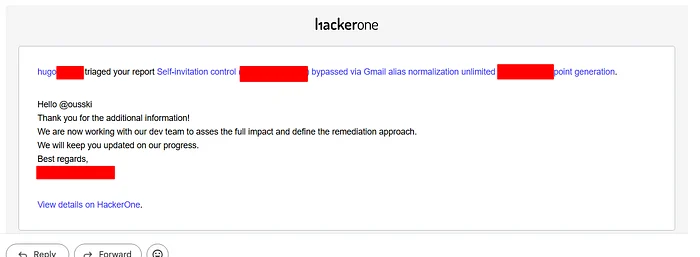
What happened, in plain words
A loyalty club runs a referral program. If you invite a friend and the friend joins, you get points. Points are the reward the club hands out for bringing in new members.
The club knows the obvious trick: inviting yourself. So it blocks it. If you type your own email address into the invitation form and send it, the site refuses straight away. Somebody thought about that trick and wrote code to stop it.
This write-up is about that block, and about how one single character gets around it. Nothing dramatic happens here. No password is stolen, nothing is broken into, no account is taken over. The block does exactly what it was written to do. It compares two pieces of text, sees that they are spelled differently, and lets through the one thing it existed to prevent.
To follow the story you only need to understand a few everyday ideas, and they are all explained as they come up.
The setup
Gmail has a quirk that matters for everything that follows: it ignores dots in the part of the address before the @. So [redacted] and [redacted] are two spellings of one and the same mailbox. Mail sent to either spelling lands in the same inbox, read by the same person.
The report mentions no other accounts, no special tools and no software versions.
Finding it
The starting point is the self-invitation block. The site refuses an invitation sent to your own address. That refusal is interesting, because it tells you the site is comparing something. The natural next question is: what exactly is it comparing?
The researcher added one dot to the middle of his own email address and sent the same invitation again. This time it went through. The email landed in the same inbox the site had just refused to send to. Signing up through that invitation paid points to both accounts.
The report sums up the mistake with a comparison. Imagine a bouncer at a door holding a list of banned names. The bouncer checks the list before anyone has taken their hat off. It is the same mistake as a bouncer who has a list of banned names and checks it before anyone has taken their hat off. The list was checked, the check was done properly, and the wrong question was answered.
The code asks one question and answers a different one. It means is this the same person? and what it actually works out is is this the same text? Almost all the time those two questions have the same answer, which is exactly why nobody notices. The check looks right, it passes its tests, and it behaves correctly against the one example someone thought to try.
Step by step
Step 1: confirm the self-invitation block
Send an invitation to your own address. The site refuses it on the spot. This step matters because it establishes two things: a comparison exists, and that comparison is the thing to defeat. Before you can get around a rule, you have to see the rule in action.
Step 2: add a dot to the local part
An email address has two halves split by the @ sign. The part before it is called the local part, the part after it is the domain. The domain is the mail service, here gmail.com. The local part is the name inside that service.
Send the same invitation to a dotted variant of the same address:
[redacted]
Line by line, there is only one line, and here is what it means. ouss.ki is the local part: the researcher's own name with a dot inserted in the middle. @ separates the name from the mail service. gmail.com is the mail service. Because Gmail ignores dots in the local part, this is the same mailbox as [redacted]. The invitation is accepted, and the email arrives in the inbox the site had just refused to send to.
Why do it this way? Because the site compares two pieces of text, and two different strings of characters look like two different people to a simple comparison, even when they lead to one inbox. Two different strings of characters look like two different people to a simple comparison, even when they lead to one inbox.
Step 3: sign up through the invitation
Signing up through that invitation pays points to both accounts. The reward is credited twice for one person. That is the whole impact: the rule that says once per person has been turned into once per spelling.
Why it works
The check compares two pieces of text rather than two identities. An identity is the actual person or mailbox; a piece of text is just characters on a screen. This kind of mistake has a name in security catalogues: CWE-180, checking something before tidying it into a standard form, instead of after. Tidying text into a standard form is called normalisation: stripping the differences that do not change the meaning, so that every spelling of the same thing becomes one canonical string.
The check compares two pieces of text rather than two identities, so a differently spelled address that reaches the same mailbox is treated as a different person. So any spelling that reaches the same mailbox passes as a different person.
The existing defences did not stop it because the check itself was the defence. It was correct against the example someone thought to try.
What else this affects
Any rule that means once per person inherits the problem. The report lists them:
- Invitation and referral rewards
- Free trials, and the waiting period before you get another one
- Discount codes, vouchers and welcome gifts
- Free samples posted to you
- One-entry-per-person competitions and votes
- Limits meant to stop someone repeating the same action
There is a worse version of this. When two parts of the same system disagree, for example sign-up tidies the address but the password reset page does not, someone can register a variant of your address and end up tangled with your account. That stops being about free points. It is worth looking for whenever you find the simple version.
What to try
Work through the variants roughly in order of how often they pay off. Each one is a different way of spelling the same mailbox, or the same destination, so that a text comparison sees something new.
- A dot somewhere before the
@, if the mailbox is Gmail. Free, endless, and it beats any plain text comparison. - A
+with a word after it. Often blocked by the sign-up form and accepted by the system behind it, so try it where the data is really sent, not in the box on the page. A check that only lives in the browser is not a check. - Turn one letter into a capital.
- Swap
gmail.comforgooglemail.com. - An address at a domain you own, set to accept everything. This beats every attempt to tidy addresses up, because there is nothing left to tidy.
- The sub-name trick, where the mailbox supports it.
- Both spellings of a domain written in another alphabet.
- A full stop on the end of the domain,
example.com., which is technically valid, and systems disagree about it, which is where it gets interesting.
A few of those terms deserve a plain explanation. The backend is the part of a website that runs on the company's servers and does the real work: storing accounts, sending mail, crediting points. The box on the page is only the front end, the part your browser draws. A check that lives only in the browser can be skipped, because the browser belongs to the visitor. A domain you own, set to accept everything, is a mail domain where every possible address delivers to you, so you can invent a fresh one each time. The sub-name trick uses the part of an address that some mail services let you add before the @ to sort incoming mail, while all of it still reaches the same inbox. Another alphabet means the same-looking domain written in a different writing system, which is a separate spelling of the same destination.
A full stop on the end of the domain, example.com., is technically valid, and systems disagree about it, which is where it gets interesting.
Glossary
- Referral program: a scheme where a company rewards you for bringing in new members.
- Points: the reward the loyalty club hands out, credited to an account.
- Self-invitation: sending an invitation to your own address, the obvious abuse the site blocks.
- Local part: the half of an email address before the
@, naming the mailbox inside the mail service. - Domain: the half of an email address after the
@, naming the mail service, such asgmail.com. - Normalisation: tidying text into one standard form so that every spelling of the same thing becomes identical.
- CWE-180: the catalogue name for checking something before tidying it into a standard form, instead of after.
- Backend: the part of a website that runs on the company's servers and does the real work.
- Front end: the part of a website your browser draws and you interact with.
- Browser-side check: a validation that runs only in your browser, which the visitor can skip.
- Variant: a different spelling of the same address or destination.
- Trailing dot: a full stop on the end of a domain, which is technically valid and which systems treat inconsistently.
- Another alphabet: the same-looking domain written in a different writing system, giving a separate spelling of one destination.